Optional features list is blank (legacy and modern UI) - troubleshooting


MilkyWindow

Member
Local time
9:38 AM
Posts
75
OS
W11 24H2 26100.712
Hello.
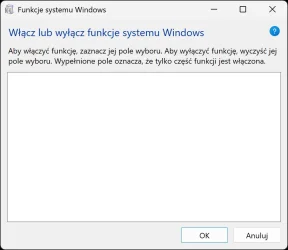
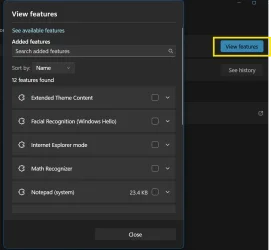
Recently I have got strange issue with windows features missing completely from the legacy "Programs and features" list aswell as from modern UI.
Not really sure what could cause this.

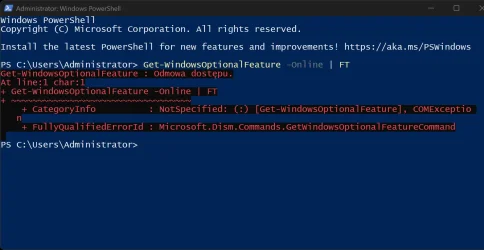
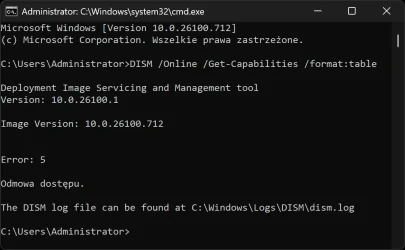
Both commands throws me "Access denied error 5".
DISM /Online /Get-Capabilities /Format:Table
Get-WindowsOptionalFeature -Online | FT

Features don't really work but I believe they are there but somehow locked by system?

Strange because this never happened before.
I don't really know the cause.

Win 11 26100
 

My Computer My Computer

At a glance

W11 24H2 26100.712
OS
W11 24H2 26100.712
Other Info
Updates are disease.

My Computers My Computers

  • At a glance

    All Branches but StableAMD Ryzen 7 7735HS 3200-4500 Mhz 8 cores x 232 GB DDR5Radeon Graphic / NVIDIA GeForce RTX 4060 8 GB...
    OS
    All Branches but Stable
    Computer type
    Laptop
    Manufacturer/Model
    Acer Nitro ANV15-51
    CPU
    AMD Ryzen 7 7735HS 3200-4500 Mhz 8 cores x 2
    Motherboard
    Sportage_RBH
    Memory
    32 GB DDR5
    Graphics Card(s)
    Radeon Graphic / NVIDIA GeForce RTX 4060 8 GB GDDR6
    Sound Card
    AMD/Realtek(R) Audio
    Monitor(s) Displays
    Integrated Monitor (15.3"vis)
    Screen Resolution
    FHD 1920X1080 16:9 144Hz
    Hard Drives
    KINGSTON OM8SEP4512Q-AA 1TB
    Western Digital 256GB
    PSU
    19V DC 6.32 A 120 W
    Cooling
    Dual Fans
    Mouse
    MS Bluetooth
    Internet Speed
    Fiber 1GB Cox -us & 1GB Orange-fr
    Browser
    Edge Canary- Firefox Nightly-Chrome Dev-Chrome Dev
    Antivirus
    Windows Defender
  • At a glance

    Windows 11 BetaAMD A9-94208 GB of DDR4AMD Radeon R5
    Operating System
    Windows 11 Beta
    Computer type
    Laptop
    Manufacturer/Model
    Asus X751BP
    CPU
    AMD A9-9420
    Memory
    8 GB of DDR4
    Graphics card(s)
    AMD Radeon R5
    Screen Resolution
    1600x900
    Hard Drives
    Seagate 1 TB
Do they show when you log in as Administrator?

Code:
net user administrator /active:yes
No they don't. As admin and as regular user too.
 

My Computer My Computer

At a glance

W11 24H2 26100.712
OS
W11 24H2 26100.712
Other Info
Updates are disease.

No they don't. As admin and as regular user too.
Did you actually log out from the current session after using the command above and then log in as Administrator ?
 

My Computers My Computers

  • At a glance

    All Branches but StableAMD Ryzen 7 7735HS 3200-4500 Mhz 8 cores x 232 GB DDR5Radeon Graphic / NVIDIA GeForce RTX 4060 8 GB...
    OS
    All Branches but Stable
    Computer type
    Laptop
    Manufacturer/Model
    Acer Nitro ANV15-51
    CPU
    AMD Ryzen 7 7735HS 3200-4500 Mhz 8 cores x 2
    Motherboard
    Sportage_RBH
    Memory
    32 GB DDR5
    Graphics Card(s)
    Radeon Graphic / NVIDIA GeForce RTX 4060 8 GB GDDR6
    Sound Card
    AMD/Realtek(R) Audio
    Monitor(s) Displays
    Integrated Monitor (15.3"vis)
    Screen Resolution
    FHD 1920X1080 16:9 144Hz
    Hard Drives
    KINGSTON OM8SEP4512Q-AA 1TB
    Western Digital 256GB
    PSU
    19V DC 6.32 A 120 W
    Cooling
    Dual Fans
    Mouse
    MS Bluetooth
    Internet Speed
    Fiber 1GB Cox -us & 1GB Orange-fr
    Browser
    Edge Canary- Firefox Nightly-Chrome Dev-Chrome Dev
    Antivirus
    Windows Defender
  • At a glance

    Windows 11 BetaAMD A9-94208 GB of DDR4AMD Radeon R5
    Operating System
    Windows 11 Beta
    Computer type
    Laptop
    Manufacturer/Model
    Asus X751BP
    CPU
    AMD A9-9420
    Memory
    8 GB of DDR4
    Graphics card(s)
    AMD Radeon R5
    Screen Resolution
    1600x900
    Hard Drives
    Seagate 1 TB
Did you actually log out from the current session after using the command above and then log in as Administrator ?
I am always logged as administrator on the pc with the issue

and yes I did ran the command and rebooted pc too
 

My Computer My Computer

At a glance

W11 24H2 26100.712
OS
W11 24H2 26100.712
Other Info
Updates are disease.

My Computers My Computers

  • At a glance

    Windows 11 Pro 25H2 26200.9457i9-10900 10 core 20 threads32 gbnone-Intel UHD Graphics 630
    OS
    Windows 11 Pro 25H2 26200.9457
    Computer type
    PC/Desktop
    Manufacturer/Model
    Dell Optiplex 7080
    CPU
    i9-10900 10 core 20 threads
    Motherboard
    DELL 0J37VM
    Memory
    32 gb
    Graphics Card(s)
    none-Intel UHD Graphics 630
    Sound Card
    Integrated Realtek
    Monitor(s) Displays
    Benq 27
    Screen Resolution
    2560x1440
    Hard Drives
    2x1tb Solidigm m.2 nvme /External drives 512gb Samsung m.2 sata+2tb Kingston m2.nvme
    PSU
    500w
    Case
    MT
    Cooling
    Dell Premium
    Keyboard
    Logitech wired
    Mouse
    Logitech wireless
    Internet Speed
    so slow I'm too embarrassed to tell
    Browser
    #1 Edge #2 Firefox
    Antivirus
    Defender+MWB Premium
  • At a glance

    Windows 11 Pro 24H2 26200.9457AMD Ryzen 7 6800U32 gbintegrated
    Operating System
    Windows 11 Pro 24H2 26200.9457
    Computer type
    PC/Desktop
    Manufacturer/Model
    Beelink Mini PC SER5
    CPU
    AMD Ryzen 7 6800U
    Memory
    32 gb
    Graphics card(s)
    integrated
    Sound Card
    integrated
    Monitor(s) Displays
    Benq 27
    Screen Resolution
    2560x1440
    Hard Drives
    1TB Crucial nvme
    Keyboard
    Logitech wired
    Mouse
    Logitech wireless
    Internet Speed
    still too embarrassed to tell
    Browser
    Firefox
    Antivirus
    Defender
  • System 3 is non compliant Dell 9020 i7-4770/24gb ram Win11 PRO 26200.9457
You are on 24h2. I suggest you upgrade to 25h2 using the enablement package KB5054156
x64 https://catalog.sf.dl.delivery.mp.m..._a0c1638cbcf4cf33dbe9a5bef69db374b4786974.msu

ARM - https://software-static.download.pr..._svc_refresh_CLIENT_CONSUMER_a64fre_en-gb.iso

or
image your system and then upgrade to 25h2 using
Option 2 here Repair Install Windows 11 with an In-place Upgrade
.msu to do this on live windows? how much will that mess up my current setup? and is it for multi language?
 

My Computer My Computer

At a glance

W11 24H2 26100.712
OS
W11 24H2 26100.712
Other Info
Updates are disease.
.msu to do this on live windows? how much will that mess up my current setup? and is it for multi language?
-Yes
-Not more than it already is
-Yes

I would prefer you go with option 2 first listed by MamaGlass as it might fix some behind the scene issues.
 

My Computers My Computers

  • At a glance

    All Branches but StableAMD Ryzen 7 7735HS 3200-4500 Mhz 8 cores x 232 GB DDR5Radeon Graphic / NVIDIA GeForce RTX 4060 8 GB...
    OS
    All Branches but Stable
    Computer type
    Laptop
    Manufacturer/Model
    Acer Nitro ANV15-51
    CPU
    AMD Ryzen 7 7735HS 3200-4500 Mhz 8 cores x 2
    Motherboard
    Sportage_RBH
    Memory
    32 GB DDR5
    Graphics Card(s)
    Radeon Graphic / NVIDIA GeForce RTX 4060 8 GB GDDR6
    Sound Card
    AMD/Realtek(R) Audio
    Monitor(s) Displays
    Integrated Monitor (15.3"vis)
    Screen Resolution
    FHD 1920X1080 16:9 144Hz
    Hard Drives
    KINGSTON OM8SEP4512Q-AA 1TB
    Western Digital 256GB
    PSU
    19V DC 6.32 A 120 W
    Cooling
    Dual Fans
    Mouse
    MS Bluetooth
    Internet Speed
    Fiber 1GB Cox -us & 1GB Orange-fr
    Browser
    Edge Canary- Firefox Nightly-Chrome Dev-Chrome Dev
    Antivirus
    Windows Defender
  • At a glance

    Windows 11 BetaAMD A9-94208 GB of DDR4AMD Radeon R5
    Operating System
    Windows 11 Beta
    Computer type
    Laptop
    Manufacturer/Model
    Asus X751BP
    CPU
    AMD A9-9420
    Memory
    8 GB of DDR4
    Graphics card(s)
    AMD Radeon R5
    Screen Resolution
    1600x900
    Hard Drives
    Seagate 1 TB
-Yes
-Not more than it already is
-Yes
bit offtopic. will it enable "vide-something" videtools? vivetools? to customize legacy windows to dark mode?
 

My Computer My Computer

At a glance

W11 24H2 26100.712
OS
W11 24H2 26100.712
Other Info
Updates are disease.
bit offtopic. will it enable "vide-something" videtools? vivetools? to customize legacy windows to dark mode?
Some velocity (vivetool) features will be present in the newer release, or soon if you are in the Release channel.
To be honest, I have never been on the release branch but I think someone else will be able to verify that.
 

My Computers My Computers

  • At a glance

    All Branches but StableAMD Ryzen 7 7735HS 3200-4500 Mhz 8 cores x 232 GB DDR5Radeon Graphic / NVIDIA GeForce RTX 4060 8 GB...
    OS
    All Branches but Stable
    Computer type
    Laptop
    Manufacturer/Model
    Acer Nitro ANV15-51
    CPU
    AMD Ryzen 7 7735HS 3200-4500 Mhz 8 cores x 2
    Motherboard
    Sportage_RBH
    Memory
    32 GB DDR5
    Graphics Card(s)
    Radeon Graphic / NVIDIA GeForce RTX 4060 8 GB GDDR6
    Sound Card
    AMD/Realtek(R) Audio
    Monitor(s) Displays
    Integrated Monitor (15.3"vis)
    Screen Resolution
    FHD 1920X1080 16:9 144Hz
    Hard Drives
    KINGSTON OM8SEP4512Q-AA 1TB
    Western Digital 256GB
    PSU
    19V DC 6.32 A 120 W
    Cooling
    Dual Fans
    Mouse
    MS Bluetooth
    Internet Speed
    Fiber 1GB Cox -us & 1GB Orange-fr
    Browser
    Edge Canary- Firefox Nightly-Chrome Dev-Chrome Dev
    Antivirus
    Windows Defender
  • At a glance

    Windows 11 BetaAMD A9-94208 GB of DDR4AMD Radeon R5
    Operating System
    Windows 11 Beta
    Computer type
    Laptop
    Manufacturer/Model
    Asus X751BP
    CPU
    AMD A9-9420
    Memory
    8 GB of DDR4
    Graphics card(s)
    AMD Radeon R5
    Screen Resolution
    1600x900
    Hard Drives
    Seagate 1 TB
Upgrading as above is of course a sound idea.

Just a note:
Both commands throws me "Access denied error 5".
DISM /Online /Get-Capabilities /Format:Table
Get-WindowsOptionalFeature -Online | FT
Lacking a screenshot (so helpful to have those!) - to be more specific... was the command prompt box you used launched with admin privileges? (That's different to being logged in as admin)

E.g.
To run Command Prompt as an administrator in Windows 11, search for cmd in the Start menu, then select Run as administrator from the right-side pane or right-click the result. You will need to click "Yes" on the User Account Control (UAC) prompt. The window title will indicate "Administrator: Command Prompt"
 

My Computer My Computer

At a glance

Windows 11 Proi7-8650U16GBIntel UHD 620
OS
Windows 11 Pro
Computer type
Laptop
Manufacturer/Model
Lenovo t480s
CPU
i7-8650U
Memory
16GB
Graphics Card(s)
Intel UHD 620
Screen Resolution
1920x1080
Hard Drives
C SN810 SDCPNRY-512G-1006
Browser
Edge, Firefox
Antivirus
Defender
Upgrading as above is of course a sound idea.

Just a note:

Lacking a screenshot (so helpful to have those!) - to be more specific... was the command prompt box you used launched with admin privileges? (That's different to being logged in as admin)

E.g.
To run Command Prompt as an administrator in Windows 11, search for cmd in the Start menu, then select Run as administrator from the right-side pane or right-click the result. You will need to click "Yes" on the User Account Control (UAC) prompt. The window title will indicate "Administrator: Command Prompt"
Here how it looks like +dism log if needed. no uac prompt. all as admin ran.
 

Attachments

  • dism.log
    dism.log
    62.6 KB · Views: 3
  • FS00002.webp
    FS00002.webp
    100.7 KB · Views: 2
  • FS00003.webp
    FS00003.webp
    54.8 KB · Views: 2
  • FS00004.webp
    FS00004.webp
    34 KB · Views: 3
  • FS00005.webp
    FS00005.webp
    11.5 KB · Views: 1
  • FS00006.webp
    FS00006.webp
    12.1 KB · Views: 2

My Computer My Computer

At a glance

W11 24H2 26100.712
OS
W11 24H2 26100.712
Other Info
Updates are disease.
Since you have an issue, I would use the inplace upgrade option. I should have said that in my previous post because if the first suggestion I gave doesn't resolve your problem, chances are good it will require the second to fix it anyway.

The steps listed in the above tutorial is for Windows 11 installed on compatible hardware. Neither did you say whether or not you are installed 11 on incompatible hardware nor do you list your system specs. If you are running on incompatible hardware, to do an inplace upgrade you will need to download iso, then use the Rufus method to create installation media for incompatible hardware, checking all the compatibility checks within the Rufus interface.. Then from within Windows open the Rufus drive in explorer and run the setup.exe file.
 
Last edited:

My Computers My Computers

  • At a glance

    Windows 11 Pro 25H2 26200.9457i9-10900 10 core 20 threads32 gbnone-Intel UHD Graphics 630
    OS
    Windows 11 Pro 25H2 26200.9457
    Computer type
    PC/Desktop
    Manufacturer/Model
    Dell Optiplex 7080
    CPU
    i9-10900 10 core 20 threads
    Motherboard
    DELL 0J37VM
    Memory
    32 gb
    Graphics Card(s)
    none-Intel UHD Graphics 630
    Sound Card
    Integrated Realtek
    Monitor(s) Displays
    Benq 27
    Screen Resolution
    2560x1440
    Hard Drives
    2x1tb Solidigm m.2 nvme /External drives 512gb Samsung m.2 sata+2tb Kingston m2.nvme
    PSU
    500w
    Case
    MT
    Cooling
    Dell Premium
    Keyboard
    Logitech wired
    Mouse
    Logitech wireless
    Internet Speed
    so slow I'm too embarrassed to tell
    Browser
    #1 Edge #2 Firefox
    Antivirus
    Defender+MWB Premium
  • At a glance

    Windows 11 Pro 24H2 26200.9457AMD Ryzen 7 6800U32 gbintegrated
    Operating System
    Windows 11 Pro 24H2 26200.9457
    Computer type
    PC/Desktop
    Manufacturer/Model
    Beelink Mini PC SER5
    CPU
    AMD Ryzen 7 6800U
    Memory
    32 gb
    Graphics card(s)
    integrated
    Sound Card
    integrated
    Monitor(s) Displays
    Benq 27
    Screen Resolution
    2560x1440
    Hard Drives
    1TB Crucial nvme
    Keyboard
    Logitech wired
    Mouse
    Logitech wireless
    Internet Speed
    still too embarrassed to tell
    Browser
    Firefox
    Antivirus
    Defender
  • System 3 is non compliant Dell 9020 i7-4770/24gb ram Win11 PRO 26200.9457
I agree with @glasskuter , you should do an In-Place Upgrade to renew the OS. I had to do it recently after many successive updates and certainly fixed a lot of stuff, including stuttery animations.

Follow the tutorial you were provided above, or make a Rufus USB in case your hardware is not supported by W11
 

My Computers My Computers

  • At a glance

    Windows 11 Pro 25H2AMD Ryzen 5 5600G @ 3.9/4.4Ghz2 x 16 GB DDR4 Kingston Fury Beast 3200 MhzAMD Radeon RX 6600 XT MSI Mech 2X OC Edition ...
    OS
    Windows 11 Pro 25H2
    Computer type
    PC/Desktop
    Manufacturer/Model
    Built PC
    CPU
    AMD Ryzen 5 5600G @ 3.9/4.4Ghz
    Motherboard
    MSI B550M-PRO-WiFi Ver. 1.4
    Memory
    2 x 16 GB DDR4 Kingston Fury Beast 3200 Mhz
    Graphics Card(s)
    AMD Radeon RX 6600 XT MSI Mech 2X OC Edition 8 GB
    Sound Card
    Realtek High Definition Audio (Integrated)
    Monitor(s) Displays
    Samsung C50Rx 27" LED / HP S2031 20" LCD
    Screen Resolution
    1920 x 1080 px / 1600 x 900 px
    Hard Drives
    WD Blue SN570 NVME M.2 SSD [1 TB] -- External Drives: - WD Scorpion Blue 250 GB 5400 RPM (Data Backup) - Hitachi 500 GB 5400 RPM (Software / ISOs Backup) - Toshiba MQ01ABD100 1 TB 5400 RPM (OS Images) - HGST TravelStar 7K1000 1 TB, 7200 RPM USB 3.0 - ADATA SU800 2TB SSD USB 3.0
    PSU
    Corsair RM750e 750W Fully Modular
    Case
    Naceb Hydra NA-1602
    Cooling
    Naceb Orpheus x 3 (Front) + Naceb Cepheus 1200 RPM Max (Rear) + ThemalRight Assasin X 90 SE (CPU)
    Keyboard
    Logitech MK470 Wireless
    Mouse
    Logitech MK470 Wireless
    Internet Speed
    200 MB Symetrical
    Browser
    Firefox / Brave / Edge
    Antivirus
    Windows Defender
    Other Info
    - VMs: WMware Player - Windows 8.1 Pro x64 / Windows 11 Pro
    - Wacom Intuos Pro Small Tablet PTH-460
  • At a glance

    Windows 11 Pro 25H2AMD Ryzen 7 7730U @ 2.0/4.5 Ghz2 x 16 GB Kingston Fury Impact DDR4 3200 MhzRadeon (tm) Graphics Vega 8 (512 MB)
    Operating System
    Windows 11 Pro 25H2
    Computer type
    Laptop
    Manufacturer/Model
    HP Pavilion 15-eh3000la (80M53LA)
    CPU
    AMD Ryzen 7 7730U @ 2.0/4.5 Ghz
    Motherboard
    HP 8BC7
    Memory
    2 x 16 GB Kingston Fury Impact DDR4 3200 Mhz
    Graphics card(s)
    Radeon (tm) Graphics Vega 8 (512 MB)
    Sound Card
    Realtek High Definition Audio (Integrated)
    Monitor(s) Displays
    AU Optronics
    Screen Resolution
    1920 x 1080 px (125% size)
    Hard Drives
    WD Blue SN570 1TB NVME M.2 Drive
    PSU
    45 Watt Charger
    Cooling
    Laptop Cooling Pad
    Keyboard
    Free Wolf Foldable Portable Keyboard
    Mouse
    Free Wolf Wireless Mouse
    Internet Speed
    200 MB Symetrical
    Browser
    Firefox / Brave / Edge
    Antivirus
    Windows Defender
    Other Info
    - 41mWh battery.
    - Wacom Intuos Pro Small Tablet PTH-460

My Computers My Computers

  • At a glance

    Win 11 Pro 26H2 26300.9550Intel® Core™ i7-14700KG.SKILL Ripjaws S5 Series 64GB (2 x 32GB) DDR5ASUS GeForce RTX 4070 Super 12GB
    OS
    Win 11 Pro 26H2 26300.9550
    Computer type
    PC/Desktop
    Manufacturer/Model
    Self Built
    CPU
    Intel® Core™ i7-14700K
    Motherboard
    ASUS TUF Z690-PLUS WIFI (BIOS 4505)
    Memory
    G.SKILL Ripjaws S5 Series 64GB (2 x 32GB) DDR5
    Graphics Card(s)
    ASUS GeForce RTX 4070 Super 12GB
    Sound Card
    Sound Blaster AE-5 Plus
    Monitor(s) Displays
    ASUS TUF Gaming 27" 2K HDR Gaming
    Screen Resolution
    2560 x 1440
    Hard Drives
    Samsung 990 Pro 1TB NVMe (Win 11 25H2)
    SK hynix P41 500GB NVMe
    SK hynix P41 2TB NVMe (x3)
    Crucial P3 Plus 4TB
    PSU
    Corsair RM850x Shift
    Case
    Antec Dark Phantom DP502 FLUX
    Cooling
    Corsair Nautilus 360 RS AIO
    Keyboard
    Logitech MK 320
    Mouse
    Razer Basilisk V3
    Internet Speed
    750Mbs
    Browser
    Firefox
    Antivirus
    Winows Security
    Other Info
    MR 8.1 Home
  • At a glance

    Win 11 Pro 25H2 26200.9550Intel Core i5-1140064 GB DDR4MSI GeForce RTX 3060 Ventus 2X 12GB
    Operating System
    Win 11 Pro 25H2 26200.9550
    Computer type
    PC/Desktop
    Manufacturer/Model
    Self Built
    CPU
    Intel Core i5-11400
    Motherboard
    Asus TUF Gaming Z590 Plus WiFi (BIOS 2803)
    Memory
    64 GB DDR4
    Graphics card(s)
    MSI GeForce RTX 3060 Ventus 2X 12GB
    Sound Card
    SoundBlaster Audigy Fx V2
    Monitor(s) Displays
    Samsung F27T350
    Screen Resolution
    1920x1080
    Hard Drives
    Samsung 980 Pro 1TB
    Samsung 970 EVO Plus 2TB
    Samsung 870 EVO 500GB SSD
    PSU
    Corsair HX750
    Case
    Cougar MX330-G Window
    Cooling
    Thermalright Frozen Edge 240 Black AIO
    Internet Speed
    350Mbps
    Browser
    Firefox
    Antivirus
    Windows Security
  • System Three
    Win 11 Pro 25H2 26200.9550
    ASUS PRIME Z370-P II BIOS 3004 7/12/21
    Intel Core i7-8700 CPU @ 3.20GHz
    32GB DDR4 RAM (4x8)
    Samsung 980 Pro 500 GB
    SK hynix P41 1 TB
    EVGA RTX 2060 (used)
    iGPU Intel UHD Graphics 630 (backup)
    Cooler Master Hyper 212
    Mid-Tower Desktop
Thanks for confirming that.

I assume you have of course done basic checks on your disk starting with Crystal Diskinfo (free) - portable version available.

You say this happened 'recently' - so perhaps you have a recent 3rd party disk image- the routine use of disk imaging of at least all O/S partitions is strongly recommended.

That you have not been offered 25H2 routinely by Windows Update is perhaps another indication of something amiss with your O/S unless your PC is nomically 'incompatible with Win 11.

No specs on your PC. Your specs say
Updates are disease.
 

My Computer My Computer

At a glance

Windows 11 Proi7-8650U16GBIntel UHD 620
OS
Windows 11 Pro
Computer type
Laptop
Manufacturer/Model
Lenovo t480s
CPU
i7-8650U
Memory
16GB
Graphics Card(s)
Intel UHD 620
Screen Resolution
1920x1080
Hard Drives
C SN810 SDCPNRY-512G-1006
Browser
Edge, Firefox
Antivirus
Defender
Thanks for confirming that.

I assume you have of course done basic checks on your disk starting with Crystal Diskinfo (free) - portable version available.

You say this happened 'recently' - so perhaps you have a recent 3rd party disk image- the routine use of disk imaging of at least all O/S partitions is strongly recommended.

That you have not been offered 25H2 routinely by Windows Update is perhaps another indication of something amiss with your O/S unless your PC is nomically 'incompatible with Win 11.

No specs on your PC. Your specs say
Yes crystal disk info shows no errors. all is alright there. Couple of days ago I did fresh format wipe reinstall from my backup all-in-one set installation.

I periodically update my installation set with corrections/qol changes (for example like new gpu drivers or my to go essential programs)

I have half-automatic post-setup installation sets of scripts and programs ( I did it for myself to have quicker all-in-one essentials for daily use meant for my offline pc)

If that is in scope of the topic at all here are my "categories" I did for my post install setup:

1 - language pack installation
2 - essentials for running programs like Visual c++ packages
3 - qol native windows changes (all from the 10forums and this forum)
4 - gpu driver
5 - "automatic" essential software installation
6 - post finish like defrag and pagefile

Windows is compatible as I format it always from the same iso I did for my setup.

Yes that is offline pc for personal use.

Before I will be whipped with "thats my fault" "lots of changes you did" etc. I will note that this happened randomly I think. because I do revisions of my setup sometimes and add/delete stuff according to my needs. So I did installed my setup from scratch but inly change in my next revision was GPU driver so I don't really see any connection here.

About "Updates are disease" - yes thats my statement (updates are ok if they are small and don't break stuff, and fix one at time problems)

I thought I did wrote my specs in profile but here it is:
Cpu i5-7600k
gpu GTX 1060 6GB
mobo Gigabyte z270p-d3
 

My Computer My Computer

At a glance

W11 24H2 26100.712
OS
W11 24H2 26100.712
Other Info
Updates are disease.

Latest Support Threads

Back
Top Bottom