Oracle VirtualBox Windows 11 (Guest) 3D-Acceleration Problem

  • Thread starter Thread starter Deleted member 40197
  • Start date Start date

D

Deleted member 40197

Guest
With 3D-Acceleration missing "Minimize, close" in right corner. The only solution is to disable 3D-Acceleration but then VM will be useless.

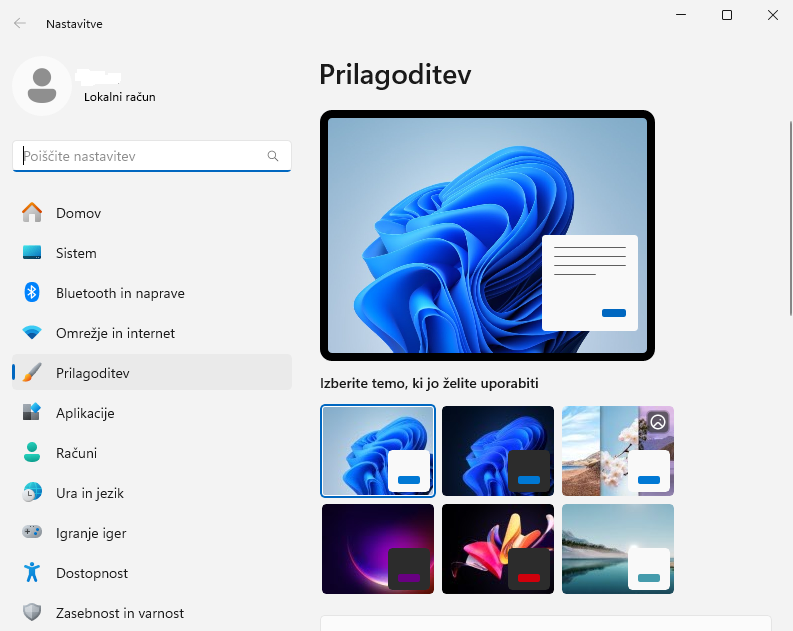
2024-12-14-055822.png


2024-12-14-055849.png
 

My Computer My Computer

At a glance

Windows 11AMD Ryzen 7 5700GMicron Technology DDR4-3200 16GBNVIDIA GeForce RTX 3060
OS
Windows 11
Computer type
PC/Desktop
Manufacturer/Model
HP Pavilion
CPU
AMD Ryzen 7 5700G
Motherboard
Erica6
Memory
Micron Technology DDR4-3200 16GB
Graphics Card(s)
NVIDIA GeForce RTX 3060
Sound Card
Realtek ALC671
Monitor(s) Displays
Samsung SyncMaster U28E590
Screen Resolution
3840 x 2160
Hard Drives
SAMSUNG MZVLQ1T0HALB-000H1
Hey Deleted member 40197,

Showing gratitude is important in online communities. Use the "like" button to appreciate helpful content. This motivates people to keep sharing knowledge. A "like" gives 1 point, "Helpful" gives 5 points, and "Great support" gives 10 points for exceptional help.

Latest Support Threads

Back
Top Bottom





