

- Local time
- 7:27 PM
- Posts
- 99
- OS
- W11 Pro
I am embarking on upgrading the supposedly non-upgradable (love a challenge) webcam in my trusty Dell 27" all in one. I bought a OV5640 based cam module and plugged it in via USB as it came with a handy test lead before pulling my all in one apart (no mean feat according to the service manual!).
Testing it on the built in W11 camera app I can get 5mp on stills (although I have to slide the auto focus slider slightly up or it freezes!), but the video list of resolutions only goes up to 800p (weirdly 710p gives slow frame rate while 800p is smooth - go figure). It should be able to go to to the following frame rates in Mjpeg...
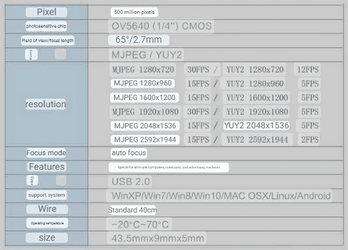
I wanted to go for 1080p so I get 30fps (although my screen is QHD). It's like Windows 11 is just ignoring the module's higher video resolutions completely . Added to this when I use Teams the resolution is awful and blurry, like it has completely ignored the camera settings (set in camera app as per MS instructions as Teams has no native way to set it - Sigh).
Does anyone have any ideas? It's so frustrating. Thanks
Testing it on the built in W11 camera app I can get 5mp on stills (although I have to slide the auto focus slider slightly up or it freezes!), but the video list of resolutions only goes up to 800p (weirdly 710p gives slow frame rate while 800p is smooth - go figure). It should be able to go to to the following frame rates in Mjpeg...
I wanted to go for 1080p so I get 30fps (although my screen is QHD). It's like Windows 11 is just ignoring the module's higher video resolutions completely
. Added to this when I use Teams the resolution is awful and blurry, like it has completely ignored the camera settings (set in camera app as per MS instructions as Teams has no native way to set it - Sigh).Does anyone have any ideas? It's so frustrating. Thanks
My Computer
At a glance
W11 ProIntel(R) Core(TM) i7-477016GBIntel HD 4600 & GeForce GT 750M
- OS
- W11 Pro
- Computer type
- PC/Desktop
- Manufacturer/Model
- Dell XPS One 2720
- CPU
- Intel(R) Core(TM) i7-4770
- Motherboard
- Dell
- Memory
- 16GB
- Graphics Card(s)
- Intel HD 4600 & GeForce GT 750M
- Sound Card
- Realtek HD Audio
- Monitor(s) Displays
- 27"
- Screen Resolution
- 2560*1440
- Hard Drives
- 512GB SSD boot drive connected via mSATA card
2TB SSD Data Drive
- Case
- AIO
- Internet Speed
- 1GB Fibre
- Antivirus
- Microsoft






