

TheLastFrontier
Well-known member
- Local time
- 2:33 AM
- Posts
- 54
- OS
- Win11
OK So as some of you in here know my main laptop up and died on me the other day as a windows update and crash broke the boot up and isn't really worth it to fix being a few years old anyways and slowly getting out out date.
Any-who until I can get a new one which might be a month or so as we have a more priority purchase we have to do first so until that's bought and we can focus on the new laptop it might be a month or so that I am having to use my old laptop to get online and such. Below is the laptop it's about 6 years old and even Windows 11 as it currently is no longer runs well on it. It did when I bought it but time marches on and windows walked further away then then system wanted to follow HA HA
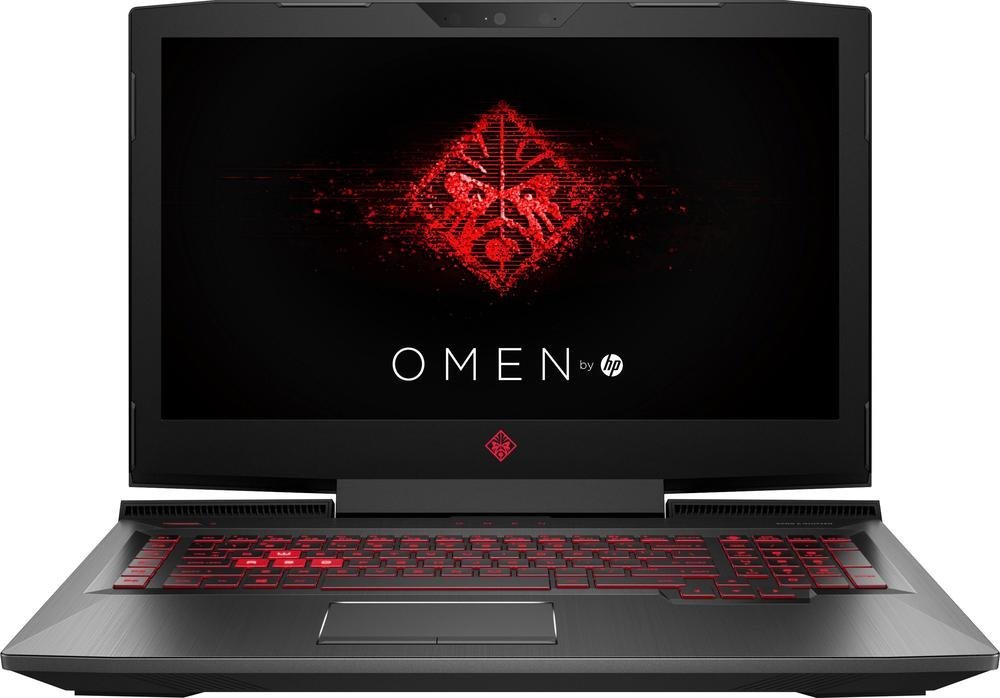
 laptopmedia.com
So this is what I am working with for a month or so.
Because of this I had to transfer over a game I had been playing. here is the game and the requirements are listed towards the bottom of the listing.

 store.steampowered.com
Problem I am having is there is just a touch of lag. The game loads fine but there is just a smidge of lag enough so to make it hard to play as I go to turn and bam I overshoot and such. I have set the computers Radeon settings to Gaming performance and I think that helped a smidge but not enough I also updated the drivers (I think it looked to update but then the version is still showing the 2022 drivers rather then the updated drivers so unsure if they did actually update or not) and I also have turned off some of Windows flashy bells and whistles to increase performance, But is there anything else I can do to squeeze out that last little bit so I can run the game smoothly? Providing I play smart there is little to no combat it's merely walking/flying around and building the factory and such nothing super flash like some game. So I only need to squeeze out maybe 5-10 more percent to get the game to run smoothly I feel.
Any ideas what I can do to get the game running without of course burning up the laptop HA HA
Any-who until I can get a new one which might be a month or so as we have a more priority purchase we have to do first so until that's bought and we can focus on the new laptop it might be a month or so that I am having to use my old laptop to get online and such. Below is the laptop it's about 6 years old and even Windows 11 as it currently is no longer runs well on it. It did when I bought it but time marches on and windows walked further away then then system wanted to follow HA HA
HP OMEN 17 (17-an000) - i7-7700HQ · RX 580 · 17.3”, Full HD (1920 x 1080), IPS · 512GB SSD · 1TB HDD · 16GB DDR4 · Windows 10 Home | LaptopMedia.com
Specs, Tests, and Price of HP OMEN 17 (17-an000) with i7-7700HQ, RX 580, 17.3”, Full HD (1920 x 1080), IPS, 512GB SSD, 1TB HDD, 16GB DDR4, Windows 10 Home
So this is what I am working with for a month or so.
Because of this I had to transfer over a game I had been playing. here is the game and the requirements are listed towards the bottom of the listing.
Save 30% on Satisfactory on Steam
Satisfactory is a first-person open-world factory building game with a dash of exploration and combat. Play alone or with friends, explore an alien planet, create multi-story factories, and enter conveyor belt heaven!
Problem I am having is there is just a touch of lag. The game loads fine but there is just a smidge of lag enough so to make it hard to play as I go to turn and bam I overshoot and such. I have set the computers Radeon settings to Gaming performance and I think that helped a smidge but not enough I also updated the drivers (I think it looked to update but then the version is still showing the 2022 drivers rather then the updated drivers so unsure if they did actually update or not) and I also have turned off some of Windows flashy bells and whistles to increase performance, But is there anything else I can do to squeeze out that last little bit so I can run the game smoothly? Providing I play smart there is little to no combat it's merely walking/flying around and building the factory and such nothing super flash like some game. So I only need to squeeze out maybe 5-10 more percent to get the game to run smoothly I feel.
Any ideas what I can do to get the game running without of course burning up the laptop HA HA
My Computer
At a glance
Win11
- OS
- Win11






