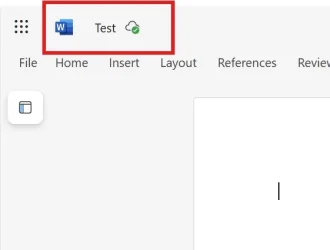
Prevent Online versions of MS Office Apps from Auto Saving to OneDrive and Removing the Tabs from the Word pages? See Attached for more details


win11freak

Well-known member
Member
Local time
7:26 AM
Posts
211
OS
Windows 11 Pro 22H2
Hi,

As the title mentioned, here are my questions below:

- Prevent Online versions of MS Office Apps from Auto Saving to OneDrive - I would need this to be disabled (See Attached).
I have One Drive syncing disabled locally on my device, so why is it still saving the files automatically to my One Drive?

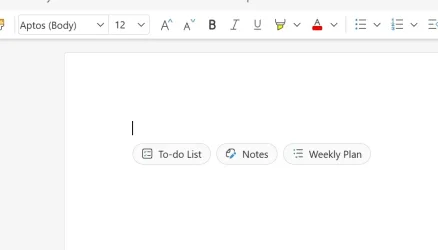
- Removing the Tabs from the Word pages? See Attached for more details.
This quite annoying. And I could not find a way to remove these tabs.
 

Attachments
  • Screenshot 2025-11-28 190136.webp
    Screenshot 2025-11-28 190136.webp
    9.1 KB · Views: 1
  • Screenshot 2025-11-28 190937.webp
    Screenshot 2025-11-28 190937.webp
    6.8 KB · Views: 1

My Computer

System One

  • OS
    Windows 11 Pro 22H2
This is the default setting with some of the Office Apps. You have to individually turn off saving to OneDrive.

For instance on my Office365 Word app the AutoSave files is checked by default. I just unchecked it. Easy Peazy.

Word_OneDrive.webp
 
Last edited:

My Computer

System One

  • OS
    Win 7/10/11
    Computer type
    PC/Desktop
    Other Info
    I'm a computer enthusiast so have quite a few systems that I run. More like an advanced hobby.
I don't have the individual desktop Office apps anymore as I rarely need them except for the New Outlook app and that's it.

Decided to just use the Online Office apps only.

Is there a way to prevent automatic saving to One Drive?

And what about those annoying tabs from my other image? How can I remove those?
 

My Computer

System One

  • OS
    Windows 11 Pro 22H2
AFAIK, on-line MS office apps are intrinsically linked to OneDrive and vice-versa. Use on-line, use OneDrive, MS allows no option.

(I think ....?)
 

My Computers

System One System Two

  • OS
    Windows 11 2xH2 (latest update ... forever anal)
    Computer type
    PC/Desktop
    Manufacturer/Model
    HP Slim S01
    CPU
    Intel i5-12400
    Memory
    8GB
    Graphics Card(s)
    NVIDIA GeForce GT730
    Sound Card
    OOBE
    Monitor(s) Displays
    Acer 32"
    Screen Resolution
    1920x1080
    Hard Drives
    512GB KIOXIA NVMe
    1TB SATA SSD
    PSU
    OOBE
    Case
    OOBE
    Cooling
    OOBE
    Keyboard
    BT
    Mouse
    BT
    Browser
    Brave FFox Chrome Opera
    Antivirus
    KIS
  • Operating System
    Windows 11 Pro 2xH2 (latest update ... 4ever anal)
    Computer type
    Laptop
    Manufacturer/Model
    HP Pavillion 15
    CPU
    i7-1165G7 @ 2.80GHz
    Graphics card(s)
    Intel Iris Xe Graphics
    Hard Drives
    Samsung NVMe 512GB
    + numerous/multiple SSD Type C USB enclosures
    Internet Speed
    NBN FTTN 50
    Browser
    Brave
    Antivirus
    KIS
And how i remove the 3 tab looking to do, Notes, from the middle of the Word page?
 

My Computer

System One

  • OS
    Windows 11 Pro 22H2
Back
Top Bottom