Problem with latest Cumulative Update Preview for Windows 11.


streetwolf

Well-known member
Member
VIP
Local time
7:57 PM
Posts
120
OS
Windows 11
2025-09 Cumulative Update Preview for Windows 11 Version 24H2 for x64-based Systems (KB5065789) (26100.6725)

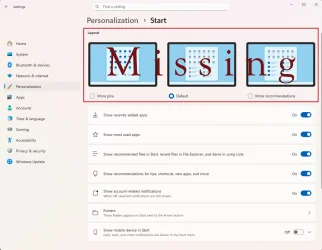
The install went fine. One thing I noticed is that right after the install when I went to Settings/Personalization/Start the top pf the menu showed 3 graphic displays on the look of the Start Menu and a check box to choose one.

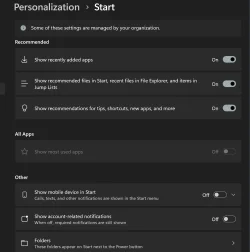
After a short time period I no longer have these graphics. In addition 'Show most used apps" is greyed out. Also there is a message on the top of the menu stating some settings are managed by your organization. These last two I can't recall if they were always like this but my hunch is they also changed.

An explanation might be that right after the install the output of doing a "Check Health of Windows Image" showed that I had recoverable errors. So I did a "Repair Windows Image" which completed successfully. A subsequent SFC /Scannow showed no errors.

Any thoughts on this? You think repairing the Windows Image might have regressed things relating to the Start Menu settings?
Screenshot 2025-09-30 155049.webp
 

My Computer

System One

  • OS
    Windows 11
    Computer type
    PC/Desktop
    Manufacturer/Model
    Home Built
    CPU
    13th Gen Intel(R) Core(TM) i9-13900K
    Motherboard
    ASUS Maximus Hero Z790
    Memory
    Corsair 2x32GB @ 6600
    Graphics Card(s)
    PNY RTX3080 TI
    Sound Card
    Realtek on motherboard.
    Monitor(s) Displays
    Corsair 4k, BenQ 4k.
    Screen Resolution
    3840x2160
Check if you have tracking app launches on as if it is off most used will be greyed out.

Settings > Privacy & Security > General

Screenshot 2025-09-30 130227.webp
 

My Computer

System One

  • OS
    Windows 11 Pro
it's enabled. I followed all the suggestions I found on the web, including yours, and none of them helped. I can't help thinking the repair brought in some older code.
 

My Computer

System One

  • OS
    Windows 11
    Computer type
    PC/Desktop
    Manufacturer/Model
    Home Built
    CPU
    13th Gen Intel(R) Core(TM) i9-13900K
    Motherboard
    ASUS Maximus Hero Z790
    Memory
    Corsair 2x32GB @ 6600
    Graphics Card(s)
    PNY RTX3080 TI
    Sound Card
    Realtek on motherboard.
    Monitor(s) Displays
    Corsair 4k, BenQ 4k.
    Screen Resolution
    3840x2160
Try disabling it then rebooting.
After reboot enable it again.
 

My Computer

System One

  • OS
    Windows 11 Pro
Didn't work.

Don't forget the Layout graphics at the top of the page are missing. It was present right after i Installed it. I am more concerned about this than the show most used apps.
 

My Computer

System One

  • OS
    Windows 11
    Computer type
    PC/Desktop
    Manufacturer/Model
    Home Built
    CPU
    13th Gen Intel(R) Core(TM) i9-13900K
    Motherboard
    ASUS Maximus Hero Z790
    Memory
    Corsair 2x32GB @ 6600
    Graphics Card(s)
    PNY RTX3080 TI
    Sound Card
    Realtek on motherboard.
    Monitor(s) Displays
    Corsair 4k, BenQ 4k.
    Screen Resolution
    3840x2160
25H2 is now on Windows Update. I installed it and still no Layout graphics. Has anyone else 'lost' it too?
 

My Computer

System One

  • OS
    Windows 11
    Computer type
    PC/Desktop
    Manufacturer/Model
    Home Built
    CPU
    13th Gen Intel(R) Core(TM) i9-13900K
    Motherboard
    ASUS Maximus Hero Z790
    Memory
    Corsair 2x32GB @ 6600
    Graphics Card(s)
    PNY RTX3080 TI
    Sound Card
    Realtek on motherboard.
    Monitor(s) Displays
    Corsair 4k, BenQ 4k.
    Screen Resolution
    3840x2160
Tried resetting start menu?


My Computer

System One

  • OS
    Windows 11 Pro
The tutorial is from Oct of 2021. I am hesitant to try it. Remember the Start Menu looks fine, its the Start Menu Settings that is missing the 3 layout graphics. I believe all Windows 11 versions have it. Take a look at yours.
 

My Computer

System One

  • OS
    Windows 11
    Computer type
    PC/Desktop
    Manufacturer/Model
    Home Built
    CPU
    13th Gen Intel(R) Core(TM) i9-13900K
    Motherboard
    ASUS Maximus Hero Z790
    Memory
    Corsair 2x32GB @ 6600
    Graphics Card(s)
    PNY RTX3080 TI
    Sound Card
    Realtek on motherboard.
    Monitor(s) Displays
    Corsair 4k, BenQ 4k.
    Screen Resolution
    3840x2160
My issue.
 

Attachments

  • Start menu.webp
    Start menu.webp
    81.1 KB · Views: 2

My Computer

System One

  • OS
    Windows 11
    Computer type
    PC/Desktop
    Manufacturer/Model
    Home Built
    CPU
    13th Gen Intel(R) Core(TM) i9-13900K
    Motherboard
    ASUS Maximus Hero Z790
    Memory
    Corsair 2x32GB @ 6600
    Graphics Card(s)
    PNY RTX3080 TI
    Sound Card
    Realtek on motherboard.
    Monitor(s) Displays
    Corsair 4k, BenQ 4k.
    Screen Resolution
    3840x2160
The tutorial is from Oct of 2021. I am hesitant to try it


It really doesn't matter when the tutorial was written.
All it does is rebuild the START menu, as it should be, currently.
It won't "take you back" to 2021.

It's like rebuilding the icon cache.
 

My Computers

System One System Two

  • OS
    Win 11 Home ♦♦♦26200.8655 ♦♦♦♦♦♦♦25H2
    Computer type
    PC/Desktop
    Manufacturer/Model
    Built by Ghot® [May 2020]
    CPU
    AMD Ryzen 7 3700X
    Motherboard
    Asus Pro WS X570-ACE (BIOS 5302)
    Memory
    G.Skill (F4-3200C14D-16GTZKW)
    Graphics Card(s)
    EVGA RTX 2070 (08G-P4-2171-KR)
    Sound Card
    Realtek ALC1220P / ALC S1220A
    Monitor(s) Displays
    Dell U3011 30"
    Screen Resolution
    2560 x 1600
    Hard Drives
    2x Samsung 860 EVO 500GB,
    WD 4TB Black FZBX - SATA III,
    WD 8TB Black FZBX - SATA III,
    DRW-24B1ST CD/DVD Burner
    PSU
    PC Power & Cooling 750W Quad EPS12V
    Case
    Cooler Master ATCS 840 Tower
    Cooling
    CM Hyper 212 EVO (push/pull)
    Keyboard
    Ducky DK9008 Shine II Blue LED
    Mouse
    Logitech Optical M-100
    Internet Speed
    300/300
    Browser
    Firefox (latest)
    Antivirus
    Bitdefender Total Security
    Other Info
    Speakers: Klipsch Pro Media 2.1
  • Operating System
    Windows XP Pro 32bit w/SP3
    Computer type
    PC/Desktop
    Manufacturer/Model
    Built by Ghot® (not in use)
    CPU
    AMD Athlon 64 X2 5000+ (OC'd @ 3.2Ghz)
    Motherboard
    ASUS M2N32-SLI Deluxe Wireless Edition
    Memory
    TWIN2X2048-6400C4DHX (2 x 1GB, DDR2 800)
    Graphics card(s)
    EVGA 256-P2-N758-TR GeForce 8600GT SSC
    Sound Card
    Onboard
    Monitor(s) Displays
    ViewSonic G90FB Black 19" Professional (CRT)
    Screen Resolution
    up to 2048 x 1536
    Hard Drives
    WD 36GB 10,000rpm Raptor SATA
    Seagate 80GB 7200rpm SATA
    Lite-On LTR-52246S CD/RW
    Lite-On LH-18A1P CD/DVD Burner
    PSU
    PC Power & Cooling Silencer 750 Quad EPS12V
    Case
    Generic Beige case, 80mm fans
    Cooling
    ZALMAN 9500A 92mm CPU Cooler
    Keyboard
    Logitech Classic Keybooard 200
    Mouse
    Logitech Optical M-BT96a
    Internet Speed
    300/300
    Browser
    Firefox 3.x ??
    Antivirus
    Symantec (Norton)
    Other Info
    Still assembled, still runs. Haven't turned it on for 15 years?
Last edited:

My Computers

System One System Two

  • OS
    Windows11 Pro 26200.8655
    Computer type
    PC/Desktop
    Manufacturer/Model
    Dell Alienware Aurora R16
    CPU
    Intel Core i9 14900F (24 -Core, 68 MB Total Cache)
    Motherboard
    Dell Alienware
    Memory
    32GB DDR5
    Graphics Card(s)
    RTX 4080 Super w/581.95
    Sound Card
    Realtec
    Monitor(s) Displays
    Corsair XENEON 32QHD165
    Screen Resolution
    2560 X 1440
    Hard Drives
    1-2TB Samsung 990 Pro PCIe NVMe M2 SSD
    1-4TB Samsung 990 Pro PCIe NVMe M2 SSD
    PSU
    1000 Watt Platinum Dell
    Case
    Alienware
    Cooling
    Liquid Closed Loop
    Keyboard
    Corsair Strafe RGB
    Mouse
    Logitech MK270 Wireless
    Internet Speed
    100Gb's Down-20 Up
    Browser
    Firefox 151.0.4
    Antivirus
    Defender
    Other Info
    Very Quiet And Fast
    CyberPower UPS CP1500PFCLCD
  • Operating System
    PClinuxOS Mate (2025.7)
    Computer type
    PC/Desktop
    Manufacturer/Model
    Intel
    CPU
    13th Gen Inter(R) Core(TM) i3-1315U
    Motherboard
    Intel
    Memory
    64 GB DDR4 @3200 MHz.
    Graphics card(s)
    Internal
    Sound Card
    None
    Monitor(s) Displays
    Dell 2419HGCF
    Screen Resolution
    1920 X 1080
    Hard Drives
    SAMSUNG 980 PRO SSD 2TB, PCIe 4.0 M.2 2280
    PSU
    Chicony 30 Watt
    Case
    Small
    Keyboard
    Dell
    Mouse
    Razor
    Internet Speed
    1GB
    Browser
    Slimjet
2025-09 Cumulative Update Preview for Windows 11 Version 24H2 for x64-based Systems (KB5065789) (26100.6725)

The install went fine. One thing I noticed is that right after the install when I went to Settings/Personalization/Start the top pf the menu showed 3 graphic displays on the look of the Start Menu and a check box to choose one.

After a short time period I no longer have these graphics. In addition 'Show most used apps" is greyed out. Also there is a message on the top of the menu stating some settings are managed by your organization. These last two I can't recall if they were always like this but my hunch is they also changed.

An explanation might be that right after the install the output of doing a "Check Health of Windows Image" showed that I had recoverable errors. So I did a "Repair Windows Image" which completed successfully. A subsequent SFC /Scannow showed no errors.

Any thoughts on this? You think repairing the Windows Image might have regressed things relating to the Start Menu settings?

View attachment 147207
If you have the new start menu with category view, then you won't have those options.
 

My Computers

System One System Two

  • OS
    Windows 11 build 26200.7296 / WSL 2 running Ubuntu
    Computer type
    Laptop
    Manufacturer/Model
    Dell Inspiron 14 5430
    CPU
    Intel i7-1355U
    Motherboard
    Dell 0GMW80
    Memory
    16GB
    Graphics Card(s)
    Intel Iris XE
    Sound Card
    Realtek
    Monitor(s) Displays
    Dell 14", LG 32" Curved Wide screen monitor and LG Ultrawide 26"
    Screen Resolution
    1920 x 1200 @ 60Hz, 1920 x 1080 @ 100Hz and 2560 x 1080 @ 60Hz
    Hard Drives
    Samsung 990 Pro 1TB NVME Gen 4 M.2 SSD
    PSU
    Dell
    Case
    Dell
    Cooling
    Dell
    Keyboard
    Dell KM3322W
    Mouse
    Dell Trackpad or Dell KM3322W
    Internet Speed
    900mb down / 400mb up FTTP
    Browser
    Edge 142.0.3595.90
    Antivirus
    Windows Defender
    Other Info
    Windows 365
    1TB OneDrive
    Outlook Classic
    Visual Studio Code running in WSL
    Python 3.14
    Samsung Magician
    Garmin Express
    Dell TB16 Thunderbolt dock
    WSL
    WEI Score: 8.3
  • Operating System
    Windows 11
    Computer type
    Tablet
    Manufacturer/Model
    Microsoft Surface Pro 7
    CPU
    Core i5 - 1035G4
    Motherboard
    Microsoft
    Memory
    8GB
    Graphics card(s)
    Intel Iris Plus
    Monitor(s) Displays
    Surface touch
    Screen Resolution
    2736 x 1824
    Hard Drives
    128GB
    PSU
    Microsoft
    Case
    Microsoft Keyboard
    Cooling
    None
    Keyboard
    Microsoft Surface Keyboard
    Mouse
    Microsoft Arc Intellimouse
    Internet Speed
    900mb / 400mb FTTP
    Browser
    Edge
    Antivirus
    Windows Defender
If you have the new start menu with category view, then you won't have those options.

I don't get the layout options no matter what I choose. Currently I have it set to Grid.
 

My Computer

System One

  • OS
    Windows 11
    Computer type
    PC/Desktop
    Manufacturer/Model
    Home Built
    CPU
    13th Gen Intel(R) Core(TM) i9-13900K
    Motherboard
    ASUS Maximus Hero Z790
    Memory
    Corsair 2x32GB @ 6600
    Graphics Card(s)
    PNY RTX3080 TI
    Sound Card
    Realtek on motherboard.
    Monitor(s) Displays
    Corsair 4k, BenQ 4k.
    Screen Resolution
    3840x2160
II tried resetting and re-registering the Start Menu and it didn't help. Restarted Windows just to make sure. When I ran the commands there was a flash on the window and I was returned to the prompt. Should I have gotten some message to show it worked?
 

My Computer

System One

  • OS
    Windows 11
    Computer type
    PC/Desktop
    Manufacturer/Model
    Home Built
    CPU
    13th Gen Intel(R) Core(TM) i9-13900K
    Motherboard
    ASUS Maximus Hero Z790
    Memory
    Corsair 2x32GB @ 6600
    Graphics Card(s)
    PNY RTX3080 TI
    Sound Card
    Realtek on motherboard.
    Monitor(s) Displays
    Corsair 4k, BenQ 4k.
    Screen Resolution
    3840x2160
I was wrong in my last post, I do have that issue , but it may be caused by some of the tweaks I have used. I tried switching off of Cat view but nothing changed.🤷‍♂️
 

My Computers

System One System Two

  • OS
    Windows11 Pro 26200.8655
    Computer type
    PC/Desktop
    Manufacturer/Model
    Dell Alienware Aurora R16
    CPU
    Intel Core i9 14900F (24 -Core, 68 MB Total Cache)
    Motherboard
    Dell Alienware
    Memory
    32GB DDR5
    Graphics Card(s)
    RTX 4080 Super w/581.95
    Sound Card
    Realtec
    Monitor(s) Displays
    Corsair XENEON 32QHD165
    Screen Resolution
    2560 X 1440
    Hard Drives
    1-2TB Samsung 990 Pro PCIe NVMe M2 SSD
    1-4TB Samsung 990 Pro PCIe NVMe M2 SSD
    PSU
    1000 Watt Platinum Dell
    Case
    Alienware
    Cooling
    Liquid Closed Loop
    Keyboard
    Corsair Strafe RGB
    Mouse
    Logitech MK270 Wireless
    Internet Speed
    100Gb's Down-20 Up
    Browser
    Firefox 151.0.4
    Antivirus
    Defender
    Other Info
    Very Quiet And Fast
    CyberPower UPS CP1500PFCLCD
  • Operating System
    PClinuxOS Mate (2025.7)
    Computer type
    PC/Desktop
    Manufacturer/Model
    Intel
    CPU
    13th Gen Inter(R) Core(TM) i3-1315U
    Motherboard
    Intel
    Memory
    64 GB DDR4 @3200 MHz.
    Graphics card(s)
    Internal
    Sound Card
    None
    Monitor(s) Displays
    Dell 2419HGCF
    Screen Resolution
    1920 X 1080
    Hard Drives
    SAMSUNG 980 PRO SSD 2TB, PCIe 4.0 M.2 2280
    PSU
    Chicony 30 Watt
    Case
    Small
    Keyboard
    Dell
    Mouse
    Razor
    Internet Speed
    1GB
    Browser
    Slimjet
I tried changing a few Registry entries and some policies via GPEDIT that I found doing a Google search which seemed like they might fix my issue but they didn't help.

As I mentioned I had the layout options in the Start settings then they disappeared after a short while. As also mentioned I did a Windows Image repair and that might be when I lost the settings.
 

My Computer

System One

  • OS
    Windows 11
    Computer type
    PC/Desktop
    Manufacturer/Model
    Home Built
    CPU
    13th Gen Intel(R) Core(TM) i9-13900K
    Motherboard
    ASUS Maximus Hero Z790
    Memory
    Corsair 2x32GB @ 6600
    Graphics Card(s)
    PNY RTX3080 TI
    Sound Card
    Realtek on motherboard.
    Monitor(s) Displays
    Corsair 4k, BenQ 4k.
    Screen Resolution
    3840x2160
I was wrong in my last post, I do have that issue , but it may be caused by some of the tweaks I have used. I tried switching off of Cat view but nothing changed.🤷‍♂️
To be clear, you do not have the layout options as shown in my screenshot?
 

My Computer

System One

  • OS
    Windows 11
    Computer type
    PC/Desktop
    Manufacturer/Model
    Home Built
    CPU
    13th Gen Intel(R) Core(TM) i9-13900K
    Motherboard
    ASUS Maximus Hero Z790
    Memory
    Corsair 2x32GB @ 6600
    Graphics Card(s)
    PNY RTX3080 TI
    Sound Card
    Realtek on motherboard.
    Monitor(s) Displays
    Corsair 4k, BenQ 4k.
    Screen Resolution
    3840x2160

My Computers

System One System Two

  • OS
    Windows11 Pro 26200.8655
    Computer type
    PC/Desktop
    Manufacturer/Model
    Dell Alienware Aurora R16
    CPU
    Intel Core i9 14900F (24 -Core, 68 MB Total Cache)
    Motherboard
    Dell Alienware
    Memory
    32GB DDR5
    Graphics Card(s)
    RTX 4080 Super w/581.95
    Sound Card
    Realtec
    Monitor(s) Displays
    Corsair XENEON 32QHD165
    Screen Resolution
    2560 X 1440
    Hard Drives
    1-2TB Samsung 990 Pro PCIe NVMe M2 SSD
    1-4TB Samsung 990 Pro PCIe NVMe M2 SSD
    PSU
    1000 Watt Platinum Dell
    Case
    Alienware
    Cooling
    Liquid Closed Loop
    Keyboard
    Corsair Strafe RGB
    Mouse
    Logitech MK270 Wireless
    Internet Speed
    100Gb's Down-20 Up
    Browser
    Firefox 151.0.4
    Antivirus
    Defender
    Other Info
    Very Quiet And Fast
    CyberPower UPS CP1500PFCLCD
  • Operating System
    PClinuxOS Mate (2025.7)
    Computer type
    PC/Desktop
    Manufacturer/Model
    Intel
    CPU
    13th Gen Inter(R) Core(TM) i3-1315U
    Motherboard
    Intel
    Memory
    64 GB DDR4 @3200 MHz.
    Graphics card(s)
    Internal
    Sound Card
    None
    Monitor(s) Displays
    Dell 2419HGCF
    Screen Resolution
    1920 X 1080
    Hard Drives
    SAMSUNG 980 PRO SSD 2TB, PCIe 4.0 M.2 2280
    PSU
    Chicony 30 Watt
    Case
    Small
    Keyboard
    Dell
    Mouse
    Razor
    Internet Speed
    1GB
    Browser
    Slimjet

My Computer

System One

  • OS
    Windows 11
    Computer type
    PC/Desktop
    Manufacturer/Model
    Home Built
    CPU
    13th Gen Intel(R) Core(TM) i9-13900K
    Motherboard
    ASUS Maximus Hero Z790
    Memory
    Corsair 2x32GB @ 6600
    Graphics Card(s)
    PNY RTX3080 TI
    Sound Card
    Realtek on motherboard.
    Monitor(s) Displays
    Corsair 4k, BenQ 4k.
    Screen Resolution
    3840x2160
well i did a clean install a couple days ago and i still have it . not sure if this helps
 

My Computer

System One

  • OS
    WINDOWS 11 WINDOWS 10
    Computer type
    PC/Desktop
    Manufacturer/Model
    HP H8 1360T
    CPU
    Intel(R) Core(TM) i7 -3770K CPU 3.50 GZ 3501 4 CORE
    Motherboard
    PEGATRON 2AD5
    Memory
    32.0 GB (31.9 GB usable)
    Graphics Card(s)
    AMD RADEON TM R5240 INTELL HD GRAPHICS 4600 TIGER 1+1 USB
    Sound Card
    AMD HD . IDT
    Monitor(s) Displays
    AOC WAL MART SPECIAL . HP 2311 IX IPS LED DELL 1708 FP
    Screen Resolution
    1920 X 1080 1600X900 1280X940
    Hard Drives
    1 FAXING S 100 512GB 1 KINGSTON 120 GB SSD 1 X12 SSD 512 GB
    PSU
    300 WATT HP
    Case
    FULL
    Cooling
    ON BOARD FAN
    Keyboard
    LOGITEC K 520 WIRELESS
    Mouse
    LOGITEC M 510 WIRELESS
    Internet Speed
    55 UP 11.2 DOWN
    Browser
    CHROME EDGE
    Antivirus
    WINDOWS SECUIRTY
    Other Info
    NON SUPPORTED HARDWARE FOR WINDOWS 11

Latest Support Threads

Back
Top Bottom