Restoring O/S on a dual-boot PC?


martinlest

Well-known member
Local time
11:53 PM
Posts
29
OS
Windows 11 23H2
Not 100% confident about what I have read browsing the internet, so may I ask here (my go-to site for many years for Windows questions)...

My PC (for flight sim only, in essence) is Windows 10/Windows 11 dual-boot. I lately installed all my software onto Windows 11 and the Windows 10 drive is now obsolete: I do like to have another method of booting on the PC, should on drive fail, so I shall leave it there.

My question is this: I made a drive image (using Windows 11 native tool) and saved it on an external HDD. If, heaven forbid, I need to use it to reinstall Windows 11, I am assuming that trying it in Windows 10 wouldn't work. Is that so? If I made another image of my Windows 11 partitions from within Windows 10, then...?

Just covering options, so I am 'armed' in case of the unhappy event. It does happen, needless to say - I only finally moved over to Windows 11 for my flight simulation because my Windows 10 installation broke a week or so ago, to the extent I had to reinstall it (luckily a software, not a hardware problem: I saw a CMD script suddenly appear (virus??? I'd had no indication from my anti-virus, and the gamin PC is very low-risk, not getting emails and so forth), deleting files from Windows/System32!!! It didn't last long, but the damage was done. I could have tried a repair with sfc or something, but it was time I moved to Win11 anyway, so I didn't bother.). I have also made a Windows 11 Recovery Drive, BTW, on a USB drive.

Thanks.
 

My Computer My Computer

At a glance

Windows 11 23H2i9-11900KF64GB DDR4Asus ProArt RTX 4070 Ti Super 16GB
OS
Windows 11 23H2
Computer type
PC/Desktop
CPU
i9-11900KF
Motherboard
Intel Z590-PLUS
Memory
64GB DDR4
Graphics Card(s)
Asus ProArt RTX 4070 Ti Super 16GB
Hard Drives
1 x Evo 860 2TB + 2 x Evo 850 500GB SSDs
PSU
Corsair 850W
Cooling
Corsair H100i AIO
The Backup & Restore (windows 7) feature in WIndows 11 is deprecated. Even Microsoft suggests one uses a 3rd party imaging app instead.
If you want to protect yourself against an "unhappy event" I strongly suggest you use a 3rd party imaging app. Some are paid, some free. IMO the best free one out there ATM is Haselo Backup Suite. The best paid one is Macrium and is probably the one most used one by members here..


If you decide to go with Haselo, here is a guide written by one of our members, @antspants. antspants - Tips for using Hasleo Backup (Free) for the first time

You can use the forum's search feature to find the many discussions here about imaging apps, how to create images, and how to create emergency recovery media for the app of choice. It is this media one uses to restore images. For whatever app one uses, it is very important that one tests that he can boot from that recovery media.
 

My Computers My Computers

  • At a glance

    Windows 11 Pro 25H2 26200.8655i9-10900 10 core 20 threads32 gbnone-Intel UHD Graphics 630
    OS
    Windows 11 Pro 25H2 26200.8655
    Computer type
    PC/Desktop
    Manufacturer/Model
    Dell Optiplex 7080
    CPU
    i9-10900 10 core 20 threads
    Motherboard
    DELL 0J37VM
    Memory
    32 gb
    Graphics Card(s)
    none-Intel UHD Graphics 630
    Sound Card
    Integrated Realtek
    Monitor(s) Displays
    Benq 27
    Screen Resolution
    2560x1440
    Hard Drives
    2x1tb Solidigm m.2 nvme /External drives 512gb Samsung m.2 sata+2tb Kingston m2.nvme
    PSU
    500w
    Case
    MT
    Cooling
    Dell Premium
    Keyboard
    Logitech wired
    Mouse
    Logitech wireless
    Internet Speed
    so slow I'm too embarrassed to tell
    Browser
    #1 Edge #2 Firefox
    Antivirus
    Defender+MWB Premium
  • At a glance

    Windows 11 Pro 24H2 26200.8457AMD Ryzen 7 6800U32 gbintegrated
    Operating System
    Windows 11 Pro 24H2 26200.8457
    Computer type
    PC/Desktop
    Manufacturer/Model
    Beelink Mini PC SER5
    CPU
    AMD Ryzen 7 6800U
    Memory
    32 gb
    Graphics card(s)
    integrated
    Sound Card
    integrated
    Monitor(s) Displays
    Benq 27
    Screen Resolution
    2560x1440
    Hard Drives
    1TB Crucial nvme
    Keyboard
    Logitech wired
    Mouse
    Logitech wireless
    Internet Speed
    still too embarrassed to tell
    Browser
    Firefox
    Antivirus
    Defender
    Other Info
    System 3 is non compliant Dell 9020 i7-4770/24gb ram Win11 PRO 26200.8457
The Backup & Restore (windows 7) feature in WIndows 11 is deprecated. Even Microsoft suggests one uses a 3rd party imaging app instead.

Well, I didn't know that, although the 'Windows 7' epithet caused me a raised eyebrow (or two!). What does that mean exactly, in practice though; that a restore will likely not work?

I could certainly use Macrium instead - I have had it on my PC for years and have made backups before. My concern was that on occasion the programme didn't recognise its own backup: 'image not valid' - even though I always validate an image after I create it (the image had been made two or three years earlier and the software, which I had innocently upodated, had 'moved on', perhaps??) and I had to start from scratch.. very annoying. But that was several years ago.

I don't know Haselo: I will look into it.

You can use the forum's search feature to find the many discussions here about imaging apps, how to create images, and how to create emergency recovery media for the app of choice

I am fairly OK with that (on the whole): my question was specifically about 'cross-platform' operations on a dual-boot PC, where the O/Ss are not the same (Win10/Win11 in my case). If I had the Haselo programme on both Windows 10 and Windows 11 and say the latter failed, would the Haselo (or Macrium) installation on Windows 10 be able to restore Windows 11 from a single drive image (made probably from within Windows 11)?

Thanks.
 
Last edited:

My Computer My Computer

At a glance

Windows 11 23H2i9-11900KF64GB DDR4Asus ProArt RTX 4070 Ti Super 16GB
OS
Windows 11 23H2
Computer type
PC/Desktop
CPU
i9-11900KF
Motherboard
Intel Z590-PLUS
Memory
64GB DDR4
Graphics Card(s)
Asus ProArt RTX 4070 Ti Super 16GB
Hard Drives
1 x Evo 860 2TB + 2 x Evo 850 500GB SSDs
PSU
Corsair 850W
Cooling
Corsair H100i AIO
Yes, either app can be used to backup/restore an entire system with multiple disks, a single disk, an individual partition, or individual files and folders.
 

My Computers My Computers

  • At a glance

    Windows 11 Pro 25H2 26200.8655i9-10900 10 core 20 threads32 gbnone-Intel UHD Graphics 630
    OS
    Windows 11 Pro 25H2 26200.8655
    Computer type
    PC/Desktop
    Manufacturer/Model
    Dell Optiplex 7080
    CPU
    i9-10900 10 core 20 threads
    Motherboard
    DELL 0J37VM
    Memory
    32 gb
    Graphics Card(s)
    none-Intel UHD Graphics 630
    Sound Card
    Integrated Realtek
    Monitor(s) Displays
    Benq 27
    Screen Resolution
    2560x1440
    Hard Drives
    2x1tb Solidigm m.2 nvme /External drives 512gb Samsung m.2 sata+2tb Kingston m2.nvme
    PSU
    500w
    Case
    MT
    Cooling
    Dell Premium
    Keyboard
    Logitech wired
    Mouse
    Logitech wireless
    Internet Speed
    so slow I'm too embarrassed to tell
    Browser
    #1 Edge #2 Firefox
    Antivirus
    Defender+MWB Premium
  • At a glance

    Windows 11 Pro 24H2 26200.8457AMD Ryzen 7 6800U32 gbintegrated
    Operating System
    Windows 11 Pro 24H2 26200.8457
    Computer type
    PC/Desktop
    Manufacturer/Model
    Beelink Mini PC SER5
    CPU
    AMD Ryzen 7 6800U
    Memory
    32 gb
    Graphics card(s)
    integrated
    Sound Card
    integrated
    Monitor(s) Displays
    Benq 27
    Screen Resolution
    2560x1440
    Hard Drives
    1TB Crucial nvme
    Keyboard
    Logitech wired
    Mouse
    Logitech wireless
    Internet Speed
    still too embarrassed to tell
    Browser
    Firefox
    Antivirus
    Defender
    Other Info
    System 3 is non compliant Dell 9020 i7-4770/24gb ram Win11 PRO 26200.8457
the 'Windows 7' epithet caused me a raised eyebrow (or two!). What does that mean exactly, in practice though; that a restore will likely not work?
It means use at your own risk. It was not dependable back in the Windows 7 days so it's even more questionable now in the days of 10 or 11..

would the Haselo (or Macrium) installation on Windows 10 be able to restore Windows 11 from a single drive image (made probably from within Windows 11)?
You don't restore an image created in either of those apps from within Windows. You restore it from the app's usb boot media that you create from within the app..

Both Haselo or Macrium can be used to backup/restore an entire system with multiple disks, a single disk, an individual partition, or individual files and folders.
 

My Computers My Computers

  • At a glance

    Windows 11 Pro 25H2 26200.8655i9-10900 10 core 20 threads32 gbnone-Intel UHD Graphics 630
    OS
    Windows 11 Pro 25H2 26200.8655
    Computer type
    PC/Desktop
    Manufacturer/Model
    Dell Optiplex 7080
    CPU
    i9-10900 10 core 20 threads
    Motherboard
    DELL 0J37VM
    Memory
    32 gb
    Graphics Card(s)
    none-Intel UHD Graphics 630
    Sound Card
    Integrated Realtek
    Monitor(s) Displays
    Benq 27
    Screen Resolution
    2560x1440
    Hard Drives
    2x1tb Solidigm m.2 nvme /External drives 512gb Samsung m.2 sata+2tb Kingston m2.nvme
    PSU
    500w
    Case
    MT
    Cooling
    Dell Premium
    Keyboard
    Logitech wired
    Mouse
    Logitech wireless
    Internet Speed
    so slow I'm too embarrassed to tell
    Browser
    #1 Edge #2 Firefox
    Antivirus
    Defender+MWB Premium
  • At a glance

    Windows 11 Pro 24H2 26200.8457AMD Ryzen 7 6800U32 gbintegrated
    Operating System
    Windows 11 Pro 24H2 26200.8457
    Computer type
    PC/Desktop
    Manufacturer/Model
    Beelink Mini PC SER5
    CPU
    AMD Ryzen 7 6800U
    Memory
    32 gb
    Graphics card(s)
    integrated
    Sound Card
    integrated
    Monitor(s) Displays
    Benq 27
    Screen Resolution
    2560x1440
    Hard Drives
    1TB Crucial nvme
    Keyboard
    Logitech wired
    Mouse
    Logitech wireless
    Internet Speed
    still too embarrassed to tell
    Browser
    Firefox
    Antivirus
    Defender
    Other Info
    System 3 is non compliant Dell 9020 i7-4770/24gb ram Win11 PRO 26200.8457
My question is this: I made a drive image (using Windows 11 native tool) and saved it on an external HDD. If, heaven forbid, I need to use it to reinst all Windows 11, I am assuming that trying it in Windows 10 wouldn't work. Is that so? If I made another image of my Windows 11 partitions from within Windows 10, then...?

I dont know if win10 bmrui will restore an image made by win11. I havent tested it to see.

If I made another image of my Windows 11 partitions from within Windows 10, then...?

I expect that will work. Add the win11 partition when creating the win10 backup image.
 

My Computers My Computers

  • At a glance

    Win7,Win11i7-97002x16gb 3600mhz
    OS
    Win7,Win11
    Computer type
    PC/Desktop
    CPU
    i7-9700
    Motherboard
    gigabyte b365m ds3h
    Memory
    2x16gb 3600mhz
    Monitor(s) Displays
    benq gw2480
    PSU
    bequiet pure power 11 400CM
    Cooling
    cryorig m9i
  • At a glance

    win7,win11i5-84002x8gb 3200
    Operating System
    win7,win11
    Computer type
    PC/Desktop
    CPU
    i5-8400
    Motherboard
    gigabyte b365m ds3h
    Memory
    2x8gb 3200
    PSU
    xfx pro 450
You don't restore an image created in either of those apps from within Windows. You restore it from the app's usb boot media that you create from within the app..

Ah, I see. My memory is that I did do that with Macrium, but it was many years ago, I may well have forgotten...

I'll have a go tomorrow at making the image - I have the Hasleo software now.
 

My Computer My Computer

At a glance

Windows 11 23H2i9-11900KF64GB DDR4Asus ProArt RTX 4070 Ti Super 16GB
OS
Windows 11 23H2
Computer type
PC/Desktop
CPU
i9-11900KF
Motherboard
Intel Z590-PLUS
Memory
64GB DDR4
Graphics Card(s)
Asus ProArt RTX 4070 Ti Super 16GB
Hard Drives
1 x Evo 860 2TB + 2 x Evo 850 500GB SSDs
PSU
Corsair 850W
Cooling
Corsair H100i AIO
bmrui.exe (bare metal restore ui ) is only in windows in pe ( either ms boot.wim or winre.wim )

Diskgenius ( free version) can be used to restore windows backup images. It doesnt care what os created the image.

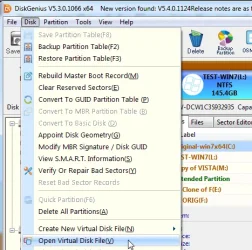
Diskgenius can load the .vhdx image and clone the win11 partition from the vhdx to the original win11 partition on disk. Job done

Disk>open virtual disk

sg-open-vd-.webp


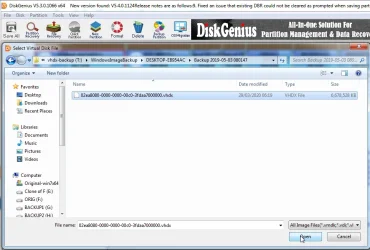
browse to select the .vhdx file

dg-select-vd-.webp

The vhdx file loads in the left pane.

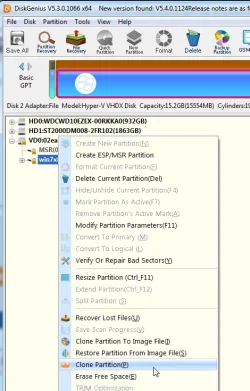
RT click the partition you want to restore

Select clone partition

select the original win11 partition as the destination for the clone


dg-clone-part--vd-.webp


Last edited:

My Computers My Computers

  • At a glance

    Win7,Win11i7-97002x16gb 3600mhz
    OS
    Win7,Win11
    Computer type
    PC/Desktop
    CPU
    i7-9700
    Motherboard
    gigabyte b365m ds3h
    Memory
    2x16gb 3600mhz
    Monitor(s) Displays
    benq gw2480
    PSU
    bequiet pure power 11 400CM
    Cooling
    cryorig m9i
  • At a glance

    win7,win11i5-84002x8gb 3200
    Operating System
    win7,win11
    Computer type
    PC/Desktop
    CPU
    i5-8400
    Motherboard
    gigabyte b365m ds3h
    Memory
    2x8gb 3200
    PSU
    xfx pro 450
I'll have a go tomorrow at making the image - I have the Hasleo software now.
I think you'll like it. I've been a die hard Macrium user for years and it's still my main imaging app. But I do make a Haselo image for every 3rd image I make. That way I don't have all my eggs in one basket. Haselo is the closest one to Macrium I have found in speed and ease of use.

Note 1: Once you create its recovery media, test that you can boot from the usb you create. If it won't boot, you may have to temporarily disable secure boot in bios and try to boot from the media again. (This is true for any imaging app)

Note 2: Only if you have RAID or VMD enabled in your bios, you will need to inject your storage controller drivers into your recovery media. (step 3 indicated in antspants' tutorial for Haselo. Button says "add driver") (Again, this is true for any imaging app)
For Intel that would be Intel Rapid Storage Controller (IRST) driver. Otherwise, during a restore your drives will not be seen.

(I solved this second issue the last time I clean installed Windows. I changed disk mode fom RAID to AHCI in bios before the clean install. That way it defaults to Microsoft's storage controller driver so no additional ones have to be inserted during a clean install or image restore)
 

My Computers My Computers

  • At a glance

    Windows 11 Pro 25H2 26200.8655i9-10900 10 core 20 threads32 gbnone-Intel UHD Graphics 630
    OS
    Windows 11 Pro 25H2 26200.8655
    Computer type
    PC/Desktop
    Manufacturer/Model
    Dell Optiplex 7080
    CPU
    i9-10900 10 core 20 threads
    Motherboard
    DELL 0J37VM
    Memory
    32 gb
    Graphics Card(s)
    none-Intel UHD Graphics 630
    Sound Card
    Integrated Realtek
    Monitor(s) Displays
    Benq 27
    Screen Resolution
    2560x1440
    Hard Drives
    2x1tb Solidigm m.2 nvme /External drives 512gb Samsung m.2 sata+2tb Kingston m2.nvme
    PSU
    500w
    Case
    MT
    Cooling
    Dell Premium
    Keyboard
    Logitech wired
    Mouse
    Logitech wireless
    Internet Speed
    so slow I'm too embarrassed to tell
    Browser
    #1 Edge #2 Firefox
    Antivirus
    Defender+MWB Premium
  • At a glance

    Windows 11 Pro 24H2 26200.8457AMD Ryzen 7 6800U32 gbintegrated
    Operating System
    Windows 11 Pro 24H2 26200.8457
    Computer type
    PC/Desktop
    Manufacturer/Model
    Beelink Mini PC SER5
    CPU
    AMD Ryzen 7 6800U
    Memory
    32 gb
    Graphics card(s)
    integrated
    Sound Card
    integrated
    Monitor(s) Displays
    Benq 27
    Screen Resolution
    2560x1440
    Hard Drives
    1TB Crucial nvme
    Keyboard
    Logitech wired
    Mouse
    Logitech wireless
    Internet Speed
    still too embarrassed to tell
    Browser
    Firefox
    Antivirus
    Defender
    Other Info
    System 3 is non compliant Dell 9020 i7-4770/24gb ram Win11 PRO 26200.8457
You don't restore an image created in either of those apps from within Windows

The instructions seem to show that you do exactly that? I've made the image now, at any rate.

Thanks (both) for the advice.. over the next day or two I will 'digest' what you have said and make a restore/boot media, but I imagine it's going to be pretty much as it was with Macrium :-)
 

My Computer My Computer

At a glance

Windows 11 23H2i9-11900KF64GB DDR4Asus ProArt RTX 4070 Ti Super 16GB
OS
Windows 11 23H2
Computer type
PC/Desktop
CPU
i9-11900KF
Motherboard
Intel Z590-PLUS
Memory
64GB DDR4
Graphics Card(s)
Asus ProArt RTX 4070 Ti Super 16GB
Hard Drives
1 x Evo 860 2TB + 2 x Evo 850 500GB SSDs
PSU
Corsair 850W
Cooling
Corsair H100i AIO
Back
Top Bottom