Screen clutter


Meebers

Well-known member
Member
VIP
Local time
3:29 PM
Posts
119
Location
Florida
OS
W11 25H2 26200.8457
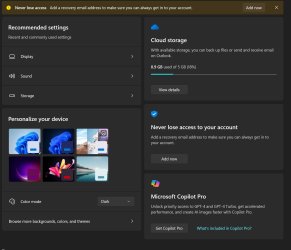
I just like to keep my screen as clean as possible. One major annoyance for me is MS insistence to put "stuff" smack dab in the middle. Would appreciate assistance/method to move it off the screen if possible. Tx
anoy1.JPG
 
Windows Build/Version
23H2 22632.3296

My Computers

System One System Two

  • OS
    W11 25H2 26200.8457
    Computer type
    PC/Desktop
    Manufacturer/Model
    Self
    CPU
    AMD RYZEN 5-5600
    Motherboard
    ASUS B 550-F
    Memory
    2x8 GB
    Graphics Card(s)
    MSI NVIDIA GeForce 710
    Sound Card
    On Board
    Monitor(s) Displays
    TCL 4k 43" TV
    Screen Resolution
    3840x2160
    Hard Drives
    Samsung 990 Pro 2TB and WD 2TB
    PSU
    800 W
    Case
    Fractal Design Focus Mid-Tower Case (RED)
    Cooling
    3 120 mm Fan
    Keyboard
    Logitech MK320
    Mouse
    Logitech
    Internet Speed
    2 Mbps/2 Mbps
    Browser
    FF
    Antivirus
    MS Defender, MWB
  • Operating System
    W11 22621.1194 / Linux Mint/Chrome OS
    Computer type
    PC/Desktop
    Manufacturer/Model
    SELF
    CPU
    AMD a8-5545m
    Motherboard
    Biostar A68N-5545
    Memory
    2x4GB
    Graphics card(s)
    GTX 550 Ti
    Sound Card
    Internal
    Monitor(s) Displays
    2 ASUS 27"
    Screen Resolution
    1920x1080
    Hard Drives
    ADATA SU655
    PSU
    800W
    Case
    Cooler Master
    Cooling
    2 120mm Fan
    Keyboard
    LOGITEC
    Mouse
    lOGITEC
    Internet Speed
    940/940
    Browser
    FF
    Antivirus
    MS -MWB
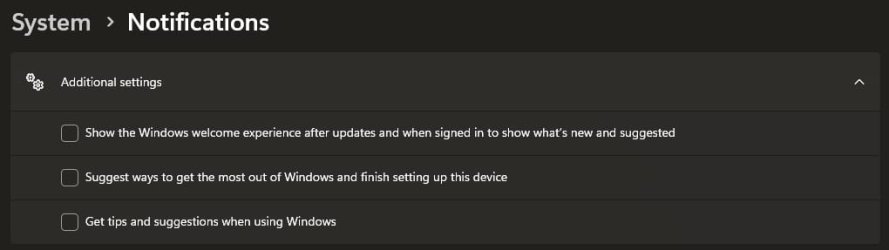
I don't know that disabling these ads is possible. I don't use maximized Settings window so I don't see all of them, and I rarely use the Home page in Settings and usually right-click Taskbar or system tray icons. Also, right-click on Start > System or Installed Apps.
 
Last edited:

My Computer

System One

  • OS
    Windows 11 Pro 25H2 26200.7840
    Computer type
    Laptop
    Manufacturer/Model
    Lenovo IdeaPad L340
    CPU
    Intel Core i3-8145U
    Memory
    16GB
    Hard Drives
    500 GB M2 1 TB HDD
    Internet Speed
    400 MB
    Browser
    Chrome | Edge
    Antivirus
    Microsoft Defender | Block unknown executables | Various ASR rules enabled | Smart App Control

My Computers

System One System Two

  • OS
    W11 25H2 26200.8457
    Computer type
    PC/Desktop
    Manufacturer/Model
    Self
    CPU
    AMD RYZEN 5-5600
    Motherboard
    ASUS B 550-F
    Memory
    2x8 GB
    Graphics Card(s)
    MSI NVIDIA GeForce 710
    Sound Card
    On Board
    Monitor(s) Displays
    TCL 4k 43" TV
    Screen Resolution
    3840x2160
    Hard Drives
    Samsung 990 Pro 2TB and WD 2TB
    PSU
    800 W
    Case
    Fractal Design Focus Mid-Tower Case (RED)
    Cooling
    3 120 mm Fan
    Keyboard
    Logitech MK320
    Mouse
    Logitech
    Internet Speed
    2 Mbps/2 Mbps
    Browser
    FF
    Antivirus
    MS Defender, MWB
  • Operating System
    W11 22621.1194 / Linux Mint/Chrome OS
    Computer type
    PC/Desktop
    Manufacturer/Model
    SELF
    CPU
    AMD a8-5545m
    Motherboard
    Biostar A68N-5545
    Memory
    2x4GB
    Graphics card(s)
    GTX 550 Ti
    Sound Card
    Internal
    Monitor(s) Displays
    2 ASUS 27"
    Screen Resolution
    1920x1080
    Hard Drives
    ADATA SU655
    PSU
    800W
    Case
    Cooler Master
    Cooling
    2 120mm Fan
    Keyboard
    LOGITEC
    Mouse
    lOGITEC
    Internet Speed
    940/940
    Browser
    FF
    Antivirus
    MS -MWB
Edwin, thanks for that, took a while to find them, but unchecked those three items and back to the clean look. TX Mike
You should probably look into this as well:


My Computers

System One System Two

  • OS
    Windows 11 Pro
    Computer type
    PC/Desktop
    Manufacturer/Model
    Custom Built
    CPU
    Ryzen 7 5700 X3D
    Motherboard
    MSI MPG B550 GAMING PLUS
    Memory
    64 GB DDR4 3600mhz Gskill Ripjaws V
    Graphics Card(s)
    RTX 4070 Super , 12GB VRAM Asus EVO Overclock
    Monitor(s) Displays
    Gigabyte M27Q (rev. 2.0) 2560 x 1440 @ 170hz HDR
    Hard Drives
    2TB Samsung nvme ssd
    4TB Western Digital nvme ssd
    PSU
    CORSAIR RMx SHIFT Series™ RM750x 80 PLUS Gold Fully Modular ATX Power Supply
    Case
    CORSAIR 3500X ARGB Mid-Tower ATX PC Case – Black
    Cooling
    ID-COOLING FROSTFLOW X 240 CPU Water Cooler
    Keyboard
    Logitech G213
    Mouse
    Logitech G203
    Internet Speed
    1.2gbps Fiber 😎
  • Operating System
    Chrome OS
    Computer type
    Laptop
    Manufacturer/Model
    HP Chromebook
    CPU
    Intel Pentium Quad Core
    Memory
    4GB LPDDR4
    Monitor(s) Displays
    14 Inch HD SVA anti glare micro edge display
    Hard Drives
    64 GB emmc

Latest Support Threads

Back
Top Bottom