Slow Computer - Three Reinstalls


GollyRojer

Well-known member
Local time
7:27 AM
Posts
23
OS
Windows 11

I have reinstalled Windows 11 three times in recent months because of the horrible slowness of my computer. When I'm typing, it intermittently freezes for up to 20 seconds before displaying what I typed. Apps take forever to load, screens refresh slowly. This has been true after each reinstall, even though I wiped and reformatted C during the last one.

In this thread: Slow Computer
Somebody suggested that the data drive might be infected, so I detached my D drive, which is a USB-connected desktop drive by Western Digital. Things appear to have improved. I couldn't get text or apps to show as slowly as before, although they're still not as fast as I would like. But I ran my antivirus, Norton and MalwareBytes, on the D drive and it found nothing.

I should mention that I have followed all the instructions in the linked thread.

What do I need to do now?
 
Windows Build/Version
Home 24H2 26120.5751

My Computer

System One

  • OS
    Windows 11

I have reinstalled Windows 11 three times in recent months because of the horrible slowness of my computer. When I'm typing, it intermittently freezes for up to 20 seconds before displaying what I typed. Apps take forever to load, screens refresh slowly. This has been true after each reinstall, even though I wiped and reformatted C during the last one.

In this thread: Slow Computer
Somebody suggested that the data drive might be infected, so I detached my D drive, which is a USB-connected desktop drive by Western Digital. Things appear to have improved. I couldn't get text or apps to show as slowly as before, although they're still not as fast as I would like. But I ran my antivirus, Norton and MalwareBytes, on the D drive and it found nothing.

I should mention that I have followed all the instructions in the linked thread.

What do I need to do now?
Filling in your system specs could be a good start.
 

My Computers

System One System Two

  • OS
    Windows 11 26200.8116
    Computer type
    PC/Desktop
    Manufacturer/Model
    homebuilt
    CPU
    Amd Threadripper 7970X
    Motherboard
    Gigabyte TRX50 Aero D Rev. 1.0
    Memory
    128GB (4 X 32) G.Skill DDR5 6400 (RDIMM)
    Graphics Card(s)
    Gigabyte RTX 4090 OC
    Sound Card
    none (USB to speakers), Realtek
    Monitor(s) Displays
    Innocn 32" OLED
    Screen Resolution
    3840 X 2160 @ 60Hz
    Hard Drives
    Crucial T700 2TB M.2 NVME SSD
    WD 4TB Blue SATA SSD
    Seagate 18TB IronWolf Pro
    PSU
    BeQuiet! Straight Power 12 1500W
    Case
    Lian Li 011 Dynamic Evo XL
    Cooling
    SilverStone Technology XE360-TR5, with 3 Phanteks T30 fans
    Keyboard
    Cherry KC 500 MX LP (mechanical)
    Mouse
    Logitech M500s (wired)
    Internet Speed
    2000/250 Mbps (down/up)
    Other Info
    xFinity gateway
  • Operating System
    windows 11 26200.8116
    Computer type
    PC/Desktop
    Manufacturer/Model
    homebuilt
    CPU
    Intel I9-13900K
    Motherboard
    Asus RoG Strix Z690-E
    Memory
    64GB G.Skill DDR5-6000
    Graphics card(s)
    Gigabyte RTX 3090 ti
    Sound Card
    built in Realtek
    Monitor(s) Displays
    Philips 27E1N8900 27" OLED
    Screen Resolution
    3840 X 2160 @60Hz
    Hard Drives
    WDC SN850 1TB
    8TB Seagate Ironwolf
    4TB Seagate Ironwolf
    PSU
    eVGA SuperNOVA 1300 GT
    Case
    Lian Li 011 Dynamic Evo
    Cooling
    Corsair iCUE H150i ELITE CAPELLIX Liquid CPU Cooler
    Keyboard
    Cherry Streaming (wired)
    Mouse
    Logitech M500s (wired)
Operating System
Windows 11 Home 64-bit
CPU
Intel Core i5 @ 2.90GHz 30 °C
Comet Lake 14nm Technology
RAM
12.0GB Dual-Channel DDR4 @ 1331MHz (19-19-19-43)
Motherboard
Dell Inc. 05GD68 (U3E1)
Graphics
G226HQL (1920x1080@60Hz)
SyncMaster (1920x1080@59Hz)
Intel UHD Graphics 630 (Dell)
Storage
238GB BC711 NVMe SK hynix 256GB (RAID (SSD))
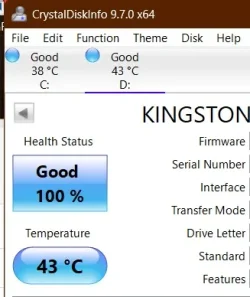
3725GB Western Digital WD My Book 1230 USB Device (USB (SATA) ) 42 °C
Optical Drives
No optical disk drives detected
Audio
Intel Display Audio
 

My Computer

System One

  • OS
    Windows 11
1. Status
1.webp

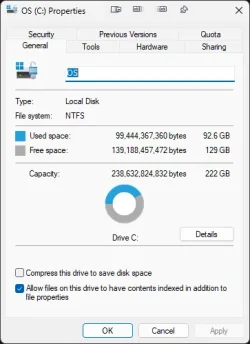
2. The SSD should not be filled more than 80 percent.
 

My Computer

System One

  • OS
    Microsoft Windows 11 Home
    Computer type
    PC/Desktop
    Manufacturer/Model
    MSI MS-7D98
    CPU
    Intel Core i5-13490F
    Motherboard
    MSI B760 GAMING PLUS WIFI
    Memory
    2 x 16 Patriot Memory (PDP Systems) PSD516G560081 6400MT (32-37-37-74); 1.35V)
    Graphics Card(s)
    GIGABYTE GeForce RTX 4070 WINDFORCE OC 12G (GV-N4070WF3OC-12GD)
    Sound Card
    Bluetooth Аудио
    Monitor(s) Displays
    INNOCN 15K1F
    Screen Resolution
    1920 x 1080
    Hard Drives
    WD_BLACK SN770 250GB
    KINGSTON SNV2S1000G (ELFK0S.6)
    PSU
    Thermaltake Toughpower GF3 1000W
    Case
    CG560 - DeepCool
    Cooling
    ID-COOLING SE-224-XTS / 2 x 140Mm Fan - rear and top; 3 x 120Mm - front
    Keyboard
    Corsair K70 RGB TKL
    Mouse
    Corsair KATAR PRO XT
    Internet Speed
    100 Mbps
    Browser
    Firefox
    Antivirus
    Microsoft Defender Antivirus
    Other Info
    https://www.userbenchmark.com/UserRun/66553205
Win+R
perfmon /report
 

My Computer

System One

  • OS
    Microsoft Windows 11 Home
    Computer type
    PC/Desktop
    Manufacturer/Model
    MSI MS-7D98
    CPU
    Intel Core i5-13490F
    Motherboard
    MSI B760 GAMING PLUS WIFI
    Memory
    2 x 16 Patriot Memory (PDP Systems) PSD516G560081 6400MT (32-37-37-74); 1.35V)
    Graphics Card(s)
    GIGABYTE GeForce RTX 4070 WINDFORCE OC 12G (GV-N4070WF3OC-12GD)
    Sound Card
    Bluetooth Аудио
    Monitor(s) Displays
    INNOCN 15K1F
    Screen Resolution
    1920 x 1080
    Hard Drives
    WD_BLACK SN770 250GB
    KINGSTON SNV2S1000G (ELFK0S.6)
    PSU
    Thermaltake Toughpower GF3 1000W
    Case
    CG560 - DeepCool
    Cooling
    ID-COOLING SE-224-XTS / 2 x 140Mm Fan - rear and top; 3 x 120Mm - front
    Keyboard
    Corsair K70 RGB TKL
    Mouse
    Corsair KATAR PRO XT
    Internet Speed
    100 Mbps
    Browser
    Firefox
    Antivirus
    Microsoft Defender Antivirus
    Other Info
    https://www.userbenchmark.com/UserRun/66553205

My Computers

System One System Two

  • OS
    Win 11 Pro 25H2 26200.8524
    Computer type
    PC/Desktop
    Manufacturer/Model
    Self Built
    CPU
    Intel® Core™ i7-14700K
    Motherboard
    ASUS TUF Z690-PLUS WIFI BIOS 4505 11/29/25
    Memory
    G.SKILL Ripjaws S5 Series 64GB (2 x 32GB) DDR5
    Graphics Card(s)
    ASUS GeForce RTX 4070 Super 12GB
    Sound Card
    Sound Blaster AE-5 Plus
    Monitor(s) Displays
    ASUS TUF Gaming 27" 2K HDR Gaming
    Screen Resolution
    2560 x 1440
    Hard Drives
    Samsung 990 Pro 1TB NVMe (Win 11 25H2)
    SK hynix P41 500GB NVMe 25H2 DEV/Games
    SK hynix P41 2TB NVMe (x3)
    Crucial P3 Plus 4TB
    PSU
    Corsair RM850x Shift
    Case
    Antec Dark Phantom DP502 FLUX
    Cooling
    Corsair Nautilus 360 RS AIO
    Keyboard
    Logitech MK 320
    Mouse
    Razer Basilisk V3
    Internet Speed
    350Mbs
    Browser
    Firefox
    Antivirus
    Winows Security
    Other Info
    MR 8.1 Home

    System 3 Specs
    Win 11 Pro 25H2 26200.8524
    ASUS PRIME Z370-P II BIOS 3004 7/12/21
    Intel Core i7-8700 CPU @ 3.20GHz
    32GB DDR4 RAM (4x8)
    iGPU Intel UHD Graphics 630
  • Operating System
    Win 11 Pro 25H2 26200.8524
    Computer type
    PC/Desktop
    Manufacturer/Model
    Self Built
    CPU
    Intel Core i7-11700F
    Motherboard
    Asus TUF Gaming Z590 Plus WiFi (BIOS 2803)
    Memory
    64 GB DDR4
    Graphics card(s)
    MSI GeForce RTX 3060 Ventus 2X 12GB
    Sound Card
    SoundBlaster Audigy Fx V2
    Monitor(s) Displays
    Samsung F27T350
    Screen Resolution
    1920x1080
    Hard Drives
    Samsung 980 Pro 1TB
    Samsung 970 EVO Plus 2TB
    Samsung 870 EVO 500GB SSD
    PSU
    Corsair HX750
    Case
    Cougar MX330-G Window
    Cooling
    Thermalright Frozen Edge 240 Black AIO
    Internet Speed
    350Mbps
    Browser
    Firefox
    Antivirus
    Windows Security
I would consider replacing the internal drive with a much larger one e.g. 1 TB.
 

My Computer

System One

  • OS
    Windows 11 Pro + Win11 Canary VM.
    Computer type
    Laptop
    Manufacturer/Model
    ASUS Zenbook 14
    CPU
    I9 13th gen i9-13900H 2.60 GHZ
    Motherboard
    Yep, Laptop has one.
    Memory
    16 GB soldered
    Graphics Card(s)
    Integrated Intel Iris XE
    Sound Card
    Realtek built in
    Monitor(s) Displays
    laptop OLED screen
    Screen Resolution
    2880x1800 touchscreen
    Hard Drives
    1 TB NVME SSD (only weakness is only one slot)
    PSU
    Internal + 65W thunderbolt USB4 charger
    Case
    Yep, got one
    Cooling
    Stella Artois (UK pint cans - 568 ml) - extra cost.
    Keyboard
    Built in UK keybd
    Mouse
    Bluetooth , wireless dongled, wired
    Internet Speed
    900 mbs (ethernet), wifi 6 typical 350-450 mb/s both up and down
    Browser
    Edge
    Antivirus
    Defender
    Other Info
    TPM 2.0, 2xUSB4 thunderbolt, 1xUsb3 (usb a), 1xUsb-c, hdmi out, 3.5 mm audio out/in combo, ASUS backlit trackpad (inc. switchable number pad)

    Macrium Reflect Home V8
    Office 365 Family (6 users each 1TB onedrive space)
    Hyper-V (a vm runs almost as fast as my older laptop)
Two antivirus is totally not recommended. It might be as easy as uninstalling one of them (in the miniPC I mention below I had one but I uninstalled it to increase performance, although a modern i5 should be capable to run one). To uninstall an antivirus you might require a special utility downloadable from the antivirus web. Follow the directions but, in absence of them, uninstall it from Programs and features first, reboot if requested, and run the said utility afterwards (rebooting again if requested) if there's one.

If this doesn't fix the slowness, do another clean install. Try a bit first w/o antivirus, and if it goes well and you want, install only one of the solutions. An imaging program could save time b/c you can restore a saved Windows image and return Windows to how it was when the image was taken (using a D: drive for the data helps a lot here, but moving "official" Windows folders to D: isn't so advisable, I keep them where they're in C: although I rarely use them, for example my browsers are set to download to D: ).

------------------------------------

The two antivirus might be causing all this but just in case:

According to the Perfmon report 1st page (but it's the 1st time I see one) the system's paging excessively. The usual solution to this is more RAM but...

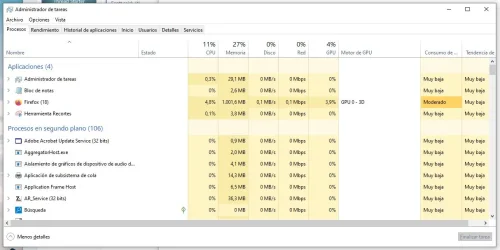
My Windows 11 is a 10th generation too (it counts the Intel releases from a given point) with 8 GB RAM and a much slower soldered "eMMC" (it's a miniPC) of the same capacity as disk C:. It also has an USB disk D: for the data. It isn't very snappy (Celeron J4125) but it can be used comfortably most of the time. It uses to have committed about 7 GB I believe. You can see this with Ctrl-Shift-Esc -> Performance tab -> Committed . I'm now in a much more powerful Windows 10 PC and it's about 12/32 GB (committed/installed) with just the browser, Notepad and Task Manager itself. This is my Processes tab.

taskmanager.webp

I've never been too able to "exactly" match this with the reality shown in the Performance tab (there're many processes but most are under 10 MB and most ones over 100 MB are Firefox processes whose total is about 1000 MB as displayed in the upper part, I doubt my list can total 3/4 GB let alone 12), but if anything out of the normal exists it should appear here.
 

My Computer

System One

  • OS
    Windows 11
    Manufacturer/Model
    MeLE Quieter 2Q (fanless miniPC)
    CPU
    Celeron J4125 (10th gen)
    Memory
    8GB DDR4
    Monitor(s) Displays
    Samsung SyncMaster T260
    Screen Resolution
    1920x1200
    Hard Drives
    256GB eMMC (Windows)
    2TB USB3 HDD Toshiba (Data)

My Computers

System One System Two

  • OS
    Windows 11 Pro
    Computer type
    PC/Desktop
    Manufacturer/Model
    GMKtec K11
    CPU
    AMD Ryzen 9 8945HS
    Memory
    32GB DDR5 SO-DIMM
    Graphics Card(s)
    Integrated AMD Radeon 780M (4.00 GHz)
    Monitor(s) Displays
    Benq 2250HM
    Screen Resolution
    1920 x 1080
    Hard Drives
    1 TB PCIe 4.0 NVMe M.2 SSD
  • Operating System
    Windows 11 Home
    Computer type
    Laptop
    Manufacturer/Model
    ASUS Zenbook 14 OLED 14" Laptop - UX3405CA-QL192W
    CPU
    Intel® Core™ Ultra 7 - 255H processor
    Memory
    16 GB LPDDR5 SDRAM
    Graphics card(s)
    Intel Arc 140T onboard graphics
    Screen Resolution
    1920 x 1200 (16:10 WUXGA resolution) OLED Touchscreen
    Hard Drives
    1TB SSD
Thank you, JLArranz and wiganken. Actually, I was not using either Norton or MalwareBytes when this first started. I was using the free version of AVG. I decided to upgrade to a paid antivirus, and after researching chose Norton. When that didn't make any difference, I followed a suggestion and added MalwareBytes after my third reinstallation. There may be something to not running two at the same time, but they are definitely not what is causing the slowness, since it preceded both of them.
 

My Computer

System One

  • OS
    Windows 11
You can have as many AntiVirus programs on your computer as you like, but the last one you install will be the only Active one, and that will disable all others. If you use the Free Version of Malwarebytes, it does not conflict with any other AV program.

We strongly suggest uninstalling all AV apps, other then Free Malwarebytes and using the included Windows Security (Defender)
It works just as well if not better than all other AV apps and it is free.

If you choose to remove Norton.
Download the Norton Removal and Reinstall app

Be sure to Click the Advanced button then Remove Only or Norton will reinstall again.
 

My Computer

System One

  • OS
    Windows 11 Pro Insider 64 bit 25H2 26200.5742
    Computer type
    PC/Desktop
    Manufacturer/Model
    Gigabyte Z390 UD
    CPU
    Intel Core i7 9700K 3.60
    Motherboard
    Gigabyte Z390 UD
    Memory
    16 GB
    Graphics Card(s)
    nVidia GEForce RTX 2060 Super
    Sound Card
    onboard
    Monitor(s) Displays
    Two 27" Dell 4K monitors
    Screen Resolution
    3840 x 2160
    Hard Drives
    M.2 NVME SSD, 500 GB; Two 2TB Mechanical HDD's
    PSU
    850w PSU
    Case
    Cyberpower PC
    Cooling
    Water cooled
    Keyboard
    Backlit Cyberpower gaming keyboard
    Mouse
    Backlit Cyberpower gaming mouse
    Internet Speed
    1 GB mbps
    Browser
    Brave
    Antivirus
    Windows Security
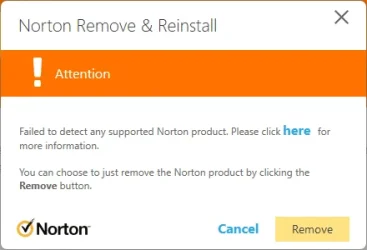
Well, that was an exercise in futility. Click on the HERE link and there is no such information there.

1755742899441.webp
 

My Computer

System One

  • OS
    Windows 11
What does it say when you click the Here link?

If you still have problems, run the Remove and Reinstall app and reinstall Norton, then run it again and choose to Remove only
 

My Computer

System One

  • OS
    Windows 11 Pro Insider 64 bit 25H2 26200.5742
    Computer type
    PC/Desktop
    Manufacturer/Model
    Gigabyte Z390 UD
    CPU
    Intel Core i7 9700K 3.60
    Motherboard
    Gigabyte Z390 UD
    Memory
    16 GB
    Graphics Card(s)
    nVidia GEForce RTX 2060 Super
    Sound Card
    onboard
    Monitor(s) Displays
    Two 27" Dell 4K monitors
    Screen Resolution
    3840 x 2160
    Hard Drives
    M.2 NVME SSD, 500 GB; Two 2TB Mechanical HDD's
    PSU
    850w PSU
    Case
    Cyberpower PC
    Cooling
    Water cooled
    Keyboard
    Backlit Cyberpower gaming keyboard
    Mouse
    Backlit Cyberpower gaming mouse
    Internet Speed
    1 GB mbps
    Browser
    Brave
    Antivirus
    Windows Security
First I got this, and when I clicked Remove I got the one above. Maybe I should reinstall from the Norton installation.
1755745166824.webp
 

My Computer

System One

  • OS
    Windows 11
1) Please run the V2 log collector > post a share link


2) Open administrative command prompt and copy and paste:

fltmc

dism /online /get-drivers /format:table >c:\drivers.txt

Post share links.


3) Monitor the computer using:


My Computer

System One

  • OS
    Windows 10
    Computer type
    Laptop
    Manufacturer/Model
    HP
    CPU
    Intel(R) Core(TM) i7-4800MQ CPU @ 2.70GHz
    Motherboard
    Product : 190A Version : KBC Version 94.56
    Memory
    16 GB Total: Manufacturer : Samsung MemoryType : DDR3 FormFactor : SODIMM Capacity : 8GB Speed : 1600
    Graphics Card(s)
    NVIDIA Quadro K3100M; Intel(R) HD Graphics 4600
    Sound Card
    IDT High Definition Audio CODEC; PNP Device ID HDAUDIO\FUNC_01&VEN_111D&DEV_76E0
    Hard Drives
    Model Hitachi HTS727575A9E364
    Antivirus
    Microsoft Defender
    Other Info
    Mobile Workstation
Arghh! Unless you are doing some really intensive networking or some serious commercial work odds are :::drum roll::: you don't need any extra virus scanner apart from the one that comes with Windows 11. Having said this Malware Bytes is more than a virus scanner and I recommend you keep it. But . . .
Please bear in mind that Celeron processor chips are not exactly the fastest CPUs in the race to begin with. That doesn't mean they don't have a purpose. In fact I own an N95. I call it my D-Celeron, as in "decelerate" because these chips are very efficient at slowing down over time. In other words they slow down fast. They don't take to a whole lot of bloatware gladly. AVG is among the worst of the worst to put on your PC because of the way it is designed — multiple engines. Plus they sink their hooks into your PC so deep it's a real job to get their crap off your computer when you don't need them anymore. Bad, bad, bad. I rate AVG right up there with McAfee. You probably still have remnants of AVG floating around in your PC eating up valuable real estate and bogging down your system.

If it were me and my PC, I would strip off my personal data to a separate drive and opt for a factory reset. But that's me. I really don't know if AVG is still pulling the same shenanigans that they used to resort to with their "free" ware but I sure wouldn't chance it. Nasty stuff.

JLArranz has given you some good advice here, in my opinion.​


Be nice to your little baby. It's only a Celeron. That's what they put in tablets. Treat it like a low budget tablet and it will be good to you. Avoid duplication of services, keep it light, no intensive software or games, run disk cleanup on it once a month. How much memory does it have? 4GB? 5? If you can give it just a litle more RAM by all means do so. Be gentle to it. This is a baby computer so it can only eat so much. 😎
 

My Computer

System One

  • OS
    WIN 11, WIN 10, WIN 8.1, WIN 7 U, WIN 7 PRO, WIN 7 HOME (32 Bit), LINUX MINT
    Computer type
    PC/Desktop
    Manufacturer/Model
    DIY, ASUS, and DELL
    CPU
    Intel i7 6900K and i9-7960X / AMD 3800X (8 core)
    Motherboard
    ASUS X99E-WS USB 3.1 and ASUS X299 SAGE
    Memory
    128 GB CORSAIR DOMINATOR PLATINUM (B DIE)
    Graphics Card(s)
    NVIDIA 1070 and RTX 3070
    Sound Card
    Crystal Sound (onboard)
    Monitor(s) Displays
    single Samsung 30" 4K and 8" aux monitor
    Screen Resolution
    4K and something equally attrocious. I'll be working on this.
    Hard Drives
    A, B, C, D, E, F, G, H, I, J, K, L, M, N, O, P, Q, R, S, T, U, V, W

    Ports X, Y, and Z are reserved for USB access and removable drives.

    Drive types consist of the following: Various mechanical hard drives bearing the brand names, Seagate, Toshiba, and Western Digital. Various NVMe drives bearing the brand names Kingston, Intel, Silicon Power, Crucial, Western Digital, and Team Group. Various SATA SSDs bearing various different brand names.

    RAID arrays included:

    LSI RAID 10 (WD Velociraptors) 1115.72 GB
    LSI RAID 10 (WD SSDS) 463.80 GB

    INTEL RAID 0 (KINGSTON HYPER X) System 447.14 GB
    INTEL RAID 1 TOSHIBA ENTERPRIZE class Data 2794.52 GB
    INTEL RAID 1 SEAGATE HYBRID 931.51 GB
    PSU
    SEVERAL. I prefer my Corsair Platinum HX1000i but I also like EVGA power supplies
    Case
    ThermalTake Level 10 GT (among others)
    Cooling
    Noctua is my favorite and I use it in my main. I also own various other coolers.
    Keyboard
    all kinds.
    Mouse
    all kinds
    Internet Speed
    360 mbps - 1 gbps (depending)
    Browser
    FIREFOX
    Antivirus
    KASPERSKY (no apologies)
    Other Info
    Gave Dell touch screen with Windows 11 to daughter and got me an OTVOC. Being a PC builder I own many desktop PCs as well. I am a father of five providing PCs, laptops, and tablets for all my family, most of which I have modified, rebuilt, or simply built from scratch. I do not own a cell phone, never have, never will.
Operating System
Windows 11 Home 64-bit
CPU
Intel Core i5 @ 2.90GHz 30 °C
Comet Lake 14nm Technology
RAM
12.0GB Dual-Channel DDR4 @ 1331MHz (19-19-19-43)
Motherboard
Dell Inc. 05GD68 (U3E1)
Graphics
G226HQL (1920x1080@60Hz)
SyncMaster (1920x1080@59Hz)
Intel UHD Graphics 630 (Dell)
Storage
238GB BC711 NVMe SK hynix 256GB (RAID (SSD))
3725GB Western Digital WD My Book 1230 USB Device (USB (SATA) ) 42 °C
Optical Drives
No optical disk drives detected
Audio
Intel Display Audio
Interesting. Perfmon says you have 5GB of physical memory. This is showing 12?
 

My Computer

System One

  • OS
    WIN 11, WIN 10, WIN 8.1, WIN 7 U, WIN 7 PRO, WIN 7 HOME (32 Bit), LINUX MINT
    Computer type
    PC/Desktop
    Manufacturer/Model
    DIY, ASUS, and DELL
    CPU
    Intel i7 6900K and i9-7960X / AMD 3800X (8 core)
    Motherboard
    ASUS X99E-WS USB 3.1 and ASUS X299 SAGE
    Memory
    128 GB CORSAIR DOMINATOR PLATINUM (B DIE)
    Graphics Card(s)
    NVIDIA 1070 and RTX 3070
    Sound Card
    Crystal Sound (onboard)
    Monitor(s) Displays
    single Samsung 30" 4K and 8" aux monitor
    Screen Resolution
    4K and something equally attrocious. I'll be working on this.
    Hard Drives
    A, B, C, D, E, F, G, H, I, J, K, L, M, N, O, P, Q, R, S, T, U, V, W

    Ports X, Y, and Z are reserved for USB access and removable drives.

    Drive types consist of the following: Various mechanical hard drives bearing the brand names, Seagate, Toshiba, and Western Digital. Various NVMe drives bearing the brand names Kingston, Intel, Silicon Power, Crucial, Western Digital, and Team Group. Various SATA SSDs bearing various different brand names.

    RAID arrays included:

    LSI RAID 10 (WD Velociraptors) 1115.72 GB
    LSI RAID 10 (WD SSDS) 463.80 GB

    INTEL RAID 0 (KINGSTON HYPER X) System 447.14 GB
    INTEL RAID 1 TOSHIBA ENTERPRIZE class Data 2794.52 GB
    INTEL RAID 1 SEAGATE HYBRID 931.51 GB
    PSU
    SEVERAL. I prefer my Corsair Platinum HX1000i but I also like EVGA power supplies
    Case
    ThermalTake Level 10 GT (among others)
    Cooling
    Noctua is my favorite and I use it in my main. I also own various other coolers.
    Keyboard
    all kinds.
    Mouse
    all kinds
    Internet Speed
    360 mbps - 1 gbps (depending)
    Browser
    FIREFOX
    Antivirus
    KASPERSKY (no apologies)
    Other Info
    Gave Dell touch screen with Windows 11 to daughter and got me an OTVOC. Being a PC builder I own many desktop PCs as well. I am a father of five providing PCs, laptops, and tablets for all my family, most of which I have modified, rebuilt, or simply built from scratch. I do not own a cell phone, never have, never will.
Interesting. Perfmon says you have 5GB of physical memory. This is showing 12?
In the pdf I see (near the bottom)
TotalPhysicalMemory 12619235328
ie 12 GB. Now why on earth don't they show the units? Or thousand separators (for goodness sake) - Or Quote GB (or failing that, MB). 'They' go to all that trouble to write the software, then bork the output. But back to the point: further up the pdf report is this:
FreePhysicalMemory 518532
So only 0.5MB free RAM? Could that be the explanation?
 

My Computers

System One System Two

  • OS
    W10
    Computer type
    PC/Desktop
    Manufacturer/Model
    Home brew
    CPU
    Ryzen3-2200G
    Motherboard
    GA-A320M-S2H
    Memory
    16 GB Kingston HyperX DDR4
    Graphics Card(s)
    Integrated
    Sound Card
    Integrated
    Monitor(s) Displays
    LG W2246
    Screen Resolution
    1920x1080
    Hard Drives
    Intel 760p 256GB NVMe M.2
    Seagate Barracuda 7200 1TB
    Gash Seagate ST31608
    PSU
    2006-vintage no-name
    Case
    Acer Aspire 2006
    Cooling
    Air (fan-assist)
    Keyboard
    HP SK-2885
    Mouse
    wireless
    Internet Speed
    32 mbps
    Browser
    FF latest
    Antivirus
    MS Defender
  • Operating System
    W10
    Computer type
    Laptop
    Manufacturer/Model
    HP 255 G8
    CPU
    Ryzen 5 3500U
    Memory
    8 GB
    Graphics card(s)
    on-board
    Monitor(s) Displays
    16"
    Screen Resolution
    1920x1080
    Hard Drives
    Samsung SSD 512GB Nvme
    Browser
    FF + Edge
    Antivirus
    MS Defender
Back
Top Bottom