Solved Son Built His Own Gaming Computer But It's Not Working


sspohl

Well-known member
Local time
11:31 PM
Posts
23
OS
Windows 11
My son took his own hard-earned money and bought components to build a gaming computer while he was home from college this summer, but it's not working and he is beyond frustrated. He has zero background in Windows or in computers in general (used a Mac all through high school/college), so I give him credit for trying. I'd like to help him, but it's beyond me at the moment too.

His components are as follows:
MSI PRO Z790-P WiFi DDR4 Motherboard
3.6GHz Intel 12th gen Core I7-12700k Processor
(2) G.Skill Ripjaws V 16GB DDR4-32000 RAM
AMD Radeon RX6600 2X 8G RFB Video Card
Crucial 2TB B P310 Gen4 NVMe SSD
WD Mainstream Blue 4TB HDD
Thermaltake Smart 600W 80+ ATX PS
A case, various fancy lights and fans

He built his pc and we used Windows MCT to create a USB to install Windows 11 Education, whatever version was current in July. (He had to wait until the fall semester began to activate the installation, which as far as I know he took care of.) The computer was working for its intended purpose over the summer, but he ran into problems when he went back to school and I don't believe it worked the entire semester.

He's back home with it now, and as I said very frustrated over his inability to figure out why it won't load up games on the Xbox app. I know he has spent countless hours watching videos and checking all his connections on the motherboard, not sure what else he has tried. I'm trying to help him and so far this is what I know:

1) The OS is painfully slow, takes five minutes or more to boot up. Called MS support and got a tech who connected and took control and checked out various stuff over the course of an hour then went into system recovery and started PC reset with keeping all personal files. He wished us well and sent an email with the support number. We waited it out and 1.5 hours later the reset "failed in the SAFE_OS phase with an error during MIGRATE_DATA operation" (error code 0x8007042B - 0x2000D)

2) Ran Belarc Advisor and the report it spits out doesn't give me any clues, all the components listed above show as active (the report is apparently too large to upload here) ... but it does indicate the OS is installed on the HDD not the SSD. That's not ideal for gaming, so planned to fix that while doing a clean install following the excellent tutorial available on this site. Used MCT to create a new USB and tried to install from that after unplugging the HDD. That goes absolutely nowhere, nothing boots, screen is black, system is hung. As I type this, I realize we didn't try installing from the USB with the HDD plugged in. Not sure if that makes a difference.

3) The personal files are completely unnecessary since he only wants to use it for Xbox, so we tried to reset completely clean from system recovery. That appears to finish, but nothing is changed and we've tried that several times. The Belarc report says the OS is version 25H2 build 26200.7462 which seems to be up to the minute.

4) Tried using DEL key to get into UEFI during reboot, but nothing happens, screen is black, system is hung. Realized I've never seen an MSI logo pop us as the system boots, just a bunch of black until the Windows spinning dots show up. Tried using advanced startup from system recovery, and that is slightly better, seems like something wants to happen with slight flashes across screen, but still nothing happening... moving and clicking mouse does nothing, but system finally booted into Windows after we pressed enter key.

If you've read this far, I thank you sincerely. My son wants to take the whole thing back to Micro Center where he bought the components and let them figure it out, but I hate to admit defeat. Does anyone have any suggestions on what to try next?
 
Windows Build/Version
25H2 build 26200.7462

My Computer

System One

  • OS
    Windows 11
    Computer type
    PC/Desktop
    Manufacturer/Model
    Self Built
    CPU
    AMD Ryzen 5 5600 G
    Motherboard
    Asus STRIX B550-F
    Memory
    16 GB Corsair 2x8 D4 3200
    Monitor(s) Displays
    Dell 1905 Flat Panel, ca 2005
    Screen Resolution
    1280 x 1024
    Hard Drives
    1TB Samsung 970 EVO Plus M.2 SSD
    1TB Samsung 850 EVO SATA SSD
    PSU
    Seasonic Focus Plus 650W
    Case
    Fractal Meshify-C
    Cooling
    two case fans
    Keyboard
    Logitech, wired
    Mouse
    Logitech, wired
    Internet Speed
    AT&T fiber Gig speed
    Browser
    Edge, until I get back to Chrome
It's best to remove the HDD and then complete the reinstall to make sure the SSD is used, that should take care of the speed issue. The Xbox app issues are unlikely due to hardware. He probably needs to be signed into a MS account to use it, other than that if there are any error messages for the Xbox app y suggest posting those here. There also should be an event log for Xbox which will likely have clues to his issue
 

My Computer

System One

  • OS
    Linux Mint
    Computer type
    Laptop
    Manufacturer/Model
    System76 Lemur Pro
Pull the power plug for 10 minutes, disconnect the HDD then reconnect the power WITH your prepared USB plugged in, hit the key to invoke the UEFI (BIOS) and select he boot override option to select your USB, when the install start use the option to delete all partitions then continue.
 

My Computers

System One System Two

  • OS
    Windows 11 Enterprise 25H2 26200 7462
    Computer type
    PC/Desktop
    Manufacturer/Model
    Custom Build
    CPU
    Intel XEON E5-2699 v3
    Motherboard
    ASUS X99-A
    Memory
    64GB Teamgroup UD4-3600
    Graphics Card(s)
    NVIDIA GeForce GTX 1080 Ti
    Sound Card
    Integrated
    Monitor(s) Displays
    ACER X34 Predator
    Screen Resolution
    3440 x 1440
    Hard Drives
    Crucial CT1000P 3P SSD8 1TB
    Crucial CT1000 BX500 SSD 1TB
    PSU
    GameMax Pro
    Case
    Fractal Design
    Cooling
    Corsair H110iGT + 6 140mm Fans
    Keyboard
    Corsair K4
    Mouse
    G-Skill G502
    Internet Speed
    300MBs
    Browser
    Chrome
    Antivirus
    OEM
    Other Info
    ASUS RT-AC87U Router
  • Operating System
    25H2 26200.5074
    Computer type
    Laptop
    Manufacturer/Model
    ASUS X555LA
    Memory
    8GB
    Browser
    Chrome
    Antivirus
    OEM
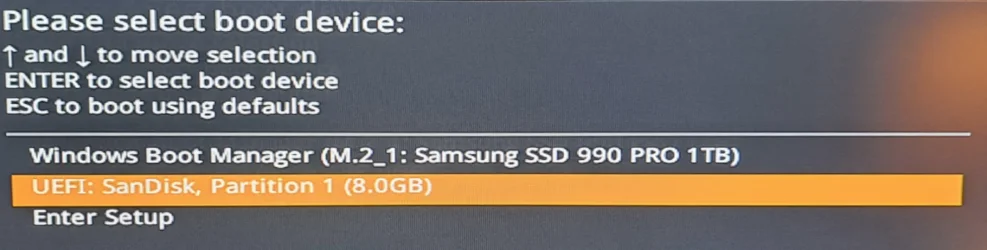
@sspohl Turn off computer. Insert prepared USB. Turn on computer and immediately
start pressing F11. This will invoke a one-time boot menu. Select the USB,
press enter and install windows. The one-time boot menu will look similar
to this.

1766292662757.webp
 

My Computers

System One System Two

  • OS
    Win 11 Pro 25H2 26200.8524
    Computer type
    PC/Desktop
    Manufacturer/Model
    Self Built
    CPU
    Intel® Core™ i7-14700K
    Motherboard
    ASUS TUF Z690-PLUS WIFI BIOS 4505 11/29/25
    Memory
    G.SKILL Ripjaws S5 Series 64GB (2 x 32GB) DDR5
    Graphics Card(s)
    ASUS GeForce RTX 4070 Super 12GB
    Sound Card
    Sound Blaster AE-5 Plus
    Monitor(s) Displays
    ASUS TUF Gaming 27" 2K HDR Gaming
    Screen Resolution
    2560 x 1440
    Hard Drives
    Samsung 990 Pro 1TB NVMe (Win 11 25H2)
    SK hynix P41 500GB NVMe 25H2 DEV/Games
    SK hynix P41 2TB NVMe (x3)
    Crucial P3 Plus 4TB
    PSU
    Corsair RM850x Shift
    Case
    Antec Dark Phantom DP502 FLUX
    Cooling
    Corsair Nautilus 360 RS AIO
    Keyboard
    Logitech MK 320
    Mouse
    Razer Basilisk V3
    Internet Speed
    350Mbs
    Browser
    Firefox
    Antivirus
    Winows Security
    Other Info
    MR 8.1 Home

    System 3 Specs
    Win 11 Pro 25H2 26200.8524
    ASUS PRIME Z370-P II BIOS 3004 7/12/21
    Intel Core i7-8700 CPU @ 3.20GHz
    32GB DDR4 RAM (4x8)
    iGPU Intel UHD Graphics 630
  • Operating System
    Win 11 Pro 25H2 26200.8524
    Computer type
    PC/Desktop
    Manufacturer/Model
    Self Built
    CPU
    Intel Core i7-11700F
    Motherboard
    Asus TUF Gaming Z590 Plus WiFi (BIOS 2803)
    Memory
    64 GB DDR4
    Graphics card(s)
    MSI GeForce RTX 3060 Ventus 2X 12GB
    Sound Card
    SoundBlaster Audigy Fx V2
    Monitor(s) Displays
    Samsung F27T350
    Screen Resolution
    1920x1080
    Hard Drives
    Samsung 980 Pro 1TB
    Samsung 970 EVO Plus 2TB
    Samsung 870 EVO 500GB SSD
    PSU
    Corsair HX750
    Case
    Cougar MX330-G Window
    Cooling
    Thermalright Frozen Edge 240 Black AIO
    Internet Speed
    350Mbps
    Browser
    Firefox
    Antivirus
    Windows Security
@sspohl Turn off computer. Insert prepared USB. Turn on computer and immediately
start pressing F11. This will invoke a one-time boot menu. Select the USB,
press enter and install windows. The one-time boot menu will look similar
to this.
Didn't i just say that?
 

My Computers

System One System Two

  • OS
    Windows 11 Enterprise 25H2 26200 7462
    Computer type
    PC/Desktop
    Manufacturer/Model
    Custom Build
    CPU
    Intel XEON E5-2699 v3
    Motherboard
    ASUS X99-A
    Memory
    64GB Teamgroup UD4-3600
    Graphics Card(s)
    NVIDIA GeForce GTX 1080 Ti
    Sound Card
    Integrated
    Monitor(s) Displays
    ACER X34 Predator
    Screen Resolution
    3440 x 1440
    Hard Drives
    Crucial CT1000P 3P SSD8 1TB
    Crucial CT1000 BX500 SSD 1TB
    PSU
    GameMax Pro
    Case
    Fractal Design
    Cooling
    Corsair H110iGT + 6 140mm Fans
    Keyboard
    Corsair K4
    Mouse
    G-Skill G502
    Internet Speed
    300MBs
    Browser
    Chrome
    Antivirus
    OEM
    Other Info
    ASUS RT-AC87U Router
  • Operating System
    25H2 26200.5074
    Computer type
    Laptop
    Manufacturer/Model
    ASUS X555LA
    Memory
    8GB
    Browser
    Chrome
    Antivirus
    OEM

My Computers

System One System Two

  • OS
    Win 11 Pro 25H2 26200.8524
    Computer type
    PC/Desktop
    Manufacturer/Model
    Self Built
    CPU
    Intel® Core™ i7-14700K
    Motherboard
    ASUS TUF Z690-PLUS WIFI BIOS 4505 11/29/25
    Memory
    G.SKILL Ripjaws S5 Series 64GB (2 x 32GB) DDR5
    Graphics Card(s)
    ASUS GeForce RTX 4070 Super 12GB
    Sound Card
    Sound Blaster AE-5 Plus
    Monitor(s) Displays
    ASUS TUF Gaming 27" 2K HDR Gaming
    Screen Resolution
    2560 x 1440
    Hard Drives
    Samsung 990 Pro 1TB NVMe (Win 11 25H2)
    SK hynix P41 500GB NVMe 25H2 DEV/Games
    SK hynix P41 2TB NVMe (x3)
    Crucial P3 Plus 4TB
    PSU
    Corsair RM850x Shift
    Case
    Antec Dark Phantom DP502 FLUX
    Cooling
    Corsair Nautilus 360 RS AIO
    Keyboard
    Logitech MK 320
    Mouse
    Razer Basilisk V3
    Internet Speed
    350Mbs
    Browser
    Firefox
    Antivirus
    Winows Security
    Other Info
    MR 8.1 Home

    System 3 Specs
    Win 11 Pro 25H2 26200.8524
    ASUS PRIME Z370-P II BIOS 3004 7/12/21
    Intel Core i7-8700 CPU @ 3.20GHz
    32GB DDR4 RAM (4x8)
    iGPU Intel UHD Graphics 630
  • Operating System
    Win 11 Pro 25H2 26200.8524
    Computer type
    PC/Desktop
    Manufacturer/Model
    Self Built
    CPU
    Intel Core i7-11700F
    Motherboard
    Asus TUF Gaming Z590 Plus WiFi (BIOS 2803)
    Memory
    64 GB DDR4
    Graphics card(s)
    MSI GeForce RTX 3060 Ventus 2X 12GB
    Sound Card
    SoundBlaster Audigy Fx V2
    Monitor(s) Displays
    Samsung F27T350
    Screen Resolution
    1920x1080
    Hard Drives
    Samsung 980 Pro 1TB
    Samsung 970 EVO Plus 2TB
    Samsung 870 EVO 500GB SSD
    PSU
    Corsair HX750
    Case
    Cougar MX330-G Window
    Cooling
    Thermalright Frozen Edge 240 Black AIO
    Internet Speed
    350Mbps
    Browser
    Firefox
    Antivirus
    Windows Security
Thank you for those helpful responses! Turns out the first issue we had was with the graphics card, for some reason it wasn't allowing the MSI motherboard startup screens to show when we were entering UEFI. Once we took that out we could see the UEFI screen and could change the boot priority. It made me realize the RFB in the video card spec must stand for refurbished -- I think he got a piece of junk and will have to look into a new card...

We continued on with the clean install which went mostly according to plan, except it says it has no networking capability... I'm guessing that is a driver issue so I'm off to another forum to figure out how to proceed
 

My Computer

System One

  • OS
    Windows 11
    Computer type
    PC/Desktop
    Manufacturer/Model
    Self Built
    CPU
    AMD Ryzen 5 5600 G
    Motherboard
    Asus STRIX B550-F
    Memory
    16 GB Corsair 2x8 D4 3200
    Monitor(s) Displays
    Dell 1905 Flat Panel, ca 2005
    Screen Resolution
    1280 x 1024
    Hard Drives
    1TB Samsung 970 EVO Plus M.2 SSD
    1TB Samsung 850 EVO SATA SSD
    PSU
    Seasonic Focus Plus 650W
    Case
    Fractal Meshify-C
    Cooling
    two case fans
    Keyboard
    Logitech, wired
    Mouse
    Logitech, wired
    Internet Speed
    AT&T fiber Gig speed
    Browser
    Edge, until I get back to Chrome
Thank you for those helpful responses! Turns out the first issue we had was with the graphics card, for some reason it wasn't allowing the MSI motherboard startup screens to show when we were entering UEFI. Once we took that out we could see the UEFI screen and could change the boot priority. It made me realize the RFB in the video card spec must stand for refurbished -- I think he got a piece of junk and will have to look into a new card...

We continued on with the clean install which went mostly according to plan, except it says it has no networking capability... I'm guessing that is a driver issue so I'm off to another forum to figure out how to proceed
Hmmm - have you tried connecting via ethernet as basic drivers for that are pretty standard.

Also, there are many very cheap external usb wifi dongles (<£10 last time I looked) that are pretty much plug and play. I have used them on old devices where getting drivers was difficult for internal wifi cards.

If nothing else it usually gets pc connected so you more easily install vendor specific drivers.
 

My Computer

System One

  • OS
    Windows 11 Pro + Win11 Canary VM.
    Computer type
    Laptop
    Manufacturer/Model
    ASUS Zenbook 14
    CPU
    I9 13th gen i9-13900H 2.60 GHZ
    Motherboard
    Yep, Laptop has one.
    Memory
    16 GB soldered
    Graphics Card(s)
    Integrated Intel Iris XE
    Sound Card
    Realtek built in
    Monitor(s) Displays
    laptop OLED screen
    Screen Resolution
    2880x1800 touchscreen
    Hard Drives
    1 TB NVME SSD (only weakness is only one slot)
    PSU
    Internal + 65W thunderbolt USB4 charger
    Case
    Yep, got one
    Cooling
    Stella Artois (UK pint cans - 568 ml) - extra cost.
    Keyboard
    Built in UK keybd
    Mouse
    Bluetooth , wireless dongled, wired
    Internet Speed
    900 mbs (ethernet), wifi 6 typical 350-450 mb/s both up and down
    Browser
    Edge
    Antivirus
    Defender
    Other Info
    TPM 2.0, 2xUSB4 thunderbolt, 1xUsb3 (usb a), 1xUsb-c, hdmi out, 3.5 mm audio out/in combo, ASUS backlit trackpad (inc. switchable number pad)

    Macrium Reflect Home V8
    Office 365 Family (6 users each 1TB onedrive space)
    Hyper-V (a vm runs almost as fast as my older laptop)
I had the ethernet cable plugged in, but it said it had no drivers whatsoever... the whole thing has been strange! I did get drivers off MSI site and once we updated the LAN driver it connected and started pulling in all kinds of drivers through MSI connect. We still have some cleanup to do, the SSD has one gigantic partition labeled recovery and the HDD needs a complete format because I think for sure something on that is corrupted, and we have to figure out if the graphics card is usable or not.... but right now his diy pc is running the xbox app faster than ever and I left him happily playing some game
 

My Computer

System One

  • OS
    Windows 11
    Computer type
    PC/Desktop
    Manufacturer/Model
    Self Built
    CPU
    AMD Ryzen 5 5600 G
    Motherboard
    Asus STRIX B550-F
    Memory
    16 GB Corsair 2x8 D4 3200
    Monitor(s) Displays
    Dell 1905 Flat Panel, ca 2005
    Screen Resolution
    1280 x 1024
    Hard Drives
    1TB Samsung 970 EVO Plus M.2 SSD
    1TB Samsung 850 EVO SATA SSD
    PSU
    Seasonic Focus Plus 650W
    Case
    Fractal Meshify-C
    Cooling
    two case fans
    Keyboard
    Logitech, wired
    Mouse
    Logitech, wired
    Internet Speed
    AT&T fiber Gig speed
    Browser
    Edge, until I get back to Chrome
Here is som basic to do if you are starting from scratch :

Go to MSI website and get latest BIOS for your board ver. I OR II ! (it is labeled on board, maybe at the bottum)
When you are there, get latest drivers for the board and save on a free USB-drive.

Unzip the BIOS-file and place in the root of USB-drive or root of C - I think my MSI Z690 was able to see that too.
You need to extract it from zip !

Shut down ..

Make sure the Crusial M.2 NVMe is mouted in the slot nearest CPU

Pull all drives but the M.2 from motherboard incl. the Radeon GPU and mount the USB with BIOS file and start
PC in BIOS (DEL repeatly when power on)

Flash your BIOS frem menu in BIOS and load system default. Then ajust to you needs, but make sure it it set to
UEFI boot ... and maybe disable the funktion for the board to automatic download drivers, ajust boot order etc.

Shut down

You then boot up on your mounted USB with Windows 11 (i think F9 og F12 repeatly when power on PC
will give You the choice to boot from USB)

When you are asked where to install you delete ALL partitions on the M.2. !! The USB-drive is listed also, so be aware
to only delete all partitions on M.2

When it says no allocated space on disk you proceed without creating a partition, installer will make partitions
the right way for You.

If you want to awoid a Microsoft account, there are lots of guides for it here and I would then install with no internet.

When up and running install the ME firmware and other drivers for the setup. ME is found same place as BIOS an
the installer runs from within Windows.

Last I would shut down and install the Radeon and WD Blue - reboot and install latest drivers for Radeon offline.
 
Last edited:

My Computer

System One

  • OS
    Windows 11 Pro
    Computer type
    PC/Desktop
    Manufacturer/Model
    Homemade by me
    CPU
    Intel i5 12600K
    Motherboard
    MSI PRO Z690-A DDR4
    Memory
    G.Skill Ripjaws V DDR4 3600 MHz / PC4-28800 CL16 2x8 GB
    Graphics Card(s)
    Intel® UHD Graphics 770 (iGPU)
    Sound Card
    8-Channel (7.1) HD Audio
    Monitor(s) Displays
    Legion/Lenovo Y25-25
    Screen Resolution
    Full HD 1920 x 1080
    Hard Drives
    WD Black NVMe M.2 500 GB (system drive)
    Case
    Lian-Li
    Keyboard
    Old solid and heavy IBM🙂
    Mouse
    Logitech
    Internet Speed
    1000 mbit
    Antivirus
    Avast free
Thank you for those detailed instructions. I think we're going to practice on reinstalling the OS a couple times before he goes back to school so it won't be such a mystery next time something gets fouled up.
 

My Computer

System One

  • OS
    Windows 11
    Computer type
    PC/Desktop
    Manufacturer/Model
    Self Built
    CPU
    AMD Ryzen 5 5600 G
    Motherboard
    Asus STRIX B550-F
    Memory
    16 GB Corsair 2x8 D4 3200
    Monitor(s) Displays
    Dell 1905 Flat Panel, ca 2005
    Screen Resolution
    1280 x 1024
    Hard Drives
    1TB Samsung 970 EVO Plus M.2 SSD
    1TB Samsung 850 EVO SATA SSD
    PSU
    Seasonic Focus Plus 650W
    Case
    Fractal Meshify-C
    Cooling
    two case fans
    Keyboard
    Logitech, wired
    Mouse
    Logitech, wired
    Internet Speed
    AT&T fiber Gig speed
    Browser
    Edge, until I get back to Chrome
I had the ethernet cable plugged in, but it said it had no drivers whatsoever... the whole thing has been strange! I did get drivers off MSI site and once we updated the LAN driver it connected and started pulling in all kinds of drivers through MSI connect. We still have some cleanup to do, the SSD has one gigantic partition labeled recovery and the HDD needs a complete format because I think for sure something on that is corrupted, and we have to figure out if the graphics card is usable or not.... but right now his diy pc is running the xbox app faster than ever and I left him happily playing some game

Excellent, sspohl! Congratulations!

Kind regards,

tecknot
 

My Computer

System One

  • OS
    Windows 11 Pro 25H2 build 26200.8457
    Computer type
    Laptop
    Manufacturer/Model
    Lenovo ThinkPad Workstation P72
    CPU
    Intel i7 8750H @ 2.2 GHz
    Motherboard
    Lenovo 01YU291
    Memory
    16 GB (all Samsung) DDR4-3200 SODIMM (non-ECC) PCIe 3
    Graphics Card(s)
    Intel UHD Graphics 630 & NVIDIA Quadro P600
    Sound Card
    Realtek ALC3286 & Focusrite Saffire 24 Pro DSP
    Monitor(s) Displays
    17.3"
    Screen Resolution
    3840x2160
    Hard Drives
    1TB SSD Samsung 860 EVO SATA 3
    1TB SSD Samsung 970 EVO M.2 NVMe PCIe 3 x 4
    2TB SSD Samsung 990 PRO M.2 NVMe PCIe 3 x 4
    PSU
    230W
    Cooling
    fan
    Keyboard
    UltraNav
    Mouse
    Kensington wireless Orbit
    Internet Speed
    640Mbps
    Browser
    DuckDuckGo and Firefox
    Antivirus
    Defender
    Other Info
    CM246 Chipset
I had the ethernet cable plugged in, but it said it had no drivers whatsoever... the whole thing has been strange! I did get drivers off MSI site and once we updated the LAN driver it connected and started pulling in all kinds of drivers through MSI connect. We still have some cleanup to do, the SSD has one gigantic partition labeled recovery and the HDD needs a complete format because I think for sure something on that is corrupted, and we have to figure out if the graphics card is usable or not.... but right now his diy pc is running the xbox app faster than ever and I left him happily playing some game
Just for your information; that partition called "Recovery" should be only arround 876Mb large. When installing Windows; delete every partition on the C-drive. Then let Windows make a new partition. (on a completely empty drive, not assigned to anything) It will generate 3 partitions;
- Partition 1; Size: 200Mb (EFI system partition)
- Partition 2; Size: 876Mb (Recovery partition)
- Partition 3; Size: Remainder of the space left on the drive. (Boot, Page File, Crash Dump, Basic Data Partition) *The C-drive*
 

My Computer

System One

  • OS
    Win 11 Pro "25H2" Build 26200.8524, Zorin OS Pro
    Computer type
    PC/Desktop
    Manufacturer/Model
    Self built
    CPU
    Intel® Core™ i7-12700KF 12th Gen.
    Motherboard
    ASUS Prime Z690-A, BIOS v4505
    Memory
    32GB DDR5 5600-36 Vengeance
    Graphics Card(s)
    PCIe4.0 Asus NVIDIA RTX3060Ti
    Sound Card
    Onboard; Realtek
    Monitor(s) Displays
    34" LG 34UC79G-B Curved 21:9 144Hz
    Screen Resolution
    2560x1080 (No HDR)
    Hard Drives
    250Gb Samsung 870PRO NVMe (Win 11 Pro)
    1Tb Samsung 980PRO NVMe
    1Tb Samsung 970EVO NVMe
    2Tb Samsung 990PRO NVMe with heatsink.
    4Tb WDC WD40EZRZ Blue SATA (Int.)
    4Tb WDC WD40EZRZ Blue SATA (Int.)
    3Tb WDC WD30EFRZ Red SATA (Int.)
    256Gb Samsung 840PRO SSD (RHEL 9,5)
    256Gb Samsung 850PRO SSD (Zorin OS Pro 18)
    PSU
    Coolermaster 850W V2 Gold with internal 12cm exaust fan
    Case
    Be-Quiet Pure Base 600.
    Cooling
    3x Be-Quiet! 12/14cm "Silent Wings 4" casefans, 1x Arctic Freezer i35 CPU towerblock with fan.
    Keyboard
    Steelseries APEX 7 keyboard.
    Mouse
    Logitech G-502 Hero
    Internet Speed
    1Gb
    Browser
    Brave
    Antivirus
    F-Secure
    Other Info
    No Noise system.
    256Gb Kingston Travler USB 3.0 drive.
    64Gb Sandisk USB 3.2 drive. (Ventoy)
    8Gb Philips USB 3.0 drive. (Win. Inst.)
    8Gb Philips USB 3.0 drive. (Rescue disk)
    2Tb WD USB 3.0 Passport drive.
    USB Ext. 500Gb WD SATA drive.
    External USB 3.0 C.A. CD/DVD* burner.
Thank you, that's helpful. I really need to go back and look at disk management to see how it got carved up -- will do that when we get the HDD back up and reformatted.
 

My Computer

System One

  • OS
    Windows 11
    Computer type
    PC/Desktop
    Manufacturer/Model
    Self Built
    CPU
    AMD Ryzen 5 5600 G
    Motherboard
    Asus STRIX B550-F
    Memory
    16 GB Corsair 2x8 D4 3200
    Monitor(s) Displays
    Dell 1905 Flat Panel, ca 2005
    Screen Resolution
    1280 x 1024
    Hard Drives
    1TB Samsung 970 EVO Plus M.2 SSD
    1TB Samsung 850 EVO SATA SSD
    PSU
    Seasonic Focus Plus 650W
    Case
    Fractal Meshify-C
    Cooling
    two case fans
    Keyboard
    Logitech, wired
    Mouse
    Logitech, wired
    Internet Speed
    AT&T fiber Gig speed
    Browser
    Edge, until I get back to Chrome
Back
Top Bottom