

Yacu
Member
- Local time
- 5:35 AM
- Posts
- 2
- OS
- Windows 11
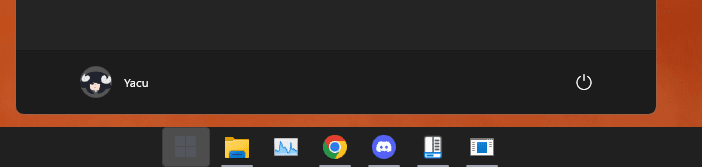
How do i fix it?
It is in the correct height when i press the Windows key, but when i type something it lowers, covering the icons!
I tried unninstalling and reinstalling, deleting the regedit entries that google told me where related to taskbar configurations, reinstalled again, locked and unlocked the taskbar (typing works well with locked taskbar but i don't want to use a locked taskbar), restarted file explorer in between, but it still appears lower than it should,
when i put the taskbar in other sides of the screen (i need it down) the flyouts appear in the right distance, so i don't know what is happening
I think it began when i chose "Windows 10 Flyouts", and then never fixed,
How do i reset that setting?, I have already unninstalled multiple times
It is in the correct height when i press the Windows key, but when i type something it lowers, covering the icons!
I tried unninstalling and reinstalling, deleting the regedit entries that google told me where related to taskbar configurations, reinstalled again, locked and unlocked the taskbar (typing works well with locked taskbar but i don't want to use a locked taskbar), restarted file explorer in between, but it still appears lower than it should,
when i put the taskbar in other sides of the screen (i need it down) the flyouts appear in the right distance, so i don't know what is happening
I think it began when i chose "Windows 10 Flyouts", and then never fixed,
How do i reset that setting?, I have already unninstalled multiple times
- Windows Build/Version
- 22H2 22621.963
Attachments

Last edited:
My Computer
At a glance
Windows 11AMD Ryzen 5600G / 12 Threads 4.4Gh;16GB Armored 3200MhzNVIDIA GeForce RTX 3060 12GB GDDR6
- OS
- Windows 11
- Computer type
- PC/Desktop
- Manufacturer/Model
- Gigabyte Technology Ltd. B550M DS3H
- CPU
- AMD Ryzen 5600G / 12 Threads 4.4Gh;
- Motherboard
- Chipset 8450 (Sop. 64GB RAM, M.2. USB 3.0)
- Memory
- 16GB Armored 3200Mhz
- Graphics Card(s)
- NVIDIA GeForce RTX 3060 12GB GDDR6
- Sound Card
- None
- Monitor(s) Displays
- Samsung LF22T35 and a LG TV connected to it
- Screen Resolution
- 1920 x 1080
- Hard Drives
- 1TBs SATA
120GB SATA3
- PSU
- Iceberg Bronze 600W 80+
- Case
- Iceberg Spider ARGB
- Cooling
- Stock AMD
- Keyboard
- Razer Ornata V2
- Mouse
- Razer Deathadder V2
- Internet Speed
- 390 Mbps
- Browser
- Google Chrome
- Antivirus
- MalwareBytes Free (Without real-time protection)
- Other Info
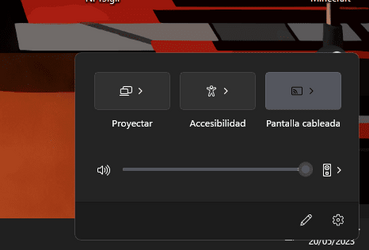
- Now that i think about it, the problem i asked support for, maybe it is because of the TV i have connected?, it miss-interprets the dimentions?, idk






