Solved start11 menu problem


Helmuuth

Snausages
Member
VIP
Local time
8:06 AM
Posts
531
Location
California
OS
Windows 11
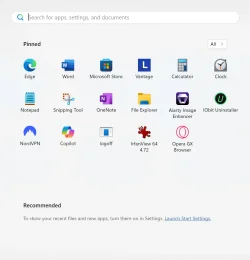
seems like start menu11 is acting up. as you can see here i chose w10 menu but it wont change from here. what is wrong.
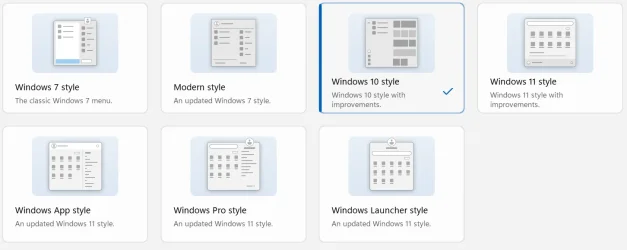
Screenshot 2025-09-13 124954.webp
Screenshot 2025-09-13 125024.webp
 

My Computer

System One

  • OS
    Windows 11
    Computer type
    Laptop
    Manufacturer/Model
    Lenovo Ideapad Flex 5
    CPU
    12th Gen Intel(R) Core(TM) i3-1215U
    Motherboard
    LENOVO (LNVNB161216)
    Memory
    793.6 MB Free (5.6 GB Total)
    Graphics Card(s)
    Intel(R) UHD Graphics (2.0 GB)
    Sound Card
    Realtek High Definition Audio(SST)
    Monitor(s) Displays
    Generic PnP Monitor (1280 x 800 @ 60 Hz)
    Screen Resolution
    1920 x 1200
    Keyboard
    Standard PS/2 Keyboard
    Mouse
    Logitech M220
    Internet Speed
    Varies
    Browser
    Microsoft edge (main), Firefox, Opera, Brave
    Antivirus
    Bitdefender Anti virus plus

At one time I used Classic Shell and then Open Shell but I now prefer the Windows 11 Start. I see no need to add extra bloat.
 

My Computers

System One System Two

  • OS
    Windows11 Pro 26200.8524
    Computer type
    PC/Desktop
    Manufacturer/Model
    Dell Alienware Aurora R16
    CPU
    Intel Core i9 14900F (24 -Core, 68 MB Total Cache)
    Motherboard
    Dell Alienware
    Memory
    32GB DDR5
    Graphics Card(s)
    RTX 4080 Super w/581.95
    Sound Card
    Realtec
    Monitor(s) Displays
    Corsair XENEON 32QHD165
    Screen Resolution
    2560 X 1440
    Hard Drives
    1-2TB Samsung 990 Pro PCIe NVMe M2 SSD
    1-4TB Samsung 990 Pro PCIe NVMe M2 SSD
    PSU
    1000 Watt Platinum Dell
    Case
    Alienware
    Cooling
    Liquid Closed Loop
    Keyboard
    Corsair Strafe RGB
    Mouse
    Logitech MK270 Wireless
    Internet Speed
    100Gb's Down-20 Up
    Browser
    Firefox 151.0.3
    Antivirus
    Defender
    Other Info
    Very Quiet And Fast
    CyberPower UPS CP1500PFCLCD
  • Operating System
    PClinuxOS Mate (2025.7)
    Computer type
    PC/Desktop
    Manufacturer/Model
    Intel
    CPU
    13th Gen Inter(R) Core(TM) i3-1315U
    Motherboard
    Intel
    Memory
    64 GB DDR4 @3200 MHz.
    Graphics card(s)
    Internal
    Sound Card
    None
    Monitor(s) Displays
    Dell 2419HGCF
    Screen Resolution
    1920 X 1080
    Hard Drives
    SAMSUNG 980 PRO SSD 2TB, PCIe 4.0 M.2 2280
    PSU
    Chicony 30 Watt
    Case
    Small
    Keyboard
    Dell
    Mouse
    Razor
    Internet Speed
    1GB
    Browser
    Slimjet
Have you tried any the other options, like the Windows 7 style, for troubleshooting purposes?
Do you have any other 3rd party apps that control Windows menu's? They may be conflicting.
I would suggest uninstalling Stardock start menu11, Restarting the computer and reinstalling.
If that fails,. post in the Stardock forum for better results

I prefer Open-Shell which can give you the Windows 7 Menu if you like
 

My Computer

System One

  • OS
    Windows 11 Pro Insider 64 bit 25H2 26200.5742
    Computer type
    PC/Desktop
    Manufacturer/Model
    Gigabyte Z390 UD
    CPU
    Intel Core i7 9700K 3.60
    Motherboard
    Gigabyte Z390 UD
    Memory
    16 GB
    Graphics Card(s)
    nVidia GEForce RTX 2060 Super
    Sound Card
    onboard
    Monitor(s) Displays
    Two 27" Dell 4K monitors
    Screen Resolution
    3840 x 2160
    Hard Drives
    M.2 NVME SSD, 500 GB; Two 2TB Mechanical HDD's
    PSU
    850w PSU
    Case
    Cyberpower PC
    Cooling
    Water cooled
    Keyboard
    Backlit Cyberpower gaming keyboard
    Mouse
    Backlit Cyberpower gaming mouse
    Internet Speed
    1 GB mbps
    Browser
    Brave
    Antivirus
    Windows Security
good thx for the hint. i got it back working again without uninstalling.
 

My Computer

System One

  • OS
    Windows 11
    Computer type
    Laptop
    Manufacturer/Model
    Lenovo Ideapad Flex 5
    CPU
    12th Gen Intel(R) Core(TM) i3-1215U
    Motherboard
    LENOVO (LNVNB161216)
    Memory
    793.6 MB Free (5.6 GB Total)
    Graphics Card(s)
    Intel(R) UHD Graphics (2.0 GB)
    Sound Card
    Realtek High Definition Audio(SST)
    Monitor(s) Displays
    Generic PnP Monitor (1280 x 800 @ 60 Hz)
    Screen Resolution
    1920 x 1200
    Keyboard
    Standard PS/2 Keyboard
    Mouse
    Logitech M220
    Internet Speed
    Varies
    Browser
    Microsoft edge (main), Firefox, Opera, Brave
    Antivirus
    Bitdefender Anti virus plus
Please tell us what you did to get it working so that others who read this post with the same problem know how to solve it.
 

My Computer

System One

  • OS
    Windows 11 Pro Insider 64 bit 25H2 26200.5742
    Computer type
    PC/Desktop
    Manufacturer/Model
    Gigabyte Z390 UD
    CPU
    Intel Core i7 9700K 3.60
    Motherboard
    Gigabyte Z390 UD
    Memory
    16 GB
    Graphics Card(s)
    nVidia GEForce RTX 2060 Super
    Sound Card
    onboard
    Monitor(s) Displays
    Two 27" Dell 4K monitors
    Screen Resolution
    3840 x 2160
    Hard Drives
    M.2 NVME SSD, 500 GB; Two 2TB Mechanical HDD's
    PSU
    850w PSU
    Case
    Cyberpower PC
    Cooling
    Water cooled
    Keyboard
    Backlit Cyberpower gaming keyboard
    Mouse
    Backlit Cyberpower gaming mouse
    Internet Speed
    1 GB mbps
    Browser
    Brave
    Antivirus
    Windows Security

Latest Support Threads

Back
Top Bottom