StartAllBack Adding Toolbars to Taskbar


jsblume

New member
Local time
5:45 AM
Posts
2
OS
Windows 11 Home
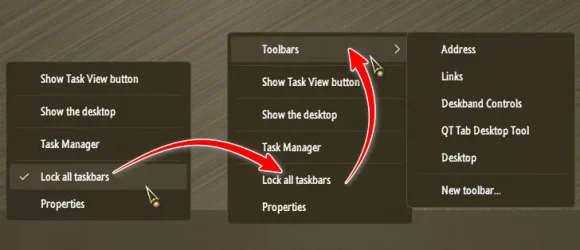
I'm installing StartAllBack 3.9.13 on a new laptop. I used to be able to add custom toolbars to the Taskbar using it on my previous laptop (hard drive failure) but I can't find the setting to enable that functionality.

The attached image shows how toolbars are accessed.

Any help would be greatly appreciated.

Thank you.
 

Attachments

  • StartAllBackTaskbarToolbars.webp
    StartAllBackTaskbarToolbars.webp
    22.2 KB · Views: 6

My Computer

System One

  • OS
    Windows 11 Home
    Computer type
    Laptop
    Manufacturer/Model
    ASUS
Any help would be greatly appreciated.
'Unlock' the Taskbar first, then the option will appear..., create your Toolbar(s)..., Lock the Taskbar..., the option will show from then on...

9505.webp
 

My Computers

System One System Two

  • OS
    Windows 11 Pro
    Computer type
    PC/Desktop
    Manufacturer/Model
    ASUS ROG Strix
  • Operating System
    Windows 11 Pro
    Computer type
    Laptop
    Manufacturer/Model
    ASUS VivoBook
Thanks, Edwin! I appreciate your quick response. I've made a note of that in my reinstallation document so that I don't forget it next time.
 

My Computer

System One

  • OS
    Windows 11 Home
    Computer type
    Laptop
    Manufacturer/Model
    ASUS

Latest Support Threads

Back
Top Bottom