Hey guys,
I am not sure if the title is clear enough and hope this is the correct section to post. Here is the current situation: Daily Win11 Pro installed on M2_1 (top M2 slot) and 2nd Win11 Pro installed on SATA SSD.
I would like to move my daily OS to a new M2 drive which is installed in the M2_2 slot (below the GPU), and then move 2nd OS to M2_1. Hopefully the screenshot will make it clearer.
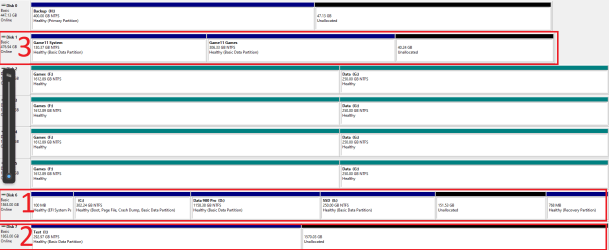
What I want to accomplish:
Step 1 - Move 1 to 2
Step 2 - Move 3 to 1
I guess I should use Macrium to clone 1 to 2 and set BIOS boot drive to 2. But not sure that would be enough for Step 1 alone. Maybe need some bcdedit magic? And then also need to manage Step 2.
I switch between the two using the legacy boot menu if that would make a difference.
I am not sure if the title is clear enough and hope this is the correct section to post. Here is the current situation: Daily Win11 Pro installed on M2_1 (top M2 slot) and 2nd Win11 Pro installed on SATA SSD.
I would like to move my daily OS to a new M2 drive which is installed in the M2_2 slot (below the GPU), and then move 2nd OS to M2_1. Hopefully the screenshot will make it clearer.
What I want to accomplish:
Step 1 - Move 1 to 2
Step 2 - Move 3 to 1
I guess I should use Macrium to clone 1 to 2 and set BIOS boot drive to 2. But not sure that would be enough for Step 1 alone. Maybe need some bcdedit magic? And then also need to manage Step 2.
I switch between the two using the legacy boot menu if that would make a difference.
- Windows Build/Version
- 23H2 Latest
My Computer
At a glance
Windows 11 Pro 23H27800x3D2 x 16GB G.SKill Flare x5 CL30MSI GTX970 Gaming 4G
- OS
- Windows 11 Pro 23H2
- Computer type
- PC/Desktop
- Manufacturer/Model
- Custom
- CPU
- 7800x3D
- Motherboard
- MSI B650 Tomahawk Wi-Fi
- Memory
- 2 x 16GB G.SKill Flare x5 CL30
- Graphics Card(s)
- MSI GTX970 Gaming 4G
- Sound Card
- OnBoard Realtec
- Monitor(s) Displays
- 3 x Samsung 23"
- Screen Resolution
- 1920 x 1080
- Hard Drives
- Samsung 980 Pro 2 TB nvme // Samsung 850 Pro 512 GB // 4 x WD Black 2TB (SATA Raid0)
- PSU
- FSP Hydro G Pro 1000W ATX3.0
- Case
- Phanteks P600s
- Cooling
- Noctua NH-D15
- Keyboard
- Logitech G19
- Mouse
- Logitech G500
- Internet Speed
- 35 Mbit VDSL
- Browser
- Firefox // Brave
- Antivirus
- Malwarebytes