System Tray Icons Show Then Go Poof!


Kuroo

Well-known member
Member
Local time
4:28 PM
Posts
94
OS
Windows 11
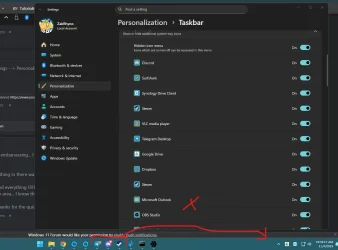
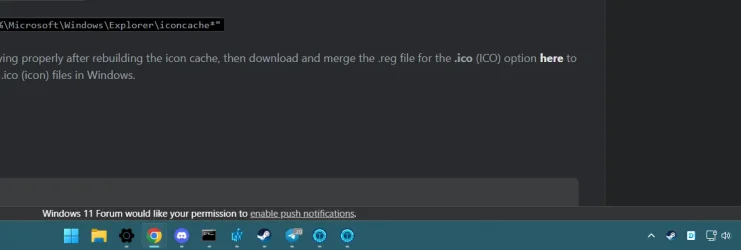
My system tray icons disappear after a while, even when the application is running or minimized. I’ve tried DISM repair, checking the taskbar settings, and running system file checks, but nothing brings the icons back. They’re also not hidden in the overflow area.


1762277574062.webp
 

Attachments

  • 1762277555110.webp
    1762277555110.webp
    55.4 KB · Views: 3

My Computer

System One

  • OS
    Windows 11
    Computer type
    PC/Desktop
    Manufacturer/Model
    Custom Built
    CPU
    AMD Ryzen 9 5950X
    Motherboard
    MAG X5750 Tomahawk Max Wifi
    Memory
    64 GB DDR4
    Graphics Card(s)
    Nvidia GeForce RTX 3070
    Sound Card
    N/A
    Monitor(s) Displays
    Viotek
    Screen Resolution
    1920 x 1080
 

My Computer

System One

  • OS
    Windows 11
    Computer type
    PC/Desktop
    Manufacturer/Model
    HP Pavilion
    CPU
    AMD Ryzen 7 5700G
    Motherboard
    Erica6
    Memory
    Micron Technology DDR4-3200 16GB
    Graphics Card(s)
    NVIDIA GeForce RTX 3060
    Sound Card
    Realtek ALC671
    Monitor(s) Displays
    Samsung SyncMaster U28E590
    Screen Resolution
    3840 x 2160
    Hard Drives
    SAMSUNG MZVLQ1T0HALB-000H1
Hello @Kuroo, :alien:

You could see if resetting your notification icons on the taskbar system tray like in the tutorial below may sort this.


My Computers

System One System Two

  • OS
    Windows 11 Pro for Workstations
    Computer type
    PC/Desktop
    Manufacturer/Model
    Custom self build
    CPU
    Intel i7-8700K 5 GHz
    Motherboard
    ASUS ROG Maximus XI Formula Z390
    Memory
    64 GB (4x16GB) G.SKILL TridentZ RGB DDR4 3600 MHz (F4-3600C18D-32GTZR)
    Graphics Card(s)
    ASUS ROG-STRIX-GTX1080TI-O11G-GAMING (11GB GDDR5X)
    Sound Card
    Integrated Digital Audio (S/PDIF)
    Monitor(s) Displays
    2 x Samsung Odyssey G75 27"
    Screen Resolution
    2560x1440
    Hard Drives
    1TB Samsung 990 PRO M.2,
    4TB Samsung 990 PRO M.2,
    TerraMaster F8 SSD Plus NAS
    PSU
    Seasonic Prime Titanium 850W
    Case
    Thermaltake Core P3 wall mounted
    Cooling
    Corsair Hydro H115i
    Keyboard
    Amazon Basics Wired Full Keyboard MD005
    Mouse
    Logitech MX Master 4
    Internet Speed
    2 Gbps Download and 100 Mbps Upload
    Browser
    Chrome and Edge
    Antivirus
    Microsoft Defender
    Other Info
    Logitech Z625 speaker system,
    Logitech BRIO 4K Pro webcam,
    HP Color LaserJet Pro MFP M477fdn,
    CyberPower CP1500PFCLCD
    Galaxy S23 Plus phone
  • Operating System
    Windows 11 Pro
    Computer type
    Laptop
    Manufacturer/Model
    Surface Laptop 7 Copilot+ PC
    CPU
    Snapdragon X Elite (12 core) 3.42 GHz
    Memory
    16 GB LPDDR5x-7467 MHz
    Monitor(s) Displays
    15" HDR
    Screen Resolution
    2496 x 1664
    Hard Drives
    1 TB SSD
    Internet Speed
    Wi-Fi 7 and Bluetooth 5.4
    Browser
    Chrome and Edge
    Antivirus
    Microsoft Defender
Just try it and the some icons came back and then poof gone again after a while.
1762279610373.webp
 

My Computer

System One

  • OS
    Windows 11
    Computer type
    PC/Desktop
    Manufacturer/Model
    Custom Built
    CPU
    AMD Ryzen 9 5950X
    Motherboard
    MAG X5750 Tomahawk Max Wifi
    Memory
    64 GB DDR4
    Graphics Card(s)
    Nvidia GeForce RTX 3070
    Sound Card
    N/A
    Monitor(s) Displays
    Viotek
    Screen Resolution
    1920 x 1080
Even did the first and clear cache still same thing happens even doesn't allow me to right click on some icons as well. It's so weird.
 

My Computer

System One

  • OS
    Windows 11
    Computer type
    PC/Desktop
    Manufacturer/Model
    Custom Built
    CPU
    AMD Ryzen 9 5950X
    Motherboard
    MAG X5750 Tomahawk Max Wifi
    Memory
    64 GB DDR4
    Graphics Card(s)
    Nvidia GeForce RTX 3070
    Sound Card
    N/A
    Monitor(s) Displays
    Viotek
    Screen Resolution
    1920 x 1080
Even did the first and clear cache still same thing happens even doesn't allow me to right click on some icons as well. It's so weird.
For me, restarting explorer.exe “""fix""” .

But I still haven't been able to identify the cause.
 

My Computer

System One

  • OS
    Windows 11
    Computer type
    PC/Desktop
    Manufacturer/Model
    Custom
    CPU
    Ryzen 5 5600X
    Motherboard
    B550 Aorus Elive V2
    Graphics Card(s)
    GTX 1070
doesn't allow me to right click on some icons

When I had some system tray icons that would not respond to right-clicking, I reinstalled my display driver and the problem went away forever. I concluded that the display driver had somehow been corrupted.


Denis
 

My Computer

System One

  • OS
    Windows 11 Home x64 Version 25H2 Build 26200.8037
When I had some system tray icons that would not respond to right-clicking, I reinstalled my display driver and the problem went away forever. I concluded that the display driver had somehow been corrupted.


Denis
Still the same doesn't fix the issue.
When I had some system tray icons that would not respond to right-clicking, I reinstalled my display driver and the problem went away forever. I concluded that the display driver had somehow been corrupted.


Denis
I have done the same with drivers and such, still the same issues. I did a clean install as well.
 

My Computer

System One

  • OS
    Windows 11
    Computer type
    PC/Desktop
    Manufacturer/Model
    Custom Built
    CPU
    AMD Ryzen 9 5950X
    Motherboard
    MAG X5750 Tomahawk Max Wifi
    Memory
    64 GB DDR4
    Graphics Card(s)
    Nvidia GeForce RTX 3070
    Sound Card
    N/A
    Monitor(s) Displays
    Viotek
    Screen Resolution
    1920 x 1080
When I had some system tray icons that would not respond to right-clicking, I reinstalled my display driver and the problem went away forever. I concluded that the display driver had somehow been corrupted.


Denis
Ya even reinstalling the drivers still getting the same issue.
 

My Computer

System One

  • OS
    Windows 11
    Computer type
    PC/Desktop
    Manufacturer/Model
    Custom Built
    CPU
    AMD Ryzen 9 5950X
    Motherboard
    MAG X5750 Tomahawk Max Wifi
    Memory
    64 GB DDR4
    Graphics Card(s)
    Nvidia GeForce RTX 3070
    Sound Card
    N/A
    Monitor(s) Displays
    Viotek
    Screen Resolution
    1920 x 1080
Hello @Kuroo, :alien:

You could see if resetting your notification icons on the taskbar system tray like in the tutorial below may sort this.

Try the fixes and still happens to the tray icons.
 

My Computer

System One

  • OS
    Windows 11
    Computer type
    PC/Desktop
    Manufacturer/Model
    Custom Built
    CPU
    AMD Ryzen 9 5950X
    Motherboard
    MAG X5750 Tomahawk Max Wifi
    Memory
    64 GB DDR4
    Graphics Card(s)
    Nvidia GeForce RTX 3070
    Sound Card
    N/A
    Monitor(s) Displays
    Viotek
    Screen Resolution
    1920 x 1080
If you have both these problems
- system tray icons disappear
- system tray icons do not respond to right-clicking
then I think you need to investigate the applications concerned [Telegram, Discord, Steam?].
It might also be worth displaying & testing the system tray icons of some WIndows components so you might be able to discount the OS misbehaving.
Few applications have system tray icons and those that do contain their own instructions for displaying them.
Perhaps those applications have support sites & user forums that might assist you.


Best of luck,
Denis
 

My Computer

System One

  • OS
    Windows 11 Home x64 Version 25H2 Build 26200.8037
If you have both these problems
- system tray icons disappear
- system tray icons do not respond to right-clicking
then I think you need to investigate the applications concerned [Telegram, Discord, Steam?].
It might also be worth displaying & testing the system tray icons of some WIndows components so you might be able to discount the OS misbehaving.
Few applications have system tray icons and those that do contain their own instructions for displaying them.
Perhaps those applications have support sites & user forums that might assist you.


Best of luck,
Denis
It really any application that goes crazy so it not just them.
 

My Computer

System One

  • OS
    Windows 11
    Computer type
    PC/Desktop
    Manufacturer/Model
    Custom Built
    CPU
    AMD Ryzen 9 5950X
    Motherboard
    MAG X5750 Tomahawk Max Wifi
    Memory
    64 GB DDR4
    Graphics Card(s)
    Nvidia GeForce RTX 3070
    Sound Card
    N/A
    Monitor(s) Displays
    Viotek
    Screen Resolution
    1920 x 1080

Latest Support Threads

Back
Top Bottom