The Broken Promise of SMS-Based Two-Factor Authentication on Microsoft Accounts (Windows 11 Impact)


This morning I started the process to restore the security information on my account, and that turns out to be the only solution that works: waiting the 30-day period Microsoft enforces.

Interestingly, even though my phone number doesn’t work for receiving verification codes, I did receive an SMS notifying me about the recovery process, along with an email to my recovery address. So the number doesn’t work for verification, but it does work for notifications.

Forget about the account recovery form — it’s useless in these cases. The only way to regain access is to wait out the 30 days, with no guarantee of success. I’ll report back if it actually works.
 

My Computer

System One

  • OS
    windows 11 24H2
    Computer type
    Laptop
    Manufacturer/Model
    HP 250 G8
I’ve documented the entire process of recovering access to Microsoft accounts after losing access to the Authenticator and facing issues with SMS verification. In about 30 days, I’ll publish a comparison based on my personal experience with the account recovery systems of Microsoft, Google, and Apple.

This write-up will be aimed especially at those who are not engineers or system administrators, so they can clearly understand what to expect, what works, and what doesn’t when access to an account is lost.
 

My Computer

System One

  • OS
    windows 11 24H2
    Computer type
    Laptop
    Manufacturer/Model
    HP 250 G8
This write-up will be aimed especially at those who are not engineers or system administrators, so they can clearly understand what to expect, what works, and what doesn’t when access to an account is lost.
Looking forward to seeing it!
 

My Computer

System One

  • OS
    Windows 11 Pro 25H2
    Computer type
    PC/Desktop
I’m sharing this because I believe the community should be aware.

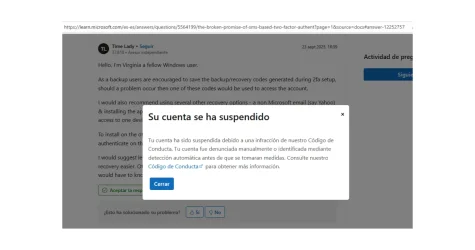
Microsoft suspended my account on the Microsoft Answers forum after I posted a technical critique of their SMS-based two-factor authentication system. I simply explained how, when SMS messages fail to arrive, users are locked out with no alternative way to regain access. No offensive language, just a real experience that highlights serious issues with security and usability.

Here’s the original post that triggered the suspension:🔗 The Broken Promise of SMS-Based Two-Factor Authentication on Microsoft Accounts - Microsoft Q&A

I’m attaching a screenshot of the suspension banner for transparency.

It’s concerning to see legitimate criticism being silenced—especially when it involves something as fundamental as account access. If anyone else has experienced something similar, I’d love to hear your story.
 

My Computer

System One

  • OS
    windows 11 24H2
    Computer type
    Laptop
    Manufacturer/Model
    HP 250 G8
It’s concerning to see legitimate criticism being silenced—especially when it involves something as fundamental as account access. If anyone else has experienced something similar, I’d love to hear your story.
You are not being silenced, your post is still present for everybody to read.

It is still present on this site as well.

As far as issues such as yours, I am sure that among the billions of Windows users across the world, a good dozen of them might have had the same issue. We will eagerly wait for them to manifest themselves.
 

My Computers

System One System Two

  • OS
    All Branches but Release
    Computer type
    Laptop
    Manufacturer/Model
    Acer Nitro ANV15-51
    CPU
    AMD Ryzen 7 7735HS 3200-4500 Mhz 8 cores x 2
    Motherboard
    Sportage_RBH
    Memory
    32 GB DDR5
    Graphics Card(s)
    Radeon Graphic / NVIDIA GeForce RTX 4060 8 GB GDDR6
    Sound Card
    AMD/Realtek(R) Audio
    Monitor(s) Displays
    Integrated Monitor (15.3"vis)
    Screen Resolution
    FHD 1920X1080 16:9 144Hz
    Hard Drives
    KINGSTON OM8SEP4512Q-AA 1TB
    Western Digital 256GB
    PSU
    19V DC 6.32 A 120 W
    Cooling
    Dual Fans
    Mouse
    MS Bluetooth
    Internet Speed
    Fiber 1GB Cox -us & 1GB Orange-fr
    Browser
    Edge Canary- Firefox Nightly-Chrome Dev-Chrome Dev
    Antivirus
    Windows Defender
  • Operating System
    Windows 11 Beta
    Computer type
    Laptop
    Manufacturer/Model
    Asus X751BP
    CPU
    AMD A9-9420
    Memory
    8 GB of DDR4
    Graphics card(s)
    AMD Radeon R5
    Screen Resolution
    1600x900
    Hard Drives
    Seagate 1 TB
Thank you for your comment, OAT.

I fully agree that using Microsoft Authenticator is a good security practice, and I do recommend it whenever possible. However, in this particular case, I'm dealing with a personal Microsoft account used on a work PC, specifically to configure and validate Microsoft services in Windows 11—as the system itself requires. It's not a corporate or managed account, so I don’t have access to advanced recovery tools or administrative support.

Regarding the suspension of my Microsoft Answers account: while my post may still be visible, I’m unable to respond, clarify, or contribute further to the discussion. That effectively limits my voice in that space. So yes, technically I haven’t been “silenced,” but in practice, I’ve been excluded from participating.

That’s why I chose to document my experience here—so that others who might face a similar situation can understand what to expect and how to navigate it. I appreciate the open dialogue and welcome any insights that help improve how these cases are handled.
 

My Computer

System One

  • OS
    windows 11 24H2
    Computer type
    Laptop
    Manufacturer/Model
    HP 250 G8
I’ve never had an issue with 2FA at Microsoft. I use MS Authenticator for Microsoft accounts only, never fails, in fact I think it’s quite brilliant, especially when all you have to do is verify a number by clicking on the corresponding number on your phone.

So is there a question in there or have you just come to vent?
Totally agree - I use MS Authenticator a lot - works every time. I also use it for Amazon especially.

I also put it on an older (pretty much redundant) android phone with no Sim card as sometimes it can be a bit cumbersome trying to use Authenticator on same device asking for authentication.
 

My Computer

System One

  • OS
    Windows 11 Pro + Win11 Canary VM.
    Computer type
    Laptop
    Manufacturer/Model
    ASUS Zenbook 14
    CPU
    I9 13th gen i9-13900H 2.60 GHZ
    Motherboard
    Yep, Laptop has one.
    Memory
    16 GB soldered
    Graphics Card(s)
    Integrated Intel Iris XE
    Sound Card
    Realtek built in
    Monitor(s) Displays
    laptop OLED screen
    Screen Resolution
    2880x1800 touchscreen
    Hard Drives
    1 TB NVME SSD (only weakness is only one slot)
    PSU
    Internal + 65W thunderbolt USB4 charger
    Case
    Yep, got one
    Cooling
    Stella Artois (UK pint cans - 568 ml) - extra cost.
    Keyboard
    Built in UK keybd
    Mouse
    Bluetooth , wireless dongled, wired
    Internet Speed
    900 mbs (ethernet), wifi 6 typical 350-450 mb/s both up and down
    Browser
    Edge
    Antivirus
    Defender
    Other Info
    TPM 2.0, 2xUSB4 thunderbolt, 1xUsb3 (usb a), 1xUsb-c, hdmi out, 3.5 mm audio out/in combo, ASUS backlit trackpad (inc. switchable number pad)

    Macrium Reflect Home V8
    Office 365 Family (6 users each 1TB onedrive space)
    Hyper-V (a vm runs almost as fast as my older laptop)
Sometimes, I feign ignorance, but this time, I'm not. I'm not really seeing the issue here. The assertion is that if you can't use SMS, there is "No backup options. No workaround. Just a dead end." Every MFA system I've ever dealt with, including Microsoft's, offers multiple methods to identify yourself when the time comes. If one chooses to setup only one method, and not download backup codes at least, whose fault is that, really? I'm sympathetic to someone losing access to an account, but just as it is with data, the time to have a backup is before you need it. Otherwise, it rather does not work.

If your email, cloud services, and operating system login are that important to you (and they should be), then treat them with the importance they deserve.
 

My Computer

System One

  • OS
    Windows 11 Pro 25H2
    Computer type
    PC/Desktop
    Manufacturer/Model
    Intel NUC12WSHi7
    CPU
    12th Gen Core i7-1260P
    Motherboard
    NUC12WSBi7
    Memory
    64 GB Micron PC4-25600
    Graphics Card(s)
    Intel Iris Xe Graphics
    Sound Card
    on-board Realtek HD Audio
    Monitor(s) Displays
    Dell U3219Q
    Screen Resolution
    3840 x 2160
    Hard Drives
    Samsung SSD 990 PRO 1TB
    Crucial MX500 2 TB
    Antivirus
    Microsoft Defender
Exactly.

You can activate as many authentifications as you like. So there’s always an option.
Which (in my opinion) is the clients fault for not enabling satisfactory authentication, not Microsofts, as they have presented multiple authentication options.

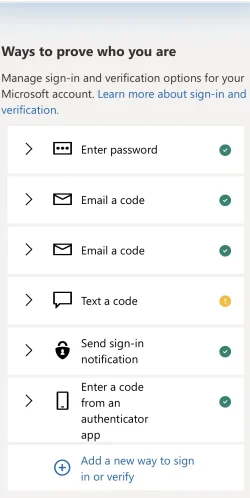
Obviously in this screen I just took of my phone and MS Authenticator app, sms currently has a problem. But I have how many other options to sign in? The answer is five.


IMG_3738.webp
 

My Computers

System One System Two

  • OS
    Windows 11 Pro 25H2 Build 26200.8524
    Computer type
    PC/Desktop
    Manufacturer/Model
    Sin-built 2013
    CPU
    Intel(R) Core(TM) i7-4770K CPU @ 3.50GHz
    Motherboard
    ASUS ROG Maximus VI Formula
    Memory
    32.0 GB of I forget and the box is in storage.
    Graphics Card(s)
    Gigabyte nVidia GeForce GTX 1660 Super OC 6GB
    Sound Card
    Onboard thingy
    Monitor(s) Displays
    5 x LG 25MS500-B - 1 x 24MK430H-B - 1 x Wacom Pro 22" Touch Screen Tablet
    Screen Resolution
    All over the place
    Hard Drives
    Too many to list.
    OS on Samsung 1TB 870 QVO SATA
    PSU
    Silverstone 1500
    Case
    NZXT Phantom 820 Full-Tower Case
    Cooling
    Noctua NH-D15 Elite Class Dual Tower CPU Cooler / 6 x EziDIY 120mm / 2 x Corsair 140mm somethings / 1 x 140mm Thermaltake something / 2 x 200mm Corsair.
    Keyboard
    Corsair K95 / Logitech diNovo Edge Wireless
    Mouse
    Logitech: G402 / G502 / Mx Masters / Mx Air Cordless
    Internet Speed
    2000/500Mbps
    Browser
    All sorts
    Antivirus
    Kaspersky Premium
    Other Info
    ㅤㅤㅤㅤㅤㅤㅤㅤㅤㅤㅤㅤㅤㅤㅤㅤㅤㅤㅤㅤㅤㅤㅤㅤㅤㅤㅤㅤㅤㅤㅤㅤㅤㅤㅤㅤㅤㅤㅤㅤ⠀⠀⠀⠀⠀⠀⠀⠀⠀⠀
    TP-Link BE9300 WiFi 7 Bluetooth 5.4 (Archer TBE550E)
    TP-Link TX201 V1 2.5GB Lan

    Grandstream HT812 - VoIP
    ASUS DSL-AX82U - Mesh
    ASUS RT-AC68U - Mesh
    ASUS RT-BE88U Router

    Brother MFC-L2880DW Printer

    I’m on a horse.
  • Operating System
    Windows 11 Pro 25H2 Build 26200.8524
    Computer type
    Laptop
    Manufacturer/Model
    LENOVO Yoga 7 14IRL8 - 7i EVO OLED 14" Touchscreen i5 12 Core 16GB/512GB
    CPU
    Intel Core 12th Gen i5-1240P Processor (1.7 - 4.4GHz)
    Memory
    16GB LPDDR5 RAM
    Graphics card(s)
    Intel Iris Xe Graphics Processor
    Sound Card
    Optimized with Dolby Atmos®
    Screen Resolution
    QHD 2880 x 1800 OLED
    Hard Drives
    M.2 512GB
    Antivirus
    Defender / Malwarebytes
    Other Info
    …still on a horse.
Microsoft has experienced several recent failures related to its multifactor authentication system, particularly when SMS is used as the second factor. In January 2025, a global outage affected users who were unable to access services like Outlook, Word, and Excel due to issues in the authentication infrastructure. In December 2024, unexpected deactivations of Office licenses were reported, caused by errors in validating the status of accounts protected by MFA. In November of that same year, services such as Teams, Exchange Online, and OneDrive suffered outages linked to authentication failures, even when credentials were correct.

Regarding the comment about user responsibility in setting up backup methods, I fully agree that anticipating and protecting access to critical services is essential. However, the issue being raised here isn’t just about individual oversight. In many documented cases, users did have alternative methods configured, such as recovery emails or the Authenticator app, yet still encountered blocks or errors that prevented identity verification.

Of course, having backups is vital—but so is the system’s ability to recognize and properly validate those backups when needed. The reliability of a security infrastructure isn’t measured only by offering options, but by ensuring those options are accessible and effective in critical situations.

This exchange of experiences isn’t meant to contradict those who’ve never had issues, but to provide context around real cases that can help improve the system for everyone.
 

My Computer

System One

  • OS
    windows 11 24H2
    Computer type
    Laptop
    Manufacturer/Model
    HP 250 G8
Back
Top Bottom