
Tons of monitor problems after installing Windows 11 24H2 Dev Preview


ZeDoct0r

Member
Local time
5:52 AM
Posts
1
OS
Windows 11
I had finally decided to check out 24H2, since it seems to have some slight performance gains. I had to install it through the dev channel because it would never give me the option on the Release Preview channel. Now, on bootup, my monitor settings get changed and they are all wrong. I have a desktop setup with my laptop sitting on a cooler on a dresser next to my desk, and two 1080p monitors. It gets defaulted to the right one, which is incorrect, and the left one (my main one) is blacked out until I change it. It defaults to "Disconnect this display" on Display 1. Also, in some fullscreen games, like Fortnite and Team Fortress 2, I am having a major black screen issue, where alt + tabbing creates a 3-4 second black screen on both monitors. This was not happening in 23H2, even in exclusive fullscreen mode. Is there any fix for this? I have updated absolutely everything I could and nothing has seemed to have helped.
 
Windows Build/Version
Windows 11 24H2 (26120.1542)
Last edited:

My Computer My Computer

At a glance

Windows 11AMD Ryzen 7 4800H16 GB DDR4NVIDIA Geforce 1660 Ti
OS
Windows 11
Computer type
Laptop
Manufacturer/Model
Lenovo
CPU
AMD Ryzen 7 4800H
Memory
16 GB DDR4
Graphics Card(s)
NVIDIA Geforce 1660 Ti
Screen Resolution
1920x1080
Hard Drives
256 GB OEM SSD
2 TB SAMSUNG 990 PRO
Welcome to the forum. Sorry no one has answered you sooner and that I'm probably not the right one to do so since I don't do insider builds. Hopefully someone running that build will offer advise.

Unfortunately, I believe I am correct in saying that the only way to get out of the Dev ring and into another insider flight or into release is to clean install. It's explained here under "Switching from the device channel"

Restoring a system image made prior to your 24h2 Dev install is also an option to get back to 23h2.

You might also run SFC in 24h2 to see if finds any file corruption.

Open a command prompt as administrator and type sfc /scannow
Pay attention to the scan results to see if SFC found anything it could not repair. If it found corruption it could not fix followup with this command (note the spaces)
dism /online /cleanup-image /restorehealth
Restart computer

Sorry I can't offer more.
 

My Computers My Computers

  • At a glance

    Windows 11 Pro 25H2 26200.8655i9-10900 10 core 20 threads32 gbnone-Intel UHD Graphics 630
    OS
    Windows 11 Pro 25H2 26200.8655
    Computer type
    PC/Desktop
    Manufacturer/Model
    Dell Optiplex 7080
    CPU
    i9-10900 10 core 20 threads
    Motherboard
    DELL 0J37VM
    Memory
    32 gb
    Graphics Card(s)
    none-Intel UHD Graphics 630
    Sound Card
    Integrated Realtek
    Monitor(s) Displays
    Benq 27
    Screen Resolution
    2560x1440
    Hard Drives
    2x1tb Solidigm m.2 nvme /External drives 512gb Samsung m.2 sata+2tb Kingston m2.nvme
    PSU
    500w
    Case
    MT
    Cooling
    Dell Premium
    Keyboard
    Logitech wired
    Mouse
    Logitech wireless
    Internet Speed
    so slow I'm too embarrassed to tell
    Browser
    #1 Edge #2 Firefox
    Antivirus
    Defender+MWB Premium
  • At a glance

    Windows 11 Pro 24H2 26200.8457AMD Ryzen 7 6800U32 gbintegrated
    Operating System
    Windows 11 Pro 24H2 26200.8457
    Computer type
    PC/Desktop
    Manufacturer/Model
    Beelink Mini PC SER5
    CPU
    AMD Ryzen 7 6800U
    Memory
    32 gb
    Graphics card(s)
    integrated
    Sound Card
    integrated
    Monitor(s) Displays
    Benq 27
    Screen Resolution
    2560x1440
    Hard Drives
    1TB Crucial nvme
    Keyboard
    Logitech wired
    Mouse
    Logitech wireless
    Internet Speed
    still too embarrassed to tell
    Browser
    Firefox
    Antivirus
    Defender
    Other Info
    System 3 is non compliant Dell 9020 i7-4770/24gb ram Win11 PRO 26200.8457
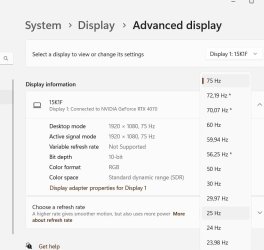
The 24H2 seems to read information directly from the monitor at startup, not from the video card driver.
My 60Hz monitor is overclocked to 75Hz in the driver settings. Now it resets to 60Hz after a windows reboot.
Windows sees all frequencies
1.jpg

Of course it's not hard to manually set the frequency, but it was better before.
 

My Computer My Computer

At a glance

Microsoft Windows 11 HomeIntel Core i5-13490F2 x 16 Patriot Memory (PDP Systems) PSD516G56...GIGABYTE GeForce RTX 4070 WINDFORCE OC 12G (G...
OS
Microsoft Windows 11 Home
Computer type
PC/Desktop
Manufacturer/Model
MSI MS-7D98
CPU
Intel Core i5-13490F
Motherboard
MSI B760 GAMING PLUS WIFI
Memory
2 x 16 Patriot Memory (PDP Systems) PSD516G560081 6400MT (32-37-37-74); 1.35V)
Graphics Card(s)
GIGABYTE GeForce RTX 4070 WINDFORCE OC 12G (GV-N4070WF3OC-12GD)
Sound Card
Bluetooth Аудио
Monitor(s) Displays
INNOCN 15K1F
Screen Resolution
1920 x 1080
Hard Drives
WD_BLACK SN770 250GB
KINGSTON SNV2S1000G (ELFK0S.6)
PSU
Thermaltake Toughpower GF3 1000W
Case
CG560 - DeepCool
Cooling
ID-COOLING SE-224-XTS / 2 x 140Mm Fan - rear and top; 3 x 120Mm - front
Keyboard
Corsair K70 RGB TKL
Mouse
Corsair KATAR PRO XT
Internet Speed
100 Mbps
Browser
Firefox
Antivirus
Microsoft Defender Antivirus
Other Info
https://www.userbenchmark.com/UserRun/66553205
Back
Top Bottom





