Solved Two line taskbar clock


awalts

New member
Local time
1:53 PM
Posts
2
OS
windows 11
Hi,
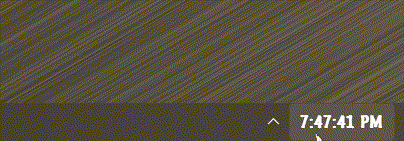
I'm trying to match the taskbar height on my new win11 laptop to the taskbar height on my win11 desktop. In particular, I want a 2 line clock as shown below ("Desktop - 2lines" which has the time and date). But, by dragging the taskbar up or down, the laptop only lets me have a one line taskbar clock or a three line taskbar clock (which needlessly shows the day of the week).
On both computers (so far as I can tell) the personalization/date&time settings and personalization/taskbar settings are identical.

Thanks for any suggestions!
awalts

1764374026610.webp
 
Windows Build/Version
25H2 OSBuild 26200.7171

My Computer

System One

  • OS
    windows 11
    Computer type
    PC/Desktop
    Manufacturer/Model
    dell
Do you use any UI alerting utilities, such as ExplorerPatcher or StartAllBack?

Seems it goes that way with StartAllBack:

giff.gif
 

My Computers

System One System Two

  • OS
    Windows 11 Pro
    Computer type
    PC/Desktop
    Manufacturer/Model
    ASUS ROG Strix
  • Operating System
    Windows 11 Pro
    Computer type
    Laptop
    Manufacturer/Model
    ASUS VivoBook
I think it has something to do with your taskbar height not being set at default. Are you either using a 3rd party tool to alter the taskbar? I have standard taskbar size and the clock is 2 rows.
 

My Computers

System One System Two

  • OS
    Windows 11 Pro 25H2
    Computer type
    PC/Desktop
    Manufacturer/Model
    Dell Optiplex 7080
    CPU
    i9-10900 10 core 20 threads
    Motherboard
    DELL 0J37VM
    Memory
    32 gb
    Graphics Card(s)
    none-Intel UHD Graphics 630
    Sound Card
    Integrated Realtek
    Monitor(s) Displays
    Benq 27
    Screen Resolution
    2560x1440
    Hard Drives
    2x1tb Solidigm m.2 nvme /External drives 512gb Samsung m.2 sata+2tb Kingston m2.nvme
    PSU
    500w
    Case
    MT
    Cooling
    Dell Premium
    Keyboard
    Logitech wired
    Mouse
    Logitech wireless
    Internet Speed
    so slow I'm too embarrassed to tell
    Browser
    #1 Edge #2 Firefox
    Antivirus
    Defender+MWB Premium
  • Operating System
    Windows 11 Pro 24H2 26200.8457
    Computer type
    PC/Desktop
    Manufacturer/Model
    Beelink Mini PC SER5
    CPU
    AMD Ryzen 7 6800U
    Memory
    32 gb
    Graphics card(s)
    integrated
    Sound Card
    integrated
    Monitor(s) Displays
    Benq 27
    Screen Resolution
    2560x1440
    Hard Drives
    1TB Crucial nvme
    Keyboard
    Logitech wired
    Mouse
    Logitech wireless
    Internet Speed
    still too embarrassed to tell
    Browser
    Firefox
    Antivirus
    Defender
    Other Info
    System 3 is non compliant Dell 9020 i7-4770/24gb ram Win11 PRO 26200.8457
I think it has something to do with your taskbar height not being set at default. Are you either using a 3rd party tool to alter the taskbar? I have standard taskbar size and the clock is 2 rows.
That's what I was thinking as mine are always two rows by default and I can make my taskbar pretty thin using roundedTB.Screenshot 2025-11-28 165739.webp
 

My Computers

System One System Two

  • OS
    Windows 11 25H2
    Computer type
    Laptop
    Manufacturer/Model
    Alienware 18 Area-51
    CPU
    Intel Core Ultra 9 275HX (24-Core)
    Motherboard
    Alienware
    Memory
    64GB DDR5 6400MT/s
    Graphics Card(s)
    NVIDIA GeForce RTX 5080 and Intel UHD Graphics
    Sound Card
    Onboard, Realtek high-performance Audio chips (ALC3329 & ALC1708))
    Monitor(s) Displays
    300HZ 18-inch QHD 500 nit Comfort View+
    Screen Resolution
    2560 x 1600
    Hard Drives
    2TB NVMe M.2 PCIe Gen 5 SSD
    Case
    Magnesium Alloy
    Cooling
    Advanced Cryo-Tech Quad-Fan Cooling system & large vapor chamber
    Keyboard
    Cherry MX ultra low profile mechanical keyboard with per key AlienFX RGB lighting
    Mouse
    Logitech MX Master 4
    Browser
    Vivaldi (main), Firefox, Chrome, Edge
    Antivirus
    MS Defender and Malwarebytes Free
  • Operating System
    Windows 11 25H2
    Computer type
    Laptop
    Manufacturer/Model
    Microsoft Surface Laptop 7
    CPU
    Qualcomm Snapdragon X Elite (12 Core) ARM based CPU
    Motherboard
    Microsoft Corp.
    Memory
    16GB LPDDR5
    Graphics card(s)
    Qualcomm Adreno X1-85
    Sound Card
    Omnisonic speakers with Dolby Atmos spatial sound
    Monitor(s) Displays
    120 Hz 13.8-inch 600 nit PixelSense Flow touchscreen
    Screen Resolution
    2304x1536
    Hard Drives
    1TB NVMe Gen 4 SSD
    Case
    Anodized Aluminum
    Cooling
    Traditional active cooling fan system
    Keyboard
    Mechanical QWERTY, backlit when in use
    Mouse
    Logitech MX Master 4 and Surface Arc Mouse
    Browser
    Vivaldi (main), Firefox, Chrome, Edge
    Antivirus
    MS Defender and Malwarebytes Free
Definitely a tweak tool in play. That Gear icon is the Control Center as a separated setup.
 

My Computer

System One

  • OS
    Windows 11 Pro
Definitely a tweak tool in play. That Gear icon is the Control Center as a separated setup.
I was gonna say, that's pretty much a dead giveaway!
 

My Computers

System One System Two

  • OS
    Windows 11 Pro
    Computer type
    PC/Desktop
    Manufacturer/Model
    ASUS ROG Strix
  • Operating System
    Windows 11 Pro
    Computer type
    Laptop
    Manufacturer/Model
    ASUS VivoBook
I had ExlorerPatcher's "taskbar style" set to windows 10. Changing it back to Windows 11 fixed the issue.
Thanks all!
 

My Computer

System One

  • OS
    windows 11
    Computer type
    PC/Desktop
    Manufacturer/Model
    dell

My Computer

System One

  • OS
    Windows 11 Pro 24H2
    Computer type
    Laptop
    Manufacturer/Model
    LG
    CPU
    i7 Ultra
    Memory
    16GB
    Graphics Card(s)
    Intel
    Sound Card
    Intel Realtek
    Monitor(s) Displays
    Laptop 17" & TB4 Dell 27" QHD Ultrasharp w/integral TB4 hub
    Screen Resolution
    2560x1600
    Hard Drives
    1TB SSD, 5 external WDs
    Mouse
    Logitech Master MX 3S
    Browser
    Vivaldi
    Antivirus
    Kaspersky Premium Suite
You can customize the taskbar clock, and many other things, with Windhawk.
https://windhawk.net
 

My Computer

System One

  • OS
    Windows 11 64-bit
    Computer type
    PC/Desktop
    Manufacturer/Model
    Me
    CPU
    Intel Core Ultra 7 265K
    Motherboard
    ASUS ROG STRIX Z890-F
    Memory
    Corsair DDR5-5200 32GB x 2
    Graphics Card(s)
    ASUS RTX 5060 Ti 16GB
    Sound Card
    on board
    Monitor(s) Displays
    ASUS PB27UQ
    Screen Resolution
    3840 x 2160
    Hard Drives
    Samsung SSD 9100 PRO 1TB, Samsung SSD 960 EVO 500GB, Seagate 1TB HDD for backup
    PSU
    Corsair RM850e - 850W Gold ATX 3.1 Modular PSU
    Case
    Coolermaster Masterbox HAF 500 Mid Tower (should have gone with Fractal Design!)
    Cooling
    Noctua NH-D15 Chromax Black
    Keyboard
    Logitech G915 X
    Mouse
    Logitech M560 Bluetooth
    Internet Speed
    750Mb/s
    Browser
    Firefox 64-bit
    Antivirus
    ESET

Latest Support Threads

Back
Top Bottom