
Solved USB Logitech H390 Headphone/Mic Causing Windows 11 System Lockup


retexan599

Well-known member
Member
Local time
4:37 PM
Posts
125
Location
Houston TX USA
OS
Windows 11 25H2 26200.8655
I have a USB Logitech H390 headphone/mic, and had used it in Windows 10 for years with no problem. I would use it to listen to music and input voice to Windows Speech Recognition. With my new Windows 11 system, I experience the following problem:

After plugging in the device to a USB port, it works satisfactorily for a short while, perhaps half an hour. Then, while listening to Spotify music, the music cuts out, voice still works, then after another several minutes, the entire Windows computer system locks up: no keyboard, no mouse. Have to hard power off the desktop to return to service.

I thought maybe the problem was with listening to music, but tried it with the headset plugged in and no music. It worked for about an hour, then the Windows system locked up again, no keyboard, no mouse.

I have tried the headset in several different USB ports and it occurs regardless of which port I use.

I also have a set of Bose QC Bluetooth headphones which I can use alternately, and the above problem does not occur. I would prefer to use the USB H390 headset because it gives more accurate voice transcription to Speech Recognition.

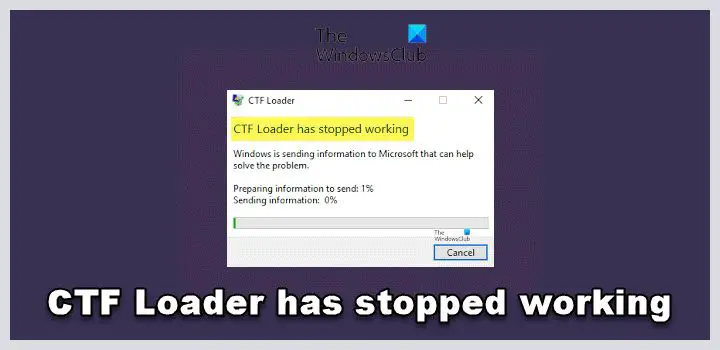
I have also noticed an error in the Reliability Monitor: “CTF Loader stopped working”. At times this has coincided with the USB headset lockup problem, but the CTF error also occurs at other times.

It is really strange to me that a headset could cause the entire Windows 11 system to freeze!

Any clues folks here might have would be appreciated.

Windows 11 Version 22H2 (OS Build 22621.1848)
HP Envy Desktop
 

My Computer My Computer

At a glance

Windows 11 25H2 26200.86552.10GHz Intel 12th Gen Core i7-1270016GBNVIDIA GeForce 3050
OS
Windows 11 25H2 26200.8655
Computer type
PC/Desktop
Manufacturer/Model
HP Envy Desktop TE02-0xxx
CPU
2.10GHz Intel 12th Gen Core i7-12700
Motherboard
HP 'BlizzardU' 894B 10; Chipset Intel ADL Z690
Memory
16GB
Graphics Card(s)
NVIDIA GeForce 3050
Sound Card
Realtek Audio
Monitor(s) Displays
HP27er
Screen Resolution
1920x1080
Hard Drives
256GB NVMe SSD
2TB HDD
PSU
600W
Case
Desktop Tower
Cooling
Air
Keyboard
Logitech K350
Mouse
Logitech M510
Internet Speed
25Mps (Max)
Browser
Chrome
Antivirus
Windows native security
Other Info
HP replaced SSD under warranty in November, 2023.
No VPN.
The CTF loader definitely works with text to speech, whether the actual cause of your problem or not. On the other hand you may be getting the CTF loader errors due to a problem with whatever TTS app you use.
definition: The Collaborative Translation Framework Loader, aka CTF Loader, is an important Windows process that ensures that certain Windows components are always connected and can communicate with each other. Windows uses the CTF Loader to offer text support for alternate user input programs. The CTF Loader also helps activate different input languages in Microsoft Office, known as the Language Bar.

That said, if your Bose BT headphone/mic cause no problem but your Logitech wired one does, IMO that's a good indication the problem lies either in your headphones themselves (most likely since they are 10 years old) or there is some kind of interference with your usb ports(less likely with a brand new PC but possible). If you suspect the problem to be the headphones and since you like them so much, USB Logitech H390 headphones can be replaced for $22.

Now, you say you get the CTF error at other times. Most TTS apps run in the background at all times. Have you tested with disabling the app through task manager and just using the headphones while listening to music. It may not be a problem with the headphones at all. There could be a problem with whatever app you use.
 

My Computers My Computers

  • At a glance

    Windows 11 Pro 25H2 26200.8655i9-10900 10 core 20 threads32 gbnone-Intel UHD Graphics 630
    OS
    Windows 11 Pro 25H2 26200.8655
    Computer type
    PC/Desktop
    Manufacturer/Model
    Dell Optiplex 7080
    CPU
    i9-10900 10 core 20 threads
    Motherboard
    DELL 0J37VM
    Memory
    32 gb
    Graphics Card(s)
    none-Intel UHD Graphics 630
    Sound Card
    Integrated Realtek
    Monitor(s) Displays
    Benq 27
    Screen Resolution
    2560x1440
    Hard Drives
    2x1tb Solidigm m.2 nvme /External drives 512gb Samsung m.2 sata+2tb Kingston m2.nvme
    PSU
    500w
    Case
    MT
    Cooling
    Dell Premium
    Keyboard
    Logitech wired
    Mouse
    Logitech wireless
    Internet Speed
    so slow I'm too embarrassed to tell
    Browser
    #1 Edge #2 Firefox
    Antivirus
    Defender+MWB Premium
  • At a glance

    Windows 11 Pro 24H2 26200.8457AMD Ryzen 7 6800U32 gbintegrated
    Operating System
    Windows 11 Pro 24H2 26200.8457
    Computer type
    PC/Desktop
    Manufacturer/Model
    Beelink Mini PC SER5
    CPU
    AMD Ryzen 7 6800U
    Memory
    32 gb
    Graphics card(s)
    integrated
    Sound Card
    integrated
    Monitor(s) Displays
    Benq 27
    Screen Resolution
    2560x1440
    Hard Drives
    1TB Crucial nvme
    Keyboard
    Logitech wired
    Mouse
    Logitech wireless
    Internet Speed
    still too embarrassed to tell
    Browser
    Firefox
    Antivirus
    Defender
    Other Info
    System 3 is non compliant Dell 9020 i7-4770/24gb ram Win11 PRO 26200.8457
The CTF loader definitely works with text to speech, whether the actual cause of your problem or not. On the other hand you may be getting the CTF loader errors due to a problem with whatever TTS app you use.
definition: The Collaborative Translation Framework Loader, aka CTF Loader, is an important Windows process that ensures that certain Windows components are always connected and can communicate with each other. Windows uses the CTF Loader to offer text support for alternate user input programs. The CTF Loader also helps activate different input languages in Microsoft Office, known as the Language Bar.

That said, if your Bose BT headphone/mic cause no problem but your Logitech wired one does, IMO that's a good indication the problem lies either in your headphones themselves (most likely since they are 10 years old) or there is some kind of interference with your usb ports(less likely with a brand new PC but possible). If you suspect the problem to be the headphones and since you like them so much, USB Logitech H390 headphones can be replaced for $22.

Now, you say you get the CTF error at other times. Most TTS apps run in the background at all times. Have you tested with disabling the app through task manager and just using the headphones while listening to music. It may not be a problem with the headphones at all. There could be a problem with whatever app you use.
Will do more investigating along the lines you suggest. Couple of points:
  • The H390 headphones were purchased in April, 2020, so they are 3 years old, not 10. Still, I may buy another set just to be sure.
  • Not sure how to 'disable the app' as you suggest -- Speech Recognition is not an app per se, it is built in to Windows 11. Same with Voice Typing, which is another form of TTS that I use. No apparent way to disable either of those in the background, when neither is being used.
 

My Computer My Computer

At a glance

Windows 11 25H2 26200.86552.10GHz Intel 12th Gen Core i7-1270016GBNVIDIA GeForce 3050
OS
Windows 11 25H2 26200.8655
Computer type
PC/Desktop
Manufacturer/Model
HP Envy Desktop TE02-0xxx
CPU
2.10GHz Intel 12th Gen Core i7-12700
Motherboard
HP 'BlizzardU' 894B 10; Chipset Intel ADL Z690
Memory
16GB
Graphics Card(s)
NVIDIA GeForce 3050
Sound Card
Realtek Audio
Monitor(s) Displays
HP27er
Screen Resolution
1920x1080
Hard Drives
256GB NVMe SSD
2TB HDD
PSU
600W
Case
Desktop Tower
Cooling
Air
Keyboard
Logitech K350
Mouse
Logitech M510
Internet Speed
25Mps (Max)
Browser
Chrome
Antivirus
Windows native security
Other Info
HP replaced SSD under warranty in November, 2023.
No VPN.
I have a USB Logitech H390 headphone/mic, and had used it in Windows 10 for years with no problem.
Sorry, my dyslexia read that as 'used it in Windows for 10 years." I read it too fast. My apologies..
Not sure how to 'disable the app' as you suggest -
Since you use the Windows app rather than a 3rd party one, you can disable it. Settings>accessibility>speech>toggle off Windows speech recognition. I'm really not sure whether a restart is necessary afterwards to stop its process and associated services in the background or not, but I would suspect so.

About those CTF Loader errors, I found this article. See if there is any info there that is of benefit. I strongly recommend you backup your system before attempting any of the solutions there though.

and here 5 Ways to Fix CTF Loader Issues in Windows
IMO i can't hurt to open a command prompt as admin and run SFC /scannow as well.
Sorry to be going all over the place with my suggestions, but I don't use TTS and have never seen CTF errors so I'm kinda flying by the seat of my pants right along with you.
 
Last edited:

My Computers My Computers

  • At a glance

    Windows 11 Pro 25H2 26200.8655i9-10900 10 core 20 threads32 gbnone-Intel UHD Graphics 630
    OS
    Windows 11 Pro 25H2 26200.8655
    Computer type
    PC/Desktop
    Manufacturer/Model
    Dell Optiplex 7080
    CPU
    i9-10900 10 core 20 threads
    Motherboard
    DELL 0J37VM
    Memory
    32 gb
    Graphics Card(s)
    none-Intel UHD Graphics 630
    Sound Card
    Integrated Realtek
    Monitor(s) Displays
    Benq 27
    Screen Resolution
    2560x1440
    Hard Drives
    2x1tb Solidigm m.2 nvme /External drives 512gb Samsung m.2 sata+2tb Kingston m2.nvme
    PSU
    500w
    Case
    MT
    Cooling
    Dell Premium
    Keyboard
    Logitech wired
    Mouse
    Logitech wireless
    Internet Speed
    so slow I'm too embarrassed to tell
    Browser
    #1 Edge #2 Firefox
    Antivirus
    Defender+MWB Premium
  • At a glance

    Windows 11 Pro 24H2 26200.8457AMD Ryzen 7 6800U32 gbintegrated
    Operating System
    Windows 11 Pro 24H2 26200.8457
    Computer type
    PC/Desktop
    Manufacturer/Model
    Beelink Mini PC SER5
    CPU
    AMD Ryzen 7 6800U
    Memory
    32 gb
    Graphics card(s)
    integrated
    Sound Card
    integrated
    Monitor(s) Displays
    Benq 27
    Screen Resolution
    2560x1440
    Hard Drives
    1TB Crucial nvme
    Keyboard
    Logitech wired
    Mouse
    Logitech wireless
    Internet Speed
    still too embarrassed to tell
    Browser
    Firefox
    Antivirus
    Defender
    Other Info
    System 3 is non compliant Dell 9020 i7-4770/24gb ram Win11 PRO 26200.8457
Thanks for your suggestions!

I have done some further testing and have additional results, although none of them solves the problem.
  • I have disabled speech recognition, but believe it is not related to the problem; the freezes still happen. BTW, turning off speech recognition, per se, does not disable voice typing.
  • I ran SFC /scannow. It found and repaired some errors, but they were associated with Bluetooth which I don’t think is part of my problem.
  • I have a several-year-old Bose QC25 hard wired headphone set which plugs in to the headphone jack on the desktop. When I use that set, there is no freeze or other problem. Of course, I can use my newer Bose QC45 Bluetooth set with no problem either.
  • With the H390 USB headset plugged in, what I call a system freeze seems to actually be a Blue Screen, which has briefly shown during subsequent restart operation.
  • I bought a brand-new H390 USB headset; using it lasted about five minutes before the Windows 11 system blue screened, so the problem was not with my previous H390.
  • I have other devices plugged in to the USB ports (thumb drive, keyboard, etc.); they have no problem so I think the USB ports per se are ok.
  • When the system freezes, here are some of the reliability monitor reports. As you can see, it says the computer has 'rebooted from a 'bugcheck'.
Reliability Report after freeze.png

Bugcheck Error report.png
So the blue screening problem seems confined to the Logitech H390 headset plugged in to a USB port. I could look for another brand of USB headset...sigh...

Lastly, I still get those ‘CTF Loader has stopped working’ messages, but they seem unrelated to the H390 headset freezes; they occur at random and other times.

Since I am stumped, I plan to continue using the QC45 Bluetooth headphones, and not fiddle with the H390 until I come across something relevant.

Thanks again.
 

My Computer My Computer

At a glance

Windows 11 25H2 26200.86552.10GHz Intel 12th Gen Core i7-1270016GBNVIDIA GeForce 3050
OS
Windows 11 25H2 26200.8655
Computer type
PC/Desktop
Manufacturer/Model
HP Envy Desktop TE02-0xxx
CPU
2.10GHz Intel 12th Gen Core i7-12700
Motherboard
HP 'BlizzardU' 894B 10; Chipset Intel ADL Z690
Memory
16GB
Graphics Card(s)
NVIDIA GeForce 3050
Sound Card
Realtek Audio
Monitor(s) Displays
HP27er
Screen Resolution
1920x1080
Hard Drives
256GB NVMe SSD
2TB HDD
PSU
600W
Case
Desktop Tower
Cooling
Air
Keyboard
Logitech K350
Mouse
Logitech M510
Internet Speed
25Mps (Max)
Browser
Chrome
Antivirus
Windows native security
Other Info
HP replaced SSD under warranty in November, 2023.
No VPN.
I had some similar trouble with a pair of Logitech headphones a while back. I am not totally convinced that their driver is completely up to the task. (My RGB lighted Logitech keyboard sometimes does not light properly and it loses the special function keys due to the driver not being loaded properly. In this case a reboot fixes the problem, but it shouldn't happen. Driver issues with that as well, leading me to think that you might be having a driver issue with your headphones.)

I solved my headphone problem by buying a pair of Corsair Void USB headphones. Problem went away and I have never looked back.
 

My Computer My Computer

At a glance

Win 11 Pro 25H2Intel i7 13700KF32 GB Team Group DDR5 - 6000 CL 30ASUS TUF GAMING RTX 3070 Ti
OS
Win 11 Pro 25H2
Computer type
PC/Desktop
Manufacturer/Model
Self build
CPU
Intel i7 13700KF
Motherboard
Gigabyte Z790 UD AC
Memory
32 GB Team Group DDR5 - 6000 CL 30
Graphics Card(s)
ASUS TUF GAMING RTX 3070 Ti
Sound Card
On board Realtek
Monitor(s) Displays
ACER 34 inch
Screen Resolution
4K
Hard Drives
1 TB Samsung 980 Pro Nvme, 1 TB Samsung 970 EVO Nvme, 2 x Samsung 970 2TB SSD SATA
PSU
EVGA 1000Q
Case
Rosewill something or other
Cooling
Noctua NH-D15. A whole schwak of Noctua case fans. $$$
Keyboard
Logitech G815
Mouse
Logitech G502 Hero
Internet Speed
700 up, 600 down
Browser
Firefox
Antivirus
MalwareBytes
I had some similar trouble with a pair of Logitech headphones a while back. I am not totally convinced that their driver is completely up to the task. (My RGB lighted Logitech keyboard sometimes does not light properly and it loses the special function keys due to the driver not being loaded properly. In this case a reboot fixes the problem, but it shouldn't happen. Driver issues with that as well, leading me to think that you might be having a driver issue with your headphones.)

I solved my headphone problem by buying a pair of Corsair Void USB headphones. Problem went away and I have never looked back.
You are probably right re a driver issue, although I have no yellow check marks in Device Manager. The thing that bugged me was that the same set of Logitech H390 headphones worked great on my Windows 10 machine over the years.

I may look into those Corsair Void headphones; if I am not being too nosy, which model did you buy (I see there are several at different price points). Thanks.
 

My Computer My Computer

At a glance

Windows 11 25H2 26200.86552.10GHz Intel 12th Gen Core i7-1270016GBNVIDIA GeForce 3050
OS
Windows 11 25H2 26200.8655
Computer type
PC/Desktop
Manufacturer/Model
HP Envy Desktop TE02-0xxx
CPU
2.10GHz Intel 12th Gen Core i7-12700
Motherboard
HP 'BlizzardU' 894B 10; Chipset Intel ADL Z690
Memory
16GB
Graphics Card(s)
NVIDIA GeForce 3050
Sound Card
Realtek Audio
Monitor(s) Displays
HP27er
Screen Resolution
1920x1080
Hard Drives
256GB NVMe SSD
2TB HDD
PSU
600W
Case
Desktop Tower
Cooling
Air
Keyboard
Logitech K350
Mouse
Logitech M510
Internet Speed
25Mps (Max)
Browser
Chrome
Antivirus
Windows native security
Other Info
HP replaced SSD under warranty in November, 2023.
No VPN.

My Computer My Computer

At a glance

Win 11 Pro 25H2Intel i7 13700KF32 GB Team Group DDR5 - 6000 CL 30ASUS TUF GAMING RTX 3070 Ti
OS
Win 11 Pro 25H2
Computer type
PC/Desktop
Manufacturer/Model
Self build
CPU
Intel i7 13700KF
Motherboard
Gigabyte Z790 UD AC
Memory
32 GB Team Group DDR5 - 6000 CL 30
Graphics Card(s)
ASUS TUF GAMING RTX 3070 Ti
Sound Card
On board Realtek
Monitor(s) Displays
ACER 34 inch
Screen Resolution
4K
Hard Drives
1 TB Samsung 980 Pro Nvme, 1 TB Samsung 970 EVO Nvme, 2 x Samsung 970 2TB SSD SATA
PSU
EVGA 1000Q
Case
Rosewill something or other
Cooling
Noctua NH-D15. A whole schwak of Noctua case fans. $$$
Keyboard
Logitech G815
Mouse
Logitech G502 Hero
Internet Speed
700 up, 600 down
Browser
Firefox
Antivirus
MalwareBytes

Latest Support Threads

Back
Top Bottom




