Virtual box performance poor on 26H2 windows running a Linux VM.


jimbo45

Well-known member
Pro User
VIP
Local time
10:36 PM
Posts
5,931
Location
Hafnarfjörður IS
OS
Windows XP,11 Linux Fedora Rawhide pre-release 46
Hi folks
At least download and install of Virtual Box is far better than the convoluted VmWare player / workstation process these days but the performance is very poor.

I know you shoulnd't compare with HYPER-V or on a LINUX Host using KVM/QEMU but it's a bit painful especially on a decent i7 laptop with 32 GB RAM etc.

I only also want a minimal Linux system (no GUI needed) so I can access Linux disks from my entire LAN. It DOES work but I'm sure there must be options to speed this up -- ideas anyone.

Cheers
jimbo
 

My Computer My Computer

At a glance

Windows XP,11 Linux Fedora Rawhide pre-releas...2 X Intel i7
OS
Windows XP,11 Linux Fedora Rawhide pre-release 46
Computer type
PC/Desktop
CPU
2 X Intel i7
Screen Resolution
4KUHD X 2
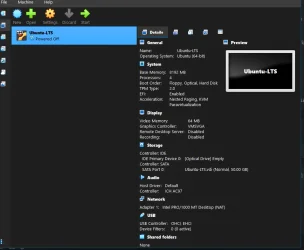
this is how i have my Ubuntu setup in Virtualbox

1786574127542.webp


its running very well setup this way.

ps. my bad i didn't read the 'headless' bit. my apologies.
best of luck Steve ..
 
Last edited:

My Computers My Computers

  • At a glance

    Windows 11 HomeRyzen 7 5825u64GB DDR4 3200Ryzen 7 5825u
    OS
    Windows 11 Home
    Computer type
    PC/Desktop
    Manufacturer/Model
    HP 24" AiO
    CPU
    Ryzen 7 5825u
    Motherboard
    HP
    Memory
    64GB DDR4 3200
    Graphics Card(s)
    Ryzen 7 5825u
    Sound Card
    RealTek
    Monitor(s) Displays
    24" HP AiO
    Screen Resolution
    1920 x 1080 @60 Hz
    Hard Drives
    1TB WD Blue SN580 M2 SSD Partitioned.
    2x 1TB USB HDD External Backup/Storage.
    PSU
    90W external power brick
    Case
    24" All in One
    Cooling
    Default Air Cooling
    Keyboard
    HP WiFi UK extended
    Mouse
    HP WiFi 3 Button
    Internet Speed
    1GB full fibre
    Browser
    Edge & Firefox
    Antivirus
    AVG Internet Security/Windows Defender
    Other Info
    Mainly Open Source Software
  • At a glance

    Ubuntu 22.04.5 LTSi5 7200u16GB DDR4Intel
    Operating System
    Ubuntu 22.04.5 LTS
    Computer type
    Laptop
    Manufacturer/Model
    Dell 13" Latitude 2017
    CPU
    i5 7200u
    Motherboard
    Dell
    Memory
    16GB DDR4
    Graphics card(s)
    Intel
    Sound Card
    Intel
    Monitor(s) Displays
    13" Dell Laptop
    Hard Drives
    250GB Crucial 2.5" SSD
    Mouse
    Generic WiFi 3 button
    Internet Speed
    WiFi only
    Browser
    Firefox
    Antivirus
    ClamAV TK
    Other Info
    Mainly Open Source Software
Hi folks
At least download and install of Virtual Box is far better than the convoluted VmWare player / workstation process these days but the performance is very poor.

I know you shoulnd't compare with HYPER-V or on a LINUX Host using KVM/QEMU but it's a bit painful especially on a decent i7 laptop with 32 GB RAM etc.

I only also want a minimal Linux system (no GUI needed) so I can access Linux disks from my entire LAN. It DOES work but I'm sure there must be options to speed this up -- ideas anyone.

Cheers
jimbo
What are you asking?

Are you saying 26H2 performance is worse than 25H2

As a direct comparison, I have provided benchmarks for HyperV on Windows versis VB on Windows and in general Hyper is roughly twice as fast as VB.

Unfortunately HyperV has limitations (main one being no sound) if guest csn only run in basic mode, forcing VB to be the virtual machine of choice for most non Windows guests)

Unless you have evidence that there is something wrong specifically with 26H2, then I cannot see any meaningful solution to your issue.

Your question re. minimal Linux is unclear as well. Are you talking about it being run in 26H2 VB VM? Is your question even related to question about 26H2 performance?
 

My Computer My Computer

At a glance

Windows 11 Pro + Win11 Canary VM.I9 13th gen i9-13900H 2.60 GHZ16 GB solderedIntegrated Intel Iris XE
OS
Windows 11 Pro + Win11 Canary VM.
Computer type
Laptop
Manufacturer/Model
ASUS Zenbook 14
CPU
I9 13th gen i9-13900H 2.60 GHZ
Motherboard
Yep, Laptop has one.
Memory
16 GB soldered
Graphics Card(s)
Integrated Intel Iris XE
Sound Card
Realtek built in
Monitor(s) Displays
laptop OLED screen
Screen Resolution
2880x1800 touchscreen
Hard Drives
1 TB NVME SSD (only weakness is only one slot)
PSU
Internal + 65W thunderbolt USB4 charger
Case
Yep, got one
Cooling
Stella Artois (UK pint cans - 568 ml) - extra cost.
Keyboard
Built in UK keybd
Mouse
Bluetooth , wireless dongled, wired
Internet Speed
900 mbs (ethernet), wifi 6 typical 350-450 mb/s both up and down
Browser
Edge
Antivirus
Defender
Other Info
TPM 2.0, 2xUSB4 thunderbolt, 1xUsb3 (usb a), 1xUsb-c, hdmi out, 3.5 mm audio out/in combo, ASUS backlit trackpad (inc. switchable number pad)

Macrium Reflect Home V8
Office 365 Family (6 users each 1TB onedrive space)
Hyper-V (a vm runs almost as fast as my older laptop)
What are you asking?

Are you saying 26H2 performance is worse than 25H2

As a direct comparison, I have provided benchmarks for HyperV on Windows versis VB on Windows and in general Hyper is roughly twice as fast as VB.

Unfortunately HyperV has limitations (main one being no sound) if guest csn only run in basic mode, forcing VB to be the virtual machine of choice for most non Windows guests)

Unless you have evidence that there is something wrong specifically with 26H2, then I cannot see any meaningful solution to your issue.

Your question re. minimal Linux is unclear as well. Are you talking about it being run in 26H2 VB VM? Is your question even related to question about 26H2 performance?
No problems with HYPER-V running on Windows Host with any type of VM. My issue is creating a basic Linux VM on Virtual Box on 26H2 (physical Windows laptop, i7 8 core 32 GB RAM 1 GB NvME internal HDD) it ran as slow as molasses -- OK I didn't expect HYPER-V performance but this was the pits. I've no issues with 26H2 experimental build currently - I also tried creating a Windows 11 PRO 25H2 beta -- also ran as slow as molasses.

I'm not sure if the issue with VBOX and Windows is that I have HYPER-V and the WSL both installed on the HOST Windows system . I was prepared for some loss of efficiency as with VBOX it was easy to dynamically attach / detach disks as well as other non disk usb devices.

By a minimal Linux I mean that itis a basic command line version (no GuI needed) with just the services running that enable disks to be shared across a network (local and remote), plus things like ftp, ssh, rsync, crontab-for timed auto commands, samba and access to media streams and other multi-media files for remote playing on Windows / other OS's and also disk storage for receiving client backups.

Cheers
jimbo
 

My Computer My Computer

At a glance

Windows XP,11 Linux Fedora Rawhide pre-releas...2 X Intel i7
OS
Windows XP,11 Linux Fedora Rawhide pre-release 46
Computer type
PC/Desktop
CPU
2 X Intel i7
Screen Resolution
4KUHD X 2
Hi

I may well be misunderstanding this, but I thought SAMBA/CIFS was a way to share.
Vague memories of a Raspberry and W10 being joined at the hip, so to speak.
 

My Computer My Computer

At a glance

W10, W11, Mint and DebianASUS 24 Gb
OS
W10, W11, Mint and Debian
Computer type
Laptop
Manufacturer/Model
HP, Lenovo, Lenovo and ASUS
Memory
ASUS 24 Gb
Browser
DuckDuckGo, Brave, Firefox and maybe Microsofty ones.
Antivirus
Yes
Other Info
Assorted hardware and OS's.
It's quite possible that VirtualBox is not yet optimised to run on Windows 11 26H2 (or to intall/run 26H2 Guests) as the developers (Oracle's Development Team) do not chase compatibility with 'Beta' version of any operating system; i.e. for Windows 11 that means there is no 'official support' claimed for any Insider builds and nor do their Deveopment Team accept bug reports against running on a 'beta OS'. To put that another way if sutch builds work then fine , but no 'bugs'/problems will be actively investigated until after the final OS version release.

The VirtualBox Guidance put it this way:

Supported Host Systems include "Window 11 (64-bit) Released Versions only". VMWare is very similar and in both cases these Hypervisors invariably need to be updated before either will claim support for a 'newer' Windows/Lunux/macOS release than the currently supported release.
 

My Computers My Computers

  • At a glance

    macOS 14.x (plus Windows 11, Debian, FreeBSD ...Apple M1 Max (T6001) - 8 performance 2 effici...32GB LPDDR5Apple M1 Max (32-core)
    OS
    macOS 14.x (plus Windows 11, Debian, FreeBSD for ARM64)
    Computer type
    Laptop
    Manufacturer/Model
    MacBook Pro M1 MAX
    CPU
    Apple M1 Max (T6001) - 8 performance 2 efficiency cores
    Memory
    32GB LPDDR5
    Graphics Card(s)
    Apple M1 Max (32-core)
    Hard Drives
    a) 1TB SSD + + 1TB SD Card + external SSD Drives
    Browser
    1. Safari 2. DuckDuckGo
    Antivirus
    -
  • At a glance

    Windows 11 Pro, plus VirtualBox VMs: various ...i732GB
    Operating System
    Windows 11 Pro, plus VirtualBox VMs: various Windows & Linux
    Computer type
    Laptop
    Manufacturer/Model
    Microsoft Surface Laptop Studio
    CPU
    i7
    Memory
    32GB
    Hard Drives
    1TB SSD, plus external SSDs for Virtual Machines etc.
    Browser
    1. MS Edge 2. DuckDuckGo
    Antivirus
    Defender
As OP has stated, performance is just as poor on 25H2 as 26H2 thus this is not related to Windows version.

At one time, type 2 hypervisor vms would not run if a type 1 hypervisor was active.

However the hyperV hypervisor was updated to include APIs that allow VB to run even if the type one hypervisor was active. However this is very inefficient making type 2 vms very slow.

Some improvements were made to the APIs which helped but still slow compared with HyperV.

You can still use the old boot entry trick where you have two boot entries for the host OS.

One boot entry disables the type 1 hypervisor and vb runs much faster but you cannot run vb.

The other enables the type 1 hypervisor snd then hyperv works but vb is slow.

See this post. It is quite old but still works today even with W11.


My Computer My Computer

At a glance

Windows 11 Pro + Win11 Canary VM.I9 13th gen i9-13900H 2.60 GHZ16 GB solderedIntegrated Intel Iris XE
OS
Windows 11 Pro + Win11 Canary VM.
Computer type
Laptop
Manufacturer/Model
ASUS Zenbook 14
CPU
I9 13th gen i9-13900H 2.60 GHZ
Motherboard
Yep, Laptop has one.
Memory
16 GB soldered
Graphics Card(s)
Integrated Intel Iris XE
Sound Card
Realtek built in
Monitor(s) Displays
laptop OLED screen
Screen Resolution
2880x1800 touchscreen
Hard Drives
1 TB NVME SSD (only weakness is only one slot)
PSU
Internal + 65W thunderbolt USB4 charger
Case
Yep, got one
Cooling
Stella Artois (UK pint cans - 568 ml) - extra cost.
Keyboard
Built in UK keybd
Mouse
Bluetooth , wireless dongled, wired
Internet Speed
900 mbs (ethernet), wifi 6 typical 350-450 mb/s both up and down
Browser
Edge
Antivirus
Defender
Other Info
TPM 2.0, 2xUSB4 thunderbolt, 1xUsb3 (usb a), 1xUsb-c, hdmi out, 3.5 mm audio out/in combo, ASUS backlit trackpad (inc. switchable number pad)

Macrium Reflect Home V8
Office 365 Family (6 users each 1TB onedrive space)
Hyper-V (a vm runs almost as fast as my older laptop)
Microsoft 'admits' in its own guidance that both the Hyper-V OS Virtualisation Platform and also the underpinning Windows hypervisor platform which powers VBS are incompatible (by their design) with third party Type 2 Hypervisors that need direct access to VT-x/AMD-V support, and that those who wish to run a third party sofware need to disable not only Hyper-V Virtualisation, if it is installed, but also those VBS features that rely on the Windows hypervisor platform (Device Guard & Credential Guard). The API provided by Microsoft does allow/support some mitigation of the impact of an active Microsoft Hyper-V and/or Windows hypervisor presence, but does not provide a complete solution for third-party developers.

Unfortunately, users of VMware and VirtualBox have frequently reported that whilst using the known BCDEdit commands to enable/disable (toggle) Hyper-V do still work, they have no impact on the VBS features. These can be disabled in the Security Settings but most users affected seem to find it easier to download/use the Microsoft DGReadiness Tool to take care of disabling VBS features.

Ironically, in my own case, VirtualBox performance on Microsoft Surface (Intel and Qualcomm XElite) devices does not appear to be noticeably affected by active Hyper-V/VBS features and my VMs launch/run Windows 10/11 and the software I use every bit as quickly as native Windows installations; and the macOS Hypervisor on 'M' Series Silicon Apple Macs (my main use case) seems to have no negative impact on VirtualBox/VMware performance so perhaps Apple has done a better job of supporting third party software developers/users in this use case, although its nowhere near as good on the maintenance of backwards compatibility.
 

My Computers My Computers

  • At a glance

    macOS 14.x (plus Windows 11, Debian, FreeBSD ...Apple M1 Max (T6001) - 8 performance 2 effici...32GB LPDDR5Apple M1 Max (32-core)
    OS
    macOS 14.x (plus Windows 11, Debian, FreeBSD for ARM64)
    Computer type
    Laptop
    Manufacturer/Model
    MacBook Pro M1 MAX
    CPU
    Apple M1 Max (T6001) - 8 performance 2 efficiency cores
    Memory
    32GB LPDDR5
    Graphics Card(s)
    Apple M1 Max (32-core)
    Hard Drives
    a) 1TB SSD + + 1TB SD Card + external SSD Drives
    Browser
    1. Safari 2. DuckDuckGo
    Antivirus
    -
  • At a glance

    Windows 11 Pro, plus VirtualBox VMs: various ...i732GB
    Operating System
    Windows 11 Pro, plus VirtualBox VMs: various Windows & Linux
    Computer type
    Laptop
    Manufacturer/Model
    Microsoft Surface Laptop Studio
    CPU
    i7
    Memory
    32GB
    Hard Drives
    1TB SSD, plus external SSDs for Virtual Machines etc.
    Browser
    1. MS Edge 2. DuckDuckGo
    Antivirus
    Defender

Latest Support Threads

Back
Top Bottom