Excel Blog:
Welcome to the April 2026 update. In broader Microsoft 365 news, Copilot's Agentic capabilities are now generally available, and Copilot Cowork, which is an agentic AI capability that acts like a digital teammate—turning your goals into multi-step plans and helping execute tasks across apps (email, meetings, documents, workflows) with user oversight, is available via the Frontier program.
For Excel, new Edit with Copilot capabilities include the Chat/Edit switcher, step-by-step reasoning with plan mode, understanding changes made by Copilot, and the ability to use the power of Python directly from Copilot, as well as new OpenAI GPT-5.5 and Claude Opus 4.7 models.
Excel for Windows, Mac, and web
New Edit with Copilot capabilitiesChat/Edit Switcher
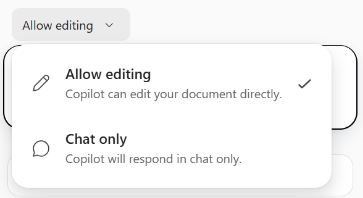
Users will see a chat/edit switcher above the prompt box that lets them control how Copilot interacts with their workbook:
- Chat only: Copilot answers questions, provides suggestions, and offers guidance—without making direct changes to the file.
- Allow editing: Copilot actively works in the workbook or spreadsheet—creating content, applying formatting, building formulas, and making app-native edits.
Plan mode
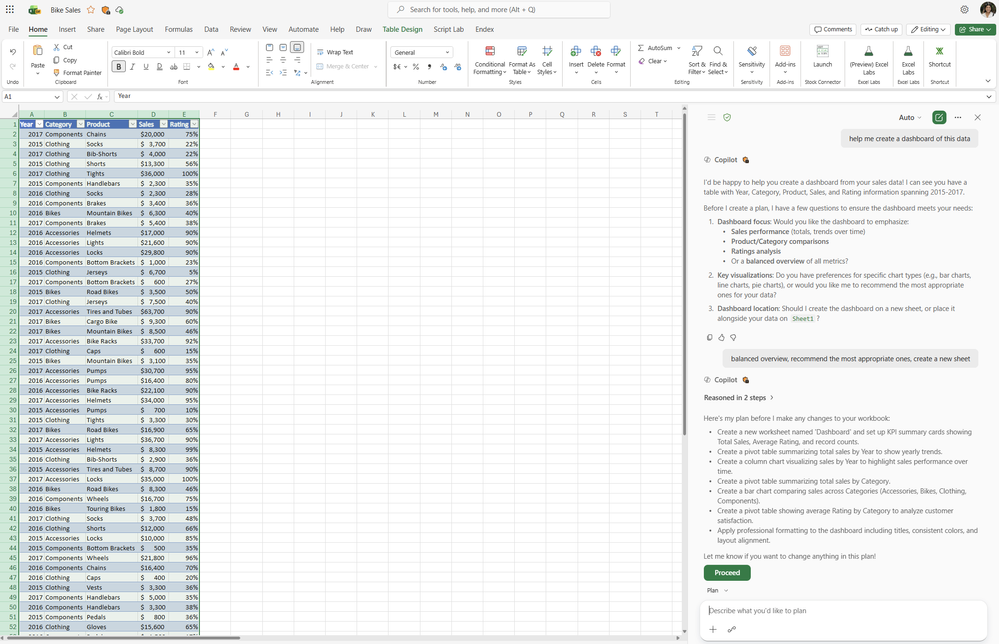
Plan mode for Copilot in Excel helps users make complex changes with confidence by outlining a clear, step‑by‑step approach before anything in the workbook is updated. Users can review how Copilot intends to complete the task, see which data or capabilities may be used, and adjust the plan as needed—helping ensure edits are intentional. This makes it easier to tackle multi‑step or high‑impact tasks while staying in control of every change.
Understand changes from Copilot
Copilot makes spreadsheet edits easy to see and control by highlighting changes directly on the grid and marking modified sheets with a green tab indicator. These visual cues persist during a Copilot turn and clear once you're done, keeping you oriented without any clutter.
Python
You can now use Python directly in Edit with Copilot in Excel to take on more advanced data analysis—without needing to leave your workbook. Copilot can apply Python-powered techniques as it makes edits, helping you transform data, generate visualizations, and complete complex, multi‑step tasks in place. When Python is enabled, Copilot can create charts and other visual outputs as part of your requested edits—bringing advanced analytical capabilities into the same experience you use to clean, reshape, and update your spreadsheet. You can invoke this feature directly in your prompt by asking Copilot to use Python for the analysis, or Copilot may invoke Python when appropriate.
Excel for iOS
Modernized comments experience on iPhoneThe updated Comments pane experience improves the clarity and usability of mobile commenting by making comment threads easier to find, read, and act on. With a more modern, streamlined user interface, you can more quickly understand what needs your attention, respond quickly, and stay engaged in collaboration as you review your files on the go. Read more here >
Many of these features are the result of your feedback. THANK YOU! Your continued Feedback in Action (#FIA) helps improve Excel for everyone. Please let us know how you like a particular feature and what we can improve upon—"Give a compliment" or "Make a suggestion". You can also submit new ideas or vote for other ideas via Microsoft Feedback.
Source:
What's New in Excel (April 2026) | Microsoft Community Hub
Welcome to the April 2026 edition of the What's New in Excel!
 techcommunity.microsoft.com