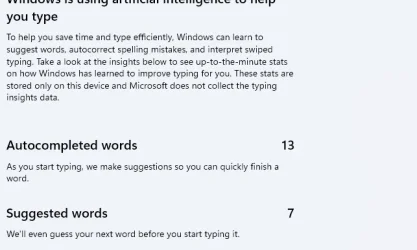
Solved What is this feature please (it seems to be Typing Insights but is still on)?


Bradavon

Well-known member
Local time
10:49 AM
Posts
48
Location
South West, England
OS
Windows 11 Pro
Hi,

OS: Windows 11 Pro 24H2
PC: Surface Laptop 7 (although I'm pretty sure it also occurs on my PC which is also 24H2).

I can't stand this feature:

1755091214707.webp

I've Googled it and it seems to be Typing Insights but I've turned it off and restarted my PC but this feature is still on.

The problem is none of the "Typing Insights" articles actually have a picture of it, so I know it's this feature.

1755091317683.webp

I also don't like it as I've already got a Spelling and Grammer checker in Office. I don't need another. Appreciate this looks to be a Windows not Office feature.

Thank you.
 
Windows Build/Version
Windows 11 Pro 24H2

My Computer My Computer

OS
Windows 11 Pro
Computer type
Laptop
Manufacturer/Model
Microsoft Surface Laptop 7
Memory
16GB
Hard Drives
512GB
Hi,

OS: Windows 11 Pro 24H2
PC: Surface Laptop 7 (although I'm pretty sure it also occurs on my PC which is also 24H2).

I can't stand this feature:


I've Googled it and it seems to be Typing Insights but I've turned it off and restarted my PC but this feature is still on.

The problem is none of the "Typing Insights" articles actually have a picture of it, so I know it's this feature.


I also don't like it as I've already got a Spelling and Grammer checker in Office. I don't need another. Appreciate this looks to be a Windows not Office feature.

Thank you.

Hello,
Have you looked in the Notepad settings themselves?
 

My Computers My Computers

  • OS
    All Branches but Release
    Computer type
    Laptop
    Manufacturer/Model
    Acer Nitro ANV15-51
    CPU
    AMD Ryzen 7 7735HS 3200-4500 Mhz 8 cores x 2
    Motherboard
    Sportage_RBH
    Memory
    32 GB DDR5
    Graphics Card(s)
    Radeon Graphic / NVIDIA GeForce RTX 4060 8 GB GDDR6
    Sound Card
    AMD/Realtek(R) Audio
    Monitor(s) Displays
    Integrated Monitor (15.3"vis)
    Screen Resolution
    FHD 1920X1080 16:9 144Hz
    Hard Drives
    KINGSTON OM8SEP4512Q-AA 1TB
    Western Digital 256GB
    PSU
    19V DC 6.32 A 120 W
    Cooling
    Dual Fans
    Mouse
    MS Bluetooth
    Internet Speed
    Fiber 1GB Cox -us & 1GB Orange-fr
    Browser
    Edge Canary- Firefox Nightly-Chrome Dev-Chrome Dev
    Antivirus
    Windows Defender
  • Operating System
    Windows 11 Beta
    Computer type
    Laptop
    Manufacturer/Model
    Asus X751BP
    CPU
    AMD A9-9420
    Memory
    8 GB of DDR4
    Graphics card(s)
    AMD Radeon R5
    Screen Resolution
    1600x900
    Hard Drives
    Seagate 1 TB
You can indeed switch off Spelling and Copilot in the settings of Notepad:
Click the little wheel on the top right side:

000524.webp
Scroll down in the settings and disable what you don't like:

000525.webp

The language is Dutch, but I think you will understand that anyway, because the words are similar.
 

My Computer My Computer

OS
Windows 11 Pro 25H2 26200.8457
Computer type
PC/Desktop
Manufacturer/Model
Build by vendor to my specs
CPU
AMD Ryzen 7 5700G
Motherboard
MSI PRO B550M-P Gen3
Memory
Kingston FURY Beast 2x16GB DIMM DDR4 2666 CL16
Graphics Card(s)
MSI GeForce GT 730 2GB LP V1
Sound Card
Creative Sound Blaster Audigy FX
Monitor(s) Displays
Samsung S24E450F 24"
Screen Resolution
1920 x 1080
Hard Drives
1. SSD Crucial P5 Plus 500GB PCIe M.2
2. SSD-SATA Crucial MX500-2TB
PSU
Corsair CV650W
Case
Cooler Master Silencio S400
Cooling
Cooler Master Hyper H412R with Be Quiet Pure Wings 2 PWM BL038 fan
Keyboard
Cherry Stream (wired, scissor keys)
Mouse
Asus WT465 (wireless)
Internet Speed
70 Mbps down / 80 Mbps up
Browser
Firefox 130.0
Antivirus
F-Secure (Internetprovider version)
Other Info
Router: FRITZBox 7490
Oracle VirtualBox 7 for testing software on Win 10 or 11
Hello,
Have you looked in the Notepad settings themselves?
I've not because I only used Notepad as an example sorry, but it's occurring in Outlook Classic too. Thanks.
 
Last edited:

My Computer My Computer

OS
Windows 11 Pro
Computer type
Laptop
Manufacturer/Model
Microsoft Surface Laptop 7
Memory
16GB
Hard Drives
512GB
I've just turned off Spell Check and Autocorrect in Notepad Settings. No difference. I've also turned off Copilot.

I'd be surprised the PC needs a restart first but already did this when I turned off "Typing Insights".
 

My Computer My Computer

OS
Windows 11 Pro
Computer type
Laptop
Manufacturer/Model
Microsoft Surface Laptop 7
Memory
16GB
Hard Drives
512GB
You can indeed switch off Spelling and Copilot in the settings of Notepad:
Click the little wheel on the top right side:

The language is Dutch, but I think you will understand that anyway, because the words are similar.
This hasn't worked, thanks.

It's also occurring in Outlook Classic which isn't even a Windows App. I've turned off it's Grammer/Spell Checking but it's occurring across Apps anyway.

No worries about the Dutch. Western European languages have connected roots, the spelling is pretty similar. I also don't think people should actually be expecting only English is spoken. I'd just use a translator tbh.
 

My Computer My Computer

OS
Windows 11 Pro
Computer type
Laptop
Manufacturer/Model
Microsoft Surface Laptop 7
Memory
16GB
Hard Drives
512GB
I Googled it again and found it:

1755101703587.webp

There's another English guy here who loves, where I found the answer. Well good for him, I bloody don't 😆:


My Computer My Computer

OS
Windows 11 Pro
Computer type
Laptop
Manufacturer/Model
Microsoft Surface Laptop 7
Memory
16GB
Hard Drives
512GB
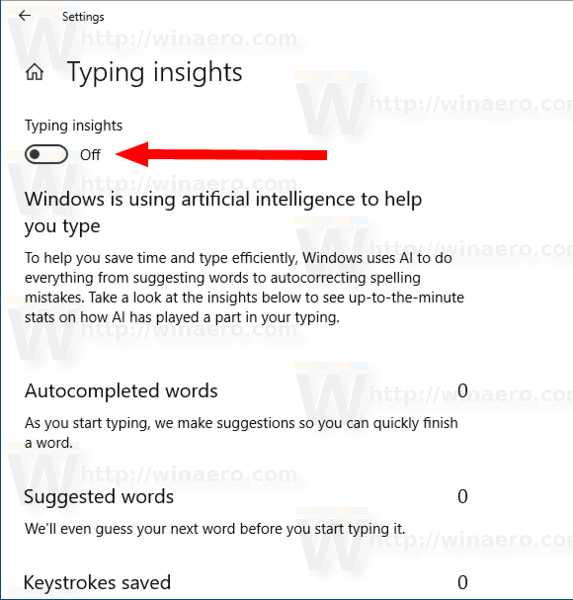
Typing Insights is also rather pointless.

It's just showing you how many Autocomplete, Suggested Words etc... it's giving.

No one needs to know this in life.
 

My Computer My Computer

OS
Windows 11 Pro
Computer type
Laptop
Manufacturer/Model
Microsoft Surface Laptop 7
Memory
16GB
Hard Drives
512GB
I actually was about to make a post on Twitter about this and saw this recent post of you asking!!!!!!

I can almost swear mine have been the same numbers in this stats page since I first joined Windows Insider in 2018 or so, which was when I found this, my stats (As of Windows 11).

Basically, every time I thought it was only for virtual keyboards or whatnot, it NEVER says it anywhere that I notice with definitive language. There are hints, suggestions, etc, but I enable the other Windows spellcheck and stuff sometimes and over time I never have a large number in any of these things.

I know it helps me a lot. i know ithelps zmeoccasionallyad is the best way to go ya know? have a good day

(I am gonna add a few auto suggestions here and see if it changes from 11 or 0)
i know ithelps zmeoccasionallyad is the best way to go ya know? have a good day​

CONFIRMED. The middle image in the table below shows 13 after I selected a few words to autocomplete the sentence above or suggested words, or whatever. OMG. Virtual/Software keyboard was not needed for those stats.


1755646519644.webp1755647573442.webp1755647459516.webp


TenForums has a similar page to the WinAero one below:

  • Turn On or Off Typing Insights in Windows 10

  • 193817d1530203256-turn-off-typing-insights-windows-10-a-typing_insights-2.jpg


Enable or Disable Typing Insights in Windows 10​


June 29, 2018 - Enable or Disable Typing Insights in Windows 10

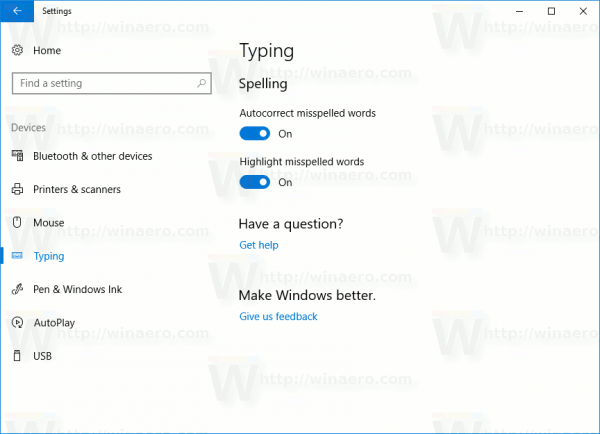
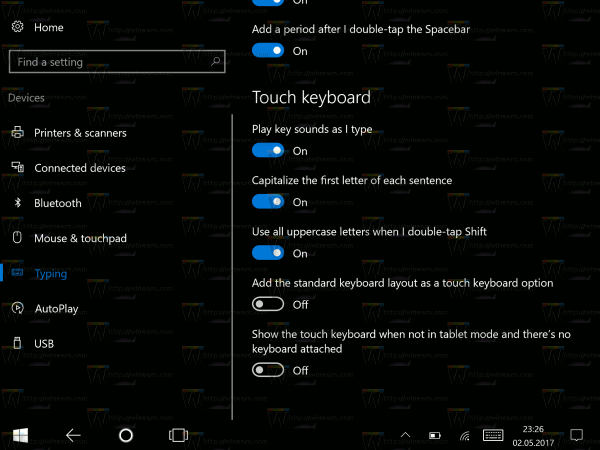
Windows 10 includes a touch keyboard for computers and tablets with a touch screen. When you touch any text field on your tablet, the touch keyboard appears on the screen. If you don't have a touch screen, you can still launch it. Starting with Windows 10 build 17704, the OS is able to show you insights about how its AI has been helping you type with efficiency.

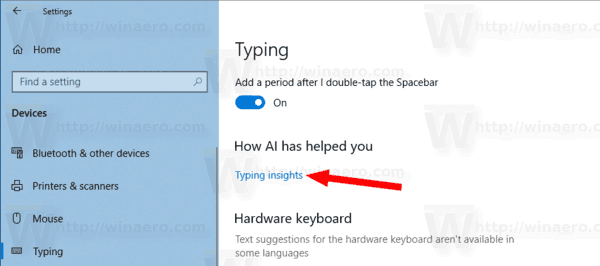
If you use the software keyboard on Windows, there are many features built into the typing experience that leverage AI and ML to help you be more efficient. Some examples include autocorrecting your spelling mistakes, prediction of the next word you would type, word suggestions as you start typing so you don’t have to type the full word and the number of words you’ve typed by swiping over the letters on the software keyboard. Windows now shows you stats about each of these features.

Settings-typing-no-touch-screen-600x434.png

Windows-10-Disable-Typing-Insights.png
Touch-keyboard-options-Windows-10-600x450.png

Windows-10-Typing-Insights-link.png


NOW I KNOW.
 

Attachments

  • 1755647610867.webp
    1755647610867.webp
    24.4 KB · Views: 0

My Computer My Computer

OS
Windows 11

Similar threads

Back
Top Bottom