Insider Windows 11 Insider Canary build 27928.1 released - Aug. 20


UPDATE 8/29:


 Windows Insider Blog:

Hello Windows Insiders, today we are releasing Windows 11 Insider Preview Build 27928 to the Canary Channel.

Changes and Improvements

[Genera]

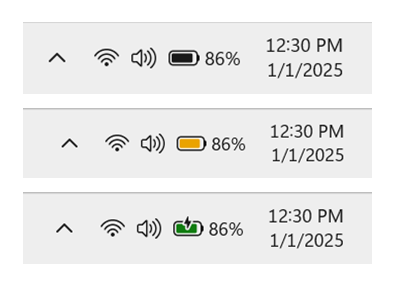
  • The updated battery iconography we began rolling out in the Canary Channel with Build 27802 is disabled in this build. This is only temporary, and we will re-enable this in a future Canary Channel flight.

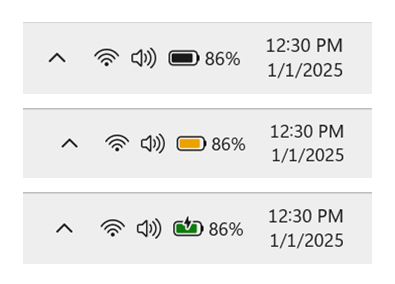
    Battery shown in black, yellow, and green to indicate different charging states.
    Battery shown in black, yellow, and green to indicate different charging states.
  • [ADDED 8/21] Administrator protection we began rolling out in the Canary Channel with Build 27718 is disabled in this build. This is only temporary, and we will re-enable this in a future Canary Channel flight.

[Settings]

We’re moving more time and language settings from Control Panel to Settings:
  • You can now add additional clocks from Settings > Time & language > Date & time under the collapsed section which can be expanded for “Show time and date in the system tray”. For those unfamiliar with the feature, these additional clocks display in Notification Center, as well as the tooltip when hovering over the clock in the taskbar.

  • You can now change your time server from Settings > Time & language > Date & time, under “Additional settings”.

  • The formatting settings for date and time have moved from Settings > Time & language > Language & region to Settings > Time & language > Date & time, and you can now change your AM/PM symbol from here as well (along with other existing formatting settings).

  • You can now change number and currency format from Settings > Time & language > Language & region, under the “Region” section.

  • If you’d like to enable Unicode UTF-8 for worldwide language support, there is now a toggle for this under Settings > Time & language > Language & region, under the “Language” section.

  • If needed, you can now copy current user language and region settings to welcome screen and system account, as well as new user accounts, from Settings > Time & language > Language & region, under “Additional settings”.

Fixes

[General]

  • Fixed an underlying issue with dao360.dll in the latest builds which could result in some apps crashing.

[Click to Do (Preview)]

  • Fixed the issue causing text and image actions in Click to Do to not work correctly and Click to Do to crash.

[File Explorer]

  • Fixed an issue where File Explorer preview windows might appear when hovering over unrelated app icons in the taskbar.
  • Fixed an issue where if you tried to use the unblock open in Properties for a file, it still shows as blocked when you open Properties the next time.

[Taskbar]

  • Fixed an issue where If you accidentally clicked down and slid your mouse on the taskbar preview thumbnail, clicking it would stop working.

[Input]

  • Fixed an underlying issue related to textinputframework.dll could result in certain apps like Sticky Notes and Notepad crashing.
  • Fixed an issue where if you attempted to type Chinese with an IME after copying something with CTRL + C, it could result in the first character getting dropped.

[Login and Lock screen]

  • Did some work to address underlying cases which could lead to you seeing a blank white screen, or a screen saying, “just a moment”, for a few minutes when logging in to your PC.
  • Did some work to address an underlying issue which could lead to the taskbar being slow to load when unlocking your PC after coming out of sleep. This issue could also have led to the password field and other login screen contents not rendering when transitioning from lock screen to login screen after sleep. If you continue experiencing issues, please report them in the Feedback Hub under Install and Update > Logon hangs.

[Live captions]

  • Fixed an issue where if you changed the opacity of live captions in Settings > Accessibility > Captions > Caption Style, it had no effect.

[Settings]

  • Fixed an issue where Settings might crash if you attempt to add a security key under Settings > Account > Sign-in options.

[Other]

  • Fixed an issue in the previous build where you might see multiple error pop ups about unexpected elements when opening Group Policy Editor.

Known issues

[General]

  • We’re investigating reports that Settings > System > Storage > Temporary files is getting stuck when scanning files. We are also investigating previous Windows Installations also not showing.
  • [NEW] Launching cmd non-elevated from the Run dialog may open in Windows Console Host rather than Windows Terminal, even if Windows Terminal is your default terminal app. If you’re experiencing this, you can type wt into Run to launch Windows Terminal directly.

[Windowing]

  • [NEW] You may experience an increase in DWM crashes in this build (which could lead to you seeing a black flash).

[File Explorer]

  • In dark mode, the red color used for a low space drive in This PC may be unexpectedly light colored in this build. Some of the other colors may also be incorrect, including that black is used for space remaining instead of a more visible color.

Reminders for Windows Insiders in the Canary Channel

  • The builds we release to the Canary Channel represent the latest platform changes early in the development cycle and should not be seen as matched to any specific release of Windows and features and experiences included in these builds may never get released as we try out different concepts and get feedback. Features may change over time, be removed, or replaced and never get released beyond Windows Insiders. Some of these features and experiences could show up in future Windows releases when they’re ready.
  • Many features in the Canary Channel are rolled out using Control Feature Rollout technology, starting with a subset of Insiders and ramping up over time as we monitor feedback to see how they land before pushing them out to everyone in this channel.
  • Some features may show up in the Dev and Beta Channels first before showing up in the Canary Channel.
  • Some features in active development we preview with Windows Insiders may not be fully localized and localization will happen over time as features are finalized. As you see issues with localization in your language, please report those issues to us via Feedback Hub.
  • To get off the Canary Channel, a clean install of Windows 11 will be required. As a reminder – Insiders can’t switch to a channel that is receiving builds with lower build numbers without doing a clean installation of Windows 11 due to technical setup requirements.
  • The desktop watermark shown at the lower right corner of the desktop is normal for these pre-release builds.
  • Check out Flight Hub for a complete look at what build is in which Insider channel.
Thanks,
Amanda & Brandon


 Source:


Check Windows Updates


UUP Dump:

64-bit ISO download:

ARM64 ISO download:

 
Last edited:
@Almighty1

I tried a clean install with 27928.1 ISO created from uupdump, the installation completes fine.
But then I see the same issues that I saw with the in-place updates done with the same ISOs.
Cannot update many Apps from the MS Store and some other ones that update cannot open. 🤣🤣🤬🤷‍♂️

We'll see what happens with the next build ISO, this is definitely broken. 😎

View attachment 143376


View attachment 143377
The problem is the UUPDump people didn't really acknowledge the issue or even try to help fix the issue from the brief few messages in that thread, I haven't read the newer responses yet.
 

My Computer

System One

  • OS
    WindowsXP/7/8/8.1/10/11,Linux,Android,FreeBSD Unix
    Computer type
    Laptop
    Manufacturer/Model
    Dell XPS 15 9570
    CPU
    Intel® Core™ i7-8750H 8th Gen 2.2Ghz up to 4.1Ghz
    Motherboard
    Dell XPS 15 9570
    Memory
    64GB using 2x32GB CL16 Mushkin redLine modules
    Graphics Card(s)
    Intel UHD 630 & NVIDIA GeForce GTX 1050 Ti with 4GB DDR5
    Sound Card
    Realtek ALC3266-CG
    Monitor(s) Displays
    15.6" 4K Touch UltraHD 3840x2160 made by Sharp
    Screen Resolution
    3840x2160 4K UltraHD
    Hard Drives
    Samsung MZ-V9P4T0B/AM 990 PRO 4TB PCIe®4.0 NVMe™ M.2 SSD was Toshiba KXG60ZNV1T02 NVMe 1TB SSD
    PSU
    Dell XPS 15 9570
    Case
    Dell XPS 15 9570
    Cooling
    Stock
    Keyboard
    Stock
    Mouse
    SwitftPoint ProPoint
    Internet Speed
    Comcast/XFinity 1.44Gbps/42.5Mbps
    Browser
    Microsoft EDGE (Chromium based) & Google Chrome
    Antivirus
    Windows Defender that came with Windows
Not familiar with Deskmodder but how did Deskmodder actually build the ISO because maybe it also used uupdump or something similar to uupdump's method which is why the same problem still exists. Also, been wanting to ask you a question about the built-in Windows Update Repair install. When you used it, did it do everything inside Windows Update as I tried it on Beta and it downloaded, installed and completed all in Windows Update. Unlike a Windows update to a new build or using the UUPDump ISO to do a in-place repair install, it does not require a reboot and does not update anything when one reboots. Reason I am asking is my notebook motherboard did have issues where the machine will reboot randomly within seconds to minutes and sometimes a few hours from the spinning part at the POST screen, it turned out one of the capacitors eventually burn down and the machine no longer powered on and sometime during May 2025, when I did the Windows Update Repair install, it corrupted the WinRE file so it was no longer working and yesterday I did do a Windows Update based repair install and while it did the download, install and complete while in Windows Update after I already updated to 26120.5761, it did not require rebooting and rebooting didn't seem to have the updating files process like I see with the normal UUPDump ISO in-place repair upgrade install or when Windows Updating to a new build and the WinRE file is still corrupted so it never touched the WinRE like a in-place repair install would.
The 27934 ISO built from uupdump has the same problems. I just tried today 8/29/2025.
No problem with Windows Update.

I bet DESKMODDER also uses uupdump. 🤣🤣
 
Last edited:

My Computer

System One

  • OS
    Windows 11 Pro 25H2
    Computer type
    PC/Desktop
    Manufacturer/Model
    Dell XPS 8930
    CPU
    Intel I9-9900K
    Memory
    64GB
    Graphics Card(s)
    NVIDIA RTX 2060
    Sound Card
    NVIDIA High Definition Audio
    Monitor(s) Displays
    4k Samsung
    Screen Resolution
    3840 x 2160
    Hard Drives
    512GB NVMe, ADATA SU 800, 2TB HDD
The 27934 ISO built from uupdump has the same problems. I just tried today 8/29/2025.
No problem with Windows Update
I just read the rest of the messages on mydigitallife and it's like they can't reproduce the probkem. I wasn't asking if you were having problems with Windows Update. I was asking you if the repair install using the Windows Update method actually updated files when the system boots like the in-place repair install when using the ISO from UUPDump or not since you are the only person I know who has used the built-in repair method.

My problem was not created by Windows Update or software but because the capacitor was failing, it was causing very frequent random reboots like someone hit the reset button which was probably why I got the corrupted WinRE as that was the only thing broken which this DISM Check, Restore, Scan health does not scan as those came out clean.

1756522883878.webp
 

My Computer

System One

  • OS
    WindowsXP/7/8/8.1/10/11,Linux,Android,FreeBSD Unix
    Computer type
    Laptop
    Manufacturer/Model
    Dell XPS 15 9570
    CPU
    Intel® Core™ i7-8750H 8th Gen 2.2Ghz up to 4.1Ghz
    Motherboard
    Dell XPS 15 9570
    Memory
    64GB using 2x32GB CL16 Mushkin redLine modules
    Graphics Card(s)
    Intel UHD 630 & NVIDIA GeForce GTX 1050 Ti with 4GB DDR5
    Sound Card
    Realtek ALC3266-CG
    Monitor(s) Displays
    15.6" 4K Touch UltraHD 3840x2160 made by Sharp
    Screen Resolution
    3840x2160 4K UltraHD
    Hard Drives
    Samsung MZ-V9P4T0B/AM 990 PRO 4TB PCIe®4.0 NVMe™ M.2 SSD was Toshiba KXG60ZNV1T02 NVMe 1TB SSD
    PSU
    Dell XPS 15 9570
    Case
    Dell XPS 15 9570
    Cooling
    Stock
    Keyboard
    Stock
    Mouse
    SwitftPoint ProPoint
    Internet Speed
    Comcast/XFinity 1.44Gbps/42.5Mbps
    Browser
    Microsoft EDGE (Chromium based) & Google Chrome
    Antivirus
    Windows Defender that came with Windows
I just read the rest of the messages on mydigitallife and it's like they can't reproduce the probkem. I wasn't asking if you were having problems with Windows Update. I was asking you if the repair install using the Windows Update method actually updated files when the system boots like the in-place repair install when using the ISO from UUPDump or not since you are the only person I know who has used the built-in repair method.

My problem was not created by Windows Update or software but because the capacitor was failing, it was causing very frequent random reboots like someone hit the reset button which was probably why I got the corrupted WinRE as that was the only thing broken which this DISM Check, Restore, Scan health does not scan as those came out clean.

View attachment 143815
They cannot reproduce because they did not try to update the Apps from the MS Store. 😒
 

My Computer

System One

  • OS
    Windows 11 Pro 25H2
    Computer type
    PC/Desktop
    Manufacturer/Model
    Dell XPS 8930
    CPU
    Intel I9-9900K
    Memory
    64GB
    Graphics Card(s)
    NVIDIA RTX 2060
    Sound Card
    NVIDIA High Definition Audio
    Monitor(s) Displays
    4k Samsung
    Screen Resolution
    3840 x 2160
    Hard Drives
    512GB NVMe, ADATA SU 800, 2TB HDD
The 27934 ISO built from uupdump has the same problems. I just tried today 8/29/2025.
No problem with Windows Update.

I bet DESKMODDER also uses uupdump. 🤣🤣
That's what I think too. I mean it seems like the MDL people are building ISOs and don't have the issue.
 

My Computer

System One

  • OS
    WindowsXP/7/8/8.1/10/11,Linux,Android,FreeBSD Unix
    Computer type
    Laptop
    Manufacturer/Model
    Dell XPS 15 9570
    CPU
    Intel® Core™ i7-8750H 8th Gen 2.2Ghz up to 4.1Ghz
    Motherboard
    Dell XPS 15 9570
    Memory
    64GB using 2x32GB CL16 Mushkin redLine modules
    Graphics Card(s)
    Intel UHD 630 & NVIDIA GeForce GTX 1050 Ti with 4GB DDR5
    Sound Card
    Realtek ALC3266-CG
    Monitor(s) Displays
    15.6" 4K Touch UltraHD 3840x2160 made by Sharp
    Screen Resolution
    3840x2160 4K UltraHD
    Hard Drives
    Samsung MZ-V9P4T0B/AM 990 PRO 4TB PCIe®4.0 NVMe™ M.2 SSD was Toshiba KXG60ZNV1T02 NVMe 1TB SSD
    PSU
    Dell XPS 15 9570
    Case
    Dell XPS 15 9570
    Cooling
    Stock
    Keyboard
    Stock
    Mouse
    SwitftPoint ProPoint
    Internet Speed
    Comcast/XFinity 1.44Gbps/42.5Mbps
    Browser
    Microsoft EDGE (Chromium based) & Google Chrome
    Antivirus
    Windows Defender that came with Windows
They cannot reproduce because they did not try to update the Apps from the MS Store. 😒
That's probably why they never responded to your last post about the apps having higher version numbers to begin with where the problem is.
 

My Computer

System One

  • OS
    WindowsXP/7/8/8.1/10/11,Linux,Android,FreeBSD Unix
    Computer type
    Laptop
    Manufacturer/Model
    Dell XPS 15 9570
    CPU
    Intel® Core™ i7-8750H 8th Gen 2.2Ghz up to 4.1Ghz
    Motherboard
    Dell XPS 15 9570
    Memory
    64GB using 2x32GB CL16 Mushkin redLine modules
    Graphics Card(s)
    Intel UHD 630 & NVIDIA GeForce GTX 1050 Ti with 4GB DDR5
    Sound Card
    Realtek ALC3266-CG
    Monitor(s) Displays
    15.6" 4K Touch UltraHD 3840x2160 made by Sharp
    Screen Resolution
    3840x2160 4K UltraHD
    Hard Drives
    Samsung MZ-V9P4T0B/AM 990 PRO 4TB PCIe®4.0 NVMe™ M.2 SSD was Toshiba KXG60ZNV1T02 NVMe 1TB SSD
    PSU
    Dell XPS 15 9570
    Case
    Dell XPS 15 9570
    Cooling
    Stock
    Keyboard
    Stock
    Mouse
    SwitftPoint ProPoint
    Internet Speed
    Comcast/XFinity 1.44Gbps/42.5Mbps
    Browser
    Microsoft EDGE (Chromium based) & Google Chrome
    Antivirus
    Windows Defender that came with Windows
That's what I think too. I mean it seems like the MDL people are building ISOs and don't have the issue.
They don't have the issue because they are not trying to update the Apps from the MS Store.
That reproduces the problems.

I will have to wait for the next official insider ISO from MS. The official 27924 does not have these issues.
 

My Computer

System One

  • OS
    Windows 11 Pro 25H2
    Computer type
    PC/Desktop
    Manufacturer/Model
    Dell XPS 8930
    CPU
    Intel I9-9900K
    Memory
    64GB
    Graphics Card(s)
    NVIDIA RTX 2060
    Sound Card
    NVIDIA High Definition Audio
    Monitor(s) Displays
    4k Samsung
    Screen Resolution
    3840 x 2160
    Hard Drives
    512GB NVMe, ADATA SU 800, 2TB HDD
They don't have the issue because they are not trying to update the Apps from the MS Store.
That reproduces the problems.

I will have to wait for the next official insider ISO from MS. The official 27924 does not have these issues.
I wonder where they are getting the apps to build the ISO from. Does the official MSFT ISO include the same version of the apps or different ones?
 

My Computer

System One

  • OS
    WindowsXP/7/8/8.1/10/11,Linux,Android,FreeBSD Unix
    Computer type
    Laptop
    Manufacturer/Model
    Dell XPS 15 9570
    CPU
    Intel® Core™ i7-8750H 8th Gen 2.2Ghz up to 4.1Ghz
    Motherboard
    Dell XPS 15 9570
    Memory
    64GB using 2x32GB CL16 Mushkin redLine modules
    Graphics Card(s)
    Intel UHD 630 & NVIDIA GeForce GTX 1050 Ti with 4GB DDR5
    Sound Card
    Realtek ALC3266-CG
    Monitor(s) Displays
    15.6" 4K Touch UltraHD 3840x2160 made by Sharp
    Screen Resolution
    3840x2160 4K UltraHD
    Hard Drives
    Samsung MZ-V9P4T0B/AM 990 PRO 4TB PCIe®4.0 NVMe™ M.2 SSD was Toshiba KXG60ZNV1T02 NVMe 1TB SSD
    PSU
    Dell XPS 15 9570
    Case
    Dell XPS 15 9570
    Cooling
    Stock
    Keyboard
    Stock
    Mouse
    SwitftPoint ProPoint
    Internet Speed
    Comcast/XFinity 1.44Gbps/42.5Mbps
    Browser
    Microsoft EDGE (Chromium based) & Google Chrome
    Antivirus
    Windows Defender that came with Windows
I wonder where they are getting the apps to build the ISO from. Does the official MSFT ISO include the same version of the apps or different ones?
I think the official MS ISO 27924 has also Apps that need to be updated, and the updates from the MS Store work fine after a clean install.
I will have to check the exact version of the Apps, next time I try with the MS ISO.
I hope they push out a new one soon. The reason I use the ISO to update is because I have several machines and I don't want to use all my download allowance from AT&T. I will have to pay extra if I go over the limit. 🤬 This really sucks.
Anyway, the Windows Update install on Canary is a full install similar to the one done from the ISO. The Build number changes every time to a higher Build.
IE: From 27928.1 to 27934.1.
 

My Computer

System One

  • OS
    Windows 11 Pro 25H2
    Computer type
    PC/Desktop
    Manufacturer/Model
    Dell XPS 8930
    CPU
    Intel I9-9900K
    Memory
    64GB
    Graphics Card(s)
    NVIDIA RTX 2060
    Sound Card
    NVIDIA High Definition Audio
    Monitor(s) Displays
    4k Samsung
    Screen Resolution
    3840 x 2160
    Hard Drives
    512GB NVMe, ADATA SU 800, 2TB HDD
I think the official MS ISO 27924 has also Apps that need to be updated, and the updates from the MS Store work fine after a clean install.
I will have to check the exact version of the Apps, next time I try with the MS ISO.
I hope they push out a new one soon. The reason I use the ISO to update is because I have several machines and I don't want to use all my download allowance from AT&T. I will have to pay extra if I go over the limit. 🤬 This really sucks.
Anyway, the Windows Update install on Canary is a full install similar to the one done from the ISO. The Build number changes every time to a higher Build.
IE: From 27928.1 to 27934.1.
Yeah, the capped sucks. I was able to get unlimited bandwidth when they offered their gateway for 2 years without paying the $25/month fee which includes unlimited bandwidth.

I did a Windows Update yesterday from Beta 26120.4520 to 26120.5761 and then tried to do a Repair using Windows Update which is also for 26120.5761 and it seems all it did was download, install and then it was completed. There was no restart required like I remembered last time and rebooting went straight to the login screen from the spinning circle, it didn't do the reboot several times with the first one starting at 30% installing updates like it does when Winodws Updating builds or when using the UUPDump ISO to do the in-place repair upgrade so maybe if it's the same build, all it does is replace files in Windows Update. I'm probably going to do a UUPDump ISO but will probably need to read all the threads from 26120.4441 and each build after to get all the id's for vivetool.
 

My Computer

System One

  • OS
    WindowsXP/7/8/8.1/10/11,Linux,Android,FreeBSD Unix
    Computer type
    Laptop
    Manufacturer/Model
    Dell XPS 15 9570
    CPU
    Intel® Core™ i7-8750H 8th Gen 2.2Ghz up to 4.1Ghz
    Motherboard
    Dell XPS 15 9570
    Memory
    64GB using 2x32GB CL16 Mushkin redLine modules
    Graphics Card(s)
    Intel UHD 630 & NVIDIA GeForce GTX 1050 Ti with 4GB DDR5
    Sound Card
    Realtek ALC3266-CG
    Monitor(s) Displays
    15.6" 4K Touch UltraHD 3840x2160 made by Sharp
    Screen Resolution
    3840x2160 4K UltraHD
    Hard Drives
    Samsung MZ-V9P4T0B/AM 990 PRO 4TB PCIe®4.0 NVMe™ M.2 SSD was Toshiba KXG60ZNV1T02 NVMe 1TB SSD
    PSU
    Dell XPS 15 9570
    Case
    Dell XPS 15 9570
    Cooling
    Stock
    Keyboard
    Stock
    Mouse
    SwitftPoint ProPoint
    Internet Speed
    Comcast/XFinity 1.44Gbps/42.5Mbps
    Browser
    Microsoft EDGE (Chromium based) & Google Chrome
    Antivirus
    Windows Defender that came with Windows
Yeah, the capped sucks. I was able to get unlimited bandwidth when they offered their gateway for 2 years without paying the $25/month fee which includes unlimited bandwidth.

I did a Windows Update yesterday from Beta 26120.4520 to 26120.5761 and then tried to do a Repair using Windows Update which is also for 26120.5761 and it seems all it did was download, install and then it was completed. There was no restart required like I remembered last time and rebooting went straight to the login screen from the spinning circle, it didn't do the reboot several times with the first one starting at 30% installing updates like it does when Winodws Updating builds or when using the UUPDump ISO to do the in-place repair upgrade so maybe if it's the same build, all it does is replace files in Windows Update. I'm probably going to do a UUPDump ISO but will probably need to read all the threads from 26120.4441 and each build after to get all the id's for vivetool.
Try the uupdump Canary ISO 27934 so you can reproduce the problems and add your comments on MDL. 😉
 

My Computer

System One

  • OS
    Windows 11 Pro 25H2
    Computer type
    PC/Desktop
    Manufacturer/Model
    Dell XPS 8930
    CPU
    Intel I9-9900K
    Memory
    64GB
    Graphics Card(s)
    NVIDIA RTX 2060
    Sound Card
    NVIDIA High Definition Audio
    Monitor(s) Displays
    4k Samsung
    Screen Resolution
    3840 x 2160
    Hard Drives
    512GB NVMe, ADATA SU 800, 2TB HDD
Try the uupdump Canary ISO 27934 so you can reproduce the problems and add your comments on MDL. 😉
I would but I run Canary under Hyper-V as a VM on Beta.
 

My Computer

System One

  • OS
    WindowsXP/7/8/8.1/10/11,Linux,Android,FreeBSD Unix
    Computer type
    Laptop
    Manufacturer/Model
    Dell XPS 15 9570
    CPU
    Intel® Core™ i7-8750H 8th Gen 2.2Ghz up to 4.1Ghz
    Motherboard
    Dell XPS 15 9570
    Memory
    64GB using 2x32GB CL16 Mushkin redLine modules
    Graphics Card(s)
    Intel UHD 630 & NVIDIA GeForce GTX 1050 Ti with 4GB DDR5
    Sound Card
    Realtek ALC3266-CG
    Monitor(s) Displays
    15.6" 4K Touch UltraHD 3840x2160 made by Sharp
    Screen Resolution
    3840x2160 4K UltraHD
    Hard Drives
    Samsung MZ-V9P4T0B/AM 990 PRO 4TB PCIe®4.0 NVMe™ M.2 SSD was Toshiba KXG60ZNV1T02 NVMe 1TB SSD
    PSU
    Dell XPS 15 9570
    Case
    Dell XPS 15 9570
    Cooling
    Stock
    Keyboard
    Stock
    Mouse
    SwitftPoint ProPoint
    Internet Speed
    Comcast/XFinity 1.44Gbps/42.5Mbps
    Browser
    Microsoft EDGE (Chromium based) & Google Chrome
    Antivirus
    Windows Defender that came with Windows
I would but I run Canary under Hyper-V as a VM on Beta.
For one of your previous questions.
I just tried a clean install of 27924 with the official MS ISO.
The versions of the Apps after a clean install are the same low level as on the uupdump ISO, but the difference is that they update to the latest level from the MS Store without any problems.
When doing a clean install with the uupdump ISO many Apps fail to update on every retry. 😵‍💫🤷‍♂️
Hard to say what is causing the Apps update problems when using the uupdump ISOs. 😵‍💫🤬🤷‍♂️
Something is definitely not compatible in the Apps update process when using the uupdump ISO.
I hope they figure out the difference and fix the problems. 🤷‍♂️
 

My Computer

System One

  • OS
    Windows 11 Pro 25H2
    Computer type
    PC/Desktop
    Manufacturer/Model
    Dell XPS 8930
    CPU
    Intel I9-9900K
    Memory
    64GB
    Graphics Card(s)
    NVIDIA RTX 2060
    Sound Card
    NVIDIA High Definition Audio
    Monitor(s) Displays
    4k Samsung
    Screen Resolution
    3840 x 2160
    Hard Drives
    512GB NVMe, ADATA SU 800, 2TB HDD
For one of your previous questions.
I just tried a clean install of 27924 with the official MS ISO.
The versions of the Apps after a clean install are the same low level as on the uupdump ISO, but the difference is that they update to the latest level from the MS Store without any problems.
When doing a clean install with the uupdump ISO many Apps fail to update on every retry. 😵‍💫🤷‍♂️
Hard to say what is causing the Apps update problems when using the uupdump ISOs. 😵‍💫🤬🤷‍♂️
Something is definitely not compatible in the Apps update process when using the uupdump ISO.
I hope they figure out the difference and fix the problems. 🤷‍♂️
That's interesting. I thought you said only a in-place repair/upgrade install with the UUPDump ISO had problems but if a clean install does too then it's definitely some other problem. The issue is getting them to look into it and test upgrading the apps from a clean install since there will be no resolving the issue if they keep ignoring it.
 

My Computer

System One

  • OS
    WindowsXP/7/8/8.1/10/11,Linux,Android,FreeBSD Unix
    Computer type
    Laptop
    Manufacturer/Model
    Dell XPS 15 9570
    CPU
    Intel® Core™ i7-8750H 8th Gen 2.2Ghz up to 4.1Ghz
    Motherboard
    Dell XPS 15 9570
    Memory
    64GB using 2x32GB CL16 Mushkin redLine modules
    Graphics Card(s)
    Intel UHD 630 & NVIDIA GeForce GTX 1050 Ti with 4GB DDR5
    Sound Card
    Realtek ALC3266-CG
    Monitor(s) Displays
    15.6" 4K Touch UltraHD 3840x2160 made by Sharp
    Screen Resolution
    3840x2160 4K UltraHD
    Hard Drives
    Samsung MZ-V9P4T0B/AM 990 PRO 4TB PCIe®4.0 NVMe™ M.2 SSD was Toshiba KXG60ZNV1T02 NVMe 1TB SSD
    PSU
    Dell XPS 15 9570
    Case
    Dell XPS 15 9570
    Cooling
    Stock
    Keyboard
    Stock
    Mouse
    SwitftPoint ProPoint
    Internet Speed
    Comcast/XFinity 1.44Gbps/42.5Mbps
    Browser
    Microsoft EDGE (Chromium based) & Google Chrome
    Antivirus
    Windows Defender that came with Windows
That's interesting. I thought you said only a in-place repair/upgrade install with the UUPDump ISO had problems but if a clean install does too then it's definitely some other problem. The issue is getting them to look into it and test upgrading the apps from a clean install since there will be no resolving the issue if they keep ignoring it.
I actually said before that the apps failed to update after a clean install of 27934 with uupdump ISO. 🤷‍♂️
 

My Computer

System One

  • OS
    Windows 11 Pro 25H2
    Computer type
    PC/Desktop
    Manufacturer/Model
    Dell XPS 8930
    CPU
    Intel I9-9900K
    Memory
    64GB
    Graphics Card(s)
    NVIDIA RTX 2060
    Sound Card
    NVIDIA High Definition Audio
    Monitor(s) Displays
    4k Samsung
    Screen Resolution
    3840 x 2160
    Hard Drives
    512GB NVMe, ADATA SU 800, 2TB HDD
I would but I run Canary under Hyper-V as a VM on Beta.

F.Y.I.
uupdump ISO 27950.1 finally fixed the problems reported with last 3 uupdump Canary builds.

That, in spite of the guys on digital life that were trying to deny that there was a problem. 😂😂🤬🤷‍♂️

No more errors updating or opening the Apps from MS Store. 👍
 

My Computer

System One

  • OS
    Windows 11 Pro 25H2
    Computer type
    PC/Desktop
    Manufacturer/Model
    Dell XPS 8930
    CPU
    Intel I9-9900K
    Memory
    64GB
    Graphics Card(s)
    NVIDIA RTX 2060
    Sound Card
    NVIDIA High Definition Audio
    Monitor(s) Displays
    4k Samsung
    Screen Resolution
    3840 x 2160
    Hard Drives
    512GB NVMe, ADATA SU 800, 2TB HDD
Back
Top Bottom