Insider Windows 11 Insider Canary build 27938.1 released - Sep. 8


UPDATE 9/11:


 Windows Insider Blog:

Hello Windows Insiders, today we are releasing Windows 11 Insider Preview Build 27938 to the Canary Channel.

What’s new in Build 27938

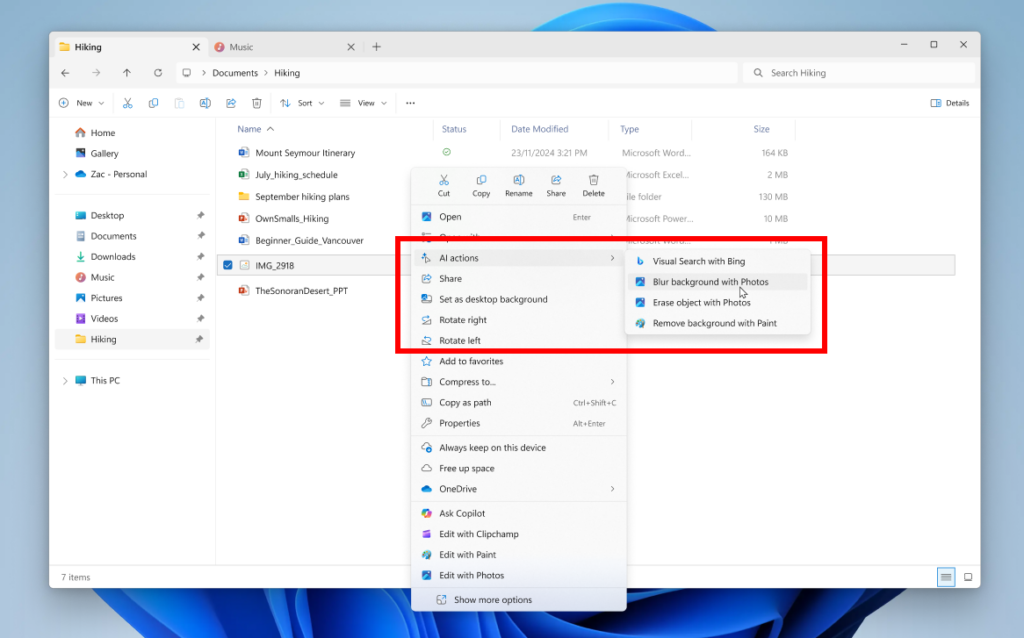
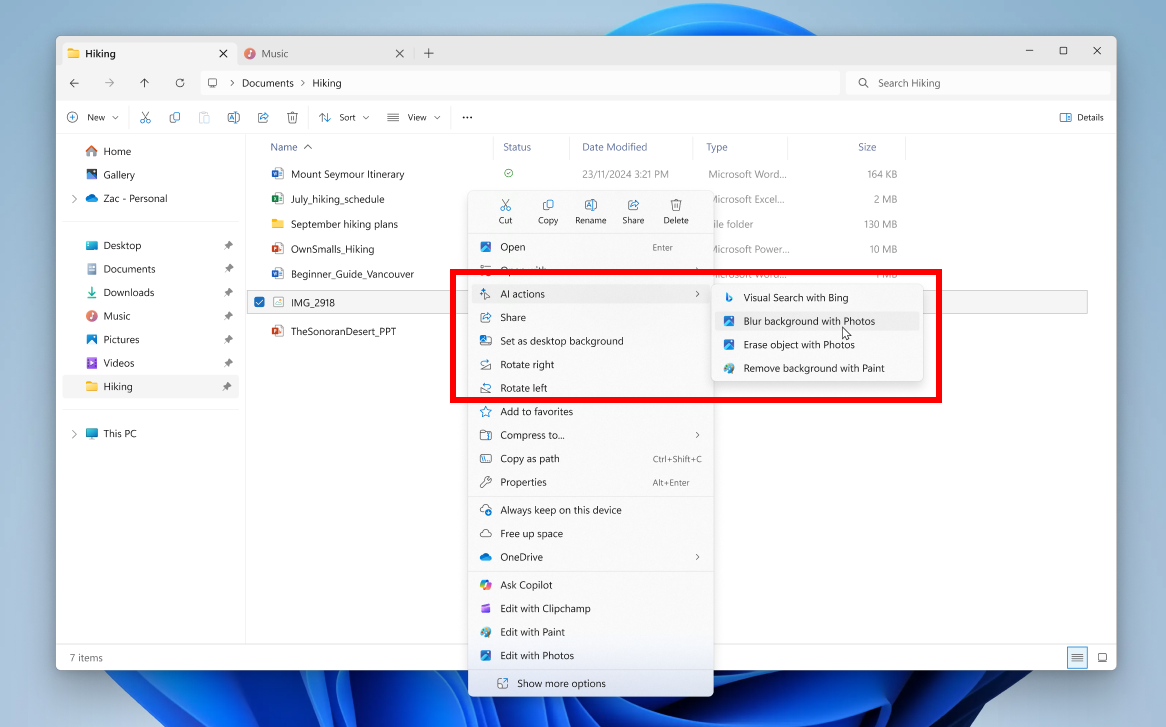
Introducing AI actions in File Explorer

With AI actions in File Explorer, you can interact more deeply with your files by right-clicking to quickly take actions like editing images or summarizing documents. Like with Click to Do, AI actions in File Explorer allow you to stay in your flow while leveraging the power of AI to take advantage of editing tools in apps or Copilot functionality without having to open your file. AI actions in File Explorer are easily accessible – to try out AI actions in File Explorer, just right-click on a file and you will see a new AI actions entry on the content menu that allows you to choose from available options for your file.


File Explorer with context menu expanded on a file showing new AI actions highlighted in a red box.

Today, you can try one of four image actions for seamless editing or web searches with images:
  • Bing Visual Search: Allows you to search the web using an image instead of text. Find similar images and products, get details about sites using the image, and identify landmarks, plants, and famous faces. From searching what you see on your screen, to shopping your preferred style, getting help with that homework problem, or translating text, getting answers is more intuitive than ever.
  • Blur Background: Opens the Photos app which automatically finds the background in the photo, and with a single click, instantly highlights your subject and blurs out the background. You can also customize the effect by adjusting the Blur Intensity or use the Brush Tool to modify the areas being blurred.
  • Erase Objects: With Photos by selecting or highlighting an unwanted element in your photo and Generative Erase makes it disappear. It allows you to fix and remove distractions from your photos.
  • Remove Background: With Paint allows you to alter any image automatically in just one click leaving a smooth cutout of the subject. Background removal can detect the subject from the entire canvas or using the selection tool.
These four image actions currently support these file types: .jpg, .jpeg, and .png.

Let us know what you think of these new AI actions in File Explorer!

FEEDBACK: Please file feedback in Feedback Hub (WIN + F) under Files, Folders, and Online Story > File Explorer.

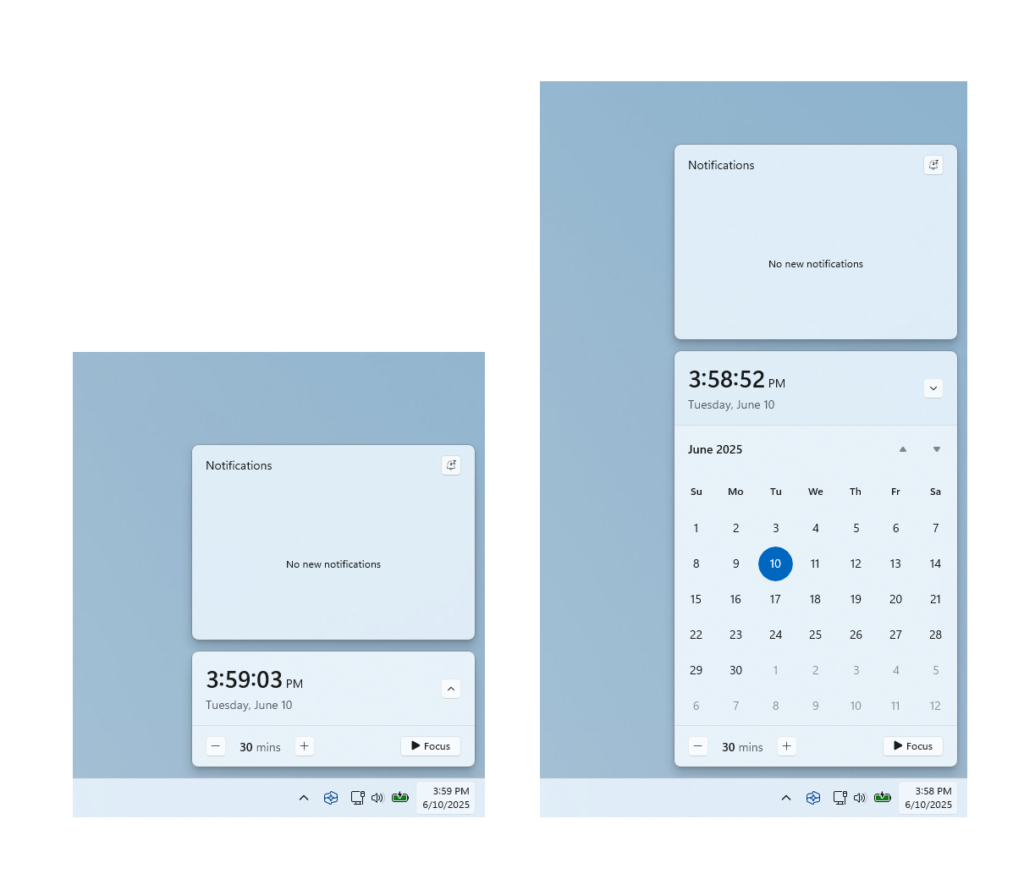
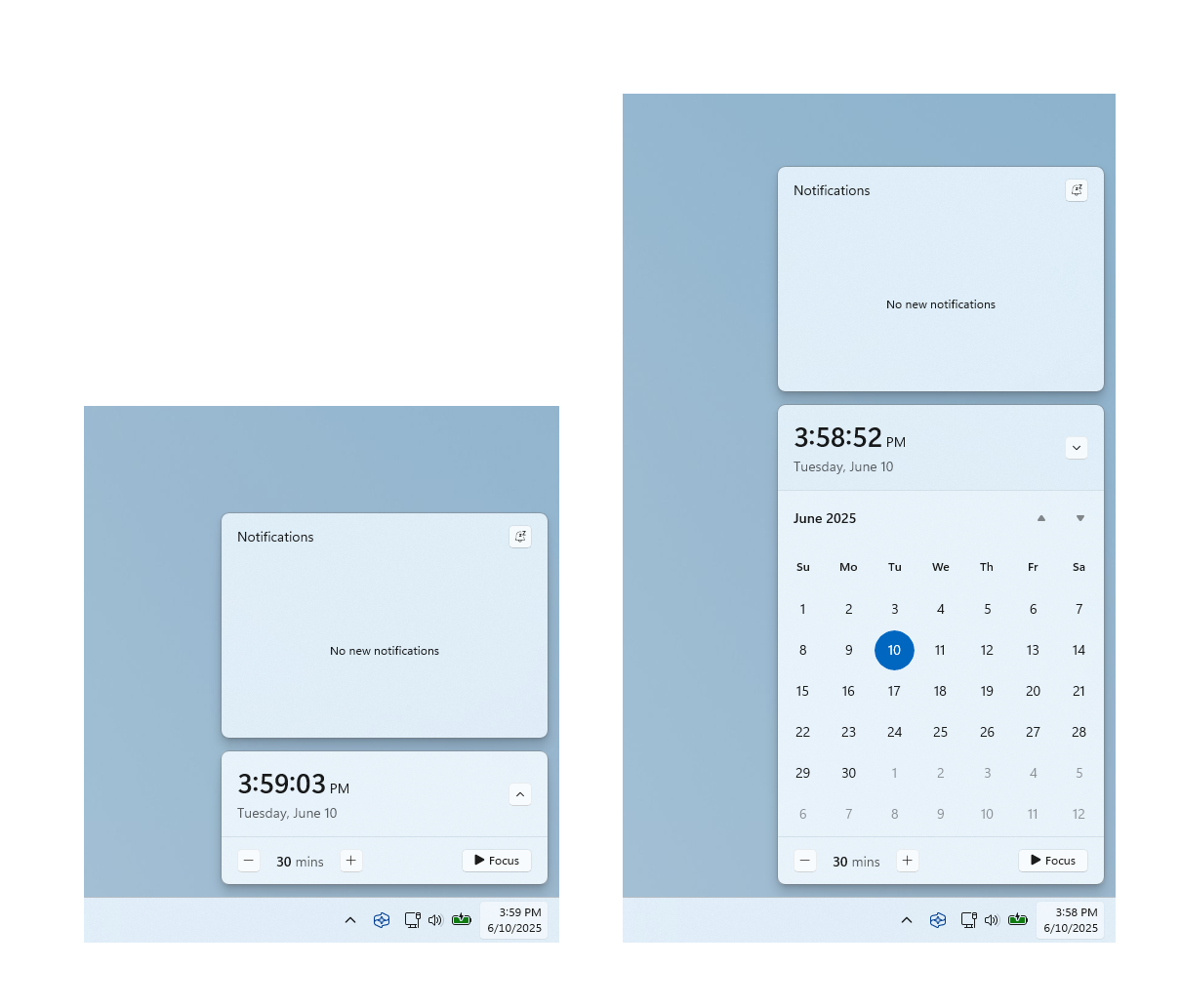
Bringing back the bigger clock with seconds option in notification center

We’re starting to roll out a highly requested feature from Windows 10, the option to show a bigger clock with seconds above the date and calendar in notification center.


Clock showing in notification center with the calendar both collapsed and expanded.

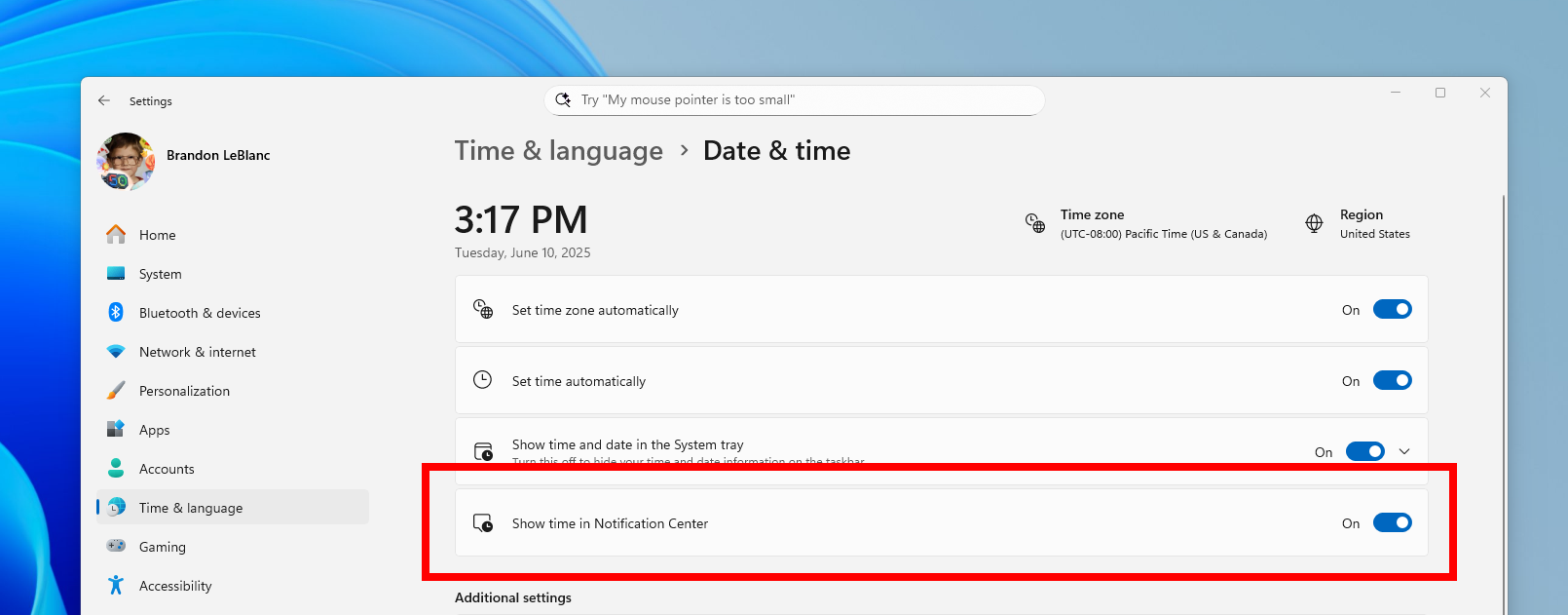
To turn this option on, go to Settings > Time & language > Date & time and flip the switch for Show time in the Notification Center.
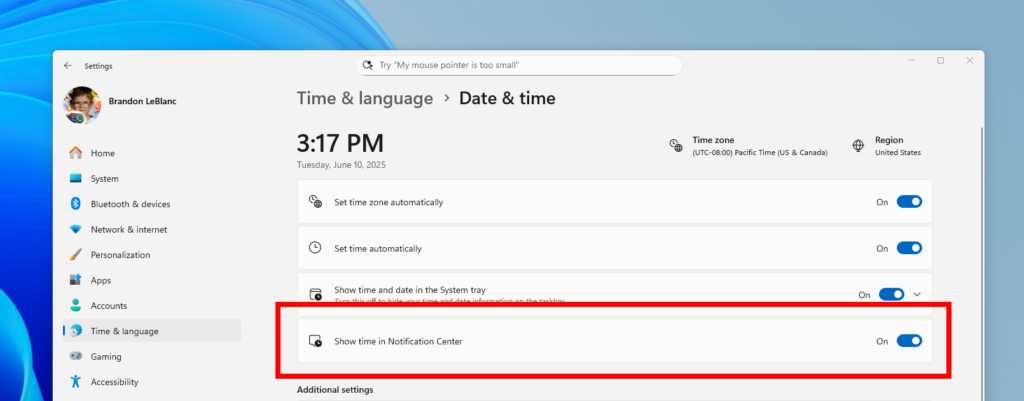
The toggle to turn on showing the clock in notification center in Settings highlighted in a red box.

FEEDBACK: Please file feedback in Feedback Hub (WIN + F) under Desktop Environment > Clock and Calendar Flyout.

Changes and Improvements

[Settings]

  • You can now visit the Settings > Privacy & security > Text and image generation to see which third-party applications recently used generative AI models provided by Windows. This page gives you visibility into the specific apps leveraging local Windows provided generative AI models and allows you to control which apps are permitted to use them—putting you in charge of your device’s AI experience.


    Text and image generation settings page with recent activity highlighted in a red box for seeing which apps use generative AI models provided by Windows.
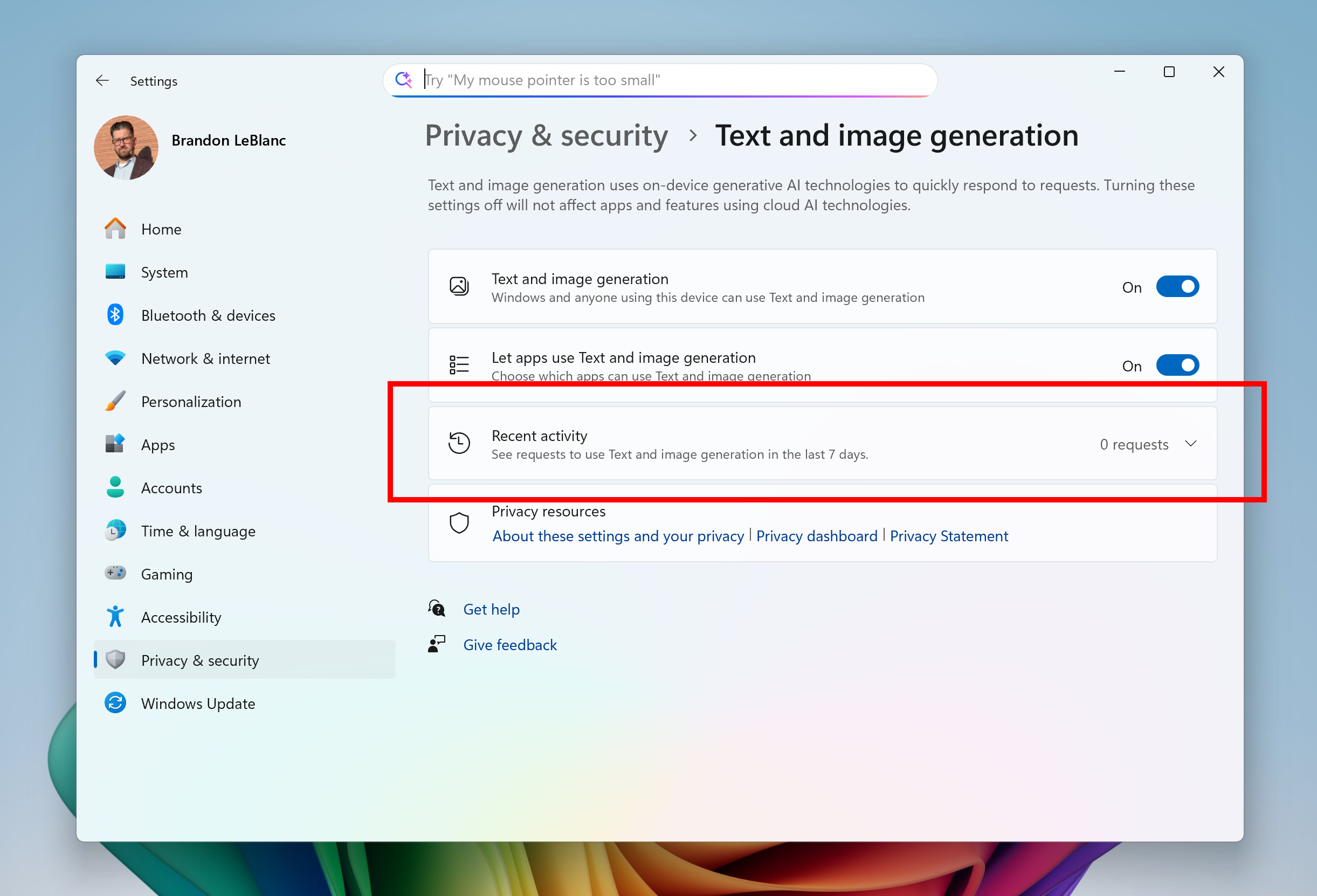
    Text and image generation settings page with recent activity highlighted in a red box for seeing which apps use generative AI models provided by Windows.

Fixes

[Reset & Recovery]

  • Fixed the issue causing the “Reset this PC” option under Settings > System > Recovery to not work on Build 27934.

[File Explorer]

  • Fixed an issue where In dark mode, the red color used for a low space drive in This PC might be unexpectedly light colored in the latest builds. Some of the other colors might also have been incorrect, including that black is used for space remaining instead of a more visible color.
  • Fixed an issue which was Fixed an issue where File Explorer was unexpectedly not showing thumbnails for video files containing certain EXIF metadata.

[Windows Management Instrumentation (WMI)]

  • Performance improvements related to WMI Registry scanning.

[Login and Lock screen]

  • Fixed an issue which was causing some of the sign in options to have a blank icon.

[Search]

  • Did some work to help reduce instances where search may get stuck in a loading state.

[Input]

  • Fixed an issue where if you typed on the touch keyboard with the Changjie, Bopomoji, or Japanese IME, it wouldn’t work if you had switched to using the previous version of the IME.

[Task Manager]

  • Fixed an issue which was causing Task Manager to freeze when going to the performance section recently for some Insiders.

[Other]

  • Fixed an issue which was causing some Insiders to experience bugchecks (green screens) with error IRQL_NOT_LESS_OR_EQUAL citing an issue with ntoskrnl.exe in the latest Canary builds when attempting to enter safe mode.
  • Fixed an issue causing some Insiders to experience bugchecks recently with error CRITICAL_PROCESS_DIED.

Known issues

[General]

  • [IMPORTANT] Some Windows Insiders may experience a rollback attempting to install this build with either an 0xC1900101-0x20017 error or 0xC1900101-0x30017 error. Unfortunately retrying to install the build will result in another rollback. We are working on a fix.
  • We’re working on the fix for an issue causing Settings > System > Storage > Temporary files to get stuck when scanning files. This issue also causes the entry to clean up previous Windows Installations to not show in Storage Settings.

[For developers]

  • [NEW] PIX on Windows is unable to play back GPU captures on this OS version. This will be addressed by a new PIX release, estimated to arrive by the end of September. In the meantime, if you are impacted, you can use the “Send Feedback” button in PIX or contact us on the DirectX Discord server and we can help provide private builds.

[Graphics]

  • We’re investigating an issue which is causing some Insiders to experience screen flickers when using the browser (and potentially other scenarios) in the latest Canary builds.

 
Last edited:
27938.1.webp
 

My Computers

System One System Two

  • OS
    Windows 11 Pro for Workstations
    Computer type
    PC/Desktop
    Manufacturer/Model
    Custom self build
    CPU
    Intel i7-8700K 5 GHz
    Motherboard
    ASUS ROG Maximus XI Formula Z390
    Memory
    64 GB (4x16GB) G.SKILL TridentZ RGB DDR4 3600 MHz (F4-3600C18D-32GTZR)
    Graphics Card(s)
    ASUS ROG-STRIX-GTX1080TI-O11G-GAMING (11GB GDDR5X)
    Sound Card
    Integrated Digital Audio (S/PDIF)
    Monitor(s) Displays
    2 x Samsung Odyssey G75 27"
    Screen Resolution
    2560x1440
    Hard Drives
    1TB Samsung 990 PRO M.2,
    4TB Samsung 990 PRO M.2,
    TerraMaster F8 SSD Plus NAS
    PSU
    Seasonic Prime Titanium 850W
    Case
    Thermaltake Core P3 wall mounted
    Cooling
    Corsair Hydro H115i
    Keyboard
    Amazon Basics Wired Full Keyboard MD005
    Mouse
    Logitech MX Master 4
    Internet Speed
    2 Gbps Download and 100 Mbps Upload
    Browser
    Chrome and Edge
    Antivirus
    Microsoft Defender
    Other Info
    Logitech Z625 speaker system,
    Logitech BRIO 4K Pro webcam,
    HP Color LaserJet Pro MFP M477fdn,
    CyberPower CP1500PFCLCD
    Galaxy S23 Plus phone
  • Operating System
    Windows 11 Pro
    Computer type
    Laptop
    Manufacturer/Model
    Surface Laptop 7 Copilot+ PC
    CPU
    Snapdragon X Elite (12 core) 3.42 GHz
    Memory
    16 GB LPDDR5x-7467 MHz
    Monitor(s) Displays
    15" HDR
    Screen Resolution
    2496 x 1664
    Hard Drives
    1 TB SSD
    Internet Speed
    Wi-Fi 7 and Bluetooth 5.4
    Browser
    Chrome and Edge
    Antivirus
    Microsoft Defender
These builds are getting spooky. Got my 10 ft. pole out.
 

My Computer

System One

  • OS
    Win 11 Insider Release Preview and Beta channels.
    Computer type
    Laptop
    Manufacturer/Model
    HP ENVY Bought: March 2017
    CPU
    i5 Core [email protected] (Unsupported for Win 11)
    Motherboard
    HP 81AD (U3E1)
    Memory
    12GB
    Graphics Card(s)
    Generic PnP Monitor (1920x1080@60Hz) Intel HD Graphics 620 (HP)
    Sound Card
    Conexant ISST audio
    Monitor(s) Displays
    Generic PnP Monitor
    Screen Resolution
    1536x864 pixels
    Hard Drives
    HGST HTS721010A9E630
    PSU
    Well...PSU you too!! What's this mean?
    Case
    HP ENVY SILVER
    Cooling
    A fan.
    Keyboard
    USA
    Mouse
    Logitec Anywhere 2
    Internet Speed
    Good enough for me! Fast!
    Browser
    Edge/Waterfox
    Antivirus
    Windows Defender
    Other Info
    No 'mo.
MS, your Canary builds are boring and a waste of Insider Canary build testers time and energy. Please give those of us that want to drop out a chance to do so without the need to do a clean install. You have done it before and I know you can do it again if you want. And before anyone say that this is not a MS forum, I know this is not a MS site but I'm sure they do monitor this site to get a better understanding of what we are experiencing and how we feel.
 

My Computers

System One System Two

  • OS
    Windows 11 Pro 25H2
    Computer type
    PC/Desktop
    Manufacturer/Model
    PowerSpec B746
    CPU
    Intel Core i7-10700K
    Motherboard
    ASRock Z490 Phantom Gaming 4/ax
    Memory
    16GB (8GB PC4-19200 DDR4 SDRAM x2)
    Graphics Card(s)
    NVIDIA GeForce GTX 1050 TI
    Sound Card
    Realtek Audio
    Monitor(s) Displays
    #1. LG ULTRAWIDE 34" #2. AOC Q32G2WG3 32"
    Screen Resolution
    #1. 3440 X 1440 #2. 1920 x 1080
    Hard Drives
    NVMe WDC WDS100T2B0C-00PXH0 1TB
    Samsung SSD 860 EVO 1TB
    PSU
    750 Watts (62.5A)
    Case
    PowerSpec/Lian Li ATX 205
    Keyboard
    Logitech K270
    Mouse
    Logitech M185
    Browser
    Microsoft Edge and Firefox
    Antivirus
    Webroot SecureAnywhere CE 26.1
  • Operating System
    Windows 11 Canary Channel
    Computer type
    PC/Desktop
    Manufacturer/Model
    PowerSpec G156
    CPU
    Intel Core i5-8400 CPU @ 2.80GHz
    Motherboard
    AsusTeK Prime B360M-A
    Memory
    16 MB DDR 4-2666
    Monitor(s) Displays
    23" Speptre HDMI 75Hz
    Screen Resolution
    1920x1080
    Hard Drives
    Samsung 970 EVO 500GB NVMe
    Keyboard
    Logitek K270
    Mouse
    Logitek M185
    Browser
    Firefox, Edge and Edge Canary
    Antivirus
    Windows Defender
MS, your Canary builds are boring and a waste of Insider Canary build testers time and energy. Please give those of us that want to drop out a chance to do so without the need to do a clean install. You have done it before and I know you can do it again if you want. And before anyone say that this is not a MS forum, I know this is not a MS site but I'm sure they do monitor this site to get a better understanding of what we are experiencing and how we feel.
Here, here!
 

My Computer

System One

  • OS
    Win 11 Insider Release Preview and Beta channels.
    Computer type
    Laptop
    Manufacturer/Model
    HP ENVY Bought: March 2017
    CPU
    i5 Core [email protected] (Unsupported for Win 11)
    Motherboard
    HP 81AD (U3E1)
    Memory
    12GB
    Graphics Card(s)
    Generic PnP Monitor (1920x1080@60Hz) Intel HD Graphics 620 (HP)
    Sound Card
    Conexant ISST audio
    Monitor(s) Displays
    Generic PnP Monitor
    Screen Resolution
    1536x864 pixels
    Hard Drives
    HGST HTS721010A9E630
    PSU
    Well...PSU you too!! What's this mean?
    Case
    HP ENVY SILVER
    Cooling
    A fan.
    Keyboard
    USA
    Mouse
    Logitec Anywhere 2
    Internet Speed
    Good enough for me! Fast!
    Browser
    Edge/Waterfox
    Antivirus
    Windows Defender
    Other Info
    No 'mo.
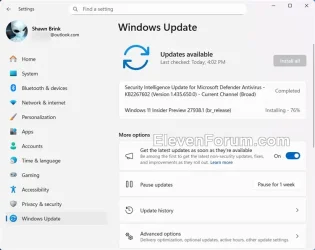
Downloading and installing.


1757369782792.webp

1757370225037.webp

Done:

Edition Windows 11 Pro
Version Dev
Installed on ‎9/‎8/‎2025
Evaluation expires on ‎8/‎11/‎2026 11:09 AM
OS build 27938.1
Experience Windows Feature Experience Pack 1000.26100.234.0
 
Last edited:

My Computer

System One

  • OS
    Windows 11 Pro 25H2
    Computer type
    PC/Desktop
    Manufacturer/Model
    Dell XPS 8930
    CPU
    Intel I9-9900K
    Memory
    64GB
    Graphics Card(s)
    NVIDIA RTX 2060
    Sound Card
    NVIDIA High Definition Audio
    Monitor(s) Displays
    4k Samsung
    Screen Resolution
    3840 x 2160
    Hard Drives
    512GB NVMe, ADATA SU 800, 2TB HDD
They still could not fix this one. 😝🤷‍♂️

  • We’re working on the fix for an issue causing Settings > System > Storage > Temporary files to get stuck when scanning files. This issue also causes the entry to clean up previous Windows Installations to not show in Storage Settings.
Had to use Disk Cleanup to delete Windows.old.
 
Last edited:
My Computer

System One

  • OS
    Windows 11 Pro 25H2
    Computer type
    PC/Desktop
    Manufacturer/Model
    Dell XPS 8930
    CPU
    Intel I9-9900K
    Memory
    64GB
    Graphics Card(s)
    NVIDIA RTX 2060
    Sound Card
    NVIDIA High Definition Audio
    Monitor(s) Displays
    4k Samsung
    Screen Resolution
    3840 x 2160
    Hard Drives
    512GB NVMe, ADATA SU 800, 2TB HDD
I'm tired. Pass.
 

My Computers

System One System Two

  • OS
    Windows 11 Pro
    Computer type
    PC/Desktop
    Manufacturer/Model
    ASUS ROG Strix
  • Operating System
    Windows 11 Pro
    Computer type
    Laptop
    Manufacturer/Model
    ASUS VivoBook

My Computer

System One

  • OS
    Win 11 Insider Release Preview and Beta channels.
    Computer type
    Laptop
    Manufacturer/Model
    HP ENVY Bought: March 2017
    CPU
    i5 Core [email protected] (Unsupported for Win 11)
    Motherboard
    HP 81AD (U3E1)
    Memory
    12GB
    Graphics Card(s)
    Generic PnP Monitor (1920x1080@60Hz) Intel HD Graphics 620 (HP)
    Sound Card
    Conexant ISST audio
    Monitor(s) Displays
    Generic PnP Monitor
    Screen Resolution
    1536x864 pixels
    Hard Drives
    HGST HTS721010A9E630
    PSU
    Well...PSU you too!! What's this mean?
    Case
    HP ENVY SILVER
    Cooling
    A fan.
    Keyboard
    USA
    Mouse
    Logitec Anywhere 2
    Internet Speed
    Good enough for me! Fast!
    Browser
    Edge/Waterfox
    Antivirus
    Windows Defender
    Other Info
    No 'mo.
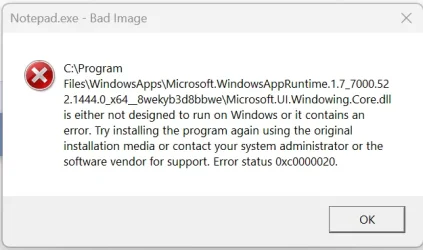
The ISO Built from uupdump is still not working like previous Build 27934.
Fails opening and updating Apps from MS Store.
Had to update with Windows Update to get a working 27938 Build, updating with uupdump ISO produced the problems below.

1757377366300.webp


This below fails on every retry.
1757377448782.webp
 
Last edited:
My Computer

System One

  • OS
    Windows 11 Pro 25H2
    Computer type
    PC/Desktop
    Manufacturer/Model
    Dell XPS 8930
    CPU
    Intel I9-9900K
    Memory
    64GB
    Graphics Card(s)
    NVIDIA RTX 2060
    Sound Card
    NVIDIA High Definition Audio
    Monitor(s) Displays
    4k Samsung
    Screen Resolution
    3840 x 2160
    Hard Drives
    512GB NVMe, ADATA SU 800, 2TB HDD
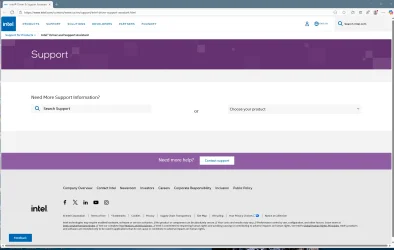
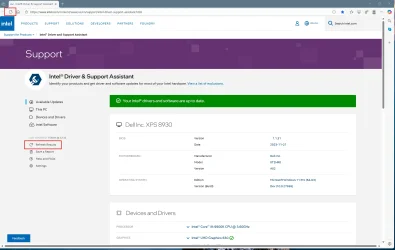
This build is also causing Intel DSA to fail. Hangs without ever showing the results.
They broke this before with one of the experimental features, looks like they did it again.
I downloaded and reinstalled Intel DSA on 9/8/2025 and got the same version and the same result.
I checked on all the other Windows 11 Builds, and this problem appears to be common to all recent Builds, Canary, Dev, Beta, R.P and also the latest public Build 26100.5074.

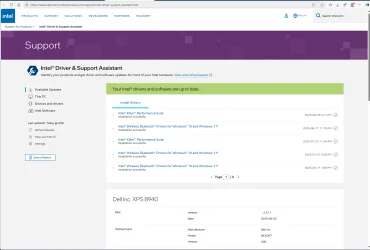
In some cases, after waiting for a long time in this hung condition, refreshing the browser page may unlock the freeze and shows the result.
After that, if I click on Refresh Results, I see the scan starting normally.
Pretty weird bug, the latest Windows Builds are causing this Application to fail. 😵‍💫🤷‍♂️
Either Intel or Microsoft should fix this one.


1757379712565.webp

1757382486728.webp

It gets stuck here without ever completing.
1757379669164.webp


Sometimes it unlocks by hitting refresh on the browser after sitting there for a long time, after that if I hit Refresh Results the scan starts normally. 🤣🤣🤬🤷‍♂️
1757397659519.webp


Edit:
I tried again on 9/9/2025 and could not reproduce this problem anymore.
Perhaps there was an issue with the Intel server yesterday when it was failing on every machine?
Glad that it works now. 🤞

1757435600207.webp
 
Last edited:

My Computer

System One

  • OS
    Windows 11 Pro 25H2
    Computer type
    PC/Desktop
    Manufacturer/Model
    Dell XPS 8930
    CPU
    Intel I9-9900K
    Memory
    64GB
    Graphics Card(s)
    NVIDIA RTX 2060
    Sound Card
    NVIDIA High Definition Audio
    Monitor(s) Displays
    4k Samsung
    Screen Resolution
    3840 x 2160
    Hard Drives
    512GB NVMe, ADATA SU 800, 2TB HDD
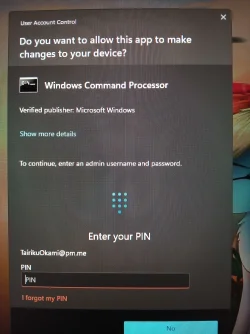
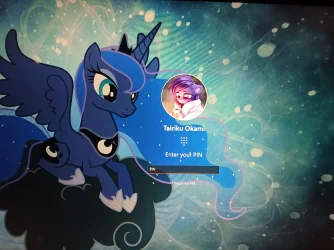
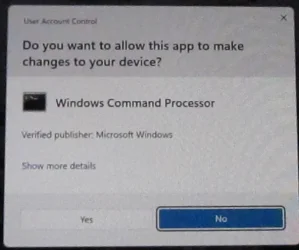
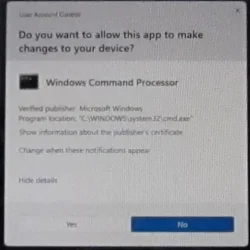
It seems that MS has updated UAC GUI, after decades. 😲

20250909_193440.webp 20250909_195952.webp
 

My Computer

System One

  • OS
    Home26H2Can
    Computer type
    PC/Desktop
    CPU
    AMD Ryzen 5 8600G (07/24)
    Motherboard
    ASROCK B650M-HDV/M.2 (07/24) BIOS 4.21 AGESA ComboAM5 1.3.0.1 (04/26)
    Memory
    2x32GB Kingston FURY DDR5 5600 MHz CL36 @5200 CL36 (07/24)
    Graphics Card(s)
    ASROCK Radeon RX 6600 Challenger D 8G @48FPS (08/24)
    Sound Card
    Creative Sound BlasterX AE-5 Plus (05/24)
    Monitor(s) Displays
    24" Philips 24M1N3200ZS/00 (05/24)
    Screen Resolution
    1920×1080@165Hz via DP1.4
    Hard Drives
    Kingston KC3000 NVMe 2TB (05/24)
    ADATA XPG GAMMIX S11 Pro 512GB (07/19)
    PSU
    Seasonic Core GM 550 Gold (04/24)
    Case
    Fractal Design Define 7 Mini with 3x Noctua NF-P14s/12@555rpm (04/24)
    Cooling
    Noctua NH-U12S with Noctua NF-P12 (04/24)
    Keyboard
    HP Pavilion Wired Keyboard 300 (07/24) + Rabalux 76017 Parker (01/24)
    Mouse
    Logitech M330 Silent Plus (01/26)
    Internet Speed
    500/100 Mbps via RouterOS (05/21) & TCP Optimizer
    Browser
    Edge, Brave for YouTube, LibreWolf for FB
    Antivirus
    NextDNS blocking 1/3 Traffic
    Other Info
    Phone: Motorola Moto G86 (02/26)

    Backup: Hasleo Backup Suite (PreOS)
    Headphones: Sennheiser RS170 (09/10)
    Chair: Huzaro Force 4.4 Grey Mesh (05/24)
    Notifier: Xiaomi Mi Band 9 Milanese (10/24)
    FlexCore USB-C 3.2 Gen 1 (M) to LAN (F) (08/25)
Installed with no issues so far, on two computers.
 

My Computers

System One System Two

  • OS
    windows 10 & 11
    Computer type
    PC/Desktop
    Manufacturer/Model
    iBuyPower (special build)
    CPU
    AMD Ryzen 7X
    Motherboard
    Asus Prime x370 Pro
    Memory
    64Gb
    Graphics Card(s)
    Radeon RX 480 8Gb
    Monitor(s) Displays
    Samsung UHD 27 inch
    Screen Resolution
    UHD
    Hard Drives
    3 Samsung 1 TB SSD each; 1 Samsung PCIe M.2 at 2 TB
  • Operating System
    Windows 11 pro
    Computer type
    PC/Desktop
    Manufacturer/Model
    IBuyPower
    CPU
    AMD 9 5900X
    Motherboard
    Asus x570 ROG Crosshair VIII Dark Hero WI-FI 6E ARGB
    Memory
    32 Gb
    Graphics card(s)
    Nvidia GeForce RTX 3080 Ti 12 GB GDDR6X
    Sound Card
    3D PREMIUM surround sound onboard
    Monitor(s) Displays
    Samsung 32 inch UHD curved monitor
    Screen Resolution
    UHD
    Hard Drives
    Samsung 980 pro 2 tb gen 4 NVMe ssd
    PSU
    850 watt consair RM850X
    Case
    Lian Li LANCOOL ONE tempered glass RGB gaming case
    Cooling
    DEEPCOOL GAMERSTORM RGB 240 mm CASTLE 240EX liquid cooler
    Keyboard
    Ares m.2 gaming keyboard
    Mouse
    Ares m.2 gaming optical mouse
    Internet Speed
    450
    Browser
    Firefox / Edge
    Antivirus
    Windows defender
    Other Info
    With all this gaming rig I am not a gamer!

My Computer

System One

  • OS
    Windows 11 Pro 25H2
    Computer type
    PC/Desktop
    Manufacturer/Model
    Dell XPS 8930
    CPU
    Intel I9-9900K
    Memory
    64GB
    Graphics Card(s)
    NVIDIA RTX 2060
    Sound Card
    NVIDIA High Definition Audio
    Monitor(s) Displays
    4k Samsung
    Screen Resolution
    3840 x 2160
    Hard Drives
    512GB NVMe, ADATA SU 800, 2TB HDD
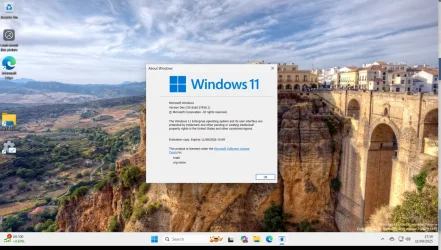
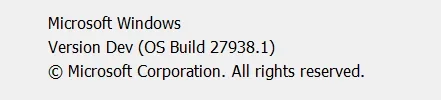
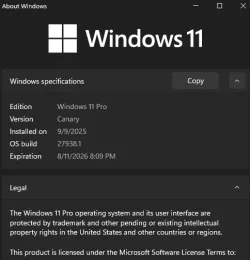
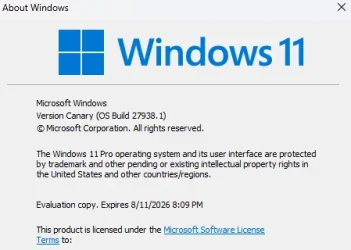
Why does this CANARY build come out as DEV !!! on my system.

Screenshot_20250911_174008.webp


Cheers
jimbo
 

My Computer

System One

  • OS
    Windows XP,11 Linux Fedora Rawhide pre-release 45
    Computer type
    PC/Desktop
    CPU
    2 X Intel i7
    Screen Resolution
    4KUHD X 2
 

My Computers

System One System Two

  • OS
    Windows 11 Pro for Workstations
    Computer type
    PC/Desktop
    Manufacturer/Model
    Custom self build
    CPU
    Intel i7-8700K 5 GHz
    Motherboard
    ASUS ROG Maximus XI Formula Z390
    Memory
    64 GB (4x16GB) G.SKILL TridentZ RGB DDR4 3600 MHz (F4-3600C18D-32GTZR)
    Graphics Card(s)
    ASUS ROG-STRIX-GTX1080TI-O11G-GAMING (11GB GDDR5X)
    Sound Card
    Integrated Digital Audio (S/PDIF)
    Monitor(s) Displays
    2 x Samsung Odyssey G75 27"
    Screen Resolution
    2560x1440
    Hard Drives
    1TB Samsung 990 PRO M.2,
    4TB Samsung 990 PRO M.2,
    TerraMaster F8 SSD Plus NAS
    PSU
    Seasonic Prime Titanium 850W
    Case
    Thermaltake Core P3 wall mounted
    Cooling
    Corsair Hydro H115i
    Keyboard
    Amazon Basics Wired Full Keyboard MD005
    Mouse
    Logitech MX Master 4
    Internet Speed
    2 Gbps Download and 100 Mbps Upload
    Browser
    Chrome and Edge
    Antivirus
    Microsoft Defender
    Other Info
    Logitech Z625 speaker system,
    Logitech BRIO 4K Pro webcam,
    HP Color LaserJet Pro MFP M477fdn,
    CyberPower CP1500PFCLCD
    Galaxy S23 Plus phone
  • Operating System
    Windows 11 Pro
    Computer type
    Laptop
    Manufacturer/Model
    Surface Laptop 7 Copilot+ PC
    CPU
    Snapdragon X Elite (12 core) 3.42 GHz
    Memory
    16 GB LPDDR5x-7467 MHz
    Monitor(s) Displays
    15" HDR
    Screen Resolution
    2496 x 1664
    Hard Drives
    1 TB SSD
    Internet Speed
    Wi-Fi 7 and Bluetooth 5.4
    Browser
    Chrome and Edge
    Antivirus
    Microsoft Defender

My Computer

System One

  • OS
    Windows 11 Pro 25H2
    Computer type
    PC/Desktop
    Manufacturer/Model
    Dell XPS 8930
    CPU
    Intel I9-9900K
    Memory
    64GB
    Graphics Card(s)
    NVIDIA RTX 2060
    Sound Card
    NVIDIA High Definition Audio
    Monitor(s) Displays
    4k Samsung
    Screen Resolution
    3840 x 2160
    Hard Drives
    512GB NVMe, ADATA SU 800, 2TB HDD
  • Like
Reactions: OAT
In addition, you will not see the word Canary anywhere in the OS, unless you...

Screenshot 2025-09-11 081911.webpcanary.webp
 

My Computers

System One System Two

  • OS
    All Branches but Release
    Computer type
    Laptop
    Manufacturer/Model
    Acer Nitro ANV15-51
    CPU
    AMD Ryzen 7 7735HS 3200-4500 Mhz 8 cores x 2
    Motherboard
    Sportage_RBH
    Memory
    32 GB DDR5
    Graphics Card(s)
    Radeon Graphic / NVIDIA GeForce RTX 4060 8 GB GDDR6
    Sound Card
    AMD/Realtek(R) Audio
    Monitor(s) Displays
    Integrated Monitor (15.3"vis)
    Screen Resolution
    FHD 1920X1080 16:9 144Hz
    Hard Drives
    KINGSTON OM8SEP4512Q-AA 1TB
    Western Digital 256GB
    PSU
    19V DC 6.32 A 120 W
    Cooling
    Dual Fans
    Mouse
    MS Bluetooth
    Internet Speed
    Fiber 1GB Cox -us & 1GB Orange-fr
    Browser
    Edge Canary- Firefox Nightly-Chrome Dev-Chrome Dev
    Antivirus
    Windows Defender
  • Operating System
    Windows 11 Beta
    Computer type
    Laptop
    Manufacturer/Model
    Asus X751BP
    CPU
    AMD A9-9420
    Memory
    8 GB of DDR4
    Graphics card(s)
    AMD Radeon R5
    Screen Resolution
    1600x900
    Hard Drives
    Seagate 1 TB
Back
Top Bottom