UPDATE 10/16:
 www.elevenforum.com
Hello Windows Insiders, today we are releasing Windows 11 Insider Preview Build 27965 to the Canary Channel.
 www.elevenforum.com
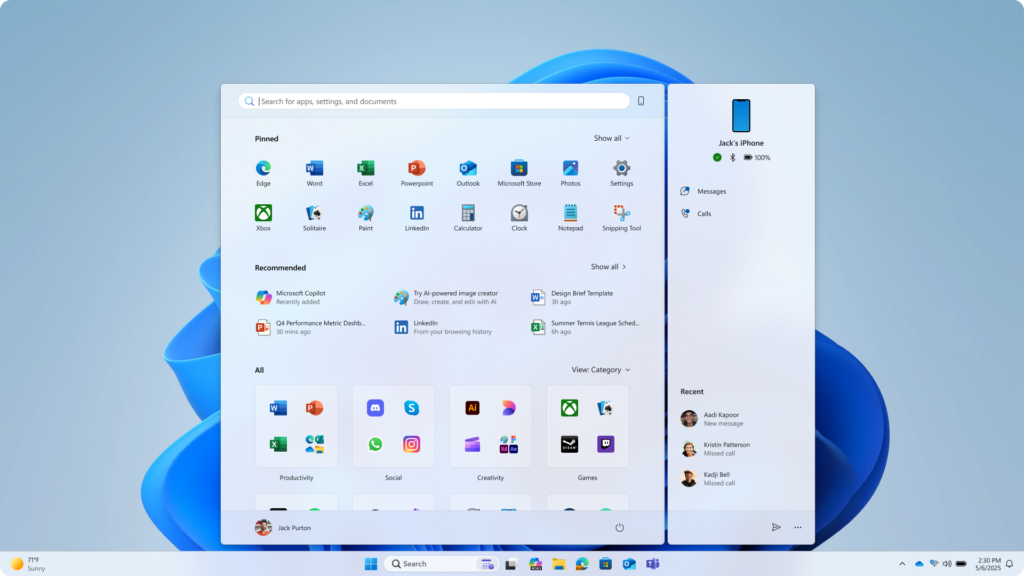
Updated Start menu shows pinned apps on the top, recommended apps and files in the middle, and installed apps which are grouped by a new category UI on the bottom.
Easily launch all your apps with scrollable Start menu
We’re making it easier for you to launch your apps with our updated, scrollable Start menu. With “All” now on the top-level, apps are easily accessible without having to navigate to a secondary page. In addition, we’re introducing two new views to browse and launch your installed apps in the “All” section: category and grid view.
The new default Category view automatically groups your apps by category for quick access to your most used categories and apps. So, if your most used apps are Outlook and Solitaire, you can expect those apps to bubble up to the top in their respective categories. Categories are formed when there are at least 3 apps in each respective category. Otherwise, they will remain in the “Other” category.
Grid view is ordered alphabetically like List view but allows for better scanning of all your installed apps with more horizontal real estate. With new view options to choose from in the “All” section, we’ll remember your last used view so you can reliably launch your apps with the view you prefer most.
 www.elevenforum.com
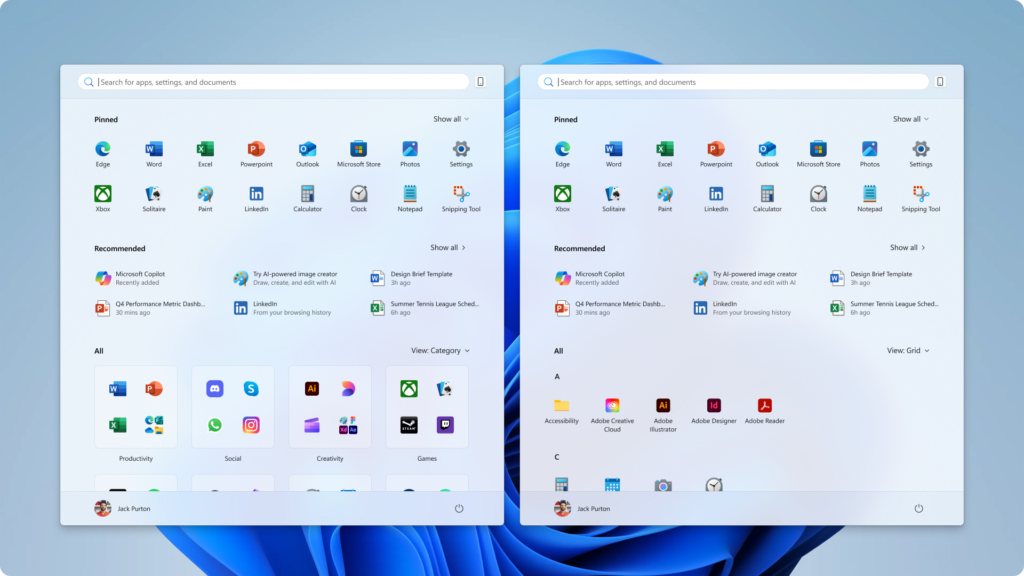
Updated Start menu introduces 2 new ways to view installed apps: by category and grid views.
Experience a larger Start menu with responsive sections
We’re making better use of your screen real estate by adapting the size of the Start menu based on your screen size. Have a larger-screen device? You can expect to see a larger Start menu, by default, so you can see more of your apps and files. On larger devices, users can expect to see 8 columns of pinned apps, 6 recommendations, and 4 columns of categories in the Start menu. On smaller devices, you’ll see 6 columns of pinned apps, 4 recommendations, and 3 columns of categories.
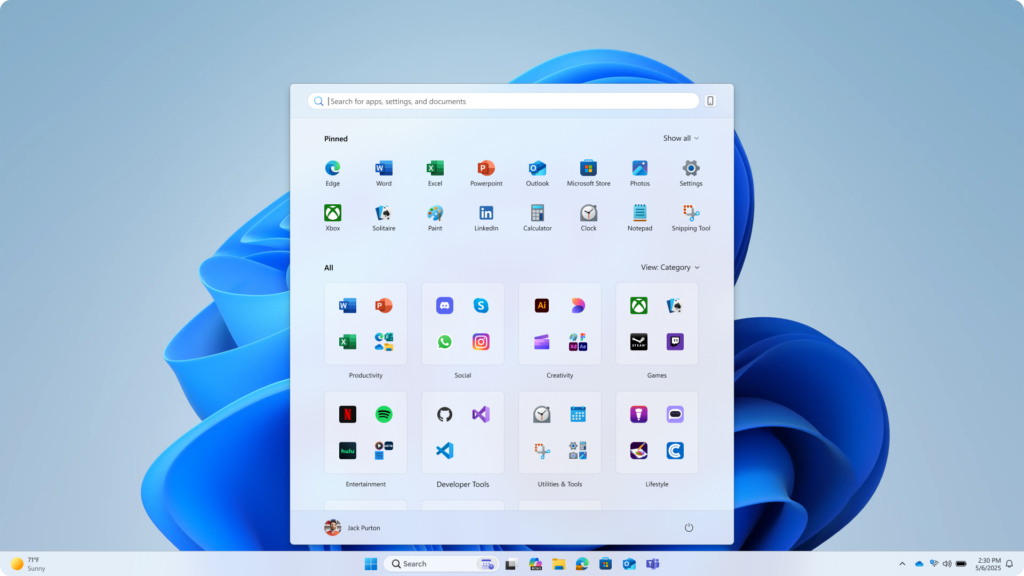
Updated Start menu only shows pinned and installed apps to illustrate that sections within Start are now responsive and can collapse such as the Recommended section.
Sections within Start are also responsive so you can see more or less of your Pinned and Recommended sections. Have only a few pins? The Pinned section will shrink down to a single row and other sections will slide up. If you’d prefer to not see recommendations, then turn off the following toggles in Settings > Personalization > Start: “Show recently added apps,” “Show recommended files in Start…,” “Show websites from your browsing history,” and “Show recommendations for tips…” If there aren’t any recommendations available, the section will collapse so you can see more of your installed apps.
 www.elevenforum.com
 www.elevenforum.com
 www.elevenforum.com
 www.elevenforum.com
 www.elevenforum.com
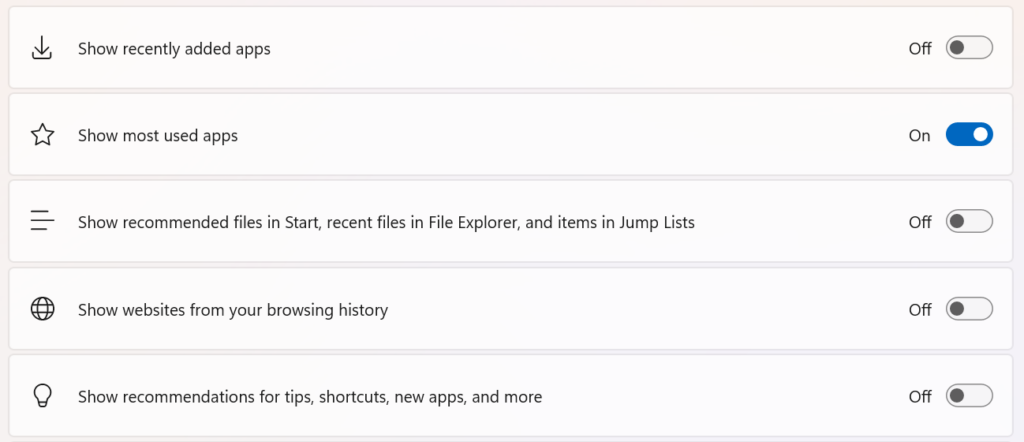
Toggles in Settings app to turn on/off features in Start.
Seamless cross-device integration with Phone Link
Lastly, we’ve updated Start to continue allowing you to take advantage of powerful cross-device features. Now, you can easily expand and collapse mobile device content using the new mobile device button next to the Search box.
 www.elevenforum.com
This cross-device integration is generally available for connected Android and iOS devices in most markets and will be coming later in 2025 to the European Economic Area.
[We are beginning to roll this out to Windows Insiders in the Canary, so the experience isn’t available to all Insiders just yet as we plan to monitor feedback before pushing it out to everyone.]
FEEDBACK: Please file feedback in Feedback Hub (WIN + F) under Desktop Environment > Start menu.
Amanda

 blogs.windows.com
Check Windows Updates
UUP Dump:
64-bit ISO download:

ARM64 ISO download:
 www.elevenforum.com
Windows 11 Insider Canary build 27971.1 - Oct. 16
Windows Insider Blog: Source: Check Windows Updates UUP Dump: 64-bit ISO download: x ARM64 ISO download: x https://www.elevenforum.com/t/uup-dump-download-windows-insider-iso.344/
www.elevenforum.com
Windows Insider Blog:
Hello Windows Insiders, today we are releasing Windows 11 Insider Preview Build 27965 to the Canary Channel.
What’s new in Build 27965
Introducing the new Start menu for Windows 11
Open Start Menu in Windows 11
This tutorial will show you how to open the Start menu in Windows 11. The Start menu in Windows 11 is comprised of three sections: Pinned, Recent, and All apps. The Pinned section on the Start menu is where you can Pin to Start apps, and rearrange them in any order you want. You can customize...
www.elevenforum.com
Updated Start menu shows pinned apps on the top, recommended apps and files in the middle, and installed apps which are grouped by a new category UI on the bottom.
Easily launch all your apps with scrollable Start menu
We’re making it easier for you to launch your apps with our updated, scrollable Start menu. With “All” now on the top-level, apps are easily accessible without having to navigate to a secondary page. In addition, we’re introducing two new views to browse and launch your installed apps in the “All” section: category and grid view.
The new default Category view automatically groups your apps by category for quick access to your most used categories and apps. So, if your most used apps are Outlook and Solitaire, you can expect those apps to bubble up to the top in their respective categories. Categories are formed when there are at least 3 apps in each respective category. Otherwise, they will remain in the “Other” category.
Grid view is ordered alphabetically like List view but allows for better scanning of all your installed apps with more horizontal real estate. With new view options to choose from in the “All” section, we’ll remember your last used view so you can reliably launch your apps with the view you prefer most.
Change Start Menu All apps View in Windows 11
This tutorial will show you how to change the view layout of the All apps section on the Start menu for your account in Windows 11. The Start menu in Windows 11 is comprised of three sections: Pinned, Recent, and All apps. The All apps section on the Start menu shows all your installed apps in...
www.elevenforum.com
Updated Start menu introduces 2 new ways to view installed apps: by category and grid views.
Experience a larger Start menu with responsive sections
We’re making better use of your screen real estate by adapting the size of the Start menu based on your screen size. Have a larger-screen device? You can expect to see a larger Start menu, by default, so you can see more of your apps and files. On larger devices, users can expect to see 8 columns of pinned apps, 6 recommendations, and 4 columns of categories in the Start menu. On smaller devices, you’ll see 6 columns of pinned apps, 4 recommendations, and 3 columns of categories.
Updated Start menu only shows pinned and installed apps to illustrate that sections within Start are now responsive and can collapse such as the Recommended section.
Sections within Start are also responsive so you can see more or less of your Pinned and Recommended sections. Have only a few pins? The Pinned section will shrink down to a single row and other sections will slide up. If you’d prefer to not see recommendations, then turn off the following toggles in Settings > Personalization > Start: “Show recently added apps,” “Show recommended files in Start…,” “Show websites from your browsing history,” and “Show recommendations for tips…” If there aren’t any recommendations available, the section will collapse so you can see more of your installed apps.
Turn On or Off Show All Pins on Start Menu in Windows 11
This tutorial will show you how to turn on or off show all pins on the Start menu for your account in Windows 11. The Start menu in Windows 11 is comprised of three sections: Pinned, Recent, and All apps. Sections within Start are also responsive so you can see more or less of your Pinned and...
www.elevenforum.com
Add or Remove Recently Added apps on Start Menu in Windows 11
This tutorial will show you how to add or remove recently added apps on the Start menu Recommended section for your account or all users in Windows 11. The Start menu in Windows 11 is comprised of three sections: Pinned, All apps, and Recommended. The Start menu contains shortcuts of all your...
www.elevenforum.com
Enable or Disable Recommended Files in Start, Recent Files in File Explorer, and items in Jump Lists in Windows 11
This tutorial will show you how to enable or disable show recommended files in Start, recent files in File Explorer, and recent items in Jump Lists for your account or all users in Windows 11. Your recently opened items will show in the Start menu Recommended section, Jump Lists, and File...
www.elevenforum.com
Add or Remove Recommended Websites on Start Menu in Windows 11
This tutorial will show you how to add or remove recommended websites on the Start menu for your account, specific users, or all users in Windows 11. The Start menu in Windows 11 is comprised of three sections: Pinned, Recent, and All apps. Starting with Windows 11 build 23451 (Dev), Microsoft...
www.elevenforum.com
Enable or Disable Recommended Tips, Shortcuts, New Apps, and more on Start Menu in Windows 11
This tutorial will show you how to turn on or off showing recommended tips, shortcuts, new apps, and more on the Start menu for your account in Windows 11. The Start menu in Windows 11 is comprised of three sections: Pinned, Recent, and All apps. You can choose to turn on or off show...
www.elevenforum.com
Toggles in Settings app to turn on/off features in Start.
Seamless cross-device integration with Phone Link
Lastly, we’ve updated Start to continue allowing you to take advantage of powerful cross-device features. Now, you can easily expand and collapse mobile device content using the new mobile device button next to the Search box.
Add or Remove Phone Link Mobile Device on Start Menu in Windows 11
This tutorial will show you how to turn on or off show your Android or iPhone mobile device from Phone Link in the Start menu for your account in Windows 11. Starting with Windows 11 build 26100.3915 (24H2) and build 22631.5262 (23H2), you can directly access content on your mobile device from...
www.elevenforum.com
This cross-device integration is generally available for connected Android and iOS devices in most markets and will be coming later in 2025 to the European Economic Area.
[We are beginning to roll this out to Windows Insiders in the Canary, so the experience isn’t available to all Insiders just yet as we plan to monitor feedback before pushing it out to everyone.]
FEEDBACK: Please file feedback in Feedback Hub (WIN + F) under Desktop Environment > Start menu.
Changes and Improvements for everyone in the Canary channel
[.NET Framework 3.5]
- Starting with Build 27965, .NET Framework 3.5 is no longer a Windows Feature on Demand optional component. We encourage customers relying on the legacy framework to move to modern versions of .NET. Customers running business-critical applications that still depend on .NET Framework 3.5 can access a .NET Framework 3.5 standalone installer located here: https://go.microsoft.com/fwlink/?linkid=2337635. More information about .NET Framework products’ lifecycle can be found here: Lifecycle FAQ – .NET Framework | Microsoft Learn
[Command Line]
- Edit, a command line text editor, is now delivered with Windows! You can quickly edit a file while in the Terminal app by typing edit followed by the file name. Edit is open source on GitHub and for a full list of its features, check out its docs.
Fixes
[Taskbar and System Tray]
- If you were having issues with the taskbar not autohiding correctly in the previous flight, that should be resolved now.
[Video Playback]
- Fixed a recent issue which was causing some videos and games to be unexpectedly red.
- Fixed an issue that could affect playback of protected content in certain Blu-ray, DVD, and digital TV apps that used Enhanced Video Renderer with HDCP enforcement.
Known issues
[File Explorer]
- [NEW] We’re working on the fix for an issue in the latest Canary builds causing File Explorer to crash when transferring files to a network drive.
[Settings]
- [NEW] Settings may crash when accessing drive information under Settings > System > Storage. This also impacts accessing the drive information from the properties when you right click a drive in File Explorer.
[Lock and login screens]
- [NEW] We’re investigating an issue in this build where the media controls may not display on the lock screen.
[Power and Battery]
- We’re investigating reports that sleep and shutdown aren’t working correctly for some Insiders after the latest Canary builds.
Reminders for Windows Insiders in the Canary Channel
- The builds we release to the Canary Channel represent the latest platform changes early in the development cycle and should not be seen as matched to any specific release of Windows and features and experiences included in these builds may never get released as we try out different concepts and get feedback. Features may change over time, be removed, or replaced and never get released beyond Windows Insiders. Some of these features and experiences could show up in future Windows releases when they’re ready.
- Many features in the Canary Channel are rolled out using Control Feature Rollout technology, starting with a subset of Insiders and ramping up over time as we monitor feedback to see how they land before pushing them out to everyone in this channel.
- Some features may show up in the Dev and Beta Channels first before showing up in the Canary Channel.
- Some features in active development we preview with Windows Insiders may not be fully localized and localization will happen over time as features are finalized. As you see issues with localization in your language, please report those issues to us via Feedback Hub.
- To get off the Canary Channel, a clean install of Windows 11 will be required. As a reminder – Insiders can’t switch to a channel that is receiving builds with lower build numbers without doing a clean installation of Windows 11 due to technical setup requirements.
- The desktop watermark shown at the lower right corner of the desktop is normal for these pre-release builds.
- Check out Flight Hub for a complete look at what build is in which Insider channel.
Amanda
Source:
Announcing Windows 11 Insider Preview Build 27965 (Canary Channel)
Hello Windows Insiders, today we are releasing Windows 11 Insider Preview Build 27965 to the Canary Channel. What’s new in Build 27965 Introducing the new Start menu for Win
blogs.windows.com
Check Windows Updates
UUP Dump:
64-bit ISO download:
Select language for Windows 11 Insider Preview 27965.1 (br_release) amd64
Select language for Windows 11 Insider Preview 27965.1 (br_release) amd64 on UUP dump. UUP dump lets you download Unified Update Platform files, like Windows Insider updates, directly from Windows Update.
uupdump.net
ARM64 ISO download:
Select language for Windows 11 Insider Preview 27965.1 (br_release) arm64
Select language for Windows 11 Insider Preview 27965.1 (br_release) arm64 on UUP dump. UUP dump lets you download Unified Update Platform files, like Windows Insider updates, directly from Windows Update.
uupdump.net
UUP Dump - Download Windows Insider ISO
UUP Dump is the most practical and easy way to get ISO images of any Insider Windows 10 or Windows 11 version, as soon as Microsoft has released a new build. UUP Dump creates a download configuration file according to your choices, downloads necessary files directly from Microsoft servers, and...
www.elevenforum.com
Last edited: