Windows 11 not recognising any microphone input


smhimmy

Member
Local time
4:04 AM
Posts
2
OS
Windows 11
Hi, I recently got a new PC (HP Omen TG03-0006na) and installed Windows 11 (25H2) on it, however whenever I connect my Anker Soundcore Q20 Life headphones in through a wired connection, Windows doesn't recognise any valid microphone input (although it does recognise the speakers). Connecting via bluetooth does make the microphone work, however I'd like to use the wired connection and I can't figure out how. I've installed all of the drivers found on HP's website and it still doesn't work. Could anyone tell me what's going on or if they've had any similar experiences. I searched online on different forums for possible solutions but none of them work.

If you have any idea or possible solutions, it would be greatly appreciated, thanks!
 
Windows Build/Version
25H2

My Computer

System One

  • OS
    Windows 11
    Computer type
    PC/Desktop
    Manufacturer/Model
    HP Omen TG03-0006na
    CPU
    i5 14400f
    Memory
    16GB DDR5
    Graphics Card(s)
    RTX 3050
    Hard Drives
    1TB SSD
According to AI
the Soundcore Life Q20 do not play audio over USB. The USB‑C port is only for charging, not for wired audio or digital audio playback. This is consistent with the official user manuals, which describe USB‑C strictly as a charging interface and never mention USB audio functionality.
 

My Computers

System One System Two

  • OS
    Windows 11 Pro 25H2
    Computer type
    PC/Desktop
    Manufacturer/Model
    Dell Optiplex 7080
    CPU
    i9-10900 10 core 20 threads
    Motherboard
    DELL 0J37VM
    Memory
    32 gb
    Graphics Card(s)
    none-Intel UHD Graphics 630
    Sound Card
    Integrated Realtek
    Monitor(s) Displays
    Benq 27
    Screen Resolution
    2560x1440
    Hard Drives
    2x1tb Solidigm m.2 nvme /External drives 512gb Samsung m.2 sata+2tb Kingston m2.nvme
    PSU
    500w
    Case
    MT
    Cooling
    Dell Premium
    Keyboard
    Logitech wired
    Mouse
    Logitech wireless
    Internet Speed
    so slow I'm too embarrassed to tell
    Browser
    #1 Edge #2 Firefox
    Antivirus
    Defender+MWB Premium
  • Operating System
    Windows 11 Pro 24H2 26200.8457
    Computer type
    PC/Desktop
    Manufacturer/Model
    Beelink Mini PC SER5
    CPU
    AMD Ryzen 7 6800U
    Memory
    32 gb
    Graphics card(s)
    integrated
    Sound Card
    integrated
    Monitor(s) Displays
    Benq 27
    Screen Resolution
    2560x1440
    Hard Drives
    1TB Crucial nvme
    Keyboard
    Logitech wired
    Mouse
    Logitech wireless
    Internet Speed
    still too embarrassed to tell
    Browser
    Firefox
    Antivirus
    Defender
    Other Info
    System 3 is non compliant Dell 9020 i7-4770/24gb ram Win11 PRO 26200.8457
Hi glasskuter, thanks for the response!

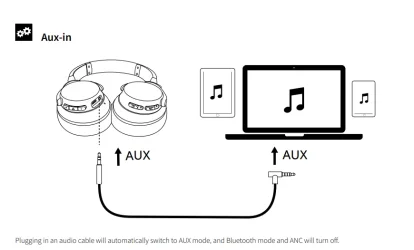
Unfortunately the AI is talking about the wrong port, my Soundcore Q20s have an audio port that you connect to the PC to switch to AUX mode. I've attached an image from the manual for these headphones. The audiojack for on the desktop isn't bad, as it can playback audio. Audio input however, doesn't work.

Best regards,
smhimmy
 

Attachments

  • Screenshot 2026-02-24 233953.webp
    Screenshot 2026-02-24 233953.webp
    20.1 KB · Views: 1

My Computer

System One

  • OS
    Windows 11
    Computer type
    PC/Desktop
    Manufacturer/Model
    HP Omen TG03-0006na
    CPU
    i5 14400f
    Memory
    16GB DDR5
    Graphics Card(s)
    RTX 3050
    Hard Drives
    1TB SSD
The manual for the headphones illustrates a TRS plug for the headphones and a TRRS right angle plug for a Laptop.
If that is accurate then there is no mic on the headphones 3.5mm socket.

AI - What a brilliant effort, I don't think so...
 

My Computer

System One

  • OS
    Windows 11
Back
Top Bottom