Insider Windows Insiders moving to Experimental and Beta on Windows 11


 Windows Insider Program Blog:

Hello Windows Insiders,

Today is the day we’re beginning to move to the new Experimental and Beta channels as announced earlier this month. As a reminder, most Insiders, those who are in the Dev and Beta channels today will transition to the new channels over time as follows:
  • Beta Channel > Beta
  • Dev Channel > Experimental
For those in the Canary Channel, you will also be transitioned to specific versions of the Experimental channel, depending on whether you are in the 28000 series Canary channel or took the optional 29500 series update. The transition takes place as follows:
  • Canary Channel 28000 series > Experimental (26H1)
  • Canary Channel 29500 series > Experimental (Future Platforms)

Transition timeline

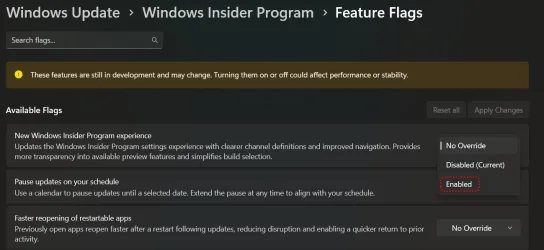
To ensure quality and reliability of the program changes, we will be rolling out the changes in a phased approach. Starting today, we will begin moving users in the Dev Channel to Experimental. Delivering on our promise to allow Insiders in Experimental to enable new experiences before they roll out to your device, if you are in the Dev Channel and do not see the new Experimental channel UI, you can enable it yourself by going to Settings > Windows Update > Windows Insider Program > Feature flags and toggling on the new experience.

We will continue this rollout over the next few weeks, expanding to Canary Channel 28000 series to Experimental (26H1), Canary Channel 29500 series to Experimental (Future Platforms) and Beta Channel to the new Beta experience. We will announce when we begin starting the rollout for these channels.

Changes to the Beta experience

Based on your feedback to have clearer definitions between channels, we have committed to updating how we use the new Beta experience to reflect what is coming to retail in the following weeks. With this, there will be a realignment of experience when Beta Channel Insiders move to the new Beta experience.

While Beta Channel Insiders can generally expect a similar experience after this transition, some may notice feature changes. Although these feature differences will be minor, users who are looking for the best continuity of all existing features should consider moving from the existing Beta Channel to Dev Channel, in preparation for the move to Experimental.

While users can still move from Beta to Experimental after the changes are implemented on your device, moving beforehand ensures the best continuity of experience for those features.

Updating WIP build information communications

We will also be changing how we publish the update information for each build, moving to the Windows Insider Program Documentation Hub. Moving release notes to this site provides additional benefits including:
  • Easier navigation between different channel and build release notes
  • Dark and light mode support
  • Better localization support
  • Enhanced deep linking capabilities
We will still announce when we’re releasing new builds here on the Windows Insider blog and will link to each build’s release notes in the Windows Insider Program Documentation Hub.

We will also highlight some of the more notable new features coming into WIP for the first time in the blog, but Insiders should check the release notes for more detailed build information.

New builds this week

With that, today we are releasing new Windows 11 Insider Preview Builds. Starting today, all Insiders can find the release notes for your device based on the new channel system, even if you haven’t moved yet. This is to make finding build information as easy as possible during this transition. See your channel release notes here:
For those on other specific build versions, here are today’s new builds and release notes:
As a reminder, you can always find your build number in the watermark on bottom right-hand corner of your desktop.

Thanks,

Stephen and the Windows Insider Team


 Source:


See also:

 
Last edited:
If you want to switch to the new "Experimental & Beta" Builds now and have the "Feature Flags" section available in the Windows Insider Program settings then all you need to do is set the "New Windows Insider Program experience" Flag (Shown below) from "No Override" to "Enabled".


Feature Flags.webp

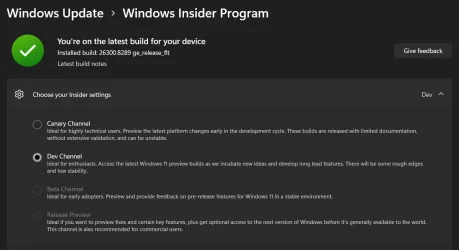
Before.

Insider Dev.webp

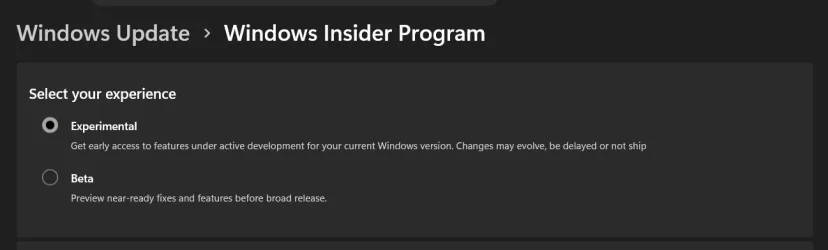
After enabling the New Windows Insider Program experience.

Experimental.webp

Thanks @Brink for adding the Tutorial to the post.
 
Last edited:

My Computers

System One System Two

  • OS
    Windows 11 Pro x 2 + Insider Dev
    Computer type
    PC/Desktop
    Manufacturer/Model
    My first abomination, I call it the Money Pit One
    CPU
    Intel Core i9 12900K @ 5.2 GHz
    Motherboard
    ASUS ROG MAXIMUS Z690 HERO
    Memory
    2 x Corsair Dominator Platinum RGB (4x16GB Total) DDR5-6200 CL36 Dual Channel Kit
    Graphics Card(s)
    EVGA GeForce RTX 3080 XC3 ULTRA GAMING 10GB GDDR6X
    Sound Card
    ROG SupremeFX ALC4082 with ESS® ES9018Q2C DAC for pinpoint positioning and dynamics
    Monitor(s) Displays
    2 x Samsung 43" HDR Neo QLED Mini-LED Tizen Smart TV (QN43QN90DAFXZC) 2024
    Screen Resolution
    1920 x 1080 @ 150 DPI & 120Hz
    Hard Drives
    2 x Samsung 980 Series - 250GB PCIe Gen3. X4 NVMe 1.4 - M.2 Internal SSD (Windows 11 Pro Dual boot)
    PSU
    Corsair HX1000i 80+ Platinum Modular Power Supply 1000W
    Case
    Phanteks Enthoo Luxe Tempered Glass Full Tower Case - Black
    Cooling
    CORSAIR iCUE H150i RGB Elite 360mm Liquid CPU Cooler
    Keyboard
    Perixx PERIBOARD-732B Wireless Mini Backlit USB Keyboard with Low Profile Keys - US Layout
    Mouse
    Logitech MX Anywhere 2S Wireless Mouse
    Internet Speed
    1000 Mbps
    Browser
    Latest Version Of Firefox & Microsoft Edge Chromium Stable
    Antivirus
    ESET Internet Security
    Other Info
    LG Electronics 14x Sata Blu-ray Disk Rewriter - WH14NS4O
    2 x OREI 4K 4x2 HDMI Matrix Switch With ARC Audio Extraction, HDR & Downscaling (UHD-402D) so I can send the output of my Cable Box, Roku, or any of my 4 computers to either of my TV's separately or simultaneously.
  • Operating System
    Windows 11 Pro x 2
    Computer type
    PC/Desktop
    Manufacturer/Model
    My second abomination, I call it the Money Pit Two
    CPU
    Intel Core i9 12900K @ 5.2 GHz
    Motherboard
    ASUS ROG STRIX Z690-F GAMING WIFI
    Memory
    2 x Vengeance RGB 32GB DDR5 6400MHz CL32 Dual Channel Kit (4x16GB Total) Black
    Graphics card(s)
    ASUS TUF Gaming GeForce RTX 3070 Ti OC Edition 8 GB GDDR6X
    Sound Card
    ROG SupremeFX ALC4082 with ESS® ES9018Q2C DAC for pinpoint positioning and dynamics
    Monitor(s) Displays
    2 x Samsung 43" HDR Neo QLED Mini-LED Tizen Smart TV (QN43QN90DAFXZC) 2024
    Screen Resolution
    1920 x 1080 @ 150 DPI & 120Hz
    Hard Drives
    2 x Samsung 980 Series - 250GB PCIe Gen3. X4 NVMe 1.4 - M.2 Internal SSD (Windows 11 Pro Dual boot)
    PSU
    Corsair AX860 - 860W Modular Power Supply
    Case
    Phanteks Enthoo Pro Tempered Glass Full Tower Case - Black
    Cooling
    CORSAIR iCUE H150i RGB Elite 360mm Liquid CPU Cooler
    Keyboard
    Perixx PERIBOARD-326 Wired Mini Backlit USB Keyboard with Low Profile Keys - US Layout
    Mouse
    Logitech MX Anywhere 2S Wireless Mouse
    Internet Speed
    1000 Mbps
    Browser
    Latest Version Of Firefox & EDGE Chromium Stable
    Antivirus
    ESET Internet Security
    Other Info
    LG Electronics 14x Sata Blu-ray Disk Rewriter - WH14NS4O
    2 x OREI 4K 4x2 HDMI Matrix Switch With ARC Audio Extraction, HDR & Downscaling (UHD-402D) so I can send the output of my Cable Box, Roku, or any of my 4 computers to either of my TV's separately or simultaneously.
@IownAmoneyPit is there a way to enable this through vivetool? i dont see this in my insider settings page
 

My Computer

System One

  • OS
    Windows 11 Dev
    Computer type
    Laptop
    Manufacturer/Model
    Microsoft Surface Pro 11 for Business
@IownAmoneyPit is there a way to enable this through vivetool? i dont see this in my insider settings page
Yes for Beta and higher.

Feature Flags page in Windows Insider Settings page: vivetool /enable /id:60911173

New Insider Settings Page: vivetool /enable /id:61157505
 

My Computers

System One System Two

  • OS
    Windows 11 25H2
    Computer type
    Laptop
    Manufacturer/Model
    Alienware 18 Area-51
    CPU
    Intel Core Ultra 9 275HX (24-Core)
    Motherboard
    Alienware
    Memory
    64GB DDR5 6400MT/s
    Graphics Card(s)
    NVIDIA GeForce RTX 5080 and Intel UHD Graphics
    Sound Card
    Onboard, Realtek high-performance Audio chips (ALC3329 & ALC1708))
    Monitor(s) Displays
    300HZ 18-inch QHD 500 nit Comfort View+
    Screen Resolution
    2560 x 1600
    Hard Drives
    2TB NVMe M.2 PCIe Gen 5 SSD
    Case
    Magnesium Alloy
    Cooling
    Advanced Cryo-Tech Quad-Fan Cooling system & large vapor chamber
    Keyboard
    Cherry MX ultra low profile mechanical keyboard with per key AlienFX RGB lighting
    Mouse
    Logitech MX Master 4
    Browser
    Vivaldi (main), Firefox, Chrome, Edge
    Antivirus
    MS Defender and Malwarebytes Free
  • Operating System
    Windows 11 25H2
    Computer type
    Laptop
    Manufacturer/Model
    Microsoft Surface Laptop 7
    CPU
    Qualcomm Snapdragon X Elite (12 Core) ARM based CPU
    Motherboard
    Microsoft Corp.
    Memory
    16GB LPDDR5
    Graphics card(s)
    Qualcomm Adreno X1-85
    Sound Card
    Omnisonic speakers with Dolby Atmos spatial sound
    Monitor(s) Displays
    120 Hz 13.8-inch 600 nit PixelSense Flow touchscreen
    Screen Resolution
    2304x1536
    Hard Drives
    1TB NVMe Gen 4 SSD
    Case
    Anodized Aluminum
    Cooling
    Traditional active cooling fan system
    Keyboard
    Mechanical QWERTY, backlit when in use
    Mouse
    Logitech MX Master 4 and Surface Arc Mouse
    Browser
    Vivaldi (main), Firefox, Chrome, Edge
    Antivirus
    MS Defender and Malwarebytes Free

Latest Support Threads

Back
Top Bottom