You Can Now Access Gaming Library, Apps, and Play History with Xbox app on Windows PCs and Handheld


 Xbox Wire:

Starting today, we’re excited to share that new updates are rolling out for Xbox on PC and handheld that make it easier to launch and manage your games and apps – all in one place.

In response to feedback we’ve heard from Xbox Insiders and our community, we’ve introduced several new features to enhance your gaming experience on Windows PCs and handhelds. The aggregated gaming library, cross-device play history, and updated app functionality give you more control over how and where you play, helping you quickly jump back into the games you love.

Aggregated Gaming Library to Launch Your Games

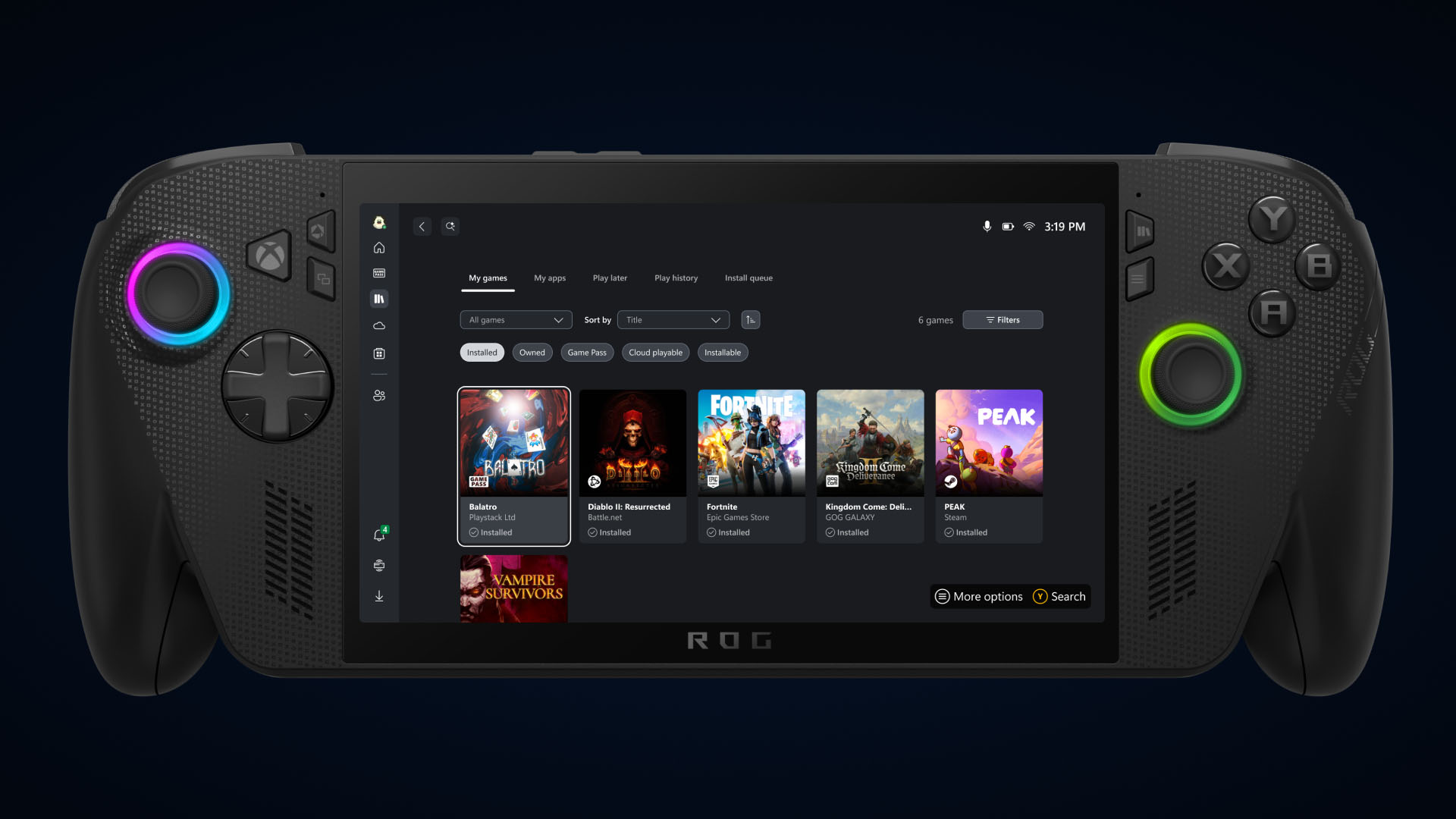
Aggregated Gaming Library Asset


Bring your game collection together with the new aggregated gaming library that shows your installed games from multiple PC storefronts, including your Xbox library, Xbox Game Pass, Battle.net and other leading PC storefronts, making it easier than ever to access your games in one place, whether you’re on a Windows PC or handheld device.

When you install a game from a supported PC storefront, it automatically appears in “My Library” within the Xbox PC app, as well as the “Most Recent” list of titles in the sidebar, so you can jump back into your favorite games with just a click.

Control What You See in Your Library

Games installed from supported PC storefronts will automatically appear in My Library and in the Most Recent section of the Xbox PC app.

Prefer a more simplified view?
  • Select your profile picture
  • Head to Settings
  • Go to Library & Extensions
  • Find the storefronts listed
  • Toggle any listings you’d prefer not to see
Once disabled, those titles will no longer appear in your library, giving you full control over how your library looks and feels.

Get to other PC Storefronts Faster with My Apps
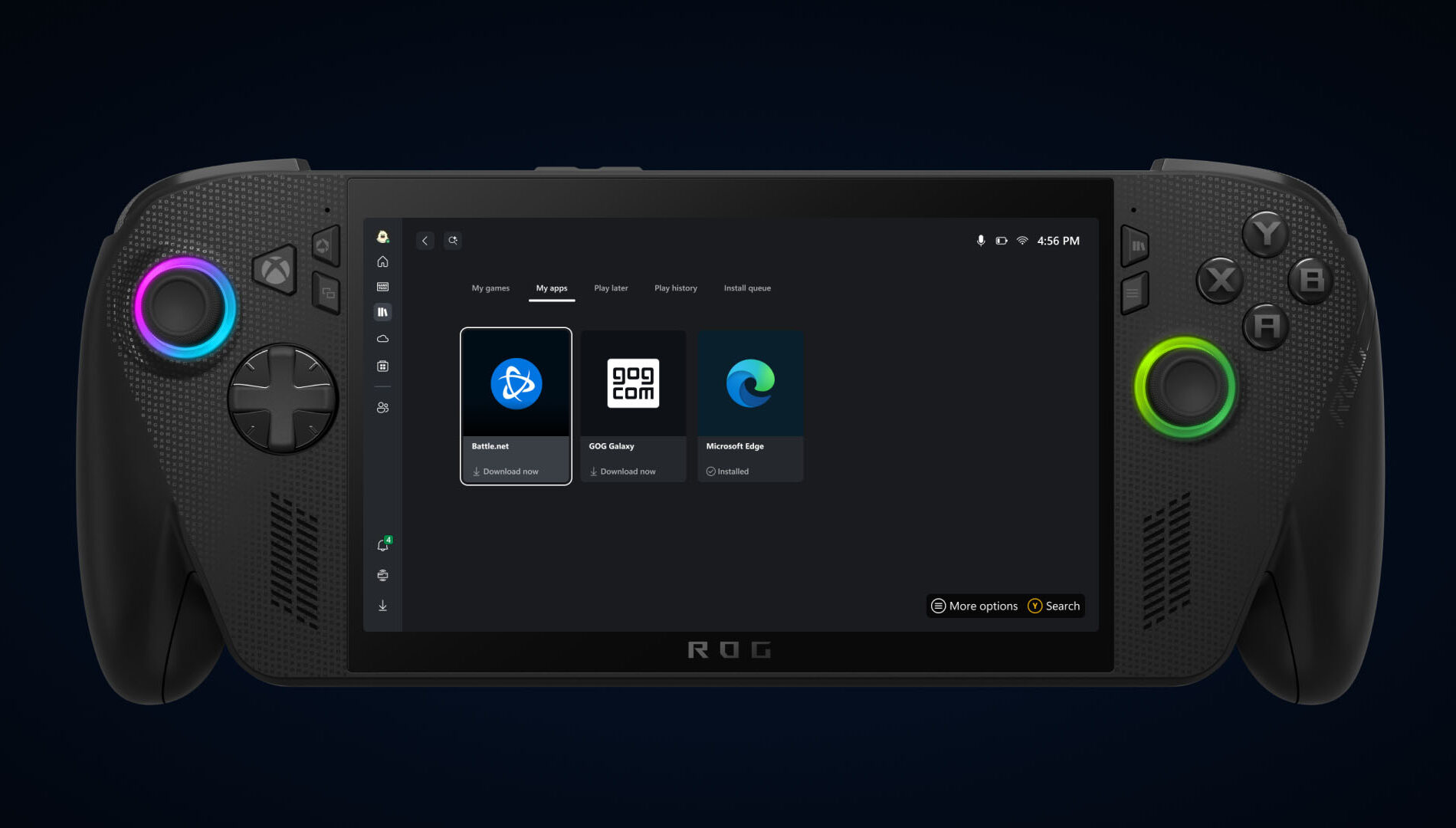
PC Storefronts with My Apps Asset


This new tab in my library brings third-party apps and storefronts together in one convenient place, supporting the aggregated gaming library so you can find, download, and launch games from multiple locations, without switching between apps or your desktop.

Just Pick Up and Play

Just Pick Up and Play Asset


Coming later in September your cloud-playable games and game play history will follow you across all your devices.

To find out which games are cloud playable, select the “cloud playable” filter in “My games” to view your catalog of supported titles.

Once this feature is released, look for the “Jump back in” list on the Home screen of your console, PC, or handheld to find your recent play history and pick up where you left off.


 Source:


My Computers

System One System Two

  • OS
    Windows 11 Pro for Workstations
    Computer type
    PC/Desktop
    Manufacturer/Model
    Custom self build
    CPU
    Intel i7-8700K 5 GHz
    Motherboard
    ASUS ROG Maximus XI Formula Z390
    Memory
    64 GB (4x16GB) G.SKILL TridentZ RGB DDR4 3600 MHz (F4-3600C18D-32GTZR)
    Graphics Card(s)
    ASUS ROG-STRIX-GTX1080TI-O11G-GAMING (11GB GDDR5X)
    Sound Card
    Integrated Digital Audio (S/PDIF)
    Monitor(s) Displays
    2 x Samsung Odyssey G75 27"
    Screen Resolution
    2560x1440
    Hard Drives
    1TB Samsung 990 PRO M.2,
    4TB Samsung 990 PRO M.2,
    TerraMaster F8 SSD Plus NAS
    PSU
    Seasonic Prime Titanium 850W
    Case
    Thermaltake Core P3 wall mounted
    Cooling
    Corsair Hydro H115i
    Keyboard
    Amazon Basics Wired Full Keyboard MD005
    Mouse
    Logitech MX Master 4
    Internet Speed
    2 Gbps Download and 100 Mbps Upload
    Browser
    Chrome and Edge
    Antivirus
    Microsoft Defender
    Other Info
    Logitech Z625 speaker system,
    Logitech BRIO 4K Pro webcam,
    HP Color LaserJet Pro MFP M477fdn,
    CyberPower CP1500PFCLCD
    Galaxy S23 Plus phone
  • Operating System
    Windows 11 Pro
    Computer type
    Laptop
    Manufacturer/Model
    Surface Laptop 7 Copilot+ PC
    CPU
    Snapdragon X Elite (12 core) 3.42 GHz
    Memory
    16 GB LPDDR5x-7467 MHz
    Monitor(s) Displays
    15" HDR
    Screen Resolution
    2496 x 1664
    Hard Drives
    1 TB SSD
    Internet Speed
    Wi-Fi 7 and Bluetooth 5.4
    Browser
    Chrome and Edge
    Antivirus
    Microsoft Defender

 Xbox Support

Release date: 9/15/2025

App version number: 2509.1001.8.0

Collected library​

Bring everything together with a collected gaming library under My games. This collected gaming library pulls your games from Xbox, Game Pass and your installed games from leading PC storefronts together. Now it’s easier to view and launch installed games from the most common gaming apps directly from My Library.

My apps​

Now all your apps are easier to find than ever in My Library. With My apps, you can now access your go-to third-party apps, such as browsers, storefronts, and gaming utilities, right from the Xbox app on PC.

Gaming Copilot (Beta)​

Built to help players get to the fun faster, sharpen their skills, and enjoy a more interactive and social gaming experience, Gaming Copilot (Beta) is now available through Xbox Game Bar.

Network quality indicator​

We’ve added a handy new feature to the Xbox app on PC: a Network quality indicator (NQI) tool. Designed to help players better understand their network conditions, NQI offers clear guidance to troubleshoot the most common in-stream network issues that might mess with your cloud gaming experience.

Visual updates for Game Bar​

We’ve wrapped up visual updates for Social widgets in Game Bar, and the result is a cleaner, more cohesive look across both Compact Mode and Desktop Mode. But it’s not just about looks, we’ve also made controller navigation smoother and more intuitive.

Rewards hub revamp​

The Rewards hub on PC is getting a major refresh, and it’s looking sharp. Whether you're tracking progress, redeeming points, or just exploring new ways to play, the updated experience is built to be smoother and more intuitive across all screen sizes, including handheld devices.

Bug fixes​

Resolved an issue where some context menus failed to load if there was no user signed in to the Microsoft Store app.
Fixed an issue where library filters were hidden when returning to My Library after a game session.

Resolved an issue where uninstalling a game would sometimes not remove it from your installed games library.


 Source:


My Computers

System One System Two

  • OS
    Windows 11 Pro for Workstations
    Computer type
    PC/Desktop
    Manufacturer/Model
    Custom self build
    CPU
    Intel i7-8700K 5 GHz
    Motherboard
    ASUS ROG Maximus XI Formula Z390
    Memory
    64 GB (4x16GB) G.SKILL TridentZ RGB DDR4 3600 MHz (F4-3600C18D-32GTZR)
    Graphics Card(s)
    ASUS ROG-STRIX-GTX1080TI-O11G-GAMING (11GB GDDR5X)
    Sound Card
    Integrated Digital Audio (S/PDIF)
    Monitor(s) Displays
    2 x Samsung Odyssey G75 27"
    Screen Resolution
    2560x1440
    Hard Drives
    1TB Samsung 990 PRO M.2,
    4TB Samsung 990 PRO M.2,
    TerraMaster F8 SSD Plus NAS
    PSU
    Seasonic Prime Titanium 850W
    Case
    Thermaltake Core P3 wall mounted
    Cooling
    Corsair Hydro H115i
    Keyboard
    Amazon Basics Wired Full Keyboard MD005
    Mouse
    Logitech MX Master 4
    Internet Speed
    2 Gbps Download and 100 Mbps Upload
    Browser
    Chrome and Edge
    Antivirus
    Microsoft Defender
    Other Info
    Logitech Z625 speaker system,
    Logitech BRIO 4K Pro webcam,
    HP Color LaserJet Pro MFP M477fdn,
    CyberPower CP1500PFCLCD
    Galaxy S23 Plus phone
  • Operating System
    Windows 11 Pro
    Computer type
    Laptop
    Manufacturer/Model
    Surface Laptop 7 Copilot+ PC
    CPU
    Snapdragon X Elite (12 core) 3.42 GHz
    Memory
    16 GB LPDDR5x-7467 MHz
    Monitor(s) Displays
    15" HDR
    Screen Resolution
    2496 x 1664
    Hard Drives
    1 TB SSD
    Internet Speed
    Wi-Fi 7 and Bluetooth 5.4
    Browser
    Chrome and Edge
    Antivirus
    Microsoft Defender
Back
Top Bottom