You can now Recall emails in Outlook for Android and iOS


 Microsoft 365 Insider Blog:

Hi, Microsoft 365 Insiders! I’m Beth Jester, a Product Manager on the Outlook team. I am excited to announce that the ability to recall emails – a feature that many of you love in Outlook for Windows, Outlook for the web, and most recently Outlook for Mac – is now available in Outlook for Android and iOS.

Recall emails in Outlook for Android and iOS​

You’re writing an email on your phone and your thumb bumps send before you’re done. Or, you forget to add an attachment. Or, you’ve included the wrong recipient. We’ve all been there and felt that moment of regret.

Recall in Outlook allows you to retract an email from all recipient’s inboxes after you’ve hit send. This feature can be particularly helpful in professional settings, where sending an incorrect message might be confusing or erode confidence. Recall has been one of the most requested features for Outlook for Android and iOS, and we are thrilled to be able to respond to your feedback and bring this feature to more users!

How it works​

  1. When you realize an email was sent with an error you’d like to correct, select the message in the Sent folder on your Android or iOS device.
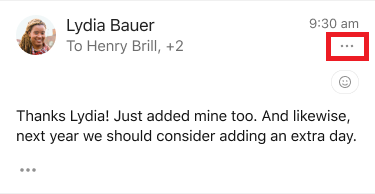
  2. Select the ... menu in the top-right corner of the email you wish to recall.

    bS00Mzc2MTQ1LWJoZTdzUg
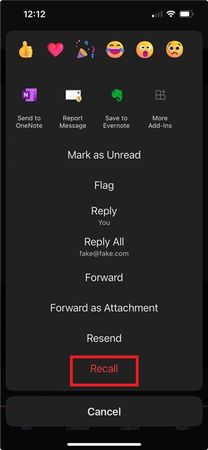
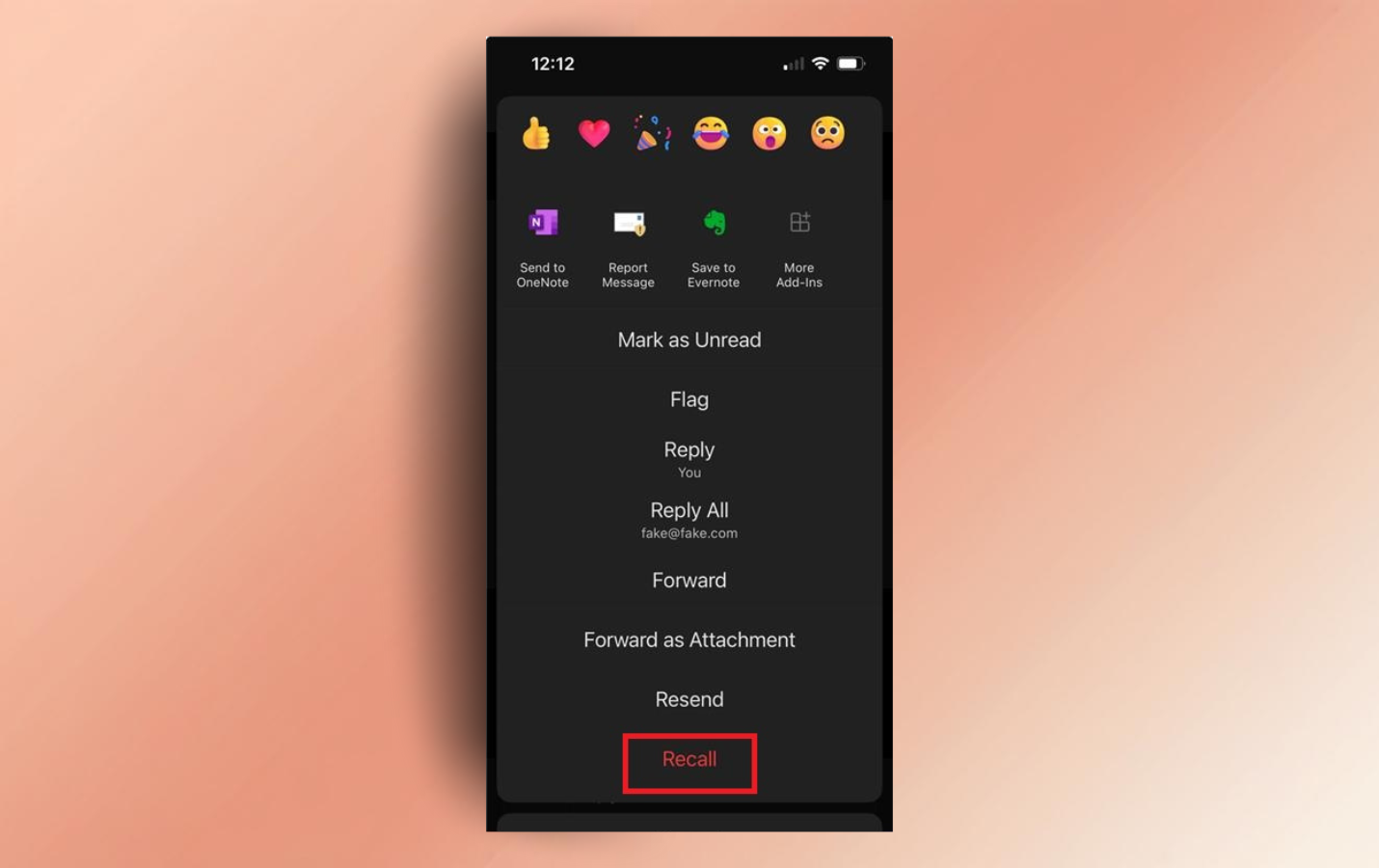
  3. Select Recall from the menu options.

    bS00Mzc2MTQ1LURXYWlyWQ
  4. After you’ve recalled a message, you will receive a status email about whether the recall was successful or not. NOTE: Recall may fail on emails that are very old.
Tips and tricks​

  • After you recall an email, you can select Resend in the menu to quickly make the needed edits and corrections.

Requirements​

To be able to recall emails in Outlook for Android and iOS, Outlook for Windows, Outlook for the web, and Outlook for Mac, both you and the recipient must be using Microsoft 365 email accounts within the same organization.

Availability​

This feature is expected to be available to Android Beta and iOS TestFlight users running app version 4.2504.0 or later starting in late February 2025.

Features are released over some time to ensure things are working smoothly. We highlight features that you may not have because they’re slowly releasing to larger numbers of Insiders. Sometimes we remove elements to further improve them based on your feedback. Though this is rare, we also reserve the option to pull a feature entirely out of the product, even if you, as an Insider, have had the opportunity to try it.

Feedback​

We’d love to hear from you! To provide feedback in Outlook for Android and iOS, open your folder side panel and choose Settings > Help & Feedback > Send Feedback.


 Source:
 
I write a lot of really angry emails and don’t count to 10 before clicking send.

What I have found in the past, is that most major companies (and smaller ones) disable recall features on their servers.
So unless it’s an accidental email to your partner instead of your intended friend with benefits 😁 I don’t find recall works that often.
Also, in my experience, some ISP’s disable recall on their servers. Must be for security purposes.

These are just things I have concluded to. I don’t find this feature very practical or trustworthy.
 

My Computers My Computers

  • At a glance

    Windows 11 Pro 25H2 Build 26200.8894Intel(R) Core(TM) i7-4770K CPU @ 3.50GHz32.0 GB of I forget and the box is in storage.Gigabyte nVidia GeForce GTX 1660 Super OC 6GB
    OS
    Windows 11 Pro 25H2 Build 26200.8894
    Computer type
    PC/Desktop
    Manufacturer/Model
    Sin-built 2013
    CPU
    Intel(R) Core(TM) i7-4770K CPU @ 3.50GHz
    Motherboard
    ASUS ROG Maximus VI Formula
    Memory
    32.0 GB of I forget and the box is in storage.
    Graphics Card(s)
    Gigabyte nVidia GeForce GTX 1660 Super OC 6GB
    Sound Card
    ROG SupremeFX Formula 8-Channel High Definition Audio
    Monitor(s) Displays
    5 x LG 25MS500-B - 1 x 24MK430H-B - 1 x Wacom Pro 22" Touch Screen Tablet
    Screen Resolution
    All over the place
    Hard Drives
    Too many to list. OS on Samsung 1TB 870 QVO SATA
    PSU
    Silverstone 1500
    Case
    NZXT Phantom 820 Full-Tower Case
    Cooling
    Noctua NH-D15 Elite Class Dual Tower CPU Cooler / 6 x EziDIY 120mm / 2 x Corsair 140mm somethings / 1 x 140mm Thermaltake something / 2 x 200mm Corsair.
    Keyboard
    Corsair K95 / Logitech diNovo Edge Wireless
    Mouse
    Logitech: G402 / G502 / Mx Masters / Mx Air Cordless
    Internet Speed
    2000/500Mbps
    Browser
    All sorts
    Antivirus
    Kaspersky Premium
    Other Info
    ㅤㅤㅤㅤㅤㅤㅤㅤㅤㅤㅤㅤㅤㅤㅤㅤㅤㅤㅤㅤㅤㅤㅤㅤㅤㅤㅤㅤㅤㅤㅤㅤㅤㅤㅤㅤㅤㅤㅤㅤ⠀⠀⠀⠀⠀⠀⠀⠀⠀⠀
    TP-Link BE9300 WiFi 7 Bluetooth 5.4 (Archer TBE550E)
    TP-Link TX201 V1 2.5GB Lan

    Grandstream HT812 - VoIP
    ASUS DSL-AX82U - Mesh
    ASUS RT-AC68U - Mesh
    ASUS RT-BE88U Router

    Brother MFC-L2880DW Printer

    I’m on a horse.
  • At a glance

    Windows 11 Pro 25H2 Build 26200.8894 (Wifes)13th Generation Intel® Core™ i5-1340P Process...16GB LPDDR5-52001x Intel® Iris® Xe Graphics
    Operating System
    Windows 11 Pro 25H2 Build 26200.8894 (Wifes)
    Computer type
    Laptop
    Manufacturer/Model
    LENOVO Yoga 7 14IRL8 - Type 82YL
    CPU
    13th Generation Intel® Core™ i5-1340P Processor(Core™ i5-1340P)
    Memory
    16GB LPDDR5-5200
    Graphics card(s)
    1x Intel® Iris® Xe Graphics
    Sound Card
    Optimized with Dolby Atmos®
    Screen Resolution
    QHD 2880 x 1800 OLED
    Hard Drives
    M.2 512 GB SSD PCIe
    Mouse
    Logiteck MX Master 3S
    Internet Speed
    2000/500
    Antivirus
    Defender / Malwarebytes
    Other Info
    …still on a horse.


    Wireless Network: Wi-Fi 6E 2x2 AX; Bluetooth® 5.1 or above
    Ports: 1x 1 Novo button; 2 in 1 Audio Combo jack; Micro SD Card Reader; HDMI 1.4b; 2 x USB Type-C (TBT4)
    USB 3.2 Gen 2 DP 1.4a
    PD 3.0); 1 x USB 3.2 Gen1 Type A
    Camera
    1x 1080P FHD IR/RGB Hybrid with Privacy Shutter and Dual Array Microphone
    Graphics
    1x Intel® Iris® Xe Graphics
    Monitor
    14" WUXGA
    Form Factor
    Convertible Notebook
  • Windows 11 Pro 25H2 Build 26200.8894 (Wifes)

    Yoga 7 2-in-1 14IML9 - Type 83DJ

    Processor: Intel® Core™ Ultra 7 155H Processor(Core™ Ultra 7 155H)

    Memory: 32GB LPD5X-7467

    Hard Drive: 1 TB SSD PCIe

    Wireless Network: 1x Wi-Fi 6E 2x2 AX; Bluetooth® 5.1 or above

    Ports: 1 x HDMI 2.1 TMDS; 1 x Novo Button; 1 x Combo Audio Jack
    2 x USB-C (USB 4.0)
    1 x USB-A 3.2 Gen 1

    Camera: 1080P FHD IR Hybrid with Dual Microphone

    Graphics: Intel® Arc™ Graphics

    Monitor: 14" 2.8K

    ...Where's my horse?
Hi folks

I might have mis-understood what's hapenning here but I understand it as :

Once it's been delivered to the recipients inbox where ever that is - could be at opposite end of the planet-- doesn't that suppose a security risk. Why on earth would anyone let an "external" program from a remote user delete stuff from a private data area. IMHO if you are an impulsive email sender just have the "Are you sure" or other confirmatory remark before the email gets sent. I certainly don't want anything other than me deleting stuff from my own mail server on my own domain. !!!

If I've got it wrong please explain.

OK I've seen - it only works for Exchange servers within the SAME organisation -- not really of much use to the General Public. In any case most organisations are tending to move away from email as the primary messaging / communication system.

Cheers
jimbo
 

My Computer My Computer

At a glance

Windows XP,11 Linux Fedora Rawhide pre-releas...2 X Intel i7
OS
Windows XP,11 Linux Fedora Rawhide pre-release 45
Computer type
PC/Desktop
CPU
2 X Intel i7
Screen Resolution
4KUHD X 2
Back
Top Bottom