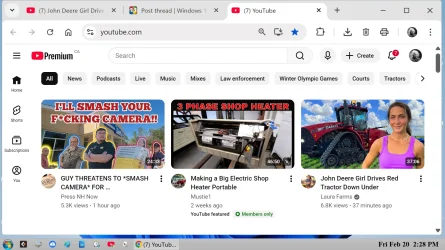
As of yesterday, my you tube videos won't play, see "untitled" attachment below. When I click on the red "play" symbol, nothing happens.
Previously, all I did was click on the link as shown in "untitled2" and the video would play instantly.
I've tried turning off my premium subscription and turning it back on. I've resigned into my google account. Nothing seems to work.
I've re-booted my machine several times, with no results.
I've also tried system restore twice with different dates, nothing.
As a side note, you tube videos play fine on my TV with Roku.
As far as I can remember, I've only made one change. I turned off Co-Pilot in
Note Pad. As I don't think this change would effect YouTube from playing?, I've turned it back on.
Previously, all I did was click on the link as shown in "untitled2" and the video would play instantly.
I've tried turning off my premium subscription and turning it back on. I've resigned into my google account. Nothing seems to work.
I've re-booted my machine several times, with no results.
I've also tried system restore twice with different dates, nothing.
As a side note, you tube videos play fine on my TV with Roku.
As far as I can remember, I've only made one change. I turned off Co-Pilot in
Note Pad. As I don't think this change would effect YouTube from playing?, I've turned it back on.
Attachments

My Computer
At a glance
Win 11 Pro 25H2 O/S Build 22631.286112th Gen Intel Core i5-12400 2.5 GHZ16.0 GB
- OS
- Win 11 Pro 25H2 O/S Build 22631.2861
- Computer type
- PC/Desktop
- Manufacturer/Model
- Clone
- CPU
- 12th Gen Intel Core i5-12400 2.5 GHZ
- Memory
- 16.0 GB
- Monitor(s) Displays
- 1 Asus 24"
- Screen Resolution
- 1920x1080
- Hard Drives
- 2x SSD
- PSU
- 600 Watt
- Internet Speed
- 300 mb/sec Download
- Browser
- Chrome