
Recent content by drminer
-

Win Update KB5101684 Windows 11 Cumulative Update Preview build 26100.8973 (24H2) and 26200.8973 (25H2) - July 28
I had the same experience exactly. sfc fine. scanhealth finds repairable component store. restorehealth fails.- drminer
- Post #29
- Forum: Windows 11 News
-

Win Update KB5089573 Windows 11 Cumulative Update Preview build 26100.8524 (24H2) and 26200.8524 (25H2) - May 26
@larysid I have the Asus Z790 Hero motherboard. There is definitely a conflict between the latest OS build and the A-volute/Nahimic/Sonic Studio 3 software. Since Sonic Studio 3 is End of Life; there will be no fix from the folks at Nahimic. My temporary solution is to uninstall all third-party...- drminer
- Post #173
- Forum: Windows 11 News
-
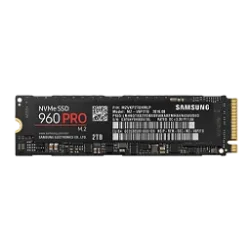
Announcing Native NVMe in Windows Server 2025
It is unlikely that the keys are being added back by the system, unless the system is reverting to a restore point. What is more likely is that the keys are not being removed. After running the deletion commands using administrative rights, check that the keys have actually been deleted. If not...- drminer
- Post #112
- Forum: Windows 11 News
-
Announcing Native NVMe in Windows Server 2025
Run the following 4 commands in an elevated command prompt and then reboot. Or you can manually delete the 4 numbered keys in the registry editor. reg delete HKEY_LOCAL_MACHINE\SYSTEM\CurrentControlSet\Policies\Microsoft\FeatureManagement\Overrides /v 1176759950 /f reg delete...- drminer
- Post #109
- Forum: Windows 11 News
-
Announcing Native NVMe in Windows Server 2025
There are 3 ways to enable native NVMe. Two involve registry edits. One involves using Vivetool. If you tell us which method and which registry keys you edited, if any, someone here can surely help. Also, there was an optional registry edit to re-enable Safe Boot after enabling native NVMe. If...- drminer
- Post #106
- Forum: Windows 11 News
-

Microsoft advancing Windows 11 driver security: Removing trust for cross-signed driver program
I edited my previous post. The policies are installed, just not where the FAQ said they would be.- drminer
- Post #16
- Forum: Windows 11 News
-
Microsoft advancing Windows 11 driver security: Removing trust for cross-signed driver program
I noticed that the audit policy is installed on the hard disk and is active; the enforcement policy is in the Reserved subfolder. Neither is on the EFI partition, where the FAQ says they should be. So far, no 3076 errors in Event Viewer under CodeIntegrity.- drminer
- Post #14
- Forum: Windows 11 News
-
Solved Secure boot update HowTo
If you opt for using the Mosby tool, you will need to know how to put Secure Boot in Setup mode on your computer. On a Dell, this is how: Enter the UEFI. Delete all 4 Secure Boot keys. Then disable Secure Boot. This puts the computer into Setup mode. Lastly, you will need to enable booting from...- drminer
- Post #81
- Forum: AntiVirus, Firewalls and System Security
-
Solved Secure boot update HowTo
If Dell no longer supports that computer, you will never get past "InProgress". Dell has to sign the update before Microsoft can install it. I have an older XPS 8930 that has not received a UEFI update for 2 years. Since I don't expect to ever get another update, I used the Mosby tool to update...- drminer
- Post #73
- Forum: AntiVirus, Firewalls and System Security
-
Did you manually update your Secure Boot Keys ?
The issue is not about making the installation drive bootable. The issue is that a new or repaired installation will have bootloaders that are signed with a revoked certificate, and Secure Boot will prevent the new installation (or repaired installation) from booting. The default bootloaders are...- drminer
- Post #1,264
- Forum: AntiVirus, Firewalls and System Security
-
Did you manually update your Secure Boot Keys ?
I wish I had not gone ahead and revoked the Production PCA 2011 certificate. I now realize that any form of in-place repair will reinstall the older 2011-signed bootloader files into the EFI partition, and the system will not boot with Secure Boot enabled. So, if I have to do an in-place repair...- drminer
- Post #1,258
- Forum: AntiVirus, Firewalls and System Security
-
Did you manually update your Secure Boot Keys ?
Yes, you are all updated. Later, the 2011 certificate can be added to DBX, which revokes it. But it might be better to hold off until you are sure that all your external boot media have been updated. Revoking the 2011 certificate too soon breaks things! (Currently, it breaks the Windows version...- drminer
- Post #1,241
- Forum: AntiVirus, Firewalls and System Security
-
Did you manually update your Secure Boot Keys ?
There is obviously a problem; if everything updated correctly, AvailableUpdates would be set to 0x0. It seems that the program cannot validate that the two bootloaders have been updated. (In addition to the file mentioned in the green text, you should check whether X:\boot\bootx64.efi has been...- drminer
- Post #1,238
- Forum: AntiVirus, Firewalls and System Security
-
Did you manually update your Secure Boot Keys ?
I was writing about the default DB, which is read-only. Mosby updates the current DB only.- drminer
- Post #1,234
- Forum: AntiVirus, Firewalls and System Security
-
Did you manually update your Secure Boot Keys ?
The option ROM certificate is missing from the default DB. There is nothing you can do about that, since it managed by the motherboard manufacturer when the UEFI is updated. It just means some new add-on cards might not work if you returned the DB to the Default setting--at least until you...- drminer
- Post #1,213
- Forum: AntiVirus, Firewalls and System Security