Microsoft advancing  Windows 11 driver security: Removing trust for cross-signed driver program


 Windows IT Pro Blog:

How our new approach strengthens customer protection while preserving app compatibility​

Today, we’re excited to announce a significant step forward in our ongoing commitment to Windows security and system reliability: the removal of trust for all kernel drivers signed by the deprecated cross-signed root program. This update will help protect our customers by ensuring that only kernel drivers that the Windows Hardware Compatibility Program (WHCP) have passed and been signed can be loaded by default. To raise the bar for platform security, Microsoft will maintain an explicit allow list of reputable drivers signed by the cross-signed program. The allow list ensures a secure and compatible experience for a limited number of widely used, and reputable cross-signed drivers. This new kernel trust policy applies to systems running Windows 11 24H2, Windows 11 25H2, Windows 11 26H1, and Windows Server 2025 in the April 2026 Windows update. All future versions of Windows 11 and Windows Server will enforce the new kernel trust policy. This update continues a long sequence of changes Microsoft has taken over the years to reduce the attack surface on Windows and reinforces our commitment to safeguarding customers. Drivers are a critical part of the Windows ecosystem, and ensuring their integrity is essential to providing a secure and trustworthy environment.

The Microsoft WHCP certification program is a rigorous driver signing process that helps us ensure  our driver vendor partners are continuously vetted and comply with the latest security and compliance requirements. The WHCP program scans all driver submissions for malware and requires Hardware Lab Kit (HLK) test results to verify drivers are compatible with the Windows OS and Windows hardware. Driver submissions that pass partner identity vetting and security and compatibility scanning are signed by Microsoft-owned and protected code signing certificates that authorize trust for the drivers across the Windows ecosystem.

Despite the high security and compliance bar imposed by the WHCP program, third-party drivers signed by the cross-signed root program are until now still broadly trusted in the Windows kernel. The cross-signed root program was introduced in the early 2000s to support and enable code integrity for third-party drivers on the Windows platform. This program provided driver publishers with Windows-trusted code signing certificates with varying degrees of partner vetting and zero assurances around the security and compatibility of kernel code. The signing program, administered by third-party certificate authorities, required driver authors to store and protect the private keys of the certificate, which led to abuse and credential theft that put our customers and their platforms at risk. The program was deprecated in 2021, and all certificates have since expired. However, trust for these certificates has persisted in specific use cases and scenarios. That changes starting now.

Balancing security with compatibility​

We know our customers depend on a diverse set of applications and hardware, many of which today rely on third-party cross-signed drivers. We know driver and application security are required by our customers but cannot come at the expense of compatibility and productivity. As a result, our new kernel trust policy responsibly raises the security bar while ensuring essential and reputable cross-signed drivers are still trusted in Windows. This helps minimize disruption and preserve the rich compatibility for which Windows is known. The new trust policy is carefully curated based on billions of driver load signals and real-world usage data across Windows 11 and Windows Server 2025 from the past two years. The driver load signals and input from our vibrant developer community have helped shape this policy and feature to help ensure a smooth transition for our customers.

How the secure enablement works​

To make this transition as seamless as possible, the new kernel trust policy will roll out in evaluation mode starting with the April 2026 Windows update servicing release to Windows 11 24H2, 25H2, 26H1, and Windows Server 2025. During evaluation mode, the Windows kernel will monitor and audit all driver loads to determine if the new trust policy can be safely activated without causing compatibility issues caused by blocking critical cross-signed drivers. A system will remain in evaluation mode until all evaluation criteria are met: 

Evaluation Criteria  Evaluation Metric 
Number of system hours 
  • Windows 11 – 100 hours
  • Windows Server 2025 – 100 hours 
Number of boot sessions 
  • Windows 11 – 3 restarts
  • Windows Server 2025 – 2 restarts 

By requiring two distinct evaluation criteria, we ensure that a diverse set of drivers across boot-start and runtime scenarios is evaluated before activating the feature. Once all evaluation criteria are met, the feature determines whether the system should activate the policy by assessing the drivers loaded during evaluation mode:
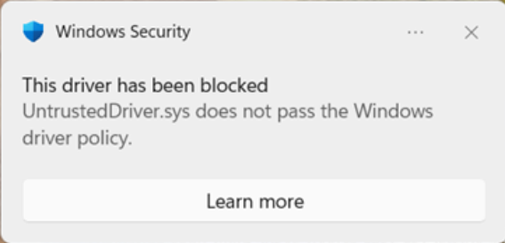
  • If all drivers loaded during the evaluation period are trusted by the kernel policy, the system activates and enforces the new kernel trust policy. Enforced systems are now protected against untrusted drivers from the cross-signed program, not on the kernel trust policy. These drivers will be blocked from running on enforced systems and the following notification is displayed:

    bS00NTA0ODE4LTZhejN1UQ

  • If any cross-signed drivers are audited during the evaluation period and determined they would not pass the new kernel trust policy, the policy is not activated and remains in evaluation, and the evaluation period is reset. The system stays in evaluation mode until the drivers blocking enablement are no longer audited.
The evaluation mode ensures that systems using untrusted cross-signed drivers for legitimate, less frequent scenarios won’t be impacted by an ecosystem-wide enforced policy. At the same time, systems where driver compatibility is not impacted by the policy will safely enforce to reduce the kernel attack surface and improve security.  Application Control for Business always provides the ability to configure a more restrictive security policy, if desired, enabling you to further restrict the drivers and applications running on your systems.

For more information on the driver policy, please visit https://go.microsoft.com/fwlink/?linkid=2352532

Allowing custom kernel drivers via App Control policy​

To run certain drivers not supported by the new kernel policy in your environment, Windows now supports a method to securely override the default kernel policy using an Application Control for Business (formerly WDAC) policy. Confidential drivers that cannot be signed through the Microsoft Windows Hardware Compatibility Program (WHCP) via Hardware Dev Center (HDC) and drivers developed for internal only scenarios are well positioned for this policy. Otherwise, drivers targeted for the Windows ecosystem must be WHCP certified and signed through the Microsoft HDC portal.

Customers with confidential or internal-only driver scenarios, who have control over the UEFI Secure Boot authorities , can use this new feature to allow custom signers not trusted in the Windows kernel by default. The App Control policy enables customers to run privately signed drivers on enrolled systems without degrading security. The policy must be signed by an authority in the device’s Secure Boot Platform Key (PK) or Key Exchange Key (KEK) variables to ensure the policy is applicable to only their environment. By default, Application Control policies are designed to restrict the default kernel policy. When these policies are PK or KEK signed, kernel trust can be expanded to trust components and certificates otherwise not trusted in Windows.

The April 2026 Windows update servicing release will support this new policy type in Application Control for Business on systems running Windows 11 24H2, 25H2, 26H1 and Windows Server 2025. For more information on allowing custom kernel drivers and building a custom policy, visit https://go.microsoft.com/fwlink/?linkid=2348122.

We are committed to delivering the best possible Windows experience - one that is secure, reliable, and fully compatible with your workflows. As we roll out the kernel trust policy, we’ll continue to listen to customer feedback, work closely with hardware and software partners, and refine our processes to ensure both security and compatibility remain top priorities. Thank you for joining us on this journey toward a safer, more resilient Windows ecosystem.

Securing the present, innovating for the future​

Security is a shared responsibility. Through collaboration across hardware and software ecosystems, we can build more resilient systems secure by design and by default, from Windows to the cloud, enabling trust at every layer of the digital experience.

The updated Windows Security book and Windows Server Security book are available to help you understand how to stay secure with Windows. Learn more about Windows 11, Windows Server, and Copilot+ PCs. To learn more about Microsoft Security Solutions, visit our website.

Bookmark the Security blog to keep up with our expert coverage on security matters.

Also, follow us on LinkedIn (Microsoft Security) and X (@MSFTSecurity) for the latest news and updates on cybersecurity.


 Source:
 
  • Like
Reactions: Gas
This change is long overdue. Microsoft were preparing for this late in 2025.
 

My Computers My Computers

  • At a glance

    Windows 11 Pro 25H2Intel Core i9 13900KCorsair Dominator Platinum 64gb 5600MT/s DDR5...Sapphire NITRO+ AMD Radeon RX 7900 XTX Vapor-...
    OS
    Windows 11 Pro 25H2
    Computer type
    PC/Desktop
    Manufacturer/Model
    Homebuilt
    CPU
    Intel Core i9 13900K
    Motherboard
    Asus ProArt Z790 Creator WiFi - Bios 3107
    Memory
    Corsair Dominator Platinum 64gb 5600MT/s DDR5 Dual Channel
    Graphics Card(s)
    Sapphire NITRO+ AMD Radeon RX 7900 XTX Vapor-X 24GB
    Sound Card
    External DAC: Cambridge Audio DACMagic200M - Headphone Amp: Topping L50
    Monitor(s) Displays
    Panasonic MX950 Mini LED 55" TV 120hz
    Screen Resolution
    3840 x 2160 120hz
    Hard Drives
    Samsung 980 Pro 2TB (OS)
    Samsung 980 Pro 1TB (Files)
    Lexar NZ790 4TB
    LaCie d2 Professional 6TB external - USB 3.1
    Seagate Expansion 16TB external - USB 3.2
    Seagate One Touch 18TB external HD - USB 3.0
    PSU
    Corsair RM1200x Shift
    Case
    Corsair RGB Smart Case 5000x (white)
    Cooling
    Corsair iCue H150i Elite Capellix XT
    Keyboard
    Incase Ergonomic USB (Microsoft clone)
    Mouse
    Logitech MX Master 3S
    Internet Speed
    Fibre 900/500 Mbps
    Browser
    Microsoft Edge Chromium
    Antivirus
    Bitdefender Total Security
    Other Info
    AMD Radeon Software & Drivers 26.1.1
    Hasleo Backup Suite
    Dashlane password manager
    Kensington Verimark fingerprint reader
    Logitech Brio 4K webcam
    Orico 10-port powered USB 3.0 hub
  • At a glance

    Windows 11 Pro 25H2Intel® Core™ i9-13900H32GB DDR4-3200 Dual channel*Intel Iris Xᵉ Graphics G7
    Operating System
    Windows 11 Pro 25H2
    Computer type
    Laptop
    Manufacturer/Model
    Asus Vivobook X1605VA
    CPU
    Intel® Core™ i9-13900H
    Motherboard
    Asus X1605VA bios 309
    Memory
    32GB DDR4-3200 Dual channel
    Graphics card(s)
    *Intel Iris Xᵉ Graphics G7
    Sound Card
    Realtek | Intel SST Bluetooth & USB
    Monitor(s) Displays
    16.0-inch, WUXGA 16:10 aspect ratio, IPS-level Panel
    Screen Resolution
    1920 x 1200 60hz
    Hard Drives
    512GB M.2 NVMe™ PCIe® 3.0 SSD
    Mouse
    Logitech MX Ergo Trackball
    Antivirus
    Bitdefender Total Security
    Other Info
    720p Webcam
    WiFi & USB to ethernet
How can I check to see if a computer has enabled this new trust policy, or if it remains in the evaluation mode?
 

My Computers My Computers

  • At a glance

    win 11 pro, 25H2i5-240032 GB DDR-3Intel HD Graphics 2000 (on-board)
    OS
    win 11 pro, 25H2
    Computer type
    PC/Desktop
    Manufacturer/Model
    Dell 790 (Mt)
    CPU
    i5-2400
    Motherboard
    Dell
    Memory
    32 GB DDR-3
    Graphics Card(s)
    Intel HD Graphics 2000 (on-board)
    Sound Card
    Intel Cougar Point PCH [B2] (On-Board)
    Monitor(s) Displays
    LG 27MN60T
  • At a glance

    Windows 11 home, 25H2Intel I7-3630QM16GB DDR3
    Operating System
    Windows 11 home, 25H2
    Computer type
    Laptop
    Manufacturer/Model
    Dell Inspiron 17R SE 7720
    CPU
    Intel I7-3630QM
    Memory
    16GB DDR3
    Hard Drives
    Samsung 500GB SSD

Attachments

Last edited:

My Computer My Computer

At a glance

Windows 7
OS
Windows 7
  • Great Support
Reactions: x_1
There's a set of PowerShell commands you need to run, as listed from the linked FAQ:
The Windows Driver Policy - Microsoft Support

I've collected them into a single script, which you need to run from Admin PowerShell.
Uh-oh. I get this:
E:\Downloads\DriverPolicy_Check.ps1 : File E:\Downloads\DriverPolicy_Check.ps1 cannot be loaded.
The file E:\Downloads\DriverPolicy_Check.ps1 is not digitally signed. You cannot run this script on
the current system.

I'm not too good with power script, so I probably messed something up/
 

My Computers My Computers

  • At a glance

    win 11 pro, 25H2i5-240032 GB DDR-3Intel HD Graphics 2000 (on-board)
    OS
    win 11 pro, 25H2
    Computer type
    PC/Desktop
    Manufacturer/Model
    Dell 790 (Mt)
    CPU
    i5-2400
    Motherboard
    Dell
    Memory
    32 GB DDR-3
    Graphics Card(s)
    Intel HD Graphics 2000 (on-board)
    Sound Card
    Intel Cougar Point PCH [B2] (On-Board)
    Monitor(s) Displays
    LG 27MN60T
  • At a glance

    Windows 11 home, 25H2Intel I7-3630QM16GB DDR3
    Operating System
    Windows 11 home, 25H2
    Computer type
    Laptop
    Manufacturer/Model
    Dell Inspiron 17R SE 7720
    CPU
    Intel I7-3630QM
    Memory
    16GB DDR3
    Hard Drives
    Samsung 500GB SSD
As Admin run:
Code:
powershell -ep bypass -f E:\Downloads\DriverPolicy_Check.ps1
 

My Computer My Computer

At a glance

Windows 7
OS
Windows 7
In simpler terms, a word salad attempt to rationalize putting a kill switch on perfectly functional hardware. Adding windows and doors the owner can't lock from the inside makes a house, or an operating system, LESS secure.
 

My Computer My Computer

At a glance

Windows 11 22H2 Pro (X-lite Micro 11 version)i7 13850HX (20 cores, 28 threads)32GB DDR5Intel UHD/ RTX 1000 ADA
OS
Windows 11 22H2 Pro (X-lite Micro 11 version)
Computer type
Laptop
Manufacturer/Model
Dell/ Precision 7680
CPU
i7 13850HX (20 cores, 28 threads)
Motherboard
Dell
Memory
32GB DDR5
Graphics Card(s)
Intel UHD/ RTX 1000 ADA
Sound Card
Realtek
Monitor(s) Displays
4K UHD Touchscreen
Screen Resolution
3840 x 2400
Hard Drives
Samsung 512GB system drive
WD Blue 1TB game drive
PSU
240W AC adapter, 1800W when docked
Internet Speed
1 gigabit symmetrical
Browser
Firefox, Librewolf
Antivirus
None. Manully configured so nobody except me can change any critical system files. (Don't ask how, it's probably against some rule somewhere)
As Admin run:
Code:
powershell -ep bypass -f E:\Downloads\DriverPolicy_Check.ps1
Thanks. I tried running this but I got the same error message as before.

I guess I'm just too stupid to use powershell :)
 

My Computers My Computers

  • At a glance

    win 11 pro, 25H2i5-240032 GB DDR-3Intel HD Graphics 2000 (on-board)
    OS
    win 11 pro, 25H2
    Computer type
    PC/Desktop
    Manufacturer/Model
    Dell 790 (Mt)
    CPU
    i5-2400
    Motherboard
    Dell
    Memory
    32 GB DDR-3
    Graphics Card(s)
    Intel HD Graphics 2000 (on-board)
    Sound Card
    Intel Cougar Point PCH [B2] (On-Board)
    Monitor(s) Displays
    LG 27MN60T
  • At a glance

    Windows 11 home, 25H2Intel I7-3630QM16GB DDR3
    Operating System
    Windows 11 home, 25H2
    Computer type
    Laptop
    Manufacturer/Model
    Dell Inspiron 17R SE 7720
    CPU
    Intel I7-3630QM
    Memory
    16GB DDR3
    Hard Drives
    Samsung 500GB SSD
In simpler terms, a word salad attempt to rationalize putting a kill switch on perfectly functional hardware. Adding windows and doors the owner can't lock from the inside makes a house, or an operating system, LESS secure.
I'd be very surprised if these changes affected a vast majority of drivers on well maintained systems.
 

My Computers My Computers

  • At a glance

    Windows 11 Pro 25H2Intel Core i9 13900KCorsair Dominator Platinum 64gb 5600MT/s DDR5...Sapphire NITRO+ AMD Radeon RX 7900 XTX Vapor-...
    OS
    Windows 11 Pro 25H2
    Computer type
    PC/Desktop
    Manufacturer/Model
    Homebuilt
    CPU
    Intel Core i9 13900K
    Motherboard
    Asus ProArt Z790 Creator WiFi - Bios 3107
    Memory
    Corsair Dominator Platinum 64gb 5600MT/s DDR5 Dual Channel
    Graphics Card(s)
    Sapphire NITRO+ AMD Radeon RX 7900 XTX Vapor-X 24GB
    Sound Card
    External DAC: Cambridge Audio DACMagic200M - Headphone Amp: Topping L50
    Monitor(s) Displays
    Panasonic MX950 Mini LED 55" TV 120hz
    Screen Resolution
    3840 x 2160 120hz
    Hard Drives
    Samsung 980 Pro 2TB (OS)
    Samsung 980 Pro 1TB (Files)
    Lexar NZ790 4TB
    LaCie d2 Professional 6TB external - USB 3.1
    Seagate Expansion 16TB external - USB 3.2
    Seagate One Touch 18TB external HD - USB 3.0
    PSU
    Corsair RM1200x Shift
    Case
    Corsair RGB Smart Case 5000x (white)
    Cooling
    Corsair iCue H150i Elite Capellix XT
    Keyboard
    Incase Ergonomic USB (Microsoft clone)
    Mouse
    Logitech MX Master 3S
    Internet Speed
    Fibre 900/500 Mbps
    Browser
    Microsoft Edge Chromium
    Antivirus
    Bitdefender Total Security
    Other Info
    AMD Radeon Software & Drivers 26.1.1
    Hasleo Backup Suite
    Dashlane password manager
    Kensington Verimark fingerprint reader
    Logitech Brio 4K webcam
    Orico 10-port powered USB 3.0 hub
  • At a glance

    Windows 11 Pro 25H2Intel® Core™ i9-13900H32GB DDR4-3200 Dual channel*Intel Iris Xᵉ Graphics G7
    Operating System
    Windows 11 Pro 25H2
    Computer type
    Laptop
    Manufacturer/Model
    Asus Vivobook X1605VA
    CPU
    Intel® Core™ i9-13900H
    Motherboard
    Asus X1605VA bios 309
    Memory
    32GB DDR4-3200 Dual channel
    Graphics card(s)
    *Intel Iris Xᵉ Graphics G7
    Sound Card
    Realtek | Intel SST Bluetooth & USB
    Monitor(s) Displays
    16.0-inch, WUXGA 16:10 aspect ratio, IPS-level Panel
    Screen Resolution
    1920 x 1200 60hz
    Hard Drives
    512GB M.2 NVMe™ PCIe® 3.0 SSD
    Mouse
    Logitech MX Ergo Trackball
    Antivirus
    Bitdefender Total Security
    Other Info
    720p Webcam
    WiFi & USB to ethernet
Legacy devices, that's what kills you.
 

My Computer My Computer

At a glance

Windows 7
OS
Windows 7
I'd be very surprised if these changes affected a vast majority of drivers on well maintained systems
It only takes ONE "unsigned" driver to cause a BSOD or application failure. I challenge anyone to produce an unaltered log that that never had any errors caused by an update on any windows machine that has run for more than a few years.
 

My Computer My Computer

At a glance

Windows 11 22H2 Pro (X-lite Micro 11 version)i7 13850HX (20 cores, 28 threads)32GB DDR5Intel UHD/ RTX 1000 ADA
OS
Windows 11 22H2 Pro (X-lite Micro 11 version)
Computer type
Laptop
Manufacturer/Model
Dell/ Precision 7680
CPU
i7 13850HX (20 cores, 28 threads)
Motherboard
Dell
Memory
32GB DDR5
Graphics Card(s)
Intel UHD/ RTX 1000 ADA
Sound Card
Realtek
Monitor(s) Displays
4K UHD Touchscreen
Screen Resolution
3840 x 2400
Hard Drives
Samsung 512GB system drive
WD Blue 1TB game drive
PSU
240W AC adapter, 1800W when docked
Internet Speed
1 gigabit symmetrical
Browser
Firefox, Librewolf
Antivirus
None. Manully configured so nobody except me can change any critical system files. (Don't ask how, it's probably against some rule somewhere)
Legacy devices, that's what kills you.
Agreed. Old USB, printer, ASIO, Audio, PCIe card cross signed drivers will get picked up.
 

My Computers My Computers

  • At a glance

    Windows 11 Pro 25H2Intel Core i9 13900KCorsair Dominator Platinum 64gb 5600MT/s DDR5...Sapphire NITRO+ AMD Radeon RX 7900 XTX Vapor-...
    OS
    Windows 11 Pro 25H2
    Computer type
    PC/Desktop
    Manufacturer/Model
    Homebuilt
    CPU
    Intel Core i9 13900K
    Motherboard
    Asus ProArt Z790 Creator WiFi - Bios 3107
    Memory
    Corsair Dominator Platinum 64gb 5600MT/s DDR5 Dual Channel
    Graphics Card(s)
    Sapphire NITRO+ AMD Radeon RX 7900 XTX Vapor-X 24GB
    Sound Card
    External DAC: Cambridge Audio DACMagic200M - Headphone Amp: Topping L50
    Monitor(s) Displays
    Panasonic MX950 Mini LED 55" TV 120hz
    Screen Resolution
    3840 x 2160 120hz
    Hard Drives
    Samsung 980 Pro 2TB (OS)
    Samsung 980 Pro 1TB (Files)
    Lexar NZ790 4TB
    LaCie d2 Professional 6TB external - USB 3.1
    Seagate Expansion 16TB external - USB 3.2
    Seagate One Touch 18TB external HD - USB 3.0
    PSU
    Corsair RM1200x Shift
    Case
    Corsair RGB Smart Case 5000x (white)
    Cooling
    Corsair iCue H150i Elite Capellix XT
    Keyboard
    Incase Ergonomic USB (Microsoft clone)
    Mouse
    Logitech MX Master 3S
    Internet Speed
    Fibre 900/500 Mbps
    Browser
    Microsoft Edge Chromium
    Antivirus
    Bitdefender Total Security
    Other Info
    AMD Radeon Software & Drivers 26.1.1
    Hasleo Backup Suite
    Dashlane password manager
    Kensington Verimark fingerprint reader
    Logitech Brio 4K webcam
    Orico 10-port powered USB 3.0 hub
  • At a glance

    Windows 11 Pro 25H2Intel® Core™ i9-13900H32GB DDR4-3200 Dual channel*Intel Iris Xᵉ Graphics G7
    Operating System
    Windows 11 Pro 25H2
    Computer type
    Laptop
    Manufacturer/Model
    Asus Vivobook X1605VA
    CPU
    Intel® Core™ i9-13900H
    Motherboard
    Asus X1605VA bios 309
    Memory
    32GB DDR4-3200 Dual channel
    Graphics card(s)
    *Intel Iris Xᵉ Graphics G7
    Sound Card
    Realtek | Intel SST Bluetooth & USB
    Monitor(s) Displays
    16.0-inch, WUXGA 16:10 aspect ratio, IPS-level Panel
    Screen Resolution
    1920 x 1200 60hz
    Hard Drives
    512GB M.2 NVMe™ PCIe® 3.0 SSD
    Mouse
    Logitech MX Ergo Trackball
    Antivirus
    Bitdefender Total Security
    Other Info
    720p Webcam
    WiFi & USB to ethernet
Old printers are being killed off by Windows Protected Print Mode.

Where I anticipate the most grief is part of the Windows community likes to push the narrative of "hacking Windows to run on unsupported HW", and then finds out the hard way it's unusable for them because of blocked drivers.
 

My Computer My Computer

At a glance

Windows 7
OS
Windows 7
I noticed that the audit policy is installed on the hard disk and is active; the enforcement policy is in the Reserved subfolder. Neither is on the EFI partition, where the FAQ says they should be. So far, no 3076 errors in Event Viewer under CodeIntegrity.
 

My Computer My Computer

At a glance

Windows 11 ProIntel i9-13900KF32 GB Corsair Vengeance DDR5-6000 MHzASUS Dual GeForce RTX 4070
OS
Windows 11 Pro
Computer type
PC/Desktop
Manufacturer/Model
iBUYPOWER
CPU
Intel i9-13900KF
Motherboard
ASUS ROG Maximus Z790 Hero
Memory
32 GB Corsair Vengeance DDR5-6000 MHz
Graphics Card(s)
ASUS Dual GeForce RTX 4070
Sound Card
none
Monitor(s) Displays
Dell U2412M
Screen Resolution
1920 x 1200
Hard Drives
WD Black SN850X NVMe SSD - 1 TB
PSU
Thermaltake Toughpower GF3 1000W
Case
Fractal Design Meshify 2 RGB
Cooling
Corsair H150i RGB Elite
Keyboard
Deck Hassium Pro
Mouse
Logitech MX Master 4
Internet Speed
1500 Mbps download, 40 Mbps upload
Browser
Firefox
Antivirus
Bitdefender Internet Security
Most likely the deployment will be done by a gradual rollout. That way if they get too many complaints, MS can pause enforcement or provide a GPO exception like they did with duplicate SID's.
 

My Computer My Computer

At a glance

Windows 7
OS
Windows 7
Most likely the deployment will be done by a gradual rollout. That way if they get too many complaints, MS can pause enforcement or provide a GPO exception like they did with duplicate SID's.
I edited my previous post. The policies are installed, just not where the FAQ said they would be.
 

My Computer My Computer

At a glance

Windows 11 ProIntel i9-13900KF32 GB Corsair Vengeance DDR5-6000 MHzASUS Dual GeForce RTX 4070
OS
Windows 11 Pro
Computer type
PC/Desktop
Manufacturer/Model
iBUYPOWER
CPU
Intel i9-13900KF
Motherboard
ASUS ROG Maximus Z790 Hero
Memory
32 GB Corsair Vengeance DDR5-6000 MHz
Graphics Card(s)
ASUS Dual GeForce RTX 4070
Sound Card
none
Monitor(s) Displays
Dell U2412M
Screen Resolution
1920 x 1200
Hard Drives
WD Black SN850X NVMe SSD - 1 TB
PSU
Thermaltake Toughpower GF3 1000W
Case
Fractal Design Meshify 2 RGB
Cooling
Corsair H150i RGB Elite
Keyboard
Deck Hassium Pro
Mouse
Logitech MX Master 4
Internet Speed
1500 Mbps download, 40 Mbps upload
Browser
Firefox
Antivirus
Bitdefender Internet Security
I wouldn't buy a printer that doesn't support WiFi printing. I have an older HP color laser printer it initially had a Windows application and drivers. They became outdated. HP went to an app that you could download from the Microsoft Store. I can print almost anything from my phone. Things are always changing don't allow yourself to be tied in to one vendor.
 

My Computer My Computer

At a glance

Windows 11 & Zorin ProIntel® Core™ Ultra 9 Processor 275HX 2.7 GHz32 gbNVIDIA® GeForce RTX™ 5060 Laptop GPU
OS
Windows 11 & Zorin Pro
Computer type
Laptop
Manufacturer/Model
Asus Rog Strix G16
CPU
Intel® Core™ Ultra 9 Processor 275HX 2.7 GHz
Motherboard
AsusteK Computer
Memory
32 gb
Graphics Card(s)
NVIDIA® GeForce RTX™ 5060 Laptop GPU
Sound Card
Realtek High Definition Audio
Monitor(s) Displays
Laptop 16 inch
Screen Resolution
2560 X 1600
Hard Drives
Boot: Samsung 9100 NVME 2 TB Microsoft Storage Controller: Standard NVM Express Driver: Microsoft 6/21/2006. No SATA/AHCI on my motherboard or in bios
Mouse
Pad
Browser
Google Chrome
Antivirus
Microsoft
Other Info
Printer: HP Color LaserJet MFP M477dw
I wouldn't buy a printer that doesn't support WiFi printing. I have an older HP color laser printer it initially had a Windows application and drivers. They became outdated. HP went to an app that you could download from the Microsoft Store.

Is it available anywhere other than microsoft store? You never know when they'll break it, then update and there's no way to go back to an earlier version that works right. I do my best to avoid anything that's only available at their store.
 

My Computers My Computers

  • At a glance

    win 11 pro, 25H2i5-240032 GB DDR-3Intel HD Graphics 2000 (on-board)
    OS
    win 11 pro, 25H2
    Computer type
    PC/Desktop
    Manufacturer/Model
    Dell 790 (Mt)
    CPU
    i5-2400
    Motherboard
    Dell
    Memory
    32 GB DDR-3
    Graphics Card(s)
    Intel HD Graphics 2000 (on-board)
    Sound Card
    Intel Cougar Point PCH [B2] (On-Board)
    Monitor(s) Displays
    LG 27MN60T
  • At a glance

    Windows 11 home, 25H2Intel I7-3630QM16GB DDR3
    Operating System
    Windows 11 home, 25H2
    Computer type
    Laptop
    Manufacturer/Model
    Dell Inspiron 17R SE 7720
    CPU
    Intel I7-3630QM
    Memory
    16GB DDR3
    Hard Drives
    Samsung 500GB SSD
I agree it's an issue but it's only available at the Microsoft Store.... Microsoft has taken a lesson from Apple., they want to control everthing
 

My Computer My Computer

At a glance

Windows 11 & Zorin ProIntel® Core™ Ultra 9 Processor 275HX 2.7 GHz32 gbNVIDIA® GeForce RTX™ 5060 Laptop GPU
OS
Windows 11 & Zorin Pro
Computer type
Laptop
Manufacturer/Model
Asus Rog Strix G16
CPU
Intel® Core™ Ultra 9 Processor 275HX 2.7 GHz
Motherboard
AsusteK Computer
Memory
32 gb
Graphics Card(s)
NVIDIA® GeForce RTX™ 5060 Laptop GPU
Sound Card
Realtek High Definition Audio
Monitor(s) Displays
Laptop 16 inch
Screen Resolution
2560 X 1600
Hard Drives
Boot: Samsung 9100 NVME 2 TB Microsoft Storage Controller: Standard NVM Express Driver: Microsoft 6/21/2006. No SATA/AHCI on my motherboard or in bios
Mouse
Pad
Browser
Google Chrome
Antivirus
Microsoft
Other Info
Printer: HP Color LaserJet MFP M477dw
My 2009 Canon MP990 still works with the native drivers dated from 2010. Even the flatbed scanner works within Windows and can be used to import scans in various graphic programs. The only thing it does not seem to be recognized as, is as a WIA device.
 

My Computer My Computer

At a glance

Windows 11 25H2Broadwell-e 6850K 4.5ghz @1.36v32GB Corsair LPM 3600 C16EVGA RTX 3080Ti FTW
OS
Windows 11 25H2
Computer type
PC/Desktop
Manufacturer/Model
EVGA home brew
CPU
Broadwell-e 6850K 4.5ghz @1.36v
Motherboard
EVGA X99 FTW K
Memory
32GB Corsair LPM 3600 C16
Graphics Card(s)
EVGA RTX 3080Ti FTW
Sound Card
Asus Centurion true 7.1 headset. (5 speakers in each earpeice)
Monitor(s) Displays
LG C4 55"
Screen Resolution
4K 144hz
Hard Drives
Various models of SSDs ~10TB No HDDs installed.
PSU
be quiet! BN516 Straight Power 12-1000w 80 Plus Platinum
Case
Corsair 780T modified to dual 200mm intake fans
Cooling
Corsair H110i
Keyboard
Corsair K95 Platinum
Mouse
Corsair M65 RGB Elite
Internet Speed
50Mbs

Latest Support Threads

Back
Top Bottom