Solved ‪The physical disk's sector size is not supported by the storage pool. (0x80E70004)‬


William654

Well-known member
Member
VIP
Local time
4:05 PM
Posts
740
OS
Windows 11
Hi

When I try to create storage space pool I get this error
‪The physical disk's sector size is not supported by the storage pool.
(0x80E70004)‬
both drives has 512 bytes sectore size, I also tried 4K sectore size but I got same error . what is the problem ?
 

My Computer My Computer

At a glance

Windows 115900x32 GB G.SkillRX 6800 XT
OS
Windows 11
Computer type
PC/Desktop
CPU
5900x
Motherboard
MAG X570S TOMAHAWK MAX WIFI
Memory
32 GB G.Skill
Graphics Card(s)
RX 6800 XT
Sound Card
Creative Sound Blaster Z
Monitor(s) Displays
BENQ and AOC QHD 120Hz
Screen Resolution
QHD
Hard Drives
2TB Intel 660p and 2TB Sabrent Rokect 4 plus nvme, 4TB HDD HGST
PSU
Corsair RM750
Case
Bloody rage
Cooling
Water cooling gamdias 240
Keyboard
razer ornata
Mouse
razer da v2
Browser
FF and Chrome
Antivirus
Malwarebytes
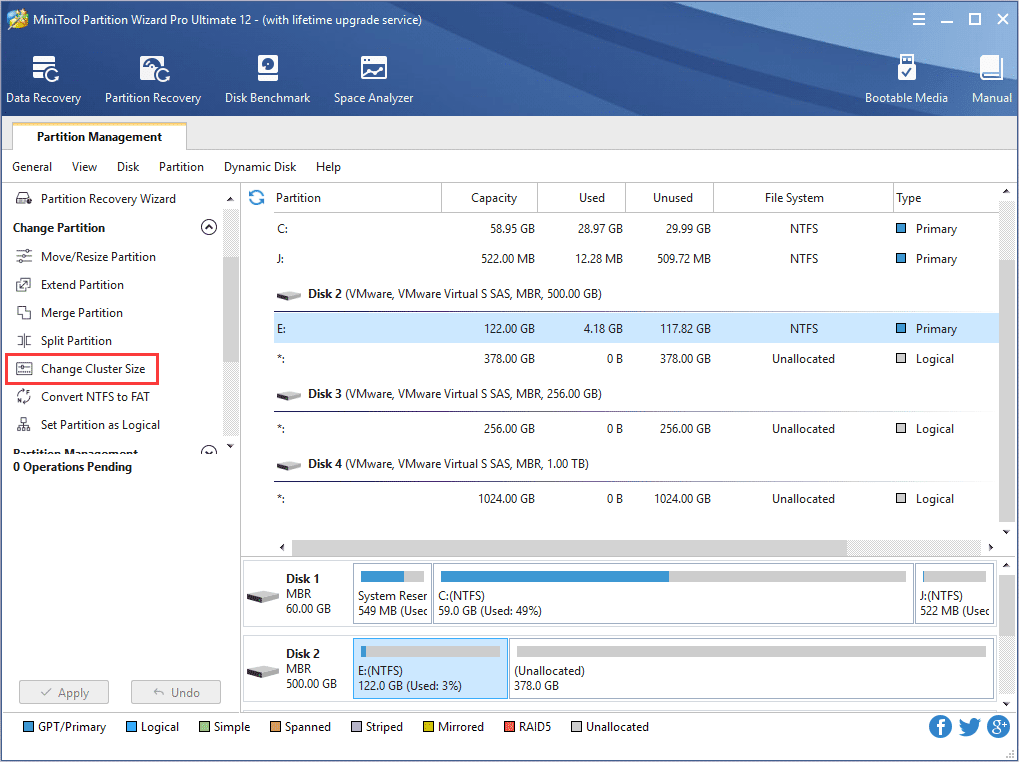
solved using partition manager to change cluster size to 4K
 

My Computer My Computer

At a glance

Windows 115900x32 GB G.SkillRX 6800 XT
OS
Windows 11
Computer type
PC/Desktop
CPU
5900x
Motherboard
MAG X570S TOMAHAWK MAX WIFI
Memory
32 GB G.Skill
Graphics Card(s)
RX 6800 XT
Sound Card
Creative Sound Blaster Z
Monitor(s) Displays
BENQ and AOC QHD 120Hz
Screen Resolution
QHD
Hard Drives
2TB Intel 660p and 2TB Sabrent Rokect 4 plus nvme, 4TB HDD HGST
PSU
Corsair RM750
Case
Bloody rage
Cooling
Water cooling gamdias 240
Keyboard
razer ornata
Mouse
razer da v2
Browser
FF and Chrome
Antivirus
Malwarebytes
Hi William,

I have the exact same problem, could you please let me know how you solved it in detail ?

Many thanks!
 

My Computer My Computer

At a glance

Windows 11
OS
Windows 11
Hi William,

I have the exact same problem, could you please let me know how you solved it in detail ?

Many thanks!
The OP used the Windows 11 Partition Manager to change the cluster size from what is stated in the post. I have found it easier to use MiniTool Partition Wizard for this type of disk management. You can visit the sites below to download their free software and the instructions for changing cluster size. You can also wait for the OP to reply to your post and follow the instructions s/he used.


Last edited:

My Computer My Computer

At a glance

Windows 11 ProfessionalIntel Core i5-940032GBIntegrated Intel UHD Graphics 630
OS
Windows 11 Professional
Computer type
PC/Desktop
Manufacturer/Model
Microcenter B677
CPU
Intel Core i5-9400
Motherboard
ASRock H310CM-HDV/M.2
Memory
32GB
Graphics Card(s)
Integrated Intel UHD Graphics 630
Sound Card
Intel Kaby Lake - High Definition Audio / cAVS (Audio, Voice, Speech) [A0]
Monitor(s) Displays
LG Model: GSM59F1
Screen Resolution
2560x1080
Case
Lian Li 205M
Antivirus
Kaspersky AV
Yes I used NIUBI Partition Editor Free Edition
 

My Computer My Computer

At a glance

Windows 115900x32 GB G.SkillRX 6800 XT
OS
Windows 11
Computer type
PC/Desktop
CPU
5900x
Motherboard
MAG X570S TOMAHAWK MAX WIFI
Memory
32 GB G.Skill
Graphics Card(s)
RX 6800 XT
Sound Card
Creative Sound Blaster Z
Monitor(s) Displays
BENQ and AOC QHD 120Hz
Screen Resolution
QHD
Hard Drives
2TB Intel 660p and 2TB Sabrent Rokect 4 plus nvme, 4TB HDD HGST
PSU
Corsair RM750
Case
Bloody rage
Cooling
Water cooling gamdias 240
Keyboard
razer ornata
Mouse
razer da v2
Browser
FF and Chrome
Antivirus
Malwarebytes
Many thanks to you both :)
 

My Computer My Computer

At a glance

Windows 11
OS
Windows 11

My Computer My Computer

At a glance

Windows 11 ProfessionalIntel Core i5-940032GBIntegrated Intel UHD Graphics 630
OS
Windows 11 Professional
Computer type
PC/Desktop
Manufacturer/Model
Microcenter B677
CPU
Intel Core i5-9400
Motherboard
ASRock H310CM-HDV/M.2
Memory
32GB
Graphics Card(s)
Integrated Intel UHD Graphics 630
Sound Card
Intel Kaby Lake - High Definition Audio / cAVS (Audio, Voice, Speech) [A0]
Monitor(s) Displays
LG Model: GSM59F1
Screen Resolution
2560x1080
Case
Lian Li 205M
Antivirus
Kaspersky AV
I'm having the same challenge. I have 4 identical hard drives. I added three into a pool successfully, and then later tried to add the fourth, but received the same error. Here's the data on the two drives (the first is the storage pool, and the second is disk I want to add)
C:\Windows\System32>fsutil fsinfo sectorInfo D:
LogicalBytesPerSector : 4096
PhysicalBytesPerSectorForAtomicity : 4096
PhysicalBytesPerSectorForPerformance : 4096
FileSystemEffectivePhysicalBytesPerSectorForAtomicity : 4096
Device Alignment : Aligned (0x000)
Partition alignment on device : Aligned (0x000)
Performs Normal Seeks
Trim Supported
Not DAX capable
Is Thinly-Provisioned, SlabSize : 536,870,912 bytes (512.0 MB)

C:\Windows\System32>fsutil fsinfo sectorInfo z:
LogicalBytesPerSector : 512
PhysicalBytesPerSectorForAtomicity : 4096
PhysicalBytesPerSectorForPerformance : 4096
FileSystemEffectivePhysicalBytesPerSectorForAtomicity : 4096
Device Alignment : Aligned (0x000)
Partition alignment on device : Aligned (0x000)
Performs Normal Seeks
Trim Not Supported
Not DAX capable
Not Thinly-Provisioned

The storage pool claims to have 4096 LogicalBytesPerSector. If it's made up of disks with 512, how is this possible?

I've tried formatting the drive to 4096 cluster sizes with windows and MiniTool, but the same error occurs. Any ideas on how to fix this?
 

My Computer My Computer

At a glance

Windows 11
OS
Windows 11
I was able to add it. I formatted the 4th drive with a partition with 4096 cluster sizes, then deleted that partition and restarted Windows. After booting up, I was able to add the unpartitioned drive to the storage spaces. Now, the storage space drive information is:

LogicalBytesPerSector : 4096
PhysicalBytesPerSectorForAtomicity : 4096
PhysicalBytesPerSectorForPerformance : 4096
FileSystemEffectivePhysicalBytesPerSectorForAtomicity : 4096
Device Alignment : Aligned (0x000)
Partition alignment on device : Aligned (0x000)
Performs Normal Seeks
Trim Supported
Not DAX capable
Is Thinly-Provisioned, SlabSize : 536,870,912 bytes (512.0 MB)


I still don't understand how disks with 512 logical bytes per sector become 4096 LogicalBytesPerSector when they are added into the storage space, but at least it's working.
 

My Computer My Computer

At a glance

Windows 11
OS
Windows 11
I still don't understand how disks with 512 logical bytes per sector become 4096 LogicalBytesPerSector when they are added into the storage space, but at least it's working.


My Computer My Computer

At a glance

Windows 115900x32 GB G.SkillRX 6800 XT
OS
Windows 11
Computer type
PC/Desktop
CPU
5900x
Motherboard
MAG X570S TOMAHAWK MAX WIFI
Memory
32 GB G.Skill
Graphics Card(s)
RX 6800 XT
Sound Card
Creative Sound Blaster Z
Monitor(s) Displays
BENQ and AOC QHD 120Hz
Screen Resolution
QHD
Hard Drives
2TB Intel 660p and 2TB Sabrent Rokect 4 plus nvme, 4TB HDD HGST
PSU
Corsair RM750
Case
Bloody rage
Cooling
Water cooling gamdias 240
Keyboard
razer ornata
Mouse
razer da v2
Browser
FF and Chrome
Antivirus
Malwarebytes
I'm having the same problem as everyone else, and given that this is the only search result that hits for error 0x80E70004, here are the steps I used to fix this, using both NIUBI Partition Editor Free Edition and Windows Disk Management:

1: In NIUBI, right click on the disk you want to add, delete all partitions, apply.
2: In diskmgmt.msc, create a NFTS partition with 4096 cluster size
3: In NIUBI, delete the partition you just created
4: Reboot
5: Open storage spaces and add the disk

I don't know why this tricks storage spaces into thinking that the disk's "sector size" is 4k, but whatever, it "works"
 

My Computer My Computer

At a glance

Windows 11
OS
Windows 11
I had similar issue.

The solution seems to reside into the reboot.

I simply deleted partition of the disks that I wanted to create a pool on.
Then reboot, then it works!

So there must be a cache in the OS which prevent this to be easier, still, no new software to install, simply the windows 11 'manage' software to delete the partition, a reboot, and that's it.
 

My Computers My Computers

  • At a glance

    Windows 11
    OS
    Windows 11
    Computer type
    PC/Desktop
  • At a glance

    MacOs
    Operating System
    MacOs
    Computer type
    Laptop
I have a bunch of old disk mounted on a USB rack, all are 512 sector logical and physical.
Of course Storage Space refuses to mount them with the infamous error 0x80E70004.
But guess what ? It is a false error message. It was not about sector size at all.
It was about the CanPool bit which was set to False for some reason. I set it to True by Resetting the disks.
You'll have to run a PowerShell in administrator and type :
Code:
Get-PhysicalDisk
Get-PhysicalDisk | Select FriendlyName, UniqueId
Reset-PhysicalDisk -UniqueId "your_id"
 

My Computer My Computer

At a glance

Windows 11
OS
Windows 11
So there must be a cache in the OS which prevent this to be easier, still, no new software to install, simply the windows 11 'manage' software to delete the partition, a reboot, and that's it.
and
But guess what ? It is a false error message. It was not about sector size at all.
It was about the CanPool bit which was set to False for some reason. I set it to True by Resetting the disks.
You'll have to run a PowerShell in administrator and type :
Code:
Powershell:
Get-PhysicalDisk
Get-PhysicalDisk | Select FriendlyName, UniqueId
Reset-PhysicalDisk -UniqueId "your_id"

To confirm, it is the CanPool flag:

1745776107895.webp

Use the same original UniqueId value in place of "your id" in the commands.

Afterwards Storage Spaces happily created my pool without complaint.

Thank you very much for getting to the bottom of this!
 

My Computer My Computer

At a glance

Windows 11 Pro
OS
Windows 11 Pro
Computer type
Laptop
Manufacturer/Model
Samsung

Latest Support Threads

Back
Top Bottom