Solved 22H2 Device Manager Bug?


Arumbinang

Member
Local time
10:58 AM
Posts
4
OS
Windows 11
Untitled.png

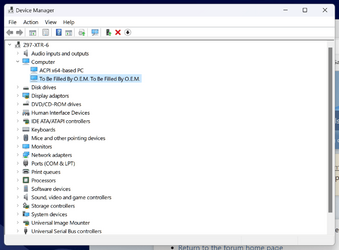
Does anyone have same issue under computer category ?
that extra list under computer category show after 22H2 update. (build 22621.521)
 

My Computer My Computer

At a glance

Windows 11Intel I7 4790Corsair Dominator Platinum DDR3-1866Nvidia Geforce GTX 1080 FE
OS
Windows 11
Computer type
PC/Desktop
Manufacturer/Model
AsRock
CPU
Intel I7 4790
Motherboard
AsRock Z97 Extreme6
Memory
Corsair Dominator Platinum DDR3-1866
Graphics Card(s)
Nvidia Geforce GTX 1080 FE
Hard Drives
Samsung 950 M.2
PSU
Corsair RM750
Case
Corsair Carbide Air 540
Cooling
Corsair H100i
Keyboard
Logitech K800
Mouse
Logitech M545
View attachment 40006

Does anyone have same issue under computer category ?
that extra list under computer category show after 22H2 update. (build 22621.521)
Nah man mine shows as my MOBO where yours shows as to be filled with OEM, Generally that just means the Manufacturer of your system did not fill in the System Motherboard information on the BIOS Chip
 

My Computer My Computer

At a glance

11[email protected]Viper Steelseries 32gb@ 3600mhzGigabyte 2070 Super 8GB, +200 core + 600 memory
OS
11
Computer type
PC/Desktop
Manufacturer/Model
Custom
CPU
[email protected]
Motherboard
Gigabyte Gaming X Z490
Memory
Viper Steelseries 32gb@ 3600mhz
Graphics Card(s)
Gigabyte 2070 Super 8GB, +200 core + 600 memory
Monitor(s) Displays
ASUS 4k HDR, Two 1080p Benq and Samsung
Screen Resolution
3840x2160/2560x1440/1920x1080
Hard Drives
Adata XPG SX8200 PRO 1tb
Samsung EVO 870 500GB
PSU
Corsair RX 650
Case
NZXT h510
Cooling
CM HYPER 212 RGB
Keyboard
Razer Ornata Chroma
Mouse
Steelseries Rival 710
Nah man mine shows as my MOBO where yours shows as to be filled with OEM, Generally that just means the Manufacturer of your system did not fill in the System Motherboard information on the BIOS Chip
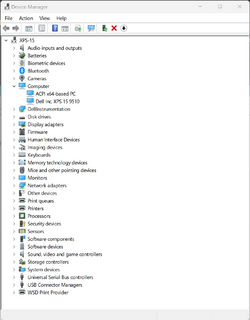
afaik, it should be one list (acpi x64/86 based pc) under computer category,
 

My Computer My Computer

At a glance

Windows 11Intel I7 4790Corsair Dominator Platinum DDR3-1866Nvidia Geforce GTX 1080 FE
OS
Windows 11
Computer type
PC/Desktop
Manufacturer/Model
AsRock
CPU
Intel I7 4790
Motherboard
AsRock Z97 Extreme6
Memory
Corsair Dominator Platinum DDR3-1866
Graphics Card(s)
Nvidia Geforce GTX 1080 FE
Hard Drives
Samsung 950 M.2
PSU
Corsair RM750
Case
Corsair Carbide Air 540
Cooling
Corsair H100i
Keyboard
Logitech K800
Mouse
Logitech M545
2022-09-23_17h19_01.png
This is how mine looks
 

My Computer My Computer

At a glance

11[email protected]Viper Steelseries 32gb@ 3600mhzGigabyte 2070 Super 8GB, +200 core + 600 memory
OS
11
Computer type
PC/Desktop
Manufacturer/Model
Custom
CPU
[email protected]
Motherboard
Gigabyte Gaming X Z490
Memory
Viper Steelseries 32gb@ 3600mhz
Graphics Card(s)
Gigabyte 2070 Super 8GB, +200 core + 600 memory
Monitor(s) Displays
ASUS 4k HDR, Two 1080p Benq and Samsung
Screen Resolution
3840x2160/2560x1440/1920x1080
Hard Drives
Adata XPG SX8200 PRO 1tb
Samsung EVO 870 500GB
PSU
Corsair RX 650
Case
NZXT h510
Cooling
CM HYPER 212 RGB
Keyboard
Razer Ornata Chroma
Mouse
Steelseries Rival 710
Mine has both lines, second one says 'Asus system product name', as stated previously this is just a section for OEMS to add an identifying string. It has no effect on the capabilties of the system or on Windows ability to use the hardware properly.
 

My Computer My Computer

At a glance

Windows 11 Pro 22H2, build: 22621.521Intel i7-12700K 3.6GHz Base (5.0GHz Turbo)64GB DDR 3600MhzAsus Tuff RTX 3080 10GB OC
OS
Windows 11 Pro 22H2, build: 22621.521
Computer type
PC/Desktop
Manufacturer/Model
Scan 3XS Custom 1700
CPU
Intel i7-12700K 3.6GHz Base (5.0GHz Turbo)
Motherboard
Asus ProArt Creator B660 D4
Memory
64GB DDR 3600Mhz
Graphics Card(s)
Asus Tuff RTX 3080 10GB OC
Sound Card
Onboard Realtek
Monitor(s) Displays
Gigabyte G32QC 32inch 16:9 curved @2560 x 1440p 165Hz Freesync Premium Pro/ Dell SE2422H 24inch 16:9 1920 x 1080p 75Hz Freesync
Screen Resolution
2560 x 1440p & 1920 x 1080p
Hard Drives
WD SN570 1TB NVME (Boot), Samsung 870QVO 1TB (SSD), SanDisk 3D Ultra 500Gb (SSD) x2, Seagate 3Tb Expansion Desk (Ext HDD), 2x Toshiba 1Tb P300 (Ext HDD)
PSU
Corsair RM1000X Modular
Case
Corsair 4000D Airflow Desktop
Cooling
Corsair Hydro H150i RGB Pro XT 360mm Liquid Cooler, 3 x 120mm fans, 1x Exhaust
Keyboard
Microsoft Ergonomic
Mouse
Logitech G402
Internet Speed
800Mbs
Browser
Edge Chromium
Antivirus
Defender, Malwarebytes
Both of my Win11 21H2 Dell machines have just the 1 line about ACPI in that item.
 

My Computers My Computers

  • At a glance

    Win11 Pro RTM Version 24H2 Build 26100.4202Intel Core i5 11th Gen. 2.40GHz12GB
    OS
    Win11 Pro RTM Version 24H2 Build 26100.4202
    Computer type
    Laptop
    Manufacturer/Model
    Dell Vostro 3400
    CPU
    Intel Core i5 11th Gen. 2.40GHz
    Memory
    12GB
    Hard Drives
    256GB SSD NVMe M.2
  • At a glance

    Win11 Pro RTM Version 24H2 Build 26100.4202Intel Core i5 10th Gen. 2.90GHz16GBOnboard, no VGA, using a DisplayPort-to-VGA a...
    Operating System
    Win11 Pro RTM Version 24H2 Build 26100.4202
    Computer type
    PC/Desktop
    Manufacturer/Model
    Dell Vostro 5890
    CPU
    Intel Core i5 10th Gen. 2.90GHz
    Memory
    16GB
    Graphics card(s)
    Onboard, no VGA, using a DisplayPort-to-VGA adapter
    Monitor(s) Displays
    24" Dell
    Hard Drives
    512GB SSD NVMe, 4TB Seagate HDD
    Browser
    Firefox, Edge
    Antivirus
    Windows Defender/Microsoft Security
This is new to 22H2.
 

My Computer My Computer

At a glance

Windows 11 Pro
OS
Windows 11 Pro
This is new to 22H2.
Really? Didn't even notice, Thought it was always that way, Has been for me for months as i've been on 22h2 for a good while now.
 

My Computer My Computer

At a glance

11[email protected]Viper Steelseries 32gb@ 3600mhzGigabyte 2070 Super 8GB, +200 core + 600 memory
OS
11
Computer type
PC/Desktop
Manufacturer/Model
Custom
CPU
[email protected]
Motherboard
Gigabyte Gaming X Z490
Memory
Viper Steelseries 32gb@ 3600mhz
Graphics Card(s)
Gigabyte 2070 Super 8GB, +200 core + 600 memory
Monitor(s) Displays
ASUS 4k HDR, Two 1080p Benq and Samsung
Screen Resolution
3840x2160/2560x1440/1920x1080
Hard Drives
Adata XPG SX8200 PRO 1tb
Samsung EVO 870 500GB
PSU
Corsair RX 650
Case
NZXT h510
Cooling
CM HYPER 212 RGB
Keyboard
Razer Ornata Chroma
Mouse
Steelseries Rival 710
Really? Didn't even notice, Thought it was always that way, Has been for me for months as i've been on 22h2 for a good while now.

Here is what 21H2 looks like.

3.jpg
 

My Computer My Computer

At a glance

Windows 11 Pro
OS
Windows 11 Pro

My Computer My Computer

At a glance

11[email protected]Viper Steelseries 32gb@ 3600mhzGigabyte 2070 Super 8GB, +200 core + 600 memory
OS
11
Computer type
PC/Desktop
Manufacturer/Model
Custom
CPU
[email protected]
Motherboard
Gigabyte Gaming X Z490
Memory
Viper Steelseries 32gb@ 3600mhz
Graphics Card(s)
Gigabyte 2070 Super 8GB, +200 core + 600 memory
Monitor(s) Displays
ASUS 4k HDR, Two 1080p Benq and Samsung
Screen Resolution
3840x2160/2560x1440/1920x1080
Hard Drives
Adata XPG SX8200 PRO 1tb
Samsung EVO 870 500GB
PSU
Corsair RX 650
Case
NZXT h510
Cooling
CM HYPER 212 RGB
Keyboard
Razer Ornata Chroma
Mouse
Steelseries Rival 710
So its not a bug,

Thanks everyone...

Untitled.png
 

My Computer My Computer

At a glance

Windows 11Intel I7 4790Corsair Dominator Platinum DDR3-1866Nvidia Geforce GTX 1080 FE
OS
Windows 11
Computer type
PC/Desktop
Manufacturer/Model
AsRock
CPU
Intel I7 4790
Motherboard
AsRock Z97 Extreme6
Memory
Corsair Dominator Platinum DDR3-1866
Graphics Card(s)
Nvidia Geforce GTX 1080 FE
Hard Drives
Samsung 950 M.2
PSU
Corsair RM750
Case
Corsair Carbide Air 540
Cooling
Corsair H100i
Keyboard
Logitech K800
Mouse
Logitech M545

My Computer My Computer

At a glance

11[email protected]Viper Steelseries 32gb@ 3600mhzGigabyte 2070 Super 8GB, +200 core + 600 memory
OS
11
Computer type
PC/Desktop
Manufacturer/Model
Custom
CPU
[email protected]
Motherboard
Gigabyte Gaming X Z490
Memory
Viper Steelseries 32gb@ 3600mhz
Graphics Card(s)
Gigabyte 2070 Super 8GB, +200 core + 600 memory
Monitor(s) Displays
ASUS 4k HDR, Two 1080p Benq and Samsung
Screen Resolution
3840x2160/2560x1440/1920x1080
Hard Drives
Adata XPG SX8200 PRO 1tb
Samsung EVO 870 500GB
PSU
Corsair RX 650
Case
NZXT h510
Cooling
CM HYPER 212 RGB
Keyboard
Razer Ornata Chroma
Mouse
Steelseries Rival 710
Sweet, Did it sort itself after a reboot or did you do something to sort it? Just incase it happens to anyone else :)
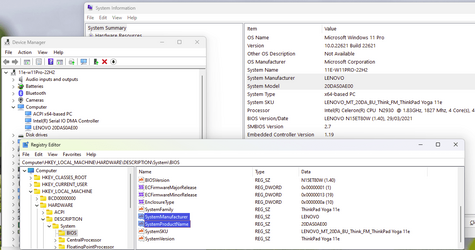
it will happens to anyone who have board that does not meet requierement to install 11, so i need a little modification in registry.

i replace string value of

FriendlyName
in both
HKEY_LOCAL_MACHINE\SYSTEM\ControlSet001\Enum\SWD\COMPUTER\MFG_To_Be_Filled_By_O.E.M.&FAM_To_Be_Filled_By_O.E.M.&PROD_To_Be_Filled_By_O.E.M.&SKU_To_Be_Filled_By_O.E.M.
and
HKEY_LOCAL_MACHINE\SYSTEM\CurrentControlSet\Enum\SWD\COMPUTER\MFG_To_Be_Filled_By_O.E.M.&FAM_To_Be_Filled_By_O.E.M.&PROD_To_Be_Filled_By_O.E.M.&SKU_To_Be_Filled_By_O.E.M.
 

My Computer My Computer

At a glance

Windows 11Intel I7 4790Corsair Dominator Platinum DDR3-1866Nvidia Geforce GTX 1080 FE
OS
Windows 11
Computer type
PC/Desktop
Manufacturer/Model
AsRock
CPU
Intel I7 4790
Motherboard
AsRock Z97 Extreme6
Memory
Corsair Dominator Platinum DDR3-1866
Graphics Card(s)
Nvidia Geforce GTX 1080 FE
Hard Drives
Samsung 950 M.2
PSU
Corsair RM750
Case
Corsair Carbide Air 540
Cooling
Corsair H100i
Keyboard
Logitech K800
Mouse
Logitech M545
Mine...

Screenshot 2022-09-23 141610.png
 

My Computers My Computers

  • At a glance

    Windows 11 ProIntel Series 3 Core Ultra X9 388H64GB LPDDR5x 9600 MT/sIntel Arc graphics B390 Panther Lake
    OS
    Windows 11 Pro
    Computer type
    Laptop
    Manufacturer/Model
    Dell XPS 16 DA16260
    CPU
    Intel Series 3 Core Ultra X9 388H
    Memory
    64GB LPDDR5x 9600 MT/s
    Graphics Card(s)
    Intel Arc graphics B390 Panther Lake
    Monitor(s) Displays
    16" 3.2K Tandem OLED Infinity Edge
    Screen Resolution
    3200 x 2000 16:10 236 PPI
    Hard Drives
    1 Terabyte M.2 PCIe NVMe SSD
    Case
    Black Anodized Aluminum
    Cooling
    Vapor Chamber Cooling
    Mouse
    None
    Internet Speed
    942 Mbps Netgear Mesh + 2 Satellites
    Browser
    Microsoft Edge (Chromium)
    Antivirus
    Windows Security (Defender)
    Other Info
    NPU delivering 67 TOPS
    Microsoft 365 subscription
    Microsoft Office 365
    Microsoft OneDrive 1TB Cloud
    Microsoft Visual Studio
    Microsoft Visual Studio Code
    Microsoft Sysinternals Suite
    Microsoft BitLocker
    Microsoft Copilot
    Dell Support Assist
    Dell Command | Update
    Macrium Reflect X subscription
    1Password Password Manager
    Amazon Kindle for PC
    Lightroom/Photoshop subscription
    Interactive Brokers Trader Workstation
  • At a glance

    Windows 11 ProSnapdragon® X Elite (12 Core) with Hexagon NP...32GB LPDDR5x 8448 MT/sIntegrated Adreno GPU
    Operating System
    Windows 11 Pro
    Computer type
    Laptop
    Manufacturer/Model
    Microsoft Surface Laptop 7
    CPU
    Snapdragon® X Elite (12 Core) with Hexagon NPU delivering 45 TOPS
    Memory
    32GB LPDDR5x 8448 MT/s
    Graphics card(s)
    Integrated Adreno GPU
    Sound Card
    Omnisonic speakers with Dolby Atmos spatial sound
    Monitor(s) Displays
    13.8″ PixelSense Flow touchscreen 120 Hz 600 NIT
    Screen Resolution
    2304 × 1536 (201 PPI), 3:2 aspect ratio
    Hard Drives
    1 TB PCIe NVMe Gen 4 SSD
    Case
    Black Anodized Aluminum
    Cooling
    Vapor Chamber Cooling
    Mouse
    None
    Internet Speed
    942 Mbps Netgear Mesh + 2 Satellites
    Browser
    Microsoft Edge (Chromium)
    Antivirus
    Windows Security (Defender)
    Other Info
    Microsoft 365 subscription (Office)
    Microsoft Office 365
    Microsoft OneDrive 1TB Cloud
    Microsoft Visual Studio 2026
    Microsoft Visual Studio Code
    Interactive Brokers Trader Workstation
    Lightroom/Photoshop subscription
    1Password Password Manager
    Microsoft Sysinternals
    Amazon Kindle for PC
    Microsoft BitLocker
    Microsoft Copilot
Does anyone have same issue under computer category ?
that extra list under computer category show after 22H2 update. (build 22621.521)
That may be new in Device Manager for 22H2, but that information has always been visible in System Information. Both of those are reading the info from the Registry, which in turn read it from the Bios. They are all just reporting whatever it says in the Bios, and that was put there by the OEM.

1663958141777.png
 

My Computers My Computers

  • At a glance

    Windows 11 HomeAMD Athlon Silver 3050U8GBRadeon Graphics
    OS
    Windows 11 Home
    Computer type
    Laptop
    Manufacturer/Model
    Acer Aspire 3 A315-23-R9VY
    CPU
    AMD Athlon Silver 3050U
    Memory
    8GB
    Graphics Card(s)
    Radeon Graphics
    Monitor(s) Displays
    laptop screen
    Screen Resolution
    1366x768 native resolution, up to 2560x1440 with Radeon Virtual Super Resolution
    Hard Drives
    1TB Samsung EVO 870 SSD (from April 2026: 250GB EVO 850)
    Internet Speed
    150 Mbps
    Browser
    Edge, Firefox
    Antivirus
    Defender
    Other Info
    fully 'Windows 11 ready' laptop. Windows 10 C: partition migrated from my old unsupported 'main machine' then upgraded to 11. A test migration ran Insider builds for 2 months. When 11 was released on 5th October 2021 it was re-imaged back to 10 and was offered the upgrade in Windows Update on 20th October. Windows Update offered the 22H2 Feature Update on 20th September 2022. It got the 23H2 Feature Update on 4th November 2023 through Windows Update, 24H2 on 3rd October 2024 through Windows Update by setting the Target Release Version for 24H2, and 25H2 on 30th September 2025 through Windows Update by setting the Target Release Version for 25H2.

    UPDATE - 11 April 2026: due to mechanical deterioration this PC has been retired from active duty. The OS with all software and files has been migrated to my System Seven in 'Other systems' to carry on as my general purpose 'main machine'.
  • At a glance

    Windows 11 ProIntel® Core™ i5-520M8GB(integrated graphics) Intel HD Graphics
    Operating System
    Windows 11 Pro
    Computer type
    Laptop
    Manufacturer/Model
    Dell Latitude E4310
    CPU
    Intel® Core™ i5-520M
    Motherboard
    0T6M8G
    Memory
    8GB
    Graphics card(s)
    (integrated graphics) Intel HD Graphics
    Screen Resolution
    1366x768
    Hard Drives
    500GB Crucial MX500 SSD
    Browser
    Firefox, Edge
    Antivirus
    Defender
    Other Info
    unsupported machine: Legacy bios, MBR, TPM 1.2, upgraded from W10 to W11 using W10/W11 hybrid install media workaround.

    In-place upgrade to 22H2 using ISO and a workaround.
    Feature Update to 23H2 by manually installing the Enablement Package.
    In-place upgrade to 24H2 using hybrid 23H2/24H2 install media.
    Upgraded to 25H2 by Enablement Package.

    Also running Insider Dev, and Canary builds and Windows 10 as native boot .vhdx.
  • My SYSTEM THREE is a Dell Latitude 5410, i7-10610U, 32GB RAM, 512GB NVMe ssd, supported device running Windows 11 Pro.

    My SYSTEM FOUR is a 2-in-1 convertible Lenovo Yoga 11e 20DA, Celeron N2930, 8GB RAM, 256GB ssd. Unsupported device: currently running Win10 Pro, plus Win11 Pro RTM and Insider Dev, Beta, and RP 24H2 as native boot vhdx.

    My SYSTEM FIVE is a Dell Latitude 3190 2-in-1, Pentium Silver N5030, 8GB RAM, 1TB NVMe ssd, supported device running Windows 11 Pro, plus Insider Beta, Dev, and Canary builds (and a few others) as a native boot .vhdx.

    My SYSTEM SIX is a Dell Latitude 5550, Core Ultra 7 165H, 64GB RAM, 1TB NVMe SSD, supported device, Windows 11 Pro 24H2, Hyper-V host machine. Updated to 25H2 on 30th September 2025.

    My SYSTEM SEVEN is a Lenovo Thinkpad T580, Intel Core i7-8650U, 16GB RAM, 512GB NVMe SSD + 2nd 512GB NVMe SSD, a supported device for Windows 11. This is my current general purpose 'main machine'. The installed Windows 11 Home from my System One has been migrated to this machine.
it will happens to anyone who have board that does not meet requierement to install 11, so i need a little modification in registry.

i replace string value of


in both

and
Ahhh i understand, Very good to know thank you!
 

My Computer My Computer

At a glance

11[email protected]Viper Steelseries 32gb@ 3600mhzGigabyte 2070 Super 8GB, +200 core + 600 memory
OS
11
Computer type
PC/Desktop
Manufacturer/Model
Custom
CPU
[email protected]
Motherboard
Gigabyte Gaming X Z490
Memory
Viper Steelseries 32gb@ 3600mhz
Graphics Card(s)
Gigabyte 2070 Super 8GB, +200 core + 600 memory
Monitor(s) Displays
ASUS 4k HDR, Two 1080p Benq and Samsung
Screen Resolution
3840x2160/2560x1440/1920x1080
Hard Drives
Adata XPG SX8200 PRO 1tb
Samsung EVO 870 500GB
PSU
Corsair RX 650
Case
NZXT h510
Cooling
CM HYPER 212 RGB
Keyboard
Razer Ornata Chroma
Mouse
Steelseries Rival 710
Whether your machine meets Windows 11 specs or not has nothing to do with it. If you built your own system you most likely will see that entry. Since motherboard manufacturers have no way of knowing who the board is being sold to they leave those areas blank in the BIOS. Once upon a time they used to provide access to a utility that would allow you to modify the BIOS with those values, but I haven't seen any these days...
 

My Computer My Computer

At a glance

Windows 11 ProRyzen 9 9950X3D64g DDR5 6000Water Cooled EVGA 3080TI Hybrid
OS
Windows 11 Pro
Computer type
PC/Desktop
Manufacturer/Model
Home Made
CPU
Ryzen 9 9950X3D
Motherboard
MSI 870E Tomahawk WIFI
Memory
64g DDR5 6000
Graphics Card(s)
Water Cooled EVGA 3080TI Hybrid
Sound Card
Main Board
Monitor(s) Displays
Samsung 27 G7 QHD - Acer Predator 27 QHD
Screen Resolution
QHD
Hard Drives
4TB Samsung 9100 pro
4TB Samsung 990 Evo plus
2TB Nvme Samsung 980 Pro
2TB SATA Crucial MX500
PSU
Seasonic 1300 Platinum
Case
Fractal Meshify 2xl
Cooling
MSI Core Liquid 360 aio cooler
Keyboard
Corsair K95
Mouse
Logitech G502X
Internet Speed
1gig Fiber
Browser
Chrome
Antivirus
Norton 360
Back
Top Bottom