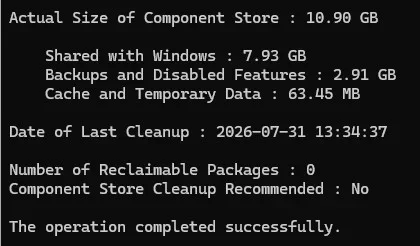
Solved 24H2 - how to remove the two (un)reclaimable that always show in DISM


A repair install will always restore them, whether that's using 24H2 or 25H2 media.

That's because 24H2 and 25H2 share a common set of system files. All the new features for 25H2 were delivered in the 24H2 cumulative updates, but were dormant until the 25H2 Enablement Package was installed. The main difference between 24H2 install media and 25H2 is that the 25H2 one includes and installs the 25H2 Enablement Package.

The 26H2 Feature Update is going to be another enablement package, so they will exist for at least another year.

1781228255981-webp.174048
I don't ever remember seeing that enablement package on the 25H2 ISO It probably is there, and maybe just skipped my attention I will look again. It ould explain a lot.
I always look through the wim packages on an ISO out of curiosity.
 

My Computer My Computer

At a glance

Wndows 11 Pro32 GB DDR4NVIDIA 4060Ti
OS
Wndows 11 Pro
Computer type
PC/Desktop
Motherboard
Z390 Aorus Ultra
Memory
32 GB DDR4
Graphics Card(s)
NVIDIA 4060Ti
Monitor(s) Displays
TCL 40"
Screen Resolution
1920 x 1080
I on the other hand had major issues with WU errors the few times I removed those packages and had to resort to repair installs to get the updates. Of course not every system will be effected or be effected right away but the risk is indeed real. Even the author of the command to remove those Un-reclaimable packages had issues on certain PC's with certain builds so remove at your own risk. That AI summery was used because it explained and broke it down simply and concisely. There are other more detailed sources if you you search for them.
I did not and never had any issues. One thing I do not do is remove those packages in an Insider build. I doubt that I will ever be on another Insider. I also will do an In Place Update Repair before the July PT.
 

My Computers My Computers

  • At a glance

    Windows11 Pro 26200.8973Intel Core i9 14900F (24 -Core, 68 MB Total C...32GB DDR5RTX 4080 Super w/610.74
    OS
    Windows11 Pro 26200.8973
    Computer type
    PC/Desktop
    Manufacturer/Model
    Dell Alienware Aurora R16
    CPU
    Intel Core i9 14900F (24 -Core, 68 MB Total Cache)
    Motherboard
    Dell Alienware
    Memory
    32GB DDR5
    Graphics Card(s)
    RTX 4080 Super w/610.74
    Sound Card
    Realtec
    Monitor(s) Displays
    Corsair XENEON 32QHD165
    Screen Resolution
    2560 X 1440
    Hard Drives
    1-2TB Samsung 990 Pro PCIe NVMe M2 SSD
    1-4TB Samsung 990 Pro PCIe NVMe M2 SSD
    PSU
    1000 Watt Platinum Dell
    Case
    Alienware
    Cooling
    Liquid Closed Loop
    Keyboard
    Corsair Strafe RGB
    Mouse
    Logitech MK270 Wireless
    Internet Speed
    100Gb's Down-20 Up
    Browser
    Firefox 153.0.1
    Antivirus
    Defender
    Other Info
    Very Quiet And Fast
    CyberPower UPS CP1500PFCLCD
  • At a glance

    PClinuxOS Mate (2025.7)13th Gen Inter(R) Core(TM) i3-1315U64 GB DDR4 @3200 MHz.Internal
    Operating System
    PClinuxOS Mate (2025.7)
    Computer type
    PC/Desktop
    Manufacturer/Model
    Intel
    CPU
    13th Gen Inter(R) Core(TM) i3-1315U
    Motherboard
    Intel
    Memory
    64 GB DDR4 @3200 MHz.
    Graphics card(s)
    Internal
    Sound Card
    None
    Monitor(s) Displays
    Dell 2419HGCF
    Screen Resolution
    1920 X 1080
    Hard Drives
    SAMSUNG 980 PRO SSD 2TB, PCIe 4.0 M.2 2280
    PSU
    Chicony 30 Watt
    Case
    Small
    Keyboard
    Dell
    Mouse
    Razor
    Internet Speed
    1GB
    Browser
    Slimjet
I did not and never had any issues. One thing I do not do is remove those packages in an Insider build. I doubt that I will ever be on another Insider. I also will do an In Place Update Repair before the July PT.
I admit, I like using the Beta and RP builds just to play with some of the new and latest features early. Never been adventurous enough to play with the experimental builds and have no desire to as they are just that, experimental.
 

My Computers My Computers

  • At a glance

    Windows 11 25H2Intel Core Ultra 9 275HX (24-Core)64GB DDR5 6400MT/sNVIDIA GeForce RTX 5080 and Intel UHD Graphics
    OS
    Windows 11 25H2
    Computer type
    Laptop
    Manufacturer/Model
    Alienware 18 Area-51
    CPU
    Intel Core Ultra 9 275HX (24-Core)
    Motherboard
    Alienware
    Memory
    64GB DDR5 6400MT/s
    Graphics Card(s)
    NVIDIA GeForce RTX 5080 and Intel UHD Graphics
    Sound Card
    Onboard, Realtek high-performance Audio chips (ALC3329 & ALC1708))
    Monitor(s) Displays
    300HZ 18-inch QHD 500 nit Comfort View+
    Screen Resolution
    2560 x 1600
    Hard Drives
    2TB NVMe M.2 PCIe Gen 5 SSD
    Case
    Magnesium Alloy
    Cooling
    Advanced Cryo-Tech Quad-Fan Cooling system & large vapor chamber
    Keyboard
    Cherry MX ultra low profile mechanical keyboard with per key AlienFX RGB lighting
    Mouse
    Logitech MX Master 4
    Browser
    Vivaldi (main), Firefox, Chrome, Edge
    Antivirus
    MS Defender and Malwarebytes Free
  • At a glance

    Windows 11 25H2Qualcomm Snapdragon X Elite (12 Core) ARM bas...16GB LPDDR5Qualcomm Adreno X1-85
    Operating System
    Windows 11 25H2
    Computer type
    Laptop
    Manufacturer/Model
    Microsoft Surface Laptop 7
    CPU
    Qualcomm Snapdragon X Elite (12 Core) ARM based CPU
    Motherboard
    Microsoft Corp.
    Memory
    16GB LPDDR5
    Graphics card(s)
    Qualcomm Adreno X1-85
    Sound Card
    Omnisonic speakers with Dolby Atmos spatial sound
    Monitor(s) Displays
    120 Hz 13.8-inch 600 nit PixelSense Flow touchscreen
    Screen Resolution
    2304x1536
    Hard Drives
    1TB NVMe Gen 4 SSD
    Case
    Anodized Aluminum
    Cooling
    Traditional active cooling fan system
    Keyboard
    Mechanical QWERTY, backlit when in use
    Mouse
    Logitech MX Master 4 and Surface Arc Mouse
    Browser
    Vivaldi (main), Firefox, Chrome, Edge
    Antivirus
    MS Defender and Malwarebytes Free
so is okay to do this on computer or not as I don't want to mess anything up again since I just did a repair update
 

My Computer My Computer

At a glance

Windows 11 Pro X64 Version 25H2 Build 26200.8973Intel(R) Core(TM) i5-8400 CPU @ 2.80GHz24GBNVIDIA GeForce GTX 960
OS
Windows 11 Pro X64 Version 25H2 Build 26200.8973
Computer type
PC/Desktop
Manufacturer/Model
Custom Build
CPU
Intel(R) Core(TM) i5-8400 CPU @ 2.80GHz
Motherboard
ASROCK B360M Pro4
Memory
24GB
Graphics Card(s)
NVIDIA GeForce GTX 960
Sound Card
Realtek(R) Audio 6.0.9231.1
Monitor(s) Displays
Generic Monitor (Dell S2721HN)
Screen Resolution
1920x1080
Hard Drives
CT240BX500SSD1
EDILOCA ES106 500GB
SATA SDD
Keyboard
TECKNET Wired Gaming Keyboard Model TK-B002
Mouse
Logitech G203 LIGHTSYNC Gaming Mouse
Browser
Firefox/Chrome
Antivirus
Malwarebytes
so is okay to do this on computer or not as I don't want to mess anything up again since I just did a repair update
No it is not, it may break things.
 

My Computers My Computers

  • At a glance

    Windows11 Pro 26200.8973Intel Core i9 14900F (24 -Core, 68 MB Total C...32GB DDR5RTX 4080 Super w/610.74
    OS
    Windows11 Pro 26200.8973
    Computer type
    PC/Desktop
    Manufacturer/Model
    Dell Alienware Aurora R16
    CPU
    Intel Core i9 14900F (24 -Core, 68 MB Total Cache)
    Motherboard
    Dell Alienware
    Memory
    32GB DDR5
    Graphics Card(s)
    RTX 4080 Super w/610.74
    Sound Card
    Realtec
    Monitor(s) Displays
    Corsair XENEON 32QHD165
    Screen Resolution
    2560 X 1440
    Hard Drives
    1-2TB Samsung 990 Pro PCIe NVMe M2 SSD
    1-4TB Samsung 990 Pro PCIe NVMe M2 SSD
    PSU
    1000 Watt Platinum Dell
    Case
    Alienware
    Cooling
    Liquid Closed Loop
    Keyboard
    Corsair Strafe RGB
    Mouse
    Logitech MK270 Wireless
    Internet Speed
    100Gb's Down-20 Up
    Browser
    Firefox 153.0.1
    Antivirus
    Defender
    Other Info
    Very Quiet And Fast
    CyberPower UPS CP1500PFCLCD
  • At a glance

    PClinuxOS Mate (2025.7)13th Gen Inter(R) Core(TM) i3-1315U64 GB DDR4 @3200 MHz.Internal
    Operating System
    PClinuxOS Mate (2025.7)
    Computer type
    PC/Desktop
    Manufacturer/Model
    Intel
    CPU
    13th Gen Inter(R) Core(TM) i3-1315U
    Motherboard
    Intel
    Memory
    64 GB DDR4 @3200 MHz.
    Graphics card(s)
    Internal
    Sound Card
    None
    Monitor(s) Displays
    Dell 2419HGCF
    Screen Resolution
    1920 X 1080
    Hard Drives
    SAMSUNG 980 PRO SSD 2TB, PCIe 4.0 M.2 2280
    PSU
    Chicony 30 Watt
    Case
    Small
    Keyboard
    Dell
    Mouse
    Razor
    Internet Speed
    1GB
    Browser
    Slimjet
okay I will leave them
 

My Computer My Computer

At a glance

Windows 11 Pro X64 Version 25H2 Build 26200.8973Intel(R) Core(TM) i5-8400 CPU @ 2.80GHz24GBNVIDIA GeForce GTX 960
OS
Windows 11 Pro X64 Version 25H2 Build 26200.8973
Computer type
PC/Desktop
Manufacturer/Model
Custom Build
CPU
Intel(R) Core(TM) i5-8400 CPU @ 2.80GHz
Motherboard
ASROCK B360M Pro4
Memory
24GB
Graphics Card(s)
NVIDIA GeForce GTX 960
Sound Card
Realtek(R) Audio 6.0.9231.1
Monitor(s) Displays
Generic Monitor (Dell S2721HN)
Screen Resolution
1920x1080
Hard Drives
CT240BX500SSD1
EDILOCA ES106 500GB
SATA SDD
Keyboard
TECKNET Wired Gaming Keyboard Model TK-B002
Mouse
Logitech G203 LIGHTSYNC Gaming Mouse
Browser
Firefox/Chrome
Antivirus
Malwarebytes
Still no issues after doing this back in March 2025.

Screenshot 2026-08-01 141120.webp
 

My Computer My Computer

At a glance

Windows 11 Pro
OS
Windows 11 Pro
so should I do it then or not some people say they have done it and not had any problems i did have a preview update a few days ago and it wouldn't install i got error 80072efe
 

My Computer My Computer

At a glance

Windows 11 Pro X64 Version 25H2 Build 26200.8973Intel(R) Core(TM) i5-8400 CPU @ 2.80GHz24GBNVIDIA GeForce GTX 960
OS
Windows 11 Pro X64 Version 25H2 Build 26200.8973
Computer type
PC/Desktop
Manufacturer/Model
Custom Build
CPU
Intel(R) Core(TM) i5-8400 CPU @ 2.80GHz
Motherboard
ASROCK B360M Pro4
Memory
24GB
Graphics Card(s)
NVIDIA GeForce GTX 960
Sound Card
Realtek(R) Audio 6.0.9231.1
Monitor(s) Displays
Generic Monitor (Dell S2721HN)
Screen Resolution
1920x1080
Hard Drives
CT240BX500SSD1
EDILOCA ES106 500GB
SATA SDD
Keyboard
TECKNET Wired Gaming Keyboard Model TK-B002
Mouse
Logitech G203 LIGHTSYNC Gaming Mouse
Browser
Firefox/Chrome
Antivirus
Malwarebytes
so should I do it then or not some people say they have done it and not had any problems i did have a preview update a few days ago and it wouldn't install i got error 80072efe
I prefer not to uninstall them... leave them as they are.. I had no problems before formatting pc (by removing them).. everything was fine at every update!! But after formatting my pc I didn't touch them... it's up to you...
 

My Computer My Computer

At a glance

win 11 pro 25 h2
OS
win 11 pro 25 h2
Computer type
PC/Desktop
This worked for us...

Code:
DISM /Online /Remove-Package /packagename:Package_for_RollupFix~31bf3856ad364e35~amd64~~26100.1742.1.10

Then confirm...

Code:
DISM /Online /Cleanup-Image /AnalyzeComponentStore
 

My Computer My Computer

At a glance

Windows 11 Pro 25H2
OS
Windows 11 Pro 25H2
Computer type
Laptop
Manufacturer/Model
Toshiba
I'm not going to bother don't want anything else to happen to my computer
 

My Computer My Computer

At a glance

Windows 11 Pro X64 Version 25H2 Build 26200.8973Intel(R) Core(TM) i5-8400 CPU @ 2.80GHz24GBNVIDIA GeForce GTX 960
OS
Windows 11 Pro X64 Version 25H2 Build 26200.8973
Computer type
PC/Desktop
Manufacturer/Model
Custom Build
CPU
Intel(R) Core(TM) i5-8400 CPU @ 2.80GHz
Motherboard
ASROCK B360M Pro4
Memory
24GB
Graphics Card(s)
NVIDIA GeForce GTX 960
Sound Card
Realtek(R) Audio 6.0.9231.1
Monitor(s) Displays
Generic Monitor (Dell S2721HN)
Screen Resolution
1920x1080
Hard Drives
CT240BX500SSD1
EDILOCA ES106 500GB
SATA SDD
Keyboard
TECKNET Wired Gaming Keyboard Model TK-B002
Mouse
Logitech G203 LIGHTSYNC Gaming Mouse
Browser
Firefox/Chrome
Antivirus
Malwarebytes
I'm not going to bother don't want anything else to happen to my computer
As the OP, I think I should add a comment. On my 'main machine' that's in daily use I removed the packages in March 2025 when it was on 24H2 build 26100.3476. Since then it has had no issues, all updates (including the 25H2 Feature Update) have installed without problems, it's now on the current latest build 26200.8973.

That is an RTM window install, Insider builds are another story, even though they are based on the same 24H2/25H2 platforms. All was fine until April 2026, then I had update failures, only cured by reinstating those two packages. This was easy to do, an in-place repair install will put them back.

All my RTM 24H2 (now 25H2) machines where I've done this continue to have no issues, getting all updates as normal.

All my Insider Dev and Beta (24H2/25H2 based builds) machines have run into update problems and required an in-place upgrade to reinstall the packages before they could update successfully.
24H2 - how to remove the two (un)reclaimable that always show in DISM - post #99

I'll not advise you one way or the other, the safest option is the easiest - do nothing.

For me I'll continue to use my main machine with them removed, safe in the knowledge I can easily put the back if ever needed. For all my Insider builds the two packages have been left in place.
 

My Computers My Computers

  • At a glance

    Windows 11 HomeAMD Athlon Silver 3050U8GBRadeon Graphics
    OS
    Windows 11 Home
    Computer type
    Laptop
    Manufacturer/Model
    Acer Aspire 3 A315-23-R9VY
    CPU
    AMD Athlon Silver 3050U
    Memory
    8GB
    Graphics Card(s)
    Radeon Graphics
    Monitor(s) Displays
    laptop screen
    Screen Resolution
    1366x768 native resolution, up to 2560x1440 with Radeon Virtual Super Resolution
    Hard Drives
    1TB Samsung EVO 870 SSD (from April 2026: 250GB EVO 850)
    Internet Speed
    150 Mbps
    Browser
    Edge, Firefox
    Antivirus
    Defender
    Other Info
    UPDATE - 11 April 2026: due to lid hinges starting to break up this laptop has been retired from active duty. The OS with all software and files has been migrated to my System Seven in 'Other systems' to carry on as my general purpose 'main machine'.

    I've now clean installed 25H2 and used Garlin's scripts to update Secure Boot to CA 2023 and revoke the PCA 2011 certificates. It's new role is to test secure boot issues.

    Info for 2021-2026:
    fully 'Windows 11 ready' laptop. Windows 10 C: partition migrated from my old unsupported 'main machine' then upgraded to 11. A test migration ran Insider builds for 2 months. When 11 was released on 5th October 2021 it was re-imaged back to 10 and was offered the upgrade in Windows Update on 20th October. Windows Update offered the 22H2 Feature Update on 20th September 2022. It got the 23H2 Feature Update on 4th November 2023 through Windows Update, 24H2 on 3rd October 2024 through Windows Update by setting the Target Release Version for 24H2, and 25H2 on 30th September 2025 through Windows Update by setting the Target Release Version for 25H2.
  • At a glance

    Windows 11 ProIntel® Core™ i5-520M8GB(integrated graphics) Intel HD Graphics
    Operating System
    Windows 11 Pro
    Computer type
    Laptop
    Manufacturer/Model
    Dell Latitude E4310
    CPU
    Intel® Core™ i5-520M
    Motherboard
    0T6M8G
    Memory
    8GB
    Graphics card(s)
    (integrated graphics) Intel HD Graphics
    Screen Resolution
    1366x768
    Hard Drives
    500GB Crucial MX500 SSD
    Browser
    Firefox, Edge
    Antivirus
    Defender
    Other Info
    unsupported machine: Legacy bios, MBR, TPM 1.2, upgraded from W10 to W11 using W10/W11 hybrid install media workaround.

    In-place upgrade to 22H2 using ISO and a workaround.
    Feature Update to 23H2 by manually installing the Enablement Package.
    In-place upgrade to 24H2 using hybrid 23H2/24H2 install media.
    Upgraded to 25H2 by Enablement Package.

    Also running Insider Dev, and Canary builds and Windows 10 as native boot .vhdx.
  • My SYSTEM THREE is a Dell Latitude 5410, i7-10610U, 32GB RAM, 512GB NVMe ssd, supported device running Windows 11 Pro.

    My SYSTEM FOUR was a 2-in-1 convertible Lenovo Yoga 11e (1st gen) type 20DA, Celeron N2930, 8GB RAM, 256GB ssd. Unsupported device. This has now been sold. It has been replaced by my System Eight.

    My SYSTEM FIVE is a Dell Latitude 3190 2-in-1, Pentium Silver N5030, 8GB RAM, 1TB NVMe ssd, supported device running Windows 11 Pro, plus Insider Beta, Dev, and Canary builds (and a few others) as a native boot .vhdx.

    My SYSTEM SIX is a Dell Latitude 5550, Core Ultra 7 165H, 64GB RAM, 1TB NVMe SSD, supported device, Windows 11 Pro 24H2, Hyper-V host machine. Updated to 25H2 on 30th September 2025.

    My SYSTEM SEVEN is a Lenovo Thinkpad T580, 1920x1080 touchscreen, Intel Core i7-8650U, 16GB RAM, 512GB NVMe SSD + 2nd 512GB NVMe SSD, a supported device for Windows 11. This is my current general purpose 'main machine'. The installed Windows 11 Home from my System One has been migrated to this machine.

    My SYSTEM EIGHT is a 2-in-1 convertible Lenovo Yoga 11e (5th gen) type 20LN, Celeron N4120, 8GB RAM, 512GB NVMe ssd, a supported device for Windows 11. Currently running Windows 11 Pro, plus Insider Dev, Beta, and Canary builds as native boot vhdx.
This is just another feature of Windows designed to annoy users due to useless software engineering by MS. I can't be bothered to fix their irritaing problems so do nothing!
 

My Computer My Computer

At a glance

Windows 11 ProCore i7-13700K64 GB Kingston Fury Beast DDR5Gigabyte GeForce RTX 2060 Super Gaming OC 8G
OS
Windows 11 Pro
Computer type
PC/Desktop
Manufacturer/Model
Self build
CPU
Core i7-13700K
Motherboard
Asus TUF Gaming Plus WiFi Z790
Memory
64 GB Kingston Fury Beast DDR5
Graphics Card(s)
Gigabyte GeForce RTX 2060 Super Gaming OC 8G
Sound Card
Realtek S1200A
Monitor(s) Displays
Viewsonic VP2770 & Dell (secondary)
Screen Resolution
2560 x 1440
Hard Drives
Kingston KC3000 2TB NVME SSD & SATA HDDs & SSD
PSU
EVGA SuperNova G2 850W
Case
Nanoxia Deep Silence 1
Cooling
Noctua NH-D14
Keyboard
Microsoft Digital Media Pro
Mouse
Logitech Wireless
Internet Speed
80 Mb / s
Browser
Chrome
Antivirus
Defender, Malwarebytes Free & AdwCleaner

Latest Support Threads

Back
Top Bottom