24H2 Networking broken again on 21600.2454


jimbo45

Well-known member
Pro User
VIP
Local time
6:17 PM
Posts
5,977
Location
Hafnarfjörður IS
OS
Windows XP,11 Linux Fedora Rawhide pre-release 46
Hi folks
Can access Internet etc on this release but no machines on my LAN can now see this machine,. as well as mobile phone and 3 X remote TV's with amazon firesticks so can't get to multimedia content from this machine.

Done all the right things --same LAN subnet, etc. Tested also with all firewalls off, minimum security etc etc -- still no joy.

Never mind about Black Friday -- Windows Networking still seems to operate on Black Magic.

The 100% Bonkers thing is that if I run a HYPER-V Linux VM on this system - the VM can be seen and accessed everywhere including those firesticks on remote TV's but still no sight of the Windows Host. Even on HYPER-V GUEST/HOST communication only works one way !!!

Something is really hosed up -- previous release was working perfectly --- and this release is meant to be the nearest thing to a definitive RTM.

Cheers
jimbo
 

My Computer My Computer

At a glance

Windows XP,11 Linux Fedora Rawhide pre-releas...2 X Intel i7
OS
Windows XP,11 Linux Fedora Rawhide pre-release 46
Computer type
PC/Desktop
CPU
2 X Intel i7
Screen Resolution
4KUHD X 2
Sorry to hear that Jimbo
I have updated lately a Asus Intel Notebook and did a fresh ISO install on a Intel Nuc 11 and they are both running 21600.2454.
The only thing I did was to make sure they both had SMB 1.0/CIFS File Sharing Support and SMB Direct both fully ticked in Turn Windows features on of off. And of course made sure all the sharing options were on except turn off password protected sharing.
Which I always have done in the past for all Win 10 and earlier Win 11 Computers but now since 24H2 I've had to do this

Computer Configuration, Windows Settings, Security Settings, Local Policies, Security Options
Double click on Microsoft Network Client: Digitally sign communications (always)
Double click on Microsoft Network Client: Digitally sign communications (if server agrees)
Set both of these to "Disabled"
Click on OK.

Computer Configuration, Administrative Templates, Network, Lanman Workstation
Double click on "Enable Insecure Guest Logons"
Set this to "Enabled"
Click on OK.

And all is working fine networking both ways on a Private Network including access to my NAS's

Good Luck
 

My Computer My Computer

At a glance

Windows 11 ProIntel Core i9 12900KFCorsair 64GB DDR5 Vengeance C40 5200MhzASUS GeForce RTX 3090 ROG Strix OC 24GB
OS
Windows 11 Pro
Computer type
PC/Desktop
Manufacturer/Model
Custom Build
CPU
Intel Core i9 12900KF
Motherboard
ASUS ROG Maximus Z690 Hero
Memory
Corsair 64GB DDR5 Vengeance C40 5200Mhz
Graphics Card(s)
ASUS GeForce RTX 3090 ROG Strix OC 24GB
Sound Card
OnBoard
Monitor(s) Displays
Acer Predator XB323UGP 32" QHD G-SYNC-C 144Hz 1MS IPS LED
Screen Resolution
2560 x 1440
Hard Drives
1x Samsung 980 Pro Series Gen4 250GB M.2 NVMe
1x Samsung 980 Pro Series Gen4 500GB M.2 NVMe
2x Samsung 980 Pro Series Gen4 2TB M.2 NVMe
PSU
Corsair AX1200i 1200W 80PLUS Titanium Modular
Case
Corsair 4000D Black Case w/ Tempered Glass Side Panel
Cooling
Noctua NH-U12A Chromax Black CPU Cooler, 4x Noctua 120mm Fans
Keyboard
Logitech MK545
Mouse
Logitech MX Master 3
Internet Speed
Fixed Wireless 150mbps/75mbps
Browser
Firefox
Antivirus
Kaspersky
Other Info
Thrustmaster TS-PC RACER
Fanatec CSL Elite Pedals with the Load Cell Kit
Yamaha Amp with Bose Speakers
Sorry to hear that Jimbo
I have updated lately a Asus Intel Notebook and did a fresh ISO install on a Intel Nuc 11 and they are both running 21600.2454.
The only thing I did was to make sure they both had SMB 1.0/CIFS File Sharing Support and SMB Direct both fully ticked in Turn Windows features on of off. And of course made sure all the sharing options were on except turn off password protected sharing.
Which I always have done in the past for all Win 10 and earlier Win 11 Computers but now since 24H2 I've had to do this

Computer Configuration, Windows Settings, Security Settings, Local Policies, Security Options
Double click on Microsoft Network Client: Digitally sign communications (always)
Double click on Microsoft Network Client: Digitally sign communications (if server agrees)
Set both of these to "Disabled"
Click on OK.

Computer Configuration, Administrative Templates, Network, Lanman Workstation
Double click on "Enable Insecure Guest Logons"
Set this to "Enabled"
Click on OK.

And all is working fine networking both ways on a Private Network including access to my NAS's

Good Luck
Hi there
I really don't want SMB1 any more -- and the NAS's I have (running Linux Fedora 41 and Arch Linux) have more or less deprecated SMB1 on SAMBA. On the firesticks I have which I plug into remote TV's (I've sideloaded Kodi on them) I also have minimum protocol to SMBV2.

Global part for SAMBA on my NAS's
#GNU nano 8.1

[global]
workgroup = VIKINGURS
security = user
# server min protocol = NT1
passdb backend = tdbsam
printing = cups
printcap name = cups
load printers = yes
cups options = raw


I suspect there's some new obscure setting in the firewall rules or whatever that have changed and need to be set properly.

(For SMB1 in SAMBA on current Linux versions -- kernel 6.11.XX you need to set min protocol to NT1 but that's being deprecated soon - plus getting name via NETBIOS (parameter is NETBIOSNAME = computer name - but it's not supported either now).

I agree if you need to share with older gear, Win 7, XP or whatever then you still need SMB1 but not really on modern gear any more.

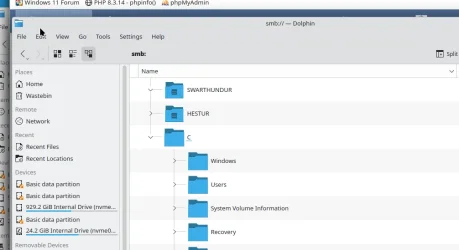
On previous Windows release - worked perfectly e.g :

Screenshot_20241129_103216.webp

On current release -- "destination is unreachable").


(BTW on the latest Amazon firesticks to enable "Developer mode" so you can sideload non amazon sourced apps you need to get into "about my firestick, scroll to the name and press ENTER 6 times on the remote -- then the option is enabled).

Cheers
jimbo
 
Last edited:

My Computer My Computer

At a glance

Windows XP,11 Linux Fedora Rawhide pre-releas...2 X Intel i7
OS
Windows XP,11 Linux Fedora Rawhide pre-release 46
Computer type
PC/Desktop
CPU
2 X Intel i7
Screen Resolution
4KUHD X 2
Hi Jimbo
The only reason I enable SMB1 is that I deal with old clients computers with windows 7 and 8.1 as I need to access those computers to transfer drivers and data.
It wouldn't really matter if it is turned on or off with your issue.
I was just explaining what I do to get my network to work and so far no issues.
I've also tried it with firewall enabled and disabled which again didn't effect anything.
The only thing I've have to do now with 24H2 is with the gpedit settings to get my network to work.
 

My Computer My Computer

At a glance

Windows 11 ProIntel Core i9 12900KFCorsair 64GB DDR5 Vengeance C40 5200MhzASUS GeForce RTX 3090 ROG Strix OC 24GB
OS
Windows 11 Pro
Computer type
PC/Desktop
Manufacturer/Model
Custom Build
CPU
Intel Core i9 12900KF
Motherboard
ASUS ROG Maximus Z690 Hero
Memory
Corsair 64GB DDR5 Vengeance C40 5200Mhz
Graphics Card(s)
ASUS GeForce RTX 3090 ROG Strix OC 24GB
Sound Card
OnBoard
Monitor(s) Displays
Acer Predator XB323UGP 32" QHD G-SYNC-C 144Hz 1MS IPS LED
Screen Resolution
2560 x 1440
Hard Drives
1x Samsung 980 Pro Series Gen4 250GB M.2 NVMe
1x Samsung 980 Pro Series Gen4 500GB M.2 NVMe
2x Samsung 980 Pro Series Gen4 2TB M.2 NVMe
PSU
Corsair AX1200i 1200W 80PLUS Titanium Modular
Case
Corsair 4000D Black Case w/ Tempered Glass Side Panel
Cooling
Noctua NH-U12A Chromax Black CPU Cooler, 4x Noctua 120mm Fans
Keyboard
Logitech MK545
Mouse
Logitech MX Master 3
Internet Speed
Fixed Wireless 150mbps/75mbps
Browser
Firefox
Antivirus
Kaspersky
Other Info
Thrustmaster TS-PC RACER
Fanatec CSL Elite Pedals with the Load Cell Kit
Yamaha Amp with Bose Speakers
Maybe check to see if the Master browser has changed. I had a power outage the other day and it changed my Master browser and hosed up the workgroup. Got it back to the usual master and now everyone shows up.
 

My Computer My Computer

At a glance

Windows 11 Pro 23H2Intel(R) Core(TM) i9-12900HK32gbIntel(R) Iris(R) Xe Graphics
OS
Windows 11 Pro 23H2
Computer type
PC/Desktop
Manufacturer/Model
MinisForum
CPU
Intel(R) Core(TM) i9-12900HK
Memory
32gb
Graphics Card(s)
Intel(R) Iris(R) Xe Graphics
Sound Card
Realtek 888
Monitor(s) Displays
Acer
Screen Resolution
1920x1080
Hard Drives
1TB SSD
Keyboard
Logitech
Mouse
Logitech MX Master 2X
Internet Speed
1GB
Browser
Firefox
Antivirus
Windows Defender
Jimbo, I didn't see you had noted this:-
Computer Configuration, Administrative Templates, Network, Lanman Workstation
Double click on "Enable Insecure Guest Logons"
Set this to "Enabled"
Click on OK.
 

My Computers My Computers

  • At a glance

    windows 11 25H2I5-85008GB
    OS
    windows 11 25H2
    Computer type
    PC/Desktop
    Manufacturer/Model
    Dell Optiplex 3060
    CPU
    I5-8500
    Motherboard
    Dell
    Memory
    8GB
    Monitor(s) Displays
    2 x Dell 24 inch
    Screen Resolution
    2560 x 1440
    Hard Drives
    250GB NVMe SSD, 2x 250 GB SSD
    PSU
    Intel(R) Core(TM) i5-8500 CPU @ 3.00GHz 3.00 GHz
    Mouse
    Logitech M310t
    Internet Speed
    100/20
    Browser
    Edge
    Antivirus
    Win Defender
  • At a glance

    Win 11 25H2I5-6300U8GBFHD
    Operating System
    Win 11 25H2
    Computer type
    Laptop
    Manufacturer/Model
    HP Elitebook 840 G3
    CPU
    I5-6300U
    Memory
    8GB
    Graphics card(s)
    FHD
    Hard Drives
    256 SSD
    Internet Speed
    100/20
    Browser
    Edge
Back
Top Bottom