300+ models of MSI motherboards have Secure Boot turned off


Ghot

Well-known member
Guru
VIP
Local time
11:06 AM
Posts
19,552
Location
Pgh PA, USA
OS
Win 11 Home ♦♦♦26200.8655 ♦♦♦♦♦♦♦25H2
Something MSI motherboard owners, might want to check. ^^


Image1.png
 
Last edited:

My Computers My Computers

  • At a glance

    Win 11 Home ♦♦♦26200.8655 ♦♦♦♦♦♦♦25H2AMD Ryzen 7 3700XG.Skill (F4-3200C14D-16GTZKW)EVGA RTX 2070 (08G-P4-2171-KR)
    OS
    Win 11 Home ♦♦♦26200.8655 ♦♦♦♦♦♦♦25H2
    Computer type
    PC/Desktop
    Manufacturer/Model
    Built by Ghot® [May 2020]
    CPU
    AMD Ryzen 7 3700X
    Motherboard
    Asus Pro WS X570-ACE (BIOS 5302)
    Memory
    G.Skill (F4-3200C14D-16GTZKW)
    Graphics Card(s)
    EVGA RTX 2070 (08G-P4-2171-KR)
    Sound Card
    Realtek ALC1220P / ALC S1220A
    Monitor(s) Displays
    Dell U3011 30"
    Screen Resolution
    2560 x 1600
    Hard Drives
    2x Samsung 860 EVO 500GB,
    WD 4TB Black FZBX - SATA III,
    WD 8TB Black FZBX - SATA III,
    DRW-24B1ST CD/DVD Burner
    PSU
    PC Power & Cooling 750W Quad EPS12V
    Case
    Cooler Master ATCS 840 Tower
    Cooling
    CM Hyper 212 EVO (push/pull)
    Keyboard
    Ducky DK9008 Shine II Blue LED
    Mouse
    Logitech Optical M-100
    Internet Speed
    300/300
    Browser
    Firefox (latest)
    Antivirus
    Bitdefender Total Security
    Other Info
    Speakers: Klipsch Pro Media 2.1
  • At a glance

    Windows XP Pro 32bit w/SP3AMD Athlon 64 X2 5000+ (OC'd @ 3.2Ghz)TWIN2X2048-6400C4DHX (2 x 1GB, DDR2 800)EVGA 256-P2-N758-TR GeForce 8600GT SSC
    Operating System
    Windows XP Pro 32bit w/SP3
    Computer type
    PC/Desktop
    Manufacturer/Model
    Built by Ghot® (not in use)
    CPU
    AMD Athlon 64 X2 5000+ (OC'd @ 3.2Ghz)
    Motherboard
    ASUS M2N32-SLI Deluxe Wireless Edition
    Memory
    TWIN2X2048-6400C4DHX (2 x 1GB, DDR2 800)
    Graphics card(s)
    EVGA 256-P2-N758-TR GeForce 8600GT SSC
    Sound Card
    Onboard
    Monitor(s) Displays
    ViewSonic G90FB Black 19" Professional (CRT)
    Screen Resolution
    up to 2048 x 1536
    Hard Drives
    WD 36GB 10,000rpm Raptor SATA
    Seagate 80GB 7200rpm SATA
    Lite-On LTR-52246S CD/RW
    Lite-On LH-18A1P CD/DVD Burner
    PSU
    PC Power & Cooling Silencer 750 Quad EPS12V
    Case
    Generic Beige case, 80mm fans
    Cooling
    ZALMAN 9500A 92mm CPU Cooler
    Keyboard
    Logitech Classic Keybooard 200
    Mouse
    Logitech Optical M-BT96a
    Internet Speed
    300/300
    Browser
    Firefox 3.x ??
    Antivirus
    Symantec (Norton)
    Other Info
    Still assembled, still runs. Haven't turned it on for 15 years?
I enabled Secure Boot when I installed Windows 11 but yes, as the article says Secure Boot was disabled by default on both of my motherboards.
 

My Computer My Computer

At a glance

Windows 11 ProIntel Core i9 9900KCorsair Vengeance RGB Pro 32GB [ 4 x 8GB ] DD...Zotac GeForce RTX 4070 Super Trinity
OS
Windows 11 Pro
Computer type
PC/Desktop
Manufacturer/Model
Custom
CPU
Intel Core i9 9900K
Motherboard
MSI MPG Z390 Gaming Pro Carbon AC
Memory
Corsair Vengeance RGB Pro 32GB [ 4 x 8GB ] DDR4 3600MHz CL18
Graphics Card(s)
Zotac GeForce RTX 4070 Super Trinity
Monitor(s) Displays
Samsung Odyssey G7 , 32" , 2560x1440 , VA , 240Hz , 1ms
Screen Resolution
QHD 2560x1440
Hard Drives
SSD: Samsung 980 Pro 250GB
HDD: 2x Western Digital Blue 4TB
PSU
MSI MPG A1000G PCIE5
Case
Cooler Master MasterCase H500P Mesh ARGB
Cooling
DeepCool Gammaxx L360 v2
Keyboard
Corsair K95 RGB Platinum ( MX Speed ) [ SteelSeries PrismCaps ]
Mouse
Corsair Dark Core RGB Pro SE
Internet Speed
16 Mb/s ‌ ‌ | ‌ ‌ 1 Mb/s
Browser
Microsoft Edge
Antivirus
Windows Security
I have known about this one for several weeks but did not have the time to deal with it and work out the settings. This thread has been very useful and I have implemented the changes and my machine still boots OK. I had to set the Secure Boot Mode setting to Custom (was Standard) before I could make the adjustments.
 

My Computers My Computers

  • At a glance

    Windows 11 Pro 22H2Intel i7-13700KF @ 5.4GHzG-Skill F4-3200C16-16GVK x 2 (32GB total)GeForce RTX 3060 Ti Ventus 2X 8G OCV1 LHR
    OS
    Windows 11 Pro 22H2
    Computer type
    PC/Desktop
    Manufacturer/Model
    Bob the Builder
    CPU
    Intel i7-13700KF @ 5.4GHz
    Motherboard
    MSI MPG Z790 Edge WiFi DDR4
    Memory
    G-Skill F4-3200C16-16GVK x 2 (32GB total)
    Graphics Card(s)
    GeForce RTX 3060 Ti Ventus 2X 8G OCV1 LHR
    Sound Card
    Realtek® ALC4080 (mobo chipset)
    Monitor(s) Displays
    Philips 28 inch Display 288E2UAE
    Screen Resolution
    3840 x 2160 (16 x 9)
    Hard Drives
    Samsung 980 Pro NVMe M2 500GB, Samsung 980 NVMe M2 500GB, Samsung 2.5" SSD 1TB, Seagate 2.5" ST5000 5TB, Seagate Barracuda NVMe M2 1TB, Samsung MZVL2512HCJQ OEM NVMe M2 1TB
    PSU
    MSI MPG R850GF PSU (850W)
    Case
    Fractal Design Define 7 Compact ATX
    Cooling
    CoolerMaster MA610P
    Keyboard
    HAVIT mechanical keyboard HV-KB390L TKL
    Mouse
    Logitech M350 Pebble Mouse BT + wireless
    Internet Speed
    50 x 20 megabits / second fibre
    Browser
    Microsoft Edge
    Antivirus
    Microsoft
    Other Info
    Intel Ethernet 1226-V 2.5GHz @ 1GHz
    Intel Wi-Fi 6E AX210
    ASUS router RT-AX86U with Wi-Fi 6
    Logitech BRIO webcam
    Macrium Reflect 8.1 paid for backups etc.
  • At a glance

    Win 11 Pro 22H2Intel i7-1195G716 GBIris Xe graphics
    Operating System
    Win 11 Pro 22H2
    Computer type
    Laptop
    Manufacturer/Model
    MSI SUMMIT E16 FLIP EVO A11MT-013AU
    CPU
    Intel i7-1195G7
    Memory
    16 GB
    Graphics card(s)
    Iris Xe graphics
    Sound Card
    Realtek High Definition Audio
    Monitor(s) Displays
    16" 120Hz Pen Touch panel
    Screen Resolution
    2560 x 1600 (16 x 10)
    Hard Drives
    Samsung NVMe 980 Pro 1TB
    PSU
    Delta Electronics ADP-65SD B, HP 1HE08AA
    Keyboard
    Full Keyboard
    Mouse
    Logitech M350 Pebble Mouse BT + wireless
    Internet Speed
    50 x 20 megabits / second fibre
    Browser
    Firefox
    Antivirus
    Microsoft
    Other Info
    Killer Wi-Fi 6E 1675x (210NGW)
    MSI Pen
    Web Cam with Windows Hello Face
    Fingerprint Reader
    ASUS router RT-AX86U with Wi-Fi 6
    Macrium Reflect 8 paid for backups etc.
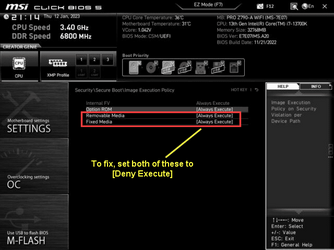
The Option ROM setting, technically, should also be Deny Execute.
At least it is on all the other motherboards I have with Secure Boot.
I think it is user's choice.
 

My Computers My Computers

  • At a glance

    Windows 11 Pro 23H2Intel i7-13700KCorsair Vengence 5600 - 32GBMSI RTX3060 Ventus 2x 12GB
    OS
    Windows 11 Pro 23H2
    Computer type
    PC/Desktop
    Manufacturer/Model
    Self Built
    CPU
    Intel i7-13700K
    Motherboard
    MSI PRO Z790-A WiFi
    Memory
    Corsair Vengence 5600 - 32GB
    Graphics Card(s)
    MSI RTX3060 Ventus 2x 12GB
    Sound Card
    On board - Realtek ALC4080
    Monitor(s) Displays
    LG 27GL850
    Screen Resolution
    2560 x 1440
    Hard Drives
    WD Black SN850X Nvme - 1TB
    WD Black 6TB HDD 256MB cache CMR
    WD Black 6TB HDD 128MB cache CMR
    PSU
    Corsair RM850x
    Case
    Fractal Design - Define 7
    Cooling
    Deepcool AK400
    Keyboard
    MS KC0405
    Mouse
    MS Model 1113 / MS Wireless Mobile Mouse 3500
    Internet Speed
    940 Mbps
    Browser
    Firefox
    Antivirus
    Windows Security
    Other Info
    I have a Case Speaker!
    I have a Blueray Disk drive!
  • At a glance

    Windows 10 Pro 22H2i7-9700KCorsair Vengence 32GBEVGA GTX1060
    Operating System
    Windows 10 Pro 22H2
    Computer type
    PC/Desktop
    Manufacturer/Model
    Self Built
    CPU
    i7-9700K
    Motherboard
    Asus Prime Z390-A
    Memory
    Corsair Vengence 32GB
    Graphics card(s)
    EVGA GTX1060
    Sound Card
    On Board
    Monitor(s) Displays
    Acer 27"
    Screen Resolution
    1920 x 1080
    Hard Drives
    WD Black Nvme 500GB
    Toshiba X300 5TB
    PSU
    Corsair RM850x
    Case
    Antec P101 Silent
    Cooling
    CoolerMaster Hyper T4
    Keyboard
    MS KC0405
    Mouse
    Logitec M-U0007
    Internet Speed
    940 Mbps
    Browser
    Firefox
    Antivirus
    Avast!
    Other Info
    I have a Case Speaker!
The Option ROM setting, technically, should also be Deny Execute.
At least it is on all the other motherboards I have with Secure Boot.
I think it is user's choice.
There is a BIOS update coming with adjusted defaults for these settings. We will see what MSI does for these settings then although after their last effort who knows what we will get.
 

My Computers My Computers

  • At a glance

    Windows 11 Pro 22H2Intel i7-13700KF @ 5.4GHzG-Skill F4-3200C16-16GVK x 2 (32GB total)GeForce RTX 3060 Ti Ventus 2X 8G OCV1 LHR
    OS
    Windows 11 Pro 22H2
    Computer type
    PC/Desktop
    Manufacturer/Model
    Bob the Builder
    CPU
    Intel i7-13700KF @ 5.4GHz
    Motherboard
    MSI MPG Z790 Edge WiFi DDR4
    Memory
    G-Skill F4-3200C16-16GVK x 2 (32GB total)
    Graphics Card(s)
    GeForce RTX 3060 Ti Ventus 2X 8G OCV1 LHR
    Sound Card
    Realtek® ALC4080 (mobo chipset)
    Monitor(s) Displays
    Philips 28 inch Display 288E2UAE
    Screen Resolution
    3840 x 2160 (16 x 9)
    Hard Drives
    Samsung 980 Pro NVMe M2 500GB, Samsung 980 NVMe M2 500GB, Samsung 2.5" SSD 1TB, Seagate 2.5" ST5000 5TB, Seagate Barracuda NVMe M2 1TB, Samsung MZVL2512HCJQ OEM NVMe M2 1TB
    PSU
    MSI MPG R850GF PSU (850W)
    Case
    Fractal Design Define 7 Compact ATX
    Cooling
    CoolerMaster MA610P
    Keyboard
    HAVIT mechanical keyboard HV-KB390L TKL
    Mouse
    Logitech M350 Pebble Mouse BT + wireless
    Internet Speed
    50 x 20 megabits / second fibre
    Browser
    Microsoft Edge
    Antivirus
    Microsoft
    Other Info
    Intel Ethernet 1226-V 2.5GHz @ 1GHz
    Intel Wi-Fi 6E AX210
    ASUS router RT-AX86U with Wi-Fi 6
    Logitech BRIO webcam
    Macrium Reflect 8.1 paid for backups etc.
  • At a glance

    Win 11 Pro 22H2Intel i7-1195G716 GBIris Xe graphics
    Operating System
    Win 11 Pro 22H2
    Computer type
    Laptop
    Manufacturer/Model
    MSI SUMMIT E16 FLIP EVO A11MT-013AU
    CPU
    Intel i7-1195G7
    Memory
    16 GB
    Graphics card(s)
    Iris Xe graphics
    Sound Card
    Realtek High Definition Audio
    Monitor(s) Displays
    16" 120Hz Pen Touch panel
    Screen Resolution
    2560 x 1600 (16 x 10)
    Hard Drives
    Samsung NVMe 980 Pro 1TB
    PSU
    Delta Electronics ADP-65SD B, HP 1HE08AA
    Keyboard
    Full Keyboard
    Mouse
    Logitech M350 Pebble Mouse BT + wireless
    Internet Speed
    50 x 20 megabits / second fibre
    Browser
    Firefox
    Antivirus
    Microsoft
    Other Info
    Killer Wi-Fi 6E 1675x (210NGW)
    MSI Pen
    Web Cam with Windows Hello Face
    Fingerprint Reader
    ASUS router RT-AX86U with Wi-Fi 6
    Macrium Reflect 8 paid for backups etc.
I just did the most recent BIOS update for PRO Z790-A WiFi (A03) this last weekend. I reset defaults when I installed it, and when I went back in to do my settings those Secure Boot items were still Enabled and I had to change to Deny Execute.
 

My Computers My Computers

  • At a glance

    Windows 11 Pro 23H2Intel i7-13700KCorsair Vengence 5600 - 32GBMSI RTX3060 Ventus 2x 12GB
    OS
    Windows 11 Pro 23H2
    Computer type
    PC/Desktop
    Manufacturer/Model
    Self Built
    CPU
    Intel i7-13700K
    Motherboard
    MSI PRO Z790-A WiFi
    Memory
    Corsair Vengence 5600 - 32GB
    Graphics Card(s)
    MSI RTX3060 Ventus 2x 12GB
    Sound Card
    On board - Realtek ALC4080
    Monitor(s) Displays
    LG 27GL850
    Screen Resolution
    2560 x 1440
    Hard Drives
    WD Black SN850X Nvme - 1TB
    WD Black 6TB HDD 256MB cache CMR
    WD Black 6TB HDD 128MB cache CMR
    PSU
    Corsair RM850x
    Case
    Fractal Design - Define 7
    Cooling
    Deepcool AK400
    Keyboard
    MS KC0405
    Mouse
    MS Model 1113 / MS Wireless Mobile Mouse 3500
    Internet Speed
    940 Mbps
    Browser
    Firefox
    Antivirus
    Windows Security
    Other Info
    I have a Case Speaker!
    I have a Blueray Disk drive!
  • At a glance

    Windows 10 Pro 22H2i7-9700KCorsair Vengence 32GBEVGA GTX1060
    Operating System
    Windows 10 Pro 22H2
    Computer type
    PC/Desktop
    Manufacturer/Model
    Self Built
    CPU
    i7-9700K
    Motherboard
    Asus Prime Z390-A
    Memory
    Corsair Vengence 32GB
    Graphics card(s)
    EVGA GTX1060
    Sound Card
    On Board
    Monitor(s) Displays
    Acer 27"
    Screen Resolution
    1920 x 1080
    Hard Drives
    WD Black Nvme 500GB
    Toshiba X300 5TB
    PSU
    Corsair RM850x
    Case
    Antec P101 Silent
    Cooling
    CoolerMaster Hyper T4
    Keyboard
    MS KC0405
    Mouse
    Logitec M-U0007
    Internet Speed
    940 Mbps
    Browser
    Firefox
    Antivirus
    Avast!
    Other Info
    I have a Case Speaker!
The BIOS update for my machine (V1.50) has arrived and was installed a few days back. It worked with no problems. My machine still booted.
The Secure Boot settings were
STANDARD which auto loads the keys from BIOS or,
CUSTOM which allows some flexibility.

When CUSTOM is set there is a choice of MAXIMUM which does a FULL secure boot validation or HARDWARE/OS COMPATIBILITY which validates what is compliant and ignores that which is not.

I just set my machine to CUSTOM / MAXIMUM and it still booted. Has anyone else updated to the new BIOS?
 

My Computers My Computers

  • At a glance

    Windows 11 Pro 22H2Intel i7-13700KF @ 5.4GHzG-Skill F4-3200C16-16GVK x 2 (32GB total)GeForce RTX 3060 Ti Ventus 2X 8G OCV1 LHR
    OS
    Windows 11 Pro 22H2
    Computer type
    PC/Desktop
    Manufacturer/Model
    Bob the Builder
    CPU
    Intel i7-13700KF @ 5.4GHz
    Motherboard
    MSI MPG Z790 Edge WiFi DDR4
    Memory
    G-Skill F4-3200C16-16GVK x 2 (32GB total)
    Graphics Card(s)
    GeForce RTX 3060 Ti Ventus 2X 8G OCV1 LHR
    Sound Card
    Realtek® ALC4080 (mobo chipset)
    Monitor(s) Displays
    Philips 28 inch Display 288E2UAE
    Screen Resolution
    3840 x 2160 (16 x 9)
    Hard Drives
    Samsung 980 Pro NVMe M2 500GB, Samsung 980 NVMe M2 500GB, Samsung 2.5" SSD 1TB, Seagate 2.5" ST5000 5TB, Seagate Barracuda NVMe M2 1TB, Samsung MZVL2512HCJQ OEM NVMe M2 1TB
    PSU
    MSI MPG R850GF PSU (850W)
    Case
    Fractal Design Define 7 Compact ATX
    Cooling
    CoolerMaster MA610P
    Keyboard
    HAVIT mechanical keyboard HV-KB390L TKL
    Mouse
    Logitech M350 Pebble Mouse BT + wireless
    Internet Speed
    50 x 20 megabits / second fibre
    Browser
    Microsoft Edge
    Antivirus
    Microsoft
    Other Info
    Intel Ethernet 1226-V 2.5GHz @ 1GHz
    Intel Wi-Fi 6E AX210
    ASUS router RT-AX86U with Wi-Fi 6
    Logitech BRIO webcam
    Macrium Reflect 8.1 paid for backups etc.
  • At a glance

    Win 11 Pro 22H2Intel i7-1195G716 GBIris Xe graphics
    Operating System
    Win 11 Pro 22H2
    Computer type
    Laptop
    Manufacturer/Model
    MSI SUMMIT E16 FLIP EVO A11MT-013AU
    CPU
    Intel i7-1195G7
    Memory
    16 GB
    Graphics card(s)
    Iris Xe graphics
    Sound Card
    Realtek High Definition Audio
    Monitor(s) Displays
    16" 120Hz Pen Touch panel
    Screen Resolution
    2560 x 1600 (16 x 10)
    Hard Drives
    Samsung NVMe 980 Pro 1TB
    PSU
    Delta Electronics ADP-65SD B, HP 1HE08AA
    Keyboard
    Full Keyboard
    Mouse
    Logitech M350 Pebble Mouse BT + wireless
    Internet Speed
    50 x 20 megabits / second fibre
    Browser
    Firefox
    Antivirus
    Microsoft
    Other Info
    Killer Wi-Fi 6E 1675x (210NGW)
    MSI Pen
    Web Cam with Windows Hello Face
    Fingerprint Reader
    ASUS router RT-AX86U with Wi-Fi 6
    Macrium Reflect 8 paid for backups etc.
I recently updated to the most current UEFI/BIOS for my Pro Z790-A Wifi DDR5 board.
However, I always reset BIOS defaults when I do this so it is not relevant.
There was no change in the default security settings with the new upgrade.
 

My Computers My Computers

  • At a glance

    Windows 11 Pro 23H2Intel i7-13700KCorsair Vengence 5600 - 32GBMSI RTX3060 Ventus 2x 12GB
    OS
    Windows 11 Pro 23H2
    Computer type
    PC/Desktop
    Manufacturer/Model
    Self Built
    CPU
    Intel i7-13700K
    Motherboard
    MSI PRO Z790-A WiFi
    Memory
    Corsair Vengence 5600 - 32GB
    Graphics Card(s)
    MSI RTX3060 Ventus 2x 12GB
    Sound Card
    On board - Realtek ALC4080
    Monitor(s) Displays
    LG 27GL850
    Screen Resolution
    2560 x 1440
    Hard Drives
    WD Black SN850X Nvme - 1TB
    WD Black 6TB HDD 256MB cache CMR
    WD Black 6TB HDD 128MB cache CMR
    PSU
    Corsair RM850x
    Case
    Fractal Design - Define 7
    Cooling
    Deepcool AK400
    Keyboard
    MS KC0405
    Mouse
    MS Model 1113 / MS Wireless Mobile Mouse 3500
    Internet Speed
    940 Mbps
    Browser
    Firefox
    Antivirus
    Windows Security
    Other Info
    I have a Case Speaker!
    I have a Blueray Disk drive!
  • At a glance

    Windows 10 Pro 22H2i7-9700KCorsair Vengence 32GBEVGA GTX1060
    Operating System
    Windows 10 Pro 22H2
    Computer type
    PC/Desktop
    Manufacturer/Model
    Self Built
    CPU
    i7-9700K
    Motherboard
    Asus Prime Z390-A
    Memory
    Corsair Vengence 32GB
    Graphics card(s)
    EVGA GTX1060
    Sound Card
    On Board
    Monitor(s) Displays
    Acer 27"
    Screen Resolution
    1920 x 1080
    Hard Drives
    WD Black Nvme 500GB
    Toshiba X300 5TB
    PSU
    Corsair RM850x
    Case
    Antec P101 Silent
    Cooling
    CoolerMaster Hyper T4
    Keyboard
    MS KC0405
    Mouse
    Logitec M-U0007
    Internet Speed
    940 Mbps
    Browser
    Firefox
    Antivirus
    Avast!
    Other Info
    I have a Case Speaker!
Same goes for some MSI laptops - especially if it's set to a Hybrid UEFI - which doesn't support Secure Bot (works only on UEFI).
 

My Computer My Computer

At a glance

WinDOS 25H2Intel & AMDSO-DIMM SK Hynix 15.8 GB Dual-Channel DDR4-26...nVidia RTX 2060 6GB Mobile GPU (TU106M)
OS
WinDOS 25H2
Computer type
Laptop
CPU
Intel & AMD
Memory
SO-DIMM SK Hynix 15.8 GB Dual-Channel DDR4-2666 (2 x 8 GB) 1329MHz (19-19-19-43)
Graphics Card(s)
nVidia RTX 2060 6GB Mobile GPU (TU106M)
Sound Card
Onbord Realtek ALC1220
Screen Resolution
1920 x 1080
Hard Drives
1x Samsung PM981 NVMe PCIe M.2 512GB / 1x Seagate Expansion ST1000LM035 1TB
So in a nutshell, MSI helps you to save your valuable time by not having to disable the worthless feature yourself.
 

My Computers My Computers

  • At a glance

    11 Homei7 13650HX16GB DDR5GeForce RTX 4060 Mobile
    OS
    11 Home
    Computer type
    Laptop
    Manufacturer/Model
    Asus TUF Gaming F16 (2024)
    CPU
    i7 13650HX
    Memory
    16GB DDR5
    Graphics Card(s)
    GeForce RTX 4060 Mobile
    Sound Card
    Eastern Electric MiniMax DAC Supreme; Emotiva UMC-200; Astell & Kern AK240
    Monitor(s) Displays
    Sony Bravia XR-55X90J
    Screen Resolution
    3840×2160
    Hard Drives
    512GB SSD internal
    37TB external
    PSU
    Li-ion
    Cooling
    2× Arc Flow Fans, 4× exhaust vents, 5× heatpipes
    Keyboard
    Logitech K800
    Mouse
    Logitech G402
    Internet Speed
    30Mbit/s up, 500Mbit/s down
    Browser
    FF
    Antivirus
    What's an antivirus?
  • At a glance

    11 Homei5 1135G716GB DDR4Intel Iris Xe
    Operating System
    11 Home
    Computer type
    Laptop
    Manufacturer/Model
    Medion S15450
    CPU
    i5 1135G7
    Memory
    16GB DDR4
    Graphics card(s)
    Intel Iris Xe
    Sound Card
    Eastern Electric MiniMax DAC Supreme; Emotiva UMC-200; Astell & Kern AK240
    Monitor(s) Displays
    Sony Bravia XR-55X90J
    Screen Resolution
    3840×2160
    Hard Drives
    2TB SSD internal
    37TB external
    PSU
    Li-ion
    Keyboard
    Logitech K800
    Mouse
    Logitech G402
    Internet Speed
    30Mbit/s up, 500Mbit/s down
    Browser
    FF

Latest Support Threads

Back
Top Bottom