- Local time
- 10:32 AM
- Posts
- 351
- Location
- San Juan-Abra, Philippines
- OS
- Windows 11 Home 25H2 build: 26200.9445
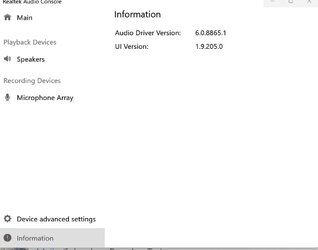
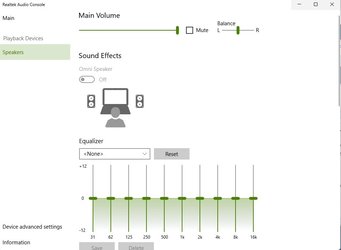
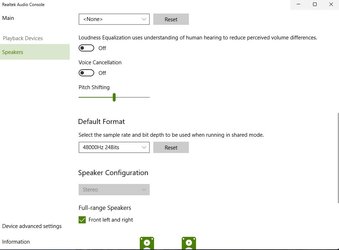
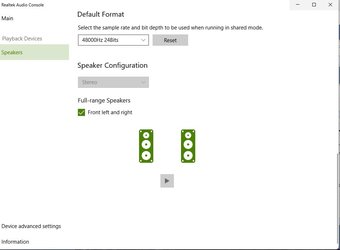
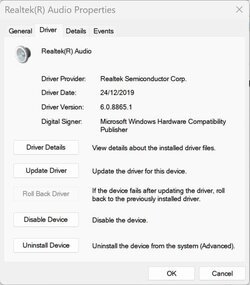
After updating my Windows11 Home version to 22H2 build 22621.608 I am getting poor System Sound volume on my Aspire5 a515-54G, Music sound is very good (50% volume sounds great with the new Windows Media Player, streaming/video sound OK but with 75% volume) so I would like to update my drivers only to get much louder System Sounds (System Sound volume is set at 100%). My present RTK Audio driver (probably a Windows update) is dated 24/12/2019, 6.0.8865.1 (attached)
When checking the audio driver for my system and OS on the Acer Support website I see:
Audio_Realtek_6.0.8865.1_W11x64 2021/10/20 which I downloaded, but all the Cabinet folders in the driver bundle are dated much older: 5/07/2019, July 5, 2019 (using Explorer)?
If I double click on Setup_Driver.cmd in one of the downloaded Acer driver folders I get the message: "Goto Windows store"
My main present (working) RTK driver is RTKVHD64.sys 6.0.8865.1 (built by WinDDK, Windows Display Driver Kit??)
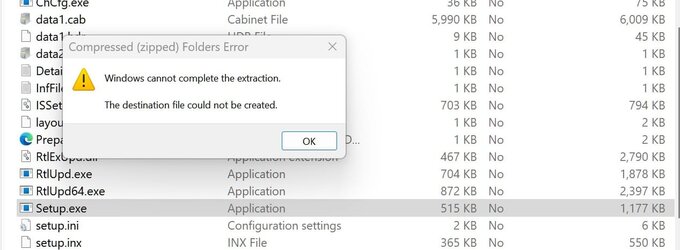
The Win64 folder from the downloaded Acer RTK driver set contains this same RTKVHD64.sys driver dated 26/12/2019 but that folder has no install.cmd or any setup.exe file. When I point W11 Device manager to this Acer driver set (Add driver) it states "No drivers"
When browsing the downloaded RTK driver package from Acer is see in the Realtek folder the folowing subfolders: extRTK,...APO, ...HSA, ..., RTKService_229 and RealtekSstPpDll_24, no idea what these folders are.
Since my sound system is jointly controled by MS(WDDK), Intel(Display sound) and RTK speaker drivers and my audio card is the very basic ALC255 chipset I wonder if I have reached the limit of my sound system and should completely forget about updating it before breaking things even more?
Comments welcome
When checking the audio driver for my system and OS on the Acer Support website I see:
Audio_Realtek_6.0.8865.1_W11x64 2021/10/20 which I downloaded, but all the Cabinet folders in the driver bundle are dated much older: 5/07/2019, July 5, 2019 (using Explorer)?
If I double click on Setup_Driver.cmd in one of the downloaded Acer driver folders I get the message: "Goto Windows store"
My main present (working) RTK driver is RTKVHD64.sys 6.0.8865.1 (built by WinDDK, Windows Display Driver Kit??)
The Win64 folder from the downloaded Acer RTK driver set contains this same RTKVHD64.sys driver dated 26/12/2019 but that folder has no install.cmd or any setup.exe file. When I point W11 Device manager to this Acer driver set (Add driver) it states "No drivers"
When browsing the downloaded RTK driver package from Acer is see in the Realtek folder the folowing subfolders: extRTK,...APO, ...HSA, ..., RTKService_229 and RealtekSstPpDll_24, no idea what these folders are.
Since my sound system is jointly controled by MS(WDDK), Intel(Display sound) and RTK speaker drivers and my audio card is the very basic ALC255 chipset I wonder if I have reached the limit of my sound system and should completely forget about updating it before breaking things even more?
Comments welcome
Attachments

My Computers
-
At a glance
Windows 11 Home 25H2 build: 26200.9445Intel(R) Core(TM) Ultra 7 258V, 2200 Mhz, 8 C...32 GB LPDDR5X (soldered)Intel(R) Arc(TM) 140V GPU (16GB)- OS
- Windows 11 Home 25H2 build: 26200.9445
- Computer type
- Laptop
- Manufacturer/Model
- Acer Swift Edge SFE14-51T
- CPU
- Intel(R) Core(TM) Ultra 7 258V, 2200 Mhz, 8 Cores
- Motherboard
- NB.JG411.004 mainboard, manufactured by Compal.
- Memory
- 32 GB LPDDR5X (soldered)
- Graphics Card(s)
- Intel(R) Arc(TM) 140V GPU (16GB)
- Sound Card
- RealTek + Intel Smart Sound
- Monitor(s) Displays
- 14" OLED matte Touch
- Screen Resolution
- 2880 x1800 x120Hz
- Hard Drives
- KINGSTON OM8PGP41024Q-AA, NVMe Gen4, 1TB
- PSU
- 65W USB-C charger
- Case
- Magnesium aluminum alloy body
- Cooling
- 1 fan
- Keyboard
- US with Backlight
- Mouse
- Precision Trackpad
- Internet Speed
- 25 Mb/s 5G
- Browser
- Edge
- Antivirus
- Windows Defender
- Other Info
- BIOS Version/Date: IInsyde Corp. V1.06, 3/16/2026, Windows Hello IR camera with Facial recognition. Secure Boot 2026 KEK key installed
-
At a glance
Windows 11 Home 25H2 build: 26200.9445Intel 12th Gen. i7 12700H, 14 cores, 2.3 GHz ...8GB LPDDR4 on board + 8GB LPDDR4 3200 MHz in ...Intel Iris Xe supports up to 4096 x 2304 @ 120Hz- Operating System
- Windows 11 Home 25H2 build: 26200.9445
- Computer type
- Laptop
- Manufacturer/Model
- Asus Vivobook K3502Z S15 15" OLED
- CPU
- Intel 12th Gen. i7 12700H, 14 cores, 2.3 GHz (24M Cache, up to 4.7 GHz, 6P+8E cores)
- Motherboard
- Alder Lake-H, 1700-4700 MHz clock rate
- Memory
- 8GB LPDDR4 on board + 8GB LPDDR4 3200 MHz in Dual Channel.
- Graphics card(s)
- Intel Iris Xe supports up to 4096 x 2304 @ 120Hz
- Sound Card
- Harman Kardon - DTS
- Monitor(s) Displays
- OLED 15.6inch 2.8K (2880 x 1620)
- Screen Resolution
- 16:9 aspect ratio 0.2ms response time 120Hz refresh rate, 550nits
- Hard Drives
- 512GB M.2 NVMe Gen4 PCIe 4.0 SSD, Micron_2450_MTFDKBA512TFK
- PSU
- 90-Watt USB charger (Thunderbolt4)
- Case
- Metal lid, plastic case
- Cooling
- 1 fan
- Keyboard
- With adjustable backlight
- Mouse
- Precision Trackpad
- Internet Speed
- ISP provides 15 mb/s WIFI LTE (4G), laptop WIFI 6 adapter.
- Browser
- Edge
- Antivirus
- Windows Defender
- Other Info
- BIOS American Megatrends International, LLC. 10.1.2.312, 13/03/2024. Network adapter: Intel Wi-Fi 6E AX211 160 MHz, Secure Boot 2026 KEK key installed