
Firefox icon


wojtekmazgaj

Member
Local time
11:54 PM
Posts
43
OS
Windows 11
When I open Firefox, it opens from the taskbar on the left, and after opening, a second icon appears on the right. What happened? How can I completely remove the second icon so that it doesn't appear after opening? I unpinned the Firefox icon from the taskbar and tried reopening Firefox, and the same thing happened again: the second icon appeared. And I can't do anything to stop it from appearing.
I've included a screenshot below as proof:
 

Attachments
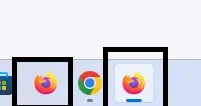
  • Zrzut ekranu 2026-11-01 214028.webp
    Zrzut ekranu 2026-11-01 214028.webp
    2.3 KB · Views: 1

My Computer My Computer

At a glance

Windows 11
OS
Windows 11
Computer type
PC/Desktop
When I open Firefox, it opens from the taskbar on the left, and after opening, a second icon appears on the right. What happened? How can I completely remove the second icon so that it doesn't appear after opening? I unpinned the Firefox icon from the taskbar and tried reopening Firefox, and the same thing happened again: the second icon appeared. And I can't do anything to stop it from appearing.
I've included a screenshot below as proof:


I believe you want to set the Taskbar setting in the RED box, like I have it...

Image1.webp
 

My Computers My Computers

  • At a glance

    Win 11 Home 26H2 26300.9818AMD Ryzen 7 3700XG.Skill (F4-3200C14D-16GTZKW)EVGA RTX 2070 (08G-P4-2171-KR)
    OS
    Win 11 Home 26H2 26300.9818
    Computer type
    PC/Desktop
    Manufacturer/Model
    Built by Ghot® [May 2020]
    CPU
    AMD Ryzen 7 3700X
    Motherboard
    Asus Pro WS X570-ACE (BIOS 5302)
    Memory
    G.Skill (F4-3200C14D-16GTZKW)
    Graphics Card(s)
    EVGA RTX 2070 (08G-P4-2171-KR)
    Sound Card
    Realtek ALC1220P / ALC S1220A
    Monitor(s) Displays
    Dell U3011 30"
    Screen Resolution
    2560 x 1600
    Hard Drives
    2x Samsung 860 EVO 500GB,
    WD 4TB Black FZBX - SATA III,
    WD 8TB Black FZBX - SATA III,
    DRW-24B1ST CD/DVD Burner
    PSU
    PC Power & Cooling 750W Quad EPS12V
    Case
    Cooler Master ATCS 840 Tower
    Cooling
    CM Hyper 212 EVO (push/pull)
    Keyboard
    Ducky DK9008 Shine II Blue LED
    Mouse
    Logitech Optical M-100
    Internet Speed
    300/300
    Browser
    Firefox (latest)
    Antivirus
    Bitdefender Total Security
    Other Info
    Speakers: Klipsch Pro Media 2.1
  • At a glance

    Windows XP Pro 32bit w/SP3AMD Athlon 64 X2 5000+ (OC'd @ 3.2Ghz)TWIN2X2048-6400C4DHX (2 x 1GB, DDR2 800)EVGA 256-P2-N758-TR GeForce 8600GT SSC
    Operating System
    Windows XP Pro 32bit w/SP3
    Computer type
    PC/Desktop
    Manufacturer/Model
    Built by Ghot® (not in use)
    CPU
    AMD Athlon 64 X2 5000+ (OC'd @ 3.2Ghz)
    Motherboard
    ASUS M2N32-SLI Deluxe Wireless Edition
    Memory
    TWIN2X2048-6400C4DHX (2 x 1GB, DDR2 800)
    Graphics card(s)
    EVGA 256-P2-N758-TR GeForce 8600GT SSC
    Sound Card
    Onboard
    Monitor(s) Displays
    ViewSonic G90FB Black 19" Professional (CRT)
    Screen Resolution
    up to 2048 x 1536
    Hard Drives
    WD 36GB 10,000rpm Raptor SATA
    Seagate 80GB 7200rpm SATA
    Lite-On LTR-52246S CD/RW
    Lite-On LH-18A1P CD/DVD Burner
    PSU
    PC Power & Cooling Silencer 750 Quad EPS12V
    Case
    Generic Beige case, 80mm fans
    Cooling
    ZALMAN 9500A 92mm CPU Cooler
    Keyboard
    Logitech Classic Keybooard 200
    Mouse
    Logitech Optical M-BT96a
    Internet Speed
    300/300
    Browser
    Firefox 3.x ??
    Antivirus
    Symantec (Norton)
    Other Info
    Still assembled, still runs. Haven't turned it on for 15 years?
Hi Wojtekmazgaj,
This is a classic Windows taskbar shortcut mismatch. It usually happens when a pinned shortcut points to one specific file path, but the actual running browser triggers a slightly different process identity, causing Windows to spawn a duplicate icon instead of grouping them together.
To fix it permanently, you just need to force Windows to map the shortcut to the active process. Try these exact steps:
  1. Unpin your current Firefox shortcut from the taskbar completely.
  2. Launch Firefox using a shortcut from your Start Menu or your Desktop.
  3. Once the browser opens, look at the new icon that appeared on the taskbar.
  4. Right-click that specific active icon and select Pin to taskbar.
  5. Close Firefox, and drag your newly pinned icon back over to the left side where you prefer it.
Next time you open Firefox from that new shortcut, it will stay grouped under a single icon. Let us know if that clears it up for you!
 

My Computers My Computers

  • At a glance

    Windows 11 Homei7-14700k2X16 GBNVIDIA GeForce RTX 5070 12gb Founders Edition
    OS
    Windows 11 Home
    Computer type
    PC/Desktop
    Manufacturer/Model
    DELL XPS 8960
    CPU
    i7-14700k
    Motherboard
    GENUINE DELL XPS 8960 DESKTOP MOTHERBOARD INTEL SOCKET LGA1700 XD433 Intel Z690 chipset.
    Memory
    2X16 GB
    Graphics Card(s)
    NVIDIA GeForce RTX 5070 12gb Founders Edition
    Sound Card
    ON BOARD 7.1 CHANNEL DIGITAL AUDIO
    Monitor(s) Displays
    Dell UltraSharp 32 4K Thunderbolt Hub, High-end Productivity Monitor - U3225QE & ASUS ROG Swift pg32ucdmr 32 4K OLED 4K UHD (3840 x 2160 pixels) at 240hz Gaming Monitor
    Screen Resolution
    Native Resolution: 3840 x 2160 at 120 Hz & 240 Hz
    Hard Drives
    Samsung SSD 990 PRO 2TB, PCIe 4.0 M.2 2280 (Boot-Drive) & Samsung SSD 990 PRO 2TB, PCIe 4.0 M.2 2280 (Storage-Drive)
    PSU
    1000W
    Case
    DELL
    Cooling
    DELL 125W CPU Liquid Water Cooling Fan System (2G44F)
    Keyboard
    ROG Azoth Gaming Keyboard
    Mouse
    Razer Naga Left-Handed Edition MMO Gaming Mouse
    Internet Speed
    Internet Speed 300 Mbps
    Browser
    Microsoft Edge, Google Chrome, Brave
    Antivirus
    Windows Defender
    Other Info
    Logitech Z906 5.1 Surround Sound Speaker System
  • At a glance

    Windows 11 RetailAMD Ryzen 7 9800X3D 4.7 GHz 8-Core ProcessorKingston FURY Beast RGB 32GB (2 x 16GB) DDR5-...ROG Strix GeForce RTX™ 5070 Ti 16GB GDDR7 OC ...
    Operating System
    Windows 11 Retail
    Computer type
    PC/Desktop
    Manufacturer/Model
    "Custom", "Self-Built"
    CPU
    AMD Ryzen 7 9800X3D 4.7 GHz 8-Core Processor
    Motherboard
    ROG STRIX X870E-E GAMING WIFI
    Memory
    Kingston FURY Beast RGB 32GB (2 x 16GB) DDR5-6000 PC5-48000 CL30 Dual Channel Desktop Memory Kit KF560C30BBEAK2-32 - Black
    Graphics card(s)
    ROG Strix GeForce RTX™ 5070 Ti 16GB GDDR7 OC Edition
    Sound Card
    ON BOARD 7.1 CHANNEL DIGITAL AUDIO
    Monitor(s) Displays
    Dell UltraSharp 32 4K Thunderbolt Hub, High-end Productivity Monitor - U3225QE & ASUS ROG Swift pg32ucdmr 32 4K OLED 4K UHD (3840 x 2160 pixels) at 240hz Gaming Monitor
    Screen Resolution
    120Hz, and 240Hz
    Hard Drives
    Samsung 9100 Pro 1 TB M.2-2280 PCIe 5.0 X4 NVME Solid State Drive, Samsung 9100 Pro 2 TB M.2-2280 PCIe 5.0 X4 NVME Solid State Drive
    PSU
    Lian Li Edge Platinum V2 1350 W 80+ Platinum Certified Fully Modular ATX Power Supply
    Case
    Lian Li O11D EVO RGB ATX Mid Tower Case
    Cooling
    Lian Li HydroShift II OLED Curved 360TL 90.1 CFM Liquid CPU Cooler
    Keyboard
    ROG Azoth Gaming Keyboard
    Mouse
    Razer Naga Left-Handed Edition MMO Gaming Mouse
    Internet Speed
    300 mbps
    Browser
    Microsoft Edge, Google Chrome, Brave
    Antivirus
    Microsoft defender
    Other Info
    Fans and wireless Controller: Lian Li UNI FAN TL LCD FLEX 63 CFM 120 mm Fans 3-Pack (Side Panel), Lian Li UNI FAN TL LCD FLEX 63 CFM 120 mm Fans 3-Pack (Bottom), Lian Li UNI FAN TL LCD FLEX 66 CFM 120 mm Fan (Rear Exhaust)
    Lian Li UNI Fan L-Wireless Controller for Computer Fans, Works with SL-Infinity Wireless, CL Wireless, SL & TL Wireless, Strimer Wireless, and Hydroshift II - Black

Latest Support Threads

Back
Top Bottom




