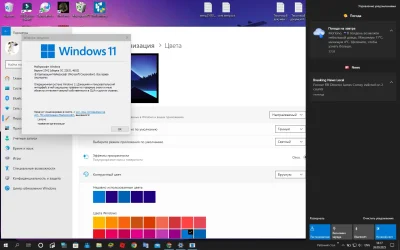
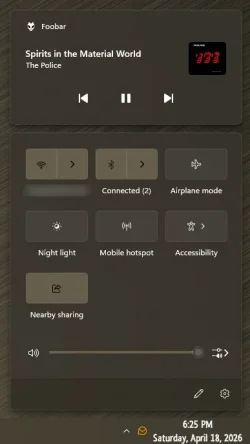
Solved Action Center Changer (.bat) Win10 or Win11


NOTE:

I had the Windows 10 Action Center, disabled.
Then, when I did an In-Place upgrade to Win 11... I found the Win 11 Calendar, broken.

In order to fix it, I had to go into Winaero and un-check... "Disable Action Center".

So for those who might be in a similar situation... that would be the solution.


This has been a public service announcement. :D
 

My Computers

System One System Two

  • OS
    Win 11 Home ♦♦♦26200.8457 ♦♦♦♦♦♦♦25H2
    Computer type
    PC/Desktop
    Manufacturer/Model
    Built by Ghot® [May 2020]
    CPU
    AMD Ryzen 7 3700X
    Motherboard
    Asus Pro WS X570-ACE (BIOS 5302)
    Memory
    G.Skill (F4-3200C14D-16GTZKW)
    Graphics Card(s)
    EVGA RTX 2070 (08G-P4-2171-KR)
    Sound Card
    Realtek ALC1220P / ALC S1220A
    Monitor(s) Displays
    Dell U3011 30"
    Screen Resolution
    2560 x 1600
    Hard Drives
    2x Samsung 860 EVO 500GB,
    WD 4TB Black FZBX - SATA III,
    WD 8TB Black FZBX - SATA III,
    DRW-24B1ST CD/DVD Burner
    PSU
    PC Power & Cooling 750W Quad EPS12V
    Case
    Cooler Master ATCS 840 Tower
    Cooling
    CM Hyper 212 EVO (push/pull)
    Keyboard
    Ducky DK9008 Shine II Blue LED
    Mouse
    Logitech Optical M-100
    Internet Speed
    300/300
    Browser
    Firefox (latest)
    Antivirus
    Bitdefender Total Security
    Other Info
    Speakers: Klipsch Pro Media 2.1
  • Operating System
    Windows XP Pro 32bit w/SP3
    Computer type
    PC/Desktop
    Manufacturer/Model
    Built by Ghot® (not in use)
    CPU
    AMD Athlon 64 X2 5000+ (OC'd @ 3.2Ghz)
    Motherboard
    ASUS M2N32-SLI Deluxe Wireless Edition
    Memory
    TWIN2X2048-6400C4DHX (2 x 1GB, DDR2 800)
    Graphics card(s)
    EVGA 256-P2-N758-TR GeForce 8600GT SSC
    Sound Card
    Onboard
    Monitor(s) Displays
    ViewSonic G90FB Black 19" Professional (CRT)
    Screen Resolution
    up to 2048 x 1536
    Hard Drives
    WD 36GB 10,000rpm Raptor SATA
    Seagate 80GB 7200rpm SATA
    Lite-On LTR-52246S CD/RW
    Lite-On LH-18A1P CD/DVD Burner
    PSU
    PC Power & Cooling Silencer 750 Quad EPS12V
    Case
    Generic Beige case, 80mm fans
    Cooling
    ZALMAN 9500A 92mm CPU Cooler
    Keyboard
    Logitech Classic Keybooard 200
    Mouse
    Logitech Optical M-BT96a
    Internet Speed
    300/300
    Browser
    Firefox 3.x ??
    Antivirus
    Symantec (Norton)
    Other Info
    Still assembled, still runs. Haven't turned it on for 15 years?
... but i'll figure out how to pin more manually via reg
I'd be happy if I could get these 3 to stick...,

8745.webp

but, Accessibility always ends up showing up on the right, instead of Nearby sharing! 🤷‍♂️
 

My Computers

System One System Two

  • OS
    Windows 11 Pro
    Computer type
    PC/Desktop
    Manufacturer/Model
    ASUS ROG Strix
  • Operating System
    Windows 11 Pro
    Computer type
    Laptop
    Manufacturer/Model
    ASUS VivoBook
workin on it! crazy that if you edit:

HKEY_CURRENT_USER\Control Panel\Quick Actions\Control Center\UserLayoutPaginated

and save it, upon reboot, windows will add back the entries that you removed... it just adds them back on at the end of the pinned. even if you restrict perms to that reg string to read-only it gets reset
 

My Computer

System One

  • OS
    Windows 11 Pro
One issue I have with the old action center is this: if I have light app mode but dark Windows mode (the way Windows 10 was originally released), the old action center and the start menu will appear in light mode. The taskbar will stay dark though. Anyone know how to fix that?
 

My Computer

System One

  • OS
    Windows 11
    Computer type
    Laptop
    Manufacturer/Model
    HP
    CPU
    Intel Pentium Silver
    Memory
    4GB
    Hard Drives
    128GB SSD
    Browser
    Microsoft Edge, Google Chrome, Firefox
    Antivirus
    Microsoft Defender
One issue I have with the old action center is this: if I have light app mode but dark Windows mode (the way Windows 10 was originally released), the old action center and the start menu will appear in light mode. The taskbar will stay dark though. Anyone know how to fix that?
Hey i am fix this issue via my windhawk script (win 11 start menu customizing fork) that triggering action center and start menu for adding "RequestedTheme=2" to "Grid". There is my screenshot Снимок экрана 2025-09-26 181755.webp
 

My Computer

System One

  • OS
    Windows 11 23h2
    Computer type
    Laptop
    Manufacturer/Model
    Lenovo Ideapad Gaming 3
    Other Info
    5
Hey i am fix this issue via my windhawk script (win 11 start menu customizing fork) that triggering action center and start menu for adding "RequestedTheme=2" to "Grid". There is my screenshot View attachment 146697
That looks amazing thank you!! Can you share how you got settings like that too? I would love to do that.
 

My Computer

System One

  • OS
    Windows 11
    Computer type
    Laptop
    Manufacturer/Model
    HP
    CPU
    Intel Pentium Silver
    Memory
    4GB
    Hard Drives
    128GB SSD
    Browser
    Microsoft Edge, Google Chrome, Firefox
    Antivirus
    Microsoft Defender
That looks amazing thank you!! Can you share how you got settings like that too? I would love to do that.
Sure! I'm get this settings app via another my big windhawk script (w11 start menu customize fork) that making win ui 2 look more like w10 design. Im made this script for many apps like whatsapp, systemsettings, w10 mail and calendar and e.t.c. If you need im can share my script but this is my first xaml script and may contain many bugs and inaccuracies and i make it "for myself" and 23h2 :) Also i have trouble with context menu in targeted uwp programs (menu doesnt appearing until i do some changes to it) and dont know hot to fix this :P
P.S. You can also get cool windows 10 lockscreen via windhawk :D
 

My Computer

System One

  • OS
    Windows 11 23h2
    Computer type
    Laptop
    Manufacturer/Model
    Lenovo Ideapad Gaming 3
    Other Info
    5
Sure! I'm get this settings app via another my big windhawk script (w11 start menu customize fork) that making win ui 2 look more like w10 design. Im made this script for many apps like whatsapp, systemsettings, w10 mail and calendar and e.t.c. If you need im can share my script but this is my first xaml script and may contain many bugs and inaccuracies and i make it "for myself" and 23h2 :) Also i have trouble with context menu in targeted uwp programs (menu doesnt appearing until i do some changes to it) and dont know hot to fix this :P
P.S. You can also get cool windows 10 lockscreen via windhawk :D
I don’t mind the inaccuracies, I’m willing to try it. I found out how to fork it enough to get settings after I saw this, and now I’ve been fighting with Settings all day 😆. Btw what do you target for the lock screen? I would think logonui.exe, but IDK I need a break rn. But I’m definitely trying that out tomorrow.
 

My Computer

System One

  • OS
    Windows 11
    Computer type
    Laptop
    Manufacturer/Model
    HP
    CPU
    Intel Pentium Silver
    Memory
    4GB
    Hard Drives
    128GB SSD
    Browser
    Microsoft Edge, Google Chrome, Firefox
    Antivirus
    Microsoft Defender
I don’t mind the inaccuracies, I’m willing to try it. I found out how to fork it enough to get settings after I saw this, and now I’ve been fighting with Settings all day 😆. Btw what do you target for the lock screen? I would think logonui.exe, but IDK I need a break rn. But I’m definitely trying that out tomorrow.
For lockscreen i am target process named lockapp.exe but i recommend to modify lockscreen in another script cuz when i modify it in my general script im get some scary errors and temporarily disabling of video driver XD. And about my general script i will send him later cause i dont have access to my laptop rn. Oh and recommend to join into windhawk discord group if you are not there, if i dont joined in this group a month ago, im will be used ugly windows 11 lockscreen:)
 

My Computer

System One

  • OS
    Windows 11 23h2
    Computer type
    Laptop
    Manufacturer/Model
    Lenovo Ideapad Gaming 3
    Other Info
    5
I don’t mind the inaccuracies, I’m willing to try it. I found out how to fork it enough to get settings after I saw this, and now I’ve been fighting with Settings all day 😆. Btw what do you target for the lock screen? I would think logonui.exe, but IDK I need a break rn. But I’m definitely trying that out tomorrow.
okay there is my theme... this is settings for forked win11 start menu styling mode, and after this quote im gonna sleep cause now is 12:29 am for me. hope you like my theme :)
{ "theme": "", "disableNewStartMenuLayout": 0, "controlStyles[0].target": "Windows.UI.Xaml.Controls.FontIcon", "controlStyles[0].styles[0]": "FontFamily:=Segoe MDL2 Assets, Segoe UI, Segoe UI Symbol, ms-appx:///WhatsApp.Design/WhatsAppMDL2Assets/WhatsAppMDL2AssetsGeneral16px.ttf#WhatsApp MDL2 Assets General16px, ms-appx:///WhatsApp.Design/WhatsAppMDL2Assets/WhatsAppMDL2AssetsGeneral16px.ttf#WhatsApp MDL2 Assets, ms-appx:///WhatsApp.Design/WhatsAppMDL2Assets/WhatsAppMDL2AssetsTimestamp10px.ttf#WhatsApp MDL2 Assets Timestamp10px, ms-appx:///WhatsApp.Design/WhatsAppMDL2Assets/WhatsAppMDL2AssetsTimestamp10px.ttf#WhatsApp MDL2 Assets, ms-appx:///WhatsApp.Design/WhatsAppMDL2Assets/WhatsAppMDL2AssetsChatList14px.ttf#WhatsApp MDL2 Assets ChatList14px, ms-appx:///WhatsApp.Design/WhatsAppMDL2Assets/WhatsAppMDL2AssetsChatList14px.ttf#WhatsApp MDL2 Assets, ms-appx:///WhatsApp.Design/WhatsAppMDL2Assets/Segoe Fluent Icons.ttf#Segoe Fluent Icons, ms-appx:///Resources/Fonts/SegMVR2.ttf#Segoe MVR MDL2 Assets", "webContentCustomJs": "", "resourceVariables[0].variableKey": "", "resourceVariables[0].value": "", "controlStyles[1].target": "Windows.UI.Xaml.Controls.Button#DashboardTileActionButton > Windows.UI.Xaml.Controls.Grid#RootGrid > Windows.UI.Xaml.Controls.ContentPresenter", "controlStyles[1].styles[0]": "CornerRadius=0", "controlStyles[2].target": "Windows.UI.Xaml.Controls.ContentPresenter#InlineContentPresenter", "controlStyles[2].styles[0]": "CornerRadius=0", "controlStyles[3].target": "SystemSettings.View.CopyButtonControl", "controlStyles[3].styles[0]": "Background:=Black", "controlStyles[4].target": "Windows.UI.Xaml.Controls.FontIcon#ChevronIcon", "controlStyles[4].styles[0]": "FontFamily:=Segoe MDL2 Assets, Segoe UI, Segoe UI Symbol, ms-appx:///WhatsApp.Design/WhatsAppMDL2Assets/WhatsAppMDL2AssetsGeneral16px.ttf#WhatsApp MDL2 Assets General16px, ms-appx:///WhatsApp.Design/WhatsAppMDL2Assets/WhatsAppMDL2AssetsGeneral16px.ttf#WhatsApp MDL2 Assets, ms-appx:///WhatsApp.Design/WhatsAppMDL2Assets/WhatsAppMDL2AssetsTimestamp10px.ttf#WhatsApp MDL2 Assets Timestamp10px, ms-appx:///WhatsApp.Design/WhatsAppMDL2Assets/WhatsAppMDL2AssetsTimestamp10px.ttf#WhatsApp MDL2 Assets, ms-appx:///WhatsApp.Design/WhatsAppMDL2Assets/WhatsAppMDL2AssetsChatList14px.ttf#WhatsApp MDL2 Assets ChatList14px, ms-appx:///WhatsApp.Design/WhatsAppMDL2Assets/WhatsAppMDL2AssetsChatList14px.ttf#WhatsApp MDL2 Assets, ms-appx:///WhatsApp.Design/WhatsAppMDL2Assets/Segoe Fluent Icons.ttf#Segoe Fluent Icons", "controlStyles[5].target": "Windows.UI.Xaml.Controls.HyperlinkButton", "controlStyles[5].styles[0]": "Foreground:=<SolidColorBrush Color=\"{ThemeResource SystemAccentColorLight1}\" Opacity=\"1\" />", "controlStyles[6].target": "Windows.UI.Xaml.Controls.TextBox#TextBox", "controlStyles[6].styles[0]": "BorderThickness:=2", "controlStyles[6].styles[1]": "BorderBrush:=<SolidColorBrush Color=\"Gray\" Opacity=\"0.8\" />", "controlStyles[6].styles[2]": "CornerRadius:=0", "controlStyles[7].target": "Windows.UI.Xaml.Controls.Border#ModePreview", "controlStyles[7].styles[0]": "CornerRadius:=0", "controlStyles[8].target": "Windows.UI.Xaml.Controls.Image", "controlStyles[8].styles[0]": "CornerRadius:=0", "controlStyles[9].target": "Windows.UI.Xaml.Controls.UserControl", "controlStyles[9].styles[0]": "CornerRadius:=0", "controlStyles[10].target": "Windows.UI.Xaml.Controls.GridViewItem", "controlStyles[10].styles[0]": "CornerRadius:=0", "controlStyles[11].styles[0]": "Background:=<SolidColorBrush Color=\"{ThemeResource SystemBaseMediumLowColor}\" Opacity=\"0.5\" />", "controlStyles[11].target": "Windows.UI.Xaml.Controls.ContentPresenter#InlineContentPresenter > SystemSettings.View.CopyButtonControl > Windows.UI.Xaml.Controls.Button#CopyButton", "controlStyles[12].target": "Windows.UI.Xaml.Controls.FontIcon#Arrow", "controlStyles[12].styles[0]": "FontFamily:=Segoe MDL2 Assets", "controlStyles[13].target": "Windows.UI.Xaml.Controls.Primitives.Thumb#VerticalThumb", "controlStyles[13].styles[0]": "CornerRadius:=0", "controlStyles[14].target": "Windows.UI.Xaml.Controls.Items.Presenter", "controlStyles[14].styles[0]": "CornerRadius:=0", "controlStyles[15].target": "Windows.UI.Xaml.Controls.MenuFlyoutItem", "controlStyles[15].styles[0]": "CornerRadius:=0", "controlStyles[16].target": "Windows.UI.Xaml.Controls.StackPanel", "controlStyles[16].styles[0]": "CornerRadius:=0", "controlStyles[17].target": "Windows.UI.Xaml.Controls.Border#FocusBorder", "controlStyles[17].styles[0]": "CornerRadius:=0", "controlStyles[18].target": "Windows.UI.Xaml.Controls.Grid#x_CheckBoxGrid", "controlStyles[18].styles[0]": "CornerRadius:=0", "controlStyles[19].target": "Windows.UI.Xaml.Shapes.Path#x_checkGlyph", "controlStyles[19].styles[0]": "CornerRadius:=0", "controlStyles[20].target": "Windows.UI.Xaml.Controls.Grid#VerticalRoot", "controlStyles[20].styles[0]": "CornerRadius:=0", "controlStyles[21].target": "Windows.UI.Xaml.Controls.Border#MailCalendarSwitchIconBorder", "controlStyles[21].styles[0]": "CornerRadius:=0", "controlStyles[22].target": "Office.UI.Xaml.Core.Button#NavigationButton", "controlStyles[22].styles[0]": "CornerRadius:=0", "controlStyles[23].styles[0]": "CornerRadius:=0", "controlStyles[23].target": "Windows.UI.Xaml.Controls.Grid#OuterGrid", "controlStyles[24].target": "Windows.UI.Xaml.Controls.Border#ContentContainer", "controlStyles[25].target": "Office.UI.Xaml.Core.Button#x_saveButton", "controlStyles[24].styles[0]": "CornerRadius:=0", "controlStyles[25].styles[0]": "CornerRadius:=0", "controlStyles[26].styles[0]": "CornerRadius:=0", "controlStyles[26].target": "Windows.UI.Xaml.Controls.Grid#OuterGrid", "controlStyles[27].target": "Windows.UI.Xaml.Controls.ToggleSwitch#x_toggleToBeta", "controlStyles[27].styles[0]": "Visiblity=Collapsed", "controlStyles[28].target": "Windows.UI.Xaml.Controls.Border#x_selection", "controlStyles[28].styles[0]": "CornerRadius:=0", "controlStyles[29].target": "Windows.UI.Xaml.Controls.Grid#ContainerGrid", "controlStyles[29].styles[0]": "CornerRadius:=0", "controlStyles[30].target": "Windows.UI.Xaml.Controls.Border#Border", "controlStyles[30].styles[0]": "CornerRadius:=0", "controlStyles[31].target": "Windows.UI.Xaml.Controls.TextBlock#Time", "controlStyles[31].styles[0]": "FontWeight=Light", "controlStyles[32].target": "Windows.UI.Xaml.Shapes.Rectangle#SelectionIndicator", "controlStyles[32].styles[0]": "CornerRadius:=0", "controlStyles[32].styles[1]": "RenderTransform:=<ScaleTransform ScaleX=\"1.1\" ScaleY=\"2.15\" />", "controlStyles[33].target": "SystemSettings.View.StableComboBox", "controlStyles[34].target": "Windows.UI.Xaml.Controls.Border#Border", "controlStyles[34].styles[0]": "BorderBrush:=<RevealBorderBrush Color=\"Transparent\" TargetTheme=\"1\" Opacity=\"1\" />", "controlStyles[34].styles[1]": "CornerRadius:=0", "controlStyles[34].styles[2]": "BorderThickness:=0.5", "controlStyles[33].styles[0]": "CornerRadius:=0", "controlStyles[33].styles[1]": "BorderBrush:=<SolidColorBrush Color=\"Gray\" Opacity=\"0.8\" />", "controlStyles[35].target": "Windows.UI.Xaml.Controls.FontIcon#ChevronIcon", "controlStyles[35].styles[0]": "Foreground:=LightGray", "controlStyles[36].target": "Windows.UI.Xaml.Controls.Primitives.Thumb#HorizontalThumb", "controlStyles[36].styles[0]": "Width:=8", "controlStyles[36].styles[1]": "Height:=25", "controlStyles[37].target": "Windows.UI.Xaml.Shapes.Ellipse#SliderInnerThumb", "controlStyles[37].styles[0]": "Height:=30", "controlStyles[37].styles[1]": "Width:=10", "controlStyles[38].target": "Windows.UI.Xaml.Controls.TextBlock", "controlStyles[38].styles[0]": "FontFamily:=Segoe UI, ms-appx:///WhatsApp.Design/Assets/Emoji/WhatsAppColorEmoji.ttf#WhatsApp Color Emoji, Segoe UI Emoji, Segoe MDL2 Assets, Segoe UI Symbol, ms-appx:///WhatsApp.Design/WhatsAppMDL2Assets/WhatsAppMDL2AssetsGeneral16px.ttf#WhatsApp MDL2 Assets General16px, ms-appx:///WhatsApp.Design/WhatsAppMDL2Assets/WhatsAppMDL2AssetsGeneral16px.ttf#WhatsApp MDL2 Assets, ms-appx:///WhatsApp.Design/WhatsAppMDL2Assets/WhatsAppMDL2AssetsTimestamp10px.ttf#WhatsApp MDL2 Assets Timestamp10px, ms-appx:///WhatsApp.Design/WhatsAppMDL2Assets/WhatsAppMDL2AssetsTimestamp10px.ttf#WhatsApp MDL2 Assets, ms-appx:///WhatsApp.Design/WhatsAppMDL2Assets/WhatsAppMDL2AssetsChatList14px.ttf#WhatsApp MDL2 Assets ChatList14px, ms-appx:///WhatsApp.Design/WhatsAppMDL2Assets/WhatsAppMDL2AssetsChatList14px.ttf#WhatsApp MDL2 Assets, ms-appx:///WhatsApp.Design/WhatsAppMDL2Assets/Segoe Fluent Icons.ttf#Segoe Fluent Icons, ms-appx:///Microsoft.Msn.Shell/Themes/Glyphs/Font/MSNMDL2.ttf#MSN MDL2 Assets, ms-appx:///Assets/ClockIcons.ttf#Clock Fluent Icons, /SystemSettings/Assets/Fonts/SettingsIcons.ttf#Settings Fluent Icons", "controlStyles[39].target": "Windows.UI.Xaml.Controls.Grid#RootContainer", "controlStyles[39].styles[0]": "CornerRadius:=0", "controlStyles[40].target": "Windows.UI.Xaml.Controls.Grid#HostContainer", "controlStyles[40].styles[0]": "CornerRadius:=0", "controlStyles[41].target": "Windows.UI.Xaml.Controls.Grid#LayoutRoot", "controlStyles[41].styles[0]": "CornerRadius:=0", "controlStyles[42].target": "Windows.UI.Xaml.Controls.Grid#PresenterContentRootGrid", "controlStyles[42].styles[0]": "CornerRadius:=0", "controlStyles[43].target": "Windows.UI.Xaml.Shapes.Rectangle#SelectionIndicator", "controlStyles[43].styles[0]": "Fill:=<SolidColorBrush Color=\"{ThemeResource SystemAccentColor}\" Opacity=\"0.8\" />", "controlStyles[44].target": "Windows.UI.Xaml.Controls.Grid#RootContainer", "controlStyles[44].styles[0]": "CornerRadius:=0", "controlStyles[45].target": "Windows.UI.Xaml.Shapes.Rectangle#NormalRectangle", "controlStyles[45].styles[0]": "CornerRadius:=0", "controlStyles[46].target": "Microsoft.UI.Xaml.Controls.AnimatedIcon#CheckGlyph", "controlStyles[46].styles[0]": "CornerRadius:=0", "controlStyles[47].target": "Windows.UI.Xaml.Controls.Grid#HostContainer", "controlStyles[47].styles[0]": "CornerRadius:=0", "controlStyles[48].target": "Windows.UI.Xaml.Controls.Grid#NVIRootGrid", "controlStyles[48].styles[0]": "CornerRadius:=0", "controlStyles[49].target": "Grid#PaneRoot", "controlStyles[49].styles[0]": "Background:=<AcrylicBrush BackgroundSource=\"HostBackdrop\" FallbackColor=\"{ThemeResource SystemChromeMediumColor}\" TintColor=\"{ThemeResource SystemAltHighColor}\" TintOpacity=\"0.6\" />", "controlStyles[50].target": "Windows.UI.Xaml.Controls.SplitView#RootSplitView", "controlStyles[50].styles[0]": "Background:=Transparent", "controlStyles[51].target": "Microsoft.UI.Xaml.Controls.NavigationView#NavView", "controlStyles[51].styles[0]": "Background:=Transparent", "controlStyles[49].styles[1]": "CornerRadius:=0", "controlStyles[52].target": "Frame#frame > ContentPresenter", "controlStyles[52].styles[0]": "Background:=Transparent", "controlStyles[53].target": "Grid#ContentRoot > Border > Grid#ContentGrid", "controlStyles[53].styles[0]": "Background:=Transparent", "controlStyles[54].target": "SecHealthUIAppShell.AppShell#SechealthUI", "controlStyles[54].styles[0]": "Background:=Transparent", "controlStyles[55].target": "SecHealthUIAppShell.DashboardHostPage > Grid#DashboardHostPageParentGrid", "controlStyles[55].styles[0]": "Background:=Transparent", "controlStyles[56].target": "SecHealthUIAppShell.DashboardTileGridView#DashboardTileGridView > Border > ScrollViewer#ScrollViewer > Border#Root > Grid > ScrollContentPresenter#ScrollContentPresenter > ItemsPresenter > ItemsWrapGrid > GridViewItem > Windows.UI.Xaml.Controls.Primitives.ListViewItemPresenter#Root > Border", "controlStyles[56].styles[0]": "Background:=Transparent", "controlStyles[57].target": "SecHealthUIAppShell.DashboardTileListView#DashboardTileListView > Border > ScrollViewer#ScrollViewer > Border#Root > Grid > ScrollContentPresenter#ScrollContentPresenter > ItemsPresenter > ItemsStackPanel > ListViewItem > Windows.UI.Xaml.Controls.Primitives.ListViewItemPresenter#Root > Border", "controlStyles[57].styles[0]": "Background:=Transparent", "controlStyles[58].target": "SecHealthUIAppShell.ThreatPillar.ThreatProtectionPage > Grid > Grid", "controlStyles[58].styles[0]": "Background:=Transparent", "controlStyles[59].styles[0]": "FontWeight:=Light", "controlStyles[59].target": "Windows.UI.Xaml.Controls.TextBlock#TimerNameText", "controlStyles[60].target": "Time.Controls.TimeTextBlock#TimerValueText", "controlStyles[60].styles[0]": "FontWeight:=Light", "controlStyles[61].target": "Time.Controls.TimeTextBlock#AlarmTime", "controlStyles[61].styles[0]": "FontWeight:=Light", "controlStyles[62].target": "Windows.UI.Xaml.Controls.TextBlock#StopwatchHoursLabel", "controlStyles[63].target": "Windows.UI.Xaml.Controls.TextBlock#StopwatchMinutesLabel", "controlStyles[64].target": "Windows.UI.Xaml.Controls.TextBlock#StopwatchSecondsLabel", "controlStyles[65].target": "Time.Controls.TimeTextBlock#StopwatchTimerText", "controlStyles[66].target": "Windows.UI.Xaml.Controls.RichTextBlock#RichTextBlock", "controlStyles[62].styles[0]": "FontWeight:=Light", "controlStyles[63].styles[0]": "FontWeight:=Light", "controlStyles[64].styles[0]": "FontWeight:=Light", "controlStyles[65].styles[0]": "FontWeight:=Light", "controlStyles[66].styles[0]": "FontWeight:=Light", "controlStyles[67].target": "Windows.UI.Xaml.Controls.Button#StartButton", "controlStyles[67].styles[0]": "Background:=<SolidColorBrush Color=\"{ThemeResource SystemAccentColor}\" Opacity=\"0.8\" />", "controlStyles[67].styles[1]": "Foreground:=White", "controlStyles[68].target": "Windows.UI.Xaml.Shapes.Rectangle#SwitchKnobOff", "controlStyles[68].styles[0]": "Height=10", "controlStyles[68].styles[1]": "Width=10", "controlStyles[69].target": "Time.Controls.SuspensionCommandBar", "controlStyles[69].styles[0]": "Background:=<AcrylicBrush TintColor=\"Black\" TintOpacity=\"0.5\" />", "controlStyles[69].styles[1]": "CornerRadius=0", "controlStyles[70].target": "Windows.UI.Xaml.Controls.TextBlock#AppName", "controlStyles[70].styles[0]": "FontSize=14", "controlStyles[70].styles[1]": "FontFamily=Segoe UI", "controlStyles[71].target": "Windows.UI.Xaml.Controls.Grid#ProgressGrid > Windows.UI.Xaml.Controls.StackPanel > Windows.UI.Xaml.Controls.TextBlock", "controlStyles[71].styles[0]": "FontWeight:=Light", "controlStyles[72].target": "Windows.UI.Xaml.Internal.TextBoxView", "controlStyles[72].styles[0]": "FontWeight:=Light", "controlStyles[5].styles[1]": "FontFamily=Segoe UI", "controlStyles[73].target": "Windows.UI.Xaml.Controls.Grid", "controlStyles[73].styles[0]": "CornerRadius:=0", "controlStyles[74].target": "Windows.UI.Xaml.Shapes.Rectangle#SelectedPipe", "controlStyles[74].styles[0]": "Fill:=<SolidColorBrush Color=\"{ThemeResource SystemAccentColorLight1}\" Opacity=\"1\" />", "controlStyles[75].target": "Windows.UI.Xaml.Shapes.Rectangle#Pill", "controlStyles[75].styles[0]": "Fill:=<SolidColorBrush Color=\"{ThemeResource SystemAccentColorLight1}\" Opacity=\"1\" />", "controlStyles[74].styles[1]": "Margin:=-5,0,-5,0", "controlStyles[75].styles[1]": "Margin:=0,-5,0,-5", "controlStyles[74].styles[2]": "Height:=5", "controlStyles[75].styles[2]": "Width:=5", "controlStyles[76].target": "Windows.UI.Xaml.Controls.Primitives.ScrollBar#VerticalScrollBar", "controlStyles[76].styles[0]": "Background:=BaseLow", "controlStyles[77].target": "Windows.UI.Xaml.Controls.StackPanel > Windows.UI.Xaml.Controls.TextBlock", "controlStyles[77].styles[0]": "FontWeight:=Light", "controlStyles[78].target": "Windows.UI.Xaml.Controls.ContentPresenter#PART_LastItemContentPresenter > Windows.UI.Xaml.Controls.TextBlock", "controlStyles[78].styles[0]": "FontWeight:=Light", "controlStyles[79].target": "SystemSettings.View.DisplayTile#DisplayTileObject > Windows.UI.Xaml.Controls.Border#TileBorder", "controlStyles[79].styles[0]": "BorderBrush:=Gray", "controlStyles[79].styles[1]": "BorderThickness:=3", "controlStyles[79].styles[2]": "CornerRadius:=0", "controlStyles[80].target": "SystemSettings.View.EntityItem > Windows.UI.Xaml.Controls.Grid > Windows.UI.Xaml.Controls.ContentPresenter#IconContentPresenter > Windows.UI.Xaml.Controls.FontIcon", "controlStyles[80].styles[0]": "Foreground:=<SolidColorBrush Color=\"{ThemeResource SystemAccentColorLight1}\" Opacity=\"1\" />", "controlStyles[81].target": "Windows.UI.Xaml.Controls.TextBlock#UserName", "controlStyles[81].styles[0]": "FontSize:=18", "controlStyles[82].target": "Windows.UI.Xaml.Controls.TextBlock#UserAccount", "controlStyles[82].styles[0]": "FontSize:=13", "controlStyles[83].target": "Windows.UI.Xaml.Controls.Grid#UserImageGrid", "controlStyles[83].styles[0]": "CornerRadius:=50", "controlStyles[84].target": "Windows.UI.Xaml.Controls.ContentPresenter#PART_ContentPresenter", "controlStyles[84].styles[0]": "FontWeight:=Light", "controlStyles[85].target": "Grid#ContentRoot > Border > Grid#ContentGrid", "controlStyles[85].styles[0]": "BorderBrush=Transparent", "controlStyles[11].styles[1]": "BorderThickness:=2", "controlStyles[1].styles[1]": "BorderThickness:=1.5", "controlStyles[86].target": "Windows.UI.Xaml.Controls.Button#SettingsDashboardButton", "controlStyles[86].styles[0]": "BorderThickness:=1.8", "controlStyles[86].styles[1]": "CornerRadius:=0", "controlStyles[87].target": "Windows.UI.Xaml.Controls.Button#ScanNowButton", "controlStyles[87].styles[0]": "BorderThickness:=1.8", "controlStyles[87].styles[1]": "CornerRadius:=0", "controlStyles[88].target": "SecHealthUIAppShell.Common.CustomHyperLinkButton#HyperlinkWrapButton > Windows.UI.Xaml.Controls.ContentPresenter#ContentPresenter > Windows.UI.Xaml.Controls.TextBlock", "controlStyles[88].styles[0]": "Foreground:=<SolidColorBrush Color=\"{ThemeResource SystemAccentColorLight1}\" Opacity=\"1\" />", "controlStyles[89].target": "Windows.UI.Xaml.Shapes.Rectangle#SelectionIndicator", "controlStyles[89].styles[0]": "Fill:=<SolidColorBrush Color=\"{ThemeResource SystemAccentColorLight1}\" Opacity=\"1\" />", "controlStyles[89].styles[1]": "Width:=5", "controlStyles[89].styles[2]": "Height:=26", "controlStyles[80].styles[1]": "FontSize=21", "controlStyles[33].styles[2]": "BorderThickness:=2", "controlStyles[90].target": "Windows.UI.Xaml.Controls.Button#NavigationViewBackButton", "controlStyles[90].styles[0]": "Background:=<SolidColorBrush Color=\"{ThemeResource SystemAccentColor}\" Opacity=\"1\" />", "controlStyles[91].target": "Windows.UI.Xaml.Controls.Button#NavigationViewBackButton > Windows.UI.Xaml.Controls.Grid#RootGrid > Microsoft.UI.Xaml.Controls.AnimatedIcon#Content", "controlStyles[91].styles[0]": "Height:=16", "controlStyles[91].styles[1]": "Weight:=16", "controlStyles[90].styles[1]": "Margin:=0,-4,0,0", "controlStyles[92].target": "Windows.UI.Xaml.Controls.CheckBox", "controlStyles[92].styles[0]": "CornerRadius:=0", "controlStyles[92].styles[1]": "BorderThickness:=1.5", "controlStyles[93].target": "Windows.UI.Xaml.Controls.Border#HighlightBackground", "controlStyles[93].styles[0]": "CornerRadius:=0", "controlStyles[94].target": "SystemSettings.View.WatermarkTextBox", "controlStyles[94].styles[0]": "CornerRadius:=0", "controlStyles[94].styles[1]": "BorderThickness:=2", "controlStyles[94].styles[2]": "BorderBrush:=<SolidColorBrush Color=\"Gray\" Opacity=\"0.8\" />", "controlStyles[95].target": "Windows.UI.Xaml.Controls.Border#BackgroundElement", "controlStyles[96].target": "Windows.UI.Xaml.Controls.Grid#DialogSpace", "controlStyles[95].styles[0]": "CornerRadius:=0", "controlStyles[96].styles[0]": "CornerRadius:=0", "controlStyles[97].target": "Windows.UI.Xaml.Controls.Button#PrimaryButton", "controlStyles[98].target": "Windows.UI.Xaml.Controls.Button#SecondaryButton", "controlStyles[97].styles[0]": "BorderThickness:=2", "controlStyles[97].styles[1]": "Background:=<RevealBorderBrush Color=\"#999EA6\" TargetTheme=\"1\" Opacity=\"0.7\" />", "controlStyles[98].styles[0]": "Background:=<RevealBorderBrush Color=\"#999EA6\" TargetTheme=\"1\" Opacity=\"0.6\" />", "controlStyles[98].styles[1]": "BorderThickness:=2", "controlStyles[97].styles[2]": "CornerRadius:=0", "controlStyles[98].styles[2]": "CornerRadius:=0", "controlStyles[99].target": "Windows.UI.Xaml.Controls.ContentControl#Title", "controlStyles[99].styles[0]": "FontWeight:=Normal", "controlStyles[100].target": "WhatsApp.Design.AppBar#AppBar", "controlStyles[100].styles[0]": "Background:=<AcrylicBrush BackgroundSource=\"HostBackdrop\" FallbackColor=\"{ThemeResource SystemChromeMediumColor}\" TintColor=\"{ThemeResource SystemAltHighColor}\" TintOpacity=\"0.6\" />", "controlStyles[101].target": "WhatsApp.Design.SearchTextBoxNoTab#SearchQueryTextBox", "controlStyles[101].styles[0]": "CornerRadius:=0", "controlStyles[101].styles[1]": "BorderThickness:=1.5", "controlStyles[101].styles[2]": "BorderBrush:=Gray", "controlStyles[102].target": "WhatsApp.JidNameControl#TitleBlock", "controlStyles[102].styles[0]": "FontWeight:=Normal", "controlStyles[103].target": "WhatsApp.Design.DateHeaderContentView", "controlStyles[103].styles[0]": "CornerRadius:=0", "controlStyles[104].target": "WhatsApp.Design.BubbleViewStackPanel#StackPanel", "controlStyles[104].styles[0]": "CornerRadius:=0", "controlStyles[105].target": "WhatsApp.Design.ChatsListItemView#View", "controlStyles[105].styles[0]": "CornerRadius:=0", "controlStyles[106].styles[0]": "CornerRadius:=0", "controlStyles[106].target": "Windows.UI.Xaml.Controls.Button", "controlStyles[107].target": "Windows.UI.Xaml.Controls.Border#PointerBackground, Windows.UI.Xaml.Controls.Border#Background, Windows.UI.Xaml.Controls.Border#CheckBackground", "controlStyles[107].styles[0]": "CornerRadius:=0", "controlStyles[102].styles[1]": "FontSize:=17", "controlStyles[102].styles[2]": "FontFamily:=Segoe UI", "controlStyles[108].target": "Windows.UI.Xaml.Controls.Primitives.ToggleButton#FilterButton > Windows.UI.Xaml.Controls.Border#Border > Windows.UI.Xaml.Controls.Grid > Windows.UI.Xaml.Controls.ContentPresenter#ContentPresenter > Windows.UI.Xaml.Controls.TextBlock", "controlStyles[108].styles[0]": "Text=", "controlStyles[109].target": "WhatsApp.Design.ChatsListItemView#View", "controlStyles[109].styles[0]": "Margin:=0,-2,0,-2", "controlStyles[109].styles[1]": "CornerRadius:=0", "controlStyles[110].target": "Windows.UI.Xaml.Shapes.Rectangle#BackgroundRectangle", "controlStyles[110].styles[0]": "CornerRadius:=0", "controlStyles[111].target": "WhatsApp.Design.JumpToButtons#JumpButtonV2", "controlStyles[111].styles[0]": "CornerRadius:=0", "controlStyles[112].target": "Windows.UI.Xaml.Controls.ToolTip", "controlStyles[112].styles[0]": "FontFamily:=Segoe UI", "controlStyles[112].styles[1]": "CornerRadius:=0", "controlStyles[113].target": "Windows.UI.Xaml.Controls.Border#PopupBorder", "controlStyles[113].styles[0]": "CornerRadius:=0", "controlStyles[114].styles[0]": "CornerRadius:=0", "controlStyles[115].styles[0]": "CornerRadius:=0", "controlStyles[115].target": "Windows.UI.Xaml.Controls.Canvas", "controlStyles[114].target": "Windows.UI.Xaml.PopupRoot", "controlStyles[116].target": "Windows.UI.Xaml.Controls.Grid#LayoutRoot", "controlStyles[116].styles[0]": "CornerRadius:=0", "controlStyles[117].target": "Windows.UI.Xaml.Controls.ComboBox#LanguageSelectorComboBox", "controlStyles[117].styles[0]": "CornerRadius:=0", "controlStyles[117].styles[1]": "Background:=<AcrylicBrush TintColor=\"Gray\" TintOpacity=\"0.1\" />", "controlStyles[103].styles[1]": "Background:=Transparent", "controlStyles[118].target": "WhatsApp.Design.AttachmentsButton#AttachButton > Windows.UI.Xaml.Controls.Border#Border > Windows.UI.Xaml.Controls.Grid > Windows.UI.Xaml.Controls.Border#Background", "controlStyles[118].styles[0]": "Fill:=Red", "controlStyles[119].target": "Windows.UI.Xaml.Controls.Grid#AvatarMeasure", "controlStyles[119].styles[0]": "Width:=30", "controlStyles[119].styles[1]": "Height:=30", "controlStyles[120].target": "Windows.UI.Xaml.Controls.TextBlock#SubtitleBlock", "controlStyles[120].styles[0]": "TextSize:=13", "controlStyles[121].target": "WhatsApp.Design.LeftPanelView#LeftPanelView", "controlStyles[121].styles[0]": "CornerRadius:=0", "controlStyles[122].target": "Windows.UI.Xaml.Controls.MenuFlyoutPresenter", "controlStyles[122].styles[0]": "CornerRadius:=0", "controlStyles[123].styles[0]": "CornerRadius:=0", "controlStyles[124].styles[0]": "CornerRadius:=0", "controlStyles[125].styles[0]": "CornerRadius:=0", "controlStyles[125].styles[1]": "Background:=<AcrylicBrush TintColor=\"Gray\" TintOpacity=\"0.1\" />", "controlStyles[124].styles[1]": "Background:=<AcrylicBrush TintColor=\"Gray\" TintOpacity=\"0.1\" />", "controlStyles[123].styles[1]": "Background:=<AcrylicBrush TintColor=\"Gray\" TintOpacity=\"0.1\" />", "controlStyles[123].target": "Windows.UI.Xaml.Controls.ComboBox#CamerasCombobox", "controlStyles[124].target": "Windows.UI.Xaml.Controls.ComboBox#ThemeCombobox", "controlStyles[125].target": "WhatsApp.Design.TonePicker#IndividualMessagesTonePicker", "controlStyles[126].target": "Windows.UI.Xaml.Controls.Button#Reset", "controlStyles[126].styles[0]": "Background:=<AcrylicBrush TintColor=\"Gray\" TintOpacity=\"0.1\" />", "controlStyles[127].target": "Windows.UI.Xaml.Controls.Viewbox#BadgeOn", "controlStyles[128].target": "WhatsApp.Design.TonePicker#IndividualMessagesTonePicker", "controlStyles[127].styles[0]": "Background:=<AcrylicBrush TintColor=\"Gray\" TintOpacity=\"0.1\" />", "controlStyles[128].styles[0]": "Background:=<AcrylicBrush TintColor=\"Gray\" TintOpacity=\"0.1\" />", "controlStyles[129].target": "Windows.UI.Xaml.Controls.Border#Background", "controlStyles[129].styles[0]": "CornerRadius:=0", "controlStyles[130].target": "WhatsApp.Design.ChatsListItem", "controlStyles[130].styles[0]": "CornerRadius:=0", "controlStyles[131].target": "Windows.UI.Xaml.Controls.TextBox", "controlStyles[132].target": "SystemSettings.View.WatermarkTextBox#SearchTextBox", "controlStyles[132].styles[0]": "BorderBrush:=Gray", "controlStyles[131].styles[0]": "BorderBrush:=Gray", "controlStyles[131].styles[1]": "BorderThickness:=1.5", "controlStyles[132].styles[1]": "BorderThickness:=1.5", "controlStyles[132].styles[2]": "CornerRadius:=0", "controlStyles[131].styles[2]": "CornerRadius:=0", "controlStyles[133].target": "Windows.UI.Xaml.Controls.TextBlock#SearchGlyph", "controlStyles[133].styles[0]": "TextSize:=15", "controlStyles[134].styles[0]": "CornerRadius:=0", "controlStyles[135].styles[0]": "CornerRadius:=0", "controlStyles[136].styles[0]": "CornerRadius:=0", "controlStyles[134].target": "Windows.UI.Xaml.Shapes.Rectangle#Rect", "controlStyles[135].target": "Windows.UI.Xaml.Controls.Border#BorderElement", "controlStyles[136].target": "WhatsApp.Design.PaletteItemView", "controlStyles[137].target": "Microsoft.UI.Xaml.Controls.AnimatedIcon#CheckGlyph", "controlStyles[137].styles[0]": "RenderTransform:=<ScaleTransform ScaleX=\"1.3\" ScaleY=\"1.3\" />", "controlStyles[138].target": "Microsoft.UI.Xaml.Controls.AnimatedIcon#DropDownGlyph", "controlStyles[138].styles[0]": "RenderTransform:=<ScaleTransform ScaleX=\"1.5\" ScaleY=\"1.5\" />", "controlStyles[112].styles[2]": "Background:=<SolidColorBrush Color=\"{ThemeResource SystemChromeLowColor}\" Opacity=\"1\" />", "controlStyles[13].styles[1]": "RenderTransform:=<ScaleTransform ScaleX=\"1.4\" ScaleY=\"1\" />", "controlStyles[13].styles[2]": "Margin:=6,0,0,0", "controlStyles[139].styles[0]": "Background:=<RevealBorderBrush Color=\"#999EA6\" TargetTheme=\"1\" Opacity=\"0.5\" />", "controlStyles[139].target": "Windows.UI.Xaml.Controls.Button#CloseButton", "controlStyles[139].styles[1]": "CornerRadius:=0", "controlStyles[140].target": "Windows.UI.Xaml.Controls.TextBlock#SpacerTextBlock", "controlStyles[140].styles[0]": "Background:=<RevealBorderBrush Color=\"#999EA6\" TargetTheme=\"1\" Opacity=\"0.5\" />", "controlStyles[140].styles[1]": "CornerRadius:=0", "controlStyles[141].target": "SystemSettings.View.SettingsPageHost#pageContent > Windows.UI.Xaml.Controls.ScrollViewer#SettingsPageHostPanel > Windows.UI.Xaml.Controls.Border#Root > Windows.UI.Xaml.Controls.Grid > Windows.UI.Xaml.Controls.ScrollContentPresenter#ScrollContentPresenter", "controlStyles[141].styles[0]": "HorizontalAlignment=0", "controlStyles[142].target": "Microsoft.UI.Xaml.Controls.NavigationViewItem", "controlStyles[142].styles[0]": "Margin:=0,0,0,0", "controlStyles[143].target": "Windows.UI.Xaml.Controls.SplitView#RootSplitView", "controlStyles[143].styles[0]": "Background:=<SolidColorBrush Color=\"{ThemeResource SystemAltHighColor}\" Opacity=\"1\"/>", "controlStyles[144].target": "Windows.UI.Xaml.Controls.Grid#PresenterContentRootGrid", "controlStyles[144].styles[0]": "BorderBrush:=<RevealBorderBrush Color=\"Transparent\" TargetTheme=\"0\" Opacity=\"1\" />", "controlStyles[144].styles[1]": "BorderThickness:=1", "controlStyles[90].styles[2]": "RequestedTheme=2", "controlStyles[145].styles[0]": "HorizontalAlignment=0", "controlStyles[145].target": "SystemSettings.View.LockscreenPreviewControl2#LockScreenPreview > Windows.UI.Xaml.Controls.Grid > Windows.UI.Xaml.Controls.StackPanel", "controlStyles[145].styles[1]": "VerticalAlignment=2", "controlStyles[146].target": "SystemSettings.View.LockscreenPreviewControl2#LockScreenPreview > Windows.UI.Xaml.Controls.Grid > Windows.UI.Xaml.Controls.StackPanel > Windows.UI.Xaml.Controls.TextBlock#LockscreenPreviewTime", "controlStyles[146].styles[0]": "HorizontalAlignment=0", "controlStyles[147].target": "SystemSettings.View.LockscreenPreviewControl2#LockScreenPreview > Windows.UI.Xaml.Controls.Grid > Windows.UI.Xaml.Controls.StackPanel > Windows.UI.Xaml.Controls.TextBlock#LockscreenPreviewDate", "controlStyles[147].styles[0]": "RenderTransform:=<ScaleTransform ScaleX=\"1.3\" ScaleY=\"1.3\" />", "controlStyles[145].styles[2]": "Margin:=3,-10,3,3", "controlStyles[148].target": "SystemSettings.View.PersonalizePreviewControl2#PersonalizePreview2 > Windows.UI.Xaml.Controls.Grid#BackgroundPreviewGrid > Windows.UI.Xaml.Controls.StackPanel#AppWindow", "controlStyles[148].styles[0]": "HorizontalAlignment=0", "controlStyles[148].styles[1]": "Margin:=0,0,0,0", "controlStyles[149].target": "SystemSettings.View.PersonalizePreviewControl2#PersonalizePreview2 > Windows.UI.Xaml.Controls.Grid#BackgroundPreviewGrid > Windows.UI.Xaml.Controls.StackPanel#AppWindow > Windows.UI.Xaml.Controls.Border", "controlStyles[149].styles[0]": "CornerRadius:=0", "controlStyles[150].target": "Windows.UI.Xaml.Controls.ItemsWrapGrid > Windows.UI.Xaml.Controls.GridViewItem > Windows.UI.Xaml.Controls.Primitives.ListViewItemPresenter#Root > Windows.UI.Xaml.Controls.UserControl > Windows.UI.Xaml.Controls.Grid > Windows.UI.Xaml.Controls.Border#ModePreview", "controlStyles[150].styles[0]": "HorizontalAlignment=0", "controlStyles[150].styles[1]": "Margin:=0,0,0,0", "controlStyles[150].styles[2]": "Width:=113", "controlStyles[150].styles[3]": "Height:=15", "controlStyles[151].target": "SystemSettings.View.ResourceLoaderConverterComboBox", "controlStyles[151].styles[0]": "BorderThickness:=2", "controlStyles[151].styles[1]": "BorderBrush:=<SolidColorBrush Color=\"Gray\" Opacity=\"0.8\" />", "controlStyles[151].styles[2]": "CornerRadius:=0", "controlStyles[152].target": "SystemSettings.View.EntityItem", "controlStyles[152].styles[0]": "BorderThickness:=1.2", "controlStyles[153].target": "SystemSettings.View.SettingsExpander > Windows.UI.Xaml.Controls.Grid > Windows.UI.Xaml.Controls.ContentPresenter#RevealedContent", "controlStyles[153].styles[0]": "Background:=<SolidColorBrush Color=\"{ThemeResource SystemListMediumColor}\" Opacity=\"0.2\" />", "controlStyles[152].styles[1]": "BorderBrush:=<RevealBorderBrush Color=\"Transparent\" TargetTheme=\"0\" Opacity=\"1\" />", "controlStyles[154].target": "SystemSettings.View.SettingsExpander > Windows.UI.Xaml.Controls.Grid > SystemSettings.View.ExpanderToggleButton#ContainerButton > Windows.UI.Xaml.Controls.ContentPresenter#ContentPresenter > Windows.UI.Xaml.Controls.Grid", "controlStyles[154].styles[0]": "Background:=<SolidColorBrush Color=\"{ThemeResource SystemListMediumColor}\" Opacity=\"0.2\" />", "controlStyles[155].target": "Windows.UI.Xaml.Controls.ContentPresenter#InlineContentPresenter > Windows.UI.Xaml.Controls.Button > Windows.UI.Xaml.Controls.ContentPresenter#ContentPresenter", "controlStyles[155].styles[0]": "BorderThickness:=2", "controlStyles[155].styles[1]": "Background:=<SolidColorBrush Color=\"{ThemeResource SystemBaseMediumLowColor}\" Opacity=\"0.8\" />", "controlStyles[155].styles[2]": "Foreground=<SolidColorBrush Color=\"{ThemeResource SystemBaseHighColor}\" Opacity=\"1\" />", "controlStyles[156].target": "Windows.UI.Xaml.PopupRoot > Windows.UI.Xaml.Controls.Canvas > Windows.UI.Xaml.Controls.ComboBoxLightDismiss > Windows.UI.Xaml.Controls.Border#PopupBorder > Windows.UI.Xaml.Controls.ScrollViewer#ScrollViewer > Windows.UI.Xaml.Controls.Border#Root > Windows.UI.Xaml.Controls.Grid > Windows.UI.Xaml.Controls.ScrollContentPresenter#ScrollContentPresenter > Windows.UI.Xaml.Controls.ItemsPresenter", "controlStyles[156].styles[0]": "Margin:=0,4,0,4", "controlStyles[157].target": "Windows.UI.Xaml.Controls.Border#SwitcherSelectedBg", "controlStyles[157].styles[0]": "CornerRadius:=0", "controlStyles[158].target": "Windows.UI.Xaml.Controls.Grid#DialogSpace", "controlStyles[158].styles[0]": "BorderBrush:=<SolidColorBrush Color=\"{ThemeResource SystemAccentColor}\" />", "controlStyles[158].styles[1]": "BorderThickness:=1", "controlStyles[159].target": "Windows.UI.Xaml.Controls.Grid#DialogSpace > Windows.UI.Xaml.Controls.ScrollViewer#ContentScrollViewer > Windows.UI.Xaml.Controls.Border#Root > Windows.UI.Xaml.Controls.Grid > Windows.UI.Xaml.Controls.ScrollContentPresenter#ScrollContentPresenter > Windows.UI.Xaml.Controls.Grid > Windows.UI.Xaml.Controls.ContentControl#Title", "controlStyles[159].styles[0]": "FontWeight=Light", "controlStyles[160].target": "Windows.UI.Xaml.Controls.Grid#CommandSpace > Windows.UI.Xaml.Controls.Button#PrimaryButton", "controlStyles[160].styles[0]": "BorderThickness:=1", "controlStyles[160].styles[1]": "Background:=<SolidColorBrush Color=\"{ThemeResource SystemBaseMediumLowColor}\" Opacity=\"0.8\" />", "controlStyles[161].target": "Windows.UI.Xaml.Controls.Grid#CommandSpace > Windows.UI.Xaml.Controls.Button#SecondaryButton", "controlStyles[161].styles[0]": "Background:=<SolidColorBrush Color=\"{ThemeResource SystemBaseMediumLowColor}\" Opacity=\"0.8\" />", "controlStyles[161].styles[1]": "BorderThickness:=1", "controlStyles[162].target": "Windows.UI.Xaml.Controls.Grid#CommandSpace > Windows.UI.Xaml.Controls.Button#CloseButton", "controlStyles[162].styles[0]": "BorderThickness:=1", "controlStyles[162].styles[1]": "Background:=<SolidColorBrush Color=\"{ThemeResource SystemBaseMediumLowColor}\" Opacity=\"0.8\" />", "controlStyles[163].target": "Windows.UI.Xaml.Controls.ComboBox", "controlStyles[163].styles[0]": "BorderThickness:=2", "controlStyles[163].styles[1]": "CornerRadius:=0", "controlStyles[163].styles[2]": "BorderBrush:=<SolidColorBrush Color=\"Gray\" Opacity=\"0.8\" />", "controlStyles[164].target": "Microsoft.UI.Xaml.Controls.SplitButton#myColorButton > Windows.UI.Xaml.Controls.Grid#RootGrid", "controlStyles[164].styles[0]": "CornerRadius:=0", "controlStyles[165].target": "Windows.UI.Xaml.Controls.ToggleSwitch#ToggleSwitch2", "controlStyles[165].styles[0]": "Width:=35", "controlStyles[160].styles[2]": "Foreground:=<SolidColorBrush Color=\"{ThemeResource SystemBaseHighColor}\" Opacity=\"0.8\" />", "controlStyles[166].target": "Windows.UI.Xaml.Controls.Grid#CommandSpace", "controlStyles[166].styles[0]": "Background:=<SolidColorBrush Color=\"{ThemeResource SystemAltHighColor}\" Opacity=\"1\" />", "controlStyles[167].target": "Windows.UI.Xaml.Controls.Primitives.RepeatButton", "controlStyles[167].styles[0]": "Background:=<SolidColorBrush Color=\"{ThemeResource SystemBaseMediumLowColor}\" Opacity=\"0.5\" />", "controlStyles[167].styles[1]": "BorderThickness:=0", "controlStyles[167].styles[2]": "CornerRadius:=0", "controlStyles[168].target": "Windows.UI.Xaml.Controls.FlyoutPresenter", "controlStyles[168].styles[0]": "CornerRadius:=0", "controlStyles[168].styles[1]": "Background:=<SolidColorBrush Color=\"{ThemeResource SystemChromeMediumColor}\" Opacity=\"1\" />", "controlStyles[168].styles[2]": "BorderBrush:=LightGray", "controlStyles[169].target": "Windows.UI.Xaml.Controls.FlyoutPresenter > Windows.UI.Xaml.Controls.Border > Windows.UI.Xaml.Controls.ScrollViewer#ScrollViewer > Windows.UI.Xaml.Controls.Border#Root > Windows.UI.Xaml.Controls.Grid > Windows.UI.Xaml.Controls.ScrollContentPresenter#ScrollContentPresenter > Windows.UI.Xaml.Controls.ContentPresenter > Windows.UI.Xaml.Controls.StackPanel > Windows.UI.Xaml.Controls.Button ", "controlStyles[169].styles[0]": "CornerRadius:=0", "controlStyles[169].styles[1]": "BorderThickness:=0", "controlStyles[169].styles[2]": "Background:=<SolidColorBrush Color=\"{ThemeResource SystemBaseMediumLowColor}\" Opacity=\"0.5\" />", "controlStyles[112].styles[3]": "BorderBrush:=LightGray", "controlStyles[170].target": "Windows.UI.Xaml.Controls.Button#Button1", "controlStyles[170].styles[0]": "CornerRadius:=0", "controlStyles[170].styles[1]": "BorderThickness:=0", "controlStyles[170].styles[2]": "Background:=<SolidColorBrush Color=\"{ThemeResource SystemBaseMediumLowColor}\" Opacity=\"0.5\" />", "controlStyles[171].target": "Windows.UI.Xaml.Controls.PasswordBox", "controlStyles[171].styles[0]": "BorderBrush:=<SolidColorBrush Color=\"Gray\" Opacity=\"0.8\" />", "controlStyles[171].styles[1]": "CornerRadius:=0", "controlStyles[171].styles[2]": "BorderThickness:=2", "controlStyles[172].target": "Windows.UI.Xaml.Controls.MenuFlyoutPresenter", "controlStyles[172].styles[0]": "Foreground:=<SolidColorBrush Color=\"{ThemeResource SystemChromeAltLowColor}\" Opacity=\"1\" />", "controlStyles[49].styles[2]": "MaxWidth:=250", "controlStyles[173].target": "WinStore.UX.Controls.SearchAutoSuggestBox#SearchBox > Windows.UI.Xaml.Controls.AutoSuggestBox#SearchTextBox", "controlStyles[173].styles[0]": "Height:=40", "controlStyles[174].target": "WinStore.UX.Controls.NoBorderCard", "controlStyles[174].styles[0]": "CornerRadius:=0", "controlStyles[175].target": "Windows.UI.Xaml.Controls.Border > WinStore.UX.Controls.Tiles.ProductImageBadge", "controlStyles[175].styles[0]": "CornerRadius:=0", "controlStyles[176].target": "WinStore.UX.Controls.Tiles.BadgeControl#Badge", "controlStyles[176].styles[0]": "CornerRadius:=0", "controlStyles[177].target": "Windows.UI.Xaml.Controls.Grid#CustomTitleBarHost", "controlStyles[177].styles[0]": "Background:=<AcrylicBrush BackgroundSource=\"HostBackdrop\" FallbackColor=\"{ThemeResource SystemChromeMediumColor}\" TintColor=\"{ThemeResource SystemAltHighColor}\" TintOpacity=\"0.6\" />", "controlStyles[178].target": "WinStore.UX.PresentationManifest.RecyclingSlotControl", "controlStyles[178].styles[0]": "CornerRadius:=0", "controlStyles[179].target": "WinStore.UX.Controls.Card", "controlStyles[179].styles[0]": "CornerRadius:=0", "controlStyles[180].target": "Windows.UI.Xaml.Controls.Grid#PrimarySlotsContainer", "controlStyles[180].styles[0]": "CornerRadius:=0", "controlStyles[179].styles[1]": "Background:=<SolidColorBrush Color=\"{ThemeResource SystemChromeLowColor}\" Opacity=\"1\" />", "controlStyles[181].target": "WinStore.UX.Controls.Card > Windows.UI.Xaml.Controls.Grid > Windows.UI.Xaml.Controls.Border3ShadowRoot > Windows.UI.Xaml.Controls.Border#Backplate > Windows.UI.Composition.SpriteVisual", "controlStyles[181].styles[0]": "CornerRadius:=0", "controlStyles[182].target": "Windows.UI.Xaml.Controls.Grid#CtaContainer", "controlStyles[182].styles[0]": "CornerRadius:=0", "controlStyles[183].target": "Microsoft.UI.Xaml.Controls.ItemsRepeater#InnerRepeater > Windows.UI.Xaml.Controls.RadioButton", "controlStyles[183].styles[0]": "CornerRadius:=0", "controlStyles[184].target": "WinStore.UX.Controls.Spotlight.ScrollingSpotlightItem", "controlStyles[184].styles[0]": "CornerRadius:=0", "controlStyles[185].target": "Windows.UI.Xaml.Controls.Grid#SpotlightIslandContainer", "controlStyles[185].styles[0]": "CornerRadius:=0", "controlStyles[186].target": "WinStore.UX.Controls.ResponsiveFeaturedPanel", "controlStyles[186].styles[0]": "CornerRadius:=0", "controlStyles[187].target": "WinStore.UX.Controls.Tiles.BottomBlurImage#TileImage", "controlStyles[187].styles[0]": "CornerRadius:=0", "controlStyles[179].styles[2]": "BorderThickness:=1", "controlStyles[179].styles[3]": "BorderBrush:=<RevealBorderBrush Color=\"Transparent\" TargetTheme=\"0\" Opacity=\"1\" />", "controlStyles[188].target": "WinStore.UX.Controls.Tiles.ImageWithBackground#TileImage", "controlStyles[188].styles[0]": "CornerRadius:=0", "controlStyles[188].styles[1]": "Margin:=0,0,0,0", "controlStyles[189].target": "WinStore.UX.Controls.Tiles.EffectBackgroundImage#_tileImage", "controlStyles[189].styles[0]": "CornerRadius:=0", "controlStyles[190].target": "ValueBanner.IdealStateFeatureControl#IdealStateFeatureControl > Windows.UI.Xaml.Controls.Button#FeatureButton", "controlStyles[190].styles[0]": "BorderBrush:=<RevealBorderBrush Color=\"Transparent\" TargetTheme=\"0\" Opacity=\"1\" />", "controlStyles[190].styles[1]": "BorderThickness:=1", "controlStyles[190].styles[2]": "CornerRadius:=0", "controlStyles[190].styles[3]": "Height:=80", "controlStyles[191].target": "SystemSettings.View.HomepageCardListPanel > Windows.UI.Xaml.Controls.ContentPresenter", "controlStyles[191].styles[0]": "Background:=Transparent", "controlStyles[191].styles[1]": "BorderBrush:=<RevealBorderBrush Color=\"Transparent\" TargetTheme=\"0\" Opacity=\"1\" />", "controlStyles[192].target": "Microsoft.UI.Xaml.Controls.InfoBar", "controlStyles[192].styles[0]": "CornerRadius:=0", "controlStyles[191].styles[2]": "CornerRadius:=0" }

PeopleExperienceHost.exe HxCalendarAppImm.exe HxOutlook.exe VoiceRecorder.exe Clipchamp.exe SecHealthUI.exe Time.exe Microsoft.Msn.Money.exe UWP Resources Gallery.exe WhatsApp.exe Video.UI.exe WindowsCamera.exe WhatsApp.Root.exe ScreenClippingHost.exe PhoneExperienceHost.exe WinStore.App.exe AppUIBasics.exe
oh and dont forget to replace startmenuexperiencehost and etc in w11start menu styling mod source code to systemsettings to avoid unexpected behavior of ur start menu xd
 

My Computer

System One

  • OS
    Windows 11 23h2
    Computer type
    Laptop
    Manufacturer/Model
    Lenovo Ideapad Gaming 3
    Other Info
    5
The themes pretty good! Thanks! Btw do you use the Windows 10 or 11 start menu? The RequestedTheme worked mostly, but the tiles were a weird grayish-whitish color. Also a few icons still took only the light mod variant… maybe I need to look a little harder into it idk.
 

My Computer

System One

  • OS
    Windows 11
    Computer type
    Laptop
    Manufacturer/Model
    HP
    CPU
    Intel Pentium Silver
    Memory
    4GB
    Hard Drives
    128GB SSD
    Browser
    Microsoft Edge, Google Chrome, Firefox
    Antivirus
    Microsoft Defender
The themes pretty good! Thanks! Btw do you use the Windows 10 or 11 start menu? The RequestedTheme worked mostly, but the tiles were a weird grayish-whitish color. Also a few icons still took only the light mod variant… maybe I need to look a little harder into it idk.
I'm use windows 10 start menu via EP, and Windows 11 Start Menu Styler mod with my config that gives Segoe MDL2 Assets font for symbols, instead of segoe fluent icons, a bit more w10 like searchpage and accent colored tiles like in older w10 versions. Im also have trouble with tiles and monochrome UWP apps icons and couldnt fix this weird bug. And if you using accent colored tiles, you get another bug that pinned tiles is bright, but icons bg in app list is OK😩 Im can share my config for w11 start menu styler - fork №1024801472 if you interested
 

My Computer

System One

  • OS
    Windows 11 23h2
    Computer type
    Laptop
    Manufacturer/Model
    Lenovo Ideapad Gaming 3
    Other Info
    5
I'm use windows 10 start menu via EP, and Windows 11 Start Menu Styler mod with my config that gives Segoe MDL2 Assets font for symbols, instead of segoe fluent icons, a bit more w10 like searchpage and accent colored tiles like in older w10 versions. Im also have trouble with tiles and monochrome UWP apps icons and couldnt fix this weird bug. And if you using accent colored tiles, you get another bug that pinned tiles is bright, but icons bg in app list is OK😩 Im can share my config for w11 start menu styler - fork №1024801472 if you interested
You Can Sent the folk Please
 

My Computer

System One

  • OS
    Windows 11 24H2 Home
    Computer type
    Laptop
I'm content with the W11 version of both, except the no edit on 24H2...

View attachment 121265

MS is so Click N Scroll happy!!! :facepalm:

View attachment 121266

this is definitely doable now with windhawk. i can edit this mod to make it look like the default control center if you want to use it...


My Computer

System One

  • OS
    Windows 11 Pro
i can edit this mod to make it look like the default control center if you want to use it...
I still have the editable version...

13095.webp
 

My Computers

System One System Two

  • OS
    Windows 11 Pro
    Computer type
    PC/Desktop
    Manufacturer/Model
    ASUS ROG Strix
  • Operating System
    Windows 11 Pro
    Computer type
    Laptop
    Manufacturer/Model
    ASUS VivoBook
Back
Top Bottom