Personalization Add or Remove Quick Access in File Explorer Home in Windows 11


Home_banner.png

This tutorial will show you how to add or remove the Quick access section in File Explorer Home for all users in Windows 11.

Starting with Windows 11 build 22593, Quick access in File Explorer (Win+E) is now called Home. The name Quick access has been repurposed for the pinned/frequent Folders section, and Pinned files is now called Favorites to align with Office and OneDrive. Recent and pinned files (Favorites) displayed in Home are now searchable using the search box in File Explorer even if they are not local files, so you can find Office files recently shared with you.

Home in the navigation pane is the default homepage of File Explorer (Win+E) that allows you to quickly access and view your pinned/frequent folders (Quick access), Favorites (pinned files), and Recent files from one location.
  • Quick access = Displays up to 13 folders that you pinned or frequently opened on the system.
  • Favorites = Pinned files.
  • Recent = Displays up to 25 files that you most recently opened.
  • Shared = Displays files shared with your Microsoft account.
Starting with Windows 11 version 22H2 KB5030310 Build 22621.2361, now that File Explorer is powered by Windows App SDK, Microsoft is introducing a modernized File Explorer Home powered by WinUI. Recommended files for users signed into Windows with an Azure Active Directory (AAD) account will be displayed as a carousel and support file thumbnails which is coming soon. Quick Access folders (available by default for users signed into Windows with a Microsoft account), Favorites, and Recent also bring in an updated experience with WinUI.

You must be signed in as an administrator to add or remove Quick access in File Explorer Home, Open/Save dialogs, and Common Item Dialogs.

This will not remove the Quick Access folders from the navigation pane in File Explorer.

If you turn on Show recommended section in File Explorer > Home, it will replace the Quick access section.


This tutorial will only work in Windows 11 build 22593 and higher.


EXAMPLE: Quick access in File Explorer Home, Open/Save dialog, and Common Item Dialog

Quick_access_in_File_Explorer_Home.png
Quick_access_in_open-save_dialog.png


Quick_access_in_common_item_dialog.png


Here's How:

1 Do step 2 (add) or step 3 (remove) below for what you would like to do.

2 Add Quick access to File Explorer Home

This is the default setting.


A) Click/tap on the Download button below to download the file below, and go to step 4 below.​

Add_Quick_access_to_File_Explorer_Home_for_all_users.reg


(Contents of REG file for reference)
Code:
Windows Registry Editor Version 5.00

[HKEY_LOCAL_MACHINE\SOFTWARE\Microsoft\Windows\CurrentVersion\Explorer\HomeFolderMSGraph\NameSpace\DelegateFolders\{3936E9E4-D92C-4EEE-A85A-BC16D5EA0819}]
@="Frequent Places Folder"

3 Remove Quick access from File Explorer Home

A) Click/tap on the Download button below to download the file below, and go to step 4 below.​

Remove_Quick_access_from_File_Explorer_Home_for_all_users.reg


(Contents of REG file for reference)
Code:
Windows Registry Editor Version 5.00

[-HKEY_LOCAL_MACHINE\SOFTWARE\Microsoft\Windows\CurrentVersion\Explorer\HomeFolderMSGraph\NameSpace\DelegateFolders\{3936E9E4-D92C-4EEE-A85A-BC16D5EA0819}]

4 Save the .reg file to your desktop.

5 Double click/tap on the downloaded .reg file to merge it.

6 When prompted, click/tap on Run, Yes (UAC), Yes, and OK to approve the merge.

7 If Home in File Explorer is currently open, then refresh (F5) or close and open the window to apply.

8 You can now delete the downloaded .reg file if you like.


That's it,
Shawn Brink


Attachments

Last edited:
To clarify, I can see Recent items and Recent folders pinned to the Quick Access when opening Explorer, but they don't show up when accessing the menu from an application, not even a native Windows application like Notepad.
In Settings -Privacy & security -General turn on 'Let Windows improve Start and search results by tracking app launches'.

1673859785746.png
 

My Computers My Computers

  • At a glance

    Win 11 ProAMD Ryzen™ 7 7730U24GB Dual-Channel DDR4 @ 1596MHz (22-22-22-52)512MB ATI AMD Radeon Graphics (ASUStek Comput...
    OS
    Win 11 Pro
    Computer type
    Laptop
    Manufacturer/Model
    ASUS Vivobook
    CPU
    AMD Ryzen™ 7 7730U
    Motherboard
    M1605YA
    Memory
    24GB Dual-Channel DDR4 @ 1596MHz (22-22-22-52)
    Graphics Card(s)
    512MB ATI AMD Radeon Graphics (ASUStek Computer Inc)
    Monitor(s) Displays
    Generic PnP Monitor (1920x1200@60Hz) - P1 PLUS (1920x1080@59Hz)
    Screen Resolution
    1920 X 1200
    Hard Drives
    953GB Western Digital WD
    PSU
    45 Watts
    Mouse
    Lenovo Bluetooth.
    Internet Speed
    500 Mbps
    Browser
    Edge
    Antivirus
    Defender
  • At a glance

    Windows 11AMD Ryzen 7 5800H / 3.2 GHz32 GB DDR4 SDRAM 3200 MHzNVIDIA GeForce RTX 3060 6 GB GDDR6 SDRAM
    Operating System
    Windows 11
    Computer type
    Laptop
    Manufacturer/Model
    ACER NITRO
    CPU
    AMD Ryzen 7 5800H / 3.2 GHz
    Motherboard
    CZ Scala_CAS (FP6)
    Memory
    32 GB DDR4 SDRAM 3200 MHz
    Graphics card(s)
    NVIDIA GeForce RTX 3060 6 GB GDDR6 SDRAM
    Sound Card
    Realtek Audio. NVIDIA High Definition Audio
    Monitor(s) Displays
    15.6" LED backlight 1920 x 1080 (Full HD) 144 Hz
    Screen Resolution
    1920 x 1080 (Full HD)
    Hard Drives
    Samsung 970 Evo Plus 2TB NVMe M.2
    PSU
    180 Watt, 19.5 V
    Mouse
    Lenovo Bluetooth
    Internet Speed
    500 Mbps
    Browser
    Edge
    Antivirus
    Defender
Thanks Shawn,

I assume then there's no way then to add [back] from way back in W7 Recent Folders and Recent Items to the Quick Access when wanting to save or retrieving a file/folder contents from any random application?

To clarify, I can see Recent items and Recent folders pinned to the Quick Access when opening Explorer, but they don't show up when accessing the menu from an application, not even a native Windows application like Notepad.

You can also turn on Show recently opened items in Start, Jump Lists, and File Explorer.


In addition, you could "Pin to Quick access" the Recent Items folder below to see more of them.

%AppData%\Microsoft\Windows\Recent
 

My Computers My Computers

  • At a glance

    Windows 11 Pro for WorkstationsIntel i7-8700K 5 GHz64 GB (4x16GB) G.SKILL TridentZ RGB DDR4 3600...ASUS ROG-STRIX-GTX1080TI-O11G-GAMING (11GB GD...
    OS
    Windows 11 Pro for Workstations
    Computer type
    PC/Desktop
    Manufacturer/Model
    Custom self build
    CPU
    Intel i7-8700K 5 GHz
    Motherboard
    ASUS ROG Maximus XI Formula Z390
    Memory
    64 GB (4x16GB) G.SKILL TridentZ RGB DDR4 3600 MHz (F4-3600C18D-32GTZR)
    Graphics Card(s)
    ASUS ROG-STRIX-GTX1080TI-O11G-GAMING (11GB GDDR5X)
    Sound Card
    Integrated Digital Audio (S/PDIF)
    Monitor(s) Displays
    2 x Samsung Odyssey G75 27"
    Screen Resolution
    2560x1440
    Hard Drives
    1TB Samsung 990 PRO M.2,
    4TB Samsung 990 PRO M.2,
    TerraMaster F8 SSD Plus NAS
    PSU
    Seasonic Prime Titanium 850W
    Case
    Thermaltake Core P3 wall mounted
    Cooling
    Corsair Hydro H115i
    Keyboard
    Amazon Basics Wired Full Keyboard MD005
    Mouse
    Logitech MX Master 4
    Internet Speed
    2 Gbps Download and 100 Mbps Upload
    Browser
    Chrome and Edge
    Antivirus
    Microsoft Defender
    Other Info
    Logitech Z625 speaker system,
    Logitech BRIO 4K Pro webcam,
    HP Color LaserJet Pro MFP M477fdn,
    CyberPower CP1500PFCLCD
    Galaxy S23 Plus phone
  • At a glance

    Windows 11 ProSnapdragon X Elite (12 core) 3.42 GHz16 GB LPDDR5x-7467 MHz
    Operating System
    Windows 11 Pro
    Computer type
    Laptop
    Manufacturer/Model
    Surface Laptop 7 Copilot+ PC
    CPU
    Snapdragon X Elite (12 core) 3.42 GHz
    Memory
    16 GB LPDDR5x-7467 MHz
    Monitor(s) Displays
    15" HDR
    Screen Resolution
    2496 x 1664
    Hard Drives
    1 TB SSD
    Internet Speed
    Wi-Fi 7 and Bluetooth 5.4
    Browser
    Chrome and Edge
    Antivirus
    Microsoft Defender
You can also turn on Show recently opened items in Start, Jump Lists, and File Explorer.


In addition, you could "Pin to Quick access" the Recent Items folder below to see more of them.

%AppData%\Microsoft\Windows\Recent
I have this enabled and pinned, but I think it's actually useless to me because Recent Items folder disappears when I use another application to open or save to. If I jump out of any screen (app) and click on "This PC", Quick Access with Recent Items and Recent Folders appears, but disappears otherwise.

1674948765830.png
 

My Computer My Computer

At a glance

Windows 11NVIDA 1650 Ti
OS
Windows 11
Computer type
Laptop
Manufacturer/Model
Lenovo
Graphics Card(s)
NVIDA 1650 Ti
Monitor(s) Displays
Lenovo C32q-20

My Computer My Computer

At a glance

Windows 11NVIDA 1650 Ti
OS
Windows 11
Computer type
Laptop
Manufacturer/Model
Lenovo
Graphics Card(s)
NVIDA 1650 Ti
Monitor(s) Displays
Lenovo C32q-20
Ya know sumpthin..., several users have stated lately... "What's wrong with File Explorer, why are you so afraid to embrace change?"

Well..., it's because, after a half a year tinkering with this :poop:, no one is wiser, you can't explain it, I can't explain, MS won't explain it.
It goes beyond frustration!!!

Here's what I don't get:
If Home is actually Quick Access, why does it reside in the Navigation Pane, with it's own namespace above it's own separator?
Yet, if I succeed in removing the Home namespace, why does Quick Access remain?

Dunno! Maybe I'm just not seeing the forest for the trees!!! 🤷‍♂️

0002489.png
 

My Computers My Computers

  • At a glance

    Windows 11 Pro
    OS
    Windows 11 Pro
    Computer type
    PC/Desktop
    Manufacturer/Model
    ASUS ROG Strix
  • At a glance

    Windows 11 Pro
    Operating System
    Windows 11 Pro
    Computer type
    Laptop
    Manufacturer/Model
    ASUS VivoBook
  • ASUS VivoBook 'Lite' ~ Windows 11 Home
@Brink, @Edwin

Okay, I'd like to throw out a variation on the questions floating around in this thread:
I have this handy, useful access menu set exactly as I want it when I right-click the File Explorer icon in the taskbar:
Clipboard03.jpg

But this set of shortcuts is reflected in (or is a reflection of) this layout in the actual File Explorer:
Clipboard02.jpg

Now, what I'd like to do is delete all the copies above the separator in File Explorer, but retain the right-click menu above.
Is that doable? Would eliminating the shortcuts above the separator also eliminate my handy black menu?
 

My Computers My Computers

  • At a glance

    11 Pro 24H2 26100.2454i7-9700 @ 3.00GHz32GBDDR4 @ 2666MHzIntel HD 630 Graphics onboard
    OS
    11 Pro 24H2 26100.2454
    Computer type
    PC/Desktop
    Manufacturer/Model
    Lenovo ThinkCentre M920S SFF
    CPU
    i7-9700 @ 3.00GHz
    Motherboard
    Lenovo 3132
    Memory
    32GBDDR4 @ 2666MHz
    Graphics Card(s)
    Intel HD 630 Graphics onboard
    Sound Card
    Realtek HD Audio
    Monitor(s) Displays
    LG E2442
    Screen Resolution
    1920x1080
    Hard Drives
    1 x Samsung 970 EVO PLUS 500GB NVMe SSD, 1 x WD_BLACK SN770
    250GB NVMe SSD (OS and programs), 1 x WD_BLACK SN770
    500GB NVMe SSD (Data)
    Case
    Lenovo SFF
    Keyboard
    Cherry Stream TKL JK-8600US-2 Wired
    Mouse
    LogiTech M510 wireless
    Internet Speed
    Fast (for fixed wireless!)
    Browser
    Chrome, sometimes Firefox
    Antivirus
    Malwarebytes Premium & Defender (working together beautifully!)
  • At a glance

    11 Pro 24H2 26100.2454i5-8400 @ 2.80GHz32GB DDR4 @ 2600MHzIntel HD 630 Graphics onboard
    Operating System
    11 Pro 24H2 26100.2454
    Computer type
    PC/Desktop
    Manufacturer/Model
    Lenovo ThinkCentre M920S SFF
    CPU
    i5-8400 @ 2.80GHz
    Motherboard
    Lenovo 3132
    Memory
    32GB DDR4 @ 2600MHz
    Graphics card(s)
    Intel HD 630 Graphics onboard
    Sound Card
    Realtek High Definition Audio onboard
    Monitor(s) Displays
    LG FULL HD (1920x1080@59Hz)
    Screen Resolution
    1920 x 1080
    Hard Drives
    1 x Samsung 970 EVO PLUS NVMe; 1 x Samsung 980 NVMe SSD
    Case
    Lenovo Think Centre SFF
    Keyboard
    Cherry Stream TKL JK-8600US-2 Wired
    Mouse
    LogiTech M510 wireless
    Internet Speed
    Fast (for fixed wireless!)
    Browser
    Chrome
    Antivirus
    Malwarebytes Premium and MS Defender, beautiful together
Hello @Wisewiz, :alien:

Unfortunately not. All those pinned items are from "Pin to Quick access" that also get pinned to the jump list of File Explorer. They are one and the same.
 

My Computers My Computers

  • At a glance

    Windows 11 Pro for WorkstationsIntel i7-8700K 5 GHz64 GB (4x16GB) G.SKILL TridentZ RGB DDR4 3600...ASUS ROG-STRIX-GTX1080TI-O11G-GAMING (11GB GD...
    OS
    Windows 11 Pro for Workstations
    Computer type
    PC/Desktop
    Manufacturer/Model
    Custom self build
    CPU
    Intel i7-8700K 5 GHz
    Motherboard
    ASUS ROG Maximus XI Formula Z390
    Memory
    64 GB (4x16GB) G.SKILL TridentZ RGB DDR4 3600 MHz (F4-3600C18D-32GTZR)
    Graphics Card(s)
    ASUS ROG-STRIX-GTX1080TI-O11G-GAMING (11GB GDDR5X)
    Sound Card
    Integrated Digital Audio (S/PDIF)
    Monitor(s) Displays
    2 x Samsung Odyssey G75 27"
    Screen Resolution
    2560x1440
    Hard Drives
    1TB Samsung 990 PRO M.2,
    4TB Samsung 990 PRO M.2,
    TerraMaster F8 SSD Plus NAS
    PSU
    Seasonic Prime Titanium 850W
    Case
    Thermaltake Core P3 wall mounted
    Cooling
    Corsair Hydro H115i
    Keyboard
    Amazon Basics Wired Full Keyboard MD005
    Mouse
    Logitech MX Master 4
    Internet Speed
    2 Gbps Download and 100 Mbps Upload
    Browser
    Chrome and Edge
    Antivirus
    Microsoft Defender
    Other Info
    Logitech Z625 speaker system,
    Logitech BRIO 4K Pro webcam,
    HP Color LaserJet Pro MFP M477fdn,
    CyberPower CP1500PFCLCD
    Galaxy S23 Plus phone
  • At a glance

    Windows 11 ProSnapdragon X Elite (12 core) 3.42 GHz16 GB LPDDR5x-7467 MHz
    Operating System
    Windows 11 Pro
    Computer type
    Laptop
    Manufacturer/Model
    Surface Laptop 7 Copilot+ PC
    CPU
    Snapdragon X Elite (12 core) 3.42 GHz
    Memory
    16 GB LPDDR5x-7467 MHz
    Monitor(s) Displays
    15" HDR
    Screen Resolution
    2496 x 1664
    Hard Drives
    1 TB SSD
    Internet Speed
    Wi-Fi 7 and Bluetooth 5.4
    Browser
    Chrome and Edge
    Antivirus
    Microsoft Defender
Thank you, my friend. That'll hold me for now.
And so, to bed. Good night, all.
 

My Computers My Computers

  • At a glance

    11 Pro 24H2 26100.2454i7-9700 @ 3.00GHz32GBDDR4 @ 2666MHzIntel HD 630 Graphics onboard
    OS
    11 Pro 24H2 26100.2454
    Computer type
    PC/Desktop
    Manufacturer/Model
    Lenovo ThinkCentre M920S SFF
    CPU
    i7-9700 @ 3.00GHz
    Motherboard
    Lenovo 3132
    Memory
    32GBDDR4 @ 2666MHz
    Graphics Card(s)
    Intel HD 630 Graphics onboard
    Sound Card
    Realtek HD Audio
    Monitor(s) Displays
    LG E2442
    Screen Resolution
    1920x1080
    Hard Drives
    1 x Samsung 970 EVO PLUS 500GB NVMe SSD, 1 x WD_BLACK SN770
    250GB NVMe SSD (OS and programs), 1 x WD_BLACK SN770
    500GB NVMe SSD (Data)
    Case
    Lenovo SFF
    Keyboard
    Cherry Stream TKL JK-8600US-2 Wired
    Mouse
    LogiTech M510 wireless
    Internet Speed
    Fast (for fixed wireless!)
    Browser
    Chrome, sometimes Firefox
    Antivirus
    Malwarebytes Premium & Defender (working together beautifully!)
  • At a glance

    11 Pro 24H2 26100.2454i5-8400 @ 2.80GHz32GB DDR4 @ 2600MHzIntel HD 630 Graphics onboard
    Operating System
    11 Pro 24H2 26100.2454
    Computer type
    PC/Desktop
    Manufacturer/Model
    Lenovo ThinkCentre M920S SFF
    CPU
    i5-8400 @ 2.80GHz
    Motherboard
    Lenovo 3132
    Memory
    32GB DDR4 @ 2600MHz
    Graphics card(s)
    Intel HD 630 Graphics onboard
    Sound Card
    Realtek High Definition Audio onboard
    Monitor(s) Displays
    LG FULL HD (1920x1080@59Hz)
    Screen Resolution
    1920 x 1080
    Hard Drives
    1 x Samsung 970 EVO PLUS NVMe; 1 x Samsung 980 NVMe SSD
    Case
    Lenovo Think Centre SFF
    Keyboard
    Cherry Stream TKL JK-8600US-2 Wired
    Mouse
    LogiTech M510 wireless
    Internet Speed
    Fast (for fixed wireless!)
    Browser
    Chrome
    Antivirus
    Malwarebytes Premium and MS Defender, beautiful together
Ya know sumpthin..., several users have stated lately... "What's wrong with File Explorer, why are you so afraid to embrace change?"

Well..., it's because, after a half a year tinkering with this :poop:, no one is wiser, you can't explain it, I can't explain, MS won't explain it.
It goes beyond frustration!!!

Here's what I don't get:
If Home is actually Quick Access, why does it reside in the Navigation Pane, with it's own namespace above it's own separator?
Yet, if I succeed in removing the Home namespace, why does Quick Access remain?

Dunno! Maybe I'm just not seeing the forest for the trees!!! 🤷‍♂️
And we can have all sorts of tweaks and even replicate (more or less) Windows 7, 8, and 10 in the taskbar and Start Menu (all of which are buggy in my experience). But nobody made any attempts to fix the Navigation Pane and Quick Access, et al.

I suppose Edwin, both you and I are old relics from the Windows 3.1x era who don't see the logic of the current mindset in doing things the long and complicated way. This probably explains why I detest Linux so much.
 

My Computer My Computer

At a glance

Windows 11NVIDA 1650 Ti
OS
Windows 11
Computer type
Laptop
Manufacturer/Model
Lenovo
Graphics Card(s)
NVIDA 1650 Ti
Monitor(s) Displays
Lenovo C32q-20
Here's what I don't get:
If Home is actually Quick Access,


I believe that Quick Access is a "part" of Home, not "the same as".


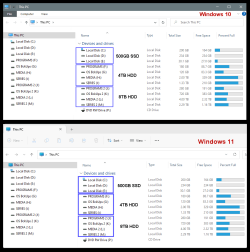
Anyway, this is how File Explorer should look. It uses a radically new system.
It shows the drives and what's on them. :D

00000 Hard Drives.png


No need to remember which non-intuitive location things are stored in. Things are stored exactly where IIIIIIIIIIIII put them.
Libraries? I don't need Libraries. They have this great "new" thing called: Folders.
You make a folder, you give it a name, then you put things in it, that go with that folder's name. It's miraculous.
Whoever thought that up was a genius.

Observe the cleanliness, the intuitiveness...

Image1.png

Just try to "guess" what's in the PICTURES folder, or the MUSIC folder, or in the real toughie... the MOVIES folder.

HOME is not a place in File Explorer... Home is where I and my computer are sitting at the present time.
Quick Access? Quick Access is my left forefinger. Lightning fast and no need to program. :D
 
Last edited:

My Computers My Computers

  • At a glance

    Win 11 Home ♦♦♦26200.8875 ♦♦♦♦♦♦♦25H2AMD Ryzen 7 3700XG.Skill (F4-3200C14D-16GTZKW)EVGA RTX 2070 (08G-P4-2171-KR)
    OS
    Win 11 Home ♦♦♦26200.8875 ♦♦♦♦♦♦♦25H2
    Computer type
    PC/Desktop
    Manufacturer/Model
    Built by Ghot® [May 2020]
    CPU
    AMD Ryzen 7 3700X
    Motherboard
    Asus Pro WS X570-ACE (BIOS 5302)
    Memory
    G.Skill (F4-3200C14D-16GTZKW)
    Graphics Card(s)
    EVGA RTX 2070 (08G-P4-2171-KR)
    Sound Card
    Realtek ALC1220P / ALC S1220A
    Monitor(s) Displays
    Dell U3011 30"
    Screen Resolution
    2560 x 1600
    Hard Drives
    2x Samsung 860 EVO 500GB,
    WD 4TB Black FZBX - SATA III,
    WD 8TB Black FZBX - SATA III,
    DRW-24B1ST CD/DVD Burner
    PSU
    PC Power & Cooling 750W Quad EPS12V
    Case
    Cooler Master ATCS 840 Tower
    Cooling
    CM Hyper 212 EVO (push/pull)
    Keyboard
    Ducky DK9008 Shine II Blue LED
    Mouse
    Logitech Optical M-100
    Internet Speed
    300/300
    Browser
    Firefox (latest)
    Antivirus
    Bitdefender Total Security
    Other Info
    Speakers: Klipsch Pro Media 2.1
  • At a glance

    Windows XP Pro 32bit w/SP3AMD Athlon 64 X2 5000+ (OC'd @ 3.2Ghz)TWIN2X2048-6400C4DHX (2 x 1GB, DDR2 800)EVGA 256-P2-N758-TR GeForce 8600GT SSC
    Operating System
    Windows XP Pro 32bit w/SP3
    Computer type
    PC/Desktop
    Manufacturer/Model
    Built by Ghot® (not in use)
    CPU
    AMD Athlon 64 X2 5000+ (OC'd @ 3.2Ghz)
    Motherboard
    ASUS M2N32-SLI Deluxe Wireless Edition
    Memory
    TWIN2X2048-6400C4DHX (2 x 1GB, DDR2 800)
    Graphics card(s)
    EVGA 256-P2-N758-TR GeForce 8600GT SSC
    Sound Card
    Onboard
    Monitor(s) Displays
    ViewSonic G90FB Black 19" Professional (CRT)
    Screen Resolution
    up to 2048 x 1536
    Hard Drives
    WD 36GB 10,000rpm Raptor SATA
    Seagate 80GB 7200rpm SATA
    Lite-On LTR-52246S CD/RW
    Lite-On LH-18A1P CD/DVD Burner
    PSU
    PC Power & Cooling Silencer 750 Quad EPS12V
    Case
    Generic Beige case, 80mm fans
    Cooling
    ZALMAN 9500A 92mm CPU Cooler
    Keyboard
    Logitech Classic Keybooard 200
    Mouse
    Logitech Optical M-BT96a
    Internet Speed
    300/300
    Browser
    Firefox 3.x ??
    Antivirus
    Symantec (Norton)
    Other Info
    Still assembled, still runs. Haven't turned it on for 15 years?
Agree, agree, agree!!!
 

My Computers My Computers

  • At a glance

    Windows 11 Pro
    OS
    Windows 11 Pro
    Computer type
    PC/Desktop
    Manufacturer/Model
    ASUS ROG Strix
  • At a glance

    Windows 11 Pro
    Operating System
    Windows 11 Pro
    Computer type
    Laptop
    Manufacturer/Model
    ASUS VivoBook
  • ASUS VivoBook 'Lite' ~ Windows 11 Home
Here's another weirdo feature I never understood:

0002504.png


Expand to current folder when I click on a folder in File Explorer???
What's the point of that??? I'm already there!!!
What purpose does expanding to current folder in the navigation Pane serve??? 🤷‍♂️🤷‍♂️🤷‍♂️
Not to mention, the breadcrumbs in the address bar if I want to navigate backwards???
 

My Computers My Computers

  • At a glance

    Windows 11 Pro
    OS
    Windows 11 Pro
    Computer type
    PC/Desktop
    Manufacturer/Model
    ASUS ROG Strix
  • At a glance

    Windows 11 Pro
    Operating System
    Windows 11 Pro
    Computer type
    Laptop
    Manufacturer/Model
    ASUS VivoBook
  • ASUS VivoBook 'Lite' ~ Windows 11 Home
Here's another weirdo feature I never understood:

View attachment 51424

Expand to current folder when I click on a folder in File Explorer???
What's the point of that??? I'm already there!!!
What purpose does expanding to current folder in the navigation Pane serve??? 🤷‍♂️🤷‍♂️🤷‍♂️
Not to mention, the breadcrumbs in the address bar if I want to navigate backwards???
Hi,
I use it without home/ quick access pinning nonsense and just go to user folder where everything is expanded so tell me what is not on the main page but is on the navigation pane ;)
It can be weird but actually very useful if you want to go somewhere else at a glance
1675181052466.png
 

My Computer My Computer

At a glance

Win-7-10-11Pro's10900k & 9940x & 5930kTrident-Z Royal 4000c16 2x16gb & Trident-Z 36...Titan Xp & 1080ti FTW3 & evga 980ti gaming
OS
Win-7-10-11Pro's
Computer type
PC/Desktop
Manufacturer/Model
Acer 17" Nitro 7840sn/ 2x16gb 5600c40/ 4060/ stock 1tb-os/ 4tb sn850x
CPU
10900k & 9940x & 5930k
Motherboard
z490-Apex & x299-Apex & x99-Sabertooth
Memory
Trident-Z Royal 4000c16 2x16gb & Trident-Z 3600c16 4x8gb & 3200c14 4x8gb
Graphics Card(s)
Titan Xp & 1080ti FTW3 & evga 980ti gaming
Sound Card
Onboard Realtek x3
Monitor(s) Displays
1-AOC G2460PG 24"G-Sync 144Hz/ 2nd 1-ASUS VG248QE 24"/ 3rd LG 43" series
Screen Resolution
1920-1080 not sure what the t.v is besides 43" class scales from 1920-1080 perfectly
Hard Drives
2-WD-sn850x 4tb/ 970evo+500gb/ 980 pro 2tb.
PSU
1000p2 & 1200p2 & 850p2
Case
D450 x2 & 1 Test bench in cherry Entertainment center
Cooling
Custom water loops x3 with 2x mora 360mm rads only 980ti gaming air cooled
Keyboard
G710+x3
Mouse
Redragon x3
Internet Speed
xfinity gigabyte
Browser
Firefox
Antivirus
mbam pro
It can be weird but actually very useful if you want to go somewhere else at a glance
True!
I usually just backpage, or use address bar breadcrumbs.
Another thing, when Expanding to current folder, is..., the Navigation Pane isn't width dynamic so, half the stuff is truncated and becomes an almost un-scrollable mess! 🤷‍♂️
 

My Computers My Computers

  • At a glance

    Windows 11 Pro
    OS
    Windows 11 Pro
    Computer type
    PC/Desktop
    Manufacturer/Model
    ASUS ROG Strix
  • At a glance

    Windows 11 Pro
    Operating System
    Windows 11 Pro
    Computer type
    Laptop
    Manufacturer/Model
    ASUS VivoBook
  • ASUS VivoBook 'Lite' ~ Windows 11 Home
File Explorer with 'Balls'
(Come on MS Boys, live a little..., I dare you!!!)

0002510.jpg
 

My Computers My Computers

  • At a glance

    Windows 11 Pro
    OS
    Windows 11 Pro
    Computer type
    PC/Desktop
    Manufacturer/Model
    ASUS ROG Strix
  • At a glance

    Windows 11 Pro
    Operating System
    Windows 11 Pro
    Computer type
    Laptop
    Manufacturer/Model
    ASUS VivoBook
  • ASUS VivoBook 'Lite' ~ Windows 11 Home
True!
I usually just backpage, or use address bar breadcrumbs.
Another thing, when Expanding to current folder, is..., the Navigation Pane isn't width dynamic so, half the stuff is truncated and becomes an almost un-scrollable mess! 🤷‍♂️
Hi,
Yep I had to do something Brink went the pincushion way which I hate :lmao:
 
Last edited:

My Computer My Computer

At a glance

Win-7-10-11Pro's10900k & 9940x & 5930kTrident-Z Royal 4000c16 2x16gb & Trident-Z 36...Titan Xp & 1080ti FTW3 & evga 980ti gaming
OS
Win-7-10-11Pro's
Computer type
PC/Desktop
Manufacturer/Model
Acer 17" Nitro 7840sn/ 2x16gb 5600c40/ 4060/ stock 1tb-os/ 4tb sn850x
CPU
10900k & 9940x & 5930k
Motherboard
z490-Apex & x299-Apex & x99-Sabertooth
Memory
Trident-Z Royal 4000c16 2x16gb & Trident-Z 3600c16 4x8gb & 3200c14 4x8gb
Graphics Card(s)
Titan Xp & 1080ti FTW3 & evga 980ti gaming
Sound Card
Onboard Realtek x3
Monitor(s) Displays
1-AOC G2460PG 24"G-Sync 144Hz/ 2nd 1-ASUS VG248QE 24"/ 3rd LG 43" series
Screen Resolution
1920-1080 not sure what the t.v is besides 43" class scales from 1920-1080 perfectly
Hard Drives
2-WD-sn850x 4tb/ 970evo+500gb/ 980 pro 2tb.
PSU
1000p2 & 1200p2 & 850p2
Case
D450 x2 & 1 Test bench in cherry Entertainment center
Cooling
Custom water loops x3 with 2x mora 360mm rads only 980ti gaming air cooled
Keyboard
G710+x3
Mouse
Redragon x3
Internet Speed
xfinity gigabyte
Browser
Firefox
Antivirus
mbam pro
Interesting discussion on navigation! Couple it with OneDrive not showing file location > 'delicious' chocolate & nuts mix, especially the latter :eek1:
 

My Computer My Computer

At a glance

Windows 10 Pro
OS
Windows 10 Pro
Doesn't work and neither does removing Home. I detest Windows 11 - absolutely hate it in every way.
 

My Computer My Computer

At a glance

WINDOWS 11INTEL 14TH GEN CORE I9-14900K 6.0GHzCORSAIR 64GB (2X32GB) CMK64GX5M2B6000C40 VENG...NVIDIA GEFORCE RTX 4070 TI SUPER & INTEL RAPT...
OS
WINDOWS 11
Computer type
PC/Desktop
Manufacturer/Model
ASUS Z790
CPU
INTEL 14TH GEN CORE I9-14900K 6.0GHz
Motherboard
ASUS ROG STRIX Z790-E GAMING WIFI II DDR5 LGA1700 ATX
Memory
CORSAIR 64GB (2X32GB) CMK64GX5M2B6000C40 VENGEANCE C40 6000MHZ DDR5 DRAM - BLACK
Graphics Card(s)
NVIDIA GEFORCE RTX 4070 TI SUPER & INTEL RAPTOR LAKE UHD 770
Sound Card
REALTEK ALC4080 CODEC / SAVITECH AMP / AUDIRVANA
Monitor(s) Displays
ASUS PA328CGV
Screen Resolution
2560x1440p
Hard Drives
SAMSUNG SSD 990 PRO 4TB, NVMe
SAMSUNG SSD 990 PRO 2TB, NVMe
SAMSUNG SSD 980 PRO 500GB NVMe
SEAGATE BARRACUDA 8TB 3.5in SATA HDD
PSU
COOLER MASTER GX III 80+GOLD 850W ATX 3.0
Case
LIAN LI LANCOOL III
Cooling
COOLER MASTER MASTER LIQUID 360 ATMOS CPU COOLER
Keyboard
HP 350 COMPACT / BON.ELK 61014R / HP HSA 4103K
Mouse
VERBATIM SILENT ERGO / LOGITECH MX EVERYWHERE 3 / LOGITECH M331
Internet Speed
260 Mbps / 23.6 Mbps
Browser
CHROME / BRAVE
Antivirus
MALWAREBYTES / DEFENDER
Other Info
QNAP NAS T453A 8TB
SANDISK 5TB
SEAGATE EXPANSION DESKTOP 4TB
SEAGATE EXPANSION DESKTOP 2TB
WESTERN DIGITAL ELEMENTS 2TB
Doesn't work and neither does removing Home. I detest Windows 11 - absolutely hate it in every way.
Unless Microsoft broke the tweak with a new update (it worked when I was on W11) it should work. Reboot your PC and have a look again.

It continues to work in W10. I miss my W7 Windows Explorer.
 

My Computer My Computer

At a glance

Windows 11NVIDA 1650 Ti
OS
Windows 11
Computer type
Laptop
Manufacturer/Model
Lenovo
Graphics Card(s)
NVIDA 1650 Ti
Monitor(s) Displays
Lenovo C32q-20
Doesn't work and neither does removing Home. I detest Windows 11 - absolutely hate it in every way.


Hello @jstocker76 and welcome to ElevenForum. :-)


It still works on Win 10 and Win 11, at least on the RTM version...


00000 Hard Drives.png
 

My Computers My Computers

  • At a glance

    Win 11 Home ♦♦♦26200.8875 ♦♦♦♦♦♦♦25H2AMD Ryzen 7 3700XG.Skill (F4-3200C14D-16GTZKW)EVGA RTX 2070 (08G-P4-2171-KR)
    OS
    Win 11 Home ♦♦♦26200.8875 ♦♦♦♦♦♦♦25H2
    Computer type
    PC/Desktop
    Manufacturer/Model
    Built by Ghot® [May 2020]
    CPU
    AMD Ryzen 7 3700X
    Motherboard
    Asus Pro WS X570-ACE (BIOS 5302)
    Memory
    G.Skill (F4-3200C14D-16GTZKW)
    Graphics Card(s)
    EVGA RTX 2070 (08G-P4-2171-KR)
    Sound Card
    Realtek ALC1220P / ALC S1220A
    Monitor(s) Displays
    Dell U3011 30"
    Screen Resolution
    2560 x 1600
    Hard Drives
    2x Samsung 860 EVO 500GB,
    WD 4TB Black FZBX - SATA III,
    WD 8TB Black FZBX - SATA III,
    DRW-24B1ST CD/DVD Burner
    PSU
    PC Power & Cooling 750W Quad EPS12V
    Case
    Cooler Master ATCS 840 Tower
    Cooling
    CM Hyper 212 EVO (push/pull)
    Keyboard
    Ducky DK9008 Shine II Blue LED
    Mouse
    Logitech Optical M-100
    Internet Speed
    300/300
    Browser
    Firefox (latest)
    Antivirus
    Bitdefender Total Security
    Other Info
    Speakers: Klipsch Pro Media 2.1
  • At a glance

    Windows XP Pro 32bit w/SP3AMD Athlon 64 X2 5000+ (OC'd @ 3.2Ghz)TWIN2X2048-6400C4DHX (2 x 1GB, DDR2 800)EVGA 256-P2-N758-TR GeForce 8600GT SSC
    Operating System
    Windows XP Pro 32bit w/SP3
    Computer type
    PC/Desktop
    Manufacturer/Model
    Built by Ghot® (not in use)
    CPU
    AMD Athlon 64 X2 5000+ (OC'd @ 3.2Ghz)
    Motherboard
    ASUS M2N32-SLI Deluxe Wireless Edition
    Memory
    TWIN2X2048-6400C4DHX (2 x 1GB, DDR2 800)
    Graphics card(s)
    EVGA 256-P2-N758-TR GeForce 8600GT SSC
    Sound Card
    Onboard
    Monitor(s) Displays
    ViewSonic G90FB Black 19" Professional (CRT)
    Screen Resolution
    up to 2048 x 1536
    Hard Drives
    WD 36GB 10,000rpm Raptor SATA
    Seagate 80GB 7200rpm SATA
    Lite-On LTR-52246S CD/RW
    Lite-On LH-18A1P CD/DVD Burner
    PSU
    PC Power & Cooling Silencer 750 Quad EPS12V
    Case
    Generic Beige case, 80mm fans
    Cooling
    ZALMAN 9500A 92mm CPU Cooler
    Keyboard
    Logitech Classic Keybooard 200
    Mouse
    Logitech Optical M-BT96a
    Internet Speed
    300/300
    Browser
    Firefox 3.x ??
    Antivirus
    Symantec (Norton)
    Other Info
    Still assembled, still runs. Haven't turned it on for 15 years?
Back
Top Bottom