
Advice needed on windows update drivers


rezpower

Well-known member
Member
VIP
Local time
4:38 PM
Posts
402
OS
Windows
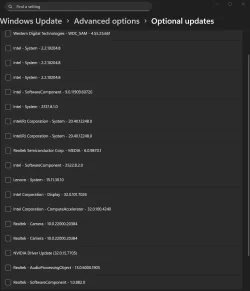
I just got a new Lenovo Legion laptop and I did a clean windows install on it. Windows found and installed ALL the drivers so I didn't need to install any device personally. The laptop is working fine and I only updated the Nvidia and Intel GPU drivers myself. When I go to windows update I see a long list of driver updates proposed. It it advised to use those updates or should they be ignored? Screenshot 2025-10-26 224058.webp
 

My Computer My Computer

At a glance

WindowsIntel i7-12800HX32 GB DDR5 4800 MHz dual-channelNVIDIA® GeForce RTX™ 3070 Ti
OS
Windows
Computer type
Laptop
Manufacturer/Model
Lenovo Legion 7i
CPU
Intel i7-12800HX
Memory
32 GB DDR5 4800 MHz dual-channel
Graphics Card(s)
NVIDIA® GeForce RTX™ 3070 Ti
Sound Card
Steinberg UR44
Hard Drives
1 TB SSD (M.2 NVMe PCIe 4.0 x4
2 TB SSD Samsung 980 PRO NNMe
Browser
Firefox
Antivirus
Windows Defender + Malwarebytes
Might as well if you already let windows install them to begin with…
Personally, I would avoid the nvidia one though. Do that manually.
 

My Computer My Computer

At a glance

Windows 11 Pro
OS
Windows 11 Pro
I agree with what dacrone says.

However If you don’t want drivers offered with Windows Updates.


My Computers My Computers

  • At a glance

    Windows 11 Pro 25H2 Build 26200.9168Intel(R) Core(TM) i7-4770K CPU @ 3.50GHz32.0 GB of I forget and the box is in storage.Gigabyte nVidia GeForce GTX 1660 Super OC 6GB
    OS
    Windows 11 Pro 25H2 Build 26200.9168
    Computer type
    PC/Desktop
    Manufacturer/Model
    Sin-built 2013
    CPU
    Intel(R) Core(TM) i7-4770K CPU @ 3.50GHz
    Motherboard
    ASUS ROG Maximus VI Formula
    Memory
    32.0 GB of I forget and the box is in storage.
    Graphics Card(s)
    Gigabyte nVidia GeForce GTX 1660 Super OC 6GB
    Sound Card
    ROG SupremeFX Formula 8-Channel High Definition Audio
    Monitor(s) Displays
    5 x LG 25MS500-B - 1 x 24MK430H-B - 1 x Wacom Pro 22" Touch Screen Tablet
    Screen Resolution
    All over the place
    Hard Drives
    Too many to list. OS on Samsung 1TB 870 QVO SATA
    PSU
    Silverstone 1500
    Case
    NZXT Phantom 820 Full-Tower Case
    Cooling
    Noctua NH-D15 Elite Class Dual Tower CPU Cooler / 6 x EziDIY 120mm / 2 x Corsair 140mm somethings / 1 x 140mm Thermaltake something / 2 x 200mm Corsair.
    Keyboard
    Corsair K95 / Logitech diNovo Edge Wireless
    Mouse
    Logitech: G402 / G502 / Mx Masters / Mx Air Cordless
    Internet Speed
    2000/500Mbps
    Browser
    All sorts
    Antivirus
    Kaspersky Premium
    Other Info
    ㅤㅤㅤㅤㅤㅤㅤㅤㅤㅤㅤㅤㅤㅤㅤㅤㅤㅤㅤㅤㅤㅤㅤㅤㅤㅤㅤㅤㅤㅤㅤㅤㅤㅤㅤㅤㅤㅤㅤㅤ⠀⠀⠀⠀⠀⠀⠀⠀⠀⠀
    TP-Link BE9300 WiFi 7 Bluetooth 5.4 (Archer TBE550E)
    TP-Link TX201 V1 2.5GB Lan

    Grandstream HT812 - VoIP
    ASUS DSL-AX82U - Mesh
    ASUS RT-AC68U - Mesh
    ASUS RT-BE88U Router

    Brother MFC-L2880DW Printer

    I’m on a horse.
  • At a glance

    Windows 11 Pro 25H2 Build 26200.9168 (Wifes)13th Generation Intel® Core™ i5-1340P Process...16GB LPDDR5-52001x Intel® Iris® Xe Graphics
    Operating System
    Windows 11 Pro 25H2 Build 26200.9168 (Wifes)
    Computer type
    Laptop
    Manufacturer/Model
    LENOVO Yoga 7 14IRL8 - Type 82YL
    CPU
    13th Generation Intel® Core™ i5-1340P Processor(Core™ i5-1340P)
    Memory
    16GB LPDDR5-5200
    Graphics card(s)
    1x Intel® Iris® Xe Graphics
    Sound Card
    Optimized with Dolby Atmos®
    Screen Resolution
    QHD 2880 x 1800 OLED
    Hard Drives
    M.2 512 GB SSD PCIe
    Mouse
    Logiteck MX Master 3S
    Internet Speed
    2000/500
    Antivirus
    Defender / Malwarebytes
    Other Info
    …still on a horse.


    Wireless Network: Wi-Fi 6E 2x2 AX; Bluetooth® 5.1 or above
    Ports: 1x 1 Novo button; 2 in 1 Audio Combo jack; Micro SD Card Reader; HDMI 1.4b; 2 x USB Type-C (TBT4)
    USB 3.2 Gen 2 DP 1.4a
    PD 3.0); 1 x USB 3.2 Gen1 Type A
    Camera
    1x 1080P FHD IR/RGB Hybrid with Privacy Shutter and Dual Array Microphone
    Graphics
    1x Intel® Iris® Xe Graphics
    Monitor
    14" WUXGA
    Form Factor
    Convertible Notebook
  • Windows 11 Pro 25H2 Build 26200.9168 (Wifes)

    Yoga 7 2-in-1 14IML9 - Type 83DJ

    Processor: Intel® Core™ Ultra 7 155H Processor(Core™ Ultra 7 155H)

    Memory: 32GB LPD5X-7467

    Hard Drive: 1 TB SSD PCIe

    Wireless Network: 1x Wi-Fi 6E 2x2 AX; Bluetooth® 5.1 or above

    Ports: 1 x HDMI 2.1 TMDS; 1 x Novo Button; 1 x Combo Audio Jack
    2 x USB-C (USB 4.0)
    1 x USB-A 3.2 Gen 1

    Camera: 1080P FHD IR Hybrid with Dual Microphone

    Graphics: Intel® Arc™ Graphics

    Monitor: 14" 2.8K

    ...Where's my horse?
Never install WDC_SAM. That will break Core Integrity, and it's generally useless.

But that's the default "driver" for many Western Digital HDD's (which don't really need any drivers).
 

My Computer My Computer

At a glance

Windows 7
OS
Windows 7
Install them all, similarly those that the Lenovo Vantage app list, including video drivers, it really is that simple.
However my choice was to exclude Nvidia GeForce Experience and Lenovo Legion Arena App.

Directly from Drivers listed by Lenovo was a VBIOS update.
 

My Computer My Computer

At a glance

Windows 11
OS
Windows 11
Thanks guys. windows work in a very strange way! If windows downloaded and installed the drivers itself in the first place, god knows why it first installed an older version of those drivers and then five minutes later listed newer version!
@dacrone : Yes, I always install my GPU Drivers manually.
 

My Computer My Computer

At a glance

WindowsIntel i7-12800HX32 GB DDR5 4800 MHz dual-channelNVIDIA® GeForce RTX™ 3070 Ti
OS
Windows
Computer type
Laptop
Manufacturer/Model
Lenovo Legion 7i
CPU
Intel i7-12800HX
Memory
32 GB DDR5 4800 MHz dual-channel
Graphics Card(s)
NVIDIA® GeForce RTX™ 3070 Ti
Sound Card
Steinberg UR44
Hard Drives
1 TB SSD (M.2 NVMe PCIe 4.0 x4
2 TB SSD Samsung 980 PRO NNMe
Browser
Firefox
Antivirus
Windows Defender + Malwarebytes
Install them all, similarly those that the Lenovo Vantage app list, including video drivers, it really is that simple.
However my choice was to exclude Nvidia GeForce Experience and Lenovo Legion Arena App.

Directly from Drivers listed by Lenovo was a VBIOS update.
Thanks I will do that right now! If my laptop explode I will be back searching for you 😂
 

My Computer My Computer

At a glance

WindowsIntel i7-12800HX32 GB DDR5 4800 MHz dual-channelNVIDIA® GeForce RTX™ 3070 Ti
OS
Windows
Computer type
Laptop
Manufacturer/Model
Lenovo Legion 7i
CPU
Intel i7-12800HX
Memory
32 GB DDR5 4800 MHz dual-channel
Graphics Card(s)
NVIDIA® GeForce RTX™ 3070 Ti
Sound Card
Steinberg UR44
Hard Drives
1 TB SSD (M.2 NVMe PCIe 4.0 x4
2 TB SSD Samsung 980 PRO NNMe
Browser
Firefox
Antivirus
Windows Defender + Malwarebytes
Never install WDC_SAM. That will break Core Integrity, and it's generally useless.

But that's the default "driver" for many Western Digital HDD's (which don't really need any drivers).
I think this was a long time ago! I remember that after installing that driver I could not longer enable memory integrity. But there have been updated versions since then and do no longer conflict.
 

My Computer My Computer

At a glance

WindowsIntel i7-12800HX32 GB DDR5 4800 MHz dual-channelNVIDIA® GeForce RTX™ 3070 Ti
OS
Windows
Computer type
Laptop
Manufacturer/Model
Lenovo Legion 7i
CPU
Intel i7-12800HX
Memory
32 GB DDR5 4800 MHz dual-channel
Graphics Card(s)
NVIDIA® GeForce RTX™ 3070 Ti
Sound Card
Steinberg UR44
Hard Drives
1 TB SSD (M.2 NVMe PCIe 4.0 x4
2 TB SSD Samsung 980 PRO NNMe
Browser
Firefox
Antivirus
Windows Defender + Malwarebytes

Latest Support Threads

Back
Top Bottom





