After KB5101650 I now have a "these files might be harmful" for USB HDD


Morph000

Well-known member
Member
VIP
Local time
10:35 AM
Posts
384
Location
Australia (best bit)
OS
Windows 11 Pro 24H2
I KNEW it would cause a problem somewhere! :p
My WD 10TB (shows as G:\ ) is plugged into a USB 3 port, not networked or mapped. I don't have a local network setup at all, just wifi.
Since the update, if I try to copy ANY file from the drive to say the desktop I get the harmful files dialogue box.
I can copy TO the WD or "Send to" FROM it, no problem.
Copy a file from desktop to it ok, but harmful files box copying the same file back.
Set local intranet sites to 192.168.1.* to allow anything on the local network. Played with Trusted sites too, set to low risk. No difference.
Tried group policy - User Configuration > Administrative Templates > Windows Components > Internet Explorer > Internet Control Panel > Security Page
Did all as suggested here: Disable These files might be harmful to your computer warning in Windows
No difference.
Had to undo GPOL settings as I wound up with control panel internet options sites settings greyed out.
Deleted 192.168.1.* site.
One suggestion online was to change drive letter. I changed it from G: to K: and that fixed it!
Changed it back to G: and problem comes back.
Not sure if or how G:\ can be added to a trusted site list as it's not a network drive.
Any ideas?
 

Attachments
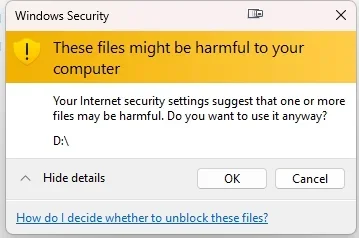
  • 2026-07-30 11 52 08.webp
    2026-07-30 11 52 08.webp
    12.3 KB · Views: 4

My Computer My Computer

At a glance

Windows 11 Pro 24H2i7 Ultra16GBIntel
OS
Windows 11 Pro 24H2
Computer type
Laptop
Manufacturer/Model
LG
CPU
i7 Ultra
Memory
16GB
Graphics Card(s)
Intel
Sound Card
Intel Realtek
Monitor(s) Displays
Laptop 17" & TB4 Dell 27" QHD Ultrasharp w/integral TB4 hub
Screen Resolution
2560x1600
Hard Drives
1TB SSD, 5 external WDs
Mouse
Logitech Master MX 3S
Browser
Vivaldi
Antivirus
Kaspersky Premium Suite
Per co-pilot, Windows stores zone mappings in the registry. One of these keys almost certainly contains a stale entry for G::

HKCU\Software\Microsoft\Windows\CurrentVersion\Internet Settings\ZoneMap\Drives

and/or

HKCU\Software\Microsoft\Windows\CurrentVersion\Explorer\MountPoints2

Look for any subkeys referencing G:. Delete them, reboot, and Windows will rebuild clean entries.

This removes the incorrect “network zone” classification and stops the warning even if you switch the drive back to G:.
 

My Computers My Computers

  • At a glance

    Windows 11 Pro 25H2 26200.9457i9-10900 10 core 20 threads32 gbnone-Intel UHD Graphics 630
    OS
    Windows 11 Pro 25H2 26200.9457
    Computer type
    PC/Desktop
    Manufacturer/Model
    Dell Optiplex 7080
    CPU
    i9-10900 10 core 20 threads
    Motherboard
    DELL 0J37VM
    Memory
    32 gb
    Graphics Card(s)
    none-Intel UHD Graphics 630
    Sound Card
    Integrated Realtek
    Monitor(s) Displays
    Benq 27
    Screen Resolution
    2560x1440
    Hard Drives
    2x1tb Solidigm m.2 nvme /External drives 512gb Samsung m.2 sata+2tb Kingston m2.nvme
    PSU
    500w
    Case
    MT
    Cooling
    Dell Premium
    Keyboard
    Logitech wired
    Mouse
    Logitech wireless
    Internet Speed
    so slow I'm too embarrassed to tell
    Browser
    #1 Edge #2 Firefox
    Antivirus
    Defender+MWB Premium
  • At a glance

    Windows 11 Pro 24H2 26200.9457AMD Ryzen 7 6800U32 gbintegrated
    Operating System
    Windows 11 Pro 24H2 26200.9457
    Computer type
    PC/Desktop
    Manufacturer/Model
    Beelink Mini PC SER5
    CPU
    AMD Ryzen 7 6800U
    Memory
    32 gb
    Graphics card(s)
    integrated
    Sound Card
    integrated
    Monitor(s) Displays
    Benq 27
    Screen Resolution
    2560x1440
    Hard Drives
    1TB Crucial nvme
    Keyboard
    Logitech wired
    Mouse
    Logitech wireless
    Internet Speed
    still too embarrassed to tell
    Browser
    Firefox
    Antivirus
    Defender
  • System 3 is non compliant Dell 9020 i7-4770/24gb ram Win11 PRO 26200.9457
I'll try that, but I also noticed that copying files from G: to C:\ root does NOT cause a problem, but copying to any folder on C:\ (inc desktop) does.
Weird?
 

My Computer My Computer

At a glance

Windows 11 Pro 24H2i7 Ultra16GBIntel
OS
Windows 11 Pro 24H2
Computer type
Laptop
Manufacturer/Model
LG
CPU
i7 Ultra
Memory
16GB
Graphics Card(s)
Intel
Sound Card
Intel Realtek
Monitor(s) Displays
Laptop 17" & TB4 Dell 27" QHD Ultrasharp w/integral TB4 hub
Screen Resolution
2560x1600
Hard Drives
1TB SSD, 5 external WDs
Mouse
Logitech Master MX 3S
Browser
Vivaldi
Antivirus
Kaspersky Premium Suite
Maybe this is your problem and solve it :


EDIT : Just saw the fix is in latest preview update
 
Last edited:

My Computer My Computer

At a glance

Windows 11 ProIntel i5 12600KG.Skill Ripjaws V DDR4 3600 MHz / PC4-28800 C...Intel® UHD Graphics 770 (iGPU)
OS
Windows 11 Pro
Computer type
PC/Desktop
Manufacturer/Model
Homemade by me
CPU
Intel i5 12600K
Motherboard
MSI PRO Z690-A DDR4
Memory
G.Skill Ripjaws V DDR4 3600 MHz / PC4-28800 CL16 2x8 GB
Graphics Card(s)
Intel® UHD Graphics 770 (iGPU)
Sound Card
8-Channel (7.1) HD Audio
Monitor(s) Displays
Legion/Lenovo Y25-25
Screen Resolution
Full HD 1920 x 1080
Hard Drives
WD Black NVMe M.2 500 GB (system drive)
Case
Lian-Li
Keyboard
Old solid and heavy IBM🙂
Mouse
Logitech
Internet Speed
1000 mbit
Antivirus
Avast free
Sounds like it, but my system is not on a network so DFS doesn't apply.
However it is Microsludge, so the final update will probably fix it anyway. :-)

Per co-pilot, Windows stores zone mappings in the registry. One of these keys almost certainly contains a stale entry for G::

HKCU\Software\Microsoft\Windows\CurrentVersion\Internet Settings\ZoneMap\Drives

and/or

HKCU\Software\Microsoft\Windows\CurrentVersion\Explorer\MountPoints2
Went through all the keys - nothing...

UPDATE: FIXED!?
Ok, it seems to have fixed itself today. I rebooted and tried it 4 times and it's gone.
Today the pc updated Acrobat reader, Visual C++, Edge, Office and OneNote.
Looks like some component of one of them was the issue!
Go figure.

UPDATE: NOT fixed, back again today! :mad:
However, using Ctrl+C and Ctrl+v works fine, so it' s dragging issue...
 
Last edited:

My Computer My Computer

At a glance

Windows 11 Pro 24H2i7 Ultra16GBIntel
OS
Windows 11 Pro 24H2
Computer type
Laptop
Manufacturer/Model
LG
CPU
i7 Ultra
Memory
16GB
Graphics Card(s)
Intel
Sound Card
Intel Realtek
Monitor(s) Displays
Laptop 17" & TB4 Dell 27" QHD Ultrasharp w/integral TB4 hub
Screen Resolution
2560x1600
Hard Drives
1TB SSD, 5 external WDs
Mouse
Logitech Master MX 3S
Browser
Vivaldi
Antivirus
Kaspersky Premium Suite
Changed drive letter and it's been fine since.
Hopefully it'll stay that way.
Obviously the old drive was flagged somehow, somewhere...
 

My Computer My Computer

At a glance

Windows 11 Pro 24H2i7 Ultra16GBIntel
OS
Windows 11 Pro 24H2
Computer type
Laptop
Manufacturer/Model
LG
CPU
i7 Ultra
Memory
16GB
Graphics Card(s)
Intel
Sound Card
Intel Realtek
Monitor(s) Displays
Laptop 17" & TB4 Dell 27" QHD Ultrasharp w/integral TB4 hub
Screen Resolution
2560x1600
Hard Drives
1TB SSD, 5 external WDs
Mouse
Logitech Master MX 3S
Browser
Vivaldi
Antivirus
Kaspersky Premium Suite
Just an update - drive letter changed for 3 weeks now and no issue.
Just changed it back to the original letter, rebooted and still fine.
Gotta love Microsludge.
 

My Computer My Computer

At a glance

Windows 11 Pro 24H2i7 Ultra16GBIntel
OS
Windows 11 Pro 24H2
Computer type
Laptop
Manufacturer/Model
LG
CPU
i7 Ultra
Memory
16GB
Graphics Card(s)
Intel
Sound Card
Intel Realtek
Monitor(s) Displays
Laptop 17" & TB4 Dell 27" QHD Ultrasharp w/integral TB4 hub
Screen Resolution
2560x1600
Hard Drives
1TB SSD, 5 external WDs
Mouse
Logitech Master MX 3S
Browser
Vivaldi
Antivirus
Kaspersky Premium Suite

Latest Support Threads

Back
Top Bottom