Announcing Native NVMe in Windows Server 2025


 Windows Server News and Best Practices:

Native NVMe support in Windows Server 2025 is a leap forward in storage innovation that will redefine what’s possible for your most demanding workloads. Enable Native NVMe today using a registry key after applying October’s latest cumulative update for WS2025!

We’re thrilled to announce the arrival of Native NVMe support in Windows Server 2025—a leap forward in storage innovation that will redefine what’s possible for your most demanding workloads. Modern NVMe (Non-Volatile Memory Express) SSDs now operate more efficiently with Windows Server. This improvement comes from a redesigned Windows storage stack that no longer treats all storage devices as SCSI (Small Computer System Interface) devices—a method traditionally used for older, slower drives. By eliminating the need to convert NVMe commands into SCSI commands, Windows Server reduces processing overhead and latency. Additionally, the whole I/O processing workflow is redesigned for extreme performance. This release is the result of close collaboration between our engineering teams and hardware partners, and it serves as a cornerstone in modernizing our storage stack.

Native NVMe is now generally available (GA) with an opt-in model (disabled by default as of October’s latest cumulative update for WS2025). Switch onto Native NVMe as soon as possible or you are leaving performance gains on the table! Stay tuned for more updates from our team as we transition to a dramatically faster, more efficient storage future.

Why Native NVMe and why now?

Modern NVMe devices—like PCIe Gen5 enterprise SSDs capable of 3.3 million IOPS, or HBAs delivering over 10 million IOPS on a single disk—are pushing the boundaries of what storage can do. SCSI-based I/O processing can’t keep up because it uses a single-queue model, originally designed for rotational disks, where protocols like SATA support just one queue with up to 32 commands. In contrast, NVMe was designed from the ground up for flash storage and supports up to 64,000 queues, with each queue capable of handling up to 64,000 commands simultaneously.

With Native NVMe in Windows Server 2025, the storage stack is purpose-built for modern hardware—eliminating translation layers and legacy constraints. Here’s what that means for you:
  • Massive IOPS Gains: Direct, multi-queue access to NVMe devices means you can finally reach the true limits of your hardware.
  • Lower Latency: Traditional SCSI-based stacks rely on shared locks and synchronization mechanisms in the kernel I/O path to manage resources. Native NVMe enables streamlined, lock-free I/O paths that slash round-trip times for every operation.
  • CPU Efficiency: A leaner, optimized stack frees up compute for your workloads instead of storage overhead.
  • Future-Ready Features: Native support for advanced NVMe capabilities like multi-queue and direct submission ensures you’re ready for next-gen storage innovation.
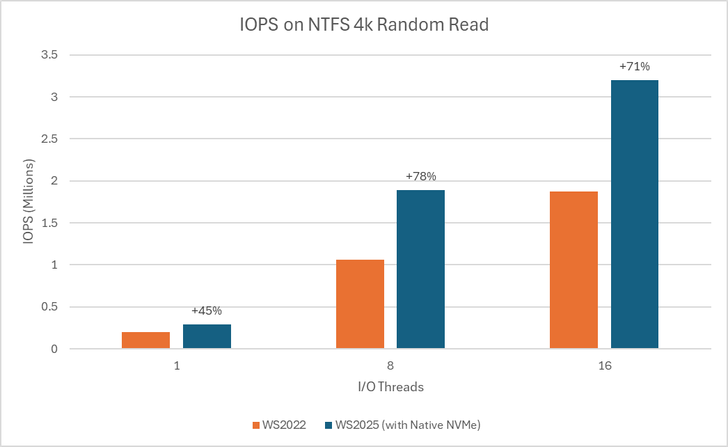
Performance Data

bS00NDc3MzUzLXA3ckVyag

Graph showing IOPS gains on WS2025 (with Native NVMe) compared to WS2022 on 1, 8, and 16-threaded 4K random read tests using an NTFS-formatted volume.
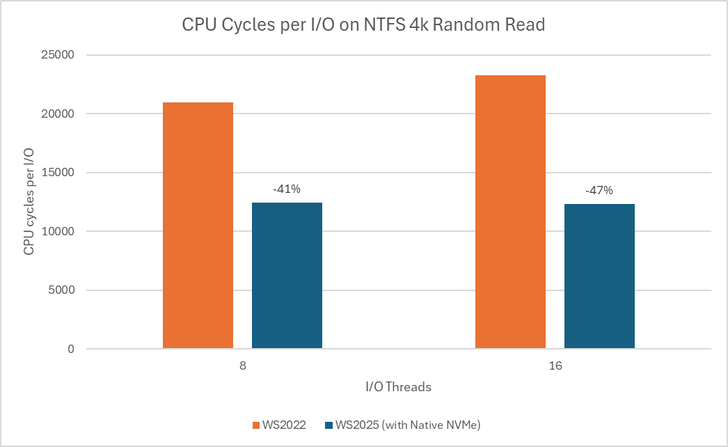
bS00NDc3MzUzLWJ6aUo3UQ

Graph showing reduction in CPU cycles per I/O on WS2025 (with Native NVMe) compared to WS2022 on 8 and 16-threaded 4K random read tests using an NTFS-formatted volume.

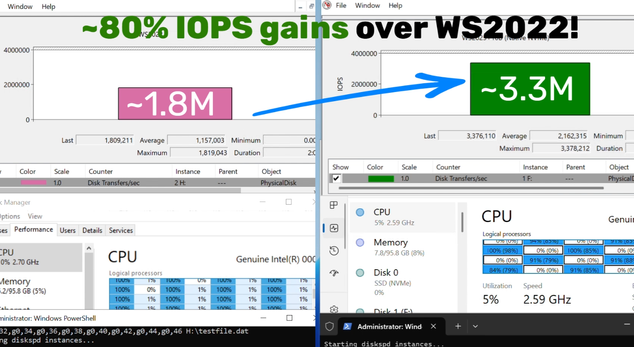
Using DiskSpd.exe, basic performance testing shows that with Native NVMe enabled, WS2025 systems can deliver up to ~80% more IOPS and a ~45% savings in CPU cycles per I/O on 4K random read workloads on NTFS volumes when compared to WS2022. This test ran on a host with Intel Dual Socket CPU (208 logical processors, 128GB RAM) and a Solidigm SB5PH27X038T 3.5TB NVMe device. The test can be recreated by running "diskspd.exe -b4k -r -Su –t8 -L -o32 -W10 -d30" and modifying the parameters as desired. Results may vary.

Top Use Cases: Where You’ll See the Difference

Try Native NVMe on servers running your enterprise applications. These gains are not just for synthetic benchmarks—they translate directly to faster database transactions, quicker VM operations, and more responsive file and analytics workloads.
  • SQL Server and OLTP: Shorter transaction times, higher IOPS, and lower tail latency under mixed read/write workloads.
  • Hyper‑V and virtualization: Faster VM boot, checkpoint operations, and live migration with reduced storage contention.
  • High‑performance file servers: Faster large‑file reads/writes and quicker metadata operations (copy, backup, restore).
  • AI/ML and analytics: Low‑latency access to large datasets and faster ETL, shuffle, and cache/scratch I/O.
How to Get Started
  1. Check your hardware: Ensure you have NVMe-capable devices that are currently using the Windows NVMe driver (StorNVMe.sys). Note that some NVMe device vendors provide their own drivers, so unless using the in-box Windows NVMe driver, you will not notice any differences.
  2. Enable Native NVMe: After applying the 2510-B Latest Cumulative Update (or most recent), add the registry key with the following PowerShell command:

    reg add HKEY_LOCAL_MACHINE\SYSTEM\CurrentControlSet\Policies\Microsoft\FeatureManagement\Overrides /v 1176759950 /t REG_DWORD /d 1 /f

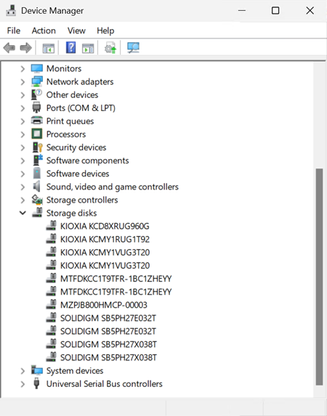
    Alternatively, use this Group Policy MSI to add the policy that controls the feature then run the local Group Policy Editor to enable the policy (found under Local Computer Policy > Computer Configuration > Administrative Templates > KB5066835 251014_21251 Feature Preview > Windows 11, version 24H2, 25H2). Once Native NVMe is enabled, open Device Manager and ensure that all attached NVMe devices are displayed under the “Storage disks” section.

    bS00NDc3MzUzLWtwMjRoRQ

    Screenshot of Device Manager where NVMe devices show up under the Storage disks section.
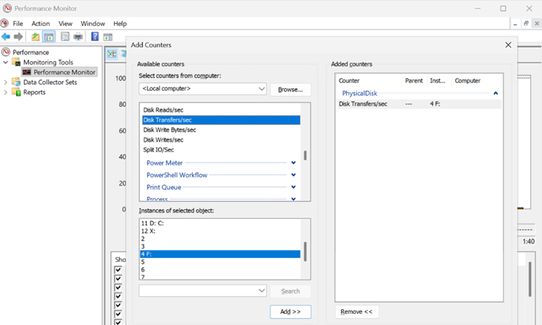
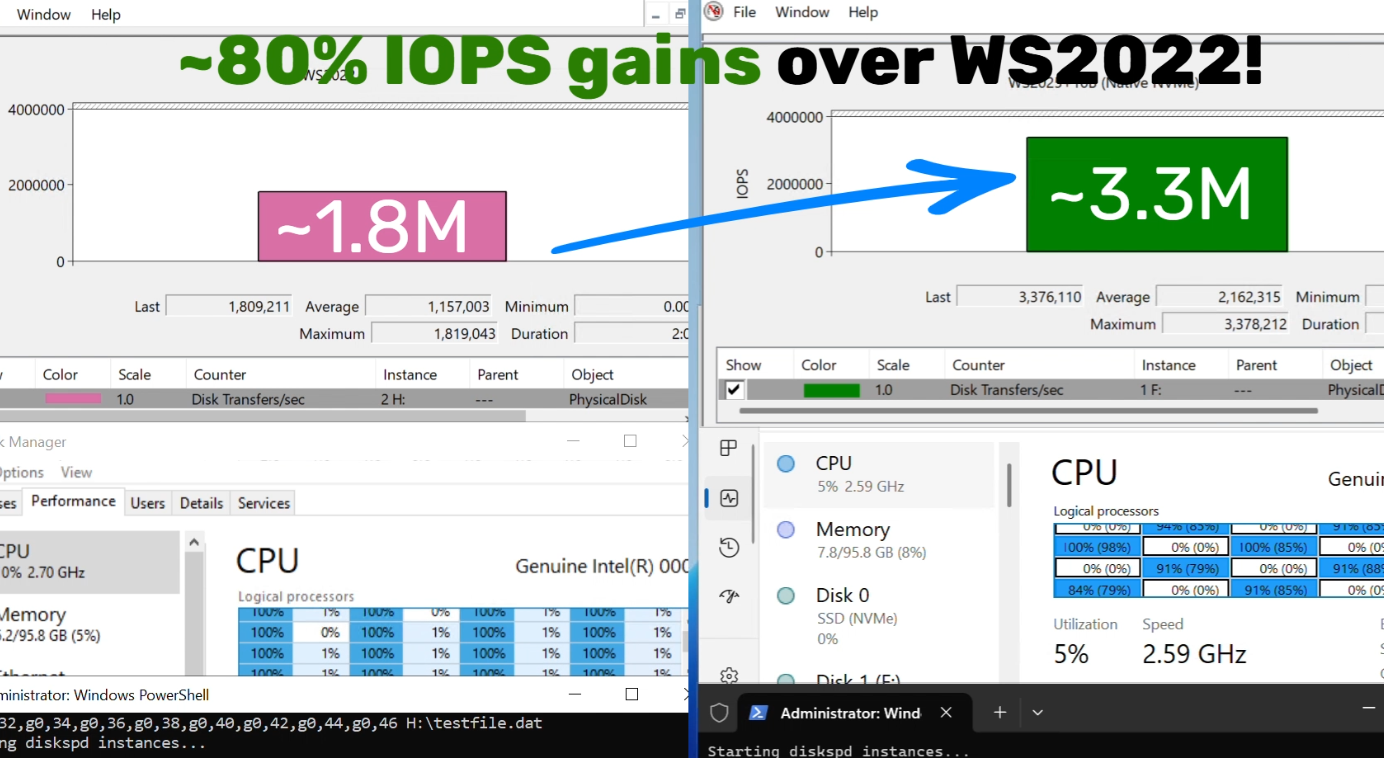
  3. Monitor and Validate: Use Performance Monitor and Windows Admin Center to see the gains for yourself. Or try DiskSpd.exe yourself to measure microbenchmarks in your own environment! A quick way to measure IOPS in Performance Monitor is to set up a histogram chart and add a counter for Physical Disk>Disk Transfers/sec (where the selected instance is a drive that corresponds to one of your attached NVMe devices) then run a synthetic workload with DiskSpd. Compare the numbers before and after enabling Native NVMe to see the realized difference in your real environment!

    bS00NDc3MzUzLUlqa3QwOQ

    Screenshot of Performance Monitor, showing how to add a counter for Disk Transfers/sec to measure IOPS of an NVMe drive.

    bS00NDc3MzUzLW96WUFGeg

    Screenshot of higher IOPS when running Native NVMe stack on Windows Server 2025.
Join the Storage Revolution

This is more than just a feature—it’s a new foundation for Windows Server storage, built for the future. We can’t wait for you to experience the difference.

Share your feedback, ask questions, and join the conversation. Let’s build the future of high-performance Windows Server storage together. Send us your feedback or questions at [email protected]!


Yash Shekar (and the Windows Server team)


 Source:
 
Quite the opposite from what i notice. Had the tweaks applied, booted in Safe Mood - to clean the previous iGPU driver with DDU - and didn't notice any issues/difference after restart. Latter on - i noticed that Storage Disks - was missing from Device Manager, checked the reg keys - and they were all removed/gone. Apparently, booting into Safe Mode - the keys are removed and reverts back to default.

To bad, cause i did notice some improvements in CrystalDiskMark and didn't encounter any of the other possible issues (like higher temperatures or BSOD), so was gonna keep it for extensive testing/use.
Oh well 2 systems suffered the same fate, Safe mode gets nuked unless if I reverted back. I guess it tries to revert back the drivers while booting to Safe mode but it fails hence it gets stuck at this state.

I am pretty sure MS did it first for Windows servers as they are the ones that will have performance benefit from it the most but for normal users? I am pretty sure normal users aren't using there PC/laptops as a server like usage.

The benefit ain't worth the risk & hassle for it. Don't like the hassle especially for something that isn't announced or isn't officially released to Windows Home/Pro.

This thing needs some major polishing before it gets officially released & announced for RP/Beta/Dev Insiders.
 

My Computer

System One

  • OS
    Win11 Insider[Always the latest Dev/Beta releases]
    Computer type
    Laptop
    Manufacturer/Model
    Asus TUF Gaming FA506IU Laptop
    CPU
    AMD Ryzen 7 4800H with Radeon Graphics
    Motherboard
    AMD K17.6 FCH, AMD K17.6 IMC
    Memory
    G.SKILL [Samsung Die] DRR4 - 3200Mhz CL18 (18-19-19-36) - 32GB(16GBx2)
    Graphics Card(s)
    nVidia GTX 1660ti GDDR6 6GB(90W) 2.02Ghz Core & +548Mhz Mem-OC'ed [VBIOS Unlocked]
    Sound Card
    Realtek ALC256 @ AMD K17.6
    Monitor(s) Displays
    LM156LF-2F03 144HZ with Adaptive SYNC
    Screen Resolution
    1920x1080 - 144Hz
    Hard Drives
    WDC PC SN530 SDBPNPZ-256G-1002 + SHGP31-500GM-2 + ST1000LM035-1RK172 + Samsung SSD 870 QVO 1TB 1000.2 GB
    PSU
    ASUS Power Brick 180W
    Case
    Laptop Case with Dual Fan
    Cooling
    Dual Fans Design with Self-Cleaning Cooling
    Keyboard
    Asus Aura RGB with Overstroke technology
    Mouse
    ROG SICA Gaming Mouse
    Internet Speed
    100Mbps FiberOptic [100 Mbps Down - 50 Mbps Up]
    Browser
    Chrome/Firefox/Tor
    Antivirus
    Symantec Endpoint Protection with Windows Defender (Active Mode) + Custom DNS Server
    Other Info
    CPU with -15 Curve Optimizer all cores and -50 Cure optimizer on iGPU
    BCLK OC to 101.6Mhz
    Benchmark Scores:-
    CineBench R23 Single core:- 1290 points
    CineBench R23 Multi core:- 11111 points
I am pretty sure MS did it first for Windows servers as they are the ones that will have performance benefit from it the most but for normal users? I am pretty sure normal users aren't using there PC/laptops as a server like usage.

The benefit ain't worth the risk & hassle for it. Don't like the hassle especially for something that isn't announced or isn't officially released to Windows Home/Pro.

This thing needs some major polishing before it gets officially released & announced for RP/Beta/Dev Insiders.

NVMe SSDs went mainstream around 2017, or at least - that's when prices began to drop considerably - making them a viable option for the average consumer. Also, quite common - in almost every laptop released around that time. And yet... only now - almost 9 years - we get native/proper support for NVMe.

Everyone can benefit from this change/update - not just server. Tho, this registry values - have multiple option beyond NVMe Native Support:

Registry Value NameTypeValue (Data)Purpose
1176759950REG_DWORD1Enables Native NVMe Opt-In
1853569164REG_DWORD1Enables Native Support
156965516REG_DWORD1Activates Modern Stack
735209102REG_DWORD1Enables BypassIO Path

Even those can improve performance for every type of Windows, based on this description:

The BypassIO Path in Windows 11 is a performance feature, integral to DirectStorage, that creates a streamlined I/O path to reduce CPU overhead for disk reads, boosting game/app loading speeds, especially on NVMe SSDs, but can conflict with older file system filter drivers (like some antivirus/anti-cheat software) causing instability, often seen as Event Viewer warnings or app crashes.

Tho, that's also the main culprit - for some of the mentioned issues - on older system (with older components/drivers) in particular.
 

My Computer

System One

  • OS
    WinDOS 25H2
    Computer type
    Laptop
    CPU
    Intel & AMD
    Memory
    SO-DIMM SK Hynix 15.8 GB Dual-Channel DDR4-2666 (2 x 8 GB) 1329MHz (19-19-19-43)
    Graphics Card(s)
    nVidia RTX 2060 6GB Mobile GPU (TU106M)
    Sound Card
    Onbord Realtek ALC1220
    Screen Resolution
    1920 x 1080
    Hard Drives
    1x Samsung PM981 NVMe PCIe M.2 512GB / 1x Seagate Expansion ST1000LM035 1TB
1853569164 is IP toggle key not Native Support features. Most experimental features require this key. If you install an Insider Preview OS build, Microsoft will enable this key to activate experimental features.

Activating the 1853569164 key during a general OS build will also trigger this bug. KB5070316 Windows 11 Insider Dev and Beta build 26220.7344 (25H2) - Dec. 5
 

My Computer

System One

  • OS
    Windows 11, version 25H2 (26200)
    Computer type
    PC/Desktop
    CPU
    AMD Ryzen 9 9950X 16-Core Processor
    Motherboard
    ASRock B650M PG Riptide
    Memory
    DDR5-6000 (CL36) 64.0 GB
    Graphics Card(s)
    NVIDIA GeForce RTX 4090
    PSU
    1200W
    Case
    Phanteks Enthoo Pro 2
    Cooling
    Noctua NH-D12L
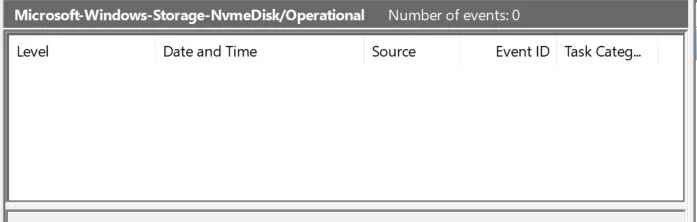
For some reason nothing is written to the event log.

1.webp

Of course, entries are made in other logs.
 

My Computer

System One

  • OS
    Microsoft Windows 11 Home
    Computer type
    PC/Desktop
    Manufacturer/Model
    MSI MS-7D98
    CPU
    Intel Core i5-13490F
    Motherboard
    MSI B760 GAMING PLUS WIFI
    Memory
    2 x 16 Patriot Memory (PDP Systems) PSD516G560081 6400MT (32-37-37-74); 1.35V)
    Graphics Card(s)
    GIGABYTE GeForce RTX 4070 WINDFORCE OC 12G (GV-N4070WF3OC-12GD)
    Sound Card
    Bluetooth Аудио
    Monitor(s) Displays
    INNOCN 15K1F
    Screen Resolution
    1920 x 1080
    Hard Drives
    WD_BLACK SN770 250GB
    KINGSTON SNV2S1000G (ELFK0S.6)
    PSU
    Thermaltake Toughpower GF3 1000W
    Case
    CG560 - DeepCool
    Cooling
    ID-COOLING SE-224-XTS / 2 x 140Mm Fan - rear and top; 3 x 120Mm - front
    Keyboard
    Corsair K70 RGB TKL
    Mouse
    Corsair KATAR PRO XT
    Internet Speed
    100 Mbps
    Browser
    Firefox
    Antivirus
    Microsoft Defender Antivirus
    Other Info
    https://www.userbenchmark.com/UserRun/66553205
NVMe SSDs went mainstream around 2017, or at least - that's when prices began to drop considerably - making them a viable option for the average consumer. Also, quite common - in almost every laptop released around that time. And yet... only now - almost 9 years - we get native/proper support for NVMe.

Everyone can benefit from this change/update - not just server. Tho, this registry values - have multiple option beyond NVMe Native Support:

Registry Value NameTypeValue (Data)Purpose
1176759950REG_DWORD1Enables Native NVMe Opt-In
1853569164REG_DWORD1Enables Native Support
156965516REG_DWORD1Activates Modern Stack
735209102REG_DWORD1Enables BypassIO Path

Even those can improve performance for every type of Windows, based on this description:

The BypassIO Path in Windows 11 is a performance feature, integral to DirectStorage, that creates a streamlined I/O path to reduce CPU overhead for disk reads, boosting game/app loading speeds, especially on NVMe SSDs, but can conflict with older file system filter drivers (like some antivirus/anti-cheat software) causing instability, often seen as Event Viewer warnings or app crashes.

Tho, that's also the main culprit - for some of the mentioned issues - on older system (with older components/drivers) in particular.
Can't deny that, the benefits is there indeed and will surely it will be built upon it for future performance update enhancement , MS taking baby steps as slowly as it can.

The way I see it...

All those DirectStorage/BypassIO/NVMe Native Support doesn't scale well if you are a single user using OS like any normal person would... Unless MS is planning to introduce in the future a crap load of background AI processes crunching CPUs and writing/reading multithreaded IO Streamlined path which will be mitigated by DirectStorage/BypassIO/NVMe Native Support. Which I won't be surprised:ROFLMAO:

I feel like SSD Controllers will be the bottleneck once we start hitting it hard. All those NVMe Gen3/4/5 DRAMless SSDs will have a hard time while SSD with DRAM can have benefits as it usually comes with it a decent performant SSD controller.

And with prices craziness that is happening with anything related to RAM/VRAM/SSD/NAND/etc,etc....... well we are doomed. Those stuff are like Oil or Gas... when those gets expensive... everything else gets expensive along with it.
 

My Computer

System One

  • OS
    Win11 Insider[Always the latest Dev/Beta releases]
    Computer type
    Laptop
    Manufacturer/Model
    Asus TUF Gaming FA506IU Laptop
    CPU
    AMD Ryzen 7 4800H with Radeon Graphics
    Motherboard
    AMD K17.6 FCH, AMD K17.6 IMC
    Memory
    G.SKILL [Samsung Die] DRR4 - 3200Mhz CL18 (18-19-19-36) - 32GB(16GBx2)
    Graphics Card(s)
    nVidia GTX 1660ti GDDR6 6GB(90W) 2.02Ghz Core & +548Mhz Mem-OC'ed [VBIOS Unlocked]
    Sound Card
    Realtek ALC256 @ AMD K17.6
    Monitor(s) Displays
    LM156LF-2F03 144HZ with Adaptive SYNC
    Screen Resolution
    1920x1080 - 144Hz
    Hard Drives
    WDC PC SN530 SDBPNPZ-256G-1002 + SHGP31-500GM-2 + ST1000LM035-1RK172 + Samsung SSD 870 QVO 1TB 1000.2 GB
    PSU
    ASUS Power Brick 180W
    Case
    Laptop Case with Dual Fan
    Cooling
    Dual Fans Design with Self-Cleaning Cooling
    Keyboard
    Asus Aura RGB with Overstroke technology
    Mouse
    ROG SICA Gaming Mouse
    Internet Speed
    100Mbps FiberOptic [100 Mbps Down - 50 Mbps Up]
    Browser
    Chrome/Firefox/Tor
    Antivirus
    Symantec Endpoint Protection with Windows Defender (Active Mode) + Custom DNS Server
    Other Info
    CPU with -15 Curve Optimizer all cores and -50 Cure optimizer on iGPU
    BCLK OC to 101.6Mhz
    Benchmark Scores:-
    CineBench R23 Single core:- 1290 points
    CineBench R23 Multi core:- 11111 points
Can't deny that, the benefits is there indeed and will surely it will be built upon it for future performance update enhancement , MS taking baby steps as slowly as it can.

The way I see it...

All those DirectStorage/BypassIO/NVMe Native Support doesn't scale well if you are a single user using OS like any normal person would... Unless MS is planning to introduce in the future a crap load of background AI processes crunching CPUs and writing/reading multithreaded IO Streamlined path which will be mitigated by DirectStorage/BypassIO/NVMe Native Support. Which I won't be surprised:ROFLMAO:

I feel like SSD Controllers will be the bottleneck once we start hitting it hard. All those NVMe Gen3/4/5 DRAMless SSDs will have a hard time while SSD with DRAM can have benefits as it usually comes with it a decent performant SSD controller.

And with prices craziness that is happening with anything related to RAM/VRAM/SSD/NAND/etc,etc....... well we are doomed. Those stuff are like Oil or Gas... when those gets expensive... everything else gets expensive along with it.

If it's problematic/bugged - Servers should be the last place - "to test a buggy feature". In the Corporate & Industrial world - even monthly Windows Updates are a Big No No! - while aiming to avoid the risk of something going wrong (and loose hours or even a day - of work/business/profit - aka - financial loss). And those are just employee works stations. You think anyone would risk an "experimental feature" - on a Server (risking the main database getting corrupted - even impacting/spreading to back-up units)? That would be catastrophic - on so many levels. Even a consumer server used for streaming, file sharing or gaming - corrupting data or going offline - could anger to many spirits and imply major losses. That being said... Server users interested in this features - should definitely wait for a stable/refined/optimized implementation.

Beyond that, indeed... makes "A LOT" more sense for Servers (far bigger improvements) - compared to average consumers. Can help with high resolution video editing and would lower loading times for games (tho, Many modern games already use DirectStorage on Windows to bypass older paths - which matters more than raw NVMe architecture). On the other hand... Laptops are more popular than Desktops this days - and this features are more aggressive with power-consumption, thus.... the main downside (can have a noticeable impact on battery life). Same goes for cooling limitations (and higher temperatures). Same reason Power Performance Tuning features - are hidden - and the online guides from Microsoft - are intended for Servers. Tho, obviously you can - and many do use them on a Consumer PC (the so called "Ultimate Power Plan" - is based on those guides). So yeah, since it's hard to separate Desktop PCs from Portable PCs this days - this feature will be accessible in consumer Windows - but will probably be hidden as well. While old hardware is particularly problematic.

True, it's a really bad time for storage investments. :\
 

My Computer

System One

  • OS
    WinDOS 25H2
    Computer type
    Laptop
    CPU
    Intel & AMD
    Memory
    SO-DIMM SK Hynix 15.8 GB Dual-Channel DDR4-2666 (2 x 8 GB) 1329MHz (19-19-19-43)
    Graphics Card(s)
    nVidia RTX 2060 6GB Mobile GPU (TU106M)
    Sound Card
    Onbord Realtek ALC1220
    Screen Resolution
    1920 x 1080
    Hard Drives
    1x Samsung PM981 NVMe PCIe M.2 512GB / 1x Seagate Expansion ST1000LM035 1TB
Last edited:

My Computer

System One

  • OS
    Microsoft Windows 11 Home
    Computer type
    PC/Desktop
    Manufacturer/Model
    MSI MS-7D98
    CPU
    Intel Core i5-13490F
    Motherboard
    MSI B760 GAMING PLUS WIFI
    Memory
    2 x 16 Patriot Memory (PDP Systems) PSD516G560081 6400MT (32-37-37-74); 1.35V)
    Graphics Card(s)
    GIGABYTE GeForce RTX 4070 WINDFORCE OC 12G (GV-N4070WF3OC-12GD)
    Sound Card
    Bluetooth Аудио
    Monitor(s) Displays
    INNOCN 15K1F
    Screen Resolution
    1920 x 1080
    Hard Drives
    WD_BLACK SN770 250GB
    KINGSTON SNV2S1000G (ELFK0S.6)
    PSU
    Thermaltake Toughpower GF3 1000W
    Case
    CG560 - DeepCool
    Cooling
    ID-COOLING SE-224-XTS / 2 x 140Mm Fan - rear and top; 3 x 120Mm - front
    Keyboard
    Corsair K70 RGB TKL
    Mouse
    Corsair KATAR PRO XT
    Internet Speed
    100 Mbps
    Browser
    Firefox
    Antivirus
    Microsoft Defender Antivirus
    Other Info
    https://www.userbenchmark.com/UserRun/66553205
Servers should be the last place - "to test a buggy feature".

Maybe Microsoft management thinks we're all fools. Maybe they're right.
 

My Computer

System One

  • OS
    Microsoft Windows 11 Home
    Computer type
    PC/Desktop
    Manufacturer/Model
    MSI MS-7D98
    CPU
    Intel Core i5-13490F
    Motherboard
    MSI B760 GAMING PLUS WIFI
    Memory
    2 x 16 Patriot Memory (PDP Systems) PSD516G560081 6400MT (32-37-37-74); 1.35V)
    Graphics Card(s)
    GIGABYTE GeForce RTX 4070 WINDFORCE OC 12G (GV-N4070WF3OC-12GD)
    Sound Card
    Bluetooth Аудио
    Monitor(s) Displays
    INNOCN 15K1F
    Screen Resolution
    1920 x 1080
    Hard Drives
    WD_BLACK SN770 250GB
    KINGSTON SNV2S1000G (ELFK0S.6)
    PSU
    Thermaltake Toughpower GF3 1000W
    Case
    CG560 - DeepCool
    Cooling
    ID-COOLING SE-224-XTS / 2 x 140Mm Fan - rear and top; 3 x 120Mm - front
    Keyboard
    Corsair K70 RGB TKL
    Mouse
    Corsair KATAR PRO XT
    Internet Speed
    100 Mbps
    Browser
    Firefox
    Antivirus
    Microsoft Defender Antivirus
    Other Info
    https://www.userbenchmark.com/UserRun/66553205
If it's problematic/bugged - Servers should be the last place - "to test a buggy feature". In the Corporate & Industrial world - even monthly Windows Updates are a Big No No! - while aiming to avoid the risk of something going wrong (and loose hours or even a day - of work/business/profit - aka - financial loss). And those are just employee works stations. You think anyone would risk an "experimental feature" - on a Server (risking the main database getting corrupted - even impacting/spreading to back-up units)? That would be catastrophic - on so many levels. Even a consumer server used for streaming, file sharing or gaming - corrupting data or going offline - could anger to many spirits and imply major losses. That being said... Server users interested in this features - should definitely wait for a stable/refined/optimized implementation.

Beyond that, indeed... makes "A LOT" more sense for Servers (far bigger improvements) - compared to average consumers. Can help with high resolution video editing and would lower loading times for games (tho, Many modern games already use DirectStorage on Windows to bypass older paths - which matters more than raw NVMe architecture). On the other hand... Laptops are more popular than Desktops this days - and this features are more aggressive with power-consumption, thus.... the main downside (can have a noticeable impact on battery life). Same goes for cooling limitations (and higher temperatures). Same reason Power Performance Tuning features - are hidden - and the online guides from Microsoft - are intended for Servers. Tho, obviously you can - and many do use them on a Consumer PC (the so called "Ultimate Power Plan" - is based on those guides). So yeah, since it's hard to separate Desktop PCs from Portable PCs this days - this feature will be accessible in consumer Windows - but will probably be hidden as well. While old hardware is particularly problematic.

True, it's a really bad time for storage investments. :\


I am sorry but this is such outdated thinking. While companies will have some harden mission critical servers that SHOULD BE isolated and air gapped, most companies will be patching servers and should be patching them monthly while implementing recommended CIS/NIST security baselines on them. We aren't in the NT or even the 2000 days where applying updates and service packs were truly scary things to do. People in the industry should be knowledgeable enough to apply updates to a small group of servers and proceeding from there. Anyone pushing back against this screams they aren't knowledgeable and if things break they would have no clue on what to do and are scared of being put into that position.

Meanwhile, they could turn this NVME feature on for some development servers where it would be beneficial and if rubbish didn't work it would have very little impact. and Microsoft has very likely been working closely with some major players on this. It's not like people would be using this feature on DCs, PKI services or DHCP servers.

Sorry but as someone who has been a sysadmin for over 20 years, I felt I needed to speak out against this.
 

My Computer

System One

  • OS
    Windows 101
    Computer type
    PC/Desktop
    Manufacturer/Model
    Asus
Code:
reg add "HKLM\System\CurrentControlSet\Policies\Microsoft\FeatureManagement\Overrides" /v "156965516" /t REG_DWORD /d "1" /f
reg add "HKLM\System\CurrentControlSet\Policies\Microsoft\FeatureManagement\Overrides" /v "735209102" /t REG_DWORD /d "1" /f
reg add "HKLM\System\CurrentControlSet\Policies\Microsoft\FeatureManagement\Overrides" /v "1853569164" /t REG_DWORD /d "1" /f

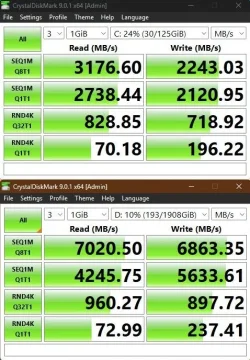
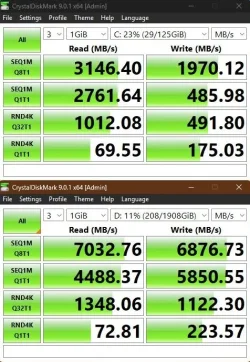
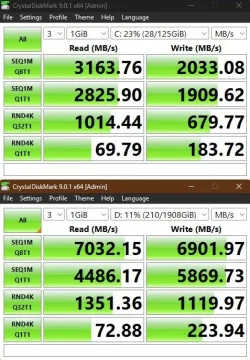
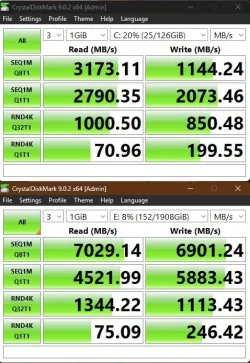
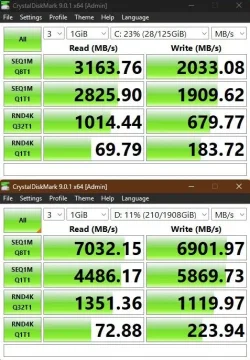
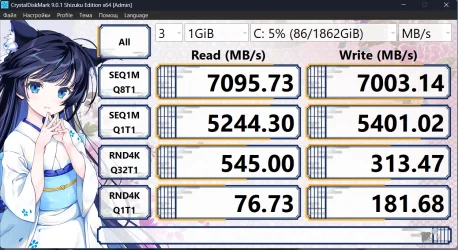
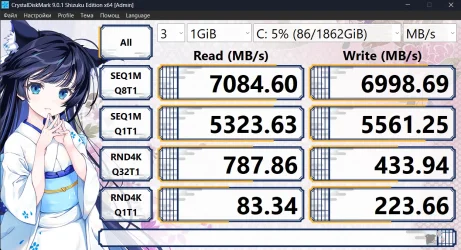
Sooo. I have got fed up with this ordeal and I have upgraded to 26H1 and it seems to do the trick, but I have got mixed results.
Slow disk has got noticeably slower and fast disk has got slightly faster. I have to use slow disk for Windows, not happy about it.

My slow disk is PCIe 3.0 running in PCIe 4.0 slot and my fast disk is PCIe 4.0 running in PCIe 5.0 slot.

View attachment 157619 View attachment 157616 View attachment 157617
I have just updated BIOS (ComboAM5 1.2.0.3g to ComboAM5 1.2.7.1) and it has improved results.

My assumption, software/driver support is important.

Software
1. The latest BIOS
2. The latest chipset driver

Hardware
3. Motherboard PCIe support (Gen4/5)
4. NVMe disk, the newer, the better (Gen5)

No NVMe driver:

capture_12172025_111552.webp

NVMe driver default / the latest BIOS/drivers / the latestest BIOS/drivers (05/26):

capture_12212025_174002.webp capture_12242025_160042.webp capture_05092026_102819.webp


Attachments

  • capture_12242025_160042.webp
    capture_12242025_160042.webp
    61.5 KB · Views: 1
Last edited:

My Computer

System One

  • OS
    Home26H2Can
    Computer type
    PC/Desktop
    CPU
    AMD Ryzen 5 8600G (07/24)
    Motherboard
    ASROCK B650M-HDV/M.2 (07/24) BIOS 4.21 AGESA ComboAM5 1.3.0.1 (04/26)
    Memory
    2x32GB Kingston FURY DDR5 5600 MHz CL36 @5200 CL36 (07/24)
    Graphics Card(s)
    ASROCK Radeon RX 6600 Challenger D 8G @48FPS (08/24)
    Sound Card
    Creative Sound BlasterX AE-5 Plus (05/24)
    Monitor(s) Displays
    24" Philips 24M1N3200ZS/00 (05/24)
    Screen Resolution
    1920×1080@165Hz via DP1.4
    Hard Drives
    Kingston KC3000 NVMe 2TB (05/24)
    ADATA XPG GAMMIX S11 Pro 512GB (07/19)
    PSU
    Seasonic Core GM 550 Gold (04/24)
    Case
    Fractal Design Define 7 Mini with 3x Noctua NF-P14s/12@555rpm (04/24)
    Cooling
    Noctua NH-U12S with Noctua NF-P12 (04/24)
    Keyboard
    HP Pavilion Wired Keyboard 300 (07/24) + Rabalux 76017 Parker (01/24)
    Mouse
    Logitech M330 Silent Plus (01/26)
    Internet Speed
    500/100 Mbps via RouterOS (05/21) & TCP Optimizer
    Browser
    Edge, Brave for YouTube, LibreWolf for FB
    Antivirus
    NextDNS blocking 1/3 Traffic
    Other Info
    Phone: Motorola Moto G86 (02/26)
    Backup: Hasleo Backup Suite (PreOS)
    Headphones: Sennheiser RS170 (09/10)
    Chair: Huzaro Force 4.4 Grey Mesh (05/24)
    Notifier: Xiaomi Mi Band 9 Milanese (10/24)
    FlexCore USB-C 3.2 Gen 1 (M) to LAN (F) (08/25)
NVMe SSDs went mainstream around 2017, or at least - that's when prices began to drop considerably - making them a viable option for the average consumer. Also, quite common - in almost every laptop released around that time. And yet... only now - almost 9 years - we get native/proper support for NVMe.

Everyone can benefit from this change/update - not just server. Tho, this registry values - have multiple option beyond NVMe Native Support:

Registry Value NameTypeValue (Data)Purpose
1176759950REG_DWORD1Enables Native NVMe Opt-In
1853569164REG_DWORD1Enables Native Support
156965516REG_DWORD1Activates Modern Stack
735209102REG_DWORD1Enables BypassIO Path

Even those can improve performance for every type of Windows, based on this description:

The BypassIO Path in Windows 11 is a performance feature, integral to DirectStorage, that creates a streamlined I/O path to reduce CPU overhead for disk reads, boosting game/app loading speeds, especially on NVMe SSDs, but can conflict with older file system filter drivers (like some antivirus/anti-cheat software) causing instability, often seen as Event Viewer warnings or app crashes.

Tho, that's also the main culprit - for some of the mentioned issues - on older system (with older components/drivers) in particular.
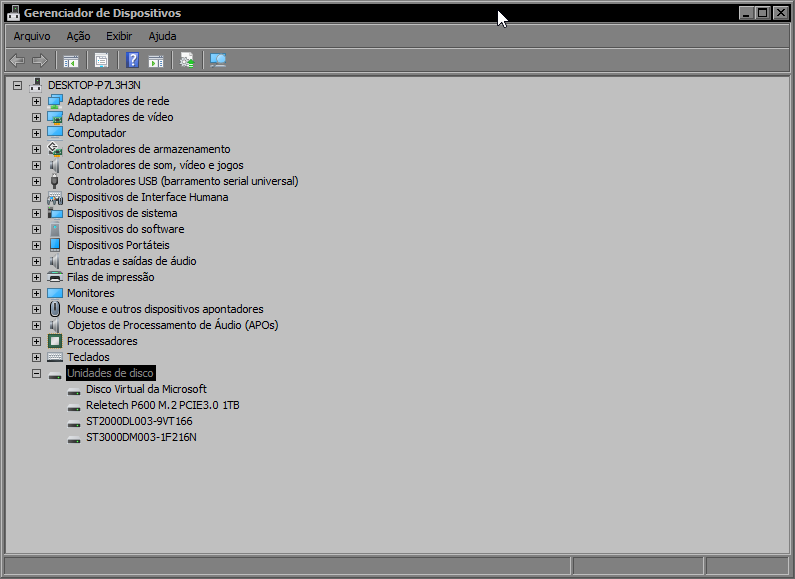
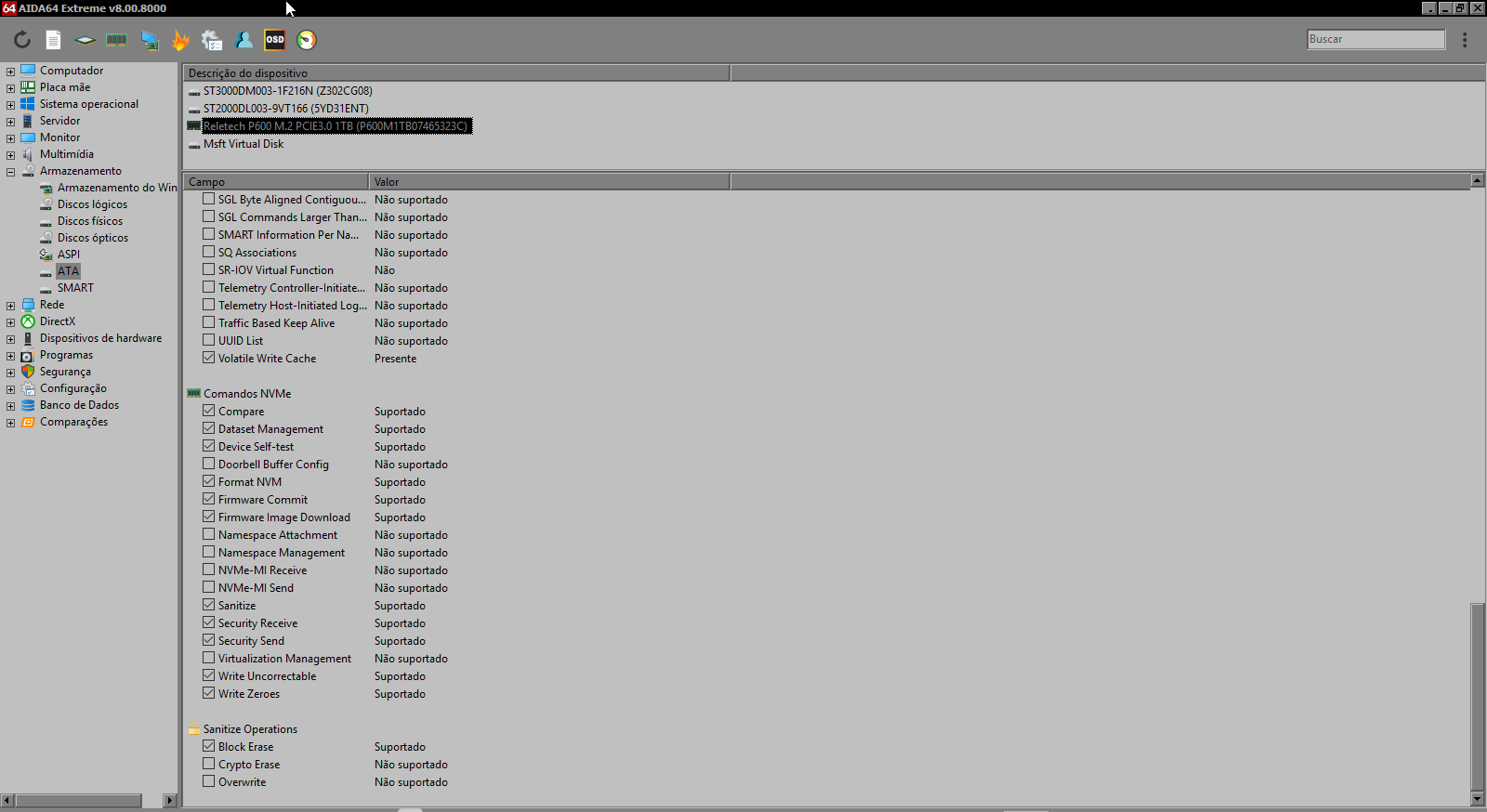
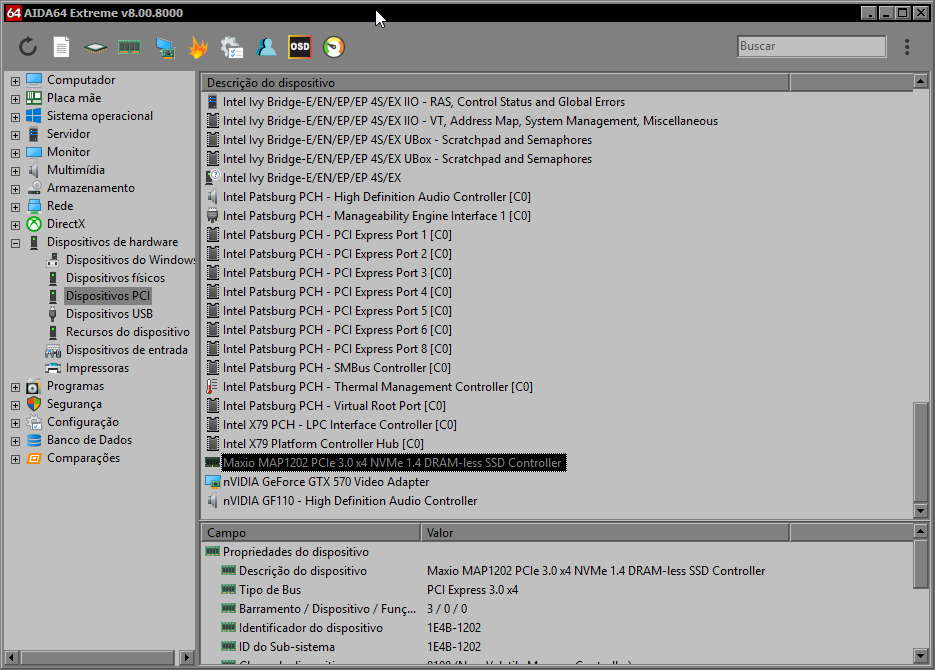
Unfortunately it didn't work here, why? :/ reletech p600 my ssd nvme,

TKLZ5E.png


HsX8wK.png


e4vYoY.png
 

My Computer

System One

  • OS
    Windows 11 Iot Enterprise 21h2 22000.3260
    Computer type
    PC/Desktop
    Manufacturer/Model
    Asus
    CPU
    xeon E5-2697v2
    Motherboard
    rampage iv extreme
    Memory
    32gb 8x4gb ddr3 1333 mhz
    Graphics Card(s)
    gtx 570 poit of view
    Sound Card
    realtek HD (ALC898)
    Monitor(s) Displays
    samsung b2030
    Screen Resolution
    1600x900
    Hard Drives
    2tb hd 5400 rpm
    3tb hd 5400 rpm
    1tb nvme pcie 3.0
    PSU
    hx850w
    Keyboard
    mtek
    Internet Speed
    500/250 gpon
    Browser
    r3dfox 146.0
    Antivirus
    none
For me it only worked after disabling Intel VMD and setting sc config stornvme start=boot
 

My Computer

System One

  • OS
    Windows 11
    Computer type
    Laptop
    Manufacturer/Model
    ASUS Vivobook S15
    CPU
    i5-8265U
    Memory
    12 GB
    Graphics Card(s)
    NVIDIA GeForce MX150 2GB
    Antivirus
    NOD32
I am sorry but this is such outdated thinking. While companies will have some harden mission critical servers that SHOULD BE isolated and air gapped, most companies will be patching servers and should be patching them monthly while implementing recommended CIS/NIST security baselines on them. We aren't in the NT or even the 2000 days where applying updates and service packs were truly scary things to do. People in the industry should be knowledgeable enough to apply updates to a small group of servers and proceeding from there. Anyone pushing back against this screams they aren't knowledgeable and if things break they would have no clue on what to do and are scared of being put into that position.

Meanwhile, they could turn this NVME feature on for some development servers where it would be beneficial and if rubbish didn't work it would have very little impact. and Microsoft has very likely been working closely with some major players on this. It's not like people would be using this feature on DCs, PKI services or DHCP servers.

Sorry but as someone who has been a sysadmin for over 20 years, I felt I needed to speak out against this.

So outdated - that the first thing you add after making that statement - is a contradictory statement. If your - modem perspective was accurate - that wouldn't/shouldn't be the case (fear the possibility of a Windows Update braking something). After all "by your claims" - Windows updates were fully stable for past 20+ years (since the last Update Roll-up - for Win2K Service Pack 4 was released). And.... every Windows Update since then was a smooth ride... Ahem Ahem! NOT! Ahem Ahem... astronomical level of BS. On the other hand, taking... "reality/proof" into account - even the latest Windows and recent Updates from past months - caused all kinds of issue:

KB Number / VersionIssueImpact
KB5066835 (Oct 2025)WinRE FailureBroke USB mouse/keyboard support in the Recovery Environment, making it impossible to fix PCs that wouldn't boot.
KB5065789 (Sept 2025)IIS / LocalhostCaused "ERR_CONNECTION_RESET" for developers using local IIS servers.
KB5067036 (Oct 2025)Task Manager LoopTask Manager wouldn't fully close, causing massive memory leaks and CPU slowdowns over time.
Version 24H2 (Initial)SSD Blue ScreensCaused BSODs specifically on Western Digital and SanDisk SSDs due to Host Memory Buffer issues.

Only updates worth taking into account - are Endpoint Security Updates - where definitions for AV/EDR are usually set even for 1 - > 4 Hours - aiming to cover 0 Days Vulnerabilities and situational vulnerability patches. Not Monthly features updates, you don't even get those with LTSC - "EXACTLY FOR THIS REASON (can still break stuff to this day - in late 2025, not something that happend only 20 years ago - as you seem to believe)!" Old way of thinking - that's still an industry standard - because it "still" works/necesary.
 

My Computer

System One

  • OS
    WinDOS 25H2
    Computer type
    Laptop
    CPU
    Intel & AMD
    Memory
    SO-DIMM SK Hynix 15.8 GB Dual-Channel DDR4-2666 (2 x 8 GB) 1329MHz (19-19-19-43)
    Graphics Card(s)
    nVidia RTX 2060 6GB Mobile GPU (TU106M)
    Sound Card
    Onbord Realtek ALC1220
    Screen Resolution
    1920 x 1080
    Hard Drives
    1x Samsung PM981 NVMe PCIe M.2 512GB / 1x Seagate Expansion ST1000LM035 1TB
Unfortunately it didn't work here, why? :/ reletech p600 my ssd nvme,

Doesn't work with every SSD, and also - you need Microsoft Default Driver: Standard NVMe Express Controller - make sure it's not using the manufacturer Driver (Samsung NVMe or whatever you're using).

As for bypassIo - oppen Terminal (as admin) - and use the following command, to see if it's compatible:

fsutil bypassIo state /v c:\

If it is, you should get:

Code:
BypassIo on "c:\" is currently supported
Storage Type:   NVMe
Storage Driver: BypassIo compatible
Driver Name:    stornvme.sys
 

My Computer

System One

  • OS
    WinDOS 25H2
    Computer type
    Laptop
    CPU
    Intel & AMD
    Memory
    SO-DIMM SK Hynix 15.8 GB Dual-Channel DDR4-2666 (2 x 8 GB) 1329MHz (19-19-19-43)
    Graphics Card(s)
    nVidia RTX 2060 6GB Mobile GPU (TU106M)
    Sound Card
    Onbord Realtek ALC1220
    Screen Resolution
    1920 x 1080
    Hard Drives
    1x Samsung PM981 NVMe PCIe M.2 512GB / 1x Seagate Expansion ST1000LM035 1TB
Doesn't work with every SSD, and also - you need Microsoft Default Driver: Standard NVMe Express Controller - make sure it's not using the manufacturer Driver (Samsung NVMe or whatever you're using).

As for bypassIo - oppen Terminal (as admin) - and use the following command, to see if it's compatible:

fsutil bypassIo state /v c:\

If it is, you should get:

Code:
BypassIo on "c:\" is currently supported
Storage Type:   NVMe
Storage Driver: BypassIo compatible
Driver Name:    stornvme.sys
It may be that this controller is not yet supported in Windows natively in the nvme, which is why "it hasn't changed" maxio mapi1202

nLuWr7.png
 

My Computer

System One

  • OS
    Windows 11 Iot Enterprise 21h2 22000.3260
    Computer type
    PC/Desktop
    Manufacturer/Model
    Asus
    CPU
    xeon E5-2697v2
    Motherboard
    rampage iv extreme
    Memory
    32gb 8x4gb ddr3 1333 mhz
    Graphics Card(s)
    gtx 570 poit of view
    Sound Card
    realtek HD (ALC898)
    Monitor(s) Displays
    samsung b2030
    Screen Resolution
    1600x900
    Hard Drives
    2tb hd 5400 rpm
    3tb hd 5400 rpm
    1tb nvme pcie 3.0
    PSU
    hx850w
    Keyboard
    mtek
    Internet Speed
    500/250 gpon
    Browser
    r3dfox 146.0
    Antivirus
    none
C:\Users\PC>fsutil bypassIo state /v c:\
BypassIo on "c:\" is partially supported
Volume stack bypass is disabled (ambakdrv.sys)
Status: 494 (The specified driver does not support BypassIO operations.)
Reason: The driver's StorageSupportedFeatures registry value is not defined
Storage type: NVMe
Storage driver: Not compatible with BypassIo
Driver name: stornvme.sys
I get this
 

My Computer

System One

  • OS
    Windows 11
    Computer type
    Laptop
    Manufacturer/Model
    ASUS Vivobook S15
    CPU
    i5-8265U
    Memory
    12 GB
    Graphics Card(s)
    NVIDIA GeForce MX150 2GB
    Antivirus
    NOD32
A little improvement on the main Crucial T500 drive. Crucial Stprage Executive is crashing while loading the application.

Screenshot 2025-12-24 214527.webpScreenshot 2025-12-25 191357.webp
 

My Computer

System One

  • OS
    Windows 11 Pro 25H2
    Computer type
    Laptop
    Manufacturer/Model
    ASUS ROG STRIX G513RC
    CPU
    AMD Ryzen™ 7 6800H 3.2-4.7 GHz
    Memory
    32 GB DDR5 4800MHz Dual Channel Crucial
    Graphics Card(s)
    NVIDIA GeForce RTX™ 3050
    Monitor(s) Displays
    15.6 inches FHD (1920 x 1080) IPS Display
    Hard Drives
    Crucial T500 2TB
    Western Digital Black SN770 2TB
    Keyboard
    RGB Keyboard
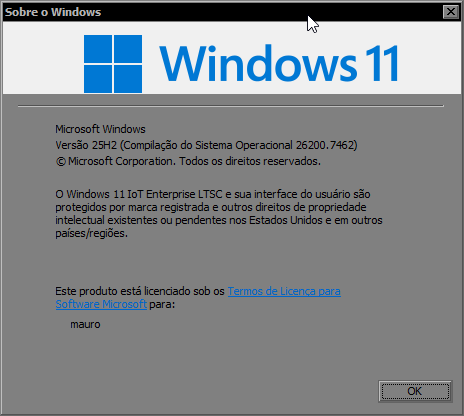
I just tried enabling it on my 25H2 installation (26200.7462) and after a reboot I lost access to my user account, giving me an error message along the lines of "The user account does not exist" when attempting to sign in. I had to reboot into safe mode to regain access to the account and then remove the registry keys and it fixed my problem. I do wonder if I maybe missed something since I only added 3 registry values according to this guide, but in this thread it looks like there was supposed to be 4 values. I'm afraid to re-attempt it though, haha.
 

My Computer

System One

  • OS
    Windows 11
    Computer type
    PC/Desktop
    Manufacturer/Model
    HP Victus Gaming Laptop 15-fb3xxx
    CPU
    AMD Ryzen 7 7445HS
    Graphics Card(s)
    Nvidia GeForce RTX 4050 Laptop GPU, AMD Radeon 740M iGPU
    Screen Resolution
    1920 x 1080p
    Hard Drives
    Samsung SSD 970 Evo Plus 1TB
    Browser
    Firefox
    Antivirus
    Windows Security
I just tried enabling it on my 25H2 installation (26200.7462) and after a reboot I lost access to my user account, giving me an error message along the lines of "The user account does not exist" when attempting to sign in. I had to reboot into safe mode to regain access to the account and then remove the registry keys and it fixed my problem. I do wonder if I maybe missed something since I only added 3 registry values according to this guide, but in this thread it looks like there was supposed to be 4 values. I'm afraid to re-attempt it though, haha.

Because these IDs enabled the IP experimentation feature (togger). This might accidentally enable other experimental features and cause problems for your system.
 

My Computer

System One

  • OS
    Windows 11, version 25H2 (26200)
    Computer type
    PC/Desktop
    CPU
    AMD Ryzen 9 9950X 16-Core Processor
    Motherboard
    ASRock B650M PG Riptide
    Memory
    DDR5-6000 (CL36) 64.0 GB
    Graphics Card(s)
    NVIDIA GeForce RTX 4090
    PSU
    1200W
    Case
    Phanteks Enthoo Pro 2
    Cooling
    Noctua NH-D12L
So question, is it available on latest Dev build (26220.7523) or not yet?
Tried that on my Surface Book 3 on latest Dev Build, still on disk.sys
 

My Computer

System One

  • OS
    Windows 11
    Computer type
    Laptop
    Manufacturer/Model
    Microsoft Surface Book 3
    CPU
    Intel(R) Core(TM) i7-1065G7
    Memory
    32 GB
    Graphics Card(s)
    Intel Iris Plus / NVidia GeForce 1660 Ti Max-Q

Latest Support Threads

Back
Top Bottom