
Solved Another fail with Macrium V8 from INSIDE a VM


jimbo45

Well-known member
Pro User
VIP
Local time
12:43 PM
Posts
5,805
Location
Hafnarfjörður IS
OS
Windows XP,11 Linux Fedora Rawhide pre-release 45
Hi folks
from INSIDE a VM I'm booting from the stand alone rescue media via an iso. I deliberately chose the PE version rather than the RE version as its better with "Virtual drivers" when restoring to another VM.

However it stays for a long time (around 5 mns on super fast SSD) in "Initialising Windows PE" and then Windows itself (the VM ) BSOD's . On Windows 11 insider preview latest build and vmware WKS 1.2.1
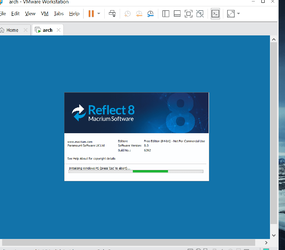
v8_1.png

After 5 mins BSOD

v8_2.png

Not a good day today with Macrium V8 -- V7 on Windows 10 works perfectly so I suspect something about W11 and Macrium V8 doesn't seem quite right yet !!!

(Back to DD again folks on W11 !!!!!)

Cheers
jimbo
 

My Computer My Computer

At a glance

Windows XP,11 Linux Fedora Rawhide pre-releas...2 X Intel i7
OS
Windows XP,11 Linux Fedora Rawhide pre-release 45
Computer type
PC/Desktop
CPU
2 X Intel i7
Screen Resolution
4KUHD X 2
I have no idea if I'm going down the right path here, but this is what I would try...

Build a Win 11 VM and install the VMware tools. Install Macrium Reflect in that VM. Build an ISO image recovery disc from within the VM. This should put all the VMware tools drivers on the recovery media.

Since the BSOD is complaining about a driver issue, I'm simply taking a stab hoping that might help.
 

My Computers My Computers

  • At a glance

    Win11 Pro 25H2 (RTM+)Intel i7-14650HX32 GBNo GPU - Built-in Intel Graphics
    OS
    Win11 Pro 25H2 (RTM+)
    Computer type
    PC/Desktop
    Manufacturer/Model
    Acemagic
    CPU
    Intel i7-14650HX
    Memory
    32 GB
    Graphics Card(s)
    No GPU - Built-in Intel Graphics
    Sound Card
    Integrated
    Monitor(s) Displays
    Varies as machine will often be moved to locations with different monitors
    Screen Resolution
    Varies
    Hard Drives
    1 x 1TB Gen 4 NVMe SSD
    PSU
    120W Power Brick
    Keyboard
    Corsair K70 Max RGB Magnetic Keyboard
    Mouse
    Logitech MX Master 3
    Internet Speed
    1Gb Up / 1 Gb Down
    Browser
    Edge
    Antivirus
    Windows Defender
  • At a glance

    Win11 Pro 25H2 (RTM+)Intel i7-1255U16 GBIntel Iris Xe Graphics
    Operating System
    Win11 Pro 25H2 (RTM+)
    Computer type
    Laptop
    Manufacturer/Model
    Lenovo ThinkBook 13x Gen 2
    CPU
    Intel i7-1255U
    Memory
    16 GB
    Graphics card(s)
    Intel Iris Xe Graphics
    Sound Card
    Realtek® ALC3306-CG codec
    Monitor(s) Displays
    13.3-inch IPS Display
    Screen Resolution
    WQXGA (2560 x 1600)
    Hard Drives
    2 TB 4 x 4 NVMe SSD
    PSU
    USB-C / Thunderbolt 4 Power / Charging
    Keyboard
    Backlit, spill resistant keyboard
    Mouse
    Buttonless Glass Precision Touchpad
    Internet Speed
    1Gb Up / 1Gb Down
    Browser
    Edge
    Antivirus
    Windows Defender
    Other Info
    WiFi 6e / Bluetooth 5.1 / Facial Recognition / Fingerprint Sensor / ToF (Time of Flight) Human Presence Sensor
Hi folks
from INSIDE a VM I'm booting from the stand alone rescue media via an iso. I deliberately chose the PE version rather than the RE version as its better with "Virtual drivers" when restoring to another VM.

However it stays for a long time (around 5 mns on super fast SSD) in "Initialising Windows PE" and then Windows itself (the VM ) BSOD's . On Windows 11 insider preview latest build and vmware WKS 1.2.1

View attachment 17093

After 5 mins BSOD

View attachment 17094

Not a good day today with Macrium V8 -- V7 on Windows 10 works perfectly so I suspect something about W11 and Macrium V8 doesn't seem quite right yet !!!

(Back to DD again folks on W11 !!!!!)

Cheers
jimbo
V8 works fine for me on Win11 PE, and Hyper-V, even on Dev version as well.
 

My Computer My Computer

At a glance

Windows 11 Pro + Win11 Canary VM.I9 13th gen i9-13900H 2.60 GHZ16 GB solderedIntegrated Intel Iris XE
OS
Windows 11 Pro + Win11 Canary VM.
Computer type
Laptop
Manufacturer/Model
ASUS Zenbook 14
CPU
I9 13th gen i9-13900H 2.60 GHZ
Motherboard
Yep, Laptop has one.
Memory
16 GB soldered
Graphics Card(s)
Integrated Intel Iris XE
Sound Card
Realtek built in
Monitor(s) Displays
laptop OLED screen
Screen Resolution
2880x1800 touchscreen
Hard Drives
1 TB NVME SSD (only weakness is only one slot)
PSU
Internal + 65W thunderbolt USB4 charger
Case
Yep, got one
Cooling
Stella Artois (UK pint cans - 568 ml) - extra cost.
Keyboard
Built in UK keybd
Mouse
Bluetooth , wireless dongled, wired
Internet Speed
900 mbs (ethernet), wifi 6 typical 350-450 mb/s both up and down
Browser
Edge
Antivirus
Defender
Other Info
TPM 2.0, 2xUSB4 thunderbolt, 1xUsb3 (usb a), 1xUsb-c, hdmi out, 3.5 mm audio out/in combo, ASUS backlit trackpad (inc. switchable number pad)

Macrium Reflect Home V8
Office 365 Family (6 users each 1TB onedrive space)
Hyper-V (a vm runs almost as fast as my older laptop)
I have no idea if I'm going down the right path here, but this is what I would try...

Build a Win 11 VM and install the VMware tools. Install Macrium Reflect in that VM. Build an ISO image recovery disc from within the VM. This should put all the VMware tools drivers on the recovery media.

Since the BSOD is complaining about a driver issue, I'm simply taking a stab hoping that might help.
I would also try creating a boot menu option and see if that works ok.
 

My Computer My Computer

At a glance

Windows 11 Pro + Win11 Canary VM.I9 13th gen i9-13900H 2.60 GHZ16 GB solderedIntegrated Intel Iris XE
OS
Windows 11 Pro + Win11 Canary VM.
Computer type
Laptop
Manufacturer/Model
ASUS Zenbook 14
CPU
I9 13th gen i9-13900H 2.60 GHZ
Motherboard
Yep, Laptop has one.
Memory
16 GB soldered
Graphics Card(s)
Integrated Intel Iris XE
Sound Card
Realtek built in
Monitor(s) Displays
laptop OLED screen
Screen Resolution
2880x1800 touchscreen
Hard Drives
1 TB NVME SSD (only weakness is only one slot)
PSU
Internal + 65W thunderbolt USB4 charger
Case
Yep, got one
Cooling
Stella Artois (UK pint cans - 568 ml) - extra cost.
Keyboard
Built in UK keybd
Mouse
Bluetooth , wireless dongled, wired
Internet Speed
900 mbs (ethernet), wifi 6 typical 350-450 mb/s both up and down
Browser
Edge
Antivirus
Defender
Other Info
TPM 2.0, 2xUSB4 thunderbolt, 1xUsb3 (usb a), 1xUsb-c, hdmi out, 3.5 mm audio out/in combo, ASUS backlit trackpad (inc. switchable number pad)

Macrium Reflect Home V8
Office 365 Family (6 users each 1TB onedrive space)
Hyper-V (a vm runs almost as fast as my older laptop)
V8 works fine for me on Win11 PE, and Hyper-V, even on Dev version as well.
Hi there
Re-installed Windows and it 's working perfectly again -- nothing wrong with the VM I had -- I re-installed from scratch W11 Dev from UUPDUMP.

Probably something in my Windows set up that had got hosed.

Macrium is a pretty good product so it was probably me with all that messing around on W11 with WSL etc.

Cheers
jimbo
 
Last edited:

My Computer My Computer

At a glance

Windows XP,11 Linux Fedora Rawhide pre-releas...2 X Intel i7
OS
Windows XP,11 Linux Fedora Rawhide pre-release 45
Computer type
PC/Desktop
CPU
2 X Intel i7
Screen Resolution
4KUHD X 2
Hi there
Re-installed Windows and it 's working perfectly again -- nothing wrong with the VM I had -- I re-installed from scratch W11 Dev from UUPDUMP.

Probably something in my Windows set up that had got hosed.

Macrium is a pretty good product so it was probably me with all that messing around on W11 with WSL etc.

Cheers
jimbo
Then marked as solved please.
 

My Computer My Computer

At a glance

Windows 11 Pro + Win11 Canary VM.I9 13th gen i9-13900H 2.60 GHZ16 GB solderedIntegrated Intel Iris XE
OS
Windows 11 Pro + Win11 Canary VM.
Computer type
Laptop
Manufacturer/Model
ASUS Zenbook 14
CPU
I9 13th gen i9-13900H 2.60 GHZ
Motherboard
Yep, Laptop has one.
Memory
16 GB soldered
Graphics Card(s)
Integrated Intel Iris XE
Sound Card
Realtek built in
Monitor(s) Displays
laptop OLED screen
Screen Resolution
2880x1800 touchscreen
Hard Drives
1 TB NVME SSD (only weakness is only one slot)
PSU
Internal + 65W thunderbolt USB4 charger
Case
Yep, got one
Cooling
Stella Artois (UK pint cans - 568 ml) - extra cost.
Keyboard
Built in UK keybd
Mouse
Bluetooth , wireless dongled, wired
Internet Speed
900 mbs (ethernet), wifi 6 typical 350-450 mb/s both up and down
Browser
Edge
Antivirus
Defender
Other Info
TPM 2.0, 2xUSB4 thunderbolt, 1xUsb3 (usb a), 1xUsb-c, hdmi out, 3.5 mm audio out/in combo, ASUS backlit trackpad (inc. switchable number pad)

Macrium Reflect Home V8
Office 365 Family (6 users each 1TB onedrive space)
Hyper-V (a vm runs almost as fast as my older laptop)

My Computer My Computer

At a glance

Windows XP,11 Linux Fedora Rawhide pre-releas...2 X Intel i7
OS
Windows XP,11 Linux Fedora Rawhide pre-release 45
Computer type
PC/Desktop
CPU
2 X Intel i7
Screen Resolution
4KUHD X 2
@cereberus I'm not the sharpest tack in the box when it comes to VMs as I don't use them often. This thread has made me realize I may have been doing it wrong all along so I need a lesson.

I have my default VM folder on an external hard drive partition. From within my host OS or using a Macrium rescue usb, I back up this partition regularly with Macrium along with the second partition on the external drive where I store personal files and folders. I have never backed up a VM from within the VM itself. I don't even have Macrium installed on my VM. The few times I've had to recover a VM all I did was restore the partition where my VMs resided. It's always worked.

What is the advantage of backing up a VM from within the VM or the disadvantage of doing it my way.
 

My Computers My Computers

  • At a glance

    Windows 11 Pro 25H2 26200.8655i9-10900 10 core 20 threads32 gbnone-Intel UHD Graphics 630
    OS
    Windows 11 Pro 25H2 26200.8655
    Computer type
    PC/Desktop
    Manufacturer/Model
    Dell Optiplex 7080
    CPU
    i9-10900 10 core 20 threads
    Motherboard
    DELL 0J37VM
    Memory
    32 gb
    Graphics Card(s)
    none-Intel UHD Graphics 630
    Sound Card
    Integrated Realtek
    Monitor(s) Displays
    Benq 27
    Screen Resolution
    2560x1440
    Hard Drives
    2x1tb Solidigm m.2 nvme /External drives 512gb Samsung m.2 sata+2tb Kingston m2.nvme
    PSU
    500w
    Case
    MT
    Cooling
    Dell Premium
    Keyboard
    Logitech wired
    Mouse
    Logitech wireless
    Internet Speed
    so slow I'm too embarrassed to tell
    Browser
    #1 Edge #2 Firefox
    Antivirus
    Defender+MWB Premium
  • At a glance

    Windows 11 Pro 24H2 26200.8457AMD Ryzen 7 6800U32 gbintegrated
    Operating System
    Windows 11 Pro 24H2 26200.8457
    Computer type
    PC/Desktop
    Manufacturer/Model
    Beelink Mini PC SER5
    CPU
    AMD Ryzen 7 6800U
    Memory
    32 gb
    Graphics card(s)
    integrated
    Sound Card
    integrated
    Monitor(s) Displays
    Benq 27
    Screen Resolution
    2560x1440
    Hard Drives
    1TB Crucial nvme
    Keyboard
    Logitech wired
    Mouse
    Logitech wireless
    Internet Speed
    still too embarrassed to tell
    Browser
    Firefox
    Antivirus
    Defender
    Other Info
    System 3 is non compliant Dell 9020 i7-4770/24gb ram Win11 PRO 26200.8457
@cereberus I'm not the sharpest tack in the box when it comes to VMs as I don't use them often. This thread has made me realize I may have been doing it wrong all along so I need a lesson.

I have my default VM folder on an external hard drive partition. From within my host OS or using a Macrium rescue usb, I back up this partition regularly with Macrium along with the second partition on the external drive where I store personal files and folders. I have never backed up a VM from within the VM itself. I don't even have Macrium installed on my VM. The few times I've had to recover a VM all I did was restore the partition where my VMs resided. It's always worked.

What is the advantage of backing up a VM from within the VM or the disadvantage of doing it my way.
None really. I just copy the vhd using file explorer.

One use of Reflect that is great is the ability to open up a Reflect image as a virtual machine (using Viboot) which is a great way of testing the images have been properly backed up. You can do this with HyperV or Virtualbox but not yet with VMware.

However, you can do it with VMware in a less elegant way by booting from a Reflect iso in the vm amd restoring an image inside vm.

Another way of making Reflect backup of VM is to mount vhd on host (ok for vhdx format) and backup the contents of vhd using Reflect on host which is a vataint on how you do it.

I sometimes make an image backup of a host pc, and restore image to a vm so I have a virtual copy of host for test purposes.

In short, I find Reflect useful for some things in a vm, but actually backing up vm is not something I ever really bother with. It is easier just to copy the vhd but to be fair a Reflect backup takes less space.

So no, you are not doing it wrong - perfectly valid way of working. You are compressing the vms doing it your way as well.
 

My Computer My Computer

At a glance

Windows 11 Pro + Win11 Canary VM.I9 13th gen i9-13900H 2.60 GHZ16 GB solderedIntegrated Intel Iris XE
OS
Windows 11 Pro + Win11 Canary VM.
Computer type
Laptop
Manufacturer/Model
ASUS Zenbook 14
CPU
I9 13th gen i9-13900H 2.60 GHZ
Motherboard
Yep, Laptop has one.
Memory
16 GB soldered
Graphics Card(s)
Integrated Intel Iris XE
Sound Card
Realtek built in
Monitor(s) Displays
laptop OLED screen
Screen Resolution
2880x1800 touchscreen
Hard Drives
1 TB NVME SSD (only weakness is only one slot)
PSU
Internal + 65W thunderbolt USB4 charger
Case
Yep, got one
Cooling
Stella Artois (UK pint cans - 568 ml) - extra cost.
Keyboard
Built in UK keybd
Mouse
Bluetooth , wireless dongled, wired
Internet Speed
900 mbs (ethernet), wifi 6 typical 350-450 mb/s both up and down
Browser
Edge
Antivirus
Defender
Other Info
TPM 2.0, 2xUSB4 thunderbolt, 1xUsb3 (usb a), 1xUsb-c, hdmi out, 3.5 mm audio out/in combo, ASUS backlit trackpad (inc. switchable number pad)

Macrium Reflect Home V8
Office 365 Family (6 users each 1TB onedrive space)
Hyper-V (a vm runs almost as fast as my older laptop)
There are times where doing your backups inside a VM can be helpful. Take this scenario which is what I have on my system:

I have a VM for the sole purpose of running as a Plex server. I won't go into the details here, but there is a very good reason for running it in a VM. The VM itself is fairly small because all the media used by Plex is on another HD.

The physical drive where my VM is located has a lot of other data (a couple of terrabytes) but it contains data that is temporary in nature and does not need to be backed up often. Also, substantial amounts of that data changes every day.

If I were to backup that entire physical HD I would have huge backups of data that I largely don't care about. The incremental updates would also be huge due to the amount of data changing.

My solution is to perform a backup from within the Plex VM. This way, I'm still getting a full disk image, but only of the Plex VM which is fairly small. It saves a lot of time and storage space for my backup. This also has the advantage of making a restore wicked quick. Create a new VM, don't even install an OS to it, boot the recovery media, do a restore (which takes only a few min), and boom - done. It also has the advantage of making my VM portable since I can restore just that VM to any drive on any system extraordinarily easily.

Point is simply that there are times where backups from within a VM can be extremely useful. This was simply one example.
 

My Computers My Computers

  • At a glance

    Win11 Pro 25H2 (RTM+)Intel i7-14650HX32 GBNo GPU - Built-in Intel Graphics
    OS
    Win11 Pro 25H2 (RTM+)
    Computer type
    PC/Desktop
    Manufacturer/Model
    Acemagic
    CPU
    Intel i7-14650HX
    Memory
    32 GB
    Graphics Card(s)
    No GPU - Built-in Intel Graphics
    Sound Card
    Integrated
    Monitor(s) Displays
    Varies as machine will often be moved to locations with different monitors
    Screen Resolution
    Varies
    Hard Drives
    1 x 1TB Gen 4 NVMe SSD
    PSU
    120W Power Brick
    Keyboard
    Corsair K70 Max RGB Magnetic Keyboard
    Mouse
    Logitech MX Master 3
    Internet Speed
    1Gb Up / 1 Gb Down
    Browser
    Edge
    Antivirus
    Windows Defender
  • At a glance

    Win11 Pro 25H2 (RTM+)Intel i7-1255U16 GBIntel Iris Xe Graphics
    Operating System
    Win11 Pro 25H2 (RTM+)
    Computer type
    Laptop
    Manufacturer/Model
    Lenovo ThinkBook 13x Gen 2
    CPU
    Intel i7-1255U
    Memory
    16 GB
    Graphics card(s)
    Intel Iris Xe Graphics
    Sound Card
    Realtek® ALC3306-CG codec
    Monitor(s) Displays
    13.3-inch IPS Display
    Screen Resolution
    WQXGA (2560 x 1600)
    Hard Drives
    2 TB 4 x 4 NVMe SSD
    PSU
    USB-C / Thunderbolt 4 Power / Charging
    Keyboard
    Backlit, spill resistant keyboard
    Mouse
    Buttonless Glass Precision Touchpad
    Internet Speed
    1Gb Up / 1Gb Down
    Browser
    Edge
    Antivirus
    Windows Defender
    Other Info
    WiFi 6e / Bluetooth 5.1 / Facial Recognition / Fingerprint Sensor / ToF (Time of Flight) Human Presence Sensor

Latest Support Threads

Back
Top Bottom




