Antivirus "full scan results" shows inflated number of files!


Sir_George

Well-known member
Power User
VIP
Local time
4:10 AM
Posts
347
Location
Denver, CO
OS
Windows 11 Professional
I have an unexplained anomaly which I recently noticed with every antivirus software I use, which includes Windows Defender, Bitdefender and Kaspersky. My full system scans have gone from approximately 500,000 files to over 3 million. This is only happening on full system scans! Additionally, this is on 3 separate computers. I do not use more than one antivirus at a time on any of the computers and all the scan results show no infection on any of the systems. I am not concerned about having an infection, just the unusual number of increased files.

Searching the web has not produced any meaningful results. This may be due to most users only doing a quick scan which, on my systems, does not replicate the issue; ie, no increase in the number of files scanned.

In conclusion, I am just curious why this is happening and if anyone else has noticed it.
 

My Computer My Computer

At a glance

Windows 11 ProfessionalIntel Core i5-940032GBIntegrated Intel UHD Graphics 630
OS
Windows 11 Professional
Computer type
PC/Desktop
Manufacturer/Model
Microcenter B677
CPU
Intel Core i5-9400
Motherboard
ASRock H310CM-HDV/M.2
Memory
32GB
Graphics Card(s)
Integrated Intel UHD Graphics 630
Sound Card
Intel Kaby Lake - High Definition Audio / cAVS (Audio, Voice, Speech) [A0]
Monitor(s) Displays
LG Model: GSM59F1
Screen Resolution
2560x1080
Case
Lian Li 205M
Antivirus
Kaspersky AV
Learn how much space files on your computer taking.

In this guide, you will learn the steps to understand the space usage on Windows 11.


Clean up temporary files and clean up the Component Store (WinSxS folder) to reduce its size in Windows 11.


My Computer My Computer

At a glance

Windows 11AMD Ryzen 7 5700GMicron Technology DDR4-3200 16GBNVIDIA GeForce RTX 3060
OS
Windows 11
Computer type
PC/Desktop
Manufacturer/Model
HP Pavilion
CPU
AMD Ryzen 7 5700G
Motherboard
Erica6
Memory
Micron Technology DDR4-3200 16GB
Graphics Card(s)
NVIDIA GeForce RTX 3060
Sound Card
Realtek ALC671
Monitor(s) Displays
Samsung SyncMaster U28E590
Screen Resolution
3840 x 2160
Hard Drives
SAMSUNG MZVLQ1T0HALB-000H1
 

My Computer My Computer

At a glance

Windows 11AMD Ryzen 7 5700GMicron Technology DDR4-3200 16GBNVIDIA GeForce RTX 3060
OS
Windows 11
Computer type
PC/Desktop
Manufacturer/Model
HP Pavilion
CPU
AMD Ryzen 7 5700G
Motherboard
Erica6
Memory
Micron Technology DDR4-3200 16GB
Graphics Card(s)
NVIDIA GeForce RTX 3060
Sound Card
Realtek ALC671
Monitor(s) Displays
Samsung SyncMaster U28E590
Screen Resolution
3840 x 2160
Hard Drives
SAMSUNG MZVLQ1T0HALB-000H1
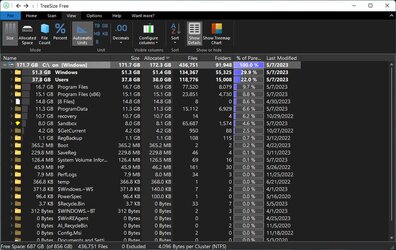
I use TreeSize and the actual number of files is 436,751. See attachment for an image.
 

Attachments

  • TreeSize Image.jpg
    TreeSize Image.jpg
    117.7 KB · Views: 2

My Computer My Computer

At a glance

Windows 11 ProfessionalIntel Core i5-940032GBIntegrated Intel UHD Graphics 630
OS
Windows 11 Professional
Computer type
PC/Desktop
Manufacturer/Model
Microcenter B677
CPU
Intel Core i5-9400
Motherboard
ASRock H310CM-HDV/M.2
Memory
32GB
Graphics Card(s)
Integrated Intel UHD Graphics 630
Sound Card
Intel Kaby Lake - High Definition Audio / cAVS (Audio, Voice, Speech) [A0]
Monitor(s) Displays
LG Model: GSM59F1
Screen Resolution
2560x1080
Case
Lian Li 205M
Antivirus
Kaspersky AV
That size of files is for Windows directory, add others up to see how much space files are taking.
 
Last edited:

My Computer My Computer

At a glance

Windows 11AMD Ryzen 7 5700GMicron Technology DDR4-3200 16GBNVIDIA GeForce RTX 3060
OS
Windows 11
Computer type
PC/Desktop
Manufacturer/Model
HP Pavilion
CPU
AMD Ryzen 7 5700G
Motherboard
Erica6
Memory
Micron Technology DDR4-3200 16GB
Graphics Card(s)
NVIDIA GeForce RTX 3060
Sound Card
Realtek ALC671
Monitor(s) Displays
Samsung SyncMaster U28E590
Screen Resolution
3840 x 2160
Hard Drives
SAMSUNG MZVLQ1T0HALB-000H1
That size of files is for Windows directory, add others up to see how much space files are taking.
The size of files listed at the top, the largest number, is the total number of files on the "C" drive. The list simply provides a breakdown of how many are in different folders.

My question was intended to have other users do a full scan with their AV and check the results of the number listed, as being scanned, against the actual number of files. But I didn't get much response.

It's no big deal, just a point of curiosity.
 
Last edited:

My Computer My Computer

At a glance

Windows 11 ProfessionalIntel Core i5-940032GBIntegrated Intel UHD Graphics 630
OS
Windows 11 Professional
Computer type
PC/Desktop
Manufacturer/Model
Microcenter B677
CPU
Intel Core i5-9400
Motherboard
ASRock H310CM-HDV/M.2
Memory
32GB
Graphics Card(s)
Integrated Intel UHD Graphics 630
Sound Card
Intel Kaby Lake - High Definition Audio / cAVS (Audio, Voice, Speech) [A0]
Monitor(s) Displays
LG Model: GSM59F1
Screen Resolution
2560x1080
Case
Lian Li 205M
Antivirus
Kaspersky AV
In my own Cleanup.bat program (batch file) I first run a command that counts all the files on the C: drive.
At the end of the cleanup, the same command runs again and again the file count is recorded, and then the computer calculates the difference in the two readings, giving me the net result.
Here is the report from a recent Cleanup. This one is from "Cinco de Mayo".
CincoDeMayo.jpg
It seems like my total file count is way higher than what y'all are quoting, for your own PC's.
But, this is after all, Windows 11/Pro/64 with a decent number of additional programs installed.

The number of files deleted, as shown here, is typical after about two days of use.

I've used many AV programs over the years, and I've never trusted their file counts.
 
I have an unexplained anomaly which I recently noticed with every antivirus software I use, which includes Windows Defender, Bitdefender and Kaspersky. My full system scans have gone from approximately 500,000 files to over 3 million.
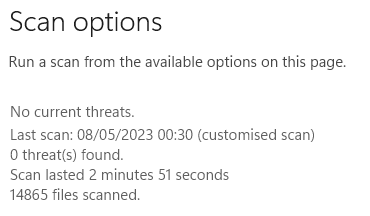
Defender will scan all the files inside each 'archive type' of file. For example, a single .cab, .zip, .wim or .iso file will add every single file it contains to the scanned files total. This is the result of scanning just one file, Macrium Reflect's boot.wim.

1683502575345.png 1683503260520.png

I use TreeSize and the actual number of files is 436,751.
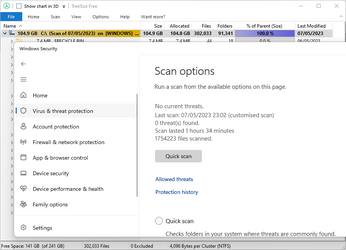
mine says 302,033....

My question was intended to have other users do a full scan with their AV and check the results of the number listed, as being scanned, against the actual number of files. But I didn't get much response.
I'm not surprised. A full custom scan of the C:\ drive can take a very long time.....

1683502802739.png
 

My Computers My Computers

  • At a glance

    Windows 11 HomeAMD Athlon Silver 3050U8GBRadeon Graphics
    OS
    Windows 11 Home
    Computer type
    Laptop
    Manufacturer/Model
    Acer Aspire 3 A315-23-R9VY
    CPU
    AMD Athlon Silver 3050U
    Memory
    8GB
    Graphics Card(s)
    Radeon Graphics
    Monitor(s) Displays
    laptop screen
    Screen Resolution
    1366x768 native resolution, up to 2560x1440 with Radeon Virtual Super Resolution
    Hard Drives
    1TB Samsung EVO 870 SSD (from April 2026: 250GB EVO 850)
    Internet Speed
    150 Mbps
    Browser
    Edge, Firefox
    Antivirus
    Defender
    Other Info
    fully 'Windows 11 ready' laptop. Windows 10 C: partition migrated from my old unsupported 'main machine' then upgraded to 11. A test migration ran Insider builds for 2 months. When 11 was released on 5th October 2021 it was re-imaged back to 10 and was offered the upgrade in Windows Update on 20th October. Windows Update offered the 22H2 Feature Update on 20th September 2022. It got the 23H2 Feature Update on 4th November 2023 through Windows Update, 24H2 on 3rd October 2024 through Windows Update by setting the Target Release Version for 24H2, and 25H2 on 30th September 2025 through Windows Update by setting the Target Release Version for 25H2.

    UPDATE - 11 April 2026: due to mechanical deterioration this PC has been retired from active duty. The OS with all software and files has been migrated to my System Seven in 'Other systems' to carry on as my general purpose 'main machine'.
  • At a glance

    Windows 11 ProIntel® Core™ i5-520M8GB(integrated graphics) Intel HD Graphics
    Operating System
    Windows 11 Pro
    Computer type
    Laptop
    Manufacturer/Model
    Dell Latitude E4310
    CPU
    Intel® Core™ i5-520M
    Motherboard
    0T6M8G
    Memory
    8GB
    Graphics card(s)
    (integrated graphics) Intel HD Graphics
    Screen Resolution
    1366x768
    Hard Drives
    500GB Crucial MX500 SSD
    Browser
    Firefox, Edge
    Antivirus
    Defender
    Other Info
    unsupported machine: Legacy bios, MBR, TPM 1.2, upgraded from W10 to W11 using W10/W11 hybrid install media workaround.

    In-place upgrade to 22H2 using ISO and a workaround.
    Feature Update to 23H2 by manually installing the Enablement Package.
    In-place upgrade to 24H2 using hybrid 23H2/24H2 install media.
    Upgraded to 25H2 by Enablement Package.

    Also running Insider Dev, and Canary builds and Windows 10 as native boot .vhdx.
  • My SYSTEM THREE is a Dell Latitude 5410, i7-10610U, 32GB RAM, 512GB NVMe ssd, supported device running Windows 11 Pro.

    My SYSTEM FOUR is a 2-in-1 convertible Lenovo Yoga 11e 20DA, Celeron N2930, 8GB RAM, 256GB ssd. Unsupported device: currently running Win10 Pro, plus Win11 Pro RTM and Insider Dev, Beta, and RP 24H2 as native boot vhdx.

    My SYSTEM FIVE is a Dell Latitude 3190 2-in-1, Pentium Silver N5030, 8GB RAM, 1TB NVMe ssd, supported device running Windows 11 Pro, plus Insider Beta, Dev, and Canary builds (and a few others) as a native boot .vhdx.

    My SYSTEM SIX is a Dell Latitude 5550, Core Ultra 7 165H, 64GB RAM, 1TB NVMe SSD, supported device, Windows 11 Pro 24H2, Hyper-V host machine. Updated to 25H2 on 30th September 2025.

    My SYSTEM SEVEN is a Lenovo Thinkpad T580, Intel Core i7-8650U, 16GB RAM, 512GB NVMe SSD + 2nd 512GB NVMe SSD, a supported device for Windows 11. This is my current general purpose 'main machine'. The installed Windows 11 Home from my System One has been migrated to this machine.
Defender will scan all the files inside each 'archive type' of file. For example, a single .cab, .zip, .wim or .iso file will add every single file it contains to the scanned files total. This is the result of scanning just one file, Macrium Reflect's boot.wim.

View attachment 59652 View attachment 59655


mine says 302,033....


I'm not surprised. A full custom scan of the C:\ drive can take a very long time.....

View attachment 59654
Thanks for the reply, I truly do appreciate it!
 

My Computer My Computer

At a glance

Windows 11 ProfessionalIntel Core i5-940032GBIntegrated Intel UHD Graphics 630
OS
Windows 11 Professional
Computer type
PC/Desktop
Manufacturer/Model
Microcenter B677
CPU
Intel Core i5-9400
Motherboard
ASRock H310CM-HDV/M.2
Memory
32GB
Graphics Card(s)
Integrated Intel UHD Graphics 630
Sound Card
Intel Kaby Lake - High Definition Audio / cAVS (Audio, Voice, Speech) [A0]
Monitor(s) Displays
LG Model: GSM59F1
Screen Resolution
2560x1080
Case
Lian Li 205M
Antivirus
Kaspersky AV
Back
Top Bottom