Any T-Clock Alternative for w11 ? or win alarm replacement


EnvioX

Key Keeper
Member
Local time
11:15 PM
Posts
93
Location
🅹🅰🅺🅰🆁🆃🅰 🅸🅽🅳🅾🅽🅴🆂🅸🅰
OS
Windows 11 Pro 23h2 22631.2792
hello, actually i just need the alarm with custom sound just like t-clock ( in fact previously i use t-clock not only for clock format, but more for the alarm.. i like the buzzer sound .. loud and clear ...
i can use t-clock with 3rd other software like startallback. but after i re-thinking, i want stop to use "replacement" so i stop use startallback and now i just cant find how to manage windows default alarm lol

so i need recommended t-clock alternative that work like t-clock on xp-10 and/or windows alarm replacement with custom sound and light weight of course


thankyou
 
Windows Build/Version
w100 pro 22621.1344

My Computer My Computer

At a glance

Windows 11 Pro 23h2 22631.2792Intel(R) Core(TM) i7-2677M CPU @ 1.80GHz6,00 GB (5,90 GB usable)Intel(R) HD Graphics 3000
OS
Windows 11 Pro 23h2 22631.2792
Computer type
Laptop
Manufacturer/Model
Toshiba Ultrabook Portege Z830 PT224L-01402S
CPU
Intel(R) Core(TM) i7-2677M CPU @ 1.80GHz
Motherboard
Portable PC (0x000003EC - 0x103CB030)
Memory
6,00 GB (5,90 GB usable)
Graphics Card(s)
Intel(R) HD Graphics 3000
Sound Card
USB Generic
Monitor(s) Displays
Built-in Laptop
Screen Resolution
1366x768
Hard Drives
Toshiba THNSNB128GMCJ 128GB PCI-E M-SATA INTERNAL Solid State Drive(SSD)
Keyboard
Using USB Port K120
Mouse
Using USB Port
Internet Speed
Broadband 50 Mb/s
Browser
Edge Stable Only
Antivirus
Microsoft Defender Only
Other Info
Screenshot Apps: Snipping Tools || I Try to use Everything from Microsoft Product
bump

hoping someone have the answer.

ps: t-clock small memory, threads, and handle
 

My Computer My Computer

At a glance

Windows 11 Pro 23h2 22631.2792Intel(R) Core(TM) i7-2677M CPU @ 1.80GHz6,00 GB (5,90 GB usable)Intel(R) HD Graphics 3000
OS
Windows 11 Pro 23h2 22631.2792
Computer type
Laptop
Manufacturer/Model
Toshiba Ultrabook Portege Z830 PT224L-01402S
CPU
Intel(R) Core(TM) i7-2677M CPU @ 1.80GHz
Motherboard
Portable PC (0x000003EC - 0x103CB030)
Memory
6,00 GB (5,90 GB usable)
Graphics Card(s)
Intel(R) HD Graphics 3000
Sound Card
USB Generic
Monitor(s) Displays
Built-in Laptop
Screen Resolution
1366x768
Hard Drives
Toshiba THNSNB128GMCJ 128GB PCI-E M-SATA INTERNAL Solid State Drive(SSD)
Keyboard
Using USB Port K120
Mouse
Using USB Port
Internet Speed
Broadband 50 Mb/s
Browser
Edge Stable Only
Antivirus
Microsoft Defender Only
Other Info
Screenshot Apps: Snipping Tools || I Try to use Everything from Microsoft Product
I'm using T-Clock version 5.4.1.1 with Windows 11, 22635.2700, also with version 22000. Have you tried that?
 

My Computer My Computer

At a glance

Windows 11 ProINTEL i9-10920X LGA 206664 GB (4 X 16 GB) G-Skill V Series DDR4 3200 ...EVGA GTX 1060 SC 3 GB
OS
Windows 11 Pro
Computer type
PC/Desktop
Manufacturer/Model
Custom Built
CPU
INTEL i9-10920X LGA 2066
Motherboard
Gigabyte X299-UD4 Pro F9
Memory
64 GB (4 X 16 GB) G-Skill V Series DDR4 3200 Quad Channel
Graphics Card(s)
EVGA GTX 1060 SC 3 GB
Sound Card
Realtek Onboard ALC1220
Monitor(s) Displays
2 x Samsung S27E310
Screen Resolution
1920x1080
Hard Drives
2 x Samsung 970 EVO Plus NVMe M2 500B
2 x 6TB WD6003FZBX SATA
PSU
Seasonic X-1050
Case
Thermaltake Armor+
Cooling
Corsair H80i V2 Liquid AOI Cooler
Keyboard
Logitech G510s
Mouse
Logitech MX Master2S
Internet Speed
500Mbs
Browser
Edge (Canary, Dev, Beta,Stable), Chrome
Antivirus
ESET NOD32 17.0.16.0
Other Info
Netgear Orbi Mesh router,
LG WH12LS39K Blu-Ray/DVD,
Malwarebytes Pro 4.6.8
Cyber Power CP1500PFCLCD UPS
It all depends on the tool you use to bring classic taskbar.
I'm running recent 23H2 Windows build and just upgraded my StartAllBack from 3.6.16 to 3.7 beta and the T-Clock functionality is gone. Since it used to work before, I tend to believe it's not the Windows issue, but the third party tool issue.

If you're looking for a replacement you may give a try to ElevenClock - I personally don't like it as it's not modifying the tray clock, instead it creates a non-transparent window for its clock in the place where the standard tray clock is. In my case DPI and taskbar customizations make it difficult to use, but I like the tool as such.
 

My Computer My Computer

At a glance

Win11 Pro 25H2
OS
Win11 Pro 25H2
Computer type
Laptop
Manufacturer/Model
Dell XPS14 9440
Monitor(s) Displays
2 x Dell UltraSharp U2718Q 4K
Screen Resolution
4K
Keyboard
Dell KB900
Mouse
Razer Cobra Pro
Internet Speed
1 Gbps
Other Info
Dell WD22TB4 dock
I tend to believe it's not the Windows issue, but the third party tool issue.
I tend to believe it's the third party tool finally adapting to the new Windows taskbar in stead of using the old (still built in) taskbar of Windows 10. And Windows 11 taskbar does not accept T-Clock anymore (which I think is a pity).

In this topic the developer has responded to a question about T-Clock:
I don't think T-Clock has a chance.

So I had to go to ElevenClock as well, but having some problems fitting the clock, which in my system is 14 pts height.
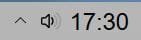
But the result is ok:
001409.jpg

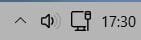
Hidden behind the clock are the network symbol and the Windows clock:
001410.jpg

And for the calendar I use a shortcut (on my desktop) to the calendar of T-Clock, which is located here:
C:\Program Files Portable\T-Clock\misc\XPCalendar.exe
Where "Program Files Portable" is a special folder I created for portable programs.
To change the settings of the calendar I have made a shortcut in my startmenu like this:
"C:\Program Files Portable\T-Clock\Clock64.exe" /prop
Of course you don't need to start T-Clock anymore at system startup, because the clock is not viewable.

To have an easy way for alarms at certain times or certain days, I use FreeAlarmClock.
Which is fully free if you use the basic functions of the program and that is ok for me.

FreeAlarmClock can do more than the built in Alarms of T-Clock, beacause it can manage alarms every moth or year as well (where T-Clock only can manage once per week as maximum, not a certain date in future). The only disadvantage is the very big warning window, but I got used to it.

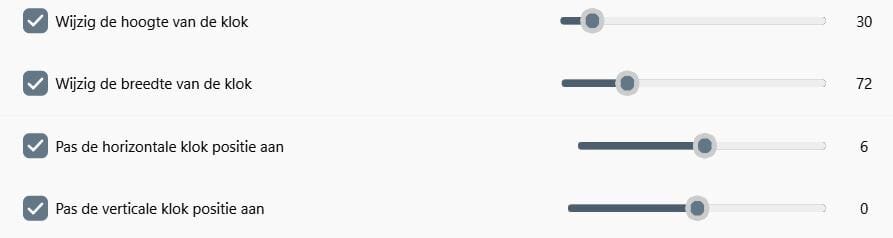
PS. To get the ElevenClock in the right size and position, I had to fiddle around with its settings and found these to fit best (for small icons on the taskbar and 125% screen):
001412.jpg

It's in Dutch, but the positions in the settings window of ElevenClock are the same.
They are to be found under "Clock position and size".
 

My Computer My Computer

At a glance

Windows 11 Pro 25H2 26200.8457AMD Ryzen 7 5700GKingston FURY Beast 2x16GB DIMM DDR4 2666 CL16MSI GeForce GT 730 2GB LP V1
OS
Windows 11 Pro 25H2 26200.8457
Computer type
PC/Desktop
Manufacturer/Model
Build by vendor to my specs
CPU
AMD Ryzen 7 5700G
Motherboard
MSI PRO B550M-P Gen3
Memory
Kingston FURY Beast 2x16GB DIMM DDR4 2666 CL16
Graphics Card(s)
MSI GeForce GT 730 2GB LP V1
Sound Card
Creative Sound Blaster Audigy FX
Monitor(s) Displays
Samsung S24E450F 24"
Screen Resolution
1920 x 1080
Hard Drives
1. SSD Crucial P5 Plus 500GB PCIe M.2
2. SSD-SATA Crucial MX500-2TB
PSU
Corsair CV650W
Case
Cooler Master Silencio S400
Cooling
Cooler Master Hyper H412R with Be Quiet Pure Wings 2 PWM BL038 fan
Keyboard
Cherry Stream (wired, scissor keys)
Mouse
Asus WT465 (wireless)
Internet Speed
70 Mbps down / 80 Mbps up
Browser
Firefox 130.0
Antivirus
F-Secure (Internetprovider version)
Other Info
Router: FRITZBox 7490
Oracle VirtualBox 7 for testing software on Win 10 or 11
Hoi Kees!
I'm using elevenclock as well but it's covering up some icons in the system tray like the battery/power and sound icon.
This is very inconvenient.
Did you find a way to solve this?
 

My Computer My Computer

At a glance

Windows 10, Windows 11
OS
Windows 10, Windows 11
Because I don't use ElevenClock anymore, I cannot tell you how to solve this.

Since StartAllBack 3.7RC, there is a possibility to change the clock and besides that, it allowes to use T-Clock again.
So I am using T-Clock (version 2.4.4-492) again and deinstalled ElevenClock.
I did that 2023 November 21, so quite soon after I wrote my answer #5.
And with that utility you don't have the problem that the clock is covering other icons in the system tray.

But StartAllBack you'll have to pay for after a testperiod. Not much just a few dollars (the prize is $5 for a licence, $9 for 2, $12 for 3 licences).
 

My Computer My Computer

At a glance

Windows 11 Pro 25H2 26200.8457AMD Ryzen 7 5700GKingston FURY Beast 2x16GB DIMM DDR4 2666 CL16MSI GeForce GT 730 2GB LP V1
OS
Windows 11 Pro 25H2 26200.8457
Computer type
PC/Desktop
Manufacturer/Model
Build by vendor to my specs
CPU
AMD Ryzen 7 5700G
Motherboard
MSI PRO B550M-P Gen3
Memory
Kingston FURY Beast 2x16GB DIMM DDR4 2666 CL16
Graphics Card(s)
MSI GeForce GT 730 2GB LP V1
Sound Card
Creative Sound Blaster Audigy FX
Monitor(s) Displays
Samsung S24E450F 24"
Screen Resolution
1920 x 1080
Hard Drives
1. SSD Crucial P5 Plus 500GB PCIe M.2
2. SSD-SATA Crucial MX500-2TB
PSU
Corsair CV650W
Case
Cooler Master Silencio S400
Cooling
Cooler Master Hyper H412R with Be Quiet Pure Wings 2 PWM BL038 fan
Keyboard
Cherry Stream (wired, scissor keys)
Mouse
Asus WT465 (wireless)
Internet Speed
70 Mbps down / 80 Mbps up
Browser
Firefox 130.0
Antivirus
F-Secure (Internetprovider version)
Other Info
Router: FRITZBox 7490
Oracle VirtualBox 7 for testing software on Win 10 or 11
Because I don't use ElevenClock anymore, I cannot tell you how to solve this.

Since StartAllBack 3.7RC, there is a possibility to change the clock and besides that, it allowes to use T-Clock again.
So I am using T-Clock (version 2.4.4-492) again and deinstalled ElevenClock.
I did that 2023 November 21, so quite soon after I wrote my answer #5.
And with that utility you don't have the problem that the clock is covering other icons in the system tray.

But StartAllBack you'll have to pay for after a testperiod. Not much just a few dollars (the prize is $5 for a licence, $9 for 2, $12 for 3 licences).
How did you get Tclock to work? I have startallback and windows 11 build 26085.1. Thank you.
 

My Computer My Computer

At a glance

Windows 11 ProINTEL i9-10920X LGA 206664 GB (4 X 16 GB) G-Skill V Series DDR4 3200 ...EVGA GTX 1060 SC 3 GB
OS
Windows 11 Pro
Computer type
PC/Desktop
Manufacturer/Model
Custom Built
CPU
INTEL i9-10920X LGA 2066
Motherboard
Gigabyte X299-UD4 Pro F9
Memory
64 GB (4 X 16 GB) G-Skill V Series DDR4 3200 Quad Channel
Graphics Card(s)
EVGA GTX 1060 SC 3 GB
Sound Card
Realtek Onboard ALC1220
Monitor(s) Displays
2 x Samsung S27E310
Screen Resolution
1920x1080
Hard Drives
2 x Samsung 970 EVO Plus NVMe M2 500B
2 x 6TB WD6003FZBX SATA
PSU
Seasonic X-1050
Case
Thermaltake Armor+
Cooling
Corsair H80i V2 Liquid AOI Cooler
Keyboard
Logitech G510s
Mouse
Logitech MX Master2S
Internet Speed
500Mbs
Browser
Edge (Canary, Dev, Beta,Stable), Chrome
Antivirus
ESET NOD32 17.0.16.0
Other Info
Netgear Orbi Mesh router,
LG WH12LS39K Blu-Ray/DVD,
Malwarebytes Pro 4.6.8
Cyber Power CP1500PFCLCD UPS
How did you get Tclock to work? I have startallback and windows 11 build 26085.1.
I only installed T-Clock version 2.4.4-492 (v2.4.4 release candidate), which you can download from here:

That does function in combination with all StartAllBack versions after 3.7RC

The version of Windows 11 that you have reported to be using seems to be an Insider version.
Not all functions of StartAllBack will work with Insider versions (as I once read on the @Tihiy's site).
And because I dont use any Insider Windows version, I can't tell you what the reason is it does not work on your system.
 

My Computer My Computer

At a glance

Windows 11 Pro 25H2 26200.8457AMD Ryzen 7 5700GKingston FURY Beast 2x16GB DIMM DDR4 2666 CL16MSI GeForce GT 730 2GB LP V1
OS
Windows 11 Pro 25H2 26200.8457
Computer type
PC/Desktop
Manufacturer/Model
Build by vendor to my specs
CPU
AMD Ryzen 7 5700G
Motherboard
MSI PRO B550M-P Gen3
Memory
Kingston FURY Beast 2x16GB DIMM DDR4 2666 CL16
Graphics Card(s)
MSI GeForce GT 730 2GB LP V1
Sound Card
Creative Sound Blaster Audigy FX
Monitor(s) Displays
Samsung S24E450F 24"
Screen Resolution
1920 x 1080
Hard Drives
1. SSD Crucial P5 Plus 500GB PCIe M.2
2. SSD-SATA Crucial MX500-2TB
PSU
Corsair CV650W
Case
Cooler Master Silencio S400
Cooling
Cooler Master Hyper H412R with Be Quiet Pure Wings 2 PWM BL038 fan
Keyboard
Cherry Stream (wired, scissor keys)
Mouse
Asus WT465 (wireless)
Internet Speed
70 Mbps down / 80 Mbps up
Browser
Firefox 130.0
Antivirus
F-Secure (Internetprovider version)
Other Info
Router: FRITZBox 7490
Oracle VirtualBox 7 for testing software on Win 10 or 11
@Kees
Thank you for the response. I figured it might be related to the insider version.
I do have Tclock working on a system with the current released version. I was hoping that a solution could be found for what I assume will eventually become the next released build.
 

My Computer My Computer

At a glance

Windows 11 ProINTEL i9-10920X LGA 206664 GB (4 X 16 GB) G-Skill V Series DDR4 3200 ...EVGA GTX 1060 SC 3 GB
OS
Windows 11 Pro
Computer type
PC/Desktop
Manufacturer/Model
Custom Built
CPU
INTEL i9-10920X LGA 2066
Motherboard
Gigabyte X299-UD4 Pro F9
Memory
64 GB (4 X 16 GB) G-Skill V Series DDR4 3200 Quad Channel
Graphics Card(s)
EVGA GTX 1060 SC 3 GB
Sound Card
Realtek Onboard ALC1220
Monitor(s) Displays
2 x Samsung S27E310
Screen Resolution
1920x1080
Hard Drives
2 x Samsung 970 EVO Plus NVMe M2 500B
2 x 6TB WD6003FZBX SATA
PSU
Seasonic X-1050
Case
Thermaltake Armor+
Cooling
Corsair H80i V2 Liquid AOI Cooler
Keyboard
Logitech G510s
Mouse
Logitech MX Master2S
Internet Speed
500Mbs
Browser
Edge (Canary, Dev, Beta,Stable), Chrome
Antivirus
ESET NOD32 17.0.16.0
Other Info
Netgear Orbi Mesh router,
LG WH12LS39K Blu-Ray/DVD,
Malwarebytes Pro 4.6.8
Cyber Power CP1500PFCLCD UPS
My experience until now is that the developer of StartAllBack will have solutions for problems his app has with newer Windows versions, at the time those versions are available for official update. But he needs time to do that and will never garantee that his app will fully function on an insider version.

So I would suggest to be patient...
 

My Computer My Computer

At a glance

Windows 11 Pro 25H2 26200.8457AMD Ryzen 7 5700GKingston FURY Beast 2x16GB DIMM DDR4 2666 CL16MSI GeForce GT 730 2GB LP V1
OS
Windows 11 Pro 25H2 26200.8457
Computer type
PC/Desktop
Manufacturer/Model
Build by vendor to my specs
CPU
AMD Ryzen 7 5700G
Motherboard
MSI PRO B550M-P Gen3
Memory
Kingston FURY Beast 2x16GB DIMM DDR4 2666 CL16
Graphics Card(s)
MSI GeForce GT 730 2GB LP V1
Sound Card
Creative Sound Blaster Audigy FX
Monitor(s) Displays
Samsung S24E450F 24"
Screen Resolution
1920 x 1080
Hard Drives
1. SSD Crucial P5 Plus 500GB PCIe M.2
2. SSD-SATA Crucial MX500-2TB
PSU
Corsair CV650W
Case
Cooler Master Silencio S400
Cooling
Cooler Master Hyper H412R with Be Quiet Pure Wings 2 PWM BL038 fan
Keyboard
Cherry Stream (wired, scissor keys)
Mouse
Asus WT465 (wireless)
Internet Speed
70 Mbps down / 80 Mbps up
Browser
Firefox 130.0
Antivirus
F-Secure (Internetprovider version)
Other Info
Router: FRITZBox 7490
Oracle VirtualBox 7 for testing software on Win 10 or 11
Hoi Kees!
I'm using elevenclock as well but it's covering up some icons in the system tray like the battery/power and sound icon.
This is very inconvenient.
Did you find a way to solve this?
Use the horizontal and vertical positions to get the clock in the position you want and you're done.
 

My Computers My Computers

  • At a glance

    Windows 11 Education For 25H2Intel® Core i7 5500u8 GBIntel HD Family Graphics 5500 AMD Firepro 4150M
    OS
    Windows 11 Education For 25H2
    Computer type
    Laptop
    Manufacturer/Model
    HP ZBook G2
    CPU
    Intel® Core i7 5500u
    Motherboard
    HP
    Memory
    8 GB
    Graphics Card(s)
    Intel HD Family Graphics 5500 AMD Firepro 4150M
    Sound Card
    Realtek High Audio
    Hard Drives
    1 TB SSD
    Mouse
    HP USB Mouse
    Antivirus
    Windows Defender
  • At a glance

    Windows 11 Pro For Workstations 25H2Xeon 1535m v632 GBAMD Quadro Pro 4100
    Operating System
    Windows 11 Pro For Workstations 25H2
    Computer type
    Laptop
    Manufacturer/Model
    HP Zbook G4
    CPU
    Xeon 1535m v6
    Motherboard
    HP
    Memory
    32 GB
    Graphics card(s)
    AMD Quadro Pro 4100
    Sound Card
    Bang and Olufson Audio
    Hard Drives
    1TB SSD
    Mouse
    HP USB Mouse
    Antivirus
    Windows Defender
Use the horizontal and vertical positions to get the clock in the position you want and you're done.
Even if you move that clock (of ElevenClock) anywhere in the system tray area, it will always be over some other icons. That's how ElevenClock functions.

As you hopefully have seen, the question of @Little_Ghost was three month back and never reacted anymore here! He even did not log on anymore after he wrote his post #6!

Since then al lot has changed in Windows 11. For me that means that already for some time I am back to ElevenClock for the clock panel. I myself have situated that clock over the cpmbined network / speaker icons that are situated in the right corner of the system tray after disablling the Windows clock to be displayed (under the time settings).

That's all I'd like to write about it, because you were just reopening an old topic.
 

My Computer My Computer

At a glance

Windows 11 Pro 25H2 26200.8457AMD Ryzen 7 5700GKingston FURY Beast 2x16GB DIMM DDR4 2666 CL16MSI GeForce GT 730 2GB LP V1
OS
Windows 11 Pro 25H2 26200.8457
Computer type
PC/Desktop
Manufacturer/Model
Build by vendor to my specs
CPU
AMD Ryzen 7 5700G
Motherboard
MSI PRO B550M-P Gen3
Memory
Kingston FURY Beast 2x16GB DIMM DDR4 2666 CL16
Graphics Card(s)
MSI GeForce GT 730 2GB LP V1
Sound Card
Creative Sound Blaster Audigy FX
Monitor(s) Displays
Samsung S24E450F 24"
Screen Resolution
1920 x 1080
Hard Drives
1. SSD Crucial P5 Plus 500GB PCIe M.2
2. SSD-SATA Crucial MX500-2TB
PSU
Corsair CV650W
Case
Cooler Master Silencio S400
Cooling
Cooler Master Hyper H412R with Be Quiet Pure Wings 2 PWM BL038 fan
Keyboard
Cherry Stream (wired, scissor keys)
Mouse
Asus WT465 (wireless)
Internet Speed
70 Mbps down / 80 Mbps up
Browser
Firefox 130.0
Antivirus
F-Secure (Internetprovider version)
Other Info
Router: FRITZBox 7490
Oracle VirtualBox 7 for testing software on Win 10 or 11
Thought I would give this a one year bump. I really miss TClock. I just upgraded to W11 last month, so it's still fresh on my mind. For me, I liked the ability to customize the clock display, I added day of week, spelled-out month, etc.

I've tried the solutions suggested above-thread, and they all fall short. Anyone ever find anything?
 

My Computer My Computer

At a glance

Windows 11i9-13950HX vPro64 GB DDR-5NVIDIA RTX™ 2000 Ada Generation Laptop GPU 8G...
OS
Windows 11
Computer type
Laptop
Manufacturer/Model
Lenovo P16 Gen 2 16"
CPU
i9-13950HX vPro
Memory
64 GB DDR-5
Graphics Card(s)
NVIDIA RTX™ 2000 Ada Generation Laptop GPU 8GB GDDR6
Monitor(s) Displays
16" WQUXGA (3840 x 2400), OLED, Touch
Screen Resolution
3840x2400
Hard Drives
(2) 4 TB SSD M.2 2280 PCIe Gen4 Performance TLC Opal
Internet Speed
1Gb
Browser
Chrome
At this moment I am a very happy user of the Windhawk taskbar (and much more) modification app.
One of the 'mods' you can install there is the "Taskbar Clock Customization" mod.
Which has a lot of options to change the clock in the system tray, not overwriting it but really changing the font and size of it and specifying what you'd like to see there.

It is very versatile, but at the same time somewhat more complicated than the rather simple to use app T-Clock.
Use of Windhawk goes somewhat in the direction of making a CSS mod to change the appearance of Internet sites.
Default functions can be used right away, but modifying the taskbar to your wishes is some more complicated.

BTW. T-Clock still seems to function if you use (the newest version of) StartAllBack, but since I don't use StartAllBack anymore, I can't verify if it really does!
 

My Computer My Computer

At a glance

Windows 11 Pro 25H2 26200.8457AMD Ryzen 7 5700GKingston FURY Beast 2x16GB DIMM DDR4 2666 CL16MSI GeForce GT 730 2GB LP V1
OS
Windows 11 Pro 25H2 26200.8457
Computer type
PC/Desktop
Manufacturer/Model
Build by vendor to my specs
CPU
AMD Ryzen 7 5700G
Motherboard
MSI PRO B550M-P Gen3
Memory
Kingston FURY Beast 2x16GB DIMM DDR4 2666 CL16
Graphics Card(s)
MSI GeForce GT 730 2GB LP V1
Sound Card
Creative Sound Blaster Audigy FX
Monitor(s) Displays
Samsung S24E450F 24"
Screen Resolution
1920 x 1080
Hard Drives
1. SSD Crucial P5 Plus 500GB PCIe M.2
2. SSD-SATA Crucial MX500-2TB
PSU
Corsair CV650W
Case
Cooler Master Silencio S400
Cooling
Cooler Master Hyper H412R with Be Quiet Pure Wings 2 PWM BL038 fan
Keyboard
Cherry Stream (wired, scissor keys)
Mouse
Asus WT465 (wireless)
Internet Speed
70 Mbps down / 80 Mbps up
Browser
Firefox 130.0
Antivirus
F-Secure (Internetprovider version)
Other Info
Router: FRITZBox 7490
Oracle VirtualBox 7 for testing software on Win 10 or 11
My clock works for me just using Winows settings. No icons are covered up.

1744797826410.webp
 

My Computers My Computers

  • At a glance

    Windows 11 Pro 25H2 26200.8655AMD Ryzen 7 5825U with Radeon Graphics16GB
    OS
    Windows 11 Pro 25H2 26200.8655
    Computer type
    Laptop
    Manufacturer/Model
    Acemagic LX15PRO
    CPU
    AMD Ryzen 7 5825U with Radeon Graphics
    Memory
    16GB
    Screen Resolution
    1920 x 1080
    Hard Drives
    SSD 2TB
    Internet Speed
    30 Mbps
    Browser
    Brave
    Antivirus
    Webroot Secure Anywhere
    Other Info
    System 3

    Acer Swift SF114-34 laptop
    OS Windows 11 Pro 26200.8524
    CPU Pentium Silver N6000
    RAM 4GB
    SSD Samsung 970 EVO Plus SSD 2TB (an upgrade)
  • At a glance

    Windows 11 Pro 23H2 22631.2506Atom N450 1.66GHz2GB
    Operating System
    Windows 11 Pro 23H2 22631.2506
    Computer type
    Laptop
    Manufacturer/Model
    HP Mini 210-1090NR PC (bought in late 2009!)
    CPU
    Atom N450 1.66GHz
    Memory
    2GB
    Browser
    Brave
    Antivirus
    Webroot
At this moment I am a very happy user of the Windhawk taskbar (and much more) modification app.
One of the 'mods' you can install there is the "Taskbar Clock Customization" mod.
Which has a lot of options to change the clock in the system tray, not overwriting it but really changing the font and size of it and specifying what you'd like to see there.

It is very versatile, but at the same time somewhat more complicated than the rather simple to use app T-Clock.
Use of Windhawk goes somewhat in the direction of making a CSS mod to change the appearance of Internet sites.
Default functions can be used right away, but modifying the taskbar to your wishes is some more complicated.

BTW. T-Clock still seems to function if you use (the newest version of) StartAllBack, but since I don't use StartAllBack anymore, I can't verify if it really does!
Thank you @Kees. I'm trying to avoid custom mod apps to the taskbar. I'm new to W11, and want to use stock as much as possible. I may at a later date try some mods, so I'll bookmark your reply.

Thanks!
 

My Computer My Computer

At a glance

Windows 11i9-13950HX vPro64 GB DDR-5NVIDIA RTX™ 2000 Ada Generation Laptop GPU 8G...
OS
Windows 11
Computer type
Laptop
Manufacturer/Model
Lenovo P16 Gen 2 16"
CPU
i9-13950HX vPro
Memory
64 GB DDR-5
Graphics Card(s)
NVIDIA RTX™ 2000 Ada Generation Laptop GPU 8GB GDDR6
Monitor(s) Displays
16" WQUXGA (3840 x 2400), OLED, Touch
Screen Resolution
3840x2400
Hard Drives
(2) 4 TB SSD M.2 2280 PCIe Gen4 Performance TLC Opal
Internet Speed
1Gb
Browser
Chrome
My clock works for me just using Winows settings. No icons are covered up.

View attachment 131375
I didn't know you could do this... off to research.

Ok, I can't find any setting for that. I noticed you have an international looking format dd-mm-yyyy. Maybe that's related?

Can you share HOW you set that?
 

My Computer My Computer

At a glance

Windows 11i9-13950HX vPro64 GB DDR-5NVIDIA RTX™ 2000 Ada Generation Laptop GPU 8G...
OS
Windows 11
Computer type
Laptop
Manufacturer/Model
Lenovo P16 Gen 2 16"
CPU
i9-13950HX vPro
Memory
64 GB DDR-5
Graphics Card(s)
NVIDIA RTX™ 2000 Ada Generation Laptop GPU 8GB GDDR6
Monitor(s) Displays
16" WQUXGA (3840 x 2400), OLED, Touch
Screen Resolution
3840x2400
Hard Drives
(2) 4 TB SSD M.2 2280 PCIe Gen4 Performance TLC Opal
Internet Speed
1Gb
Browser
Chrome
Ok, I found a mostly working solution. Doesn't have quite the customization of TClock, but did let me add a Day of Week.

  • Windows+R
  • type intl.cpl
  • a window title Region opens with two tabs - Formats and Administrative
  • on the Formats tab you see the Short Date field on the main page....but you can't make a custom entry there, so....
  • at the bottom of the Formats tab, click Additional Settings to get a Customize Format window with FOUR tabs - select the Date tab
  • on the Date tab, under the Date Formats section, you can type in a custom date format in the Short Date field.
    For example, I'm in the US and use the MM/DD/YYYY order so adding the day of the week I entered: ddd - MM/dd/yyyy and then clicked Apply at the bottom right. Worked like a charm for me.
 

My Computer My Computer

At a glance

Windows 11i9-13950HX vPro64 GB DDR-5NVIDIA RTX™ 2000 Ada Generation Laptop GPU 8G...
OS
Windows 11
Computer type
Laptop
Manufacturer/Model
Lenovo P16 Gen 2 16"
CPU
i9-13950HX vPro
Memory
64 GB DDR-5
Graphics Card(s)
NVIDIA RTX™ 2000 Ada Generation Laptop GPU 8GB GDDR6
Monitor(s) Displays
16" WQUXGA (3840 x 2400), OLED, Touch
Screen Resolution
3840x2400
Hard Drives
(2) 4 TB SSD M.2 2280 PCIe Gen4 Performance TLC Opal
Internet Speed
1Gb
Browser
Chrome
Back to zero...

While the tweak above did give me the "Day of the week" I wanted, it also changed how Quicken displayed the date. It went from 4/17/2025, to 1742025.

I dbl checked the settings under intl.cpl, and they still say mm-dd-yy, but for some reason, it's displaying otherwise.

I couldn't live with this, so I set it back. Still looking for an answer.
 

My Computer My Computer

At a glance

Windows 11i9-13950HX vPro64 GB DDR-5NVIDIA RTX™ 2000 Ada Generation Laptop GPU 8G...
OS
Windows 11
Computer type
Laptop
Manufacturer/Model
Lenovo P16 Gen 2 16"
CPU
i9-13950HX vPro
Memory
64 GB DDR-5
Graphics Card(s)
NVIDIA RTX™ 2000 Ada Generation Laptop GPU 8GB GDDR6
Monitor(s) Displays
16" WQUXGA (3840 x 2400), OLED, Touch
Screen Resolution
3840x2400
Hard Drives
(2) 4 TB SSD M.2 2280 PCIe Gen4 Performance TLC Opal
Internet Speed
1Gb
Browser
Chrome
Back
Top Bottom