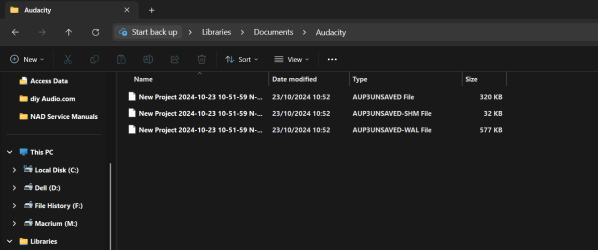
A curious one. Latest version of Audacity on latest DEV builds. When I go to open Audacity I get three files immediately created in the Audacity folder with the current date and timestamp before I actually do anything with Audacity such as recording etc.
When I close Audacity the files self delete.
The files increase in size as I do stuff in Audacity and if I don't save the project the files again self delete.
The file size in this image is the 'default' size they open to.
Are these possibly hidden files I shouldn't be seeing? (all Windows settings for files are to not show hidden stuff). Another PC running standard W11 (not DEV) doesn't do this. I don't know if this is an Audacity thing or a Windows thing tbh.
My Computer
At a glance
W11 Pro x64 ongoing Canary 29500 latest buildsIntel i58GbIntel HD Graphics
Well it seems this was a case of user error. Although I've no recollection of doing this the target directory for Temporary Files was set to point to the Audacity folder rather than one in App Data. I can only think I must have changed it at some point but have no recollection of doing so.
My Computer
At a glance
W11 Pro x64 ongoing Canary 29500 latest buildsIntel i58GbIntel HD Graphics
I use Audacity version 2.3.3. I always stick to this version and never upgrade. It does what I want to use it for. about a week ago I used it to combine left and right channels to one stereo channel.
Audacity will now collect and share personal data under new ownership: see here.
There's a link to a github fork of Audacity on the referenced webpage, but version 2.3.3 is good for me and I haven't looked elsewhere.
My Computer
At a glance
Windows 11 Pro 23H2 (OS Build [22631.4751])Intel Core i5-11600KF48GB DDR4-2667 = 2x8 Patriot + 2x16 G.SkillNvidia GeForce RTX 3060
OS
Windows 11 Pro 23H2 (OS Build [22631.4751])
Computer type
PC/Desktop
Manufacturer/Model
CyberPower Inc.
CPU
Intel Core i5-11600KF
Motherboard
MSI MPG Z590 Gaming Carbon WIFI
Memory
48GB DDR4-2667 = 2x8 Patriot + 2x16 G.Skill
Graphics Card(s)
Nvidia GeForce RTX 3060
Sound Card
All on-board: Nvidia High-def Audio, Nvidia Virtual Audio Device, Realtek USB Audio