Solved AOMEI Backupper (Free Standard Edition) Review


Already found my mistake in Backupper settings: The entire disk including the free space was backed up!
oops.
 

My Computers

System One System Two

  • OS
    Win7,Win11
    Computer type
    PC/Desktop
    CPU
    i7-9700
    Motherboard
    gigabyte b365m ds3h
    Memory
    2x16gb 3600mhz
    Monitor(s) Displays
    benq gw2480
    PSU
    bequiet pure power 11 400CM
    Cooling
    cryorig m9i
  • Operating System
    win7,win11
    Computer type
    PC/Desktop
    CPU
    i5-8400
    Motherboard
    gigabyte b365m ds3h
    Memory
    2x8gb 3200
    PSU
    xfx pro 450
:lmao:
 

My Computer

System One

  • OS
    Windows11 Pro 25H2
    Computer type
    PC/Desktop
    Manufacturer/Model
    Asus
    CPU
    i7
    Motherboard
    z97k
    Memory
    32GB
    Graphics Card(s)
    nVidia
    Sound Card
    Realtek
    Hard Drives
    3
    Cooling
    air
    Browser
    Edge
    Antivirus
    ESET
I used Disk Backup and followed the help instructions, what to use for a full data backup (full disk backup excluding the free space):

2.3 Disk Backup.............................................................................................................. 5
2.4 Partition and Volume Backup.................................................................................6
Thanks
Frank
 

My Computers

System One System Two

  • OS
    Windows 11 Home 25H2 build: 26200.8524
    Computer type
    Laptop
    Manufacturer/Model
    Acer Swift A.I SF14-51T
    CPU
    Intel(R) Core(TM) Ultra 7 258V, 2200 Mhz, 8 Cores
    Motherboard
    Icefish_LNV, Version V1.15
    Memory
    32 GB LPDDR5X (soldered)
    Graphics Card(s)
    Intel(R) Arc(TM) 140V GPU (16GB)
    Sound Card
    RealTek + Intel Smart Sound
    Monitor(s) Displays
    14" IPS WUXGA
    Screen Resolution
    1920x1200x60Hz
    Hard Drives
    Micron_2550_MTFDKBA1T0TGE, NVMe Gen4, 1TB
    PSU
    45W USB-C GaN charger
    Case
    Full aluminum body
    Cooling
    1 fan
    Keyboard
    US with Backlight
    Mouse
    Precision Trackpad
    Internet Speed
    25 Mb/s 5G
    Browser
    Edge
    Antivirus
    Windows Defender
    Other Info
    BIOS Version/Date Insyde Corp. V1.15, 8/28/2025, Windows Hello IR camera with Facial recognition. Secure Boot 2026 KEK key installed
  • Operating System
    Windows 11 Home 25H2 build: 26200.8524
    Computer type
    Laptop
    Manufacturer/Model
    Asus Vivobook K3502Z S15 15" OLED
    CPU
    Intel 12th Gen. i7 12700H, 14 cores, 2.3 GHz (24M Cache, up to 4.7 GHz, 6P+8E cores)
    Motherboard
    Alder Lake-H, 1700-4700 MHz clock rate
    Memory
    8GB LPDDR4 on board + 8GB LPDDR4 3200 MHz in Dual Channel.
    Graphics card(s)
    Intel Iris Xe supports up to 4096 x 2304 @ 120Hz
    Sound Card
    Harman Kardon - DTS
    Monitor(s) Displays
    OLED 15.6inch 2.8K (2880 x 1620)
    Screen Resolution
    16:9 aspect ratio 0.2ms response time 120Hz refresh rate, 550nits
    Hard Drives
    512GB M.2 NVMe Gen4 PCIe 4.0 SSD, Micron_2450_MTFDKBA512TFK
    PSU
    90-Watt USB charger (Thunderbolt4)
    Case
    Metal lid, plastic case
    Cooling
    1 fan
    Keyboard
    With adjustable backlight
    Mouse
    Precision Trackpad
    Internet Speed
    ISP provides 15 mb/s WIFI LTE (4G), laptop WIFI 6 adapter.
    Browser
    Edge
    Antivirus
    Windows Defender
    Other Info
    BIOS American Megatrends International, LLC. 10.1.2.312, 13/03/2024. Network adapter: Intel Wi-Fi 6E AX211 160 MHz, Secure Boot 2026 KEK key installed
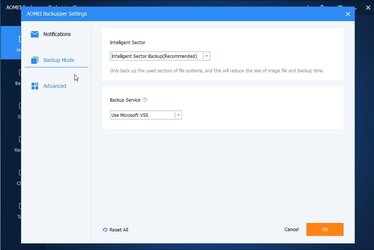
The default setting is intelligent sector.

backupper-seittngs.jpg
 

My Computers

System One System Two

  • OS
    Win7,Win11
    Computer type
    PC/Desktop
    CPU
    i7-9700
    Motherboard
    gigabyte b365m ds3h
    Memory
    2x16gb 3600mhz
    Monitor(s) Displays
    benq gw2480
    PSU
    bequiet pure power 11 400CM
    Cooling
    cryorig m9i
  • Operating System
    win7,win11
    Computer type
    PC/Desktop
    CPU
    i5-8400
    Motherboard
    gigabyte b365m ds3h
    Memory
    2x8gb 3200
    PSU
    xfx pro 450
The default setting is intelligent sector.

View attachment 36171
Thanks @SIW2
I selected DISK BACKUP and clicked on ADD, Disk 0 and Disk 1, maybe I should click on Disk 0 only (C:/)?
Screenshot 2022-08-12 042058.jpg
The default setting was "Intelligent Sector" as you show above
Frank
 
Last edited:

My Computers

System One System Two

  • OS
    Windows 11 Home 25H2 build: 26200.8524
    Computer type
    Laptop
    Manufacturer/Model
    Acer Swift A.I SF14-51T
    CPU
    Intel(R) Core(TM) Ultra 7 258V, 2200 Mhz, 8 Cores
    Motherboard
    Icefish_LNV, Version V1.15
    Memory
    32 GB LPDDR5X (soldered)
    Graphics Card(s)
    Intel(R) Arc(TM) 140V GPU (16GB)
    Sound Card
    RealTek + Intel Smart Sound
    Monitor(s) Displays
    14" IPS WUXGA
    Screen Resolution
    1920x1200x60Hz
    Hard Drives
    Micron_2550_MTFDKBA1T0TGE, NVMe Gen4, 1TB
    PSU
    45W USB-C GaN charger
    Case
    Full aluminum body
    Cooling
    1 fan
    Keyboard
    US with Backlight
    Mouse
    Precision Trackpad
    Internet Speed
    25 Mb/s 5G
    Browser
    Edge
    Antivirus
    Windows Defender
    Other Info
    BIOS Version/Date Insyde Corp. V1.15, 8/28/2025, Windows Hello IR camera with Facial recognition. Secure Boot 2026 KEK key installed
  • Operating System
    Windows 11 Home 25H2 build: 26200.8524
    Computer type
    Laptop
    Manufacturer/Model
    Asus Vivobook K3502Z S15 15" OLED
    CPU
    Intel 12th Gen. i7 12700H, 14 cores, 2.3 GHz (24M Cache, up to 4.7 GHz, 6P+8E cores)
    Motherboard
    Alder Lake-H, 1700-4700 MHz clock rate
    Memory
    8GB LPDDR4 on board + 8GB LPDDR4 3200 MHz in Dual Channel.
    Graphics card(s)
    Intel Iris Xe supports up to 4096 x 2304 @ 120Hz
    Sound Card
    Harman Kardon - DTS
    Monitor(s) Displays
    OLED 15.6inch 2.8K (2880 x 1620)
    Screen Resolution
    16:9 aspect ratio 0.2ms response time 120Hz refresh rate, 550nits
    Hard Drives
    512GB M.2 NVMe Gen4 PCIe 4.0 SSD, Micron_2450_MTFDKBA512TFK
    PSU
    90-Watt USB charger (Thunderbolt4)
    Case
    Metal lid, plastic case
    Cooling
    1 fan
    Keyboard
    With adjustable backlight
    Mouse
    Precision Trackpad
    Internet Speed
    ISP provides 15 mb/s WIFI LTE (4G), laptop WIFI 6 adapter.
    Browser
    Edge
    Antivirus
    Windows Defender
    Other Info
    BIOS American Megatrends International, LLC. 10.1.2.312, 13/03/2024. Network adapter: Intel Wi-Fi 6E AX211 160 MHz, Secure Boot 2026 KEK key installed
I just made a full backup with AOMEI Standard freeware version ... was disappointed that I could not explore the image file (mount on a virtual drive) in the free version...
That is really an essential feature I couldn't do without. Reflect Free does have it.
 

My Computers

System One System Two

  • OS
    Windows 11 Home
    Computer type
    Laptop
    Manufacturer/Model
    Acer Aspire 3 A315-23-R9VY
    CPU
    AMD Athlon Silver 3050U
    Memory
    8GB
    Graphics Card(s)
    Radeon Graphics
    Monitor(s) Displays
    laptop screen
    Screen Resolution
    1366x768 native resolution, up to 2560x1440 with Radeon Virtual Super Resolution
    Hard Drives
    1TB Samsung EVO 870 SSD (from April 2026: 250GB EVO 850)
    Internet Speed
    150 Mbps
    Browser
    Edge, Firefox
    Antivirus
    Defender
    Other Info
    fully 'Windows 11 ready' laptop. Windows 10 C: partition migrated from my old unsupported 'main machine' then upgraded to 11. A test migration ran Insider builds for 2 months. When 11 was released on 5th October 2021 it was re-imaged back to 10 and was offered the upgrade in Windows Update on 20th October. Windows Update offered the 22H2 Feature Update on 20th September 2022. It got the 23H2 Feature Update on 4th November 2023 through Windows Update, 24H2 on 3rd October 2024 through Windows Update by setting the Target Release Version for 24H2, and 25H2 on 30th September 2025 through Windows Update by setting the Target Release Version for 25H2.

    UPDATE - 11 April 2026: due to mechanical deterioration this PC has been retired from active duty. The OS with all software and files has been migrated to my System Seven below to carry on as my general purpose 'main machine'.

    My SYSTEM THREE is a Dell Latitude 5410, i7-10610U, 32GB RAM, 512GB NVMe ssd, supported device running Windows 11 Pro.

    My SYSTEM FOUR is a 2-in-1 convertible Lenovo Yoga 11e 20DA, Celeron N2930, 8GB RAM, 256GB ssd. Unsupported device: currently running Win10 Pro, plus Win11 Pro RTM and Insider Dev, Beta, and RP 24H2 as native boot vhdx.

    My SYSTEM FIVE is a Dell Latitude 3190 2-in-1, Pentium Silver N5030, 8GB RAM, 1TB NVMe ssd, supported device running Windows 11 Pro, plus Insider Beta, Dev, and Canary builds (and a few others) as a native boot .vhdx.

    My SYSTEM SIX is a Dell Latitude 5550, Core Ultra 7 165H, 64GB RAM, 1TB NVMe SSD, supported device, Windows 11 Pro 24H2, Hyper-V host machine. Updated to 25H2 on 30th September 2025.

    My SYSTEM SEVEN is a Lenovo Thinkpad T580, Intel Core i7-8650U, 16GB RAM, 512GB NVMe SSD + 2nd 512GB NVMe SSD, a supported device for Windows 11. This is my current general purpose 'main machine'. The installed Windows 11 Home from my System One has been migrated to this machine.
  • Operating System
    Windows 11 Pro
    Computer type
    Laptop
    Manufacturer/Model
    Dell Latitude E4310
    CPU
    Intel® Core™ i5-520M
    Motherboard
    0T6M8G
    Memory
    8GB
    Graphics card(s)
    (integrated graphics) Intel HD Graphics
    Screen Resolution
    1366x768
    Hard Drives
    500GB Crucial MX500 SSD
    Browser
    Firefox, Edge
    Antivirus
    Defender
    Other Info
    unsupported machine: Legacy bios, MBR, TPM 1.2, upgraded from W10 to W11 using W10/W11 hybrid install media workaround. In-place upgrade to 22H2 using ISO and a workaround. Feature Update to 23H2 by manually installing the Enablement Package. In-place upgrade to 24H2 using hybrid 23H2/24H2 install media. Upgraded to 25H2 by Enablement Package. Also running Insider Dev, and Canary builds and Windows 10 as native boot .vhdx.

    My SYSTEM THREE is a Dell Latitude 5410, i7-10610U, 32GB RAM, 512GB NVMe ssd, supported device running Windows 11 Pro.

    My SYSTEM FOUR is a 2-in-1 convertible Lenovo Yoga 11e 20DA, Celeron N2930, 8GB RAM, 256GB ssd. Unsupported device: currently running Win10 Pro, plus Win11 Pro RTM and Insider Dev, Beta, and RP 24H2 as native boot vhdx.

    My SYSTEM FIVE is a Dell Latitude 3190 2-in-1, Pentium Silver N5030, 8GB RAM, 1TB NVMe ssd, supported device running Windows 11 Pro, plus Insider Beta, Dev, and Canary builds (and a few others) as a native boot .vhdx.

    My SYSTEM SIX is a Dell Latitude 5550, Core Ultra 7 165H, 64GB RAM, 1TB NVMe SSD, supported device, Windows 11 Pro 24H2, Hyper-V host machine. Updated to 25H2 on 30th September 2025.

    My SYSTEM SEVEN is a Lenovo Thinkpad T580, Intel Core i7-8650U, 16GB RAM, 512GB NVMe SSD + 2nd 512GB NVMe SSD, a supported device for Windows 11. This is my current general purpose 'main machine'. The installed Windows 11 Home from my System One has been migrated to this machine.
That is really an essential feature I couldn't do without. Reflect Free does have it.
I am having some isues with AOMEI and may try Macrium Reflect free again, do you still get these VSS "Insufficient Authority" event errors when using Macrium?
Frank
 

My Computers

System One System Two

  • OS
    Windows 11 Home 25H2 build: 26200.8524
    Computer type
    Laptop
    Manufacturer/Model
    Acer Swift A.I SF14-51T
    CPU
    Intel(R) Core(TM) Ultra 7 258V, 2200 Mhz, 8 Cores
    Motherboard
    Icefish_LNV, Version V1.15
    Memory
    32 GB LPDDR5X (soldered)
    Graphics Card(s)
    Intel(R) Arc(TM) 140V GPU (16GB)
    Sound Card
    RealTek + Intel Smart Sound
    Monitor(s) Displays
    14" IPS WUXGA
    Screen Resolution
    1920x1200x60Hz
    Hard Drives
    Micron_2550_MTFDKBA1T0TGE, NVMe Gen4, 1TB
    PSU
    45W USB-C GaN charger
    Case
    Full aluminum body
    Cooling
    1 fan
    Keyboard
    US with Backlight
    Mouse
    Precision Trackpad
    Internet Speed
    25 Mb/s 5G
    Browser
    Edge
    Antivirus
    Windows Defender
    Other Info
    BIOS Version/Date Insyde Corp. V1.15, 8/28/2025, Windows Hello IR camera with Facial recognition. Secure Boot 2026 KEK key installed
  • Operating System
    Windows 11 Home 25H2 build: 26200.8524
    Computer type
    Laptop
    Manufacturer/Model
    Asus Vivobook K3502Z S15 15" OLED
    CPU
    Intel 12th Gen. i7 12700H, 14 cores, 2.3 GHz (24M Cache, up to 4.7 GHz, 6P+8E cores)
    Motherboard
    Alder Lake-H, 1700-4700 MHz clock rate
    Memory
    8GB LPDDR4 on board + 8GB LPDDR4 3200 MHz in Dual Channel.
    Graphics card(s)
    Intel Iris Xe supports up to 4096 x 2304 @ 120Hz
    Sound Card
    Harman Kardon - DTS
    Monitor(s) Displays
    OLED 15.6inch 2.8K (2880 x 1620)
    Screen Resolution
    16:9 aspect ratio 0.2ms response time 120Hz refresh rate, 550nits
    Hard Drives
    512GB M.2 NVMe Gen4 PCIe 4.0 SSD, Micron_2450_MTFDKBA512TFK
    PSU
    90-Watt USB charger (Thunderbolt4)
    Case
    Metal lid, plastic case
    Cooling
    1 fan
    Keyboard
    With adjustable backlight
    Mouse
    Precision Trackpad
    Internet Speed
    ISP provides 15 mb/s WIFI LTE (4G), laptop WIFI 6 adapter.
    Browser
    Edge
    Antivirus
    Windows Defender
    Other Info
    BIOS American Megatrends International, LLC. 10.1.2.312, 13/03/2024. Network adapter: Intel Wi-Fi 6E AX211 160 MHz, Secure Boot 2026 KEK key installed
what is disk 1 ?

your pic only shows one disk.
 

My Computers

System One System Two

  • OS
    Win7,Win11
    Computer type
    PC/Desktop
    CPU
    i7-9700
    Motherboard
    gigabyte b365m ds3h
    Memory
    2x16gb 3600mhz
    Monitor(s) Displays
    benq gw2480
    PSU
    bequiet pure power 11 400CM
    Cooling
    cryorig m9i
  • Operating System
    win7,win11
    Computer type
    PC/Desktop
    CPU
    i5-8400
    Motherboard
    gigabyte b365m ds3h
    Memory
    2x8gb 3200
    PSU
    xfx pro 450
what is disk 1 ?

your pic only shows one disk.
This is really embarassing, I managed to backup my taget drive (external HDD) together with my Drive 0. Don't know why AOMEI allows you to add the target drive to a backup (not fool proof). Anyhow, I deleted this stupid large image file and made a new backup in 20 minutes (70 MB), checking took 30 minutes. (half the time of a W7 backup job).
Still looking for a way to look at my files in the AOMEI backup image file.
Frank
 

My Computers

System One System Two

  • OS
    Windows 11 Home 25H2 build: 26200.8524
    Computer type
    Laptop
    Manufacturer/Model
    Acer Swift A.I SF14-51T
    CPU
    Intel(R) Core(TM) Ultra 7 258V, 2200 Mhz, 8 Cores
    Motherboard
    Icefish_LNV, Version V1.15
    Memory
    32 GB LPDDR5X (soldered)
    Graphics Card(s)
    Intel(R) Arc(TM) 140V GPU (16GB)
    Sound Card
    RealTek + Intel Smart Sound
    Monitor(s) Displays
    14" IPS WUXGA
    Screen Resolution
    1920x1200x60Hz
    Hard Drives
    Micron_2550_MTFDKBA1T0TGE, NVMe Gen4, 1TB
    PSU
    45W USB-C GaN charger
    Case
    Full aluminum body
    Cooling
    1 fan
    Keyboard
    US with Backlight
    Mouse
    Precision Trackpad
    Internet Speed
    25 Mb/s 5G
    Browser
    Edge
    Antivirus
    Windows Defender
    Other Info
    BIOS Version/Date Insyde Corp. V1.15, 8/28/2025, Windows Hello IR camera with Facial recognition. Secure Boot 2026 KEK key installed
  • Operating System
    Windows 11 Home 25H2 build: 26200.8524
    Computer type
    Laptop
    Manufacturer/Model
    Asus Vivobook K3502Z S15 15" OLED
    CPU
    Intel 12th Gen. i7 12700H, 14 cores, 2.3 GHz (24M Cache, up to 4.7 GHz, 6P+8E cores)
    Motherboard
    Alder Lake-H, 1700-4700 MHz clock rate
    Memory
    8GB LPDDR4 on board + 8GB LPDDR4 3200 MHz in Dual Channel.
    Graphics card(s)
    Intel Iris Xe supports up to 4096 x 2304 @ 120Hz
    Sound Card
    Harman Kardon - DTS
    Monitor(s) Displays
    OLED 15.6inch 2.8K (2880 x 1620)
    Screen Resolution
    16:9 aspect ratio 0.2ms response time 120Hz refresh rate, 550nits
    Hard Drives
    512GB M.2 NVMe Gen4 PCIe 4.0 SSD, Micron_2450_MTFDKBA512TFK
    PSU
    90-Watt USB charger (Thunderbolt4)
    Case
    Metal lid, plastic case
    Cooling
    1 fan
    Keyboard
    With adjustable backlight
    Mouse
    Precision Trackpad
    Internet Speed
    ISP provides 15 mb/s WIFI LTE (4G), laptop WIFI 6 adapter.
    Browser
    Edge
    Antivirus
    Windows Defender
    Other Info
    BIOS American Megatrends International, LLC. 10.1.2.312, 13/03/2024. Network adapter: Intel Wi-Fi 6E AX211 160 MHz, Secure Boot 2026 KEK key installed
...may try Macrium Reflect free again, do you still get these VSS "Insufficient Authority" event errors when using Macrium?
It wan't me, I've never seen any errors like that.
 
Last edited:

My Computers

System One System Two

  • OS
    Windows 11 Home
    Computer type
    Laptop
    Manufacturer/Model
    Acer Aspire 3 A315-23-R9VY
    CPU
    AMD Athlon Silver 3050U
    Memory
    8GB
    Graphics Card(s)
    Radeon Graphics
    Monitor(s) Displays
    laptop screen
    Screen Resolution
    1366x768 native resolution, up to 2560x1440 with Radeon Virtual Super Resolution
    Hard Drives
    1TB Samsung EVO 870 SSD (from April 2026: 250GB EVO 850)
    Internet Speed
    150 Mbps
    Browser
    Edge, Firefox
    Antivirus
    Defender
    Other Info
    fully 'Windows 11 ready' laptop. Windows 10 C: partition migrated from my old unsupported 'main machine' then upgraded to 11. A test migration ran Insider builds for 2 months. When 11 was released on 5th October 2021 it was re-imaged back to 10 and was offered the upgrade in Windows Update on 20th October. Windows Update offered the 22H2 Feature Update on 20th September 2022. It got the 23H2 Feature Update on 4th November 2023 through Windows Update, 24H2 on 3rd October 2024 through Windows Update by setting the Target Release Version for 24H2, and 25H2 on 30th September 2025 through Windows Update by setting the Target Release Version for 25H2.

    UPDATE - 11 April 2026: due to mechanical deterioration this PC has been retired from active duty. The OS with all software and files has been migrated to my System Seven below to carry on as my general purpose 'main machine'.

    My SYSTEM THREE is a Dell Latitude 5410, i7-10610U, 32GB RAM, 512GB NVMe ssd, supported device running Windows 11 Pro.

    My SYSTEM FOUR is a 2-in-1 convertible Lenovo Yoga 11e 20DA, Celeron N2930, 8GB RAM, 256GB ssd. Unsupported device: currently running Win10 Pro, plus Win11 Pro RTM and Insider Dev, Beta, and RP 24H2 as native boot vhdx.

    My SYSTEM FIVE is a Dell Latitude 3190 2-in-1, Pentium Silver N5030, 8GB RAM, 1TB NVMe ssd, supported device running Windows 11 Pro, plus Insider Beta, Dev, and Canary builds (and a few others) as a native boot .vhdx.

    My SYSTEM SIX is a Dell Latitude 5550, Core Ultra 7 165H, 64GB RAM, 1TB NVMe SSD, supported device, Windows 11 Pro 24H2, Hyper-V host machine. Updated to 25H2 on 30th September 2025.

    My SYSTEM SEVEN is a Lenovo Thinkpad T580, Intel Core i7-8650U, 16GB RAM, 512GB NVMe SSD + 2nd 512GB NVMe SSD, a supported device for Windows 11. This is my current general purpose 'main machine'. The installed Windows 11 Home from my System One has been migrated to this machine.
  • Operating System
    Windows 11 Pro
    Computer type
    Laptop
    Manufacturer/Model
    Dell Latitude E4310
    CPU
    Intel® Core™ i5-520M
    Motherboard
    0T6M8G
    Memory
    8GB
    Graphics card(s)
    (integrated graphics) Intel HD Graphics
    Screen Resolution
    1366x768
    Hard Drives
    500GB Crucial MX500 SSD
    Browser
    Firefox, Edge
    Antivirus
    Defender
    Other Info
    unsupported machine: Legacy bios, MBR, TPM 1.2, upgraded from W10 to W11 using W10/W11 hybrid install media workaround. In-place upgrade to 22H2 using ISO and a workaround. Feature Update to 23H2 by manually installing the Enablement Package. In-place upgrade to 24H2 using hybrid 23H2/24H2 install media. Upgraded to 25H2 by Enablement Package. Also running Insider Dev, and Canary builds and Windows 10 as native boot .vhdx.

    My SYSTEM THREE is a Dell Latitude 5410, i7-10610U, 32GB RAM, 512GB NVMe ssd, supported device running Windows 11 Pro.

    My SYSTEM FOUR is a 2-in-1 convertible Lenovo Yoga 11e 20DA, Celeron N2930, 8GB RAM, 256GB ssd. Unsupported device: currently running Win10 Pro, plus Win11 Pro RTM and Insider Dev, Beta, and RP 24H2 as native boot vhdx.

    My SYSTEM FIVE is a Dell Latitude 3190 2-in-1, Pentium Silver N5030, 8GB RAM, 1TB NVMe ssd, supported device running Windows 11 Pro, plus Insider Beta, Dev, and Canary builds (and a few others) as a native boot .vhdx.

    My SYSTEM SIX is a Dell Latitude 5550, Core Ultra 7 165H, 64GB RAM, 1TB NVMe SSD, supported device, Windows 11 Pro 24H2, Hyper-V host machine. Updated to 25H2 on 30th September 2025.

    My SYSTEM SEVEN is a Lenovo Thinkpad T580, Intel Core i7-8650U, 16GB RAM, 512GB NVMe SSD + 2nd 512GB NVMe SSD, a supported device for Windows 11. This is my current general purpose 'main machine'. The installed Windows 11 Home from my System One has been migrated to this machine.
It wan't me, I've never seen any errors like that.
Hi Bree, I just made a new backup with AOMEI and no longer have these VSS errors, I added an account to Component Services -> Computers -> My Computer and open Properties. Select the COM Security tab and add Network Service account and grant permissions to both Access Permission (Local Access, not remote) and Launch and Activation (Local for launch and activate, not remote).
Works like a charm. Still try to find a way to view/extract files in the AOMEI image (this is a bummer)
Frank
 

My Computers

System One System Two

  • OS
    Windows 11 Home 25H2 build: 26200.8524
    Computer type
    Laptop
    Manufacturer/Model
    Acer Swift A.I SF14-51T
    CPU
    Intel(R) Core(TM) Ultra 7 258V, 2200 Mhz, 8 Cores
    Motherboard
    Icefish_LNV, Version V1.15
    Memory
    32 GB LPDDR5X (soldered)
    Graphics Card(s)
    Intel(R) Arc(TM) 140V GPU (16GB)
    Sound Card
    RealTek + Intel Smart Sound
    Monitor(s) Displays
    14" IPS WUXGA
    Screen Resolution
    1920x1200x60Hz
    Hard Drives
    Micron_2550_MTFDKBA1T0TGE, NVMe Gen4, 1TB
    PSU
    45W USB-C GaN charger
    Case
    Full aluminum body
    Cooling
    1 fan
    Keyboard
    US with Backlight
    Mouse
    Precision Trackpad
    Internet Speed
    25 Mb/s 5G
    Browser
    Edge
    Antivirus
    Windows Defender
    Other Info
    BIOS Version/Date Insyde Corp. V1.15, 8/28/2025, Windows Hello IR camera with Facial recognition. Secure Boot 2026 KEK key installed
  • Operating System
    Windows 11 Home 25H2 build: 26200.8524
    Computer type
    Laptop
    Manufacturer/Model
    Asus Vivobook K3502Z S15 15" OLED
    CPU
    Intel 12th Gen. i7 12700H, 14 cores, 2.3 GHz (24M Cache, up to 4.7 GHz, 6P+8E cores)
    Motherboard
    Alder Lake-H, 1700-4700 MHz clock rate
    Memory
    8GB LPDDR4 on board + 8GB LPDDR4 3200 MHz in Dual Channel.
    Graphics card(s)
    Intel Iris Xe supports up to 4096 x 2304 @ 120Hz
    Sound Card
    Harman Kardon - DTS
    Monitor(s) Displays
    OLED 15.6inch 2.8K (2880 x 1620)
    Screen Resolution
    16:9 aspect ratio 0.2ms response time 120Hz refresh rate, 550nits
    Hard Drives
    512GB M.2 NVMe Gen4 PCIe 4.0 SSD, Micron_2450_MTFDKBA512TFK
    PSU
    90-Watt USB charger (Thunderbolt4)
    Case
    Metal lid, plastic case
    Cooling
    1 fan
    Keyboard
    With adjustable backlight
    Mouse
    Precision Trackpad
    Internet Speed
    ISP provides 15 mb/s WIFI LTE (4G), laptop WIFI 6 adapter.
    Browser
    Edge
    Antivirus
    Windows Defender
    Other Info
    BIOS American Megatrends International, LLC. 10.1.2.312, 13/03/2024. Network adapter: Intel Wi-Fi 6E AX211 160 MHz, Secure Boot 2026 KEK key installed
you could use a giveaway version pro, or an earlier version number of free when they had mounting in free edition.

you should be able to paste the giveaway license into the standard version you already have installed.

 
Last edited:

My Computers

System One System Two

  • OS
    Win7,Win11
    Computer type
    PC/Desktop
    CPU
    i7-9700
    Motherboard
    gigabyte b365m ds3h
    Memory
    2x16gb 3600mhz
    Monitor(s) Displays
    benq gw2480
    PSU
    bequiet pure power 11 400CM
    Cooling
    cryorig m9i
  • Operating System
    win7,win11
    Computer type
    PC/Desktop
    CPU
    i5-8400
    Motherboard
    gigabyte b365m ds3h
    Memory
    2x8gb 3200
    PSU
    xfx pro 450
you could use a giveaway version pro, or an earlier version number or free when they had mounting in free edition.
Maybe they will let me upgrade to PRO free? Using an earlier version may stop the mounting option when updating....
 

My Computers

System One System Two

  • OS
    Windows 11 Home 25H2 build: 26200.8524
    Computer type
    Laptop
    Manufacturer/Model
    Acer Swift A.I SF14-51T
    CPU
    Intel(R) Core(TM) Ultra 7 258V, 2200 Mhz, 8 Cores
    Motherboard
    Icefish_LNV, Version V1.15
    Memory
    32 GB LPDDR5X (soldered)
    Graphics Card(s)
    Intel(R) Arc(TM) 140V GPU (16GB)
    Sound Card
    RealTek + Intel Smart Sound
    Monitor(s) Displays
    14" IPS WUXGA
    Screen Resolution
    1920x1200x60Hz
    Hard Drives
    Micron_2550_MTFDKBA1T0TGE, NVMe Gen4, 1TB
    PSU
    45W USB-C GaN charger
    Case
    Full aluminum body
    Cooling
    1 fan
    Keyboard
    US with Backlight
    Mouse
    Precision Trackpad
    Internet Speed
    25 Mb/s 5G
    Browser
    Edge
    Antivirus
    Windows Defender
    Other Info
    BIOS Version/Date Insyde Corp. V1.15, 8/28/2025, Windows Hello IR camera with Facial recognition. Secure Boot 2026 KEK key installed
  • Operating System
    Windows 11 Home 25H2 build: 26200.8524
    Computer type
    Laptop
    Manufacturer/Model
    Asus Vivobook K3502Z S15 15" OLED
    CPU
    Intel 12th Gen. i7 12700H, 14 cores, 2.3 GHz (24M Cache, up to 4.7 GHz, 6P+8E cores)
    Motherboard
    Alder Lake-H, 1700-4700 MHz clock rate
    Memory
    8GB LPDDR4 on board + 8GB LPDDR4 3200 MHz in Dual Channel.
    Graphics card(s)
    Intel Iris Xe supports up to 4096 x 2304 @ 120Hz
    Sound Card
    Harman Kardon - DTS
    Monitor(s) Displays
    OLED 15.6inch 2.8K (2880 x 1620)
    Screen Resolution
    16:9 aspect ratio 0.2ms response time 120Hz refresh rate, 550nits
    Hard Drives
    512GB M.2 NVMe Gen4 PCIe 4.0 SSD, Micron_2450_MTFDKBA512TFK
    PSU
    90-Watt USB charger (Thunderbolt4)
    Case
    Metal lid, plastic case
    Cooling
    1 fan
    Keyboard
    With adjustable backlight
    Mouse
    Precision Trackpad
    Internet Speed
    ISP provides 15 mb/s WIFI LTE (4G), laptop WIFI 6 adapter.
    Browser
    Edge
    Antivirus
    Windows Defender
    Other Info
    BIOS American Megatrends International, LLC. 10.1.2.312, 13/03/2024. Network adapter: Intel Wi-Fi 6E AX211 160 MHz, Secure Boot 2026 KEK key installed
see my previous post.
 

My Computers

System One System Two

  • OS
    Win7,Win11
    Computer type
    PC/Desktop
    CPU
    i7-9700
    Motherboard
    gigabyte b365m ds3h
    Memory
    2x16gb 3600mhz
    Monitor(s) Displays
    benq gw2480
    PSU
    bequiet pure power 11 400CM
    Cooling
    cryorig m9i
  • Operating System
    win7,win11
    Computer type
    PC/Desktop
    CPU
    i5-8400
    Motherboard
    gigabyte b365m ds3h
    Memory
    2x8gb 3200
    PSU
    xfx pro 450
see my previous post.
When reading the Russian link you posted:
  • Download the updated Russifier on the download page.
  • Copy the lang folder to the folder of the installed program and replace it at the path C:\Program Files (x86)\AOMEI\AOMEI Backupper\6.9.2
  • Copy the file en.txt to the folder of the installed program and replace the file at the path C:\Program Files (x86)\AOMEI\AOMEI Backupper\6.9.2\autoupdate\lang
Looks simple to do but will I end up with a Russian version (text)? And then the licenses provided, that is probably not legal?
Did you try this out?

Frank
 

My Computers

System One System Two

  • OS
    Windows 11 Home 25H2 build: 26200.8524
    Computer type
    Laptop
    Manufacturer/Model
    Acer Swift A.I SF14-51T
    CPU
    Intel(R) Core(TM) Ultra 7 258V, 2200 Mhz, 8 Cores
    Motherboard
    Icefish_LNV, Version V1.15
    Memory
    32 GB LPDDR5X (soldered)
    Graphics Card(s)
    Intel(R) Arc(TM) 140V GPU (16GB)
    Sound Card
    RealTek + Intel Smart Sound
    Monitor(s) Displays
    14" IPS WUXGA
    Screen Resolution
    1920x1200x60Hz
    Hard Drives
    Micron_2550_MTFDKBA1T0TGE, NVMe Gen4, 1TB
    PSU
    45W USB-C GaN charger
    Case
    Full aluminum body
    Cooling
    1 fan
    Keyboard
    US with Backlight
    Mouse
    Precision Trackpad
    Internet Speed
    25 Mb/s 5G
    Browser
    Edge
    Antivirus
    Windows Defender
    Other Info
    BIOS Version/Date Insyde Corp. V1.15, 8/28/2025, Windows Hello IR camera with Facial recognition. Secure Boot 2026 KEK key installed
  • Operating System
    Windows 11 Home 25H2 build: 26200.8524
    Computer type
    Laptop
    Manufacturer/Model
    Asus Vivobook K3502Z S15 15" OLED
    CPU
    Intel 12th Gen. i7 12700H, 14 cores, 2.3 GHz (24M Cache, up to 4.7 GHz, 6P+8E cores)
    Motherboard
    Alder Lake-H, 1700-4700 MHz clock rate
    Memory
    8GB LPDDR4 on board + 8GB LPDDR4 3200 MHz in Dual Channel.
    Graphics card(s)
    Intel Iris Xe supports up to 4096 x 2304 @ 120Hz
    Sound Card
    Harman Kardon - DTS
    Monitor(s) Displays
    OLED 15.6inch 2.8K (2880 x 1620)
    Screen Resolution
    16:9 aspect ratio 0.2ms response time 120Hz refresh rate, 550nits
    Hard Drives
    512GB M.2 NVMe Gen4 PCIe 4.0 SSD, Micron_2450_MTFDKBA512TFK
    PSU
    90-Watt USB charger (Thunderbolt4)
    Case
    Metal lid, plastic case
    Cooling
    1 fan
    Keyboard
    With adjustable backlight
    Mouse
    Precision Trackpad
    Internet Speed
    ISP provides 15 mb/s WIFI LTE (4G), laptop WIFI 6 adapter.
    Browser
    Edge
    Antivirus
    Windows Defender
    Other Info
    BIOS American Megatrends International, LLC. 10.1.2.312, 13/03/2024. Network adapter: Intel Wi-Fi 6E AX211 160 MHz, Secure Boot 2026 KEK key installed
When reading the Russian link you posted:
  • Download the updated Russifier on the download page.
  • Copy the lang folder to the folder of the installed program and replace it at the path C:\Program Files (x86)\AOMEI\AOMEI Backupper\6.9.2
  • Copy the file en.txt to the folder of the installed program and replace the file at the path C:\Program Files (x86)\AOMEI\AOMEI Backupper\6.9.2\autoupdate\lang
Looks simple to do but will I end up with a Russian version (text)? And then the licenses provided, that is probably not legal?
Did you try this out?

Frank
I agree, how is this legal?
 

My Computer

System One

  • OS
    Windows 11 Pro 24H2
    Computer type
    PC/Desktop
    Manufacturer/Model
    MinisForum / UM790-Pro
    CPU
    AMD Ryzen™ 9 7940HS Processor, 8 Cores/16 Threads
    Motherboard
    MinisForum
    Memory
    32Gb DDR5 5600MHz SODIMM
    Graphics Card(s)
    Integrated AMD Radeon 780M
    Sound Card
    Onboard
    Monitor(s) Displays
    LG 32" 4K
    Screen Resolution
    3840 X 2160
    Hard Drives
    1 Gb WD - Black SN850X PCIe Gen4 NVMe SSD
    1 Gb Kingston OMPGP41024Q-A0 Gen4 NVMe SSD
    Keyboard
    Logitech K800
    Mouse
    Logitech MX Master 3
you should be able to paste the giveaway license into the standard version you already have installed.
No need to download anything or to be able to understand anything else that is written in that article.

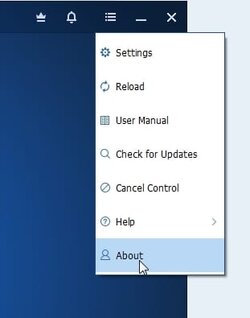
there are are three little lines at top rt of backupper main window. click that and select register, then paste the givaway license in.

It says About on mine because it is already registered

backupper-about.jpg
 
Last edited:

My Computers

System One System Two

  • OS
    Win7,Win11
    Computer type
    PC/Desktop
    CPU
    i7-9700
    Motherboard
    gigabyte b365m ds3h
    Memory
    2x16gb 3600mhz
    Monitor(s) Displays
    benq gw2480
    PSU
    bequiet pure power 11 400CM
    Cooling
    cryorig m9i
  • Operating System
    win7,win11
    Computer type
    PC/Desktop
    CPU
    i5-8400
    Motherboard
    gigabyte b365m ds3h
    Memory
    2x8gb 3200
    PSU
    xfx pro 450
No need to download anything or to be able to understand anything else that is written in that article.

there are are three little lines at top rt of backupper main window. click that and select register, then paste the givaway license in.

It says About on mine because it is already registered

View attachment 36204
спасибо
 

My Computers

System One System Two

  • OS
    Windows 11 Home 25H2 build: 26200.8524
    Computer type
    Laptop
    Manufacturer/Model
    Acer Swift A.I SF14-51T
    CPU
    Intel(R) Core(TM) Ultra 7 258V, 2200 Mhz, 8 Cores
    Motherboard
    Icefish_LNV, Version V1.15
    Memory
    32 GB LPDDR5X (soldered)
    Graphics Card(s)
    Intel(R) Arc(TM) 140V GPU (16GB)
    Sound Card
    RealTek + Intel Smart Sound
    Monitor(s) Displays
    14" IPS WUXGA
    Screen Resolution
    1920x1200x60Hz
    Hard Drives
    Micron_2550_MTFDKBA1T0TGE, NVMe Gen4, 1TB
    PSU
    45W USB-C GaN charger
    Case
    Full aluminum body
    Cooling
    1 fan
    Keyboard
    US with Backlight
    Mouse
    Precision Trackpad
    Internet Speed
    25 Mb/s 5G
    Browser
    Edge
    Antivirus
    Windows Defender
    Other Info
    BIOS Version/Date Insyde Corp. V1.15, 8/28/2025, Windows Hello IR camera with Facial recognition. Secure Boot 2026 KEK key installed
  • Operating System
    Windows 11 Home 25H2 build: 26200.8524
    Computer type
    Laptop
    Manufacturer/Model
    Asus Vivobook K3502Z S15 15" OLED
    CPU
    Intel 12th Gen. i7 12700H, 14 cores, 2.3 GHz (24M Cache, up to 4.7 GHz, 6P+8E cores)
    Motherboard
    Alder Lake-H, 1700-4700 MHz clock rate
    Memory
    8GB LPDDR4 on board + 8GB LPDDR4 3200 MHz in Dual Channel.
    Graphics card(s)
    Intel Iris Xe supports up to 4096 x 2304 @ 120Hz
    Sound Card
    Harman Kardon - DTS
    Monitor(s) Displays
    OLED 15.6inch 2.8K (2880 x 1620)
    Screen Resolution
    16:9 aspect ratio 0.2ms response time 120Hz refresh rate, 550nits
    Hard Drives
    512GB M.2 NVMe Gen4 PCIe 4.0 SSD, Micron_2450_MTFDKBA512TFK
    PSU
    90-Watt USB charger (Thunderbolt4)
    Case
    Metal lid, plastic case
    Cooling
    1 fan
    Keyboard
    With adjustable backlight
    Mouse
    Precision Trackpad
    Internet Speed
    ISP provides 15 mb/s WIFI LTE (4G), laptop WIFI 6 adapter.
    Browser
    Edge
    Antivirus
    Windows Defender
    Other Info
    BIOS American Megatrends International, LLC. 10.1.2.312, 13/03/2024. Network adapter: Intel Wi-Fi 6E AX211 160 MHz, Secure Boot 2026 KEK key installed
Latest free version of Aomei Backupper (Std) is 6.9.2. Must be very recent they took out the explore image option because 6.9.1 has it.
 

My Computer

System One

  • OS
    10, 11
The default setting is intelligent sector.

View attachment 36171
This thread mentioned that the MSR partition is skipped in a full disk backup with AOMEI, I wonder if that is a result of this "intelligent sector" in Backup Mode and if "Make an exact backup" would include MSR. Anyone tried this? would the free space also be backed up when selecting "Make an exact backup"?
 

My Computers

System One System Two

  • OS
    Windows 11 Home 25H2 build: 26200.8524
    Computer type
    Laptop
    Manufacturer/Model
    Acer Swift A.I SF14-51T
    CPU
    Intel(R) Core(TM) Ultra 7 258V, 2200 Mhz, 8 Cores
    Motherboard
    Icefish_LNV, Version V1.15
    Memory
    32 GB LPDDR5X (soldered)
    Graphics Card(s)
    Intel(R) Arc(TM) 140V GPU (16GB)
    Sound Card
    RealTek + Intel Smart Sound
    Monitor(s) Displays
    14" IPS WUXGA
    Screen Resolution
    1920x1200x60Hz
    Hard Drives
    Micron_2550_MTFDKBA1T0TGE, NVMe Gen4, 1TB
    PSU
    45W USB-C GaN charger
    Case
    Full aluminum body
    Cooling
    1 fan
    Keyboard
    US with Backlight
    Mouse
    Precision Trackpad
    Internet Speed
    25 Mb/s 5G
    Browser
    Edge
    Antivirus
    Windows Defender
    Other Info
    BIOS Version/Date Insyde Corp. V1.15, 8/28/2025, Windows Hello IR camera with Facial recognition. Secure Boot 2026 KEK key installed
  • Operating System
    Windows 11 Home 25H2 build: 26200.8524
    Computer type
    Laptop
    Manufacturer/Model
    Asus Vivobook K3502Z S15 15" OLED
    CPU
    Intel 12th Gen. i7 12700H, 14 cores, 2.3 GHz (24M Cache, up to 4.7 GHz, 6P+8E cores)
    Motherboard
    Alder Lake-H, 1700-4700 MHz clock rate
    Memory
    8GB LPDDR4 on board + 8GB LPDDR4 3200 MHz in Dual Channel.
    Graphics card(s)
    Intel Iris Xe supports up to 4096 x 2304 @ 120Hz
    Sound Card
    Harman Kardon - DTS
    Monitor(s) Displays
    OLED 15.6inch 2.8K (2880 x 1620)
    Screen Resolution
    16:9 aspect ratio 0.2ms response time 120Hz refresh rate, 550nits
    Hard Drives
    512GB M.2 NVMe Gen4 PCIe 4.0 SSD, Micron_2450_MTFDKBA512TFK
    PSU
    90-Watt USB charger (Thunderbolt4)
    Case
    Metal lid, plastic case
    Cooling
    1 fan
    Keyboard
    With adjustable backlight
    Mouse
    Precision Trackpad
    Internet Speed
    ISP provides 15 mb/s WIFI LTE (4G), laptop WIFI 6 adapter.
    Browser
    Edge
    Antivirus
    Windows Defender
    Other Info
    BIOS American Megatrends International, LLC. 10.1.2.312, 13/03/2024. Network adapter: Intel Wi-Fi 6E AX211 160 MHz, Secure Boot 2026 KEK key installed

Latest Support Threads

Back
Top Bottom