
win9598xp7
Member
- Local time
- 1:24 PM
- Posts
- 72
- OS
- Windows 11
Sometimes, I run into a site that won't load while a pop-up blocker is running (we've all been there). In Edge, when I click the extensions buttons in the toolbar, I saw a global Allow extensions on X" setting. Here is what I mean, using this site as an example:
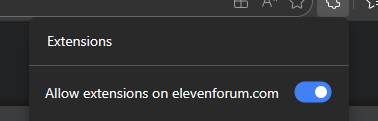
I toggled that off, instead of going into individual extensions themselves. I figured why not? It was conveniently located right at the top and assumed it was easily reversable when I was done. Like any other site permission that is tracked (and can be cleared).
I asked ChatGPT to tell me where this global setting was stored for any sites I'd done this for (so I could clear them and ensure that was a one-off change).
But it actually told me that there were NO settings/list stored for this, and there is no way to see what sites I had globally disabled this on. And that I'd have to revisit each site and turn it back on one at a time (which of course is impossible as I have no way of remembering that). And that those sites are just SOL using extensions from now on.
Tell me this can't be right? There MUST be someway to know what sites are not allowing extensions to run from this global toggle and clear it. ChatGPT can't be right on that...can it?
I toggled that off, instead of going into individual extensions themselves. I figured why not? It was conveniently located right at the top and assumed it was easily reversable when I was done. Like any other site permission that is tracked (and can be cleared).
I asked ChatGPT to tell me where this global setting was stored for any sites I'd done this for (so I could clear them and ensure that was a one-off change).
But it actually told me that there were NO settings/list stored for this, and there is no way to see what sites I had globally disabled this on. And that I'd have to revisit each site and turn it back on one at a time (which of course is impossible as I have no way of remembering that). And that those sites are just SOL using extensions from now on.
Tell me this can't be right? There MUST be someway to know what sites are not allowing extensions to run from this global toggle and clear it. ChatGPT can't be right on that...can it?
My Computer
At a glance
Windows 11
- OS
- Windows 11
- Computer type
- PC/Desktop








